feral-skillbridge
 mili kava
Build a modern, responsive full-stack web application called **SkillBridge – AI Career Platform** for students and fresh graduates. The platform should help users discover jobs and internships, analyze resumes, and manage their job applications. **User Features:** - User registration, login, logout, and profile management. - Job and internship listings with search, filters, and categories. - Resume upload and AI-powered resume analysis. - AI job matching with a percentage score based on skills and job requirements. - Save jobs and manage applications. - Application tracking with Applied, Interview, Selected, and Rejected statuses. - Personalized dashboard with application statistics. **Admin Features:** - Admin dashboard with analytics. - Add, update, and delete job listings. - Manage registered users and job applications. **Design Requirements:** - Premium, modern SaaS design. - Clean dashboard with sidebar navigation. - Professional typography, subtle gradients, and smooth animations. - Responsive design for desktop, tablet, and mobile. - Use a consistent design system. **Technical Requirements:** - Build a functional full-stack application. - Implement secure authentication and role-based access. - Create proper database models and REST APIs. - Implement frontend-backend integration. - Include form validation, error handling, and loading states. - Use AI integration for resume analysis and job matching. - Include sample data for demonstration. Make the application feel like a real production-ready SaaS product, not just a static UI prototype.


Comments (0)
Sign in to leave a comment
System Requirements
System Requirements Document for feral-skillbridge
1. Introduction
SkillBridge – AI Career Platform (project: feral-skillbridge) is a modern, responsive full-stack web application for students and fresh graduates. It helps them discover jobs and internships, analyze their resumes with AI, receive AI job-match percentage scores based on their skills against job requirements, save jobs, apply, and track applications through Applied, Interview, Selected, and Rejected statuses on a personalized dashboard. Administrators operate a separate analytics dashboard and manage job listings, registered users, and job applications.
The product must feel like a real, production-ready SaaS product — not a static UI prototype. It requires secure authentication, role-based access, proper database models, REST APIs, frontend–backend integration, form validation, error handling, loading states, AI integration for resume analysis and job matching, and sample data for demonstration.
The audience is two active human roles: the Student or fresh graduate (job seeker) and the Administrator.
Success Criteria and KPIs
- A new visitor can register, log in, and reach a personalized dashboard with application statistics.
- A job seeker can search, filter, and browse listings by category, view an AI match percentage on a job, save it, apply, and move the application through all four statuses.
- A job seeker can upload a resume and receive AI-powered analysis.
- An administrator can view analytics and add, update, and delete job listings, and manage registered users and job applications.
- Role-based access prevents job-seeker features from being used by admins in the seeker role and vice versa; protected pages are unreachable without the correct role.
- Every form surfaces validation errors, request failures, and loading states; the app ships with sample data so all dashboards and listings are populated on first run.
- The interface is responsive and usable at desktop, tablet, and mobile widths with a consistent design system.
2. System Overview
SkillBridge is delivered as a full-stack web application with a React frontend, a shared FastAPI backend exposing REST APIs, and MariaDB for application-owned persistent data. AI resume analysis and job matching are performed by the backend through a LiteLLM gateway, which in turn uses a PostgreSQL database for its own operation. Sample data seeds jobs, users, and applications for demonstration.
Two active human personas use the product: the Student or fresh graduate (job seeker) and the Administrator. The job seeker owns discovery, resume analysis, matching, saving, applying, tracking, and personal statistics. The administrator owns platform analytics and management of jobs, users, and applications.
Access is role-based: user features are limited to logged-in users with the user role, and admin features are limited to admins. The Landing and Login pages are the anonymous entry surfaces; all other pages are role-restricted.
Removed from scope
- None. No concepts were removed by the user.
2a. Product Interpretation and Delivery Boundary
SkillBridge is a first-party application with application-owned identity. Visitors arrive anonymously at the Landing page, register or log in through the Login page, and then work inside role-restricted destinations. The job seeker's working context is a sidebar-navigated dashboard area covering Dashboard, Jobs, Job Details, Saved Jobs, Applications, Resume Analysis, and Profile. The administrator's working context is a separate sidebar-navigated admin area covering Admin Dashboard, Manage Jobs, Manage Users, and Manage Applications.
AI capabilities (resume analysis and job matching) are delivered by the backend calling a LiteLLM gateway; the user interacts only with SkillBridge's own surfaces and sees analysis results and match percentages rendered by the application. There is no provider-owned user surface and no external destination in the current scope. All current behavior is delivered now; no future-horizon features are defined by the source.
2b. Source Content Inventory
Not applicable — no reference directive with content_source was supplied.
2c. Page Content and Component Coverage
Landing
- Information/state: Anonymous public entry. Product name and value proposition for students and fresh graduates; primary sign-up call to action; entry to login for returning users.
- Primary actions: Navigate to registration (via Login page registration flow); navigate to Login.
- Supporting actions: None beyond entry navigation.
- Domain entities: None persisted.
- Component responsibilities: Hero composition presenting the product name and audience; sign-up control; login link. No authenticated data is shown.
- States: Loading (static content, no data fetch); empty/success/error not applicable; if a session already exists, the user may proceed to their role's dashboard.
Login
- Information/state: Anonymous identity-access surface handling both registration and login. Fields for registration (name, email, password) and login (email, password). Role assignment: registered accounts receive the user role; administrator accounts are provisioned/seeded.
- Primary actions: Register a new account; log in with credentials; log out when authenticated.
- Supporting actions: Switch between registration and login modes; navigate back to Landing.
- Domain entities: User account (identity, credentials, role, profile).
- Component responsibilities: Registration form with validation; login form with validation; submit controls with loading state; error display for invalid credentials, duplicate email, and validation failures; logout control available to authenticated users.
- States: Loading (submit in progress, controls disabled); empty (initial forms); success (redirect to Dashboard for users, Admin Dashboard for admins); error (validation messages, invalid credentials, duplicate registration, network failure with retry).
Dashboard
- Information/state: Personalized dashboard for the logged-in job seeker. Application statistics across Applied, Interview, Selected, and Rejected; summary counts; recent activity context.
- Primary actions: Review application statistics; navigate to other seeker destinations via sidebar.
- Supporting actions: Follow links into Applications, Jobs, Saved Jobs, Resume Analysis, Profile.
- Domain entities: Application (with status), Job, User profile.
- Component responsibilities: Sidebar navigation (seeker destinations); statistics blocks per status and totals; loading skeletons; empty state when no applications exist with a prompt to browse jobs.
- States: Loading (statistics fetch); empty (no applications — zeroed statistics with guidance); success (populated statistics); error (fetch failure with retry).
Jobs
- Information/state: Browsable job and internship listings with search, filters, and categories. Each listing shows title, organization, category, and type (job/internship).
- Primary actions: Search listings; apply filters; select a category; open a job's details.
- Supporting actions: Save a job from the listing; clear filters.
- Domain entities: Job listing (title, organization, category, type, requirements/skills, description).
- Component responsibilities: Search input; filter controls; category selector; listing results; loading state; empty state when no results match; error state with retry; save control per listing.
- States: Loading (results fetch); empty (no matches — suggest clearing filters); success (results list); error (fetch failure with retry).
Job Details
- Information/state: Full detail of a selected job or internship, including requirements/skills and description, plus the AI match percentage score for the logged-in user based on their skills versus the job requirements.
- Primary actions: View AI match percentage; apply to the job; save the job.
- Supporting actions: Return to Jobs; remove from saved if already saved.
- Domain entities: Job listing; match score; application; saved job.
- Component responsibilities: Detail panel; match score display (percentage); apply control with confirmation and loading state; save toggle; error handling for failed match computation or failed apply.
- States: Loading (detail and match score fetch); empty (match unavailable when no resume/skills on file — prompt to complete Resume Analysis or Profile); success (detail with score); error (fetch or apply failure with retry).
Saved Jobs
- Information/state: The logged-in user's saved jobs list.
- Primary actions: View saved jobs; remove a saved job; open a saved job's details.
- Supporting actions: Apply from a saved job; navigate to Jobs.
- Domain entities: Saved job; Job listing.
- Component responsibilities: Saved list; remove control with loading state; empty state when nothing is saved; error state with retry.
- States: Loading; empty (no saved jobs with prompt to browse); success; error (fetch or remove failure with retry).
Applications
- Information/state: The logged-in user's applications with their current status among Applied, Interview, Selected, and Rejected.
- Primary actions: View applications; change an application's status among the four statuses; manage (update/withdraw context as supported by status change).
- Supporting actions: Open the related job details; filter by status.
- Domain entities: Application (job reference, status, timestamps).
- Component responsibilities: Application list with status indicators; status change control with loading state; empty state when no applications; error state with retry.
- States: Loading; empty (no applications with prompt to browse jobs); success; error (fetch or status-change failure with retry).
Resume Analysis
- Information/state: Resume upload and AI-powered analysis result for the logged-in user.
- Primary actions: Upload a resume; view the AI analysis result.
- Supporting actions: Re-upload/replace resume; retry analysis on failure.
- Domain entities: Resume (uploaded file reference); analysis result.
- Component responsibilities: File upload control with validation (file type/size); upload progress/loading state; analysis result display; error display for invalid file or analysis failure with retry.
- States: Loading (upload/analysis in progress); empty (no resume uploaded — prompt to upload); success (analysis displayed); error (invalid file, upload failure, analysis failure with retry).
Profile
- Information/state: The logged-in user's profile information, editable.
- Primary actions: View profile; edit and save profile details.
- Supporting actions: Log out.
- Domain entities: User profile.
- Component responsibilities: Profile form with validation; save control with loading state; success confirmation; error display with retry.
- States: Loading (profile fetch); empty (fields blank for new users); success (saved confirmation); error (fetch or save failure with retry).
Admin Dashboard
- Information/state: Analytics for the administrator: platform-level counts and trends across users, jobs, and applications.
- Primary actions: Review analytics; navigate to admin management destinations via sidebar.
- Supporting actions: Follow links into Manage Jobs, Manage Users, Manage Applications.
- Domain entities: User, Job, Application (aggregated).
- Component responsibilities: Admin sidebar navigation; analytics blocks; loading state; empty state when no data; error state with retry.
- States: Loading; empty (no data yet); success; error (fetch failure with retry).
Manage Jobs
- Information/state: Administrative list of job listings with create, update, and delete capability.
- Primary actions: Add a job listing; update a job listing; delete a job listing.
- Supporting actions: Search/filter the list; confirm deletion.
- Domain entities: Job listing.
- Component responsibilities: Job list; create/edit form with validation; delete control with confirmation and loading state; success and error feedback.
- States: Loading; empty (no jobs — prompt to add); success (created/updated/deleted confirmation); error (validation, save, or delete failure with retry).
Manage Users
- Information/state: Administrative list of registered users.
- Primary actions: View registered users; manage registered users.
- Supporting actions: Search/filter users; view user details.
- Domain entities: User account and profile.
- Component responsibilities: User list; management controls with loading state; success and error feedback.
- States: Loading; empty (no users); success; error (fetch or management failure with retry).
Manage Applications
- Information/state: Administrative list of job applications across users.
- Primary actions: View job applications; manage job applications.
- Supporting actions: Filter by status or user; view application details.
- Domain entities: Application; User; Job.
- Component responsibilities: Application list; management controls with loading state; success and error feedback.
- States: Loading; empty (no applications); success; error (fetch or management failure with retry).
3. Functional Requirements
FR-1 — Registration. As a visitor, I should register an account with my details so that I can access SkillBridge. (explicit)
- Lifecycle: Trigger — visitor submits registration form on Login. Input — name, email, password. Result — account created with the user role; user is authenticated. Access — anonymous entry. Failure/recovery — validation errors shown inline; duplicate email rejected with message; network failure shows retry. Continuation — redirected to Dashboard.
FR-2 — Login. As a registered user or administrator, I should log in with my credentials so that I can reach my role's workspace. (explicit)
- Lifecycle: Trigger — submit login form on Login. Input — email, password. Result — authenticated session; role determines destination (Dashboard for users, Admin Dashboard for admins). Failure/recovery — invalid credentials message; network failure retry. Continuation — role-appropriate dashboard.
FR-3 — Logout. As a logged-in user or administrator, I should log out so that my session ends securely. (explicit)
- Lifecycle: Trigger — logout control. Result — session terminated; returned to anonymous entry. Failure/recovery — if logout request fails, session remains and error is shown with retry. Continuation — Landing/Login.
FR-4 — Profile management. As a logged-in user, I should view and edit my profile so that my information stays current. (explicit)
- Lifecycle: Trigger — open Profile and edit fields. Input — profile fields. Result — saved profile persisted and confirmed. Failure/recovery — validation errors inline; save failure with retry. Continuation — remain on Profile with confirmation.
FR-5 — Browse listings with search, filters, categories. As a job seeker, I should search, filter, and browse job and internship listings by category so that I can find relevant opportunities. (explicit)
- Lifecycle: Trigger — open Jobs, enter search/filters/category. Result — matching listings displayed. Failure/recovery — empty results prompt to clear filters; fetch failure with retry. Continuation — open Job Details.
FR-6 — Resume upload and AI analysis. As a job seeker, I should upload my resume and receive AI-powered analysis so that I understand my resume's strengths. (explicit)
- Lifecycle: Trigger — upload resume on Resume Analysis. Input — resume file. Result — AI analysis result displayed and stored. Failure/recovery — invalid file rejected; analysis failure with retry. Continuation — view result; re-upload.
FR-7 — AI job matching percentage. As a job seeker, I should see an AI match percentage score for a job based on my skills versus the job requirements so that I can prioritize applications. (explicit)
- Lifecycle: Trigger — open Job Details. Input — user skills (from profile/resume) and job requirements. Result — percentage score displayed. Failure/recovery — if skills unavailable, prompt to complete profile/resume; computation failure with retry. Continuation — apply or save.
FR-8 — Save jobs. As a job seeker, I should save jobs so that I can revisit them. (explicit)
- Lifecycle: Trigger — save control on Jobs or Job Details. Result — job appears in Saved Jobs. Failure/recovery — save failure with retry. Continuation — view in Saved Jobs.
FR-9 — Remove saved jobs. As a job seeker, I should remove a saved job so that my saved list stays relevant. (explicit)
- Lifecycle: Trigger — remove control in Saved Jobs. Result — job removed from saved list. Failure/recovery — removal failure with retry. Continuation — remain in Saved Jobs.
FR-10 — Apply to jobs. As a job seeker, I should apply to a job so that I can be considered. (explicit)
- Lifecycle: Trigger — apply control on Job Details. Result — application created with status Applied. Failure/recovery — apply failure with retry; duplicate application prevented with message. Continuation — view in Applications.
FR-11 — Manage applications and track statuses. As a job seeker, I should manage my applications and track them through Applied, Interview, Selected, and Rejected statuses so that I know where each stands. (explicit)
- Lifecycle: Trigger — open Applications; change status. Result — status updated and persisted. Failure/recovery — status-change failure with retry. Continuation — updated list and dashboard statistics.
FR-12 — Personalized dashboard statistics. As a job seeker, I should see a personalized dashboard with application statistics so that I can gauge my progress. (explicit)
- Lifecycle: Trigger — open Dashboard. Result — statistics across the four statuses displayed. Failure/recovery — fetch failure with retry; empty state when no applications. Continuation — navigate to Applications.
FR-13 — Admin analytics dashboard. As an administrator, I should view an admin dashboard with analytics so that I can monitor platform activity. (explicit)
- Lifecycle: Trigger — open Admin Dashboard. Result — analytics displayed. Failure/recovery — fetch failure with retry. Continuation — navigate to management pages.
FR-14 — Add job listings. As an administrator, I should add job listings so that seekers have opportunities to browse. (explicit)
- Lifecycle: Trigger — add form in Manage Jobs. Input — job fields. Result — listing created and visible to seekers. Failure/recovery — validation errors; save failure with retry. Continuation — listing appears in Manage Jobs and Jobs.
FR-15 — Update job listings. As an administrator, I should update job listings so that information stays accurate. (explicit)
- Lifecycle: Trigger — edit in Manage Jobs. Result — listing updated. Failure/recovery — validation/save failure with retry. Continuation — updated listing visible.
FR-16 — Delete job listings. As an administrator, I should delete job listings so that outdated opportunities are removed. (explicit)
- Lifecycle: Trigger — delete with confirmation in Manage Jobs. Result — listing removed. Failure/recovery — delete failure with retry. Continuation — updated list.
FR-17 — Manage registered users. As an administrator, I should manage registered users so that the platform's user base is administered. (explicit)
- Lifecycle: Trigger — open Manage Users; use management controls. Result — user management action persisted. Failure/recovery — failure with retry. Continuation — updated user list.
FR-18 — Manage job applications. As an administrator, I should manage job applications so that applications are administered across users. (explicit)
- Lifecycle: Trigger — open Manage Applications; use management controls. Result — application management action persisted. Failure/recovery — failure with retry. Continuation — updated application list.
FR-19 — Role-based access. As the platform, I should enforce role-based access so that user features are limited to logged-in users and admin features to admins. (explicit)
- Lifecycle: Trigger — any protected request or navigation. Result — permitted for correct role; denied otherwise with redirect to Login. Failure/recovery — unauthorized access redirected with message. Continuation — role-appropriate workspace.
FR-20 — Form validation, error handling, loading states. As any user, I should see validation, error handling, and loading states so that I understand what the system is doing. (explicit)
- Lifecycle: Trigger — any form submission or data fetch. Result — inline validation, error messages, and loading indicators. Failure/recovery — retry affordances. Continuation — successful completion.
FR-21 — Sample data. As a demonstrator, I should see sample data so that the application is populated on first run. (explicit)
- Lifecycle: Trigger — initial deployment. Result — seeded jobs, users, and applications. Continuation — dashboards and listings populated.
4. User Personas
Student or fresh graduate (job seeker)
- Product context: A student or recent graduate entering the job market, using SkillBridge to find jobs and internships and to present their resume effectively.
- Primary goal: Discover relevant opportunities, understand their fit via AI match scores, and manage applications to a successful outcome.
- Distinct responsibilities: Registers/logs in; browses and searches listings by category; uploads a resume for AI analysis; views AI match percentages; saves jobs; applies; tracks applications through Applied, Interview, Selected, and Rejected; reviews personal dashboard statistics; manages their profile.
- Inputs/decisions: Resume file, profile/skills, search and filter choices, save/apply decisions, status updates.
- Interactions: With the Administrator indirectly — the admin manages the jobs the seeker browses and the applications the seeker submits.
- Observable success: A populated dashboard, saved jobs, applications progressing through statuses, and a clear resume analysis and match score.
Administrator
- Product context: The operator responsible for the platform's content and oversight.
- Primary goal: Keep job listings current and monitor platform activity, users, and applications.
- Distinct responsibilities: Reviews analytics on the Admin Dashboard; adds, updates, and deletes job listings; manages registered users; manages job applications.
- Inputs/decisions: Job listing fields, deletion confirmations, user and application management actions.
- Interactions: With job seekers indirectly — the admin's listings and management affect what seekers see and how their applications are handled.
- Observable success: Accurate listings, current analytics, and administered users and applications.
5. Core User Flows
Flow A — Job seeker registers and reaches dashboard
- Visitor opens Landing (anonymous) and selects sign-up.
- On Login, the visitor completes registration (name, email, password); validation errors appear inline if invalid.
- On success, the account is created with the user role and the seeker lands on Dashboard, which shows zeroed statistics with guidance to browse jobs.
Flow B — Job seeker logs in and logs out
- Returning seeker opens Login, enters credentials.
- On success, redirected to Dashboard; on failure, an invalid-credentials message with retry.
- Seeker selects logout (from Profile or navigation); session ends and they return to the anonymous entry.
Flow C — Job seeker discovers and applies to a job
- Seeker opens Jobs, enters a search term, applies filters, and selects a category; matching listings display (empty state prompts clearing filters).
- Seeker opens Job Details; the AI match percentage is shown (or a prompt to complete resume/profile if skills are unavailable).
- Seeker selects apply; an application is created with status Applied (duplicate prevented with message).
- Seeker continues to Applications to see the new entry.
Flow D — Job seeker saves and removes a job
- Seeker saves a job from Jobs or Job Details; it appears in Saved Jobs.
- Seeker opens Saved Jobs and removes a job; the list updates (failure shows retry).
Flow E — Job seeker uploads a resume and views AI analysis
- Seeker opens Resume Analysis and uploads a resume file (invalid file rejected).
- Upload/analysis shows a loading state; on success the AI analysis result is displayed.
- On analysis failure, the seeker retries; on success they may re-upload to replace.
Flow F — Job seeker tracks application statuses
- Seeker opens Applications and views current statuses among Applied, Interview, Selected, and Rejected.
- Seeker changes a status; the change persists (failure shows retry).
- Seeker returns to Dashboard to see updated statistics.
Flow G — Job seeker manages profile
- Seeker opens Profile, edits fields, and saves; validation errors appear inline if invalid.
- On success, a confirmation is shown; the seeker remains on Profile.
Flow H — Administrator reviews analytics
- Admin logs in via Login and lands on Admin Dashboard.
- Analytics across users, jobs, and applications display (empty state if no data; retry on failure).
- Admin navigates to management destinations via the admin sidebar.
Flow I — Administrator manages job listings
- Admin opens Manage Jobs and adds a listing via the form (validation on error).
- Admin updates an existing listing; changes persist.
- Admin deletes a listing after confirmation; the list updates and the listing disappears from seeker Jobs.
Flow J — Administrator manages users and applications
- Admin opens Manage Users, views registered users, and performs management actions (failure shows retry).
- Admin opens Manage Applications, views applications across users, and performs management actions (failure shows retry).
6. Visuals Colors and Theme
The creative direction — Typography as architecture for career momentum, muse Paula Scher — is authoritative.
- Mode: Light.
- Colors by role: Background
#F4EFE6(warm paper ground, dominant area); Surface#FFFFFF; Text#111111; Primary#E3241B(Scher red — primary actions and match scores); Accent#F2B705(yellow — status bands and highlights); Muted#6B6459; Teal#0F7C74(third flat block for interview states). - Fonts: Headings Anton, all caps, tight leading
0.92, stacked in two or three lines. Body Archivo at 400 and 600, normal tracking. - Type scale (1.333 modular): display 40/56/76/104/136px; section 20/24/32px; body 16/18px; labels 13px all-caps.
- Shape language: Hard edges only; flat colour blocks; diagonal bands at 8 degrees; thick 3px rules; no radius above 2px; type sits inside solid rectangles.
- Layout: Full-bleed type compositions on a 12-column grid; dashboard keeps a fixed left sidebar as a black column with all-caps labels; job cards are flat panels with a red score block on the right edge.
- Imagery: Type is the image; high-contrast duotone photo cutouts of students only inside colour blocks; painted map lines as faint background texture behind the hero.
- Motion: Staggered word reveals on load, colour-block wipes between sections, a slow marquee of job titles; all motion stops under
prefers-reduced-motion. - Avoid: Rounded cards with soft shadows; gradient blobs or glass panels; centred hero headline; blue or indigo as primary; thin light type at small sizes for headings.
7. Signature Design Concept
The public entry is a full-viewport paper ground (#F4EFE6) with the words SKILL and BRIDGE stacked in Anton at 136px on desktop and 56px on mobile. The word BRIDGE sits inside a solid red (#E3241B) block that bleeds off the right edge. A yellow (#F2B705) band runs diagonally at 8 degrees under it carrying the line "Match your skills to real jobs". The sign-up control is a black (#111111) rectangle pinned under the headline, left-aligned. Faint painted map lines texture the background. The headline is never centred; readable text and the sign-up control stay whole at 375px, 768px, and 1280px, with the bleed gesture carried by the red block and yellow band rather than by cropping text.
8. Interaction Model & Motion Direction
Interaction Model: Animated Motion Tempo: expressive Hero Dimensionality: flat
Landing Hero Motion Brief
- Focal subject: The stacked SKILL / BRIDGE wordmark, with BRIDGE reversed out of a red block.
- Thesis: On load, the stacked words reveal in a staggered sequence (input) → the red block wipes in behind BRIDGE and the yellow diagonal band sweeps under the headline (transformation) → the composed hero settles with the black sign-up control pinned left (outcome).
- Motion vocabulary: Staggered word reveals, colour-block wipes, diagonal band sweep; a slow marquee of job titles on the listings page.
- Composed first frame: Paper ground, SKILL in black Anton, BRIDGE in a red block bleeding right, yellow diagonal band, black sign-up rectangle.
- Reduced-motion state: All motion stops; the hero renders in its final composed arrangement with no reveals or wipes.
9. Non-Functional Requirements
- Security: Secure authentication and role-based access; user features limited to logged-in users, admin features to admins. (explicit)
- Full-stack functionality: A functional full-stack application, not a static UI prototype; REST APIs with frontend–backend integration. (explicit)
- Data models: Proper database models for users, jobs, applications, saved jobs, resumes, and analyses. (explicit)
- UX states: Form validation, error handling, and loading states throughout. (explicit)
- AI integration: Resume analysis and job matching via AI, delivered through the LiteLLM gateway. (explicit)
- Responsiveness: Usable at desktop, tablet, and mobile widths. (explicit)
- Design consistency: A consistent design system with professional typography, subtle gradients, and smooth animations. (explicit)
- Demonstration data: Sample data seeded for demonstration. (explicit)
- Accessibility: All motion respects
prefers-reduced-motion; readable text and controls remain whole at 375px, 768px, and 1280px. (required_inference, from creative direction)
10. Tech Stack
- Frontend: React application UI.
- Backend: Shared FastAPI process for application APIs and domain modules.
- Application database: MariaDB for application-owned persistent data.
- AI gateway: LiteLLM gateway for the backend's model-provider calls.
- Gateway database: PostgreSQL supporting LiteLLM, separate from application-owned storage.
- Deployment: Docker/docker-compose for the provisioned services (backend, database, frontend, litellm, postgres).
11. Assumptions and Constraints
- Role-based access (explicit): Admin features are limited to admins; user features to logged-in users.
- Full-stack (explicit): The application must be functional, not a static prototype.
- Identity (required_inference): Application-owned identity with self-service registration; administrator accounts are provisioned/seeded.
- AI delivery (required_inference): AI calls route through the LiteLLM gateway; the user interacts only with SkillBridge surfaces.
- Sample data (explicit): Seeded jobs, users, and applications for demonstration.
- Design (explicit + direction): The creative direction governs visuals; explicit user design requirements take precedence where stated.
12. Glossary
- Job seeker: The Student or fresh graduate persona.
- Administrator: The admin persona managing platform content and oversight.
- Match score: AI-computed percentage of fit between a user's skills and a job's requirements.
- Application status: One of Applied, Interview, Selected, Rejected.
- Saved job: A job a seeker has bookmarked for later.
- LiteLLM gateway: The service through which the backend makes model-provider calls for AI features.
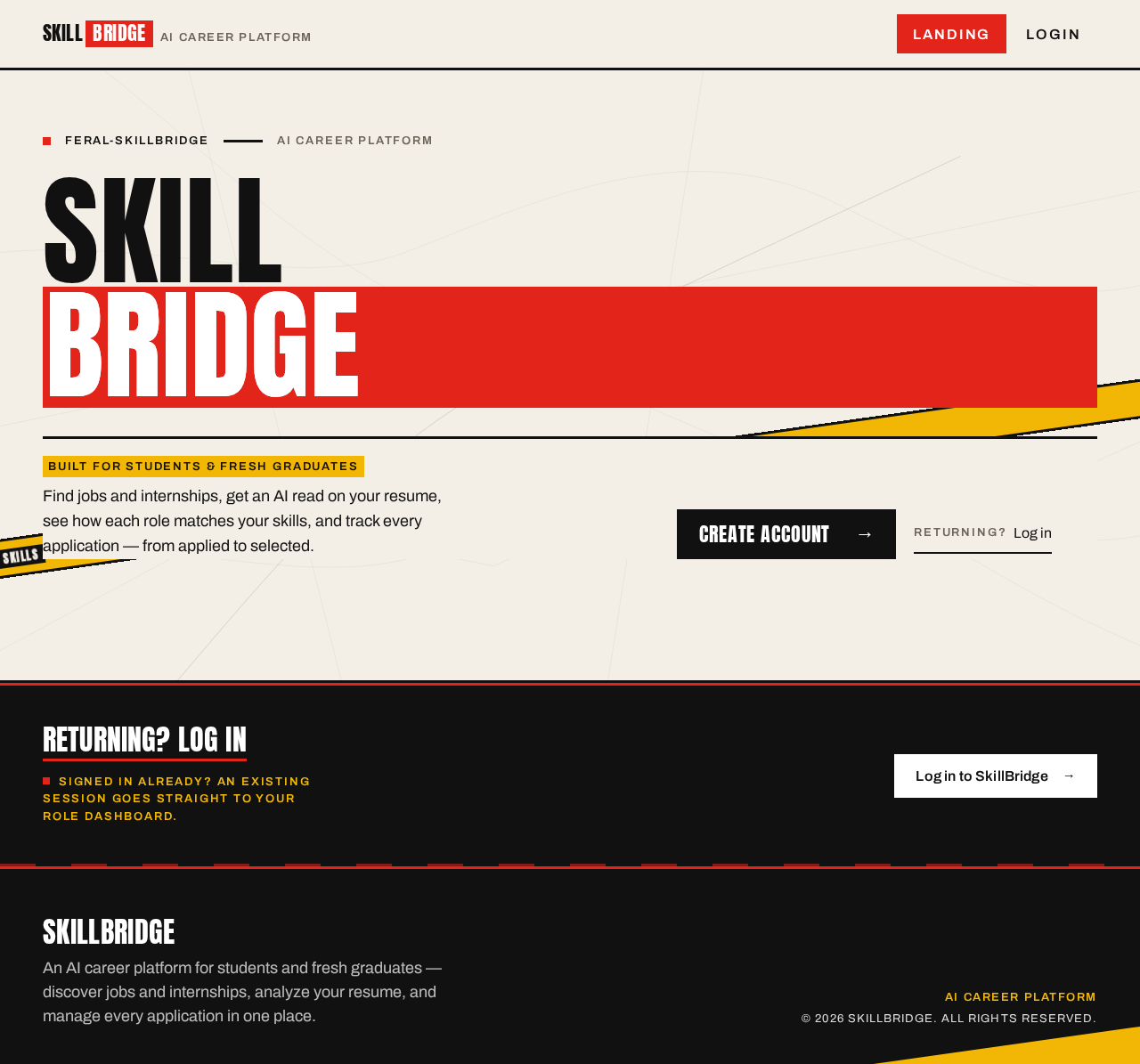
Built for students & fresh graduatesFind jobs and internships, get an AI read on your resume, see how each role matches your skills, and track every application — from applied to selected.
Returning? Log in
Log in to SkillBridgeSigned in already? An existing session goes straight to your role dashboard.
Built for students & fresh graduatesFind jobs and internships, get an AI read on your resume, see how each role matches your skills, and track every application — from applied to selected.
Returning? Log in
Log in to SkillBridgeSigned in already? An existing session goes straight to your role dashboard.
No comments yet. Be the first!