fashion-affiliate-commerce
 Hari Krishna Mudgonda
Copy-paste this into 8080.AI Build a complete production-ready web app called: RPD CREATIVE STUDIO Right Price Deals — AI Fashion Content & Affiliate Commerce Studio PURPOSE Create an all-in-one tool where I can paste ecommerce product links or upload product images and quickly turn them into professional Instagram/YouTube/Pinterest fashion content. The app must be designed primarily for mobile users and should have a clean, modern, premium fashion-commerce interface. SUPPORTED SOURCES Support product links from: - Myntra - Amazon India - Flipkart - Ajio - Meesho - Nykaa - Tata CLiQ PRODUCT IMPORT When I paste a product URL: 1. Detect the marketplace. 2. Extract whatever product information is publicly available. 3. Extract: - Product name - Brand - Price - MRP - Discount - Product images - Available colors - Sizes - Category - Product description - Important features - Product URL 4. Show the extracted information for editing before generating content. 5. If automatic extraction fails, let me manually enter the information and upload images. IMAGE UPLOAD Allow me to upload product images directly. PRODUCT WORKSPACE Create a product workspace showing: - Product image gallery - Product information - Price/MRP/discount - Colors - Sizes - Product URL - Editable fields - Generate Content button AI FASHION PRESENTATION Allow me to generate an AI fashion presentation of the product. Create realistic fashion-editorial images showing the clothing/product naturally presented by an AI fashion model. Use two default model personalities: AASHI - Indian fashion model - Elegant - Traditional - Ethnic - Festive - Graceful - Suitable for sarees, kurtis, kurta sets, ethnic wear and traditional fashion ZARA - Indian/modern fashion model - Trendy - Contemporary - Casual - Western - Suitable for modern, casual and western fashion The user must be able to select: - Aashi - Zara - Product-only presentation Do not create revealing or inappropriate fashion imagery. CONTENT GENERATOR From one product, generate: 1. Instagram single post 2. Instagram carousel 3. Instagram story 4. YouTube Short concept 5. Pinterest post 6. WhatsApp deal image CAROUSEL GENERATOR Create 4–5 original premium carousel templates. A typical 5-slide carousel should contain: SLIDE 1 Strong visual hook + product/model image SLIDE 2 Product presentation + key features SLIDE 3 Close-up/details + quality/value points SLIDE 4 Price + MRP + discount + important buying information SLIDE 5 Strong CTA: "Join WhatsApp for Daily Deals" Do not copy existing marketplace designs. Create original designs. DESIGN STYLE Use: - Premium fashion-commerce aesthetic - Clean white/light backgrounds where appropriate - Strong typography - High readability - Modern editorial layouts - Red/yellow/pink accents where appropriate - Large product photography - Strong visual hierarchy RPD BRANDING Brand: RIGHT PRICE DEALS Use the RPD brand consistently across generated content. CONTENT INTELLIGENCE For every product automatically generate: - Scroll-stopping hook - Short product headline - Benefits - Key selling points - Value proposition - CTA - Instagram caption - Hashtags - YouTube Shorts title - YouTube Shorts description - WhatsApp promotional copy The copy should sound natural, concise and sales-focused without making false claims. PRICE DISPLAY Support: - Current price - MRP - Discount percentage - Coupon/code - Extra savings - "Under ₹999" style badges Allow these fields to be edited manually. MULTI-PRODUCT MODE Allow me to add multiple products at once. For example: 10 product links → extract products → select products → generate content for all selected products. Provide: - Select all - Select individual products - Bulk generate - Bulk export CONTENT QUEUE Create a content queue showing: - Product - Content type - Status - Generated content - Download/export action DASHBOARD Create a simple dashboard with: - Total products - Content generated - Pending content - Recent projects - Quick Generate - Bulk Generate PROJECT SYSTEM Allow projects to be saved. Example: Project: "Festive Kurti Collection" Inside the project: - Products - Images - Generated posts - Carousels - Captions - Exported content EXPORT Allow generated content to be exported/downloaded in high quality. Primary formats: - Instagram Post: 1080×1080 - Instagram Story: 1080×1920 - YouTube Short: 1080×1920 - Instagram Carousel: 1080×1080 MOBILE-FIRST UI The entire app must work extremely well on Android mobile screens. Use: - Bottom navigation - Large touch targets - Simple workflows - Minimal typing - Clear buttons - Fast navigation - Responsive layouts Main navigation: HOME PRODUCTS CREATE PROJECTS SETTINGS CREATE FLOW Paste Product Link ↓ Extract Product ↓ Review/Edit Product ↓ Choose Model ↓ Choose Content Type ↓ Choose Template ↓ Generate ↓ Preview ↓ Edit ↓ Export IMPORTANT Do not make the interface complicated. The primary goal is: PRODUCT LINK → PRODUCT DATA → AI FASHION PRESENTATION → SOCIAL CONTENT → EXPORT FREE-FIRST REQUIREMENT Do not add artificial credits, coins or unnecessary billing systems. Use free/open-source solutions wherever practical. Do not require paid services for basic app functionality. If a feature requires an external AI service, clearly separate that integration so it can be configured later. ERROR HANDLING If product extraction fails: - Explain what failed - Never crash - Allow manual product entry - Allow image upload - Allow the workflow to continue If AI image generation is unavailable: - Continue with product images and carousel generation - Never block the entire application QUALITY REQUIREMENTS The application must feel like a real production product, not a demo. Prioritize: - Working navigation - Working buttons - Real forms - Real product management - Real project management - Real content generation workflow - Responsive mobile UI - Error handling - Empty states - Loading states - Preview states - Clean visual hierarchy Do not fill the application with fake features or placeholder buttons. Build the complete working MVP first, then improve the visual polish and user experience. Before considering the build complete, test the complete workflow: Product URL → extraction → editing → model selection → content generation → carousel → preview → export Fix any broken flows before declaring the application finished. SUCCESS CRITERIA A user should be able to open RPD Creative Studio on an Android phone and understand what to do within seconds. The ideal experience is: "I paste a Myntra/Amazon/Flipkart/Ajio/Meesho product link, review the product, choose Aashi or Zara, select a template, generate a professional fashion carousel/short, and export it." Build this as a complete RPD Creative Studio rather than a simple landing page.

Comments (0)
Sign in to leave a comment
Project Tasks
72 planning tasksGenerate system requirement document
Generate personas & user flows
Create flow for Affiliate Fashion Content Creator
HOME
Repair HOME JSX
HOME / App Bottom Nav
HOME / Masthead
HOME / Action Band
HOME / Dashboard Stats
HOME / Recent Projects
HOME / Quick Actions
HOME / Footer
App Bottom Nav
Footer
Sign Up
Sign Up / Bottom Nav
Sign Up / Masthead
Sign Up / Enrollment
Sign Up / Action Band
Sign Up / Footer
Login
Login / Bottom Nav
Login / Masthead
Login / Verification
Login / Action Band
Login / Footer
PRODUCTS
PRODUCTS / App Bottom Nav
PRODUCTS / Masthead
PRODUCTS / Library
PRODUCTS / Bulk Action Bar
PRODUCTS / Footer
Product Workspace
Product Workspace / App Bottom Nav
Product Workspace / Workspace Masthead
Product Workspace / Workspace Product Editor
Product Workspace / Workspace Generate Action Band
Product Workspace / Footer
CREATE
CREATE / App Bottom Nav
CREATE / Masthead
CREATE / Step Ladder
CREATE / Carousel Preview
CREATE / Generate Band
CREATE / Footer
Content Preview
Content Preview / Preview Bottom Nav
Content Preview / Preview Masthead
Content Preview / Preview Asset Stage
Content Preview / Preview Export Controls
Content Preview / Preview Footer
Content Queue
Content Queue / App Bottom Nav
Content Queue / Queue Masthead
Content Queue / Queue List
Content Queue / Queue Bulk Export Bar
Content Queue / Footer
PROJECTS
PROJECTS / App Bottom Nav
PROJECTS / Masthead
PROJECTS / Library
PROJECTS / Create Band
PROJECTS / Footer
SETTINGS
SETTINGS / Bottom Nav
SETTINGS / Masthead
SETTINGS / Integration Config
SETTINGS / App Info
SETTINGS / Sign Out
SETTINGS / Footer
Architecture
Workspace task plan
RPD
Right Price Deals
Export frame
1080 × 1080
1:1
Wordmark
Archivo Black 96px
-0.03em
Tagline
Right Price Deals
+0.12em
Terminator
2px ink rule
#0E0E0E
Studio dashboard
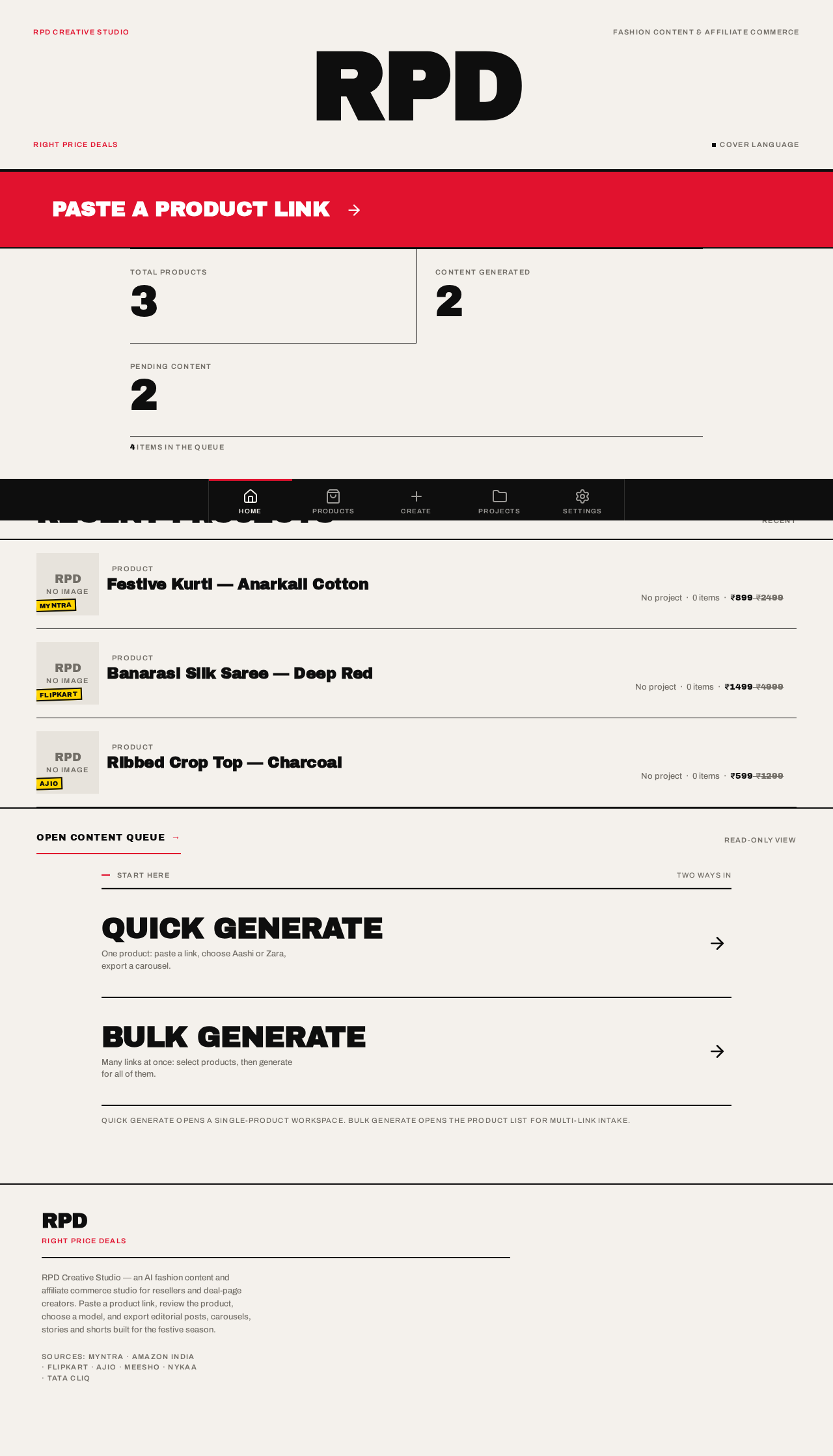
4 items in the queue
Recent projects
Start here
Two ways inQuick Generate opens a single-product workspace. Bulk Generate opens the product list for multi-link intake.
RPD
Right Price Deals
Export frame
1080 × 1080
1:1
Wordmark
Archivo Black 96px
-0.03em
Tagline
Right Price Deals
+0.12em
Terminator
2px ink rule
#0E0E0E
Studio dashboard
4 items in the queue
Recent projects
Start here
Two ways inQuick Generate opens a single-product workspace. Bulk Generate opens the product list for multi-link intake.
No comments yet. Be the first!