fashion-affiliate-commerce
 Hari Krishna Mudgonda
Copy-paste this into 8080.AI Build a complete production-ready web app called: RPD CREATIVE STUDIO Right Price Deals — AI Fashion Content & Affiliate Commerce Studio PURPOSE Create an all-in-one tool where I can paste ecommerce product links or upload product images and quickly turn them into professional Instagram/YouTube/Pinterest fashion content. The app must be designed primarily for mobile users and should have a clean, modern, premium fashion-commerce interface. SUPPORTED SOURCES Support product links from: - Myntra - Amazon India - Flipkart - Ajio - Meesho - Nykaa - Tata CLiQ PRODUCT IMPORT When I paste a product URL: 1. Detect the marketplace. 2. Extract whatever product information is publicly available. 3. Extract: - Product name - Brand - Price - MRP - Discount - Product images - Available colors - Sizes - Category - Product description - Important features - Product URL 4. Show the extracted information for editing before generating content. 5. If automatic extraction fails, let me manually enter the information and upload images. IMAGE UPLOAD Allow me to upload product images directly. PRODUCT WORKSPACE Create a product workspace showing: - Product image gallery - Product information - Price/MRP/discount - Colors - Sizes - Product URL - Editable fields - Generate Content button AI FASHION PRESENTATION Allow me to generate an AI fashion presentation of the product. Create realistic fashion-editorial images showing the clothing/product naturally presented by an AI fashion model. Use two default model personalities: AASHI - Indian fashion model - Elegant - Traditional - Ethnic - Festive - Graceful - Suitable for sarees, kurtis, kurta sets, ethnic wear and traditional fashion ZARA - Indian/modern fashion model - Trendy - Contemporary - Casual - Western - Suitable for modern, casual and western fashion The user must be able to select: - Aashi - Zara - Product-only presentation Do not create revealing or inappropriate fashion imagery. CONTENT GENERATOR From one product, generate: 1. Instagram single post 2. Instagram carousel 3. Instagram story 4. YouTube Short concept 5. Pinterest post 6. WhatsApp deal image CAROUSEL GENERATOR Create 4–5 original premium carousel templates. A typical 5-slide carousel should contain: SLIDE 1 Strong visual hook + product/model image SLIDE 2 Product presentation + key features SLIDE 3 Close-up/details + quality/value points SLIDE 4 Price + MRP + discount + important buying information SLIDE 5 Strong CTA: "Join WhatsApp for Daily Deals" Do not copy existing marketplace designs. Create original designs. DESIGN STYLE Use: - Premium fashion-commerce aesthetic - Clean white/light backgrounds where appropriate - Strong typography - High readability - Modern editorial layouts - Red/yellow/pink accents where appropriate - Large product photography - Strong visual hierarchy RPD BRANDING Brand: RIGHT PRICE DEALS Use the RPD brand consistently across generated content. CONTENT INTELLIGENCE For every product automatically generate: - Scroll-stopping hook - Short product headline - Benefits - Key selling points - Value proposition - CTA - Instagram caption - Hashtags - YouTube Shorts title - YouTube Shorts description - WhatsApp promotional copy The copy should sound natural, concise and sales-focused without making false claims. PRICE DISPLAY Support: - Current price - MRP - Discount percentage - Coupon/code - Extra savings - "Under ₹999" style badges Allow these fields to be edited manually. MULTI-PRODUCT MODE Allow me to add multiple products at once. For example: 10 product links → extract products → select products → generate content for all selected products. Provide: - Select all - Select individual products - Bulk generate - Bulk export CONTENT QUEUE Create a content queue showing: - Product - Content type - Status - Generated content - Download/export action DASHBOARD Create a simple dashboard with: - Total products - Content generated - Pending content - Recent projects - Quick Generate - Bulk Generate PROJECT SYSTEM Allow projects to be saved. Example: Project: "Festive Kurti Collection" Inside the project: - Products - Images - Generated posts - Carousels - Captions - Exported content EXPORT Allow generated content to be exported/downloaded in high quality. Primary formats: - Instagram Post: 1080×1080 - Instagram Story: 1080×1920 - YouTube Short: 1080×1920 - Instagram Carousel: 1080×1080 MOBILE-FIRST UI The entire app must work extremely well on Android mobile screens. Use: - Bottom navigation - Large touch targets - Simple workflows - Minimal typing - Clear buttons - Fast navigation - Responsive layouts Main navigation: HOME PRODUCTS CREATE PROJECTS SETTINGS CREATE FLOW Paste Product Link ↓ Extract Product ↓ Review/Edit Product ↓ Choose Model ↓ Choose Content Type ↓ Choose Template ↓ Generate ↓ Preview ↓ Edit ↓ Export IMPORTANT Do not make the interface complicated. The primary goal is: PRODUCT LINK → PRODUCT DATA → AI FASHION PRESENTATION → SOCIAL CONTENT → EXPORT FREE-FIRST REQUIREMENT Do not add artificial credits, coins or unnecessary billing systems. Use free/open-source solutions wherever practical. Do not require paid services for basic app functionality. If a feature requires an external AI service, clearly separate that integration so it can be configured later. ERROR HANDLING If product extraction fails: - Explain what failed - Never crash - Allow manual product entry - Allow image upload - Allow the workflow to continue If AI image generation is unavailable: - Continue with product images and carousel generation - Never block the entire application QUALITY REQUIREMENTS The application must feel like a real production product, not a demo. Prioritize: - Working navigation - Working buttons - Real forms - Real product management - Real project management - Real content generation workflow - Responsive mobile UI - Error handling - Empty states - Loading states - Preview states - Clean visual hierarchy Do not fill the application with fake features or placeholder buttons. Build the complete working MVP first, then improve the visual polish and user experience. Before considering the build complete, test the complete workflow: Product URL → extraction → editing → model selection → content generation → carousel → preview → export Fix any broken flows before declaring the application finished. SUCCESS CRITERIA A user should be able to open RPD Creative Studio on an Android phone and understand what to do within seconds. The ideal experience is: "I paste a Myntra/Amazon/Flipkart/Ajio/Meesho product link, review the product, choose Aashi or Zara, select a template, generate a professional fashion carousel/short, and export it." Build this as a complete RPD Creative Studio rather than a simple landing page.

Comments (0)
Sign in to leave a comment
System Requirements
System Requirements Document for fashion-affiliate-commerce
1. Introduction
RPD Creative Studio (Right Price Deals — AI Fashion Content & Affiliate Commerce Studio) is a complete, production-ready, mobile-first web application that turns ecommerce fashion products into professional social content. The operator pastes a product link from a supported Indian marketplace — or uploads product images directly — and the studio extracts the product data, presents it for review and editing, generates an AI fashion presentation using selectable model personalities, produces multi-platform social content (Instagram, YouTube, Pinterest, WhatsApp), and exports high-quality assets.
The product intent is a single, uncomplicated pipeline:
PRODUCT LINK → PRODUCT DATA → AI FASHION PRESENTATION → SOCIAL CONTENT → EXPORT
The audience is the solo affiliate fashion content creator operating primarily on an Android phone, working fast, chasing festive-season deal volume, and needing the app itself to feel like a premium fashion magazine they can operate with one thumb — not a SaaS dashboard.
2. System Overview
RPD Creative Studio is a first-party web application with application-owned identity, a mobile-first bottom-navigation shell, and a five-destination primary navigation (HOME, PRODUCTS, CREATE, PROJECTS, SETTINGS) supported by dedicated Product Workspace, Content Preview, Content Queue, Sign Up, and Login surfaces.
Current delivery. The app delivers: multi-marketplace product import with manual fallback; direct image upload; an editable product workspace; AI fashion presentation with two default model personalities (Aashi, Zara) plus product-only presentation; a content generator producing six content types; an original carousel generator with 4–5 premium templates; content intelligence copy generation; editable price display with badges; multi-product bulk mode; a content queue; a dashboard; a project system; and high-resolution export in four primary formats.
Actors. The single accepted active human persona is the Affiliate Fashion Content Creator. External marketplace sites (Myntra, Amazon India, Flipkart, Ajio, Meesho, Nykaa, Tata CLiQ) are typed non-persona external sources. Any external AI image service is a typed non-persona provider integration, clearly separated and configurable later.
Ownership. All accepted human-facing work is owned by first-party custom pages. Product extraction, content generation, carousel rendering, and export rendering are backend/system processes that support first-party human interaction; the human interaction itself always has a first-party owner.
Narrow exclusions. No artificial credits, coins, or unnecessary billing systems. No paid services required for basic app functionality. No revealing or inappropriate fashion imagery. No copying of existing marketplace designs. No fake features or placeholder buttons. No complicated interface.
2a. Product Interpretation and Delivery Boundary
RPD Creative Studio is delivered as a first-party web application that the creator opens on an Android phone. The app owns its own identity: a self-starting creator enrolls on first use and verifies on return so that products, projects, generated content, and exports remain bound to the correct person and can be resumed. HOME is anonymously reachable as the product entry surface that explains the studio workflow; the working destinations (PRODUCTS, Product Workspace, CREATE, Content Preview, Content Queue, PROJECTS, SETTINGS) require the creator's verified identity so durable work is retained and revisited.
Marketplace product data is retrieved from public pages of the seven supported sources; the app does not own those sources and does not require the creator to hold accounts with them. AI fashion presentation depends on an external AI image service that is deliberately separated from the core app so it can be configured later; when it is unavailable, the workflow continues with product images and carousel generation. No billing, credit, or coin system is part of the current delivery. Everything described in this document is current; there is no deferred future scope beyond the explicitly separated, later-configurable external AI service integration.
2c. Page Content and Component Coverage
HOME
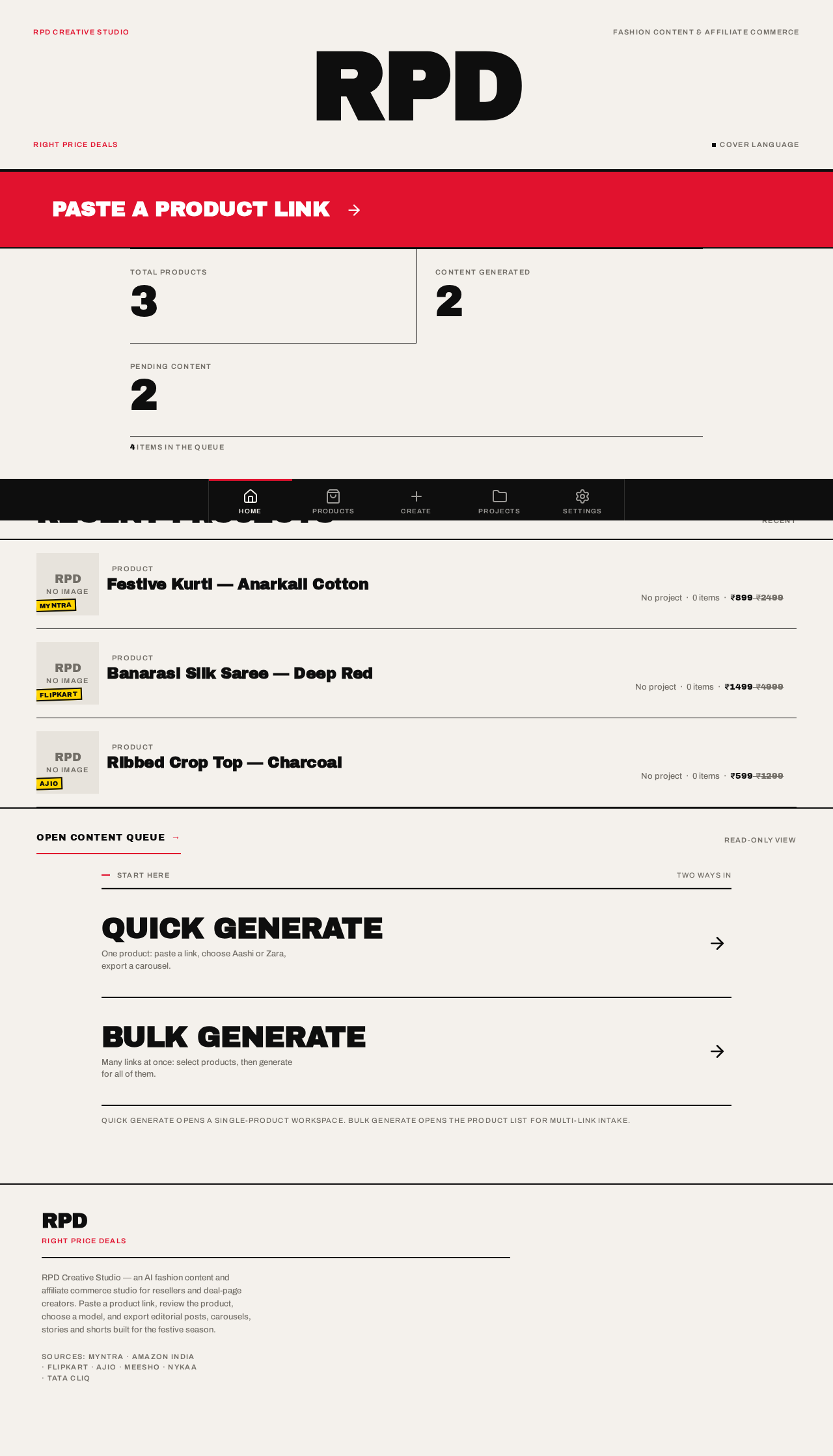
- Information/state: RPD magazine masthead (wordmark "RPD" in Archivo Black at ~96px bleeding past both screen edges, "RIGHT PRICE DEALS" in 11px red uppercase letterspaced beneath, closed by a 2px ink rule); full-bleed red action band reading "PASTE A PRODUCT LINK →"; dashboard stat strip (Total products, Content generated, Pending content) in a 2-column layout divided by vertical hairlines; Recent projects list; Quick Generate and Bulk Generate actions.
- Primary actions: Paste a product link (red action band); Quick Generate; Bulk Generate; open a recent project; navigate to any bottom-nav destination.
- Supporting actions: Open the content queue; open a recent product.
- Domain entities: Product, Project, Content item, Dashboard counters.
- Component responsibilities: Masthead block; red action band; stat strip; recent-projects list (each row a 96px product thumb + oversized product name); quick/bulk generate entry points; bottom navigation bar.
- States: Loading — stat strip and recent list show skeleton rows. Empty — no products yet: stat strip shows zeros and the recent list is replaced by a first-run prompt pointing at the red action band. Success — counters populated, recent projects listed. Error — counters fail to load: an inline message explains the failure and offers retry; the paste action remains usable. Recovery — retry reloads counters without leaving HOME.
Sign Up
- Information/state: First-use enrollment form for the self-starting creator; explanation that an account retains products, projects, and generated content.
- Primary actions: Create the creator's account and enter the studio.
- Supporting actions: Move to Login if the creator already has an account.
- Domain entities: Creator identity.
- Component responsibilities: Enrollment form; validation messaging; link to Login.
- States: Loading — submit disabled with progress indication. Empty — blank form. Success — creator is enrolled and lands in the studio. Error — invalid or already-used details are explained inline without losing entered values. Recovery — correct the field and resubmit.
Login
- Information/state: Returning verification form so the creator resumes saved products, projects, queue, and exports.
- Primary actions: Verify identity and resume work.
- Supporting actions: Move to Sign Up for a new creator.
- Domain entities: Creator identity.
- Component responsibilities: Verification form; validation messaging; link to Sign Up.
- States: Loading — submit disabled with progress indication. Empty — blank form. Success — creator resumes at their saved work. Error — incorrect credentials explained inline without losing the entered identifier. Recovery — retry or switch to Sign Up.
PRODUCTS
- Information/state: The creator's product library; multi-product intake area accepting multiple links at once; per-product selection state; selection summary.
- Primary actions: Add multiple product links at once; select all; select individual products; bulk generate; bulk export; open a product's workspace.
- Supporting actions: Filter/sort the library; remove a product.
- Domain entities: Product (name, brand, price, MRP, discount, images, colors, sizes, category, description, features, product URL, source marketplace).
- Component responsibilities: Multi-link intake field; product list rows with selection controls; select-all control; bulk action bar; per-product status.
- States: Loading — extraction progress per link with per-row status. Empty — no products: prompt to paste links or open the workspace for manual entry. Success — products listed with extracted data and selection controls. Error — per-link extraction failure is explained for that link while other links continue; failed links offer manual entry. Recovery — retry a failed link or continue into manual entry.
Product Workspace
- Information/state: Product image gallery; product information; price/MRP/discount; colors; sizes; product URL; editable fields; commercial fields (current price, MRP, discount percentage, coupon/code, extra savings, "Under ₹999" style badges); source marketplace; extraction status.
- Primary actions: Paste a product URL and extract; edit every extracted field; upload product images directly; manually enter product information when extraction fails; Generate Content.
- Supporting actions: Reorder/remove gallery images; re-run extraction; copy the product URL.
- Domain entities: Product and all its fields; uploaded images; price display fields.
- Component responsibilities: URL intake and extraction control; gallery; editable field set; price block with rotated yellow price stamps; manual-entry form; image upload control; red "GENERATE CONTENT →" action band.
- States: Loading — extraction in progress with a clear indicator. Empty — no product loaded: URL intake and manual-entry/image-upload paths both offered. Success — extracted data shown for editing before any content is generated. Error — extraction failure explains what failed, never crashes, and presents manual entry and image upload so the workflow continues. Recovery — manual entry or image upload completes the product and enables Generate Content.
CREATE
- Information/state: Numbered step-ladder flow 01 Paste link → 02 Extract product → 03 Review/Edit product → 04 Choose model → 05 Choose content type → 06 Choose template → 07 Generate; completed steps collapse to a single red-checked uppercase line; the active step expands full-width between 1px black rules.
- Primary actions: Advance each step; choose Aashi, Zara, or product-only presentation; choose content type (Instagram single post, Instagram carousel, Instagram story, YouTube Short concept, Pinterest post, WhatsApp deal image); choose one of the 4–5 original premium carousel templates; generate.
- Supporting actions: Return to an earlier step by expanding it; change a completed selection.
- Domain entities: Product, model personality, content type, carousel template, generated content.
- Component responsibilities: Step-ladder container; model selector; content-type selector; template selector; generate control; progress rule that wipes left-to-right when a step completes.
- States: Loading — generation in progress with per-step status. Empty — no product selected: step 01 is active and prompts for a link. Success — generation completes and hands off to Content Preview. Error — generation failure is explained and the creator can retry or continue with product images and carousel generation when AI image generation is unavailable. Recovery — retry, or proceed without AI imagery so the app is never blocked.
Content Preview
- Information/state: Generated asset preview; carousel preview as a horizontal snap-scroll of 1080×1080 slides shown edge-to-edge with the next slide peeking 12px; generated copy (hook, headline, benefits, key selling points, value proposition, CTA, Instagram caption, hashtags, YouTube Shorts title, YouTube Shorts description, WhatsApp promotional copy); export format choices.
- Primary actions: Preview each generated asset; edit generated copy; edit price display fields; export in a primary format (Instagram Post 1080×1080, Instagram Story 1080×1920, YouTube Short 1080×1920, Instagram Carousel 1080×1080).
- Supporting actions: Move between carousel slides; return to CREATE to change model, content type, or template.
- Domain entities: Generated content item, carousel slides, copy fields, export formats.
- Component responsibilities: Asset preview stage; carousel snap-scroll; copy editing fields; export controls; format selector.
- States: Loading — asset rendering in progress. Empty — nothing generated yet: prompt to return to CREATE. Success — assets and copy shown, export available. Error — render or export failure explained with retry; previously generated content remains intact. Recovery — retry export or adjust copy and re-export.
Content Queue
- Information/state: Queue rows showing product, content type, status, generated content, and download/export action.
- Primary actions: Open a queued item's preview; download/export an item; bulk export selected items.
- Supporting actions: Filter by status or content type; remove an item.
- Domain entities: Content item, status, product, export artifact.
- Component responsibilities: Queue list; status indicators; per-row export action; bulk export bar.
- States: Loading — queue rows load with status placeholders. Empty — no content yet: prompt to start from CREATE. Success — rows show product, content type, status, and export action. Error — a failed item shows its failure status and offers retry. Recovery — retry the failed generation or export from the row.
PROJECTS
- Information/state: Saved projects (for example, "Festive Kurti Collection") each containing products, images, generated posts, carousels, captions, and exported content.
- Primary actions: Create a project; save products, images, generated posts, carousels, captions, and exported content into it; open a project; add or remove items.
- Supporting actions: Rename a project; revisit exported content.
- Domain entities: Project, Product, Image, Generated post, Carousel, Caption, Exported content.
- Component responsibilities: Project list; project detail with grouped contents; create/rename controls.
- States: Loading — project list and contents load with placeholders. Empty — no projects: prompt to create the first project. Success — project shows its products, images, posts, carousels, captions, and exports. Error — save failure explained with retry; unsaved changes are not silently discarded. Recovery — retry the save.
SETTINGS
- Information/state: Application settings, including the clearly separated external AI service integration so it can be configured later; brand context (RIGHT PRICE DEALS / RPD).
- Primary actions: Configure the separated external AI service integration; review app information.
- Supporting actions: Sign out.
- Domain entities: Integration configuration, creator identity.
- Component responsibilities: Integration configuration section; app information; sign-out control.
- States: Loading — settings load with placeholders. Empty — integration not yet configured: explanatory state noting the app works without it. Success — configuration saved and reflected. Error — invalid configuration explained inline. Recovery — correct and resave, or leave unconfigured and continue using the app.
3. Functional Requirements
FR-1 — Build the complete production-ready studio. As the Affiliate Fashion Content Creator, I should open a complete production-ready mobile-first web app called RPD Creative Studio (Right Price Deals — AI Fashion Content & Affiliate Commerce Studio) rather than a simple landing page, so that I have a real working studio. (explicit)
- Trigger: opening the app. Observable result: the full studio with working navigation, forms, product management, project management, and content generation workflow. Failure/recovery: any unavailable area explains itself and never crashes. Continuation: I proceed into the studio workflow.
FR-2 — Paste product links from supported marketplaces. As the creator, I should paste product links from Myntra, Amazon India, Flipkart, Ajio, Meesho, Nykaa, and Tata CLiQ, so that I can import products from any of my deal sources. (explicit)
- Trigger: pasting one or more product URLs. Observable result: the app accepts the links and begins import. Failure/recovery: an unsupported or malformed link is explained without crashing. Continuation: I move to extraction.
FR-3 — Detect the marketplace. As the creator, I should have the marketplace detected from the pasted URL, so that I know which source the product came from. (explicit)
- Trigger: a pasted product URL. Observable result: the detected marketplace is shown. Failure/recovery: an undetectable marketplace is reported and I can continue with manual entry. Continuation: extraction proceeds.
FR-4 — Extract publicly available product information. As the creator, I should have whatever product information is publicly available extracted from the product page, so that I do not retype product data. (explicit)
- Trigger: a detected marketplace URL. Observable result: extracted product data is presented. Failure/recovery: extraction failure explains what failed and never crashes. Continuation: I review or fall back to manual entry.
FR-5 — Extract the full product field set. As the creator, I should have product name, brand, price, MRP, discount, product images, available colors, sizes, category, product description, important features, and product URL extracted, so that every field I need for content is populated. (explicit)
- Trigger: successful extraction. Observable result: all listed fields are populated where publicly available. Failure/recovery: any field that cannot be extracted is left for manual entry and clearly indicated. Continuation: I edit the fields.
FR-6 — Review and edit extracted information before generating. As the creator, I should see the extracted information for editing before any content is generated, so that I control what goes into my content. (explicit)
- Trigger: completed extraction. Observable result: an editable product view appears before generation. Failure/recovery: edits are preserved if a later step fails. Continuation: I confirm and generate.
FR-7 — Manual entry and image upload fallback. As the creator, when automatic extraction fails I should be able to manually enter the product information and upload images, so that the workflow continues. (explicit)
- Trigger: extraction failure. Observable result: manual entry fields and image upload are available and the workflow proceeds. Failure/recovery: the failure is explained and never crashes the app. Continuation: I complete the product manually and generate content.
FR-8 — Direct product image upload. As the creator, I should upload product images directly, so that I can work with my own photography. (explicit)
- Trigger: selecting images to upload. Observable result: images appear in the product gallery. Failure/recovery: an unsupported or failed upload is explained and other images remain. Continuation: I continue editing or generating.
FR-9 — Product workspace. As the creator, I should have a product workspace showing the product image gallery, product information, price/MRP/discount, colors, sizes, product URL, editable fields, and a Generate Content button, so that everything about the product lives in one place. (explicit)
- Trigger: opening a product. Observable result: the workspace displays all listed elements with editable fields and the Generate Content button. Failure/recovery: missing data is shown as empty editable fields rather than blocking. Continuation: I generate content.
FR-10 — AI fashion presentation. As the creator, I should generate an AI fashion presentation of the product with realistic fashion-editorial images showing the clothing/product naturally presented by an AI fashion model, so that my content looks professionally styled. (explicit)
- Trigger: requesting an AI fashion presentation. Observable result: realistic fashion-editorial images of the product presented by the selected model. Failure/recovery: when AI image generation is unavailable, the app continues with product images and carousel generation and never blocks. Continuation: I preview and export.
FR-11 — Two default model personalities. As the creator, I should have two default model personalities — AASHI (Indian fashion model; elegant, traditional, ethnic, festive, graceful; suitable for sarees, kurtis, kurta sets, ethnic wear and traditional fashion) and ZARA (Indian/modern fashion model; trendy, contemporary, casual, western; suitable for modern, casual and western fashion) — so that presentations match the garment. (explicit)
- Trigger: reaching model selection. Observable result: both personalities are presented with their described character and suitability. Failure/recovery: if presentation generation fails, the selection is retained and retryable. Continuation: I choose a model.
FR-12 — Model selection including product-only. As the creator, I should select Aashi, Zara, or product-only presentation, so that I can present the product with or without a model. (explicit)
- Trigger: choosing a presentation option. Observable result: the chosen option drives generation. Failure/recovery: an unavailable option is explained and I can choose another. Continuation: I choose content type.
FR-13 — No revealing or inappropriate imagery. As the creator, I should never receive revealing or inappropriate fashion imagery, so that my published content stays appropriate. (explicit)
- Trigger: any AI fashion presentation generation. Observable result: generated imagery is appropriate fashion-editorial presentation only. Failure/recovery: a generation that would violate this is not produced; the creator is informed and can adjust. Continuation: I regenerate with an appropriate selection.
FR-14 — Six content types from one product. As the creator, I should generate from one product an Instagram single post, an Instagram carousel, an Instagram story, a YouTube Short concept, a Pinterest post, and a WhatsApp deal image, so that I cover every channel from a single import. (explicit)
- Trigger: selecting content types for a product. Observable result: each selected content type is generated. Failure/recovery: a failed content type is reported individually without blocking the others. Continuation: I preview and export.
FR-15 — Original premium carousel templates. As the creator, I should choose from 4–5 original premium carousel templates, so that my carousels look designed rather than templated. (explicit)
- Trigger: reaching template selection. Observable result: 4–5 distinct original templates are offered. Failure/recovery: if a template fails to render, another can be chosen. Continuation: I generate the carousel.
FR-16 — Five-slide carousel structure. As the creator, I should get a carousel whose slides follow the structure — Slide 1 strong visual hook + product/model image; Slide 2 product presentation + key features; Slide 3 close-up/details + quality/value points; Slide 4 price + MRP + discount + important buying information; Slide 5 strong CTA "Join WhatsApp for Daily Deals" — so that each slide does its job. (explicit)
- Trigger: generating a carousel. Observable result: slides carry the described content in order. Failure/recovery: a slide that cannot be composed is reported and the carousel can be regenerated. Continuation: I preview slide by slide.
FR-17 — Original designs, not marketplace copies. As the creator, I should receive original designs that do not copy existing marketplace designs, so that my content is distinct. (explicit)
- Trigger: any template or carousel generation. Observable result: designs are original. Failure/recovery: a design that would replicate a marketplace layout is not produced. Continuation: I select another original template.
FR-18 — Premium fashion-commerce design style. As the creator, I should get content in a premium fashion-commerce aesthetic with clean white/light backgrounds where appropriate, strong typography, high readability, modern editorial layouts, red/yellow/pink accents where appropriate, large product photography, and strong visual hierarchy, so that my content reads as premium. (explicit)
- Trigger: any content generation. Observable result: generated assets follow the stated design style. Failure/recovery: a rendering failure is reported and retryable. Continuation: I preview and export.
FR-19 — Consistent RPD branding. As the creator, I should have the RIGHT PRICE DEALS (RPD) brand used consistently across generated content, so that my output is recognizably mine. (explicit)
- Trigger: any content generation. Observable result: RPD branding appears consistently on generated content. Failure/recovery: a branding render failure is reported and retryable. Continuation: I preview and export.
FR-20 — Content intelligence for every product. As the creator, I should automatically get a scroll-stopping hook, short product headline, benefits, key selling points, value proposition, CTA, Instagram caption, hashtags, YouTube Shorts title, YouTube Shorts description, and WhatsApp promotional copy for every product, so that I never start from a blank caption. (explicit)
- Trigger: generating content for a product. Observable result: all listed copy elements are produced. Failure/recovery: a copy element that fails is reported and retryable without losing the others. Continuation: I edit and export.
FR-21 — Natural, concise, sales-focused copy without false claims. As the creator, I should get copy that sounds natural, concise and sales-focused without making false claims, so that my promotions stay credible. (explicit)
- Trigger: copy generation. Observable result: generated copy is natural, concise, sales-focused, and free of false claims. Failure/recovery: copy that would assert an unsupported claim is not produced. Continuation: I edit and export.
FR-22 — Price display fields. As the creator, I should have current price, MRP, discount percentage, coupon/code, extra savings, and "Under ₹999" style badges supported in price display, so that my deals are presented completely. (explicit)
- Trigger: viewing or generating price display. Observable result: all listed price elements render. Failure/recovery: a missing value is shown as an empty editable field. Continuation: I edit the fields.
FR-23 — Manually editable price fields. As the creator, I should be able to edit the price display fields manually, so that I can correct or override extracted values. (explicit)
- Trigger: editing a price field. Observable result: the edited value is used in generated content. Failure/recovery: an invalid value is explained and the previous value retained. Continuation: I regenerate or export.
FR-24 — Multi-product mode. As the creator, I should add multiple products at once — for example 10 product links → extract products → select products → generate content for all selected products — so that I can work at deal-page volume. (explicit)
- Trigger: pasting multiple links. Observable result: all links are extracted and listed for selection. Failure/recovery: individual link failures are reported per link while the rest continue. Continuation: I select products.
FR-25 — Select all, select individual, bulk generate, bulk export. As the creator, I should have select all, select individual products, bulk generate, and bulk export, so that I can process many products efficiently. (explicit)
- Trigger: using a bulk control. Observable result: the selected set is generated or exported in bulk. Failure/recovery: a failure within a bulk run is reported per item without discarding successful items. Continuation: I retry the failed items or export the successful ones.
FR-26 — Content queue. As the creator, I should have a content queue showing product, content type, status, generated content, and a download/export action, so that I can track and manage everything I have produced. (explicit)
- Trigger: opening the content queue. Observable result: rows show product, content type, status, generated content, and export action. Failure/recovery: a failed item shows its failure status and can be retried. Continuation: I export or retry.
FR-27 — Dashboard. As the creator, I should have a simple dashboard with total products, content generated, pending content, recent projects, Quick Generate, and Bulk Generate, so that I can see my state and start work fast. (explicit)
- Trigger: opening HOME. Observable result: all listed dashboard elements are shown. Failure/recovery: a counter that fails to load is explained with retry while the rest of HOME stays usable. Continuation: I start a quick or bulk generate.
FR-28 — Project system. As the creator, I should save projects — for example Project: "Festive Kurti Collection" — containing products, images, generated
RPD
Right Price Deals
Export frame
1080 × 1080
1:1
Wordmark
Archivo Black 96px
-0.03em
Tagline
Right Price Deals
+0.12em
Terminator
2px ink rule
#0E0E0E
Studio dashboard
4 items in the queue
Recent projects
Start here
Two ways inQuick Generate opens a single-product workspace. Bulk Generate opens the product list for multi-link intake.
RPD
Right Price Deals
Export frame
1080 × 1080
1:1
Wordmark
Archivo Black 96px
-0.03em
Tagline
Right Price Deals
+0.12em
Terminator
2px ink rule
#0E0E0E
Studio dashboard
4 items in the queue
Recent projects
Start here
Two ways inQuick Generate opens a single-product workspace. Bulk Generate opens the product list for multi-link intake.
No comments yet. Be the first!