english-learning-professionals

byNure Aiza

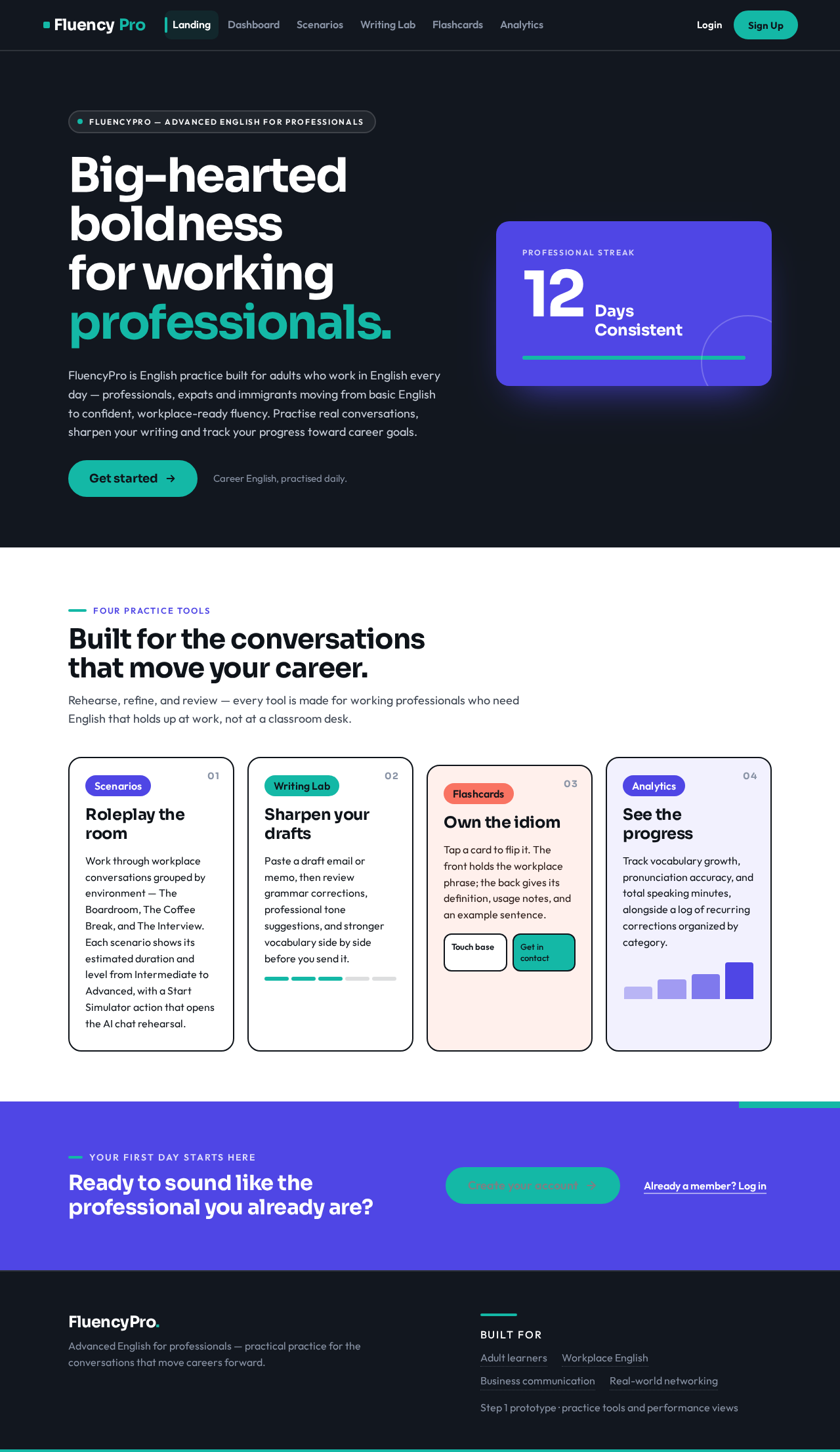
Build Step 1 of "FluencyPro — Advanced English for Professionals". Create the complete project foundation, database schema, and responsive mobile-first UI for an English learning web app tailored strictly for adult learners (focusing on career advancement, business communication, and real-world networking). ### Important Execution Rules: - I have zero coding experience. Make all technical and architectural decisions yourself. Do not ask me to write or edit code. - For this initial step, focus heavily on the UI layouts, step-by-step user flows, responsive navigation, reusable components, and placeholder data states. Do not attempt to integrate active live voice WebRTC or third-party audio streaming APIs yet. ### Target Audience & Tone: - **Users:** Working professionals, expats, and adult immigrants seeking to upgrade from basic English to confident, workplace-ready fluency. - **Tone & Persona:** Professional, premium, encouraging, and highly practical (avoid gamified elements like cartoon mascots or childish badges; focus instead on real-world milestones and performance analytics). ### Aesthetic & Visual Style Guide: - **Theme:** Clean, modern, executive tech aesthetic. - **Palette:** Deep slate gray or navy blue base, crisp white panels, vibrant indigo/teal accent colors for interactive elements. - **Layout:** Mobile-first responsive layout. A sticky bottom navigation bar for mobile viewports, transforming smoothly into a left-side persistent navigation sidebar on tablet and desktop monitors. ### Core Database Architecture (Initialize Tables): - `users`: ID, name, professional goal (e.g., tech, hospitality, finance), streak, subscription tier. - `scenarios`: ID, title, category (e.g., "Salary Negotiation", "Client Presentation", "Casual Networking"), difficulty. - `user_progress`: ID, user_id, scenario_id, completeness_percentage, top_mistakes_json, speaking_score. ### Main Navigation & Key Screens: Please build a layout containing the following five primary navigation views: 1. **Dashboard (Home):** - Professional streak tracker (e.g., "12 Days Consistent"). - "Daily Challenge" card featuring an adult idiom or workplace phrase of the day with its contextual definition. - Up-next recommendation widget based on their chosen career path. 2. **Scenarios (Practice Roleplay Hub):** - A grid of interactive conversation scenarios categorized by environment (e.g., *The Boardroom*, *The Coffee Break*, *The Interview*). - Each card must display estimated duration, level (Intermediate/Advanced), and a "Start Simulator" call-to-action. - Design a visual placeholder for the upcoming AI chat simulator view, showcasing chat bubbles (User vs. AI Coach) alongside an explicit "Tap to Speak" microphone UI anchor. 3. **Writing Lab (Grammar & Email Correction):** - A split-screen interface or form. - On the left/top: A large text area field where the user can paste an draft email or memo (e.g., "Draft an update to your boss"). - On the right/bottom: A placeholder feedback section showing how grammar corrections, professional tone enhancements, and vocabulary suggestions will be highlighted in real-time. 4. **Flashcards (Idioms & Vocabulary):** - A clean UI component allowing cards to visually flip on tap. - Front side: A high-level idiom, phrasal verb, or corporate jargon phrase (e.g., "Touch base", "Circle back"). - Back side: Clear definition, literal translation placeholder, formal vs. informal usage notes, and an example sentence. 5. **Analytics (Profile):** - User profile data editing form. - A performance visualization dashboard displaying data charts for: Vocabulary Growth, Pronunciation Accuracy %, and Total Speaking Minutes. - A dynamic "Common Mistakes Log" aggregating placeholder text corrections organized by category (e.g., Prepositions, Soft Skills Tone). Please generate the complete, interactive prototype layout structure based on these specifications so we can review the full user flow.

LandingDashboard
Landing

Comments (0)

No comments yet. Be the first!

Project Tasks

64 planning tasks
#1

Generate system requirement document

0m 41s0.05 cr used
Done
#2

Generate personas & user flows

0m 8s0.05 cr used
Done
#5

Architecture

0.05 cr needed
Paused
#6

Workspace task plan

0.05 cr needed
Paused
#7

Create flow for Adult English Learner (Working Professional)

0m 7sCredits in parent
Done
#8

Create flow for Expat or Adult Immigrant Professional

0m 7sCredits in parent
Done
#9

Landing

2m 2sCredits in subtasks
Done
#10

Dashboard

5m 1sCredits in subtasks
Done
#11

Scenarios

5m 7sCredits in subtasks
Paused
#12

Writing Lab

5m 7sCredits in subtasks
Paused
#13

Flashcards

5m 7sCredits in subtasks
Paused
#14

Analytics

5m 7sCredits in subtasks
Paused
#15

Login

5m 7sCredits in subtasks
Paused
#16

Sign Up

5m 6sCredits in subtasks
Paused
#17

Landing / Hero

0m 31s0.85 cr used
Done
#18

Landing / Practice Tools

0m 31s0.85 cr used
Done
#19

Landing / Entry Links

0m 29s0.85 cr used
Done
#20

Landing / Navigation

0m 0s0.85 cr used
Done
#21

Landing / Footer

0m 0s0.85 cr used
Done
#22

Navigation

0m 28sCredits in parent
Done
#23

Footer

0m 19sCredits in parent
Done
#24

Fix Landing: The global text token is , which makes the dark-mode body text low-contrast gray rather…

0m 10sCredits unavailable
Error
#25

Fix Landing review finding: frontend/src/styles/theme.css: The global text token is…

0m 9s0 cr used
Error
#26

Dashboard / Navigation

0m 0s0.85 cr used
Done
#27

Dashboard / Sidebar

0m 0s0.85 cr used
Done
#28

Dashboard / Streak Hero

0m 33s0.85 cr used
Done
#29

Dashboard / Daily Challenge

0m 43s0.85 cr used
Done
#30

Dashboard / Up Next

0m 47s0.85 cr used
Done
#31

Dashboard / Footer

0m 0s0.85 cr used
Done
#32

Dashboard Sidebar

0m 26sCredits in parent
Done
#33

Scenarios / Sidebar Slot

0.85 cr needed
Paused
#34

Scenarios / Header Slot

0.85 cr needed
Paused
#35

Scenarios / Intro

0.85 cr needed
Paused
#36

Scenarios / Environment Grid

0.85 cr needed
Paused
#37

Scenarios / Simulator Placeholder

0.85 cr needed
Paused
#38

Scenarios / Footer Slot

0.85 cr needed
Paused
#39

Writing Lab / Header Slot

0.85 cr needed
Paused
#40

Writing Lab / Sidebar Slot

0.85 cr needed
Paused
#41

Writing Lab / Intro

0.85 cr needed
Paused
#42

Writing Lab / Split Workspace

0.85 cr needed
Paused
#43

Writing Lab / Footer Slot

0.85 cr needed
Paused
#44

Fix Dashboard: Tablet bottom navigation covers Daily Challenge content; see () and ().

2m 42sCredits unavailable
Error
#45

Fix Dashboard: CSS syntax error: Unexpected } (51:1). The production build (Post CSS) rejects this…

1m 11sCredits unavailable
Done
#46

Fix Dashboard review findings: Tablet bottom navigation covers Daily Challenge content; (+1 more)

0m 28s0 cr used
Done
#47

Flashcards / Sidebar Slot

0.85 cr needed
Paused
#48

Flashcards / Header Slot

0.85 cr needed
Paused
#49

Flashcards / Intro

0.85 cr needed
Paused
#50

Flashcards / Deck

0.85 cr needed
Paused
#51

Flashcards / Footer Slot

0.85 cr needed
Paused
#52

Fix Dashboard review finding: Tablet bottom navigation covers Daily Challenge content;

0m 21s0 cr used
Done
#53

Analytics / Sidebar Slot

0.85 cr needed
Paused
#54

Analytics / Header Slot

0.85 cr needed
Paused
#55

Analytics / Intro

0.85 cr needed
Paused
#56

Analytics / Profile Form

0.85 cr needed
Paused
#57

Analytics / Performance Charts

0.85 cr needed
Paused
#58

Analytics / Mistakes Log

0.85 cr needed
Paused
#59

Analytics / Footer Slot

0.85 cr needed
Paused
#60

Login / Header

0.85 cr needed
Paused
#61

Login / Access Panel

0.85 cr needed
Paused
#62

Login / Footer

0.85 cr needed
Paused
#63

Fix Dashboard review finding: Tablet bottom navigation covers Daily Challenge content;

0m 42s0 cr used
Paused
#64

Sign Up / Navigation Slot

0.85 cr needed
Paused
#65

Sign Up / Enrollment Panel

0.85 cr needed
Paused
#66

Sign Up / Footer Slot

0.85 cr needed
Paused
Live
Landing design preview
Landing: Read product explanation
Sign Up: Open enrollment form
Sign Up: 1. Submit enrollment details
Sign Up: 2. Fix validation error and retry
Login: Open sign-in form
Login: 1. Submit credentials
Login: 2. Retry after invalid credentials
Dashboard: View streak
Dashboard: Read Daily Challenge
Dashboard: View up-next recommendation
Scenarios: Browse scenarios by environment
Scenarios: Review card duration and level
Scenarios: Start Simulator
Scenarios: View simulator placeholder
Writing Lab: 1. Paste draft email
Writing Lab: 2. Review placeholder feedback
Writing Lab: 3. Clear and re-enter draft
Flashcards: Read front phrase
Flashcards: Tap card to flip
Flashcards: Read back detail
Flashcards: Flip back to next card
Analytics: Edit profile data
Analytics: View performance charts
Analytics: Review Common Mistakes Log
Analytics: Filter mistakes by category
Live
Landing design preview
Landing: Read product explanation
Sign Up: Open enrollment form
Sign Up: 1. Submit enrollment details
Sign Up: 2. Fix validation error and retry
Login: Open sign-in form
Login: 1. Submit credentials
Login: 2. Retry after invalid credentials
Dashboard: View streak
Dashboard: Read Daily Challenge
Dashboard: View up-next recommendation
Scenarios: Browse scenarios by environment
Scenarios: Review card duration and level
Scenarios: Start Simulator
Scenarios: View simulator placeholder
Writing Lab: 1. Paste draft email
Writing Lab: 2. Review placeholder feedback
Writing Lab: 3. Clear and re-enter draft
Flashcards: Read front phrase
Flashcards: Tap card to flip
Flashcards: Read back detail
Flashcards: Flip back to next card
Analytics: Edit profile data
Analytics: View performance charts
Analytics: Review Common Mistakes Log
Analytics: Filter mistakes by category