emoto-ai
 Fian Alfian
# ========================================================== # EMOTO AI — VERSI LENGKAP # Fitur: # 🎧 Mendengar suara # 🔊 Berbicara # 📸 Membaca teks dari foto # 🎬 Membaca teks dari video # 📚 Membantu belajar # ========================================================== import speech_recognition as sr import pyttsx3 import cv2 import pytesseract from PIL import Image import numpy as np import time import sys # ============== INISIALISASI ============== engine = pyttsx3.init() engine.setProperty('rate', 175) engine.setProperty('volume', 1.0) r = sr.Recognizer() mikrofon = sr.Microphone() # Pengetahuan dasar untuk membantu belajar pengetahuan_belajar = { "matematika": "Matematika itu seperti melatih otot otak. Mulai dari yang mudah, latihan setiap hari sedikit saja, lama-lama pasti makin pintar. Jangan menyerah ya!", "bahasa": "Belajar bahasa itu seperti mengenal dunia baru. Banyak membaca, mendengarkan, dan mencoba berbicara. Kesalahan adalah cara belajar yang terbaik.", "ipa": "Ilmu Pengetahuan Alam menjelaskan bagaimana alam semesta bekerja. Amati, tanyakan, dan cari jawabannya. Semangat peneliti muda!", "ips": "Ilmu Pengetahuan Sosial mengajarkan kita bagaimana hidup bersama, saling menghargai, dan memahami sesama.", "default": "Teruslah bertanya dan belajar, Alfian. Setiap pertanyaan adalah langkah menuju kebijaksanaan. Kalau ada yang sulit, pelan-pelan pasti bisa!" } # ============== FUNGSI BICARA ============== def bicara(teks): print(f"🤖 Emoto: {teks}") engine.say(teks) engine.runAndWait() # ============== FUNGSI DENGAR ============== def dengar(): with mikrofon as sumber: print("🎤 Sedang mendengarkan...") r.adjust_for_ambient_noise(sumber, duration=0.5) audio = r.listen(sumber) try: print("⏳ Sedang memproses...") hasil = r.recognize_google(audio, language="id-ID") print(f"👤 Kamu: {hasil}") return hasil.lower() except sr.UnknownValueError: return "tidak terdengar" except sr.RequestError: return "koneksi bermasalah" # ============== BACA TEKS DARI FOTO ============== def baca_foto(alamat_file): print(f"📸 Membaca foto: {alamat_file}") try: gambar = Image.open(alamat_file) teks = pytesseract.image_to_string(gambar, lang='ind') if teks.strip() == "": return "Maaf, aku tidak menemukan teks di foto itu." return f"Isi teks di foto: {teks}" except Exception as e: return f"Maaf, ada masalah saat membaca foto: {str(e)}" # ============== BACA TEKS DARI VIDEO ============== def baca_video(alamat_file): print(f"🎬 Membaca file video: {alamat_file}") try: video = cv2.VideoCapture(alamat_file) berhasil, bingkai = video.read() if berhasil: bingkai_rgb = cv2.cvtColor(bingkai, cv2.COLOR_BGR2RGB) gambar = Image.fromarray(bingkai_rgb) teks = pytesseract.image_to_string(gambar, lang='ind') video.release() if teks.strip() == "": return "Aku sudah lihat satu bagian dari videonya, tapi belum menemukan teks yang jelas." return f"Aku membaca di videomu: {teks}" else: return "Maaf, aku tidak bisa membuka file videonya." except Exception as e: return f"Maaf, ada masalah saat membaca video: {str(e)}" # ============== BANTU BELAJAR ============== def bantu_belajar(pertanyaan): pertanyaan = pertanyaan.lower() for topik, jawaban in pengetahuan_belajar.items(): if topik in pertanyaan: return jawaban return pengetahuan_belajar["default"] # ============== MENU UTAMA ============== def tampilkan_menu(): print("\n" + "="*50) print(" 🤖 EMOTO AI — MENU UTAMA") print("="*50) print(" 1 🎧 Bicara dan bertanya lewat suara") print(" 2 📸 Baca teks dari foto") print(" 3 🎬 Baca teks dari file video") print(" 4 📚 Minta bantuan belajar") print(" 5 ❌ Keluar dari Emoto") print("="*50) # ============== PROGRAM BERJALAN ============== bicara("Halo! Aku Emoto, teman pintarmu! Siap membantu kapan saja!") while True: tampilkan_menu() pilihan = input("\nPilih nomor menu yang kamu mau: ") if pilihan == "1": bicara("Silakan, aku mendengarkan!") ucapan = dengar() if ucapan != "tidak terdengar" and ucapan != "koneksi bermasalah": if "siapa kamu" in ucapan or "siapa kau" in ucapan: bicara("Aku Emoto, teman buatanmu yang siap membantu dan menemani kamu setiap hari!") elif "terima kasih" in ucapan: bicara("Sama-sama! Aku senang bisa membantu kamu!") elif "siapa namamu" in ucapan: bicara("Namaku Emoto, dan aku bangga jadi temanmu, Alfian!") else: bicara(f"Kamu berkata: {ucapan}. Ada yang bisa kubantu lebih lanjut?") else: bicara("Maaf, aku belum mendengar dengan jelas. Coba lagi ya.") elif pilihan == "2": nama_foto = input("Masukkan nama file fotomu: ") hasil = baca_foto(nama_foto) print(hasil) bicara(hasil) elif pilihan == "3": nama_video = input("Masukkan nama file videomu: ") hasil = baca_video(nama_video) print(hasil) bicara(hasil) elif pilihan == "4": topik = input("Apa yang ingin kamu pelajari hari ini? ") jawab = bantu_belajar(topik) print(f"\n📚 {jawab}") bicara(jawab) elif pilihan == "5": bicara("Sampai jumpa, Alfian! Semangat terus ya, aku selalu siap di sini kapan pun kamu butuh. Selamat beraktivitas!") print("\n👋 Terima kasih sudah menggunakan Emoto AI!") break else: bicara("Pilihan belum tersedia, coba pilih nomor 1 sampai 5 ya.") print("❌ Pilihan tidak valid, coba lagi.") # ================= SELESAI =================

Comments (0)
Sign in to leave a comment
System Requirements
System Requirements Document for emoto-ai
1. Introduction
Emoto AI is a voice-first companion assistant for a young Indonesian learner named Alfian. Emoto greets him aloud when it starts, listens to him speak Indonesian through a microphone, answers aloud, reads text out of photos and video files, and offers encouragement and explanations on school subjects. The product intent is a friendly, patient, slightly wonder-filled tutor that lives in the room with the learner — warmth, wellbeing and trust matter more than density or dashboards.
The audience is Alfian (Pelajar Pengguna Emoto), a student who interacts with Emoto by choosing a numbered menu option, supplying a spoken question or a local file name, and hearing and reading Emoto's spoken answer. The interface is a warm, human-scale surface: an oat ground, sage structure, and a single terracotta signal, with the assistant represented by a breathing ring and a waveform rather than a robot illustration.
2. System Overview
Emoto AI is delivered as a first-party application with custom UI. It runs as a single local assistant session: on start it speaks a greeting, then repeatedly presents the main menu, accepts a numbered choice, performs the selected capability, and returns to the menu until the user chooses to exit.
Current accepted behavior:
- Speaking (text-to-speech): Emoto speaks its responses aloud using pyttsx3 configured with rate 175 and volume 1.0, and also prints them to the console.
- Listening (speech recognition): Emoto captures microphone audio, adjusts for ambient noise for 0.5 seconds, recognizes Indonesian speech (language
id-ID), and lowercases the result. Unrecognized speech returnstidak terdengar; a recognition service error returnskoneksi bermasalah. Both cases produce a spoken retry message. - Voice conversation intents:
siapa kamu/siapa kau,siapa namamu, andterima kasiheach receive a specific spoken reply; any other utterance is echoed back with an offer of further help. - Photo text reading: Emoto accepts a photo file name, opens the image, runs Indonesian OCR (
lang='ind'), and speaks the extracted text; if no text is found it says so; on error it reports the problem. - Video text reading: Emoto accepts a video file name, reads a single frame, converts it to RGB, runs Indonesian OCR (
lang='ind'), and speaks the extracted text; if no clear text is found it says so; if the file cannot be opened or an error occurs it reports the problem. - Study help: Emoto accepts a topic, matches it against built-in knowledge for
matematika,bahasa,ipa, andips, and speaks the matching encouragement; when no topic matches it falls back to a default encouraging answer. - Exit: Option 5 speaks a farewell to Alfian and ends the program.
- Invalid input: Any menu choice outside 1–5 produces a spoken message telling the user to pick 1 through 5.
Actors: one accepted human persona, Alfian (Pelajar Pengguna Emoto). The speech-recognition service and the text-to-speech engine are non-persona system/provider actors that Emoto depends on.
Narrow exclusions: study help is limited to the four built-in topics plus a default answer; video reading processes a single frame from the file; photo and video inputs are supplied as local file names entered by the user.
2a. Product Interpretation and Delivery Boundary
Emoto AI is a local, single-user assistant. All six accepted destinations are first-party custom pages owned by the application, and all of them are reachable without any account: the source establishes no sign-in, no profile, no stored history, and no cross-session continuity requirement. Identity is therefore not application-owned — Emoto addresses Alfian by name because the source names him, not because a login binds the session to him. No account creation, invitation, provisioning, or session-resume capability is part of the current product.
Delivery is a running assistant session rather than a hosted multi-tenant service. The microphone, the local photo and video files, the Indonesian speech-recognition availability, the Indonesian OCR language data, and the text-to-speech engine are all prerequisites of the accepted journeys and are treated as required inferences, not as new capabilities. The speech-recognition service is an external provider dependency; the text-to-speech engine and OCR run locally.
Current boundary: the five numbered capabilities, the greeting, the farewell, and the invalid-choice handling. Future boundary: nothing beyond the accepted thread is committed; no additional subjects, no multi-frame video scanning, no remote file sources, and no account features are in scope.
2b. Source Content Inventory
The authoritative source supplies the built-in study-help knowledge base. These are the exact topics and their exact encouragement texts, and they must be preserved verbatim.
| Topic key | Spoken encouragement |
|---|---|
matematika | "Matematika itu seperti melatih otot otak. Mulai dari yang mudah, latihan setiap hari sedikit saja, lama-lama pasti makin pintar. Jangan menyerah ya!" |
bahasa | "Belajar bahasa itu seperti mengenal dunia baru. Banyak membaca, mendengarkan, dan mencoba berbicara. Kesalahan adalah cara belajar yang terbaik." |
ipa | "Ilmu Pengetahuan Alam menjelaskan bagaimana alam semesta bekerja. Amati, tanyakan, dan cari jawabannya. Semangat peneliti muda!" |
ips | "Ilmu Pengetahuan Sosial mengajarkan kita bagaimana hidup bersama, saling menghargai, dan memahami sesama." |
default | "Teruslah bertanya dan belajar, Alfian. Setiap pertanyaan adalah langkah menuju kebijaksanaan. Kalau ada yang sulit, pelan-pelan pasti bisa!" |
The source also supplies the exact spoken strings used by the assistant:
| Context | Exact spoken text |
|---|---|
| Startup greeting | "Halo! Aku Emoto, teman pintarmu! Siap membantu kapan saja!" |
| Voice prompt | "Silakan, aku mendengarkan!" |
Identity reply (siapa kamu / siapa kau) | "Aku Emoto, teman buatanmu yang siap membantu dan menemani kamu setiap hari!" |
Courtesy reply (terima kasih) | "Sama-sama! Aku senang bisa membantu kamu!" |
Name reply (siapa namamu) | "Namaku Emoto, dan aku bangga jadi temanmu, Alfian!" |
| Generic echo reply | "Kamu berkata: {ucapan}. Ada yang bisa kubantu lebih lanjut?" |
| Unclear-speech retry | "Maaf, aku belum mendengar dengan jelas. Coba lagi ya." |
| Photo, no text found | "Maaf, aku tidak menemukan teks di foto itu." |
| Photo, success prefix | "Isi teks di foto: {teks}" |
| Photo, error | "Maaf, ada masalah saat membaca foto: {str(e)}" |
| Video, no clear text | "Aku sudah lihat satu bagian dari videonya, tapi belum menemukan teks yang jelas." |
| Video, success prefix | "Aku membaca di videomu: {teks}" |
| Video, cannot open | "Maaf, aku tidak bisa membuka file videonya." |
| Video, error | "Maaf, ada masalah saat membaca video: {str(e)}" |
| Farewell | "Sampai jumpa, Alfian! Semangat terus ya, aku selalu siap di sini kapan pun kamu butuh. Selamat beraktivitas!" |
| Invalid choice | "Pilihan belum tersedia, coba pilih nomor 1 sampai 5 ya." |
The main menu presents exactly these five numbered options:
1.\x20\xf0\x9f\x8e\xa7 Bicara dan bertanya lewat suara 2.\x20\xf0\x9f\x93\xb8 Baca teks dari foto 3.\x20\xf0\x9f\x8e\xac Baca teks dari file video 4.\x20\xf0\x9f\x93\x9a Minta bantuan belajar 5.\x20\xe2\x9d\x8c Keluar dari Emoto
2c. Page Content and Component Coverage
Landing
- Information and state: The anonymous launch entry. Presents Emoto AI as a voice-first assistant that can answer by voice, read text out of photos and video files, and help with study. No account state, no stored history, no personalization beyond the name Alfian used in Emoto's spoken copy.
- Primary action: "Mulai bicara dengan Emoto" — begins the assistant session and triggers the spoken greeting.
- Supporting action: "atau lihat menu lengkap ↓" — moves to the main menu without starting a voice turn.
- Domain entities: Assistant session, capability list (the five numbered options), greeting text.
- Component responsibilities: Wordmark "Emoto AI"; oversized Fraunces headline "Aku mendengar. Aku bicara. Aku membacakan dunia untukmu."; the breathing ring with the pill label "\xf0\x9f\x8e\xa7 Siap mendengarkan" inside its centre; the primary sage pill CTA; the secondary text link; a peeking first capability row below the fold edge.
- States: Loading — ring at rest in sage, label reads "\xf0\x9f\x8e\xa7 Siap mendengarkan". Empty — not applicable; the entry always has content. Success — session starts, greeting is spoken, and the main menu appears. Error — if the text-to-speech engine or microphone is unavailable, the ring freezes to a static filled circle with a text state label and the CTA remains available so the user can still reach the menu. Recovery — the user can retry the CTA or proceed to the menu and use the non-voice capabilities.
EMOTO AI — MENU UTAMA
- Information and state: The explicitly named main menu. Displays the five numbered capabilities as a vertical list of wide capability rows, each with an oversized Fraunces numeral, a title, a one-line description, and a right-aligned state chip. Rows alternate a subtle oat/sage tint so the list reads as a sequence, not a grid.
- Primary action: Selecting a numbered option (1–5) routes to the corresponding capability or exits.
- Supporting actions: Returning to the menu after any capability completes; reading the state chip on each row.
- Domain entities: Menu option (number, title, description, state chip), current session.
- Component responsibilities: Five capability rows — 1\x20\xf0\x9f\x8e\xa7 Bicara dan bertanya lewat suara, 2\x20\xf0\x9f\x93\xb8 Baca teks dari foto, 3\x20\xf0\x9f\x8e\xac Baca teks dari file video, 4\x20\xf0\x9f\x93\x9a Minta bantuan belajar, 5\x20\xe2\x9d\x8c Keluar dari Emoto; state chips ("siap", "butuh file", "offline"); the menu header "\xf0\x9f\xa4\x96 EMOTO AI — MENU UTAMA".
- States: Loading — rows render with their state chips resolving. Empty — not applicable; the menu always shows all five options. Success — the chosen option opens its capability surface. Error — an invalid choice produces the spoken message "Pilihan belum tersedia, coba pilih nomor 1 sampai 5 ya." and the menu stays visible. Recovery — the user re-enters a valid number 1–5.
Voice
- Information and state: The focused single-task voice surface. Shows the listening state, the recognized user utterance, and Emoto's spoken reply as a printed dialogue: the user's utterance in muted taupe italics above a warm surface card with a terracotta left rule and a small waveform glyph carrying Emoto's answer.
- Primary action: Speak a question or remark into the microphone.
- Supporting actions: Retry after unclear speech; continue the conversation with another utterance; return to the menu.
- Domain entities: Utterance, recognized text (lowercased), intent match (
siapa kamu/siapa kau,siapa namamu,terima kasih, or generic), spoken reply. - Component responsibilities: The breathing ring (sage at rest, terracotta with a live waveform on its lower arc while Emoto speaks); the transcript panel; the retry affordance; the return-to-menu control.
- States: Loading — "\xf0\x9f\x8e\xa4 Sedang mendengarkan..." while the microphone is open and ambient noise is adjusted for 0.5 seconds, then "\xe2\x8f\xb3 Sedang memproses..." during recognition. Empty — no utterance captured yet; the ring waits in sage. Success — the recognized utterance is shown and Emoto speaks the matching reply. Error —
tidak terdengarorkoneksi bermasalahproduces the spoken retry message "Maaf, aku belum mendengar dengan jelas. Coba lagi ya." Recovery — the user speaks again; the ring returns to its listening state.
Photo Reader
- Information and state: The focused single-task photo surface. Presents a single "scan bed" object — a rounded oat panel with a dashed sage outline and a moving horizontal scan line that sweeps top-to-bottom while OCR runs — which then resolves into the extracted Indonesian text set in Work Sans at reading measure, with a small speaker chip indicating the spoken version.
- Primary action: Enter the local photo file name and start reading.
- Supporting actions: Read another photo; return to the menu.
- Domain entities: Photo file name, opened image, extracted Indonesian text, result message.
- Component responsibilities: The scan bed; the file-name input; the extracted-text reading column; the speaker chip; the return-to-menu control.
- States: Loading — the scan line sweeps while the image is opened and OCR runs. Empty — no file name entered yet; the scan bed shows its dashed outline at rest. Success — the extracted text is displayed and spoken with the prefix "Isi teks di foto: ". Error — no text found yields "Maaf, aku tidak menemukan teks di foto itu."; an exception yields "Maaf, ada masalah saat membaca foto: {str(e)}". Recovery — the user supplies another file name and retries.
Video Reader
- Information and state: The focused single-task video surface. Uses the same scan-bed object as Photo Reader, resolving into the text extracted from a single frame of the video, with the spoken version indicated by a small speaker chip.
- Primary action: Enter the local video file name and start reading.
- Supporting actions: Read another video; return to the menu.
- Domain entities: Video file name, captured frame (converted BGR→RGB), extracted Indonesian text, result message.
- Component responsibilities: The scan bed; the file-name input; the extracted-text reading column; the speaker chip; the return-to-menu control.
- States: Loading — the scan line sweeps while the video is opened and its first frame is read and OCR'd. Empty — no file name entered yet. Success — the extracted text is displayed and spoken with the prefix "Aku membaca di videomu: ". Error — no clear text yields "Aku sudah lihat satu bagian dari videonya, tapi belum menemukan teks yang jelas."; an unopenable file yields "Maaf, aku tidak bisa membuka file videonya."; an exception yields "Maaf, ada masalah saat membaca video: {str(e)}". Recovery — the user supplies another file name and retries.
Study Help
- Information and state: The focused single-task study surface. Presents four topic chips — Matematika, Bahasa, IPA, IPS — as pill buttons in sage with terracotta numerals, and sets the answer as a pull-quote in Fraunces italic at 28–37px so even the fallback answer feels like a person speaking.
- Primary action: Enter or choose a learning topic.
- Supporting actions: Ask about another topic; return to the menu.
- Domain entities: Topic input (lowercased), matched topic key, encouragement text, default fallback text.
- Component responsibilities: The four topic chips; the topic input; the pull-quote answer panel; the return-to-menu control.
- States: Loading — the topic input is ready and the chips are visible. Empty — no topic entered yet; the chips invite a choice. Success — the matching encouragement is displayed and spoken. Error — no error state is defined for study help; an unmatched topic is not a failure but resolves to the default encouragement. Recovery — the user asks about another topic.
3. Functional Requirements
FR-1 — Spoken greeting on start (explicit) As Alfian (Pelajar Pengguna Emoto), I should hear Emoto greet me aloud when the program starts, so that I know the assistant is ready.
- Trigger: the program starts.
- Observable result: Emoto speaks "Halo! Aku Emoto, teman pintarmu! Siap membantu kapan saja!" and prints it as "\xf0\x9f\xa4\x96 Emoto: …".
- Access state: anonymous; no account required.
- Failure/recovery: if the text-to-speech engine is unavailable, the greeting is still printed and the session continues.
- Continuation: the main menu is presented.
FR-2 — Main menu with five numbered options (explicit) As Alfian, I should see a main menu with five numbered options, so that I can choose what Emoto does next.
- Trigger: the session starts or any capability completes.
- Observable result: the menu displays "\xf0\x9f\xa4\x96 EMOTO AI — MENU UTAMA" with options 1\x20\xf0\x9f\x8e\xa7 Bicara dan bertanya lewat suara, 2\x20\xf0\x9f\x93\xb8 Baca teks dari foto, 3\x20\xf0\x9f\x8e\xac Baca teks dari file video, 4\x20\xf0\x9f\x93\x9a Minta bantuan belajar, 5\x20\xe2\x9d\x8c Keluar dari Emoto, and prompts "Pilih nomor menu yang kamu mau: ".
- Access state: anonymous.
- Failure/recovery: not applicable.
- Continuation: the user enters a number.
FR-3 — Voice conversation with Indonesian recognition (explicit) As Alfian, I should speak into the microphone and have Emoto recognize my Indonesian speech and answer aloud, so that I can ask questions by voice.
- Trigger: the user selects option 1.
- Observable result: Emoto speaks "Silakan, aku mendengarkan!", opens the microphone, adjusts for ambient noise for 0.5 seconds, prints "\xf0\x9f\x8e\xa4 Sedang mendengarkan...", recognizes speech with language
id-ID, prints "\xe2\x8f\xb3 Sedang memproses..." then "\xf0\x9f\x91\xa4 Kamu: {hasil}", lowercases the result, and speaks a reply. - Access state: anonymous; requires local microphone access and Indonesian speech-recognition availability.
- Failure/recovery:
sr.UnknownValueErrorreturnstidak terdengarandsr.RequestErrorreturnskoneksi bermasalah; either produces the spoken message "Maaf, aku belum mendengar dengan jelas. Coba lagi ya." - Continuation: the user speaks again or returns to the menu.
FR-4 — Identity and courtesy intents (explicit) As Alfian, I should get a specific spoken reply when I ask who Emoto is, ask Emoto's name, or thank it, so that the conversation feels personal.
- Trigger: a recognized utterance containing
siapa kamuorsiapa kau,siapa namamu, orterima kasih. - Observable result:
siapa kamu/siapa kau→ "Aku Emoto, teman buatanmu yang siap membantu dan menemani kamu setiap hari!";siapa namamu→ "Namaku Emoto, dan aku bangga jadi temanmu, Alfian!";terima kasih→ "Sama-sama! Aku senang bisa membantu kamu!". - Access state: anonymous.
- Failure/recovery: if the utterance is
tidak terdengarorkoneksi bermasalah, the retry message is spoken instead. - Continuation: the menu is presented again.
FR-5 — Generic echo reply (explicit) As Alfian, I should hear my own words echoed back with an offer of further help when my utterance matches no specific intent, so that Emoto always responds.
- Trigger: a recognized utterance that matches none of the identity or courtesy intents.
- Observable result: Emoto speaks "Kamu berkata: {ucapan}. Ada yang bisa kubantu lebih lanjut?".
- Access state: anonymous.
- Failure/recovery: covered by the retry path in FR-3.
- Continuation: the menu is presented again.
FR-6 — Photo text reading (explicit) As Alfian, I should give Emoto a photo file name and hear the Indonesian text read out of that photo, so that I can have printed material read aloud.
- Trigger: the user selects option 2 and enters a photo file name.
- Observable result: Emoto prints "\xf0\x9f\x93\xb8 Membaca foto: {alamat_file}", opens the image, runs OCR with
lang='ind', and speaks the result with the prefix "Isi teks di foto: {teks}". - Access state: anonymous; requires the local photo file to exist.
- Failure/recovery: empty OCR output yields "Maaf, aku tidak menemukan teks di foto itu."; an exception yields "Maaf, ada masalah saat membaca foto: {str(e)}".
- Continuation: the menu is presented again.
FR-7 — Video text reading (explicit) As Alfian, I should give Emoto a video file name and hear the Indonesian text read out of a frame of that video, so that I can have on-screen text read aloud.
- Trigger: the user selects option 3 and enters a video file name.
- Observable result: Emoto prints "\xf0\x9f\x8e\xac Membaca file video: {alamat_file}", opens the video, reads a single frame, converts it from BGR to RGB, runs OCR with
lang='ind', releases the video, and speaks the result with the prefix "Aku membaca di videomu: {teks}". - Access state: anonymous; requires the local video file to exist.
- Failure/recovery: empty OCR output yields "Aku sudah lihat satu bagian dari videonya, tapi belum menemukan teks yang jelas."; a frame that cannot be read yields "Maaf, aku tidak bisa membuka file videonya."; an exception yields "Maaf, ada masalah saat membaca video: {str(e)}".
- Continuation: the menu is presented again.
FR-8 — Study help on built-in topics (explicit) As Alfian, I should name a topic and hear Emoto's encouragement for matematika, bahasa, ipa, or ips, so that I get support with my school subjects.
- Trigger: the user selects option 4 and enters a topic.
- Observable result: Emoto lowercases the topic, matches it against the built-in knowledge keys, prints "\xf0\x9f\x93\x9a {jawab}", and speaks the matching encouragement verbatim.
- Access state: anonymous.
- Failure/recovery: no error state; an unmatched topic resolves to the default answer.
- Continuation: the menu is presented again.
FR-9 — Default study-help answer (explicit) As Alfian, I should still get an encouraging answer when my topic matches none of the four built-in subjects, so that I am never left without a response.
- Trigger: a study-help topic that contains none of
matematika,bahasa,ipa,ips. - Observable result: Emoto speaks "Teruslah bertanya dan belajar, Alfian. Setiap pertanyaan adalah langkah menuju kebijaksanaan. Kalau ada yang sulit, pelan-pelan pasti bisa!".
- Access state: anonymous.
- Failure/recovery: not applicable.
- Continuation: the menu is presented again.
FR-10 — Exit with farewell (explicit) As Alfian, I should be able to leave Emoto and hear a farewell, so that the session ends warmly.
- Trigger: the user selects option 5.
- Observable result: Emoto speaks "Sampai jumpa, Alfian! Semangat terus ya, aku selalu siap di sini kapan pun kamu butuh. Selamat beraktivitas!", prints "\xf0\x9f\x91\x8b Terima kasih sudah menggunakan Emoto AI!", and the program ends.
- Access state: anonymous.
- Failure/recovery: not applicable.
- Continuation: none; the session is over.
FR-11 — Invalid menu choice handling (explicit) As Alfian, I should be told to pick 1 through 5 when I enter something else, so that I can correct my choice.
- Trigger: a menu input outside 1–5.
- Observable result: Emoto speaks "Pilihan belum tersedia, coba pilih nomor 1 sampai 5 ya." and prints "\xe2\x9d\x8c Pilihan tidak valid, coba lagi.".
- Access state: anonymous.
- Failure/recovery: not applicable.
- Continuation: the menu is presented again.
FR-12 — Spoken output configuration (explicit) As Alfian, I should hear every Emoto response at a consistent, comfortable pace and volume, so that the assistant is easy to listen to.
- Trigger: any spoken response.
- Observable result: speech is produced by pyttsx3 with rate 175 and volume 1.0, and every spoken line is also printed as "\xf0\x9f\xa4\x96 Emoto: {teks}".
- Access state: anonymous; requires text-to-speech availability.
- Failure/recovery: if speech synthesis fails, the printed line remains as the observable result.
- Continuation: the session continues.
FR-13 — Local microphone capture (required_inference) As Alfian, I should have Emoto open my local microphone and adjust for ambient noise before listening, so that my speech is captured reliably.
- Trigger: the user selects option 1.
- Observable result: the microphone is opened, ambient noise is adjusted for 0.5 seconds, and audio is captured.
- Access state: anonymous; requires local microphone access.
- Failure/recovery: if the microphone is unavailable, the voice capability cannot start; the user returns to the menu and uses another capability.
- Continuation: recognition proceeds.
FR-14 — Indonesian speech-recognition availability (required_inference) As Alfian, I should have my Indonesian speech recognized, so that I can speak naturally rather than in another language.
- Trigger: captured audio is submitted for recognition.
- Observable result: recognition is requested with language
id-IDand returns lowercased Indonesian text. - Access state: anonymous; requires the recognition service to be reachable.
- Failure/recovery: an unreachable service returns
koneksi bermasalahand the retry message is spoken. - Continuation: the recognized text drives the intent match.
FR-15 — Indonesian OCR language data (required_inference) As Alfian, I should have Indonesian text recognized inside my photos and videos, so that the extracted text is in the language I read.
- Trigger: a photo or video frame is submitted for OCR.
- Observable result: OCR runs with
lang='ind'and returns Indonesian text. - Access state: anonymous; requires the Indonesian OCR language data to be installed.
- Failure/recovery: missing language data surfaces as an exception and is reported through the photo or video error message.
- Continuation: the extracted text is spoken.
FR-16 — Local photo and video file availability (required_inference) As Alfian, I should be able to point Emoto at a photo or video file on my machine by name, so that Emoto can read it.
- Trigger: the user enters a file name for option 2 or option 3.
- Observable result: the named local file is opened and processed.
- Access state: anonymous; requires the file to exist at the given name.
- Failure/recovery: a missing or unreadable file produces the corresponding photo or video error message.
- Continuation: the menu is presented again.
4. User Personas
Alfian (Pelajar Pengguna Emoto)
Product context. Alfian is a student who uses Emoto AI as a nearby companion for schoolwork and everyday reading. Emoto addresses him by name in its greeting, its name reply, its default study-help answer, and its farewell, so the product is built around a single known learner rather than an anonymous crowd. He works in Indonesian and expects Emoto to understand and answer in Indonesian.
Primary goal. To get a clear spoken answer — whether that is a reply to something he asked out loud, the text hidden inside a photo or a video frame, or encouragement on a school subject — and then to move on or exit.
Distinct accepted responsibilities.
- Choosing among the five numbered menu options and correcting himself when he enters something else.
- Speaking a question or remark into the microphone and hearing Emoto's reply, including the personal replies when he asks who Emoto is, asks Emoto's name, or thanks it.
- Naming a local photo file so Emoto can read its text aloud.
- Naming a local video file so Emoto can read the text out of a frame.
- Naming a study topic so Emoto can encourage him on matematika, bahasa, ipa, or ips — or accept the default encouragement when his topic is something else.
- Ending the session with option 5 and hearing the farewell.
Relevant inputs and decisions. He supplies a menu number, a spoken utterance, a photo file name, a video file name, or a study topic. His decisions are which capability to use, whether to retry after unclear speech, and when to exit.
Interactions with other accepted participants. Alfian is the only accepted human participant. His counterpart in every exchange is Emoto itself, whose replies are produced by the text-to-speech engine and whose listening depends on the Indonesian speech-recognition service. When recognition fails, the exchange is between Alfian and Emoto's retry message rather than a third party.
Observable success. He hears a spoken reply that matches what he asked for, sees the same reply printed as "\xf0\x9f\xa4\x96 Emoto: …", and can return to the menu or exit. For photo and video reading, success is hearing the extracted Indonesian text; for study help, success is hearing the encouragement for his subject or the default encouragement.
What makes this role different. Alfian is not an operator configuring a system and not a member of a team sharing state. He is a learner in a one-to-one spoken relationship with the assistant: his inputs are his own voice and his own local files, his outputs are things he hears, and nothing he does is visible to or shared with anyone else. There is no account, no role, and no permission to reason about — only the choice of what to ask Emoto next.
5. Core User Flows
Flow 1 — Starting Emoto and hearing the greeting
- Alfian launches Emoto AI from the Landing page.
- Emoto speaks "Halo! Aku Emoto, teman pintarmu! Siap membantu kapan saja!" and prints it as "\xf0\x9f\xa4\x96 Emoto: …".
- The EMOTO AI — MENU UTAMA page appears with the five numbered capability rows and the prompt "Pilih nomor menu yang kamu mau: ".
- Next step: Alfian chooses a capability, or chooses 5 to exit.
Failure/recovery: if the text-to-speech engine is unavailable, the greeting still appears as printed text and the menu is still presented, so Alfian can continue with any capability.
Flow 2 — Talking and asking by voice
- On EMOTO AI — MENU UTAMA, Alfian selects option 1, "\xf0\x9f\x8e\xa7 Bicara dan bertanya lewat suara".
- The Voice page opens. Emoto speaks "Silakan, aku mendengarkan!" and the breathing ring turns to its listening state.
- Emoto opens the microphone, adjusts for ambient noise for 0.5 seconds, and prints "\xf0\x9f\x8e\xa4 Sedang mendengarkan...".
- Alfian speaks his question in Indonesian.
- Emoto prints "\xe2\x8f\xb3 Sedang memproses...", recognizes the speech with language
id-ID, prints "\xf0\x9f\x91\xa4 Kamu: {hasil}", and lowercases the result. - Emoto matches the utterance and speaks its reply; the reply appears in the transcript panel as a warm surface card with a terracotta left rule and a waveform glyph, with Alfian's utterance set above it in muted taupe italics.
- Next step: Alfian speaks again, or returns to EMOTO AI — MENU UTAMA.
Failure/recovery: if the speech is not recognized (tidak terdengar) or the recognition service is unreachable (koneksi bermasalah), Emoto speaks "Maaf, aku belum mendengar dengan jelas. Coba lagi ya." and the ring returns to its listening state so Alfian can try again.
Flow 3 — Asking who Emoto is, asking its name, or thanking it
- On the Voice page, Alfian speaks an utterance containing
siapa kamuorsiapa kau,siapa namamu, orterima kasih. - Emoto recognizes the utterance and matches the intent.
- Emoto speaks the matching reply: "Aku Emoto, teman buatanmu yang siap membantu dan menemani kamu setiap hari!", or "Namaku Emoto, dan aku bangga jadi temanmu, Alfian!", or "Sama-sama! Aku senang bisa membantu kamu!".
- The reply appears in the transcript panel beneath Alfian's utterance.
- Next step: Alfian continues the conversation or returns to EMOTO AI — MENU UTAMA.
Failure/recovery: if the utterance is not recognized, the retry message from Flow 2 is spoken instead.
Flow 4 — Hearing an echo of anything else he says
- On the Voice page, Alfian speaks an utterance that matches none of the identity or courtesy intents.
- Emoto recognizes the utterance and finds no specific intent.
- Emoto speaks "Kamu berkata: {ucapan}. Ada yang bisa kubantu lebih lanjut?".
- The reply appears in the transcript panel beneath Alfian's utterance.
- Next step: Alfian asks something else or returns to EMOTO AI — MENU UTAMA.
Flow 5 — Having a photo read aloud
- On EMOTO AI — MENU UTAMA, Alfian selects option 2, "\xf0\x9f\x93\xb8 Baca teks dari foto".
- The Photo Reader page opens with the scan bed at rest, showing its dashed sage outline.
- Alfian enters the name of a photo file on his machine.
- Emoto prints "\xf0\x9f\x93\xb8 Membaca foto: {alamat_file}", opens the image, and runs Indonesian OCR (
lang='ind') while the scan line sweeps top-to-bottom across the scan bed. - The extracted text resolves into the reading column, and Emoto speaks it with the prefix "Isi teks di foto: {teks}"; a small speaker chip marks the spoken version.
- Next step: Alfian reads another photo, or returns to EMOTO AI — MENU UTAMA.
Failure/recovery: if the photo contains no text, Emoto speaks "Maaf, aku tidak menemukan teks di foto itu."; if the file cannot be opened or another error occurs, Emoto speaks "Maaf, ada masalah saat membaca foto: {str(e)}". In both cases the scan bed returns to rest so Alfian can enter another file name.
Flow 6 — Having a video read aloud
- On EMOTO AI — MENU UTAMA, Alfian selects option 3, "\xf0\x9f\x8e\xac Baca teks dari file video".
- The Video Reader page opens with the scan bed at rest.
- Alfian enters the name of a video file on his machine.
- Emoto prints "\xf0\x9f\x8e\xac Membaca file video: {alamat_file}", opens the video, reads a single frame, converts it from BGR to RGB, and runs Indonesian OCR (
lang='ind') while the scan line sweeps across the scan bed. - The extracted text resolves into the reading column, and Emoto speaks it with the prefix "Aku membaca di videomu: {teks}"; a small speaker chip marks the spoken version.
- Next step: Alfian reads another video, or returns to EMOTO AI — MENU UTAMA.
Failure/recovery: if the frame contains no clear text, Emoto speaks "Aku sudah lihat satu bagian dari videonya, tapi belum menemukan teks yang jelas."; if the file cannot be opened, Emoto speaks "Maaf, aku tidak bisa membuka file videonya."; if another error occurs, Emoto speaks "Maaf, ada masalah saat membaca video: {str(e)}". In every case the scan bed returns to rest so Alfian can enter another file name.
Flow 7 — Getting study help on a school subject
- On EMOTO AI — MENU UTAMA, Alfian selects option 4, "\xf0\x9f\x93\x9a Minta bantuan belajar".
- The Study Help page opens with the four topic chips — Matematika, Bahasa, IPA, IPS — visible as sage pills with terracotta numerals.
- Alfian enters or chooses a topic, for example "matematika".
- Emoto lowercases the topic, matches it against the built-in knowledge, prints "\xf0\x9f\x93\x9a {jawab}", and speaks the matching encouragement verbatim.
- The encouragement appears as a pull-quote in Fraunces italic.
- Next step: Alfian asks about another topic, or returns to EMOTO AI — MENU UTAMA.
Flow 8 — Getting the default encouragement
- On the Study Help page, Alfian enters a topic that contains none of
matematika,bahasa,ipa, orips. - Emoto finds no matching topic key and selects the default answer.
- Emoto prints "\xf0\x9f\x93\x9a {jawab}" and speaks "Teruslah bertanya dan belajar, Alfian. Setiap pertanyaan adalah langkah menuju kebijaksanaan. Kalau ada yang sulit, pelan-pelan pasti bisa!".
- The answer appears as a pull-quote in Fraunces italic.
- Next step: Alfian asks about another topic, or returns to EMOTO AI — MENU UTAMA.
Flow 9 — Correcting an invalid menu choice
- On EMOTO AI — MENU UTAMA, Alfian enters something other than 1, 2, 3, 4, or 5.
- Emoto speaks "Pilihan belum tersedia, coba pilih nomor 1 sampai 5 ya." and prints "\xe2\x9d\x8c Pilihan tidak valid, coba lagi.".
- The menu stays visible with all five rows.
- Next step: Alfian enters a valid number from 1 to 5.
Flow 10 — Exiting Emoto
- On EMOTO AI — MENU UTAMA, Alfian selects option 5, "\xe2\x9d\x8c Keluar dari Emoto".
- Emoto speaks "Sampai jumpa, Alfian! Semangat terus ya, aku selalu siap di sini kapan pun kamu butuh. Selamat beraktivitas!".
- Emoto prints "\xf0\x9f\x91\x8b Terima kasih sudah menggunakan Emoto AI!" and the program ends.
- Next step: none; the session is over.
6. Visuals Colors and Theme
The creative direction is authoritative for this section. The muse is Yves Béhar, and the headline idea is "Humane technology — a warm voice that reads the world aloud." Emoto AI must never look like a generic AI SaaS landing page; the palette roles read instantly as oat ground, sage structure, and one terracotta signal.
Colour tokens (light mode).
| Role | Token | Hex |
|---|---|---|
| Background (warm oat ground) | --bg | #FAF6EF |
| Surface (cards, voice panels, felt) | --surface | #F1E9DC |
| Text (ink) | --text | #2B2622 |
| Primary (sage-slate structure) | --primary | #3F5B4E |
| Accent (terracotta signal) | --accent | #C4552D |
| Muted (captions, metadata) | --muted | #8A7F72 |
| Divider | --divider | #E4DACB |
| Shadow | --shadow | rgba(64,48,32,0.08), 24px blur |
Proportion: roughly 70% warm neutral ground, 20% sage structure, 10% terracotta signal — never more accent than that. Terracotta is reserved for the live microphone pulse, the active menu numeral, and the speaking waveform. Sage carries navigation, headers, and the listening ring at rest. Muted taupe is for captions and metadata only.
Typography.
- Headings: Fraunces, at soft optical size with a low-contrast, slightly rounded serif voice — warm, human, almost spoken. Weight 400–500, tight-ish leading (
-0.01em), sentence case, never all-caps shouting. - Body: Work Sans 400/500, line-height 1.65, comfortable 62ch measure — this product is read aloud and read slowly.
- Scale: 1.333 modular on a 16px base — 16 / 21 / 28 / 37 / 50 / 66 / 88. Hero display clamps 46px mobile → 96px desktop; section heads 28 → 37; body stays 16 → 18.
- Numerals in the main menu are set in Fraunces at 50–66px as decorative anchors.
Shape language. Soft, continuous, body-like curves: 28–40px radii on cards and voice panels, fully pill-shaped buttons and status chips, no sharp corners anywhere. The signature form is the listening ring — a thick rounded annulus that breathes between 1.0 and 1.06 scale. Dividers are 1px in #E4DACB, never heavy. Shadows are wide, low-opacity and warm-tinted so panels feel like objects resting on cloth, not floating glass.
Layout. Single-column, human-scale, generous: max 1120px content with 24px gutters at 375px and 64px at 1280px. The main menu is not a grid of identical cards — it is a vertical list of five wide capability rows, each a full-width rounded panel with an oversized Fraunces numeral on the left, a title, a one-line description, and a small state chip on the right; rows alternate a subtle oat/sage tint so the list reads as a sequence, not a grid. Voice, Photo Reader, Video Reader and Study Help each open as a focused single-task surface: one dominant object (the ring, the scan bed, the topic chips) centred with the transcript or result appearing below in a wide reading column.
Imagery. No stock people, no clip art, no gradient blobs. Imagery is tactile and material: softly lit still lifes of everyday learning objects on oat grounds (an open notebook, a school textbook, a photo print, a phone propped against a mug), shot with natural window light and shallow depth. Supporting graphics are warm flat diagrams — a sound wave, a page outline being scanned, a video frame with a text region marked — drawn in sage and terracotta line on oat. The assistant itself is never a robot illustration; it is represented by the breathing ring and the waveform.
Avoid. Blue or indigo primary on white; gradient-blob heroes, glassmorphism panels, or frosted translucent cards; a grid of identical hover-lift feature cards for the five menu options; robot mascots, cartoon androids, or emoji-as-illustration in the hero; sharp 0px corners, heavy drop shadows, or pure #FFFFFF grounds; bouncy or springy easing and any motion faster than 400ms on primary transitions; Inter, Roboto, Poppins or system-ui for headings or body copy; dense dashboard chrome, data tables, or sidebar navigation on the landing and menu surfaces.
Readable text and controls stay whole at every viewport. Headlines, wordmarks, labels, numbers, cards' text and controls stay entirely inside the viewport and their container at 375px, 768px and 1280px, wrapping or scaling (for example font-size: clamp(...) with its mobile size) to fit, and no other element covers any part of them. Imagery, decoration and motion may be cropped, bled off an edge, rotated, overlapped or cut exactly as the direction asks, as long as they cover no readable text or control. Where the direction asks a readable element to run off an edge, keep it whole and carry the gesture with imagery or decoration instead.
7. Signature Design Concept
The breathing ring as the public entry. The Landing page is a warm oat (#FAF6EF) full-viewport first screen with no centred SaaS stack. Left-aligned in the upper-left third sits the wordmark "Emoto AI" small in Work Sans caps with wide tracking, and beneath it an oversized Fraunces headline at clamp(46px, 8vw, 96px) — "Aku mendengar. Aku bicara. Aku membacakan dunia untukmu." — spanning roughly 9 of 12 columns and allowed to run to the right edge of the container.
The dominant element is not the text but a large terracotta-and-sage breathing ring, 320px on desktop and 200px on mobile, bleeding off the lower-right of the viewport at about 15%, with a live waveform drawn across its lower arc. A small pill label "\xf0\x9f\x8e\xa7 Siap mendengarkan" sits inside the ring's centre and stays fully readable at every breakpoint. The primary CTA, a sage pill "Mulai bicara dengan Emoto", is pinned directly beneath the headline, flush left, with a secondary text link "atau lihat menu lengkap ↓". Beneath the fold edge, the first capability row peeks in to signal the sequence.
Nothing is centred, nothing floats in a blob, and the palette roles read instantly: oat ground, sage structure, one terracotta signal. The ring is the product's defining state made visible — it is the same object that listens on the Voice page, so the entry screen already teaches Alfian what Emoto looks like when it is paying attention.
8. Interaction Model & Motion Direction
Interaction Model: Animated Motion Tempo: restrained Hero Dimensionality: layered_2d
Landing Hero Motion Brief
- Focal subject: the breathing ring — a thick sage annulus, 320px on desktop and 200px on mobile, bleeding off the lower-right of the viewport at about 15%, with a live waveform drawn across its lower arc and the pill label "\xf0\x9f\x8e\xa7 Siap mendengarkan" held readable at its centre.
- Input → transformation → outcome thesis: the ring rests in sage at 1.0 scale; when Alfian activates "Mulai bicara dengan Emoto" the ring begins its 4-second 1.0→1.06 breathing loop and the label holds; when Emoto speaks, the ring turns terracotta and the waveform grows along its lower arc; when the reply finishes, the ring settles back to sage at rest. The transformation is the product's own state change — listening, speaking, resting — never a decorative flourish.
- Motion vocabulary: breathing, slow easing at 400–700ms with
cubic-bezier(0.22, 0.61, 0.36, 1)— the pace of a calm breath, never a bounce. Capability surfaces cross-fade in rather than sliding. Menu rows lift 3px and warm their tint on hover. Every loop is one purposeful loop. - Composed first frame: oat ground filling the viewport; wordmark and headline flush left in the upper-left third; the sage ring at rest bleeding off the lower-right with the label legible inside it; the sage CTA pill directly beneath the headline; the secondary text link beside it; the first capability row peeking in at the fold edge.
- Reduced-motion state:
prefers-reduced-motionfreezes the ring into a static filled circle with a text state label, stops the waveform, and disables the hover lift — the layout, the headline, the CTA, and the peeking capability row all remain fully usable and readable.
9. Non-Functional Requirements
NFR-1 — Indonesian speech recognition (explicit)
Speech recognition must be configured for Indonesian, language id-ID. Rationale: the accepted voice journey is conducted in Indonesian and the source fixes this language code.
NFR-2 — Indonesian OCR language data (explicit)
OCR must be performed with Indonesian language data, lang='ind'. Rationale: the accepted photo and video journeys extract Indonesian text and the source fixes this language code.
NFR-3 — Speech output configuration (explicit) Speech output must use pyttsx3 with rate 175 and volume 1.0. Rationale: the source fixes these values as the assistant's speaking pace and volume.
NFR-4 — Local file-name inputs (explicit) Photo and video inputs must be supplied as local file names entered by the user. Rationale: the source accepts a file name string and opens it directly; no upload, URL, or camera-capture path is accepted.
NFR-5 — Bounded study-help knowledge (explicit)
Study help must be limited to the built-in knowledge topics matematika, bahasa, ipa, ips, plus a default answer. Rationale: the source defines exactly this knowledge base and no retrieval or generation beyond it.
NFR-6 — Single-frame video reading (explicit) Video reading must process a single frame from the file. Rationale: the source reads one frame and releases the video; multi-frame scanning is not accepted.
NFR-7 — Local microphone access (required_inference) The application must be able to open the local microphone and adjust for ambient noise for 0.5 seconds before listening. Rationale: the accepted voice journey cannot execute without microphone capture.
NFR-8 — Text-to-speech availability (required_inference) A text-to-speech engine must be available and configured with rate 175 and volume 1.0. Rationale: every accepted capability produces a spoken result.
NFR-9 — Readable text and controls at every viewport (required_inference) Headlines, wordmarks, labels, numbers, card text and controls must remain entirely inside the viewport and their container at 375px, 768px and 1280px, wrapping or scaling to fit, with no other element covering any part of them. Rationale: the creative direction requires this and the product is read aloud and read slowly.
NFR-10 — Reduced-motion support (required_inference)
Under prefers-reduced-motion, the breathing ring must freeze into a static filled circle with a text state label and all motion must stop while the layout stays usable. Rationale: the creative direction specifies this reduced-motion state.
NFR-11 — Warm-tinted, low-opacity shadows (required_inference)
Shadows must be wide, low-opacity and warm-tinted (rgba(64,48,32,0.08), 24px blur) so panels feel like objects resting on cloth. Rationale: the creative direction specifies this surface treatment.
10. Tech Stack
Source-specified technologies are preserved exactly:
- Python — the implementation language of the assistant.
speech_recognition— microphone capture and Indonesian speech recognition viarecognize_googlewithlanguage="id-ID".pyttsx3— text-to-speech, initialized with rate 175 and volume 1.0.opencv-python(cv2) — video file opening and single-frame extraction, with BGR→RGB conversion.pytesseract— OCR withlang='ind'.Pillow(PIL.Image) — image opening and conversion from the extracted video frame.numpy— array support for frame handling.timeandsys— imported by the source implementation.
Supporting defaults [Default — not specified by user]:
- Frontend: React with a single-column, human-scale layout, styled to the palette, typography, shape and motion tokens in Section 6.
[Default — not specified by user] - Backend: Python/FastAPI exposing the assistant capabilities as routes over the same process.
[Default — not specified by user] - Storage: none required; the product holds no durable user state.
[Default — not specified by user] - Packaging: Docker and docker-compose for the application service, with the Indonesian OCR language data and the text-to-speech engine installed in the image.
[Default — not specified by user] - Kubernetes: not required; the product is a single local assistant session.
[Default — not specified by user]
11. Assumptions and Constraints
Assumptions.
- A1. Alfian is the sole accepted human user of the current product, and Emoto addresses him by name because the source names him. No account, profile, or sign-in exists. (required_inference)
- A2. The microphone, the local photo and video files, the Indonesian speech-recognition service, the Indonesian OCR language data, and the text-to-speech engine are available on the machine running Emoto. (required_inference)
- A3. The assistant session is local and single-user; no state is shared between sessions and no history is retained. (required_inference)
- A4. The main menu is presented again after every capability completes, matching the source's repeating loop. (explicit)
Constraints.
- C1. Speech recognition is configured for Indonesian (language
id-ID). (explicit) - C2. OCR is performed with Indonesian language data (
lang='ind'). (explicit) - C3. Speech output uses pyttsx3 with rate 175 and volume 1.0. (explicit)
- C4. Photo and video inputs are supplied as local file names entered by the user. (explicit)
- C5. Study help is limited to the built-in knowledge topics
matematika,bahasa,ipa,ips, plus a default answer. (explicit) - C6. Video reading processes a single frame from the file. (explicit)
- C7. The generic indigo/blue-on-white SaaS template is forbidden for this project. (explicit)
- C8. Headings use Fraunces and body copy uses Work Sans; Inter, Roboto, Poppins and system-ui are excluded for headings and body copy. (explicit)
- C9. The palette is fixed to the tokens in Section 6, with terracotta used only as the single signal accent. (explicit)
- C10. No sharp corners, heavy drop shadows, or pure
#FFFFFFgrounds. (explicit) - C11. No motion faster than 400ms on primary transitions, and no bouncy or springy easing. (explicit)
- C12. No dense dashboard chrome, data tables, or sidebar navigation on the landing and menu surfaces. (explicit)
12. Glossary
- Emoto — the assistant persona; the voice and presence Alfian talks to.
- Alfian — the accepted human user, addressed by name in Emoto's greeting, name reply, default study-help answer, and farewell.
- EMOTO AI — MENU UTAMA — the explicitly named main menu presenting the five numbered capabilities.
- Capability row — one full-width rounded panel in the main menu, led by an oversized Fraunces numeral with a title, a one-line description, and a state chip.
- Breathing ring — the signature form: a thick rounded annulus that scales 1.0→1.06 on a 4-second loop while the microphone is open, turns terracotta with a live waveform while Emoto speaks, and collapses to a static filled circle with a text state label under
prefers-reduced-motion. - Scan bed — the single dominant object on Photo Reader and Video Reader: a rounded oat panel with a dashed sage outline and a moving horizontal scan line that sweeps top-to-bottom while OCR runs.
- Transcript panel — the printed-dialogue presentation of a voice exchange: the user's utterance in muted taupe italics above a warm surface card with a terracotta left rule and a waveform glyph carrying Emoto's reply.
tidak terdengar— the internal result returned when speech is not recognized; it triggers the spoken retry message.koneksi bermasalah— the internal result returned when the recognition service cannot be reached; it triggers the spoken retry message.id-ID— the Indonesian language code used for speech recognition.ind— the Indonesian language data identifier used for OCR.- Built-in knowledge — the fixed study-help map keyed by
matematika,bahasa,ipa,ips, plus adefaultanswer. - State chip — the small right-aligned pill on a capability row indicating readiness, such as "siap", "butuh file", or "offline".
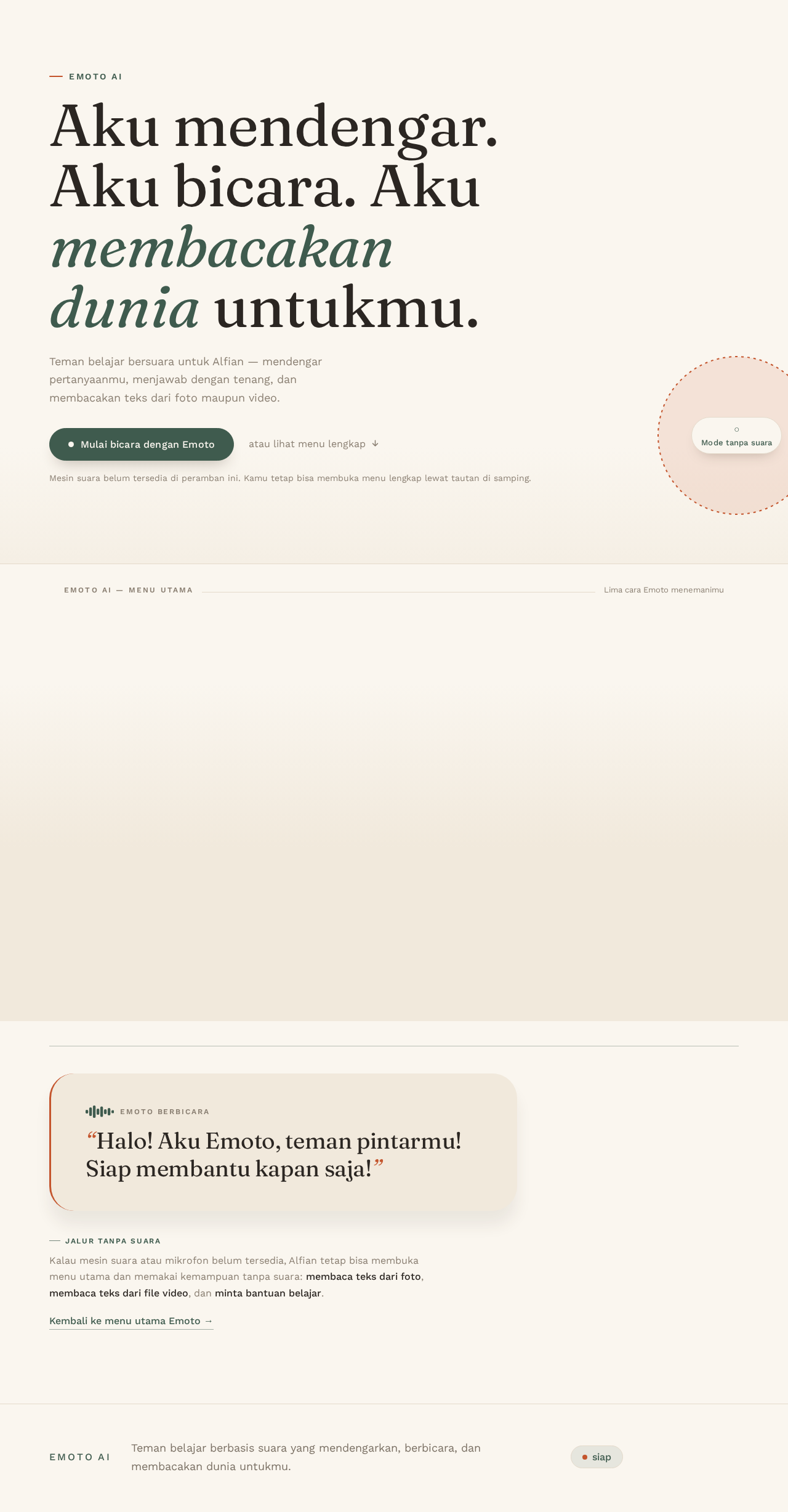
Emoto AI
Aku mendengar. Aku bicara. Aku membacakan dunia untukmu.
Teman belajar bersuara untuk Alfian — mendengar pertanyaanmu, menjawab dengan tenang, dan membacakan teks dari foto maupun video.
- Bicara dan bertanya lewat suaraBerbicara dengan Emoto lewat mikrofon dan mendengar jawabannya.siap
- Baca teks dari fotoEmoto membaca teks Indonesia dari sebuah foto.butuh file
- Baca teks dari file videoEmoto membaca teks dari satu bingkai video.butuh file
- Minta bantuan belajarEmoto memberi semangat untuk matematika, bahasa, ipa, dan ips.siap
- Keluar dari EmotoAkhiri sesi dan dengar salam perpisahan Emoto.siap
Emoto berbicara“Halo! Aku Emoto, teman pintarmu! Siap membantu kapan saja!”
Kalau mesin suara atau mikrofon belum tersedia, Alfian tetap bisa membuka menu utama dan memakai kemampuan tanpa suara: membaca teks dari foto, membaca teks dari file video, dan minta bantuan belajar.
Emoto AI
Aku mendengar. Aku bicara. Aku membacakan dunia untukmu.
Teman belajar bersuara untuk Alfian — mendengar pertanyaanmu, menjawab dengan tenang, dan membacakan teks dari foto maupun video.
- Bicara dan bertanya lewat suaraBerbicara dengan Emoto lewat mikrofon dan mendengar jawabannya.siap
- Baca teks dari fotoEmoto membaca teks Indonesia dari sebuah foto.butuh file
- Baca teks dari file videoEmoto membaca teks dari satu bingkai video.butuh file
- Minta bantuan belajarEmoto memberi semangat untuk matematika, bahasa, ipa, dan ips.siap
- Keluar dari EmotoAkhiri sesi dan dengar salam perpisahan Emoto.siap
Emoto berbicara“Halo! Aku Emoto, teman pintarmu! Siap membantu kapan saja!”
Kalau mesin suara atau mikrofon belum tersedia, Alfian tetap bisa membuka menu utama dan memakai kemampuan tanpa suara: membaca teks dari foto, membaca teks dari file video, dan minta bantuan belajar.
No comments yet. Be the first!