emerald-flashlight
 Abhay Gamer
Make a app for flashlight

Comments (0)
Sign in to leave a comment
System Requirements
System Requirements Document for emerald-flashlight
1. Introduction
emerald-flashlight is a single-purpose application whose only job is to turn the user's device into a working flashlight. The product intent is narrow and deliberate: a person who needs light in the dark opens the app, gets light immediately, and can turn it off just as quickly. There is no account, no feed, no settings labyrinth, and no secondary feature set — the app is the lamp.
The audience is anyone who reaches for their phone in the dark: a midnight walker, a camper, an electrician working under a sink, a parent checking on a sleeping child. These users want quiet capability — a tool they trust, that responds instantly, and that feels engineered rather than assembled. The interface is therefore treated as a precision instrument: a lamp dial, a beam pattern, and instrument readouts for intensity, beam, and battery, presented on a dark titanium ground.
2. System Overview
emerald-flashlight is delivered as a first-party application with custom UI, composed of two pages:
- Landing — the anonymous public entry surface. It explains that the app lets the user use their device as a flashlight, and it is where the working lamp dial lives as the hero instrument.
- Flashlight — the primary local-device destination where the device flashlight is turned on and off and where the instrument readouts (Intensity, Beam, Battery) are shown.
Both pages are owned by the application and require no identity: there is no sign-in, no account, and no persisted user profile. The only human actor is the Flashlight User. The device flashlight hardware is a non-persona actor owned by the device/platform; the application requests and controls it but does not own the emitter.
Accepted behavior in scope: turning the device flashlight on and off, adjusting intensity, and reading beam and battery status. Out of scope: any account system, any social or sharing capability, any content feed, and any feature unrelated to operating the light.
2a. Product Interpretation and Delivery Boundary
The entire product is delivered as first-party custom UI running on the user's own device. Access is open and anonymous on both pages — the user never establishes an identity, and no durable actor-specific state is created, so no authentication, invitation, or provisioning flow exists or is required. The device flashlight emitter is owned by the device/platform; the application only requests its state and reflects the result. Nothing in the current scope is deferred to a future horizon: the flashlight capability, its intensity control, and its status readouts are all current. There is no provider-hosted surface and no headless delivery path.
2b. Source Content Inventory
Not applicable. No reference directive in this project declares content_source, so no source content inventory is produced.
2c. Page Content and Component Coverage
Landing
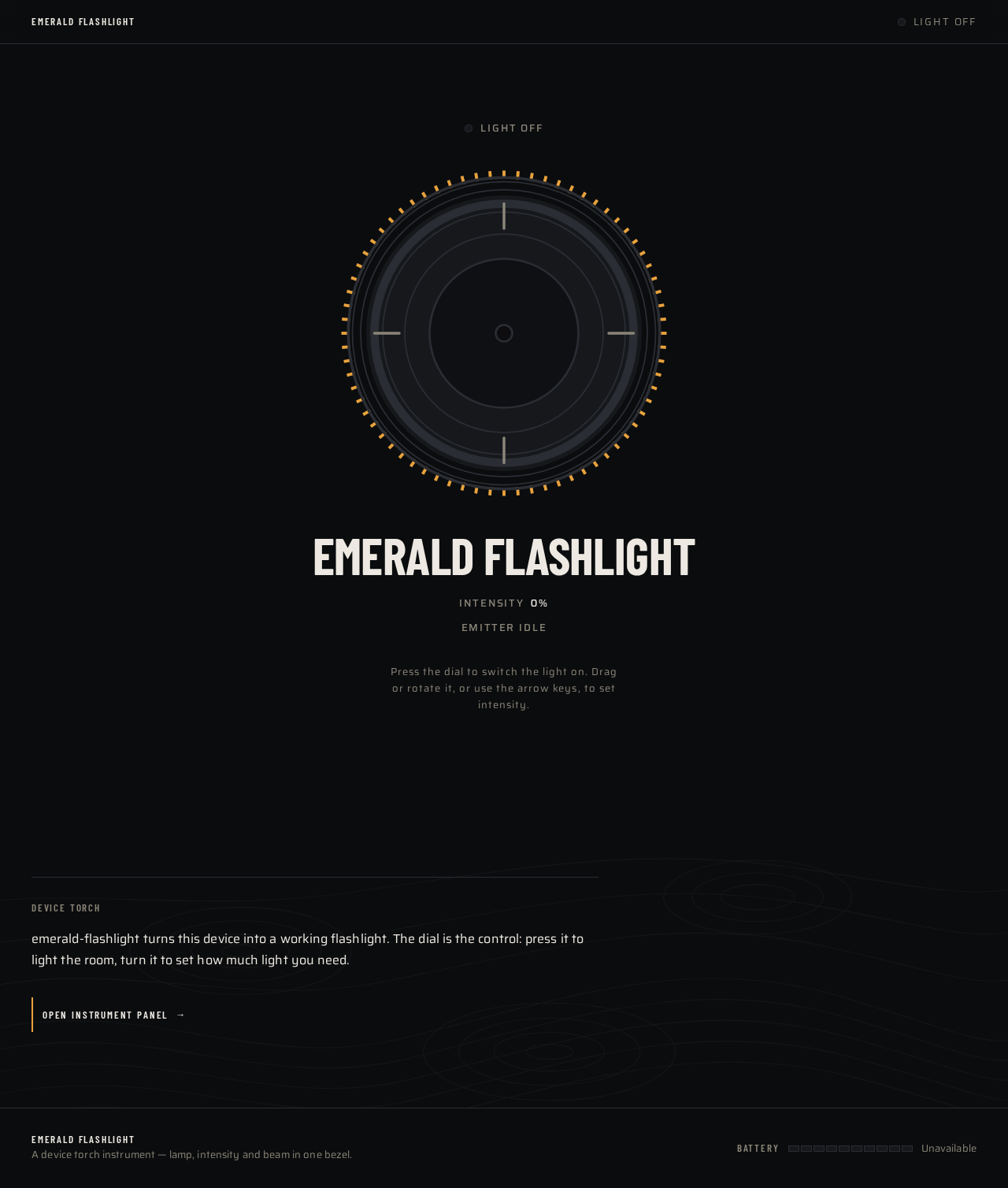
- Information and state: The page presents the product as a working instrument. A full-bleed dark titanium field (#0B0C0E) fills the viewport. Centered is the oversized circular lamp dial (320–420px on desktop, 240px minimum on mobile) with a knurled amber outer ring and a graphite inner face. Directly beneath the dial, the wordmark EMERALD FLASHLIGHT is set in Barlow Condensed uppercase at 64px. Behind the dial sits a radial amber beam gradient whose spread radius and warm-to-cool shift are bound to the current intensity value. A sticky top bar carries the wordmark on the left and a small status dot on the right. The page states, in the instrument register, that the app lets the user use their device as a flashlight.
- Primary action: Press the lamp dial to turn the device flashlight on; press it again to turn it off. The dial's inner ring fills with amber as intensity rises, and the dial rotates 1:1 with pointer or touch input.
- Supporting actions: Continue to the Flashlight page for the full instrument panel and status readouts.
- Domain entities: Lamp state (on/off), intensity value, beam spread, battery level, device flashlight emitter.
- Component responsibilities:
TopBar(wordmark, status dot);LampDial(knurled outer ring, graphite face, amber fill ring, rotation binding, press-to-toggle);BeamGradient(radial amber gradient bound to intensity);Wordmark(Barlow Condensed uppercase 64px);StatusDot(reflects lamp on/off). - States:
- Loading: the dial renders in its off state with the beam gradient at zero spread while the device flashlight capability is being resolved.
- Empty: not applicable — the page has no collection content.
- Success: the dial shows the on state with the amber fill ring at the current intensity, the beam gradient is visible, and the status dot indicates on.
- Error: if the device flashlight is unavailable or permission to use it is denied, the dial renders in a disabled state with a plain message that the device flashlight is unavailable, and the status dot indicates off.
- Recovery: the user can retry by pressing the dial again; if the device flashlight becomes available, the dial returns to its normal interactive state.
Flashlight
- Information and state: The primary local-device destination. The lamp dial remains the central control, and below it sits a ruled instrument panel with three rows — Intensity, Beam, and Battery — each with an uppercase 13px letterspaced label on the left and a tabular Saira numeral on the right, separated by hairline #2A2D33 rules. Battery is rendered as a segmented ruled bar in teal #4FB8A8 rather than a rounded icon, with its percentage in tabular numerals that count up once on mount. A topographic-line texture at 4% opacity sits behind the instrument panel.
- Primary action: Turn the device flashlight on and off via the lamp dial.
- Supporting actions: Adjust intensity by rotating the dial; read the Intensity, Beam, and Battery rows.
- Domain entities: Lamp state (on/off), intensity value, beam spread, battery level and percentage, device flashlight emitter.
- Component responsibilities:
LampDial(press-to-toggle, rotation-to-intensity, amber fill ring);InstrumentPanel(three ruled rows with hairline separators);IntensityRow(label left, tabular value right);BeamRow(label left, tabular value right);BatteryRow(label left, segmented teal bar, tabular percentage);TopographicTexture(4% opacity background layer). - States:
- Loading: the instrument panel renders with placeholder dashes in the value columns while battery and beam values are read; the dial renders in its off state.
- Empty: not applicable — the panel always has three fixed rows.
- Success: the dial reflects the current lamp state, the Intensity and Beam rows show live values, and the Battery row shows the segmented bar and counted-up percentage.
- Error: if the device flashlight or battery reading is unavailable, the affected row shows an explicit unavailable value rather than a stale or fabricated number, and the dial renders disabled if the emitter itself is unavailable.
- Recovery: values refresh when the device reports them again; the user can retry the dial press to re-attempt turning the light on.
3. Functional Requirements
FR-1 — Turn the device flashlight on and off As a Flashlight User, I should be able to turn my device's flashlight on and off from the app, so that I have light when I need it.
- Provenance:
explicit(authoritative requirement: "Build an app whose purpose is to function as a flashlight.") - Actor: Flashlight User. Trigger: pressing the lamp dial.
- Observable result: the device flashlight emitter turns on or off, and the dial's visual state and the status dot change to match.
- Access state: anonymous; no identity required.
- Failure/recovery: if the device flashlight is unavailable or access to it is denied, the dial renders disabled with a plain unavailable message; the user can retry by pressing the dial again.
- Continuation: the user can keep toggling the light as needed, or move to the Flashlight page for status readouts.
FR-2 — Reach the working lamp from an anonymous entry surface As a Flashlight User, I should land on a page that explains the app is a flashlight and lets me start using it immediately, so that I am not blocked by setup.
- Provenance:
required_inference(indispensable anonymous entry for the accepted flashlight capability). - Actor: Flashlight User. Trigger: opening the app.
- Observable result: the Landing page renders with the lamp dial as the only interactive element and the wordmark beneath it.
- Access state: anonymous; no identity required.
- Failure/recovery: if the device flashlight capability cannot be resolved, the dial renders disabled with an unavailable message and the user can retry.
- Continuation: pressing the dial turns the light on; the user can continue to the Flashlight page.
FR-3 — Adjust light intensity As a Flashlight User, I should be able to raise and lower the light intensity, so that I can match the light to the situation.
- Provenance:
required_inference(indispensable control for a light source whose intensity is the defining instrument value). - Actor: Flashlight User. Trigger: rotating the lamp dial with pointer or touch.
- Observable result: the intensity value changes, the dial's inner ring fills with amber in proportion, and the beam gradient's spread and warm-to-cool shift follow the value.
- Access state: anonymous; no identity required.
- Failure/recovery: if the device does not expose intensity control, the dial remains a plain on/off control and the Intensity row reports that intensity is not adjustable on this device.
- Continuation: the user can keep adjusting, or leave the light at the chosen intensity.
FR-4 — Read instrument status As a Flashlight User, I should be able to read the current intensity, beam, and battery values, so that I know the state of my light.
- Provenance:
required_inference(indispensable observable state for a device-powered light). - Actor: Flashlight User. Trigger: viewing the Flashlight page.
- Observable result: the ruled instrument panel shows Intensity, Beam, and Battery rows with tabular numerals, and the Battery row shows a segmented teal bar with a percentage that counts up once on mount.
- Access state: anonymous; no identity required.
- Failure/recovery: any value the device cannot report is shown as explicitly unavailable rather than fabricated.
- Continuation: values refresh as the device reports them.
FR-5 — See the light state reflected in the interface As a Flashlight User, I should see the interface visibly change when the light is on, so that I can confirm the light is actually working.
- Provenance:
required_inference(indispensable observable confirmation of the accepted on/off outcome). - Actor: Flashlight User. Trigger: the lamp state changing.
- Observable result: when the lamp is on, the beam gradient is visible and breathes at ±4% opacity over 3.5s; when the lamp is off, the gradient and the ambient motion stop entirely.
- Access state: anonymous; no identity required.
- Failure/recovery: if the emitter fails to turn on, the interface stays in the off state and the dial shows the unavailable state rather than a false on state.
- Continuation: the user can retry the toggle.
4. User Personas
Flashlight User
Product context. The Flashlight User is someone who reaches for their phone in the dark — a midnight walker, a camper, an electrician under a sink, a parent checking on a sleeping child. They are not browsing; they are solving an immediate, physical problem. They open the app because they need light now, and they judge the app entirely on whether the light comes on fast and stays reliable.
Primary goal. Get a working light with minimal interaction, and be able to turn it off just as quickly.
Distinct accepted responsibilities. This role is the sole human actor in the product. Their recurring responsibility is turning the light on and off and keeping it available when needed. They also adjust intensity to match the situation and read the instrument panel to know how much battery remains and how the beam is configured.
Relevant inputs and decisions. The user decides when to press the dial to toggle the light, how far to rotate the dial to set intensity, and whether the current battery reading means they should conserve light. Their inputs are pointer or touch on the dial; their decisions are immediate and physical rather than administrative.
Interactions with other accepted participants. The only other actor is the device flashlight emitter, owned by the device/platform. The user initiates; the device responds with light or with an unavailable state. There is no other human participant, no counterparty, and no recipient of a transfer — the light is for the user standing there.
Observable success. The light turns on the moment the dial is pressed, the interface visibly reflects the on state, the intensity responds to the dial, and the battery reading is honest. Success is a working light with minimal interaction.
5. Core User Flows
Flow 1 — Turn the light on from a cold open
- The Flashlight User opens emerald-flashlight and lands on the Landing page. The dark titanium field fills the viewport with the oversized knurled lamp dial centered and the wordmark EMERALD FLASHLIGHT beneath it. The dial is the only interactive element on the screen.
- The user presses the dial. The application requests the device flashlight emitter to turn on.
- The device flashlight turns on. The dial's inner ring fills with amber at the current intensity, the radial beam gradient appears behind the dial, the status dot in the top bar indicates on, and the beam gradient begins its restrained ±4% opacity breathing at 3.5s.
- The user has light. They can continue to the Flashlight page for the full instrument panel, or stay on Landing and keep using the dial.
Failure and recovery: if the device flashlight is unavailable or access to it is denied, the dial renders disabled with a plain message that the device flashlight is unavailable, and the status dot stays off. The user can press the dial again to retry; if the emitter becomes available, the dial returns to its normal interactive state.
Flow 2 — Turn the light off
- With the light on, the Flashlight User presses the lamp dial again.
- The application requests the device flashlight emitter to turn off.
- The device flashlight turns off. The amber fill ring empties, the beam gradient disappears, the status dot indicates off, and the ambient breathing motion stops entirely.
- The user is back in the dark with the app still open and ready for the next press.
Flow 3 — Adjust intensity to match the situation
- The Flashlight User is on the Flashlight page with the light on and the ruled instrument panel visible below the dial.
- The user rotates the dial with pointer or touch. The dial rotates 1:1 with the input.
- As the dial turns, the intensity value changes, the dial's inner ring fills with amber in proportion to the value, and the radial beam gradient behind the dial widens or narrows and shifts warm-to-cool to match. The Intensity row in the instrument panel updates its tabular numeral.
- The user settles on an intensity and stops turning. The light holds at that value.
Failure and recovery: if the device does not expose intensity control, the dial remains a plain on/off control and the Intensity row reports that intensity is not adjustable on this device. The user can still use the light at the device's fixed output.
Flow 4 — Check battery and beam status
- The Flashlight User is on the Flashlight page and wants to know how much light they have left.
- The user reads the ruled instrument panel: Intensity, Beam, and Battery, each with an uppercase letterspaced label on the left and a tabular Saira numeral on the right, separated by hairline rules.
- The Battery row shows a segmented ruled bar in teal with its percentage in tabular numerals that count up once on mount. The Beam row shows the current beam value.
- The user decides whether to conserve light or keep going, and continues using the dial.
Failure and recovery: if the device cannot report battery or beam, the affected row shows an explicit unavailable value rather than a stale or fabricated number. Values refresh when the device reports them again.
6. Visuals, Colors and Theme
The creative direction is authoritative for this section. The muse is MARQ by Garmin — a luxury instrument aesthetic — and the headline idea is instrument-grade light: a flashlight app that reads like a precision tool, not a utility. The lamp is treated as a precision instrument: a bezel, a dial, a beam pattern.
Mode: dark-first. The product is about light in the dark, and the palette is built on that ground.
Color tokens (dark mode):
| Role | Hex | Use |
|---|---|---|
| Background | #0B0C0E | Deep titanium black page ground |
| Surface | #16181C | Graphite surfaces |
| Border | #2A2D33 | Hairline borders and ruled separators |
| Text | #EDE9E2 | Warm off-white body and heading text |
| Primary | #E8A33D | Amber — the lamp itself: on-state, beam glow, primary control ring, and nothing else |
| Accent | #4FB8A8 | Teal — instrument accent reserved for battery/status readouts and secondary data |
| Muted | #8A8578 | Labels, units, and secondary copy |
Proportion: approximately 75% dark ground, 15% graphite surfaces, 7% amber, 3% teal. The two signals never compete: amber is the light, teal is the data.
Typography:
- Headings: Barlow Condensed, 600–700 weight, uppercase for the wordmark and instrument labels, tight tracking (-0.01em) so numerals sit like engraved bezel text.
- Body and controls: Saira, 400–500 weight, humanist and calm, with tabular numerals for battery percentages and intensity values.
- Scale: 1.333 modular — 64 / 48 / 32 / 22 / 16 / 13. Hero wordmark 64px condensed uppercase; instrument readouts 32px tabular; body 16px; micro-labels 13px uppercase letterspaced 0.14em.
Shape language: circular bezels and concentric rings, ruled data rows, chamfered corners (2px radius on panels, full-round only on the lamp dial). No soft cards and no pill buttons everywhere — controls are flat plates with a hairline border and a single amber signal edge. The primary control is a large circular dial with a knurled outer ring, echoing a tool-watch crown.
Layout: single-column, edge-to-edge dark field. The hero is a full-bleed beam gradient with the lamp dial centered and oversized (minimum 320px diameter on desktop, 240px on mobile). Below it, a ruled instrument panel with three rows — Intensity, Beam, Battery — label left, value right, hairline separators, tabular numerals. A sticky top bar carries the wordmark left and a small status dot right. No sidebar, no card grid, no hero copy block.
Imagery: no stock photography and no illustration. Imagery is generated from the product's own state — a radial beam gradient whose spread and color temperature shift with the intensity value, a topographic-line texture at 4% opacity behind the instrument panel, and macro-style concentric ring detailing on the dial. Battery is rendered as a ruled segmented bar, not an icon.
Explicitly avoided: blue or indigo primary/accent on white; a centered marketing hero with headline, subtext, and a rounded CTA button; a grid of identical hover-lift cards; Inter, Roboto, Arial, Helvetica, Open Sans, Lato, Poppins, or system-ui for any text; gradient blobs, glassmorphism panels, or purple-to-pink backgrounds; playful bouncy easing, confetti, or springy micro-interactions; pure #FFFFFF text on pure #000000; emoji, cartoon icons, or illustrated mascots. The generic indigo/blue-on-white SaaS template is forbidden for this project.
7. Signature Design Concept
The dial is the hero, and the page lights up the room it is drawn on.
The public entry is a full-viewport dark titanium field (#0B0C0E) with a single oversized circular lamp dial dead center — 320–420px across, knurled amber outer ring, graphite inner face. The wordmark EMERALD FLASHLIGHT is set in Barlow Condensed uppercase directly beneath the dial at 64px, reading like a watch dial engraving. There is no headline-plus-subtext-plus-button stack, no gradient blob, and no centered marketing copy.
The dial is not a picture of a control; it is the control. Pressing it turns the beam on with a real state change. Its amber fill ring maps directly to the live intensity value, so the instrument's own readout is the ornament. Behind the dial, a radial amber beam gradient (#E8A33D at center → transparent) spreads outward, and its spread radius and warm-to-cool shift are driven by the intensity state — the page visibly lights up the room it is drawn on. When the lamp is off, the gradient is gone and the field is dark.
Below the fold, the ruled instrument panel reads like a watch spec sheet rather than a settings list: hairline #2A2D33 separators, uppercase 13px letterspaced labels on the left, tabular Saira numerals on the right — Intensity, Beam, Battery. Battery is a segmented ruled bar in teal #4FB8A8, with its percentage counting up once on mount. A topographic-line texture at 4% opacity sits behind the panel, visible only at close inspection, giving the dark ground a material quality instead of a flat void.
8. Interaction Model & Motion Direction
Interaction Model: Animated Motion Tempo: restrained Hero Dimensionality: layered_2d
Landing Hero Motion Brief
- Focal subject: the oversized knurled lamp dial at the center of the dark titanium field, with the radial amber beam gradient behind it and the EMERALD FLASHLIGHT wordmark beneath.
- Input → transformation → outcome thesis: the user presses the dial → the application requests the device flashlight emitter and the dial's amber fill ring and beam gradient respond to the live intensity state → the device flashlight turns on and the page visibly lights up, with the gradient breathing at ±4% opacity over 3.5s while the lamp is on and stopping entirely when it is off.
- Motion vocabulary: restrained and mechanical. The dial rotates 1:1 with pointer or touch and its inner ring fills with amber as intensity rises. Battery numerals count up once on mount. The beam gradient breathes at ±4% opacity over 3.5s when the lamp is on — the only ambient motion. No bounce, no particles, no hover-lift.
- Composed first frame: the dark titanium field fills the viewport; the dial sits centered in its off state with an empty amber ring; the beam gradient is absent; the wordmark sits beneath the dial; the status dot in the sticky top bar reads off.
- Reduced-motion state: the dial still rotates 1:1 with input and the amber fill ring still tracks intensity, but the ambient beam breathing is removed entirely and the battery numerals appear at their final values without counting up. The on/off state change remains fully visible through the fill ring, the gradient's presence, and the status dot.
9. Non-Functional Requirements
- NFR-1 — Immediate response. The light must turn on the moment the dial is pressed, with no intermediate screen, confirmation, or delay. Rationale: the product's entire value is a tool that responds instantly in the dark. Provenance:
required_inferencefrom the accepted flashlight capability and the creative direction's "responds instantly" register. - NFR-2 — Single-purpose surface. The application must not present any capability unrelated to operating the light. Rationale: the authoritative requirement defines the app's purpose as functioning as a flashlight. Provenance:
explicit. - NFR-3 — Anonymous access. Neither page may require an account, sign-in, or any identity establishment. Rationale: no accepted journey creates durable actor-specific state, a commitment, an entitlement, or a value transfer that must be bound to a participant. Provenance:
required_inference. - NFR-4 — Honest status. Any value the device cannot report must be shown as explicitly unavailable rather than fabricated or stale. Rationale: an instrument the user trusts in the dark must not lie about battery or beam. Provenance:
required_inference. - NFR-5 — Readable contrast. Text must use warm off-white
#EDE9E2on#0B0C0E, never pure white on pure black. Rationale: explicit creative direction constraint. Provenance:explicit. - NFR-6 — Restrained motion. Ambient motion is limited to the beam gradient's ±4% opacity breathing at 3.5s while the lamp is on, and it must stop entirely when the lamp is off. Rationale: explicit creative direction constraint. Provenance:
explicit. - NFR-7 — Reduced-motion support. The interface must honor a reduced-motion preference by removing the ambient beam breathing and the battery count-up while preserving the visible on/off state change. Rationale:
required_inferencefor accessible delivery of the accepted state feedback.
10. Tech Stack
- Frontend: React, delivered as a first-party custom UI with two pages (Landing, Flashlight). Rationale: the accepted delivery shape is custom UI, and React is the appropriate default for a component-driven instrument interface.
[Default — not specified by user] - Device flashlight access: the platform's native flashlight/torch capability, requested through the runtime's device API. The emitter itself is owned by the device/platform, not by the application. Provenance:
required_inferencefrom the accepted flashlight capability. - Storage: none. The product creates no durable actor-specific state, so no database or persistence layer is required. Provenance:
required_inferencefrom the anonymous, stateless access model. - Backend: none required for the current scope. All accepted behavior is local to the device.
[Default — not specified by user] - Containerization and orchestration: not required. The product is a local device utility with no server-side component.
[Default — not specified by user]
11. Assumptions and Constraints
- A-1. The user's device exposes a controllable flashlight/torch emitter. If it does not, the app renders the unavailable state described in FR-1 and FR-4 rather than failing silently.
[Assumption] - A-2. Intensity control depends on the device exposing variable torch output. Where it does not, the dial remains a plain on/off control and the Intensity row reports that intensity is not adjustable on this device.
[Assumption] - **
Emerald Flashlight
Intensity0%
Emitter idle
Press the dial to switch the light on. Drag or rotate it, or use the arrow keys, to set intensity.
Device Torch
emerald-flashlight turns this device into a working flashlight. The dial is the control: press it to light the room, turn it to set how much light you need.
Open instrument panelEmerald Flashlight
Intensity0%
Emitter idle
Press the dial to switch the light on. Drag or rotate it, or use the arrow keys, to set intensity.
Device Torch
emerald-flashlight turns this device into a working flashlight. The dial is the control: press it to light the room, turn it to set how much light you need.
Open instrument panel
No comments yet. Be the first!