Cotton T-Shirts
Trending upRevenue$4,200
Units Sold12
build an frontend for inventory management software for a wholesale Business of Clothing business.


Sign in to leave a comment
As a Frontend Developer, implement the shared Navbar component from its approved JSX/CSS design and reuse it across all declared pages without duplicating local variants. Implementation contract: - Outcome: Implement Shared Navbar - Owned behavior: - As a Frontend Developer, implement the shared Navbar component from its approved JSX/CSS design and reuse it across all declared pages without duplicating local variants. - Implement shared design sections: Navbar. Acceptance criteria: - The task-owned behavior is implemented and verified without undeclared mocks or downstream assumptions. - The shared Navbar component renders once and is reused by every declared consuming page.
As a Frontend Developer, implement the shared Footer component from its approved JSX/CSS design and reuse it across all declared pages without duplicating local variants. Implementation contract: - Outcome: Implement Shared Footer - Owned behavior: - As a Frontend Developer, implement the shared Footer component from its approved JSX/CSS design and reuse it across all declared pages without duplicating local variants. - Implement shared design sections: Footer. Acceptance criteria: - The task-owned behavior is implemented and verified without undeclared mocks or downstream assumptions. - The shared Footer component renders once and is reused by every declared consuming page.
As a Frontend Developer, implement the approved Authentication page design and the task-owned sections below. Implementation contract: - Outcome: Implement Authentication page - Requirement sources: - src-53e272b4aad94007 - src-262e19d19a7d08bc - src-d3c33a7ebd87ccfc - src-92f1226aad906ee3 - src-016157fafd2ec28a - Owned behavior: - Toggle sign-up/login mode - Enter email and password - Validate form fields - Submit credentials - Display validation errors - Show loading during submission - Navigate to dashboard on success - Interfaces: - /api/auth/register - /api/auth/login - State transitions: - auth_session state group management - Failure and safety behavior: - Display authentication errors - Handle network errors Acceptance criteria: - The task-owned behavior is implemented and verified without undeclared mocks or downstream assumptions. - Render Authentication page with form and info sections - Toggle between sign-up and login modes - Validate and submit credentials - Display validation errors and success messages - Redirect to dashboard on success - Display product purpose and security information
As a Frontend Developer, implement the approved Dashboard for tracking sales, filling inventory, and searching inventory page design and the task-owned sections below. Implementation contract: - Outcome: Implement Dashboard SalesTrendingSection - Requirement sources: - src-2da3e066ec7041f0 - src-53e272b4aad94007 - src-262e19d19a7d08bc - src-d3c33a7ebd87ccfc - src-92f1226aad906ee3 - src-016157fafd2ec28a - Owned behavior: - Display sales trends and performance analytics - Track Sales and Inventory (In-house Team Member) — trigger: Access the dashboard; inputs: Sales data, Inventory data; outcomes: View sales trends, Monitor inventory levels - Interfaces: - sales_records API - Input contract for Track Sales and Inventory: Sales data, Inventory data - State transitions: - Load sales data on dashboard access - When Access the dashboard: Update inventory records - Failure and safety behavior: - Unable to load sales data - If Track Sales and Inventory cannot complete: Unable to load data. Acceptance criteria: - The task-owned behavior is implemented and verified without undeclared mocks or downstream assumptions. - Render SalesTrendingSection with accurate sales data and trend indicators - When Access the dashboard, In-house Team Member produces View sales trends. - When Access the dashboard, In-house Team Member produces Monitor inventory levels. - Track Sales and Inventory includes the required human touchpoint: Dashboard.
As a Frontend Developer, implement the approved Dashboard for tracking sales, filling inventory, and searching inventory page design and the task-owned sections below. Implementation contract: - Outcome: Implement Dashboard InventoryMonitoringSection - Requirement sources: - src-b56250f9b4cf71a1 - src-53e272b4aad94007 - src-262e19d19a7d08bc - src-d3c33a7ebd87ccfc - src-92f1226aad906ee3 - src-016157fafd2ec28a - Owned behavior: - Monitor and display current inventory levels - Manage Inventory (In-house Team Member) — trigger: Access the inventory management page; inputs: Inventory adjustments, New inventory entries; outcomes: Update inventory, Add new items - Interfaces: - inventory_items API - Input contract for Manage Inventory: Inventory adjustments, New inventory entries - State transitions: - Load inventory data on dashboard access - When Access the inventory management page: Inventory database update - Failure and safety behavior: - Unable to load inventory data - If Manage Inventory cannot complete: Unable to update inventory. Acceptance criteria: - The task-owned behavior is implemented and verified without undeclared mocks or downstream assumptions. - Render InventoryMonitoringSection with accurate inventory data and status indicators - When Access the inventory management page, In-house Team Member produces Update inventory. - When Access the inventory management page, In-house Team Member produces Add new items. - Manage Inventory includes the required human touchpoint: Inventory Management Page.
As a Frontend Developer, implement the approved Dashboard for tracking sales, filling inventory, and searching inventory page design and the task-owned sections below. Implementation contract: - Outcome: Implement InventoryFillingSection on Dashboard - Requirement sources: - src-d661c164b3e65e28 - src-accb3f7f9300abae - src-e5e333d587b38393 - src-562506f3c89fc9be - src-d296abb771ebf842 - src-53e272b4aad94007 - src-262e19d19a7d08bc - src-d3c33a7ebd87ccfc - src-92f1226aad906ee3 - src-016157fafd2ec28a - Owned behavior: - Product selection - Quantity input - Submit fill request - Display confirmation - Interfaces: - inventory management API - State transitions: - Update inventory records - Failure and safety behavior: - Display error message on failed submission Acceptance criteria: - The task-owned behavior is implemented and verified without undeclared mocks or downstream assumptions. - Render InventoryFillingSection on Dashboard - Allow product selection and quantity input - Submit fill requests to backend - Display confirmation or error messages
As a Frontend Developer, implement the approved Dashboard for tracking sales, filling inventory, and searching inventory page design and the task-owned sections below. Implementation contract: - Outcome: Implement InventorySearchSection - Requirement sources: - src-536b5dabbf2893fb - src-53e272b4aad94007 - src-262e19d19a7d08bc - src-d3c33a7ebd87ccfc - src-92f1226aad906ee3 - src-016157fafd2ec28a - Owned behavior: - Enter search query - View filtered results - Select item from results - View item details - Clear search Acceptance criteria: - The task-owned behavior is implemented and verified without undeclared mocks or downstream assumptions. - InventorySearchSection renders once - Search input accepts queries - Filtered results display correctly - Item detail view shows selected item details
As a Frontend Developer, implement the approved Dashboard for tracking sales, filling inventory, and searching inventory page design and the task-owned sections below. Implementation contract: - Outcome: Implement DashboardErrorState - Requirement sources: - src-7a05447e972245e0 - src-53e272b4aad94007 - src-262e19d19a7d08bc - src-d3c33a7ebd87ccfc - src-92f1226aad906ee3 - src-016157fafd2ec28a - Owned behavior: - View error message - Click retry button Acceptance criteria: - The task-owned behavior is implemented and verified without undeclared mocks or downstream assumptions. - DashboardErrorState renders on data load failure - Displays error message and retry button - Retry button attempts data reload
As a Frontend Developer, implement the approved Page for managing inventory page design and the task-owned sections below. Implementation contract: - Outcome: Implement Inventory Management Page - Requirement sources: - src-b56250f9b4cf71a1 - src-92f1226aad906ee3 - src-53e272b4aad94007 - src-262e19d19a7d08bc - src-d3c33a7ebd87ccfc - src-016157fafd2ec28a - Owned behavior: - visible and interactive behavior owned by these sections - Manage Inventory (In-house Team Member) — trigger: Access the inventory management page; inputs: Inventory adjustments, New inventory entries; outcomes: Update inventory, Add new items - Interfaces: - consumed API, data, or event contracts - Input contract for Manage Inventory: Inventory adjustments, New inventory entries - State transitions: - material source-backed transition with its trigger and observable result - When Access the inventory management page: Inventory database update - Failure and safety behavior: - source-backed failure behavior owned by this task - If Manage Inventory cannot complete: Unable to update inventory. Acceptance criteria: - The task-owned behavior is implemented and verified without undeclared mocks or downstream assumptions. - observable task-owned checks - When Access the inventory management page, In-house Team Member produces Update inventory. - When Access the inventory management page, In-house Team Member produces Add new items. - Manage Inventory includes the required human touchpoint: Inventory Management Page.
As a Frontend Developer, implement the approved Page for managing inventory page design and the task-owned sections below. Implementation contract: - Outcome: Implement RecentActivitySection on Inventory Management Page - Requirement sources: - src-3039ab65e8408971 - src-a4d619443015ba06 - src-53e272b4aad94007 - src-262e19d19a7d08bc - src-d3c33a7ebd87ccfc - src-92f1226aad906ee3 - src-016157fafd2ec28a - Owned behavior: - Display recent inventory adjustments and additions - Show transaction details: timestamp, action, item, change, actor Acceptance criteria: - The task-owned behavior is implemented and verified without undeclared mocks or downstream assumptions. - Render RecentActivitySection once on Inventory Management Page - Display list of recent activities with accurate details - Match design structure and theme with provided CSS - Section is read-only and does not interact with backend endpoints - Access restricted to in-house team members, requiring login
As a Backend Developer, implement the authentication backend to manage user sign-up, login, and session management for secure access. Implementation contract: - Outcome: Implement Authentication Backend - Requirement sources: - src-2b26369cffa694a2 - Owned behavior: - As a Backend Developer, implement the authentication backend to manage user sign-up, login, and session management for secure access. - Manage user sign-up, login, and session management - Provide authoritative application identity, session, and current-user access state. - Interfaces: - API for user sign-up, login, and session management - Provide identity.access.management: Provide authoritative application identity, session, and current-user access state. - State transitions: - User session state transitions from unauthenticated to authenticated - Failure and safety behavior: - Handle incorrect credentials, session expiration - Use authoritative session/current-user state, enforce access server-side, and fail closed without exposing prototype identity data. Acceptance criteria: - The task-owned behavior is implemented and verified without undeclared mocks or downstream assumptions. - User can securely sign up, log in, and maintain a session. - Capability identity.access.management implements Provide authoritative application identity, session, and current-user access state. and is verified through its declared interfaces.
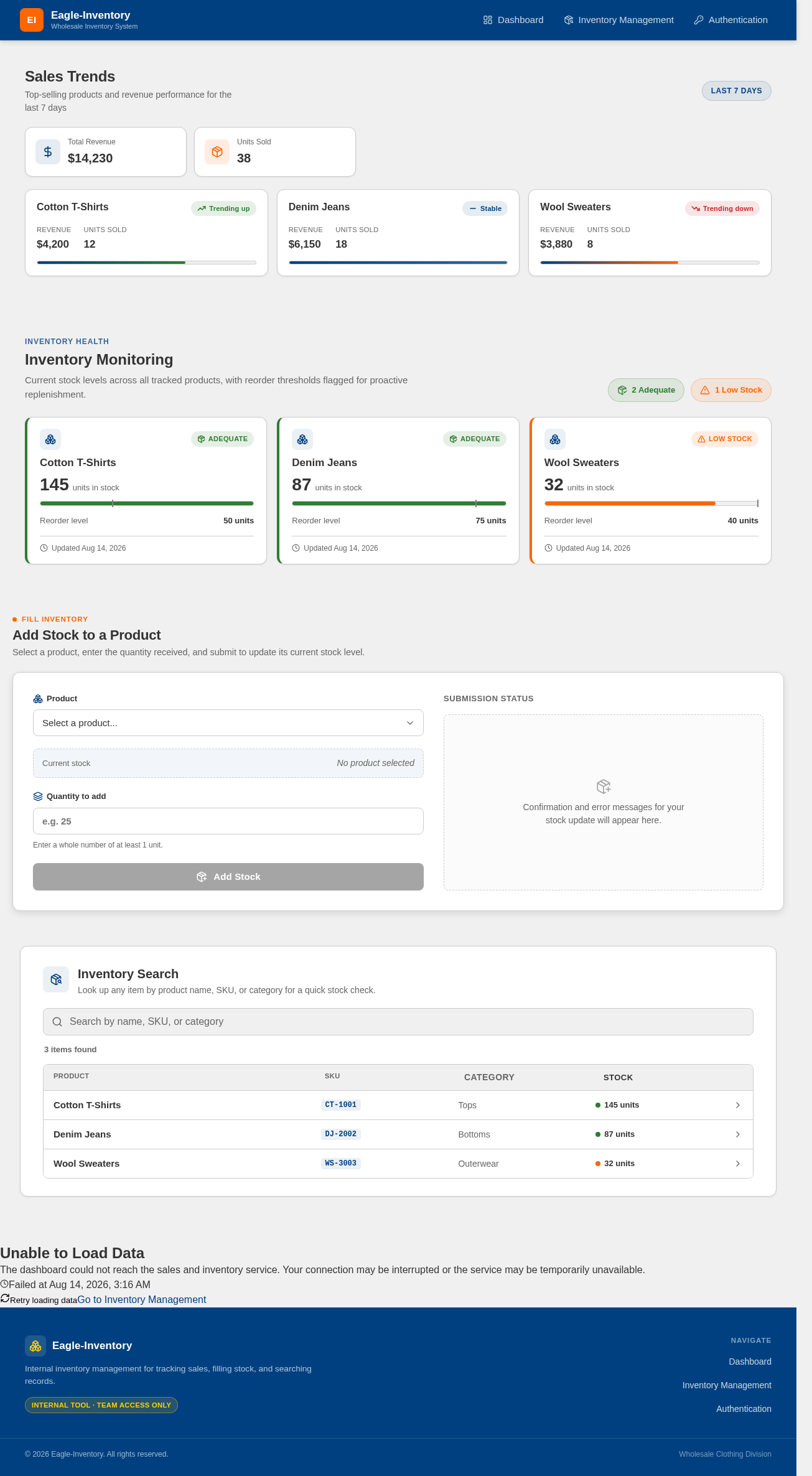
Top-selling products and revenue performance for the last 7 days
Current stock levels across all tracked products, with reorder thresholds flagged for proactive replenishment.
Select a product, enter the quantity received, and submit to update its current stock level.
Confirmation and error messages for your stock update will appear here.
Look up any item by product name, SKU, or category for a quick stock check.
The dashboard could not reach the sales and inventory service. Your connection may be interrupted or the service may be temporarily unavailable.
Top-selling products and revenue performance for the last 7 days
Current stock levels across all tracked products, with reorder thresholds flagged for proactive replenishment.
Select a product, enter the quantity received, and submit to update its current stock level.
Confirmation and error messages for your stock update will appear here.
Look up any item by product name, SKU, or category for a quick stock check.
The dashboard could not reach the sales and inventory service. Your connection may be interrupted or the service may be temporarily unavailable.
No comments yet. Be the first!