crimson-web
 Jatin Yadav
Need to create AI-quote-generation web app in which user upload images and PDF and on bases of image and PDF processing we have list of furniture items and in RAG we previous data set of quotation which is used to generate new quotation create proper UI and pages with dashboard
Comments (0)
Sign in to leave a comment
System Requirements
System Requirements Document (SRD) for Crimson-Web
1. Introduction
This document outlines the system requirements for Crimson-Web, an AI-powered internal procurement tool designed specifically for furniture businesses and procurement teams. The tool enables users to upload images and PDFs, process them to detect furniture items, and generate quotations based on historical data. It also provides functionalities for reviewing, downloading, and maintaining a history of generated quotations. The system includes basic authentication to ensure secure access.
This document has been tailored for Jatin Yadav's requirements, considering the specific needs of furniture businesses in India (IN). Locale-specific defaults such as currency (₹), timezone (IST), and user preferences have been incorporated.
2. System Overview
Crimson-Web is an internal tool aimed at streamlining the quotation generation process for furniture businesses and procurement teams. By leveraging AI, the system processes uploaded images and PDFs to identify furniture items and uses historical quotation data to generate accurate and consistent quotes. The tool is designed to be user-friendly, secure, and efficient, focusing on core functionalities without unnecessary complexity.
Key Features:
- AI-Powered Quote Generation: Automatically processes images and PDFs to detect furniture items and generate quotations.
- Basic Authentication: Ensures secure access to the system with email/password login.
- Quote Review and Download: Allows users to review generated quotes and download them for sharing.
- Quotation History: Maintains a record of all generated quotations for easy reference and retrieval.
- Selective Re-Run Capability: Enables users to manually trigger the regeneration of specific quotations if needed.
3. Functional Requirements
As a User:
- I should be able to log in using email and password.
- I should be able to upload images and PDFs for processing.
- I should be able to view the list of detected furniture items from the uploaded files.
- I should be able to generate a quotation based on the detected items and historical data.
- I should be able to review the generated quotation before finalizing it.
- I should be able to download the finalized quotation for sharing or record-keeping.
- I should be able to view a history of all previously generated quotations.
- I should be able to revisit and download past quotations from the history.
- I should be able to manually trigger the regeneration of a specific quotation if needed.
4. User Personas
1. Admin
- Role: Manages user accounts and oversees system usage.
- Responsibilities:
- Add or remove users.
- Monitor system performance and usage logs.
- Access all generated quotations.
2. Procurement Team Member
- Role: Uses the system to generate and manage quotations.
- Responsibilities:
- Upload images and PDFs for processing.
- Review and finalize generated quotations.
- Download and share quotations.
- Access the history of past quotations.
- Trigger the regeneration of specific quotations if required.
5. Creative Reference Stories (AI Inspiration)
Based on the project's focus on AI-driven functionality and its internal business use, the "Architectural Marble" design story has been selected. This story emphasizes timeless, structured, and sophisticated aesthetics, which align with the professional and functional nature of Crimson-Web.
6. Visuals Colors and Theme
Unique Color Palette for Crimson-Web:
- Background: #F6F2EB (soft cream inspired by natural stone)
- Surface: #EDE5D8 (light sand tone for panels and cards)
- Text: #3A3A3A (matte dark gray for readability)
- Accent: #B68A60 (mocha brown for buttons and highlights)
- Muted Tones: #D4C8B4 (subtle beige for secondary elements)
Typography:
- Heading: Elegant serif font with a weight of 500, providing a professional and structured appearance.
- Body: Clean sans-serif font with a weight of 400 for readability.
Layout:
- Density: Medium, ensuring a balance between content and white space.
- Spacing: Structured vertical hierarchy for easy navigation.
- Hero Section: Architectural surface-inspired design with a clean and professional look.
Motion:
- Speed: Slow and smooth transitions.
- Style: Subtle and refined animations.
- Effects: Fade-in, gentle rise, and ease-in-out transitions.
7. Signature Design Concept
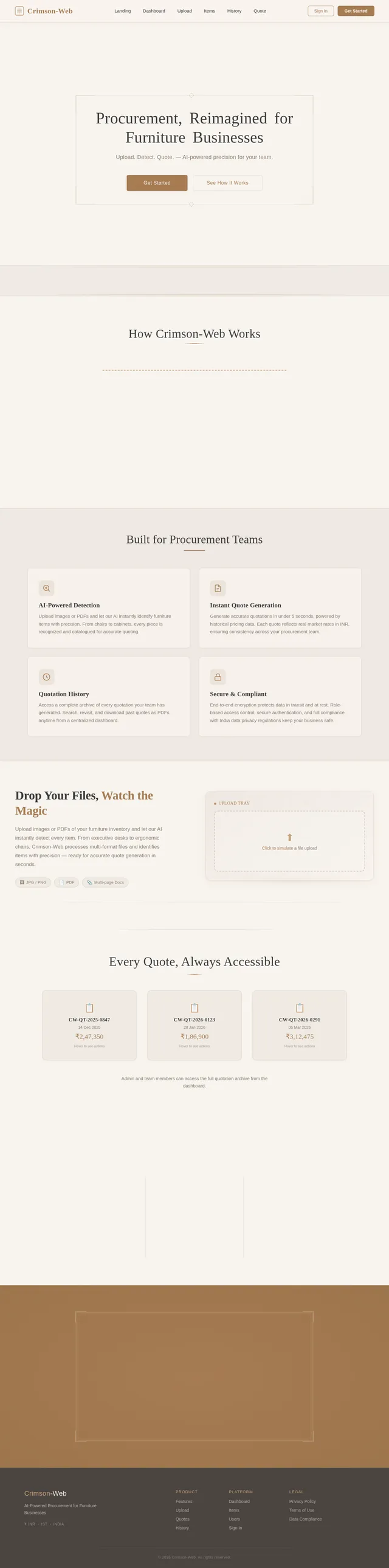
"Engraved Elegance" Landing Page
The homepage of Crimson-Web will feature a visually striking design inspired by architectural engravings. The background will showcase a high-resolution marble texture with subtle, engraved patterns that evoke a sense of sophistication and professionalism.
Key Features:
Interactive Hero Section:
- A central headline that appears as if it is being engraved into the marble background in real-time, accompanied by a smooth fade-in animation.
- A glowing "Get Started" call-to-action (CTA) button styled like a refined architectural element.
Dynamic Upload Animation:
- When users upload images or PDFs, the files will "slide" into a virtual tray with a subtle sound effect, mimicking the feel of placing documents on a physical desk.
Quotation History Interaction:
- Past quotations will appear as "cards" that flip when hovered over, revealing download and revisit options.
Selective Re-Run Interaction:
- Users can click a "Re-Run Quote" button on any historical quotation card, triggering a smooth animation where the card "refreshes" and updates with the regenerated quote.
Micro-Interactions:
- Buttons will have a gentle elevation effect on hover, with a warm mocha glow around the edges.
- Transition animations between pages will mimic the smooth opening and closing of a portfolio.
This design concept ensures that Crimson-Web leaves a lasting impression while maintaining a professional and functional interface.
8. Non-Functional Requirements
- Performance: The system should process uploaded files and generate quotations within 5 seconds for optimal user experience.
- Scalability: The system should support up to 500 concurrent users without performance degradation.
- Security: All user data, including uploaded files and generated quotations, must be encrypted in transit and at rest.
- Availability: The system should have 99.9% uptime, ensuring reliability for internal teams.
- Localization: The system should support Indian currency (₹) and timezone (IST) by default.
9. Tech Stack
Frontend:
- React for Web
Backend:
- Python
- FastAPI
Database:
- MySQL (preferred for RDBMS)
- Alembic for database migrations
AI Models:
- GPT 5.2 for user-friendly responses
- Claude 4.5 Opas for academic or coding work
- Gemini 3 Pro for friendly responses
AI Tools:
- Litellm for LLM Routing
- Langchain
Orchestration:
- Docker for local orchestration
- Kubernetes for server-side orchestration
10. Assumptions and Constraints
Assumptions:
- The system will only be used internally by furniture businesses and procurement teams.
- Users will have basic technical knowledge to operate the tool.
- Historical quotation data will be provided and maintained by the admin.
Constraints:
- The system will not include advanced analytics such as item trend tracking.
- The tool will only support Indian currency (₹) and timezone (IST).
- The system must comply with data privacy regulations applicable in India.
11. Glossary
- AI-Powered Quote Generation: The process of using artificial intelligence to analyze uploaded files and generate quotations based on historical data.
- Selective Re-Run Capability: A feature allowing users to manually trigger the regeneration of specific quotations.
- Dashboard: The user interface where users can review, download, and manage quotations.
- Authentication: A security mechanism requiring users to log in with email and password.
This document provides a comprehensive overview of the requirements for Crimson-Web, ensuring that the tool meets the specific needs of furniture businesses and procurement teams.
No comments yet. Be the first!