search the whole basket
01 · findSearch vegetables
Find any vegetable by name — from palak to baby corn — and drop it straight into your cart.
 Veerachar Veer Veerachar Veer
Building a cross-platform mobile application (Android and iOS) for Dr. Vegetable is an exciting venture! To make this vision a reality, you need a solid blueprint covering both the User App (Customer-facing) and the Admin Panel (Back-office management) for manual editing, pricing charts, and coupon controls. Phase 1: Customer App Features (Android & iOS) Authentication: Phone Number Login: Quick and secure OTP (One-Time Password) verification using services like Firebase Authentication or MSG91. Home Page: Search bar, categorized vegetable lists (leafy, roots, exotic, daily essentials), banner sliders for ongoing offers, and daily price highlights. Cart & Checkout: Add/remove items, quantity adjustments, and real-time total calculation. Delivery Rules Engine: Free Delivery: Automatically applied for orders ≥Rs. 200. Delivery Charge: Automatically added for orders <Rs. 200. Payment Gateway & Modes: COD (Cash on Delivery): Pay when the order arrives. UPI Integration: Direct triggers for Google Pay and PhonePe (via UPI intents). Post-Purchase Experience: Tracking ID: Real-time status updates (Order Placed → Packed → Out for Delivery → Delivered). Feedback & Complaints: Simple rating system for delivery/quality and a ticketing form for issue resolution. Discounts & Offers: Apply promo codes at checkout for instant price reductions. Phase 2: Admin Panel Features (Manual Control Dashboard) Since you requested manual editing capabilities for day-to-day operations, the Admin Web Dashboard or mobile-admin app should include: Price Chart Management: A separate master sheet/table where you can manually update daily vegetable prices (e.g., changing tomato price from Rs. 40 to Rs. 35) instantly across both Android and iOS apps. Offer & Discount Coupon Manager: Create custom coupon codes (e.g., DRVEG50), set minimum purchase limits, define discount percentages or flat amounts, and set expiry dates. Manual Banner & Template Control: Upload promotional banner designs and switch between UI layout templates for festive seasons or special sales. Order & Delivery Management: View incoming customer orders, assign delivery tracking IDs, and manage customer complaints. Phase 3: Recommended Technology Stack To build this efficiently for both Android and iOS with a robust backend: Frontend (Mobile App): Flutter or React Native (Allows you to write a single codebase that deploys smoothly to both Google Play Store and Apple App Store). Backend & Database: Node.js with Express or Firebase paired with MongoDB or PostgreSQL to handle user profiles, dynamic price charts, and cart logic. Payment Integration: Razorpay or Cashfree (Easily handles UPI apps like Google Pay, PhonePe, credit/debit cards, and COD tracking). Suggested Next Steps UI/UX Wireframes: Draft basic screen layouts for the Home Page, Cart, and Admin Dashboard. Database Schema Design: Structure how your dynamic vegetable price charts and coupon codes will be stored in the database. Would you like to start by outlining the database structure for the dynamic price chart and manual coupon system?

Sign in to leave a comment
Dr. Vegetable is a cross-platform mobile grocery application for Android and iOS, paired with a back-office admin panel, that lets Indian households order fresh vegetables with live, manually maintained daily prices. The product intent is a chore turned into a small pleasure: customers sign in with a phone number and OTP, browse categorized vegetables (leafy, roots, exotic, daily essentials) with daily price highlights and offer banners, build a cart with real-time totals, apply promo codes, and check out with Cash on Delivery or UPI (Google Pay / PhonePe via UPI intents). After purchase they receive a tracking ID with real-time status progression (Order Placed → Packed → Out for Delivery → Delivered), can rate delivery and quality, and can file complaint tickets.
The second audience is the store operator, who runs day-to-day operations from an admin panel: manually editing the daily vegetable price chart so changes appear instantly in both mobile apps, creating and managing discount coupons, uploading promotional banners and switching UI layout templates for festive seasons or sales, and viewing incoming orders, assigning delivery tracking IDs, and managing customer complaints.
This document is the system requirements blueprint for that product.
Dr. Vegetable is delivered as two first-party surfaces sharing one backend: a customer mobile app (Android and iOS) and an admin back-office panel. Both are served by a shared FastAPI backend process with a MariaDB database for application-owned persistent data, and a React application UI. The customer app is built with Flutter or React Native from a single codebase deployed to Google Play and the Apple App Store; the backend is Node.js with Express or Firebase paired with MongoDB or PostgreSQL, with Razorpay or Cashfree handling payments including UPI apps and COD tracking. The provisioned scaffold (shared FastAPI backend, MariaDB, React frontend) is the runnable inventory; the source-recommended stack is preserved as the stated technology direction.
Current actors are the Customer and the Admin / Store Operator. Current behavior covers phone-OTP authentication, the home page with search, categorized lists, banner sliders and daily price highlights, cart and checkout with the delivery rules engine (free delivery at ≥ Rs. 200, delivery charge below Rs. 200), COD and UPI payment modes, promo codes, order tracking with a tracking ID and four status stages, delivery/quality ratings, complaint tickets, and the admin capabilities for price chart management, coupon management, banner and template control, and order/delivery/complaint management.
The customer experience is a first-party mobile application for Android and iOS. Customers establish identity with a phone number verified by OTP before shopping; the anonymous entry surface (Landing) explains the app and routes to Login, and protected customer destinations (Home Page, Cart, Checkout, Order Tracking, Feedback, Complaints) require an established customer session. The admin back office is a first-party web dashboard whose destinations (Admin Dashboard, Price Chart, Coupons, Banners & Templates) are restricted to the authenticated store operator.
All product state — prices, coupons, banners, templates, orders, tracking IDs, ratings, and complaints — is owned and persisted by the application backend and database. Payment processing for UPI (Google Pay, PhonePe) and card flows is delegated to the payment gateway (Razorpay or Cashfree); COD is recorded by the application and settled on delivery. OTP delivery is delegated to the authentication provider (Firebase Authentication or MSG91). No future-horizon features are defined in this document; everything described is current scope.
Not applicable — no reference directive with content_source was supplied.
Customer authentication
Home browsing
Cart management
Delivery rules engine
Payment modes
Order tracking
Feedback and complaints
Promo codes
Admin price chart management
Admin coupon management
Admin banner and template control
Admin order and delivery management
Identity establishment (prerequisite)
Order placement prerequisite
Completed-order prerequisite for ratings
A shopper ordering fresh vegetables for an Indian household on Android or iOS. Their product context is a daily or frequent grocery need where prices change daily and delivery speed and cost matter. Their primary goal is to find the right vegetables at the current day's price, build a cart, pay conveniently (COD or UPI), and know when the order arrives. Distinct accepted responsibilities: phone-OTP sign-in; searching and browsing categorized vegetables and daily price highlights; adding/removing items and adjusting quantities with real-time totals; applying promo codes; selecting COD or UPI (Google Pay/PhonePe); tracking the order through four status stages; rating delivery and quality; filing complaint tickets. Relevant inputs/decisions: phone number and OTP, search terms, quantities, promo codes, payment mode, ratings, complaint details. Interactions with other participants: receives tracking ID and status updates driven by the Admin's tracking-ID assignment; receives complaint resolution from the Admin; benefits from the Admin's price, coupon, and banner updates. Observable success: vegetables arrive with correct pricing and delivery charges, and any issue is resolved via a ticket.
The store owner or operator running day-to-day back-office work. Their product context is a manual-control dashboard where they keep prices current and manage promotions and fulfillment. Their primary goal is to keep the live price chart accurate, run coupon and banner campaigns, and fulfill orders and resolve complaints. Distinct accepted responsibilities: manually editing the daily vegetable price chart so changes appear instantly in both apps; creating and managing coupons with minimum purchase limits, discount values, and expiry dates; uploading promotional banners and switching UI layout templates; reviewing incoming orders, assigning delivery tracking IDs, and managing customer complaints. Relevant inputs/decisions: price values, coupon parameters, banner assets, template selection, tracking IDs, complaint responses. Interactions with other participants: their price/coupon/banner changes reach Customers instantly; their tracking-ID assignments drive Customer order status; their complaint handling resolves Customer issues. Observable success: prices and campaigns are live and correct, orders carry tracking IDs, and complaints reach resolution.
Customer: Sign in and shop
Customer: Track order and give feedback
Admin / Store Operator: Update prices
Admin / Store Operator: Manage coupons and banners
Admin / Store Operator: Fulfill orders and resolve complaints
Muse: Karim Rashid — sensual pop minimalism for a vegetable market that feels like a treat.
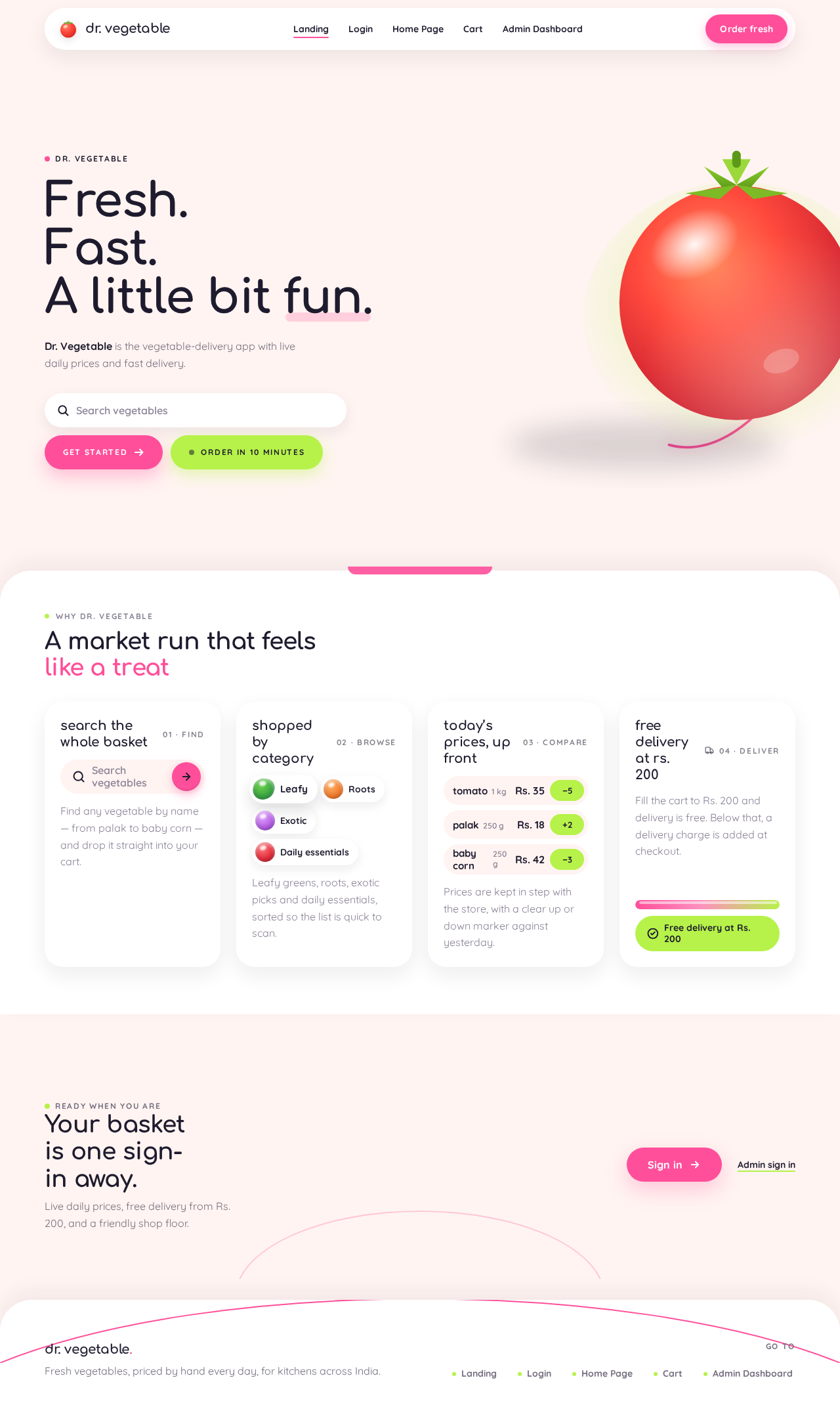
#FFF4F1 (blush-cream ground); surface #FFFFFF (glossy white capsules); text #1E1B2E (ink-plum); primary #FF4F9A (bubblegum pink, ~15% of any screen for primary actions); accent #B6F24A (lime, reserved for savings, free-delivery threshold met, live price ticks); muted #8A8296 (lavender-grey metadata). Pink and lime never sit as text on each other; both pair with ink or white.clamp(40px, 9vw, 72px), section heads 36px desktop / 27px mobile; body Quicksand, 16px, 1.6 line-height; section labels Quicksand 700 uppercase 12px, 0.14em tracking; prices always Quicksand 700 tabular. Scale 1.333 modular: 64/48/36/27/20/16/14.0 12px 32px rgba(30,27,46,0.08), no border. Section boundaries curve with a 48px-radius wave/arc. Product thumbnails in perfect circles. One organic blob per screen maximum, as background colour, never behind text.The public entry (Landing) is a full-bleed blush-cream canvas where a single oversized 3D tomato capsule (~60% of viewport height) floats right-of-centre with a long soft shadow, while the headline "Fresh. Fast. A little bit fun." stacks flush-left in Comfortaa 700 at clamp(40px, 9vw, 72px) over the left third. Beneath the headline a pill search field and a lime "Order in 10 minutes" pill sit on the blush ground. A thin pink arc sweeps behind the tomato and continues off the right edge. No centred stack, no gradient blob, no blue button — the colour block and the glossy subject are the hero. The entry CTA routes to Login. Readable text and controls stay whole at 375px, 768px, and 1280px; imagery and the pink arc may bleed off the edge.
Interaction Model: Animated Motion Tempo: expressive Hero Dimensionality: layered_2d
Landing Hero Motion Brief
Dr. Vegetable
Dr. Vegetable is the vegetable-delivery app with live daily prices and fast delivery.
Find any vegetable by name — from palak to baby corn — and drop it straight into your cart.
Leafy greens, roots, exotic picks and daily essentials, sorted so the list is quick to scan.
Prices are kept in step with the store, with a clear up or down marker against yesterday.
Fill the cart to Rs. 200 and delivery is free. Below that, a delivery charge is added at checkout.
Ready when you are
Live daily prices, free delivery from Rs. 200, and a friendly shop floor.
Dr. Vegetable
Dr. Vegetable is the vegetable-delivery app with live daily prices and fast delivery.
Find any vegetable by name — from palak to baby corn — and drop it straight into your cart.
Leafy greens, roots, exotic picks and daily essentials, sorted so the list is quick to scan.
Prices are kept in step with the store, with a clear up or down marker against yesterday.
Fill the cart to Rs. 200 and delivery is free. Below that, a delivery charge is added at checkout.
Ready when you are
Live daily prices, free delivery from Rs. 200, and a friendly shop floor.
No comments yet. Be the first!