document-processing-summaries
 Malhar Shah
I want to build a website regarding document processing and giving summaries. how to move forward

Comments (0)
Sign in to leave a comment
System Requirements
System Requirements Document for document-processing-summaries
1. Introduction
document-processing-summaries is a website that processes documents and produces summaries of them. A person brings a document into the product, the product processes it, and the resulting summary is presented back for reading.
The product intent is narrow and deliberate: turn a long document into a short, structured signal. The audience is knowledge workers, analysts, researchers, and operations leads who push dense PDFs and reports through a pipeline and need to trust the output. The interface is designed as a measuring instrument for text — precise, fast, technically credible — rather than a generic document utility.
This document defines the current delivery: three pages (Landing, Document Upload, Summary), two active human personas (Document Submitter, Summary Reader), the functional requirements each persona's work depends on, the flows that carry that work end to end, and the visual, motion, and technical constraints that govern implementation.
2. System Overview
The current product is a first-party website with a custom interface and a backend processing pipeline. It accepts a document as input, processes it, and presents a generated summary of that document.
Actors
- Document Submitter (human, active) — brings documents into the product and retrieves the resulting summary.
- Summary Reader (human, active) — consumes the produced summaries rather than the source documents.
- Processing pipeline (system, non-persona) — performs the document processing that must complete before a summary is presented.
Accepted behavior
- A website for document processing that produces summaries of documents.
- The website accepts documents as input for processing.
- The website generates and presents summaries of the processed documents.
- A document must be submitted before its generated summary can be viewed.
- Document processing must complete before the summary is presented.
Ownership
All three pages are application-owned custom pages. The Landing page is the anonymous public entry surface. Document Upload is the dedicated submission destination. Summary is the focused destination for presenting and reviewing a generated summary. The processing pipeline is backend execution supporting the human-facing interaction; it is not a destination.
Narrow exclusions
No account creation, sign-in, or user profile is part of the current delivery. No document library, history, or saved-document management is part of the current delivery. No editing, annotation, or export of summaries is part of the current delivery. No collaboration, sharing, or multi-user review is part of the current delivery. No billing, pricing, or subscription surface is part of the current delivery. These are not prohibited capabilities for a future horizon; they are simply not accepted current scope.
2a. Product Interpretation and Delivery Boundary
The product is delivered as a first-party website with a custom interface. A person arrives at the Landing page, which explains what the site does and offers a single path forward: process a document. From there they move to Document Upload, provide a document, and the product processes it. When processing completes, the Summary page presents the generated summary for reading.
Access is open. The Landing page, Document Upload, and Summary are all reachable without establishing an identity. Nothing in the accepted requirements asks a person to create an account, sign in, or own durable private state across sessions; the work is a single pass — submit a document, receive its summary. The delivery boundary therefore keeps identity out of the current product entirely, and no protected destination exists.
The current/future boundary is equally clear. Everything described in this document is current. Anything not described here — accounts, document libraries, summary editing, sharing, billing — is outside the current delivery and is not implied by the presence of a processing pipeline or a summary viewer.
2b. Source Content Inventory
Not applicable. No reference directive in this project declares content_source authority, so no source content inventory is produced.
2c. Page Content and Component Coverage
Landing
The anonymous public entry surface. It explains the document-processing and summarization website before any submission and offers the single path into the workflow.
Information and state
- Product identity: the name
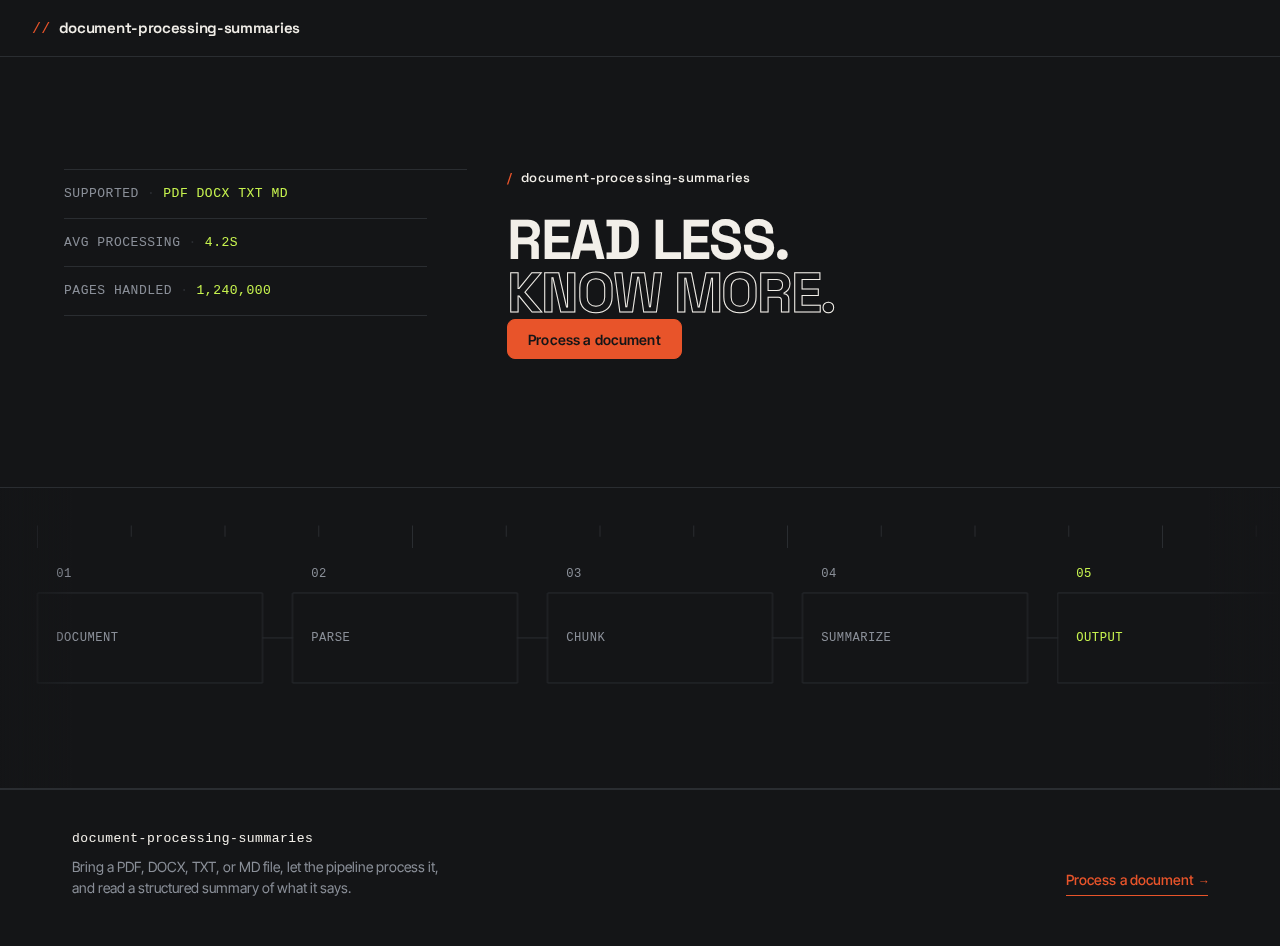
document-processing-summariesand a one-line statement of what the site does. - The two-line hero headline: "READ LESS. KNOW MORE." with the second line rendered in outline stroke.
- A left instrument rail of stacked metadata rows:
SUPPORTED · PDF DOCX TXT MD,AVG PROCESSING · 4.2S,PAGES HANDLED · 1,240,000, each row separated by a 1px#2A2D31rule, values in acid lime#C6F24E. - A 1px-ruled schematic pipeline diagram showing document → parse → chunk → summarize → output as five labelled nodes with connecting rules, running edge-to-edge and bleeding off the viewport, cropped mid-node.
- No subheadline paragraph, no centred stack.
Primary action
- A single tangerine
#E8542Arectangular CTA button reading "Process a document", pinned flush left beneath the headline, navigating to Document Upload.
Supporting actions
- None. The Landing page has exactly one path forward.
Domain entities
- None persisted. The metadata rows are static product facts, not live data.
Component responsibilities
HeroHeadline— renders the two-line headline with the outline-stroke second line; scales withclamp(40px, 8vw, 112px).InstrumentRail— renders the stacked uppercase micro-label rows with hairline separators and acid-lime values.PipelineDiagram— renders the five-node schematic in 1px strokes, bleeding off the right edge.PrimaryCTA— the single tangerine button; the only interactive control on the page.
States
- Loading — not applicable; the page is static.
- Empty — not applicable.
- Success — the page renders fully; the CTA is available.
- Error — not applicable; there is no data dependency.
- Recovery — not applicable.
Document Upload
The dedicated submission destination for providing a document to the processing workflow. Single centred column, 640px wide, with a monospace status log streaming on the right at 1280px and stacking below at 768px and 375px.
Information and state
- A ruled drop-zone: a single rectangle with a dashed
#E8542Aborder, not a floating card, with no cloud icon. - A monospace file manifest table below the drop-zone listing each provided file with its name, type, and size.
- A monospace status log streaming on the right, using the same uppercase micro-label rows as the Landing instrument rail.
- A horizontal ruled progress bar that fills in discrete ticks during processing — no spinner, no percentage gradient.
- A status chip that reads muted while processing and flips to acid lime
#C6F24Eon completion, in 120ms with no bounce.
Primary action
- Provide a document — by dropping a file onto the drop-zone or selecting one — and submit it for processing.
Supporting actions
- Remove a file from the manifest before submitting.
- Retry submission after a processing failure.
Domain entities
- Submitted document — the file the person provides; carries name, type, and size.
- Processing run — the pipeline execution for a submitted document; carries a status (in progress, complete, failed) and a tick-based progress position.
- Generated summary — the output produced when processing completes; the artifact the Summary page presents.
Component responsibilities
DropZone— the dashed-border ruled rectangle; accepts drop and file-selection input.FileManifestTable— the monospace table of provided files with remove controls.StatusLog— the streaming monospace log of pipeline events.TickProgressBar— the ruled bar that fills in discrete ticks.StatusChip— the muted-to-acid-lime completion indicator.SubmitControl— the 40px-height button that starts processing.
States
- Loading — the status log streams pipeline events and the tick bar advances; the status chip stays muted.
- Empty — no file provided; the drop-zone is the only affordance and the manifest table is absent.
- Success — processing completes; the status chip flips to acid lime and the person is carried to the Summary page.
- Error — processing fails; the status chip stays muted, the status log states the failure, and the submit control returns to an actionable state.
- Recovery — the person can remove the failed file, provide another, or retry submission; the manifest and log reset for the new attempt.
Summary
The focused destination for presenting and reviewing the generated summary of a submitted document. A two-pane reader: a narrow left rail of extracted entities and section anchors, and a right reading column with a 68ch measure and editorial numerals in the margin.
Information and state
- The generated summary text, organized into sections.
- Editorial numerals: each section prefixed by a tabular monospace index (01, 02, 03) set in the left margin at 2× body size in muted grey
#8A8F98, functioning as both navigation and ornament. - A narrow left rail of extracted entities and section anchors; collapses to a horizontal scrollable chip row at 375px.
- Abstract page-miniature thumbnails of the uploaded document rendered as grey rectangles with ruled lines, used as the summary's visual anchor.
- Token counts and section indices in the margin.
Primary action
- Read the generated summary.
Supporting actions
- Jump to a section via its anchor or its editorial numeral.
- Return to Document Upload to process another document.
Domain entities
- Generated summary — the sectioned summary output of the submitted document.
- Section — a titled portion of the summary with an index, anchor, and token count.
- Extracted entity — a named item surfaced from the document and listed in the left rail.
- Source document reference — the submitted document the summary was generated from, represented by its page-miniature thumbnails.
Component responsibilities
SummaryReader— the right reading column at 68ch measure.SectionIndex— the tabular monospace numerals in the left margin.EntityRail— the narrow left rail of extracted entities and section anchors; becomes a horizontal scrollable chip row at 375px.PageMiniatures— the grey ruled-rectangle thumbnails of the source document.MarginNumerals— token counts and section indices set in the margin.
States
- Loading — not reachable; the Summary page is only presented after processing completes.
- Empty — not reachable; a summary exists by the time this page is presented.
- Success — the summary renders sectioned, with anchors, entities, and margin numerals.
- Error — not applicable on this page; processing failure is handled on Document Upload and the person is not carried here.
- Recovery — the person returns to Document Upload to process another document.
3. Functional Requirements
Each requirement is a distinct story point with its provenance, lifecycle facts, and observable acceptance.
FR-1 — Process a document and receive a summary As a Document Submitter, I should be able to bring a document into the website and receive a summary of it, so that I do not have to read the full document myself.
- Provenance: explicit.
- Trigger/input: the person provides a document file on Document Upload and submits it.
- Observable result: the product processes the document and presents a generated summary on the Summary page.
- Access state: no identity required; Document Upload is openly reachable.
- Failure/recovery: if processing fails, the status log states the failure and the person can retry or provide another document.
- Continuation: after reading the summary, the person can return to Document Upload to process another document.
FR-2 — Accept documents as input As a Document Submitter, I should be able to provide a document to the website as input for processing.
- Provenance: explicit.
- Trigger/input: dropping a file onto the ruled drop-zone or selecting one.
- Observable result: the file appears in the monospace file manifest table with its name, type, and size.
- Access state: no identity required.
- Failure/recovery: an unsupported or unreadable file is reported in the status log and can be removed from the manifest.
- Continuation: the person submits the manifest for processing.
FR-3 — Generate and present summaries As a Summary Reader, I should be able to read a generated summary of a processed document, so that I can understand the document's content quickly.
- Provenance: explicit.
- Trigger/input: the person opens the Summary page for a document whose processing has completed.
- Observable result: the summary is presented as sections with editorial numerals, a left rail of extracted entities and section anchors, and margin token counts.
- Access state: no identity required.
- Failure/recovery: not applicable on this page; a summary is only presented once it exists.
- Continuation: the person jumps between sections via anchors or numerals, or returns to Document Upload.
FR-4 — Submission precedes viewing As a Document Submitter, I should only be able to view a generated summary after I have submitted the document it was generated from.
- Provenance: required_inference.
- Trigger/input: the person attempts to view a summary.
- Observable result: a summary is available only for a document that has been submitted.
- Access state: no identity required.
- Failure/recovery: with no submitted document, the person is directed to Document Upload.
- Continuation: the person submits a document and is then carried to its summary.
FR-5 — Processing completes before presentation As a Document Submitter, I should see the processing of my document complete before its summary is presented.
- Provenance: required_inference.
- Trigger/input: the person submits a document for processing.
- Observable result: the tick progress bar advances and the status log streams events while processing runs; the status chip flips from muted to acid lime
#C6F24Eon completion, and only then is the summary presented. - Access state: no identity required.
- Failure/recovery: if processing does not complete, the status chip stays muted, the status log states the failure, and the summary is not presented.
- Continuation: on completion the person is carried to the Summary page.
4. User Personas
Document Submitter
Product context. The Document Submitter is the primary human actor who brings documents into the product so they can be processed. They arrive with a dense document — a PDF, a DOCX, a TXT, or a Markdown file — and a need to know what is in it without reading all of it.
Primary goal. Get a usable summary of their document without doing the reading themselves.
Distinct accepted responsibilities. The Document Submitter owns the submission side of the lifecycle end to end: they provide the document, they watch processing run, and they are the one who is carried to the summary when it completes. Their work is the only work that creates a processing run.
Relevant inputs and decisions. They decide which document to provide and when to submit it. They read the file manifest to confirm what they have provided, and they decide whether to remove a file, retry after a failure, or provide a different document.
Interactions with other accepted participants. The Document Submitter hands off to the processing pipeline, which performs the work and produces the summary. The Document Submitter and the Summary Reader are frequently the same person in sequence, but their responsibilities differ: the Submitter creates the artifact, the Reader consumes it.
Observable success. The status chip flips to acid lime, the summary is presented, and the Document Submitter has a usable summary of their document.
Summary Reader
Product context. The Summary Reader is a human actor whose goal is to consume the produced summaries rather than the source documents. They come to the Summary page to understand a document's content quickly.
Primary goal. Read and use the summary as a stand-in for the full document.
Distinct accepted responsibilities. The Summary Reader owns the consumption side of the lifecycle: reading the sectioned summary, navigating between sections via anchors and editorial numerals, and using the extracted entities and margin token counts to orient themselves. Their work does not create processing runs.
Relevant inputs and decisions. They decide which sections to read and in what order, using the section anchors, the editorial numerals, and the left rail of extracted entities as their navigation.
Interactions with other accepted participants. The Summary Reader depends on the Document Submitter having submitted a document and on the processing pipeline having completed. They do not interact with the pipeline directly.
Observable success. They have read the summary and understand the document's content without having read the full document.
5. Core User Flows
Flow 1 — Document Submitter processes a document and reads its summary
- The Document Submitter arrives at the Landing page. The page presents the product identity, the two-line hero headline "READ LESS. KNOW MORE.", the left instrument rail of supported formats and processing facts, and the 1px-ruled schematic pipeline diagram.
- The Document Submitter selects the single tangerine "Process a document" CTA, pinned flush left beneath the headline.
- The Document Upload page opens as a single centred 640px column with a ruled drop-zone bearing a dashed tangerine border, and a monospace status log streaming on the right at 1280px.
- The Document Submitter provides a document by dropping a file onto the drop-zone or selecting one. The file appears in the monospace file manifest table below the drop-zone with its name, type, and size.
- If the file is not one they want to process, the Document Submitter removes it from the manifest and provides another. The manifest updates.
- The Document Submitter submits the manifest. The processing pipeline begins.
- While processing runs, the horizontal ruled progress bar fills in discrete ticks and the monospace status log streams pipeline events. The status chip remains muted. No spinner and no percentage gradient appear.
- On success: processing completes, the status chip flips from muted to acid lime
#C6F24Ein 120ms with no bounce, and the Document Submitter is carried to the Summary page. - On failure: the status chip stays muted and the status log states the failure. The Document Submitter recovers by removing the failed file, providing another, or retrying submission; the manifest and log reset for the new attempt.
- On the Summary page, the generated summary is presented as a two-pane reader: a narrow left rail of extracted entities and section anchors, and a right reading column at 68ch measure with editorial numerals in the margin.
- The Document Submitter reads the summary. Each section is prefixed by a tabular monospace index (01, 02, 03) set in the left margin at 2× body size in muted grey, functioning as both navigation and ornament. Token counts and section indices appear in the margin.
- The Document Submitter continues by returning to Document Upload to process another document.
Flow 2 — Summary Reader reads a generated summary
- The Summary Reader arrives at the Summary page for a document whose processing has completed. The page presents the generated summary as a two-pane reader.
- The Summary Reader orients using the narrow left rail of extracted entities and section anchors, and the abstract page-miniature thumbnails of the uploaded document rendered as grey rectangles with ruled lines.
- The Summary Reader selects a section anchor or an editorial numeral to jump to a section. The reading column moves to that section.
- The Summary Reader reads the section at the 68ch measure, using the margin token counts and section indices to gauge the section's weight.
- At 375px, the left rail collapses to a horizontal scrollable chip row; the Summary Reader scrolls it to reach further entities and anchors.
- The Summary Reader continues by reading further sections, or returns to Document Upload to process another document.
Flow 3 — Summary Reader encounters no summary for an unsubmitted document
- The Summary Reader attempts to view a summary for a document that has not been submitted.
- No summary exists, because a document must be submitted before its generated summary can be viewed.
- The Summary Reader is directed to Document Upload.
- The Summary Reader provides a document and follows Flow 1 from step 6.
6. Visuals Colors and Theme
The creative direction is authoritative for this section. The muse is Rasmus Andersson; the headline is systematic product craft with an opinion — graphite ground, one hot accent, numerals as ornament. The register is instrument-panel confidence: precise, fast, technically credible, with enough character that it does not read as another white SaaS template. The interface should feel like a measuring instrument for text.
Colour tokens — dark mode
| Role | Hex | Use |
|---|---|---|
| Background | #141517 | Graphite ground; 70% of the composition |
| Surface | #1C1E21 | Raised surfaces; 20% of the composition |
| Border | #2A2D31 | Hairline 1px rules and separators |
| Text | #F2EFE9 | Warm off-white body and heading text; 8% of the composition |
| Primary | #E8542A | Tangerine; carries the CTA and the upload drop-zone border |
| Accent | #C6F24E | Acid lime; sparing status/verification accent only — processing complete, summary ready. Never a CTA colour. 2% of the composition |
| Muted | #8A8F98 | Metadata, timestamps, file sizes, editorial numerals |
No blue anywhere in the palette. No #0057FF, #2563EB, #4F46E5, or neighbours.
Typography
- Headings: Space Grotesk at 600–700 weight, tight tracking (−0.02em to −0.03em), sentence case for hero and section titles, oversized scale so the headline carries the page.
- Body: Inter Tight.
- Numerals and file metadata: JetBrains Mono, for the instrument feel.
- Scale: 1.25 modular — 56 / 40 / 28 / 20 / 16 / 14, with 1.5 body leading.
- Display headline:
clamp(40px, 8vw, 112px). - Monospace metadata: 13px with 0.04em tracking.
Plain Inter, Roboto, Arial, Helvetica, Open Sans, Lato, Poppins, and system-ui are forbidden for headings and body.
Shape language
Compact rounded rectangles, 6–10px radius. Hairline 1px borders in #2A2D31. No soft shadows. No pills except status chips. Controls are dense and keyboard-first: 32px input height, 40px button height. The upload drop-zone is a single ruled rectangle with a dashed #E8542A border — not a floating card.
Layout
4/8-pt spacing scale throughout.
- Landing: two-column asymmetric hero. Left rail (35% width) of stacked metadata rows; right dominant headline block (65%) that bleeds to the viewport edge.
- Document Upload: single centred column 640px wide with a ruled drop-zone, a file manifest table below, and a monospace status log streaming on the right at 1280px — stacked below at 768px and 375px.
- Summary: two-pane reader. Narrow left rail of extracted entities and section anchors (collapses to a horizontal scrollable chip row at 375px), and a right reading column with 68ch measure and editorial numerals in the margin marking token counts and section indices.
Imagery
No photography and no illustration. Imagery is the interface itself: monospace status logs, tabular file manifests, a schematic pipeline diagram on the Landing page drawn in 1px strokes showing document → parse → chunk → summarize → output as five labelled nodes with connecting rules, and abstract page-miniature thumbnails of the uploaded document rendered as grey rectangles with ruled lines, used as the summary's visual anchor.
Avoid
Any blue or indigo in the palette. Plain Inter, Roboto, Arial, Helvetica, Open Sans, Lato, Poppins, or system-ui for headings or body. Gradient-blob heroes, glassmorphism panels, floating cards with hover-lift. Centred headline + subtext + blue button hero composition. Cloud-upload iconography, illustrated robots, or AI sparkle motifs. Soft drop shadows and pill-shaped buttons. Decorative continuous animation loops or parallax for its own sake. Photography of people or stock office scenes. The generic indigo/blue-on-white SaaS template is forbidden for this project.
7. Signature Design Concept
The public entry is the Landing page, and its signature concept is type-as-image over an instrument panel.
The composition is a two-column hero on graphite #141517 with no gradient and no blob.
Left rail (35% width). A monospace-stacked data column reading like an instrument panel:
SUPPORTED · PDF DOCX TXT MD
AVG PROCESSING · 4.2S
PAGES HANDLED · 1,240,000
Each row is separated by a 1px #2A2D31 rule, with the values in acid lime #C6F24E.
Right column (65%). An oversized Space Grotesk headline at clamp(40px, 8vw, 112px), tight-tracked, reading "READ LESS. KNOW MORE." The second line is set in outline stroke — transparent fill, 1px #F2EFE9 stroke — so the composition is type-as-image, not type-as-copy. The headline spans the full viewport width and bleeds off the right edge at 1280px.
Beneath the headline, a single tangerine #E8542A rectangular CTA button reading "Process a document" is pinned flush left, not centred.
To the far right, a 1px-ruled schematic pipeline diagram runs edge-to-edge and bleeds off the viewport, cropped mid-node. It shows document → parse → chunk → summarize → output as five labelled nodes with connecting rules.
There is no centred stack, no subheadline paragraph, and no blue button.
The concept recomposes only accepted content and controls: the product identity, the single CTA into Document Upload, the supported-format and processing facts, and the pipeline schematic. It introduces no new behavior, page, or destination.
8. Interaction Model & Motion Direction
Interaction Model: Static Motion Tempo: restrained Hero Dimensionality: flat
The direction specifies restrained tempo, flat hero dimensionality, and bold hero drama. Motion is fast and functional: 120–200ms cubic-bezier(0.2, 0, 0, 1) transitions. There is no parallax, no continuous loop, and no decorative animation.
Landing Hero Motion Brief
- Focal subject: the oversized two-line headline "READ LESS. KNOW MORE." with its second line in outline stroke, set against the left instrument rail and the bleeding 1px pipeline schematic.
- Input → transformation → outcome thesis: as the page settles, the instrument rail rows and the pipeline schematic draw in with 1px strokes and the headline resolves into place; the outcome is a composed instrument panel with a single tangerine CTA available. The motion uses only accepted content — no new behavior is introduced.
- Motion vocabulary: 120–200ms
cubic-bezier(0.2, 0, 0, 1)transitions; 1px stroke draw-on for the schematic; no bounce, no gradient, no loop. - Composed first frame: graphite
#141517ground, left rail of uppercase micro-labels with acid-lime values separated by hairline rules, oversized headline with the outline-stroke second line bleeding off the right edge, tangerine CTA pinned flush left, pipeline schematic cropped mid-node at the far right. - Reduced-motion state: all motion stops and the composed first frame is shown whole. The headline, rail rows, CTA, and schematic are fully rendered and static; nothing is cropped that would hide readable text or a control.
Upload progress motion. The ruled horizontal progress bar fills in discrete ticks — not a smooth gradient. When processing completes, the status chip flips from muted to acid lime #C6F24E in 120ms with no bounce.
Summary reveal motion. Summary sections reveal on scroll with a 4px rise and a 150ms fade, one section at a time.
Readable text and controls. Headlines, wordmarks, labels, numbers, cards' text, and controls stay entirely inside the viewport and their container at 375px, 768px, and 1280px, wrapping or scaling (for example font-size: clamp(...) with its mobile size) to fit, and no other element covers any part of them. Imagery, decoration, and motion follow the creative direction: the pipeline schematic may be cropped, bled off an edge, or cut exactly as the direction asks, as long as it covers no readable text or control. With prefers-reduced-motion, motion stops and whole items are shown.
9. Non-Functional Requirements
NFR-1 — Responsive integrity of readable content Headlines, wordmarks, labels, numbers, cards' text, and controls stay entirely inside the viewport and their container at 375px, 768px, and 1280px, wrapping or scaling to fit, with no other element covering any part of them. Provenance: explicit creative direction. Rationale: the direction's layout specifies distinct 1280px, 768px, and 375px behaviors, and readable content must survive all three.
NFR-2 — Reduced-motion support
With prefers-reduced-motion, all motion stops and whole items are shown; scrollable rows become horizontally scrollable (overflow-x: auto) or wrap into rows. Provenance: explicit creative direction. Rationale: the direction's motion vocabulary must degrade without hiding content.
NFR-3 — Processing completion signal
Processing completion is signalled by a status chip flipping from muted to acid lime #C6F24E in 120ms with no bounce, paired with a ruled progress bar that fills in discrete ticks. No spinner and no percentage gradient are used. Provenance: explicit creative direction. Rationale: the instrument-panel register requires a discrete, non-decorative completion signal.
NFR-4 — Backend processing integration
The website requires backend integration to perform document processing and produce summaries. Provenance: explicit planning scope (requires_backend_integration: true). Rationale: processing must complete before a summary is presented, which requires server-side execution.
NFR-5 — No identity requirement
No page in the current delivery requires account creation, sign-in, or identity establishment. Provenance: explicit planning scope (all three surfaces carry access_requirement: none). Rationale: the accepted work is a single pass with no durable private state to own or resume.
NFR-6 — No blue in the palette
No blue or indigo appears anywhere in the palette, including #0057FF, #2563EB, #4F46E5, or neighbours. Provenance: explicit creative direction. Rationale: the graphite-and-tangerine instrument register depends on the absence of blue.
10. Tech Stack
The authoritative requirement thread specifies no technology choices. The following are the minimum needed to deliver the accepted behavior, using the project defaults.
- Frontend: React — a custom-UI website with three pages and client-side state for the upload manifest, processing status, and summary rendering.
- Backend: Python / FastAPI — accepts submitted documents, runs the processing pipeline, and returns the generated summary.
- Storage: appropriate storage for submitted documents and their generated summaries, sufficient to serve a summary after processing completes.
- Containerization: Docker and docker-compose for local development and deployment of the frontend and backend services.
- Kubernetes: not required by the current delivery; the accepted scope does not establish a deployment scale that demands it.
11. Assumptions and Constraints
Assumptions
- A-1 — The processing pipeline is a first-party backend service. This is a required inference from the accepted requirement that processing must complete before a summary is presented, and from the planning scope's
requires_backend_integration: true. - A-2 — A submitted document and its generated summary are held only long enough to present the summary. No document library, history, or saved-document management is accepted current scope.
- A-3 — The supported document formats shown on the Landing instrument rail (
PDF DOCX TXT MD) are the formats the product accepts. This is a required inference from the direction's instrument rail content. - A-4 — The Landing metadata values (
AVG PROCESSING · 4.2S,PAGES HANDLED · 1,240,000) are static product facts presented as instrument-panel content, not live telemetry.
Constraints
- C-1 — No account creation, sign-in, or user profile is part of the current delivery.
- C-2 — No document library, history, or saved-document management is part of the current delivery.
- C-3 — No editing, annotation, or export of summaries is part of the current delivery.
- C-4 — No collaboration, sharing, or multi-user review is part of the current delivery.
- C-5 — No billing, pricing, or subscription surface is part of the current delivery.
- C-6 — The palette, typography, shape language, layout, motion, and imagery specified in Sections 6–8 are binding.
- C-7 — The generic indigo/blue-on-white SaaS template is forbidden for this project.
12. Glossary
Document Submitter — The active human persona who brings documents into the product so they can be processed, and who retrieves the resulting summary.
Summary Reader — The active human persona who consumes produced summaries rather than source documents.
Submitted document — A file provided by a Document Submitter on the Document Upload page; carries name, type, and size.
Processing run — A pipeline execution for a submitted document; carries a status (in progress, complete, failed) and a tick-based progress position.
Generated summary — The sectioned summary output produced when processing completes; the artifact the Summary page presents.
Section — A titled portion of a generated summary with an index, anchor, and token count.
Extracted entity — A named item surfaced from a document and listed in the Summary page's left rail.
Instrument rail — The stacked monospace metadata rows of uppercase micro-labels with acid-lime values, separated by hairline rules; appears on the Landing page and is repeated as the live status log during upload.
Tick progress bar — The horizontal ruled progress bar that fills in discrete ticks during processing, rather than a smooth gradient.
Status chip — The indicator that reads muted while processing and flips to acid lime #C6F24E on completion.
Editorial numerals — The tabular monospace section indices (01, 02, 03) set in the Summary page's left margin at 2× body size in muted grey, functioning as both navigation and ornament.
Page miniature — An abstract thumbnail of the uploaded document rendered as a grey rectangle with ruled lines, used as the summary's visual anchor.
- SUPPORTED
- PDF DOCX TXT MD
- AVG PROCESSING
- 4.2S
- PAGES HANDLED
- 1,240,000
- SUPPORTED
- PDF DOCX TXT MD
- AVG PROCESSING
- 4.2S
- PAGES HANDLED
- 1,240,000
No comments yet. Be the first!