divine-todo
build a to-do with single page design and minimalist design

Comments (0)
Sign in to leave a comment
Project Tasks16
Implement HomeHeader for Home
As a frontend developer, implement the HomeHeader section for the Home page. This section renders a time-of-day-aware greeting with IST clock using useState and useEffect with a 1-second interval. It uses the KineticWord component which animates each character using framer-motion spring animations (y: 40→0, opacity 0→1, staggered by 0.035s per letter). GSAP is used to transition the background gradient (bgRef) between morning/afternoon/evening/night color presets. The header displays the current IST date and time (formatISTDate, formatISTTime), a time-of-day emoji (getTodIcon), and a greeting text (getGreetingText). The background uses a radial gradient overlay managed via gsap color transitions. CSS file: HomeHeader.css.
Implement HomeInputSection for Home
As a frontend developer, implement the HomeInputSection for the Home page. This section renders a task creation form with: (1) a text input bound to inputValue state, (2) a priority selector (high/medium/low) using setPriority state, (3) a due date input (dueDate state), and (4) a submit button with a magnetic cursor GSAP effect (handleBtnMouseMove, handleBtnMouseLeave) that offsets the button by 20% of cursor distance via gsap.to(btnRef). On click, a ripple effect is spawned (spawnRipple) using a ripples state array with auto-cleanup after 700ms. On successful submit, a GSAP boxShadow yoyo animation plays on formCardRef. Validation sets an error state if the input is empty. A parallax background layer with decorative circles shifts via CSS custom property --scroll. Uses framer-motion AnimatePresence and lucide-react icons (Plus, CalendarDays, AlertCircle). CSS file: HomeInputSection.css.
Implement HomeFilterBar for Home
As a frontend developer, implement the HomeFilterBar for the Home page. This section renders a filter pill group (All Tasks/Active/Completed/Today with counts) and a sort dropdown. State includes selectedFilter, sortBy, sortOpen booleans. A cursor-reactive glow div (hfb-glow) tracks mouse position relative to the filter container via handleMouseMove, updating mousePos state and translating the glow element. The sort dropdown (sortRef) closes on outside click via a document mousedown listener. Filter buttons use framer-motion motion.button with active state styling. The sort dropdown uses AnimatePresence for enter/exit. Lucide icons used: CheckCircle2, Circle, Calendar, Zap, ArrowUpDown, ArrowDownAZ, Clock, TrendingUp, ChevronDown. Parallax decorative orbs shift via --scroll CSS custom property. CSS file: HomeFilterBar.css.
Implement HomeTaskCanvas for Home
As a frontend developer, implement the HomeTaskCanvas for the Home page. This section renders a drag-and-drop reorderable task list using framer-motion Reorder.Group and Reorder.Item. Each task item includes: a DragHandle component (3x2 dot grid), a custom CheckIcon SVG checkbox for toggling completion, EditIcon and DeleteIcon SVG action buttons, a CalendarIcon with formatted due date via formatDate(), and priority badge. Task state is managed locally with initialTasks array (6 tasks with id, text, priority, dueDate, completed fields). GSAP is used for enter/exit animations on task items. The component uses useMotionValue and useDragControls from framer-motion. Priority is color-coded (high/medium/low). CSS file: HomeTaskCanvas.css.
Implement HomeTaskList for Home
As a frontend developer, implement the HomeTaskList for the Home page. This section renders an active/completed split task list with framer-motion AnimatePresence. State: tasks array (6 initialTasks with id/text/priority/dueDate/completed). Functions: toggleComplete (flips completed flag), deleteTask (filters array). formatDueDate() converts date strings to human-readable labels (Today/Tomorrow/Yesterday/X days overdue/In X days). isOverdue() checks if date < today. taskVariants define entry (opacity 0, y 20, scale 0.97) and exit (opacity 0, x -60, scale 0.95) animations. GSAP animates the header ref on mount (opacity 0→1, y -12→0) and the count badge on tasks.length change (scale 1.3→1 with back.out easing). Lucide icons: Check, Calendar, Pencil, Trash2, ListTodo, AlertCircle. CSS file: HomeTaskList.css.
Implement HomeCompletedSection for Home
As a frontend developer, implement the HomeCompletedSection for the Home page. This section renders a collapsible completed tasks panel. State: expandedCompleted (boolean toggle), tasks (5 COMPLETED_TASKS), toggleCount (increments on each toggle to trigger ScrambleText re-animation). The ScrambleText sub-component uses GSAP timeline to animate each .hcs-letter span: opacity 0.3→1, y 6→0, with a randomized character scramble effect (setInterval cycling random chars from a 62-char set before resolving to the final character, 35ms interval, 4 iterations max). listVariants define height 0→auto and opacity 0→1 transitions for the collapsible panel using framer-motion AnimatePresence. Each completed task has an undo button (handleUndo filters by id). The toggle button text cycles between 'Show Completed Tasks' and 'Hide Completed' using ScrambleText keyed by toggleCount. CSS file: HomeCompletedSection.css.
Implement HomeEmptyState for Home
As a frontend developer, implement the HomeEmptyState for the Home page. This section renders a zero-state screen shown when no tasks exist. It features a GSAP-driven kinetic text scramble reveal: HEADING_TEXT ('No tasks yet! Add one to get started.') is scrambled character-by-character using a 62-char SCRAMBLE_CHARS set. A gsap.to() tween drives a progress object (0→1, duration 1.8s, power2.inOut) and on each onUpdate callback reveals characters sequentially (nonSpaceIndices array), replacing unrevealed chars with random scramble chars. displayChars state stores {char, revealed, isSpace} objects per character. A GSAP pulse animation runs on iconRef (the CheckCircle2 lucide icon). sectionRef tracks mount. The scramble starts after a 600ms setTimeout. framer-motion AnimatePresence wraps the section entrance. lucide-react icons: CheckCircle2, ArrowUp, Check. CSS file: HomeEmptyState.css.
Implement HomeFooterActions for Home
As a frontend developer, implement the HomeFooterActions for the Home page. This section renders a task summary footer with: (1) RollingDigit/RollingNumber sub-components that animate a vertical strip of 0-9 digits via CSS translateY(-offset*1.2em) to display rolling odometer-style counts, (2) a GSAP progress bar animation (gsap.fromTo on progressRef from width 0% to percentage%, duration 1.2s power3.out) triggered by IntersectionObserver at 0.3 threshold, (3) a 'Clear Completed' button that sets showConfirm state to show a confirmation dialog using framer-motion AnimatePresence, (4) a CSV download button with showToast state displaying a success toast. Task stats (totalTasks=7, completedTasks=4, percentage=57%) are derived from a local tasks array. Lucide icons: Trash2, Download, AlertTriangle, CheckCircle. CSS file: HomeFooterActions.css.
Task DB Model Migration
As a Backend Developer, define the SQLAlchemy Task model (id UUID, text VARCHAR(500), priority ENUM high/medium/low, due_date DATE nullable, completed BOOLEAN default false, order_index INTEGER, created_at TIMESTAMP IST, updated_at TIMESTAMP IST) and generate the initial Alembic migration. Configure the MySQL/MariaDB connection string via environment variables. Ensure the Alembic env.py targets the correct database URL and the migration applies cleanly on docker-compose up.
Frontend API Client Setup
As a Frontend Developer, create a centralised API client module (src/api/tasksApi.js or .ts) using fetch or axios that wraps all backend endpoints: createTask, getTasks, updateTask, deleteTask, reorderTasks, clearCompleted, exportCSV. Configure base URL from environment variable (REACT_APP_API_URL). Add error handling and response normalisation. This module will be consumed by all Home page sections that interact with task data (HomeInputSection, HomeTaskCanvas, HomeTaskList, HomeFilterBar, HomeFooterActions, HomeCompletedSection). Note: depends on tmp_backend_tasks_api.
Design System Theme Setup
As a Frontend Developer, set up the global design system: define all CSS custom properties (--primary: #2A9D8F, --primary-light: #A8DADC, --secondary: #E76F51, --accent: #F4A261, --highlight: #FFB703, --bg: #F1FAEE, --surface: rgba(233,233,233,0.8), --text: #264653, --text-muted: #6D6875, --border: rgba(38,70,83,0.2)) in a root theme.css or index.css. Install and configure framer-motion and gsap as shared dependencies. Set up base typography, reset styles, and responsive breakpoints. Ensure all section CSS files can reference the design tokens consistently.
Tasks CRUD API Endpoints
As a Backend Developer, implement the FastAPI endpoints for task management: POST /tasks (create task with text, priority, dueDate), GET /tasks (list all tasks with optional filter by status/priority), PATCH /tasks/{id} (update task fields including completed toggle), DELETE /tasks/{id} (delete task), POST /tasks/reorder (persist drag-and-drop order), DELETE /tasks/completed (bulk clear completed tasks). All endpoints return JSON. Validation via Pydantic models. Note: Frontend section tasks (HomeInputSection, HomeTaskCanvas, HomeTaskList, HomeFilterBar, HomeFooterActions, HomeCompletedSection) depend on these endpoints.
Global Task State Management
As a Frontend Developer, implement a global task state layer (React Context + useReducer or Zustand store) to manage the shared tasks array across all Home page sections. Actions: ADD_TASK, TOGGLE_COMPLETE, DELETE_TASK, REORDER_TASKS, CLEAR_COMPLETED, SET_FILTER, SET_SORT, LOAD_TASKS. This replaces the local state currently stubbed in each section component and ensures HomeFilterBar filters, HomeTaskList, HomeTaskCanvas, HomeCompletedSection, and HomeFooterActions all share a single source of truth. Connect to the API client (tmp_api_client) for async operations.
CSV Export API Endpoint
As a Backend Developer, implement GET /tasks/export/csv that streams a CSV file of all tasks (id, text, priority, dueDate, completed, createdAt) as a file download response with Content-Disposition: attachment; filename=tasks.csv. This supports the HomeFooterActions CSV download button. Note: depends on tmp_backend_tasks_api.
CORS and API Middleware Setup
As a Backend Developer, configure FastAPI CORS middleware to allow requests from the React frontend origin (localhost:3000 in development, production domain in prod). Add global exception handlers for 404 and 422 validation errors returning consistent JSON error shapes. Add request logging middleware. Configure IST timezone defaults for all datetime fields.
Integrate Task Management E2E
As a Tech Lead, verify the end-to-end integration between the Home page frontend sections and the Tasks CRUD backend API. Ensure the global state layer correctly calls the API client, API responses are normalised and reflected in HomeTaskList, HomeTaskCanvas, HomeFilterBar, HomeCompletedSection, and HomeFooterActions. Verify add task (HomeInputSection → POST /tasks), toggle complete (HomeTaskList → PATCH /tasks/{id}), delete (HomeTaskList → DELETE /tasks/{id}), reorder (HomeTaskCanvas → POST /tasks/reorder), clear completed (HomeFooterActions → DELETE /tasks/completed), and CSV download (HomeFooterActions → GET /tasks/export/csv) all work end-to-end. Check IST timestamps display correctly.
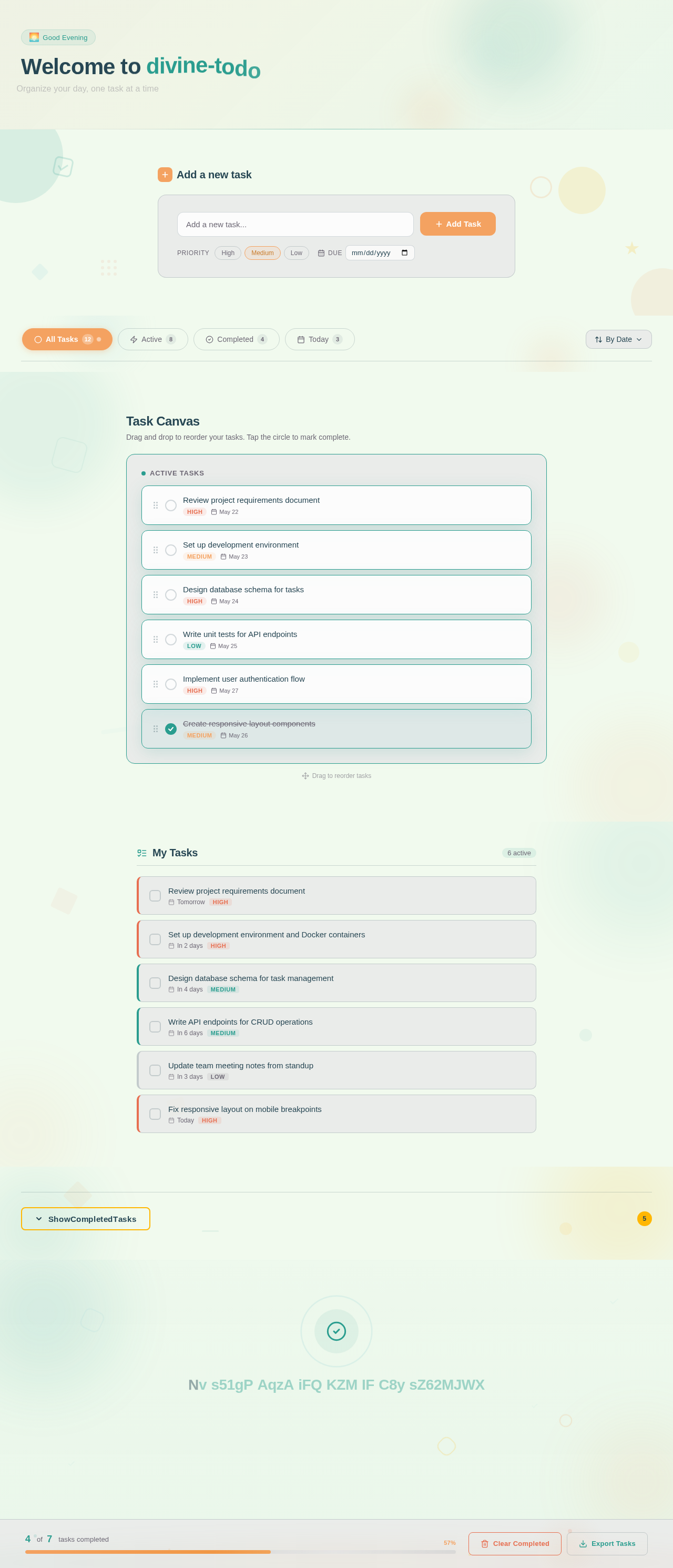
Welcome to divine-todo
Organize your day, one task at a time
Add a new task
Your task list is a blank canvas. Start by adding your first task above and watch your productivity grow.
No comments yet. Be the first!