divine-todo
build a to-do with single page design and minimalist design

Comments (0)
Sign in to leave a comment
System Requirements
divine-todo
Introduction
The "divine-todo" project is focused on creating a simple, minimalist to-do application with a single-page design. This approach ensures users can manage their tasks efficiently without distractions, providing a seamless and intuitive user experience.
System Overview
The divine-todo application is designed to be a straightforward task management tool. It will feature a minimalist interface, allowing users to add, view, and manage their to-do items on a single page. The application will prioritize ease of use and simplicity, ensuring that users can quickly interact with their tasks without unnecessary complexity.
Functional Requirements
- As a User, I should be able to add new tasks to my to-do list.
- As a User, I should be able to view all my tasks on a single page.
- As a User, I should be able to mark tasks as completed.
- As a User, I should be able to delete tasks from my list.
User Personas
- User: The primary user of the divine-todo application who needs to manage personal tasks efficiently.
Visuals Colors and Theme
- primary: #2A9D8F (a calming teal)
- primary_light: #A8DADC (a lighter tint of teal for hover states)
- secondary: #E76F51 (a warm coral for emphasis)
- accent: #F4A261 (a vibrant orange for CTAs and active states)
- highlight: #FFB703 (a bright amber for notifications and active indicators)
- bg: #F1FAEE (a soft, off-white background)
- surface: rgba(233, 233, 233, 0.8) (a light grey for card/panel backgrounds)
- text: #264653 (a deep blue for primary text)
- text_muted: #6D6875 (a muted grey for secondary text)
- border: rgba(38, 70, 83, 0.2) (a subtle teal border)
Signature Design Concept
The divine-todo app will feature an interactive "Task Canvas" on the homepage. This canvas will allow users to drag and drop tasks into different sections of their to-do list, providing a tactile and engaging way to organize tasks. The canvas will utilize framer-motion for smooth drag-and-drop animations and spring physics, making the interaction feel natural and responsive. The background will subtly change colors based on the time of day, using gsap for seamless transitions, enhancing the user's experience with a dynamic and visually appealing interface.
Interaction Model & Motion Direction
The landing page will employ a "parallax" interaction model, creating a layered depth effect as users scroll. Decorative elements will move at different speeds, providing a visually rich first impression while keeping the main content in focus. Internal pages, such as task details, will use a "static" model to maintain clarity and focus on task management.
Non-Functional Requirements
- The application should load quickly and perform efficiently on all modern browsers.
- It should be responsive and accessible on both desktop and mobile devices.
- The design should adhere to accessibility standards, ensuring usability for all users.
Tech Stack
- Frontend: React for Web
- Backend: Python with FastAPI
- Database: MySQL or MariaDB, using Alembic for migrations
- Local Orchestration: Docker, docker-compose
Assumptions and Constraints
- The application will be developed for users in India, considering locale-specific defaults such as timezone (IST).
- The design will focus on a single-page application to maintain simplicity and ease of use.
- No advanced task categorization or priority labeling will be included in this version.
Glossary
- SPA: Single Page Application
- CTA: Call to Action
- UI: User Interface
- UX: User Experience
- IST: Indian Standard Time
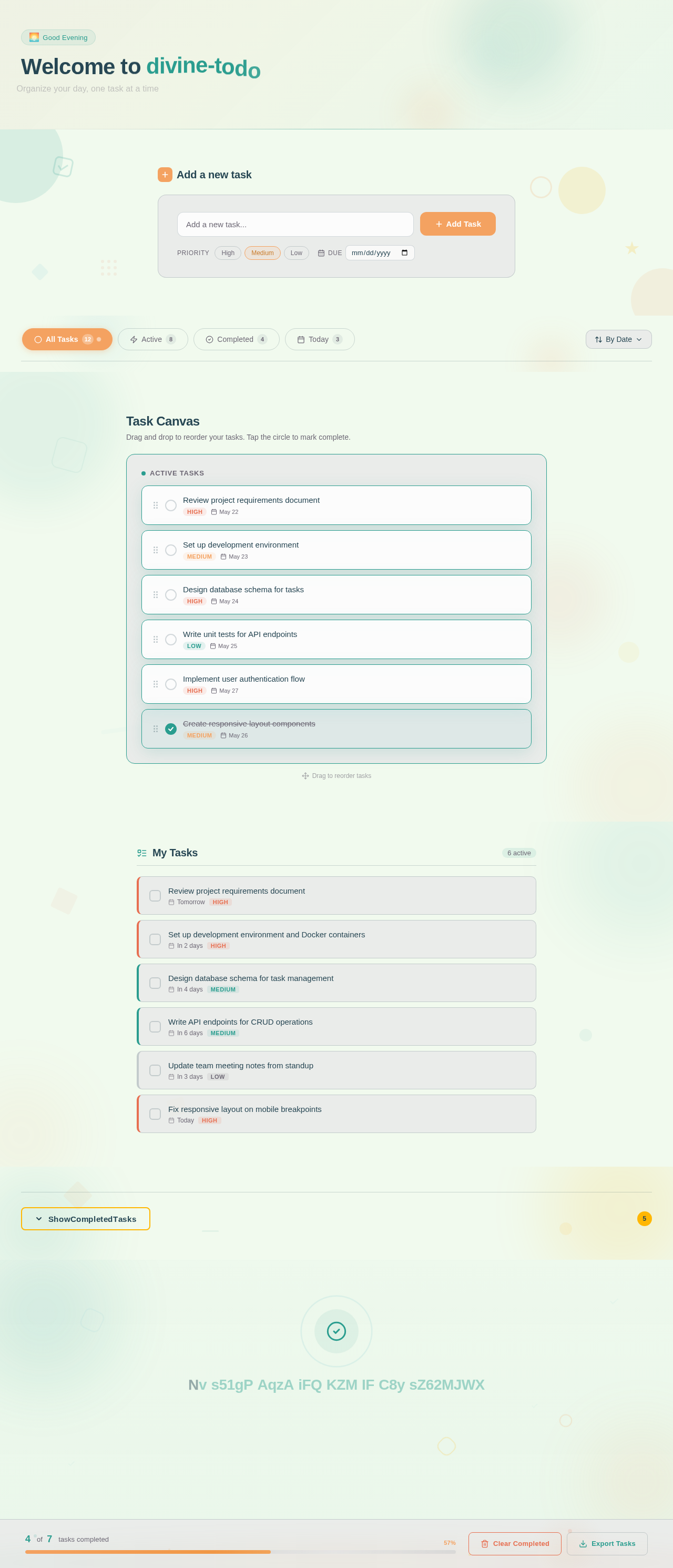
Welcome to divine-todo
Organize your day, one task at a time
Add a new task
Your task list is a blank canvas. Start by adding your first task above and watch your productivity grow.
No comments yet. Be the first!