divine-calculator
build a calculator with single design page and minimal design

Comments (0)
Sign in to leave a comment
Project Tasks6
Implement CalculatorBackground for Calculator
As a frontend developer, implement the CalculatorBackground section for the Calculator page. This section renders an animated full-viewport background using a canvas element (gradientRef) and three ambient orb elements (blueOrbRef, amberOrbRef, accentOrbRef). Uses useEffect with ResizeObserver for canvas DPI-aware resizing. A GSAP timeline with repeat:-1 and yoyo:true drives a 30-minute ambient cycle tweening gradState object (blueAmount, amberAmount, angle) between cool blue (rgba 74,144,226) and warm amber (rgba 245,166,35) phases. A requestAnimationFrame render loop draws a linear gradient computed from gradState.angle using ctx.createLinearGradient. Desktop detection via window.innerWidth >= 1024 conditionally enables the animated gradient with a 300ms fade-in. Uses framer-motion motion elements for orb entrance animations. Apply CalculatorBackground.css with position:fixed, full coverage z-index base layer.
Implement Calculator API Endpoint
As a backend developer, implement a FastAPI endpoint POST /api/calculate that accepts operand1, operand2, and operation (add, subtract, multiply, divide) as request body fields. Returns the computed result with error handling for division by zero and invalid inputs. Validates input types and returns structured JSON responses. Note: Frontend tasks 34030f12, a0bdcdc0, b85db1c9, bd2d227b should integrate with this endpoint for server-side calculation fallback.
Implement CalculatorWrapper for Calculator
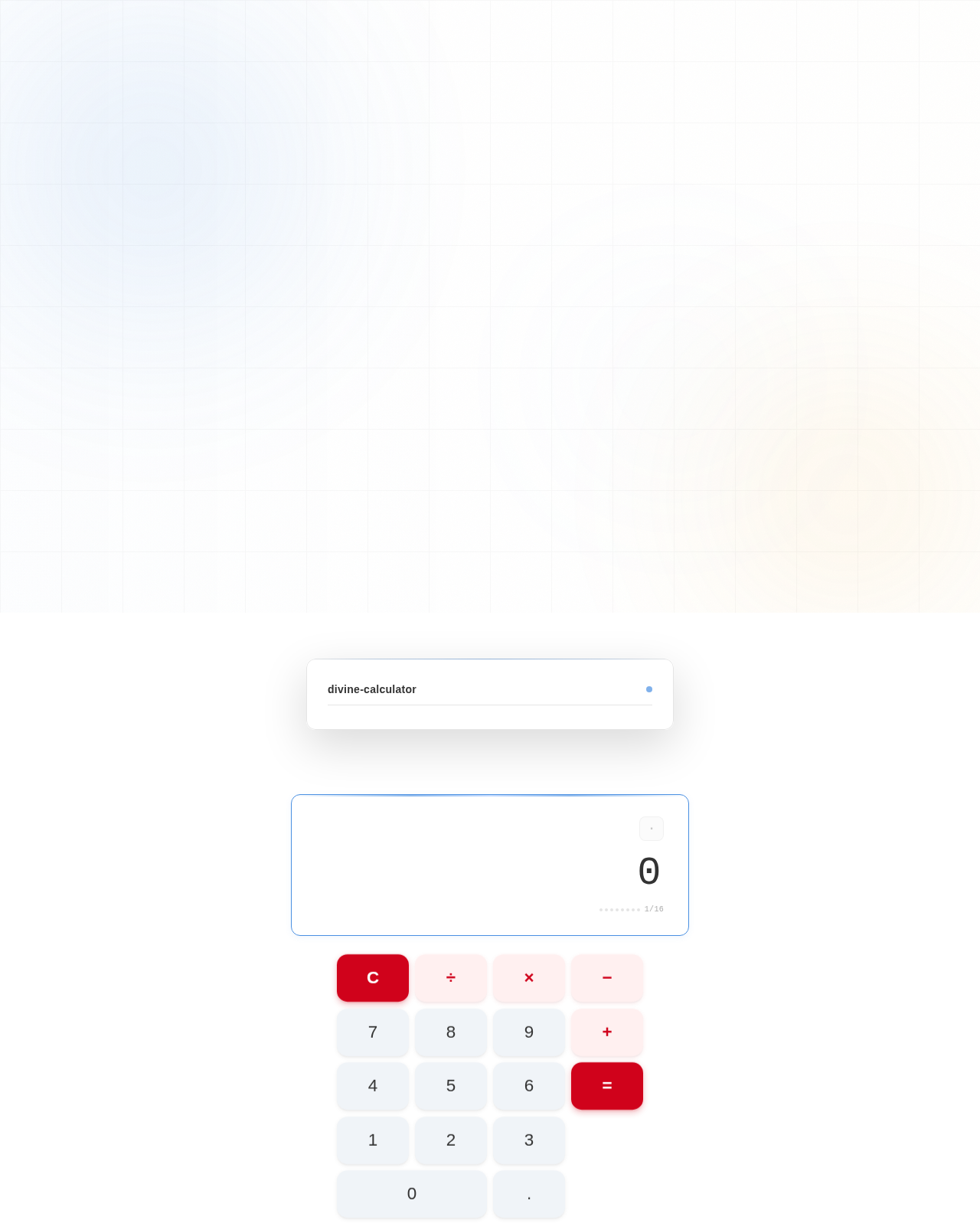
As a frontend developer, implement the CalculatorWrapper section for the Calculator page. This section renders the outer floating card shell using a motion.div (cw-container) with spring entry animation: initial opacity:0, y:40, scale:0.96 animating to opacity:1, y:0, scale:1 (stiffness:80, damping:20, delay:0.15). whileHover applies elevated boxShadow '0 24px 70px rgba(0,0,0,0.18)' and y:-2. useState tracks isHovered via onHoverStart/onHoverEnd handlers. Inside cw-inner renders cw-brand with a motion.span for 'divine-calculator' brand name (x:-10 to x:0 entrance, delay:0.4) and a cw-brand-dot motion.span with scale:0 to scale:1 spring entrance (stiffness:300, damping:15, delay:0.6) that toggles cw-brand-dot--active class on hover. Apply CalculatorWrapper.css with floating card styles, rounded corners, border rgba(0,0,0,0.1), and multi-layer box-shadow for the 'floating calculator' effect.
Integrate Calculator Frontend Backend
As a Tech Lead, verify the end-to-end integration between the Calculator frontend implementation and the Calculator backend API. Ensure the CalculatorDisplay section correctly calls POST /api/calculate, handles API responses and errors (division by zero, invalid input) in the UI, and that all arithmetic operations work as expected. Verify keyboard interactions and animated result reveals function correctly with real API data. Note: depends on frontend tasks 34030f12, b85db1c9 and backend task temp_backend_calc_api.
Implement CalculatorDisplay for Calculator
As a frontend developer, implement the CalculatorDisplay section for the Calculator page. This section manages all calculator state: displayValue (default '0'), previousValue (null), operation (null), waitingForOperand (boolean), showResult (boolean), resultKey (number for AnimatePresence keying). Implements inputDigit (MAX_CHARS=16 guard, waitingForOperand branching), inputDecimal (duplicate dot prevention), performOperation (switch on +/-/*/÷, toPrecision(12) result formatting, division-by-zero 'Error' handling), and clearAll callbacks. Keyboard handler via useEffect on window keydown supports digits 0-9, '.', operators +/-/*/÷, Enter/=, Backspace, and Escape. Uses framer-motion AnimatePresence with key=resultKey for animated result reveal transitions. OPERATIONS map renders display symbols (−, ×, ÷). Apply CalculatorDisplay.css with right-aligned display text, dark grey #333333 primary text, #777777 muted secondary text for the expression line.
Implement CalculatorButtonGrid for Calculator
As a frontend developer, implement the CalculatorButtonGrid section for the Calculator page. Renders a BUTTONS array of 17 button configs (label, type: function/operation/number, optional span:true for '0' spanning two columns). CalcButton sub-component uses useState for ripples array and useRef for btnRef. handleTap (onMouseDown + onTouchStart) computes ripple x/y from getBoundingClientRect, appends ripple object with Date.now()+Math.random() id, and clears after 600ms via setTimeout. Each motion.button uses whileHover scale:1.05 and whileTap scale:0.98 with springConfig (stiffness:500, damping:15, mass:0.8). Inner motion.span label uses bounceConfig (stiffness:600, damping:12, mass:0.6) whileTap scale:0.9. Buttons have staggered mount animation: opacity:0,y:20 → opacity:1,y:0. Full aria-label mapping for ÷, ×, −, +, =, C. CSS classes: cbg-btn--function (accent #D0021B), cbg-btn--operation (#F5A623), cbg-btn--number (#4A90E2), cbg-btn--zero for span. Ripple circles toggle cbg-ripple-circle--accent for function buttons. Apply CalculatorButtonGrid.css with 4-column CSS grid, overflow:hidden per button for ripple containment.
No comments yet. Be the first!