deep-app
 Omer Timna
Hypno gif maker: an app where I can take a picture of any animted/realistic character from the internet/my phone's gallery and turn it to a gif picture by adding hypnotic effects to it. The hypnotic effects can be for example, a big spiral background that spins in a circular motion, hypnotic spirals in the character's eyes that also spin in a circular motion, and swinging pendulums(pocket watch, necklace, pendant, etc)that swing from side to side in a continuous motion. Other hypnotic effects are also welcomed. Also, if possible, I would like to add features that control the placement of the hypnotic effects on the picture(except for the spiral background effect, because it covers the whole background anyway)and also the posture of the character(by being able to move it's head, arms, hands, etc). If there's more then one character in the picture, let the posture control feature work on all the characters.

Comments (0)
Sign in to leave a comment
System Requirements
System Requirements Document (SRD) for deep-app
1. Introduction
Welcome to the System Requirements Document (SRD) for deep-app, a creative application designed to transform static images of animated or realistic characters into hypnotic gifs. This document outlines the functional and non-functional requirements, user personas, design concepts, and technical specifications for the project.
The app is tailored for casual users, including Omer Timna from Israel, who seek quick and intuitive tools to add hypnotic effects and adjust character poses with minimal effort. The goal is to provide a seamless and enjoyable experience for users who want to experiment with hypnotic visuals and create captivating gifs.
2. System Overview
deep-app is a gif-making application that allows users to:
- Import images from their phone's gallery or the internet.
- Add hypnotic effects such as spinning spiral backgrounds, spiral eyes, and swinging pendulums.
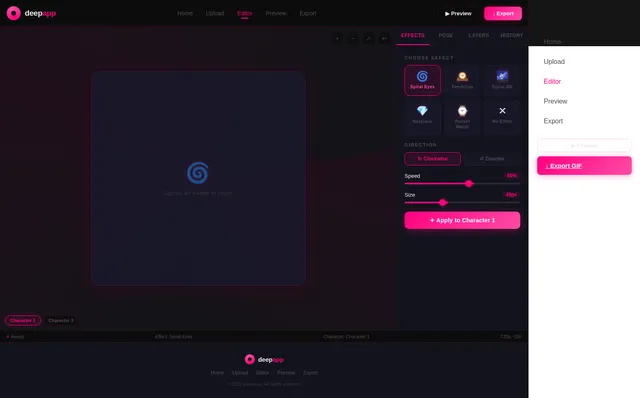
- Customize the placement, size, and direction of these effects.
- Adjust character poses using pre-set pose buttons for quick, one-click modifications.
- Work with multiple characters in a single image, enabling independent control of poses and effects for each character.
The app is designed for casual users who prioritize ease of use and quick results over complex customization. It will leverage modern AI and animation tools to deliver a smooth and engaging user experience.
3. Functional Requirements as Story Points
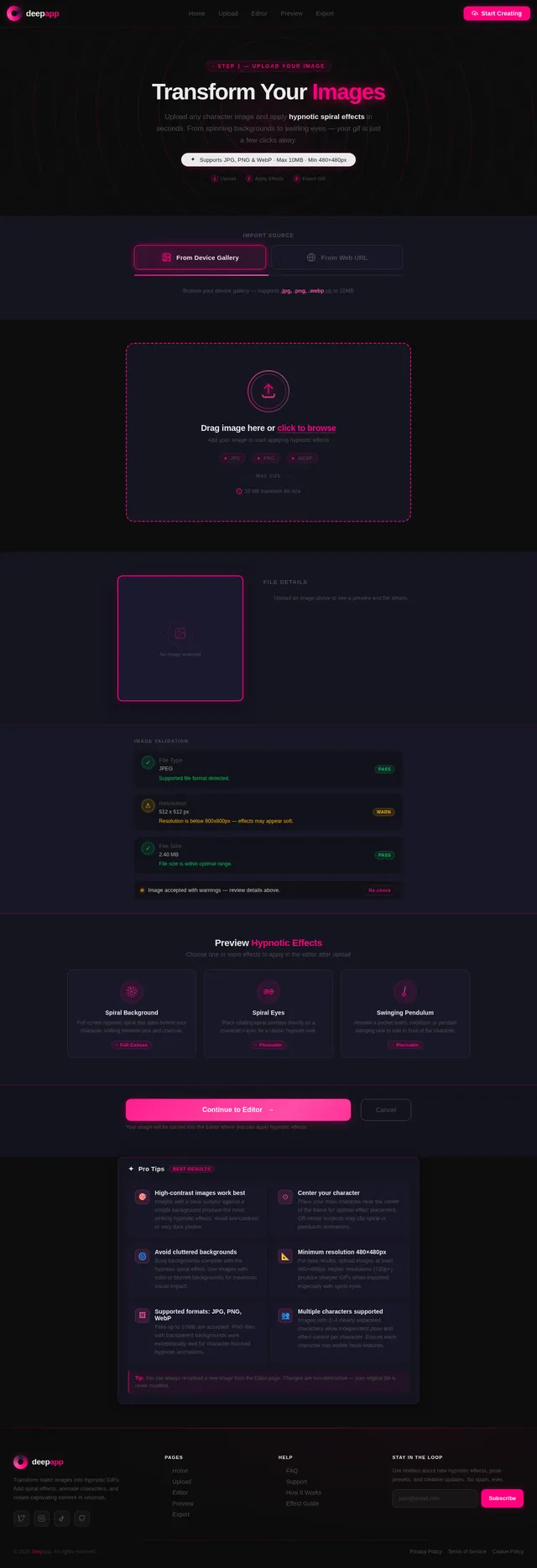
- As a User, I should be able to upload images from my phone's gallery or the internet.
- As a User, I should be able to add hypnotic effects such as:
- A spinning spiral background.
- Spiral eyes that rotate in a circular motion.
- Swinging pendulums (e.g., pocket watches, necklaces, pendants) that move side to side.
- As a User, I should be able to customize the placement, size, and direction of hypnotic effects (except for the spiral background, which covers the entire background).
- As a User, I should be able to adjust the posture of characters in the image using pre-set pose buttons (e.g., lift arm, tilt head, lean closer).
- As a User, I should be able to apply posture adjustments and effects to multiple characters in the image independently.
- As a User, I should be able to preview the gif before exporting it.
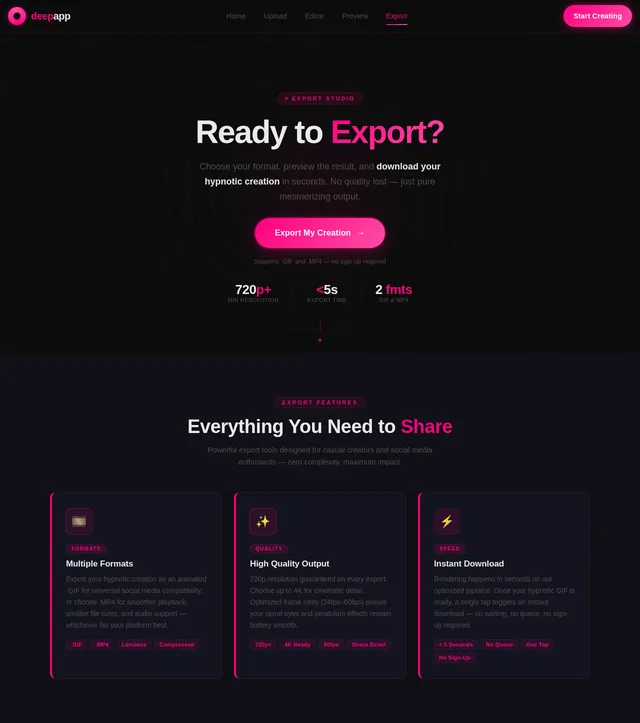
- As a User, I should be able to export the final gif in standard formats (e.g., .gif, .mp4).
4. User Personas
1. Casual Creator
- Description: A user who enjoys experimenting with images and gifs for fun and social sharing.
- Goals: Create hypnotic gifs quickly and easily without needing advanced technical skills.
- Pain Points: Complexity in tools, time-consuming processes, lack of intuitive controls.
2. Social Media Enthusiast
- Description: A user who wants to create eye-catching gifs to share on social media platforms.
- Goals: Produce visually appealing content that stands out and garners attention.
- Pain Points: Limited customization options, low-quality outputs.
5. Visuals Colors and Theme
The visual identity of deep-app will reflect its hypnotic and creative nature. Below is the unique color palette designed for the project:
- Background: #0D0D0D (Deep Black)
- Surface: #1A1A2E (Midnight Blue)
- Text: #EAEAEA (Soft White)
- Accent: #FF007F (Hypnotic Pink)
- Muted Tones: #4E4E50 (Charcoal Gray)
This palette creates a dark, immersive atmosphere with vibrant accents to highlight interactive elements and hypnotic effects.
6. Signature Design Concept
The deep-app homepage will feature an interactive hypnotic portal as its centerpiece.
Concept Details:
- Visuals: A large, animated spiral fills the background, spinning slowly to draw users into the experience. The spiral subtly shifts colors between the accent pink (#FF007F) and muted tones (#4E4E50), creating a mesmerizing effect.
- Interactions:
- As users move their cursor or swipe on mobile, the spiral reacts dynamically, speeding up or slowing down based on the motion.
- Hovering over menu items causes them to ripple outward, as if distorting the spiral.
- Micro-animations:
- Buttons and icons pulse gently, mimicking the rhythm of a heartbeat, to guide user attention.
- When users click "Start," the portal "pulls" them into the app with a zoom-in animation, transitioning seamlessly to the editor interface.
- Mood: The design evokes curiosity and creativity, making users feel like they are stepping into a world of hypnotic possibilities.
This bold and eccentric design ensures that deep-app leaves a lasting impression on users from the very first interaction.
7. Non-Functional Requirements
- The app should load within 3 seconds on standard devices.
- The UI should be responsive and optimized for both mobile and desktop platforms.
- The exported gifs should maintain high quality (minimum 720p resolution).
- The app should support Hebrew and English languages, considering the locale of the primary user.
- The app should handle up to 10MB image uploads without performance degradation.
8. Tech Stack
Frontend
- React for Web
- React Native for Mobile App
Backend
- Python
- FastAPI
Database
- MySQL (with Alembic for migrations)
AI Models
- GPT 5.4 for user-friendly responses
- Google Nano Banana for image generation
AI Tools
- Litellm for LLM Routing
- Langchain
Orchestration
- Docker
- docker-compose
- Kubernetes
9. Assumptions and Constraints
- Users will primarily use the app on mobile devices.
- The app will target casual creators, so advanced editing features are not required.
- The app will rely on pre-set poses rather than freeform manipulation for posture adjustments.
- The app will require an internet connection for AI-based features.
10. Glossary
- Hypnotic Effects: Visual elements like spinning spirals, spiral eyes, and swinging pendulums that create a hypnotic aesthetic.
- Pre-set Pose Buttons: One-click options to adjust character posture (e.g., lift arm, tilt head).
- Gif: A short, looping animation format.
- LLM Routing: Large Language Model routing for selecting the best AI model for a task.
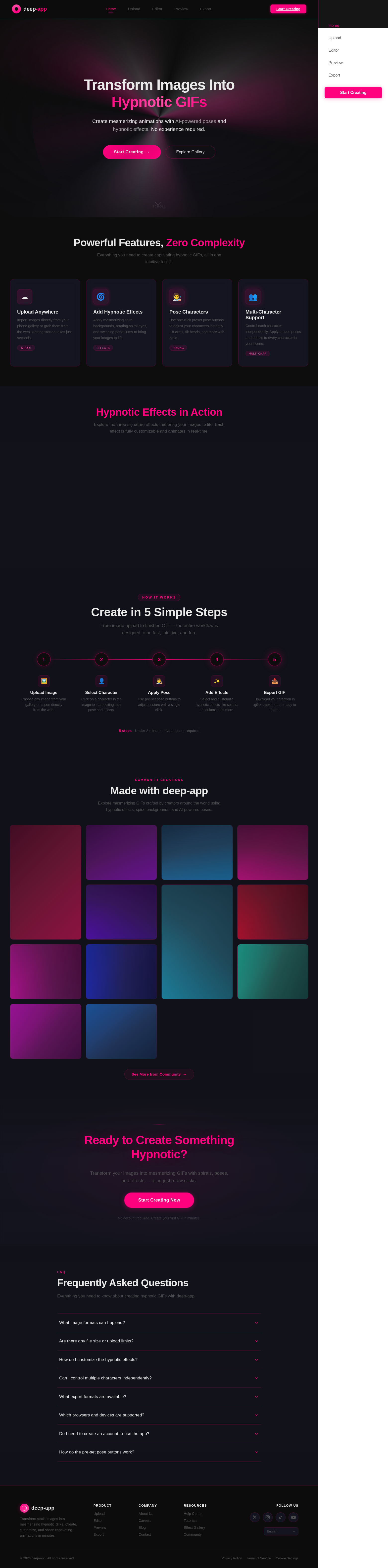
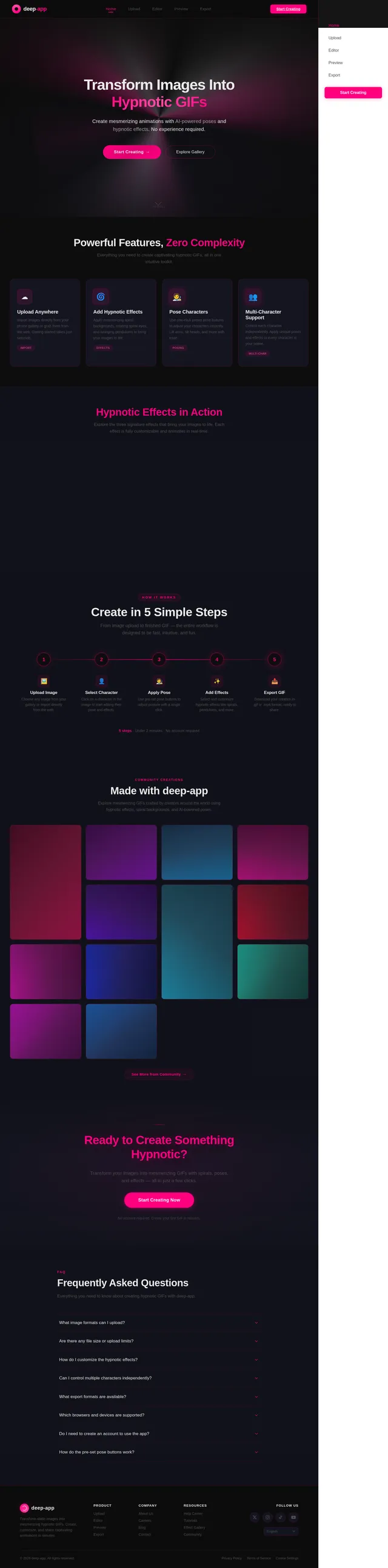
Transform Images Into Hypnotic GIFs
Create mesmerizing animations with AI-powered poses and hypnotic effects. No experience required.
Powerful Features, Zero Complexity
Everything you need to create captivating hypnotic GIFs, all in one intuitive toolkit.
Upload Anywhere
Import images directly from your phone gallery or grab them from the web. Getting started takes just seconds.
ImportAdd Hypnotic Effects
Apply mesmerizing spiral backgrounds, rotating spiral eyes, and swinging pendulums to bring your images to life.
EffectsPose Characters
Use one-click preset pose buttons to adjust your characters instantly. Lift arms, tilt heads, and more with ease.
PosingMulti-Character Support
Control each character independently. Apply unique poses and effects to every character in your scene.
Multi-CharHypnotic Effects in Action
Explore the three signature effects that bring your images to life. Each effect is fully customizable and animates in real-time.
Create in 5 Simple Steps
From image upload to finished GIF — the entire workflow is designed to be fast, intuitive, and fun.
Upload Image
Choose any image from your gallery or import directly from the web.
Select Character
Click on a character in the image to start editing their pose and effects.
Apply Pose
Use pre-set pose buttons to adjust posture with a single click.
Add Effects
Select and customize hypnotic effects like spirals, pendulums, and more.
Export GIF
Download your creation in .gif or .mp4 format, ready to share.
Made with deep-app
Explore mesmerizing GIFs crafted by creators around the world using hypnotic effects, spiral backgrounds, and AI-powered poses.
Ready to Create Something Hypnotic?
Transform your images into mesmerizing GIFs with spirals, poses, and effects — all in just a few clicks.
Start Creating NowNo account required. Create your first GIF in minutes.
Frequently Asked Questions
Everything you need to know about creating hypnotic GIFs with deep-app.
deep-app supports all major image formats including PNG, JPG, JPEG, and WebP. You can upload images directly from your phone gallery or import them from the internet. For best results, we recommend using high-resolution images with clearly visible characters.
Free users can upload images up to 10MB per file. There is no limit on the number of images you can work with during a session. Larger files may take slightly longer to process, but our AI pipeline handles optimization automatically.
After adding an effect like spiral eyes or a swinging pendulum, you can adjust its placement, size, and direction directly on the canvas. The spiral background covers the full image and its speed and color intensity can be fine-tuned. All adjustments update in real-time so you can see changes instantly.
Yes! deep-app supports multi-character images. Simply click on each character to select them individually. You can apply different poses and effects to each character independently, giving you full creative control over complex scenes with multiple subjects.
You can export your creations as standard .gif files or as .mp4 video files. GIF format is perfect for social media sharing and messaging apps, while MP4 offers higher quality and smaller file sizes for platforms that support video uploads.
deep-app works on all modern browsers including Chrome, Firefox, Safari, and Edge. It is fully optimized for mobile devices running iOS 15+ and Android 10+. For the smoothest experience, we recommend using the latest version of your preferred browser.
No account is required to start creating! You can upload an image, apply effects, adjust poses, and preview your GIF without signing up. An optional account lets you save projects, access your creation history, and share directly to social platforms.
Instead of manually dragging body parts, deep-app uses AI-powered pre-set pose buttons like "lift arm," "tilt head," and "lean closer." Simply click a button and the character pose updates instantly. This one-click approach is designed for casual creators who want quick, professional-looking results.
No comments yet. Be the first!