dawn-dashboard
 suhas
suhasSystem Role: You are an expert full-stack app developer and UI/UX designer. Your task is to build a comprehensive, visually appealing, and highly functional QA/QC Document Management System for an EPC (Engineering, Procurement, and Construction) workflow. App Overview: The app manages the submission, review, and approval lifecycle of technical documents between four distinct parties: Vendors, the Main Contractor (Madina), the Engineering Services Subcontractor (GES), and the Client (QE-LNG). 1. Global UI/UX & Visual Design Theme: Modern, colorful, and highly readable. Use a clean white/light-grey background with distinct, bold colors for data visualization. Data Visualization: Incorporate interactive UI elements like 3D/holographic-style charts, donut charts, and bar graphs on the dashboards to show document health (e.g., 40% Approved, 30% Under Review, 30% Revise & Resubmit). Status Badges: Use color-coded tags for quick scanning: Draft/Created: Grey Sent/Under Review: Blue Code A (Accepted/IFC): Green Code B (Accepted with Comments): Yellow Code C (Revise and Resubmit): Red Audit Trail: Every document must have a hidden "History Log" that tracks timestamps of when it moved between tabs and who moved it. 2. Main Overall Dashboard Layout: A master control panel displaying all active projects. Features: "Create New Project" button (Requires User to input Project Name). "Delete Project" button (Requires secondary confirmation). High-level graphical summary of all combined projects (Total documents, overall approval progress). Clicking on a specific Project card opens the Project-Specific Dashboard. 3. Project-Specific Dashboard & Tab Structure When a project is opened, display a dashboard specific to that project, featuring dynamic charts tracking document statuses. Below the charts, implement a persistent tabbed navigation bar with the following tabs: Vendor(s) (Support multiple: Vendor 1, Vendor 2, etc.) GES (Engineering Services) Madina (Main Contractor) QE-LNG (Client) 4. Document Creation Logic (Vendor & GES Tabs) When a user clicks "Create New Document" in either the Vendor or GES tab, open a form with the following rules: Manual Entry Fields: The app MUST require the user to manually type the "Document Title", "Document Number", and "Revision Number". Do not auto-generate the document number. Category Dropdown: Require the user to select the document purpose: "IFA (Issued for Approval)" or "IFC (Issued for Construction)". AI Upload & Summarize Feature (Max 50MB): Provide an "Upload Document/Image" button. Action: Upon upload, an integrated AI must scan the document, extract the key data, and generate a text summary highlighting: 1. Completed/Correct elements, and 2. Mistakes/Discrepancies to be addressed. Memory Saver: Once the text summary is generated and saved to the document's profile, the app must automatically delete the uploaded source file to save database storage. 5. Document Routing & Visibility Rules (The Core Engine) Documents must never disappear from a tab; they only change status and duplicate into the receiver's tab. Vendor to Madina Flow: * The Vendor tab has a "Send to Madina" button. When clicked, the document status in the Vendor tab changes to "Sent to Madina - Under Review". Simultaneously, the document appears in the Madina Tab with the status "Received from Vendor - Action Required". GES to Madina Flow: * GES can also originate documents. The process mirrors the Vendor flow, utilizing a "Send to Madina" button, keeping the document visible in the GES tab as "Sent to Madina". 6. Madina Tab Actions (The Hub) When a document lands in the Madina tab, the user clicks on it to reveal three distinct action buttons: "Send to GES": Routes the document to the GES tab for engineering endorsement. Status updates to "Under Review with GES". "Send to QE-LNG": Routes the document to the client tab for final approval. Status updates to "Submitted to QE-LNG". "Return for Revision": Sends the document back to the originator (Vendor or GES). Prompts the user to type in the next anticipated Revision Number so the originator knows what to update it to. 7. QE-LNG Tab Logic (Client Approval & Coding) When a document is in the QE-LNG tab, it requires a final review action. Provide three specific grading buttons: Code A (Accepted): Changes document status to "Accepted". Automatically changes the document category from IFA to IFC (Issued for Construction). Updates the status across all previous tabs (Madina, GES, Vendor) to reflect final approval. Code B (Accepted with Comments) & Code C (Revise and Resubmit): Clicking either B or C MUST trigger a mandatory "Upload Commented Document" field (Max 50MB). Once the marked-up document is uploaded, display a "Return to Madina" button. When clicked, the document returns to the Madina tab (and subsequently back to the originator). The uploaded commented document must be preserved and accessible to Madina/GES/Vendor so they can see the exact markups required for the next revision.
Comments (0)
Sign in to leave a comment
Project Tasks18
Implement Theme & Structure
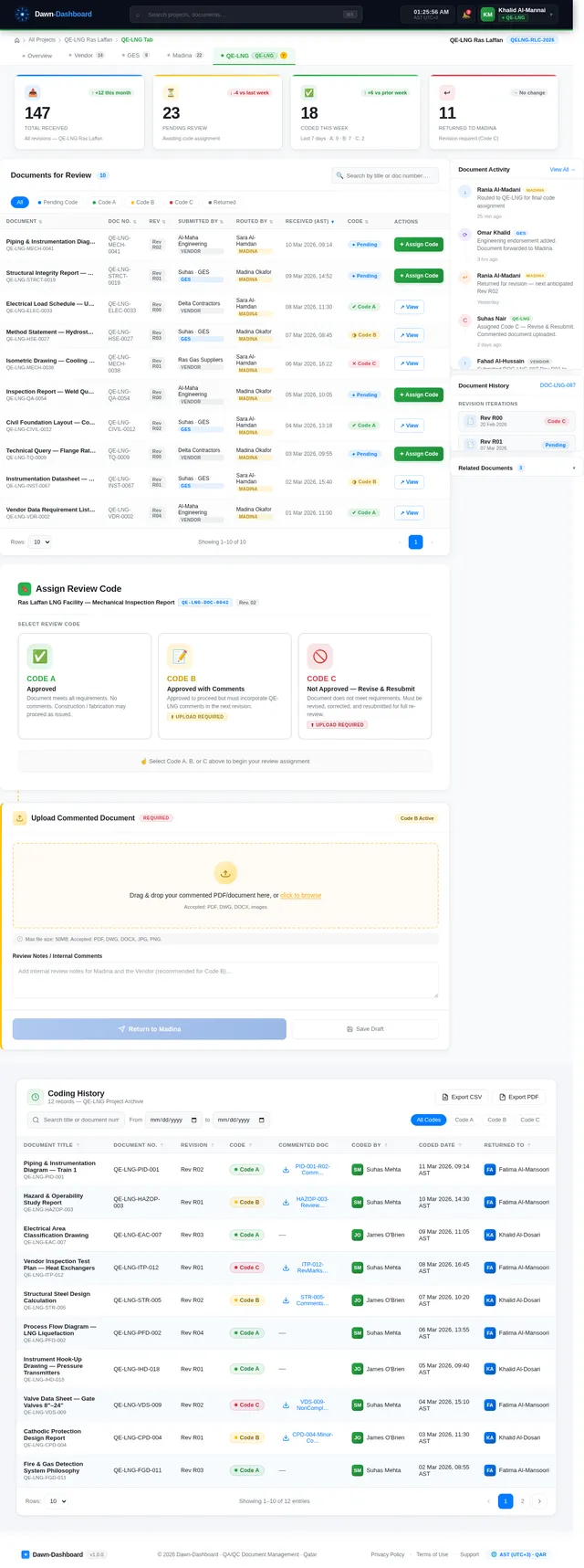
As a user, I want the scaffold project pages (home, login, signup, welcome, dashboard/overview, dashboard/ai-assistant, dashboard/settings) to look exactly identical to the mock-design pages. This task covers: applying the Dawn-Dashboard design tokens (primary blue #007BFF, green #28A745, yellow #FFC107, red #DC3545, grey #6C757D, white/light-grey backgrounds), setting up global CSS variables, Inter font family, reusable status badge components, and removing any pages not required by the user flows. This task must be completed independently before all other frontend tasks.
Build Dashboard Page
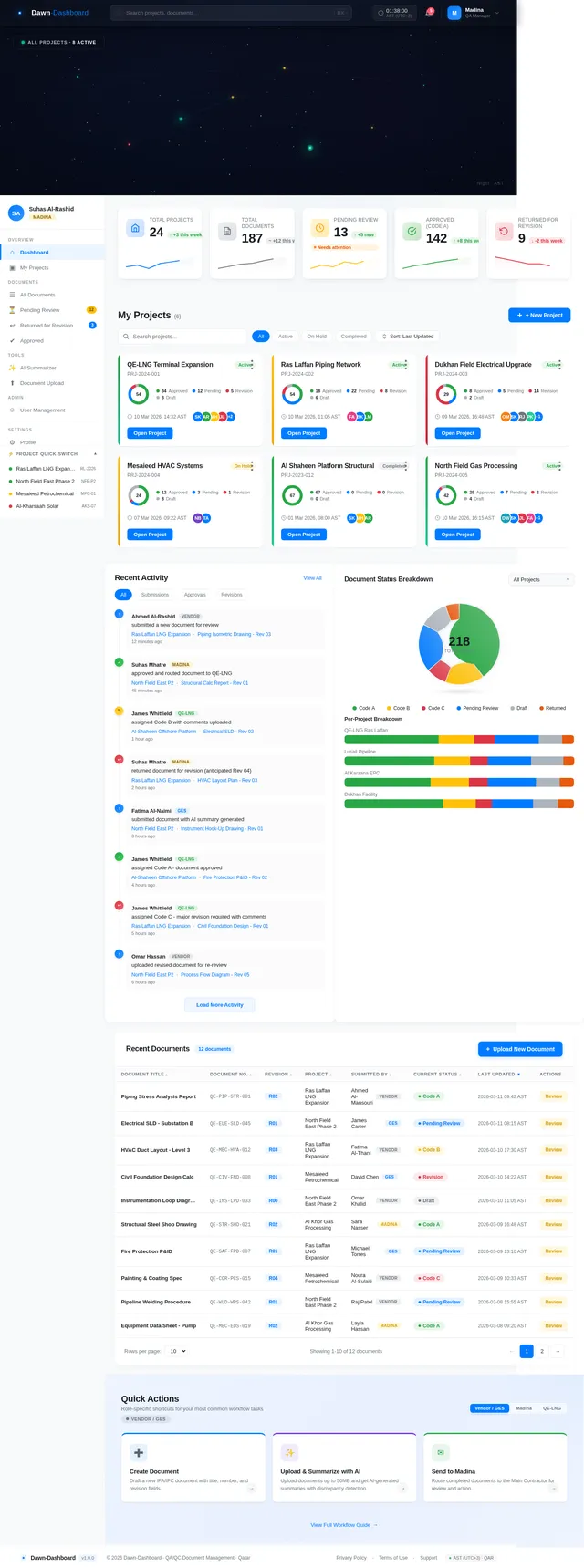
As a user, I want to view the main Dashboard page (entry point for all user flows) that shows a galaxy map hero section with all active projects as star nodes, high-level KPI stats (total projects, total documents, pending review, approved, returned), a project grid with health indicators, recent activity feed, document status chart, and quick actions. Implement based on the existing Dashboard (v2) JSX design. The page includes: GalaxyHero animated canvas star field, StatsOverview KPI cards, ProjectGrid with create/delete project functionality, ActivityFeed, DocumentStatusChart, QuickActions, TopBar with AST clock and user avatar, Sidebar navigation, and Footer.
Implement Projects CRUD API
As a user, I want backend API endpoints to create, read, update, and delete projects. Implement FastAPI endpoints: POST /projects (create with name), GET /projects (list all with summary stats), GET /projects/{id} (single project detail with document counts by status), DELETE /projects/{id} (with confirmation flag). Include MySQL models using Alembic migrations. Project model fields: id, name, created_at, updated_at, created_by.
Build Project Dashboard Page
As a user, I want to open a project-specific dashboard by clicking a project card or star on the galaxy map, and see dynamic charts tracking document statuses for that project (donut chart with Code A/B/C/Pending/Draft breakdown), plus a persistent tabbed navigation bar with Vendor Tab, GES Tab, Madina Tab, and QE-LNG Tab. Implement based on the existing Project Dashboard (v2) JSX design. The page should show project-level KPIs, document health visualization, and route to each role tab.
Implement Documents CRUD API
As a user, I want backend API endpoints to create, read, update, and delete documents within a project. Implement FastAPI endpoints: POST /projects/{id}/documents (create with title, doc_number, revision_number, category IFA/IFC, originator_role), GET /projects/{id}/documents (list with status filter), GET /documents/{id} (detail with audit trail), PATCH /documents/{id} (update status, routing), DELETE /documents/{id}. Document model: id, project_id, title, doc_number, revision_number, category, status, originator_role, current_tab, created_at, ai_summary.
Integrate Dashboard with Projects API
As a user, I want the Dashboard page to fetch real project data from the backend API, display live KPI stats (total projects, documents, pending, approved), render the galaxy map with actual project nodes, and support create/delete project actions via the API. Connect the Dashboard (v2) frontend to GET /projects, POST /projects, DELETE /projects/{id} endpoints. Handle loading states, error states, and empty states.
Build Vendor Tab Page
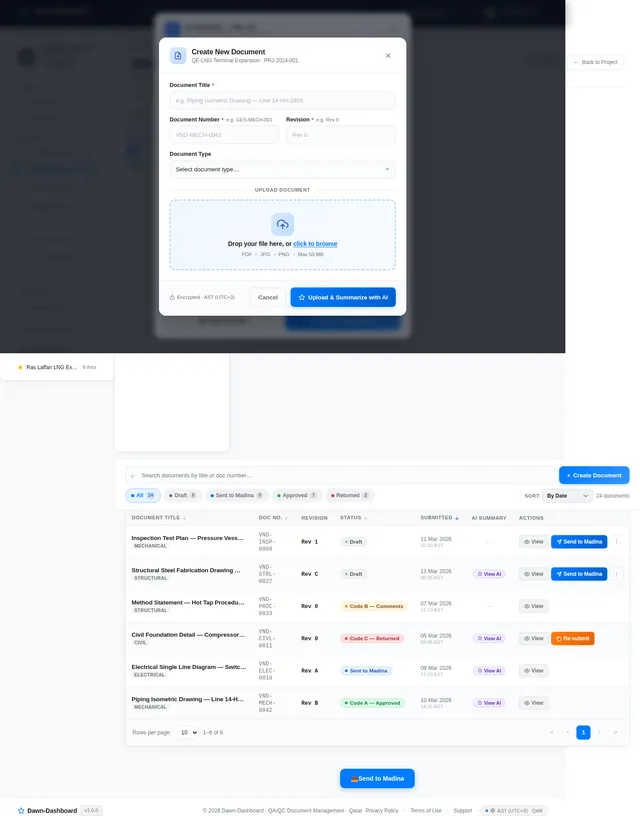
As a Vendor, I want to view my submitted documents in the Vendor Tab, see their statuses (Draft, Sent to Madina - Under Review, Accepted, Revision Required), create new documents, and send documents to Madina. Implement based on the existing Vendor Tab (v2) JSX design. The tab includes: document list with color-coded status badges, 'Create New Document' button opening the Document Form, 'Send to Madina' action button, and document status transitions. Documents must remain visible in the Vendor Tab even after routing.
Build GES Tab Page
As a GES user, I want to view my documents in the GES Tab, create new documents, upload and summarize them with AI, and send them to Madina. Implement based on the existing GES Tab (v2) JSX design. The tab mirrors the Vendor Tab structure: document list with status badges (Draft, Sent to Madina, Under Review with GES, etc.), 'Create New Document' button, AI upload & summarize feature, and 'Send to Madina' routing. Documents from the Madina Tab routed to GES also appear here.
Build Madina Tab Page
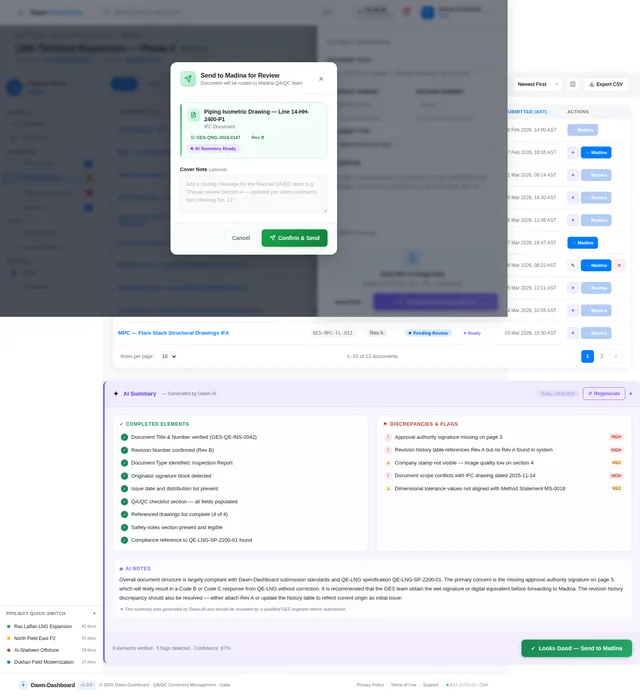
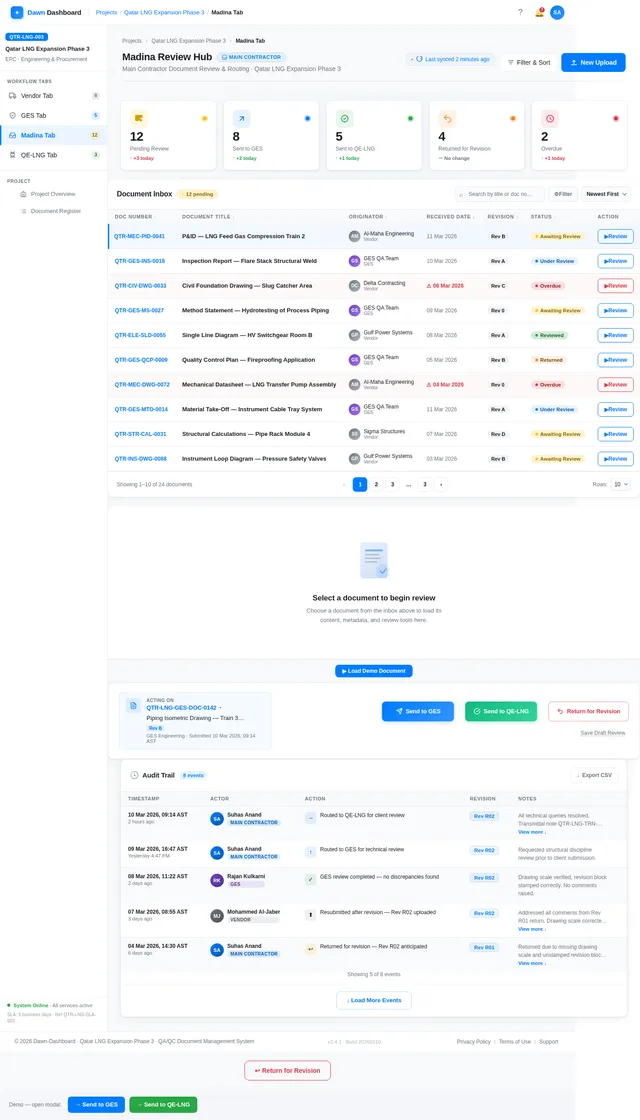
As a Madina user, I want to view all received documents in the Madina Tab inbox, review each document with a side-by-side PDF viewer and review checklist, and take routing actions: Send to GES, Send to QE-LNG, or Return for Revision (with next revision number input). Implement based on the existing Madina Tab (v2) JSX design. The page includes: MadinaStatsBar KPIs, DocumentInbox table with status filters, DocumentReviewPanel with inline PDF viewer and QA checklist, ActionBar with three routing buttons, AuditTrail timeline, RevisionRequestModal, and RoutingConfirmModal.
Build QE-LNG Tab Page
As a QE-LNG user, I want to view submitted documents, assign approval codes (Code A = Accepted/IFC, Code B = Accepted with Comments, Code C = Revise & Resubmit), upload commented documents for Code B and C, and return documents to Madina. Implement based on the existing QE-LNG Tab (v2) JSX design. The tab includes: document list with code status badges, grading action buttons (A/B/C), mandatory commented document upload for B and C, 'Return to Madina' button, and status propagation back to Madina/GES/Vendor tabs.
Implement Document Routing API
As a user, I want backend API endpoints to handle all document routing actions: Vendor/GES to Madina (POST /documents/{id}/send-to-madina), Madina to GES (POST /documents/{id}/route-to-ges), Madina to QE-LNG (POST /documents/{id}/route-to-qelng), Return for Revision (POST /documents/{id}/return-for-revision with next_revision_number body), QE-LNG Code assignment (POST /documents/{id}/assign-code with code A/B/C and optional commented file upload). Each endpoint must update document status, create an audit trail entry, and propagate status changes to all relevant tabs.
Implement AI Document Summarize API
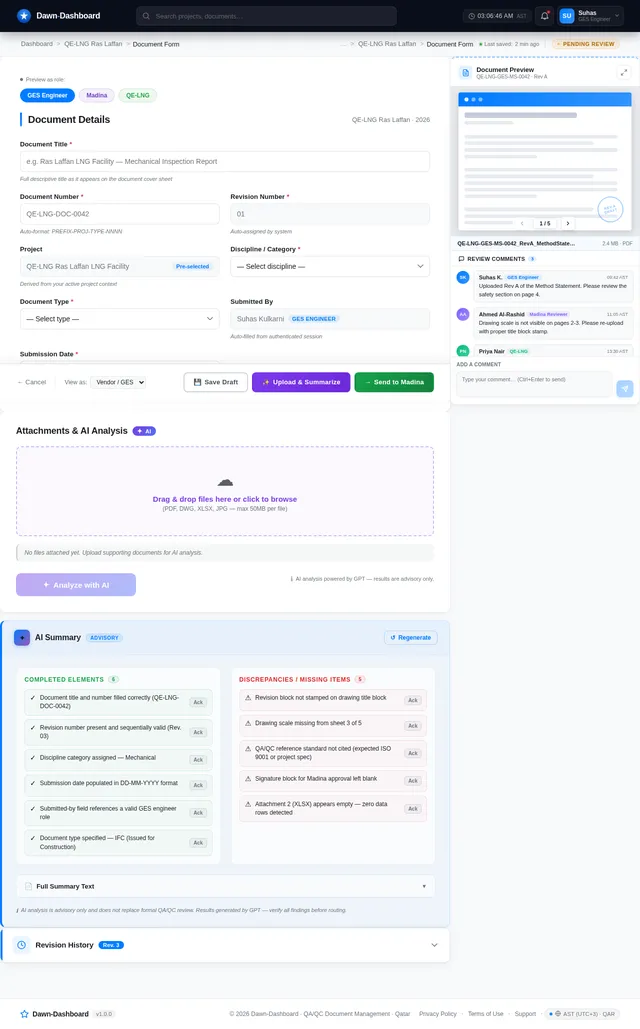
As a Vendor or GES user, I want to upload a document (PDF or image, max 50MB) and receive an AI-generated summary highlighting completed/correct elements and mistakes/discrepancies. Implement POST /documents/{id}/summarize: accept file upload, route through Litellm to the appropriate AI model (GPT for user-friendly summary, Claude for technical accuracy), generate structured summary with two sections (Completed Elements, Discrepancies), save summary text to the document record, and automatically delete the source file from storage. Return the summary JSON.
Implement File Upload & Storage API
As a user, I want to upload documents and commented files (max 50MB) securely. Implement POST /upload endpoint supporting PDF and image formats, with file size validation (50MB limit), temporary storage for AI processing (auto-delete after summary generation), and persistent storage for commented documents uploaded during Code B/C assignment. Integrate with FastAPI's file handling and ensure commented documents are accessible to all relevant parties (Madina, GES, Vendor).
Implement Role-Based Access Control
As a system, I want role-based access control (RBAC) so that Vendors, GES, Madina, and QE-LNG users only see and perform actions appropriate to their role. Implement role assignment on user model (vendor, ges, madina, qelng), FastAPI dependency guards on all routing/document endpoints, and frontend role-aware UI rendering (show/hide action buttons based on logged-in role). Roles: Vendor sees Vendor Tab only; GES sees GES Tab; Madina sees all tabs with routing actions; QE-LNG sees QE-LNG Tab with code assignment.
Build Document Form Page
As a Vendor or GES user, I want to fill in a document creation form with mandatory manual entry fields (Document Title, Document Number, Revision Number), a Category dropdown (IFA or IFC), and an AI-powered Upload & Summarize feature (max 50MB). Implement based on the existing Document Form (v2) JSX design. The form must enforce manual text entry (no auto-generation), call the AI summarize API on upload, display the generated summary highlighting completed elements and discrepancies, and auto-delete the source file after summary is saved.
Implement Audit Trail API
As a user, I want every document to have a full audit trail. Implement a document_history table and API: GET /documents/{id}/history returns all audit events with timestamp (AST UTC+3), actor user id and role, action type, from_tab, to_tab, revision_number_at_time, and notes. Audit entries are auto-created by routing API endpoints. Expose this via GET /documents/{id}/history. Ensure all timestamps default to Arabia Standard Time (UTC+3).
Integrate Document Tabs with Routing API
As a user, I want all four document tabs (Vendor, GES, Madina, QE-LNG) to fetch live document data and execute routing actions via backend APIs. Connect tab pages to document listing endpoints (GET /projects/{id}/documents?tab=vendor|ges|madina|qelng), routing action endpoints (send-to-madina, route-to-ges, route-to-qelng, return-for-revision, assign-code), and audit trail endpoint. Reflect real-time status changes in all tabs after routing. Handle upload for commented documents on Code B/C assignment.
Integrate AI Summarize in Document Form
As a Vendor or GES user, I want the Document Form page to call the AI summarize API when I upload a file, display a loading state during AI processing, render the structured summary (Completed Elements and Discrepancies sections) inline in the form, and confirm source file deletion after summary is saved. Connect Document Form (v2) frontend to POST /upload and POST /documents/{id}/summarize endpoints. Show progress indicator and handle errors gracefully.
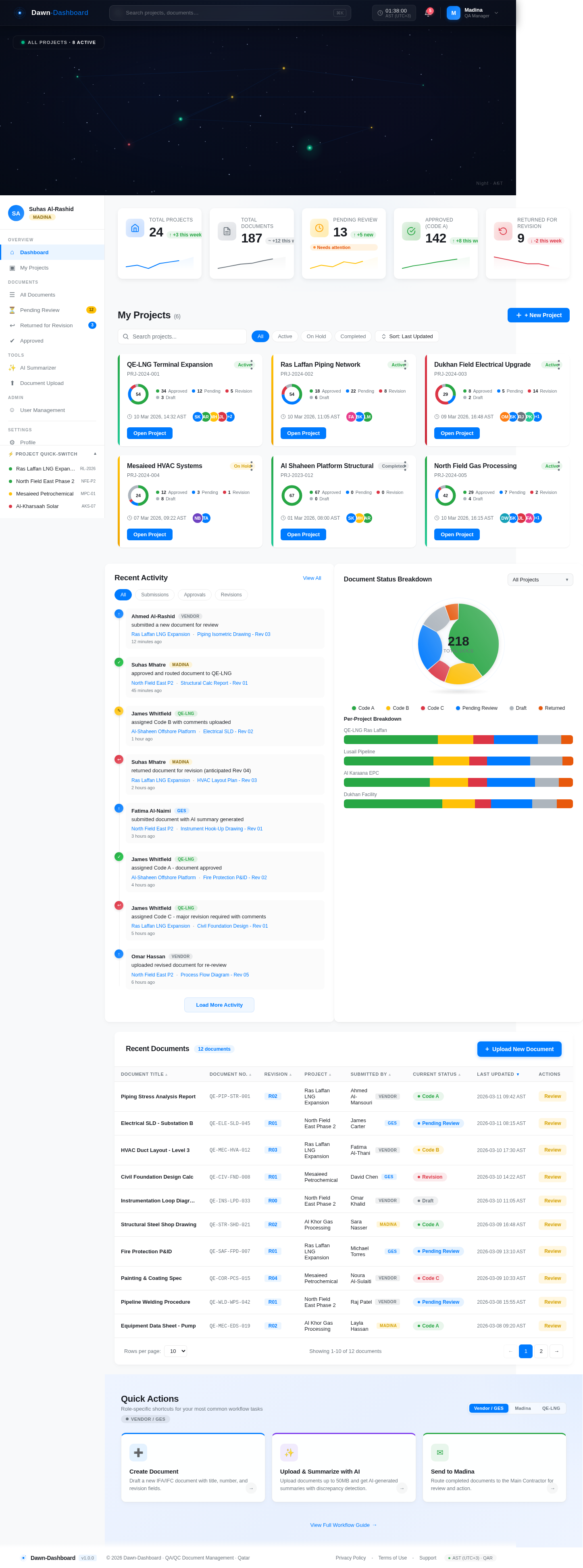
Total Projects
Total Documents
Pending Review
Approved (Code A)
Returned for Revision
My Projects(6)
QE-LNG Terminal Expansion
PRJ-2024-001Ras Laffan Piping Network
PRJ-2024-002Dukhan Field Electrical Upgrade
PRJ-2024-003Mesaieed HVAC Systems
PRJ-2024-004Al Shaheen Platform Structural
PRJ-2023-012North Field Gas Processing
PRJ-2024-005Recent Activity
Recent Documents
12 documents| Document Title | Document No. | Revision | Project | Submitted By | Current Status | Last Updated | Actions |
|---|---|---|---|---|---|---|---|
| Piping Stress Analysis Report | QE-PIP-STR-001 | R02 | Ras Laffan LNG Expansion | Ahmed Al-MansouriVendor | Code A | ||
| Electrical SLD - Substation B | QE-ELE-SLD-045 | R01 | North Field East Phase 2 | James CarterGES | Pending Review | ||
| HVAC Duct Layout - Level 3 | QE-MEC-HVA-012 | R03 | Ras Laffan LNG Expansion | Fatima Al-ThaniVendor | Code B | ||
| Civil Foundation Design Calc | QE-CIV-FND-008 | R01 | Mesaieed Petrochemical | David ChenGES | Revision | ||
| Instrumentation Loop Diagram | QE-INS-LPD-033 | R00 | North Field East Phase 2 | Omar KhalidVendor | Draft | ||
| Structural Steel Shop Drawing | QE-STR-SHD-021 | R02 | Al Khor Gas Processing | Sara NasserMadina | Code A | ||
| Fire Protection P&ID | QE-SAF-FPD-007 | R01 | Ras Laffan LNG Expansion | Michael TorresGES | Pending Review | ||
| Painting & Coating Spec | QE-COR-PCS-015 | R04 | Mesaieed Petrochemical | Noura Al-SulaitiVendor | Code C | ||
| Pipeline Welding Procedure | QE-WLD-WPS-042 | R01 | North Field East Phase 2 | Raj PatelVendor | Pending Review | ||
| Equipment Data Sheet - Pump | QE-MEC-EDS-019 | R02 | Al Khor Gas Processing | Layla HassanMadina | Code A |
Quick Actions
Role-specific shortcuts for your most common workflow tasks
Vendor / GESCreate Document
Draft a new IFA/IFC document with title, number, and revision fields.
→Upload & Summarize with AI
Upload documents up to 50MB and get AI-generated summaries with discrepancy detection.
→Send to Madina
Route completed documents to the Main Contractor for review and action.
→
No comments yet. Be the first!