dawn-dashboard
 suhas
suhasSystem Role: You are an expert full-stack app developer and UI/UX designer. Your task is to build a comprehensive, visually appealing, and highly functional QA/QC Document Management System for an EPC (Engineering, Procurement, and Construction) workflow. App Overview: The app manages the submission, review, and approval lifecycle of technical documents between four distinct parties: Vendors, the Main Contractor (Madina), the Engineering Services Subcontractor (GES), and the Client (QE-LNG). 1. Global UI/UX & Visual Design Theme: Modern, colorful, and highly readable. Use a clean white/light-grey background with distinct, bold colors for data visualization. Data Visualization: Incorporate interactive UI elements like 3D/holographic-style charts, donut charts, and bar graphs on the dashboards to show document health (e.g., 40% Approved, 30% Under Review, 30% Revise & Resubmit). Status Badges: Use color-coded tags for quick scanning: Draft/Created: Grey Sent/Under Review: Blue Code A (Accepted/IFC): Green Code B (Accepted with Comments): Yellow Code C (Revise and Resubmit): Red Audit Trail: Every document must have a hidden "History Log" that tracks timestamps of when it moved between tabs and who moved it. 2. Main Overall Dashboard Layout: A master control panel displaying all active projects. Features: "Create New Project" button (Requires User to input Project Name). "Delete Project" button (Requires secondary confirmation). High-level graphical summary of all combined projects (Total documents, overall approval progress). Clicking on a specific Project card opens the Project-Specific Dashboard. 3. Project-Specific Dashboard & Tab Structure When a project is opened, display a dashboard specific to that project, featuring dynamic charts tracking document statuses. Below the charts, implement a persistent tabbed navigation bar with the following tabs: Vendor(s) (Support multiple: Vendor 1, Vendor 2, etc.) GES (Engineering Services) Madina (Main Contractor) QE-LNG (Client) 4. Document Creation Logic (Vendor & GES Tabs) When a user clicks "Create New Document" in either the Vendor or GES tab, open a form with the following rules: Manual Entry Fields: The app MUST require the user to manually type the "Document Title", "Document Number", and "Revision Number". Do not auto-generate the document number. Category Dropdown: Require the user to select the document purpose: "IFA (Issued for Approval)" or "IFC (Issued for Construction)". AI Upload & Summarize Feature (Max 50MB): Provide an "Upload Document/Image" button. Action: Upon upload, an integrated AI must scan the document, extract the key data, and generate a text summary highlighting: 1. Completed/Correct elements, and 2. Mistakes/Discrepancies to be addressed. Memory Saver: Once the text summary is generated and saved to the document's profile, the app must automatically delete the uploaded source file to save database storage. 5. Document Routing & Visibility Rules (The Core Engine) Documents must never disappear from a tab; they only change status and duplicate into the receiver's tab. Vendor to Madina Flow: * The Vendor tab has a "Send to Madina" button. When clicked, the document status in the Vendor tab changes to "Sent to Madina - Under Review". Simultaneously, the document appears in the Madina Tab with the status "Received from Vendor - Action Required". GES to Madina Flow: * GES can also originate documents. The process mirrors the Vendor flow, utilizing a "Send to Madina" button, keeping the document visible in the GES tab as "Sent to Madina". 6. Madina Tab Actions (The Hub) When a document lands in the Madina tab, the user clicks on it to reveal three distinct action buttons: "Send to GES": Routes the document to the GES tab for engineering endorsement. Status updates to "Under Review with GES". "Send to QE-LNG": Routes the document to the client tab for final approval. Status updates to "Submitted to QE-LNG". "Return for Revision": Sends the document back to the originator (Vendor or GES). Prompts the user to type in the next anticipated Revision Number so the originator knows what to update it to. 7. QE-LNG Tab Logic (Client Approval & Coding) When a document is in the QE-LNG tab, it requires a final review action. Provide three specific grading buttons: Code A (Accepted): Changes document status to "Accepted". Automatically changes the document category from IFA to IFC (Issued for Construction). Updates the status across all previous tabs (Madina, GES, Vendor) to reflect final approval. Code B (Accepted with Comments) & Code C (Revise and Resubmit): Clicking either B or C MUST trigger a mandatory "Upload Commented Document" field (Max 50MB). Once the marked-up document is uploaded, display a "Return to Madina" button. When clicked, the document returns to the Madina tab (and subsequently back to the originator). The uploaded commented document must be preserved and accessible to Madina/GES/Vendor so they can see the exact markups required for the next revision.
Comments (0)
Sign in to leave a comment
System Requirements
System Requirements Document (SRD)
Project Name: Dawn-Dashboard
1. Introduction
The Dawn-Dashboard is a QA/QC Document Management System designed specifically for EPC (Engineering, Procurement, and Construction) workflows. This system facilitates the submission, review, and approval lifecycle of technical documents between four distinct parties: Vendors, the Main Contractor (Madina), the Engineering Services Subcontractor (GES), and the Client (QE-LNG).
The project has been marked as started per supervisor pre-approval, and this document outlines the updated requirements and design specifications for the system.
This SRD has been tailored for Suhas in Qatar (QA), ensuring locale-specific defaults such as time zones (Arabian Standard Time, UTC+3), currency (Qatari Riyal - QAR), and cultural preferences for modern, visually appealing designs.
2. System Overview
The Dawn-Dashboard will serve as a centralized platform for managing technical documents across multiple parties involved in EPC workflows. It will provide:
- A global dashboard for high-level project summaries.
- Project-specific dashboards for detailed document tracking.
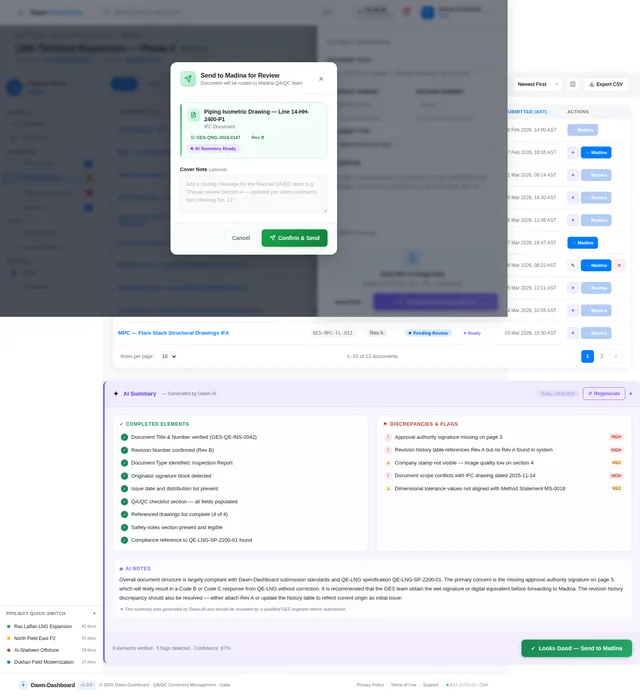
- AI-powered document summarization and discrepancy detection.
- Robust document routing and visibility rules to ensure transparency and accountability.
- Final approval mechanisms with coding and comment upload features.
The system will prioritize user experience, data visualization, and seamless collaboration between stakeholders.
3. Functional Requirements
As User:
- I should be able to create new projects and delete projects with confirmation.
- I should be able to view a high-level summary of all projects on the main dashboard.
- I should be able to open project-specific dashboards and view dynamic charts tracking document statuses.
As Vendor:
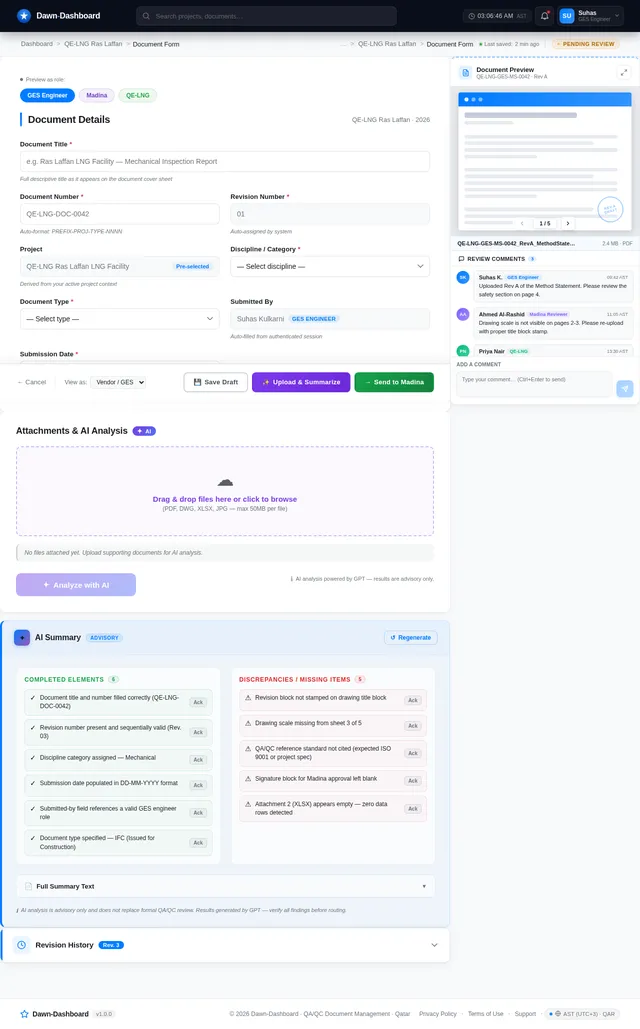
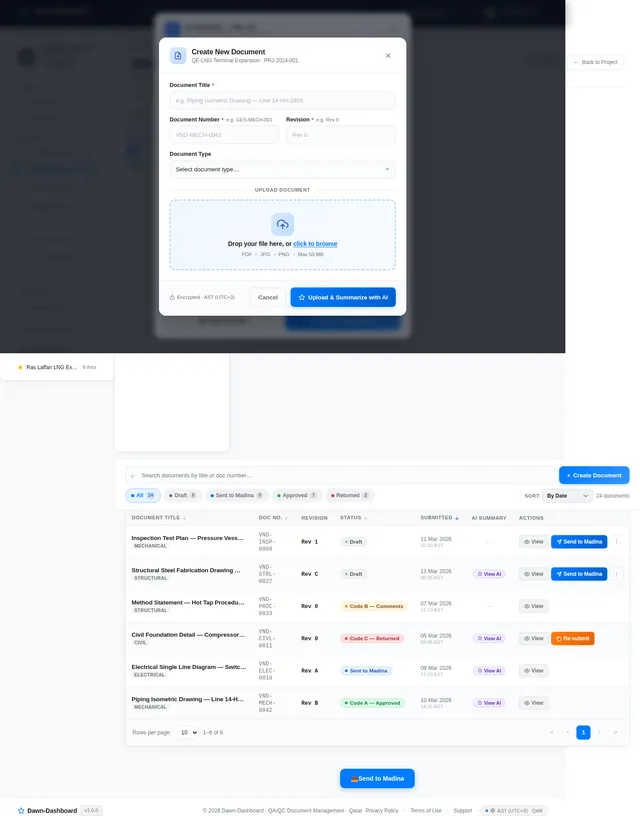
- I should be able to create new documents with manual entry fields for title, document number, and revision number.
- I should be able to upload documents/images and receive AI-generated summaries highlighting completed elements and discrepancies.
- I should be able to send documents to Madina for review.
As GES:
- I should be able to create new documents with manual entry fields for title, document number, and revision number.
- I should be able to upload documents/images and receive AI-generated summaries highlighting completed elements and discrepancies.
- I should be able to send documents to Madina for review.
As Madina:
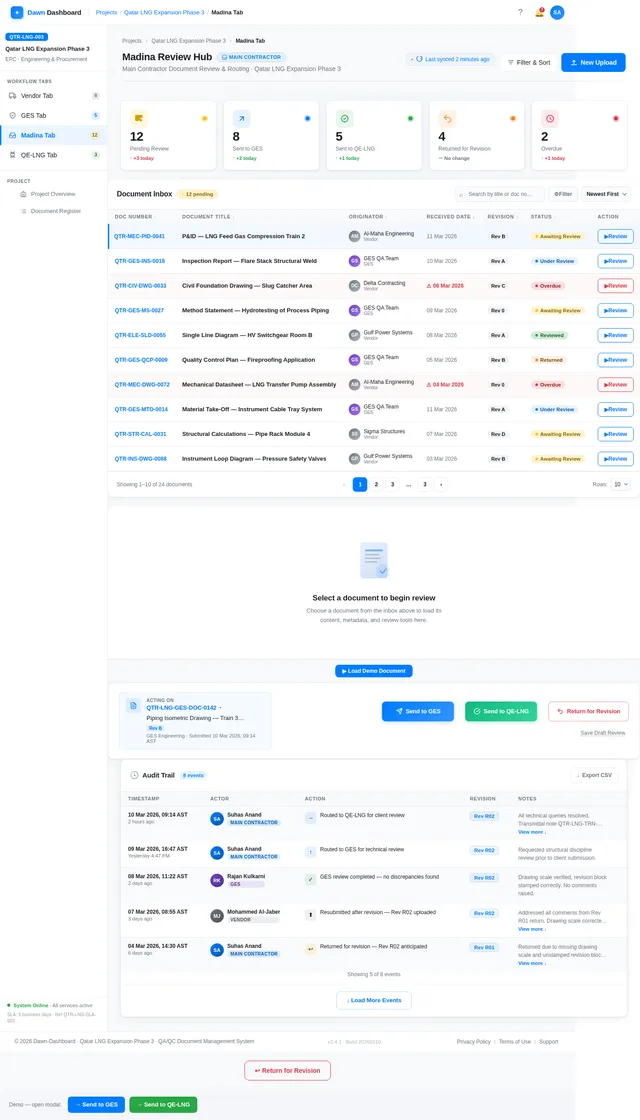
- I should be able to receive documents from Vendors and GES and take action (send to GES, send to QE-LNG, or return for revision).
- I should be able to type in the next anticipated revision number when returning documents for revision.
As QE-LNG:
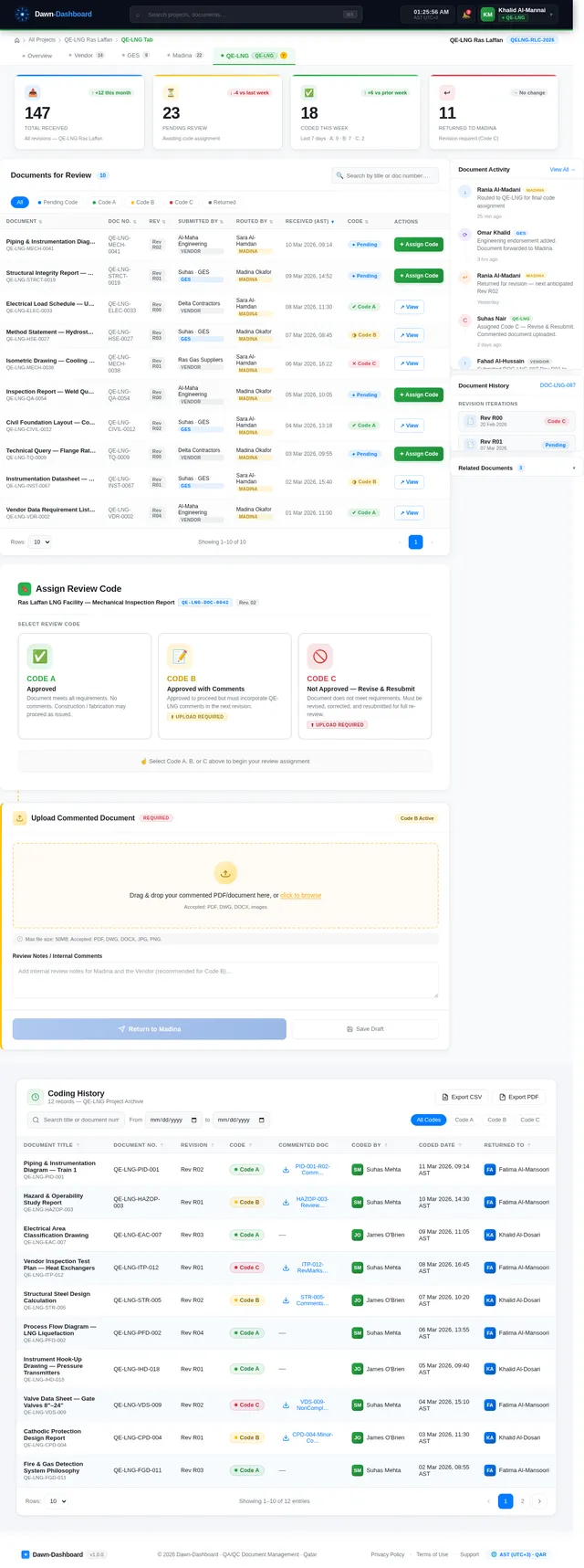
- I should be able to review documents and assign codes (A, B, or C).
- I should be able to upload commented documents when assigning Code B or C.
- I should be able to return commented documents to Madina for further action.
4. User Personas
1. Vendor
- Role: Submits technical documents for review.
- Needs: Easy document creation, AI-powered summaries, and clear routing to Madina.
2. GES (Engineering Services Subcontractor)
- Role: Provides engineering endorsement for documents.
- Needs: Document creation, AI-powered summaries, and routing to Madina.
3. Madina (Main Contractor)
- Role: Acts as the hub for document review and routing.
- Needs: Centralized control over document actions and visibility into all statuses.
4. QE-LNG (Client)
- Role: Provides final approval and coding for documents.
- Needs: Clear grading options, ability to upload comments, and visibility into document history.
5. Visuals Colors and Theme
The Dawn-Dashboard will feature a modern, colorful, and highly readable design:
- Background: Clean white/light-grey for readability.
- Primary Colors:
- Blue (#007BFF) for actionable items and statuses.
- Green (#28A745) for approvals.
- Yellow (#FFC107) for comments.
- Red (#DC3545) for revisions.
- Grey (#6C757D) for drafts.
- Data Visualization: Interactive 3D/holographic-style charts, donut charts, and bar graphs.
6. Signature Design Concept
The Dawn-Dashboard homepage will feature a living galaxy map where each star represents a project.
Concept Details:
- Visuals: A dark, cosmic-themed background with glowing stars and constellations.
- Interaction: Hovering over a star reveals the project name and high-level stats (e.g., total documents, approval progress).
- Animation: Stars pulse gently, and constellations form dynamically as the user navigates.
- Micro-interactions: Clicking a star zooms into the project-specific dashboard, transitioning from the galaxy view to dynamic charts and tabs.
- Color Shifts: The galaxy map subtly changes colors based on the time of day (e.g., warm tones in the morning, cool tones at night).
This design will make the homepage unforgettable, engaging users with a sense of exploration and discovery.
7. Non-Functional Requirements
- Performance: The system must handle up to 10,000 documents per project without lag.
- Scalability: Support for up to 100 concurrent users.
- Security: Role-based access control and encrypted document storage.
- Localization: Default settings for Qatar (QA), including timezone (UTC+3) and currency (QAR).
8. Tech Stack
Frontend:
- React for Web
Backend:
- Python
- FastAPI
Database:
- MySQL (preferred) or MariaDB with Alembic for migrations
AI Models:
- GPT 5.2 for user-friendly responses
- Claude 4.5 Opas for academic or coding work
- Google Nano Banana for image generation
AI Tools:
- Litellm for LLM Routing
- Langchain
Orchestration:
- Docker and docker-compose for local orchestration
- Kubernetes for server-side orchestration
9. Assumptions and Constraints
-
Assumptions:
- Users will have basic technical knowledge to navigate the dashboard.
- AI models will be pre-trained and integrated seamlessly.
-
Constraints:
- Maximum upload size for documents/images is 50MB.
- Document routing must adhere strictly to the defined workflows.
10. Glossary
- EPC: Engineering, Procurement, and Construction.
- QA/QC: Quality Assurance/Quality Control.
- IFA: Issued for Approval.
- IFC: Issued for Construction.
- Madina: Main Contractor.
- GES: Engineering Services Subcontractor.
- QE-LNG: Client.
This document reflects the updated requirements for the Dawn-Dashboard project, marking it as started per supervisor pre-approval. Let’s bring this vision to life!
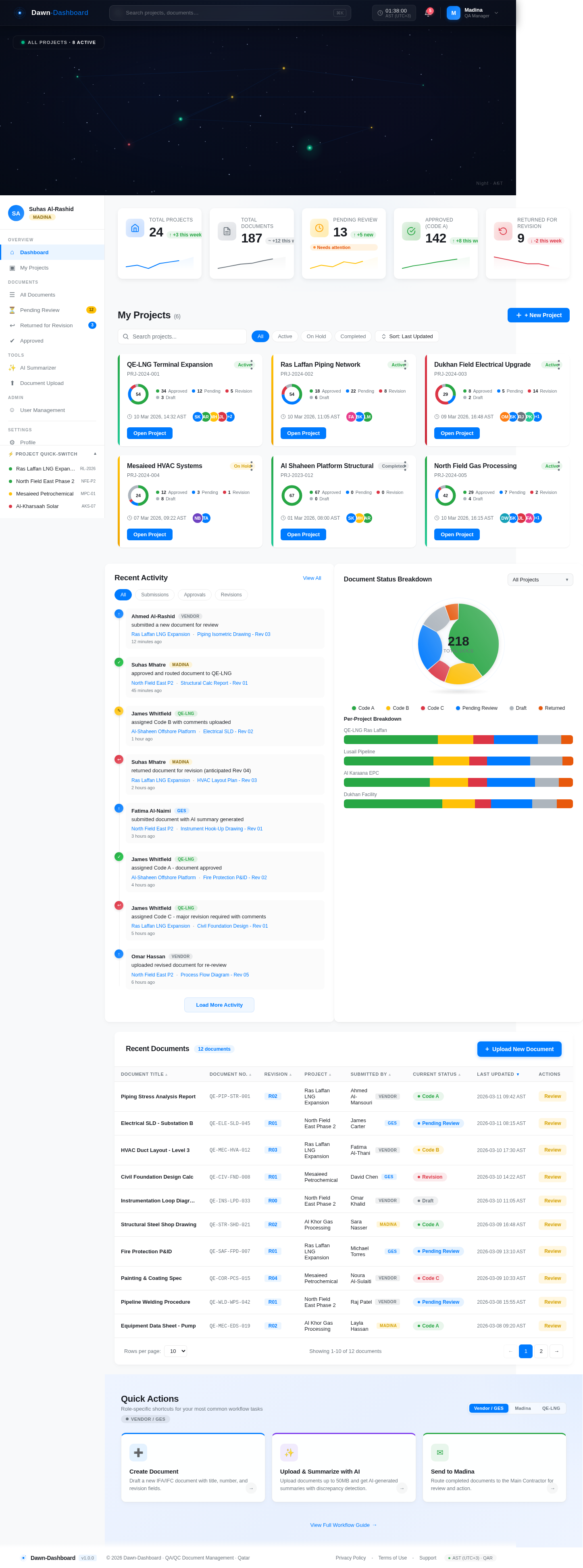
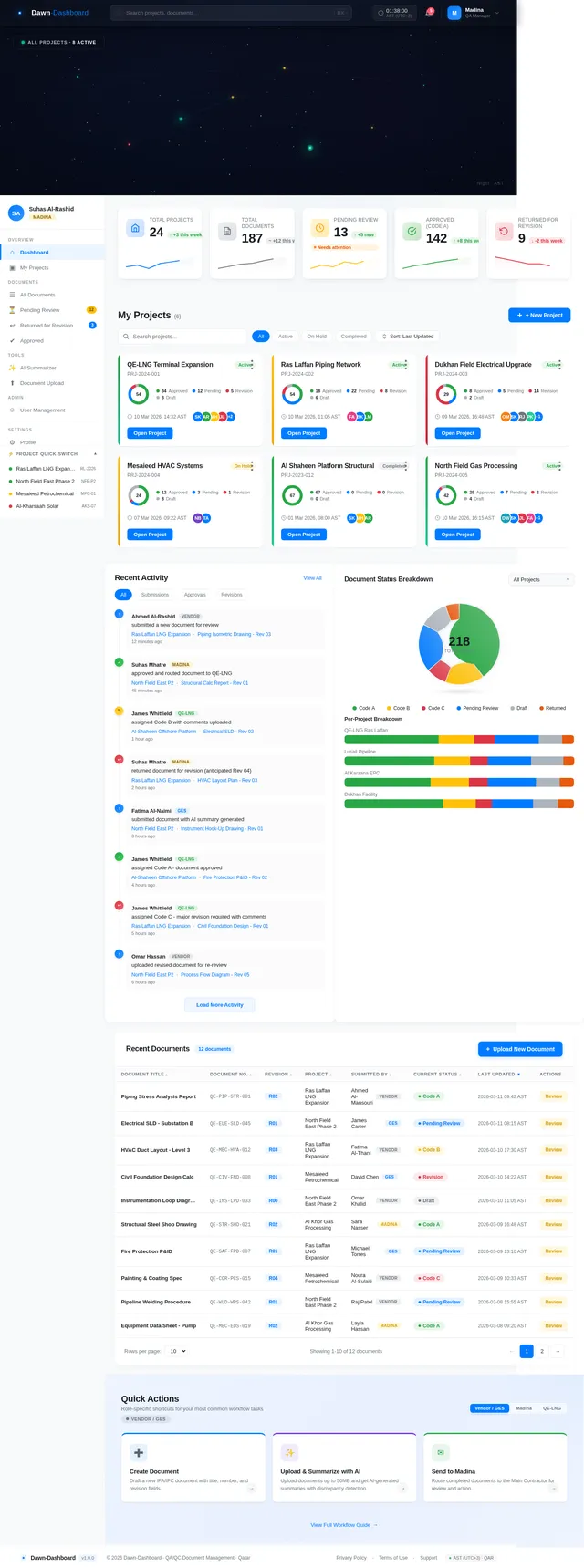
Total Projects
Total Documents
Pending Review
Approved (Code A)
Returned for Revision
My Projects(6)
QE-LNG Terminal Expansion
PRJ-2024-001Ras Laffan Piping Network
PRJ-2024-002Dukhan Field Electrical Upgrade
PRJ-2024-003Mesaieed HVAC Systems
PRJ-2024-004Al Shaheen Platform Structural
PRJ-2023-012North Field Gas Processing
PRJ-2024-005Recent Activity
Recent Documents
12 documents| Document Title | Document No. | Revision | Project | Submitted By | Current Status | Last Updated | Actions |
|---|---|---|---|---|---|---|---|
| Piping Stress Analysis Report | QE-PIP-STR-001 | R02 | Ras Laffan LNG Expansion | Ahmed Al-MansouriVendor | Code A | ||
| Electrical SLD - Substation B | QE-ELE-SLD-045 | R01 | North Field East Phase 2 | James CarterGES | Pending Review | ||
| HVAC Duct Layout - Level 3 | QE-MEC-HVA-012 | R03 | Ras Laffan LNG Expansion | Fatima Al-ThaniVendor | Code B | ||
| Civil Foundation Design Calc | QE-CIV-FND-008 | R01 | Mesaieed Petrochemical | David ChenGES | Revision | ||
| Instrumentation Loop Diagram | QE-INS-LPD-033 | R00 | North Field East Phase 2 | Omar KhalidVendor | Draft | ||
| Structural Steel Shop Drawing | QE-STR-SHD-021 | R02 | Al Khor Gas Processing | Sara NasserMadina | Code A | ||
| Fire Protection P&ID | QE-SAF-FPD-007 | R01 | Ras Laffan LNG Expansion | Michael TorresGES | Pending Review | ||
| Painting & Coating Spec | QE-COR-PCS-015 | R04 | Mesaieed Petrochemical | Noura Al-SulaitiVendor | Code C | ||
| Pipeline Welding Procedure | QE-WLD-WPS-042 | R01 | North Field East Phase 2 | Raj PatelVendor | Pending Review | ||
| Equipment Data Sheet - Pump | QE-MEC-EDS-019 | R02 | Al Khor Gas Processing | Layla HassanMadina | Code A |
Quick Actions
Role-specific shortcuts for your most common workflow tasks
Vendor / GESCreate Document
Draft a new IFA/IFC document with title, number, and revision fields.
→Upload & Summarize with AI
Upload documents up to 50MB and get AI-generated summaries with discrepancy detection.
→Send to Madina
Route completed documents to the Main Contractor for review and action.
→
No comments yet. Be the first!