dawai-setu
 dawai setu
Build a complete, polished, modern, responsive healthcare web application called **DAWAI-SETU (Drug Availability Watch & Inter-facility Transfer Utility)**. ## PROBLEM & PURPOSE The project addresses the problem of emerging medicine shortages: a shortage at one facility can become a regional disruption because of changing consumption, replenishment delays, uneven inventories and geographic constraints. DAWAI-SETU should detect shortages early, forecast stockout risk, identify regional patterns, find available surplus, recommend redistribution/intervention and track the transfer until the receiving facility gets the stock. Core flow: **Detect → Explain → Predict → Find Surplus → Recommend → Transfer → Track → Prevent Regional Shortage** The prototype uses **simulated healthcare supply-chain data** representing 500+ medicines and 40+ hospitals, pharmacies, laboratories, medicine dealers and blood banks across the **Mangalore–Udupi–Manipal region**. Clearly label data as simulated/demo data. ## 1. LOGIN / REGISTRATION First screen: DAWAI-SETU login/registration. User selects: * Hospital * Pharmacy * Laboratory * Medicine Dealer Collect: * Manager/user name * Facility/company name * Facility type * Email OR phone number Then: **Send verification code → Enter OTP → Account verified** OTP can be simulated for the prototype if no real SMS/email service exists. Request location permission because geography is important for distance, redistribution and logistics. Use nearby healthcare-facility density to classify the area as **Urban / Semi-Urban / Rural**, rather than using only a simple facility-count rule. Show this classification in the profile and use it in risk/logistics calculations. ## 2. ROLE-BASED SIDEBAR For a Hospital Manager: * Dashboard * My Hospital * Medicines * Blood Bank * Regional Redistribution * Regional Map * Facility Network * Inbox * Transfers * Alerts * History For Pharmacy/Medicine Dealer: * Dashboard * My Company/Pharmacy Inventory * Regional Redistribution * Regional Map * Facility Network * Inbox/Requests * Transfers * Alerts * History For Laboratory/Blood Bank: * Dashboard * Blood Bank * Regional Blood Network * Regional Map * Facility Network * Inbox * Transfers * Alerts * History Admin/Regional Authority should see the complete regional network, shortages, map, facilities, alerts, transfers and intervention recommendations. ## 3. MAIN DASHBOARD Show: * Total medicines * Critical medicines * At-risk medicines * Surplus medicines * Expiring medicines * Active transfers * Incoming/outgoing requests * Regional shortage alerts Include an AI summary such as: “3 medicines require attention. 2 nearby facilities have surplus stock that could cover projected shortages.” ## 4. MEDICINE INVENTORY For every medicine show: * Name/category * Current stock * Unit * Average daily consumption * Consumption trend * Days of stock remaining * Incoming stock * Replenishment/lead time * Supplier * Expiry date * Criticality * Risk level * AI analysis * Recommended action Calculate: **Days of Stock = Current Stock ÷ Average Daily Consumption** Compare remaining stock against replenishment time. Risk must NOT depend only on stock quantity. Traffic-light status: 🟢 Low/Safe 🟡 At Risk 🟠 High Risk 🔴 Critical/Stockout ## 5. AI RISK ANALYSIS AI risk should consider: * Current stock * Consumption rate/trend * Days remaining * Replenishment time * Incoming stock * Expiry * Medicine criticality * Nearby availability * Regional shortage patterns * Geographic/logistics constraints Every AI risk must explain WHY. Example: **🔴 Critical — 92% estimated stockout risk** * Consumption increased 24% * Only 3.2 days of stock remain * Replenishment requires 8 days * No incoming shipment * 2 nearby facilities are also declining Show: **Stockout probability + estimated stockout window + confidence (High/Moderate/Low).** Do not present predictions as certain facts. ## 6. SURPLUS & SHORTAGE MATCHING If our facility has surplus: Show: **“You have surplus stock that nearby facilities need.”** Provide a **Resolve** button. Clicking it opens the relevant facility and allows us to offer a recommended quantity. If our facility is at risk: Show: **“A nearby facility has surplus stock you may need.”** Provide **Request Units**. Surplus calculation should consider expected consumption and safety stock, not simply total stock. Also use **expiry-aware redistribution**: prioritize suitable surplus that may expire sooner when another facility needs it, using FEFO principles where appropriate. ## 7. REGIONAL REDISTRIBUTION Provide a medicine/blood-group search. Example: Search **Amoxicillin**. Show all relevant facilities with: * Facility name/type * Location * Distance * Current stock * Available/surplus units * Consumption * Days remaining * Risk * Expiry * Estimated delivery time * Offer/Request button Rank sources using: **Urgency + safe surplus + distance + estimated delivery time + source safety stock + expiry**, not distance alone. If no search is entered, show two columns: ### WE CAN HELP Medicines where our facility has surplus and other facilities need stock. ### WE NEED HELP Medicines where our facility is approaching stockout and other facilities have surplus. ## 8. REGIONAL SHORTAGE INTELLIGENCE The system must detect progression: **Facility-level risk → Emerging regional risk → Regional shortage** Example: Hospital B becomes low → Hospital D and Pharmacy E also decline → system identifies an emerging regional shortage. Show: * Number of affected facilities * Locations * Consumption trend * Regional stock * Projected demand * Replenishment delays * Available surplus * Recommended interventions Add **“What happens if we do nothing?”** simulation: Without intervention: Day 1 🟡 → Day 3 🟠 → Day 4 🔴 → Day 6 more facilities affected → Day 8 regional shortage. With recommended redistribution: Transfer initiated → stock received → risk decreases. ## 9. INTERVENTIONS AI recommendations can include: * Redistribute from surplus facility * Request emergency replenishment from medicine dealer * Monitor * Escalate regional shortage to authority/admin ## 10. BLOOD BANK For hospitals/blood facilities, use the same intelligence for blood. Track: * Blood group * Available units * Reserved units * Consumption/demand * Expiry * Incoming units * Risk * Nearby availability Example: O+ → 8 units → demand 5/day → 🔴 Critical → nearby blood bank has available units → Request Units. Create a **Regional Blood Network** connecting participating hospital blood banks and regional blood banks. ## 11. REGIONAL MAP Create an interactive Mangalore–Udupi–Manipal map. Facility markers: 🟢 Surplus/Adequate 🟡 At Risk 🔴 Critical/Stockout Allow: * Search * Zoom * Facility-type filters * Medicine filters * Blood-group filters Clicking a facility shows its inventory, risk, surplus/shortage and transfer opportunities. ## 12. FACILITY NETWORK Show all hospitals, pharmacies, laboratories and medicine dealers in the region. Display: * Name * Type * Location * Urban/Semi-Urban/Rural * Available resources * Critical shortages * Surplus * Network status ## 13. TRANSFERS & DELIVERY Complete workflow: **Request/Offer → Approval → Pickup Scheduled → Picked Up → In Transit → Delivered → Received → Inventory Updated** Both source and destination should see the status. For urban facilities, simulate integration with a last-mile service such as **Swiggy Genie**. Do not claim a real integration unless an actual API is connected. Show a delivery timeline similar to a delivery app: ✓ Approved ✓ Pickup scheduled ✓ Picked up → In transit ○ Delivered ○ Received Show distance and estimated delivery time. Rural facilities can have longer logistics/replenishment estimates. ## 14. INBOX & HISTORY Inbox: * Requests * Offers * Alerts * Approvals History: * Transfer ID * Medicine/blood * Source * Destination * Quantity * Date/time * Status * Approval * Delivery Keep a traceable audit trail. ## 15. INVENTORY UPDATE When a transfer is received: * Source inventory decreases * Destination inventory increases * Days of stock updates * AI risk recalculates * Dashboard updates Example: Hospital B: 2.1 days 🔴 → receives 150 units → 7.2 days 🟢. ## 16. DATA CONFIDENCE Show confidence for AI results: * High * Moderate * Low Example: “Moderate confidence because consumption data has not been updated for 4 days.” ## 17. ROLE PERMISSIONS Hospital Manager: manage hospital medicines/blood, offer/request stock, approve outgoing transfers, receive incoming transfers. Pharmacy/Dealer: manage medicine inventory, offer/request/supply stock. Blood-bank/Lab manager: manage blood inventory and transfers. Regional Admin: monitor the entire network, regional shortages, alerts, transfers and interventions. ## 18. DESIGN Use a professional healthcare operations design, not a generic AI dashboard. Style: * Clean * Modern * Trustworthy * Data-rich but uncluttered * Responsive * Accessible Use cards, tables, charts, map, search/filter controls, traffic-light indicators, AI insight panels and transfer timelines. ## MOST IMPORTANT REQUIREMENT Do not create disconnected decorative pages. All features must connect into a working story: **Login → Inventory → Risk Detection → AI Explanation → Forecast → Regional Search → Surplus/Shortage Match → Recommendation → Request/Offer → Approval → Pickup → Transit → Delivery → Receive → Inventory Update → Risk Recalculation.** The central value proposition is: > **DAWAI-SETU bridges healthcare facilities before shortages become crises.** It should answer: **What do we have? What will we need? What is at risk? Why? Who nearby has surplus? What should we do now? What happens if we do nothing? Did our intervention reduce the risk?**

Comments (0)
Sign in to leave a comment
System Requirements
System Requirements Document for dawai-setu
1. Introduction
DAWAI-SETU (Drug Availability Watch & Inter-facility Transfer Utility) is a responsive healthcare web application designed to address the problem of emerging medicine shortages in the Mangalore–Udupi–Manipal region. The application aims to detect shortages early, forecast stockout risks, identify regional patterns, find available surplus, recommend redistribution or intervention, and track transfers until the receiving facility gets the stock. The target audience includes hospital managers, pharmacy or medicine dealer managers, laboratory or blood bank managers, and regional admins or authorities.
2. System Overview
DAWAI-SETU is a web-based application that uses simulated healthcare supply-chain data to manage and monitor the availability of medicines and blood across various facilities. The system provides role-based access to different users, enabling them to manage inventories, detect risks, and facilitate the redistribution of resources. The application is designed to be modern, responsive, and accessible, with a focus on providing a seamless user experience for healthcare professionals.
2a. Product Interpretation and Delivery Boundary
The application is designed to operate within the Mangalore–Udupi–Manipal region, using simulated data for 500+ medicines and 40+ healthcare facilities. It provides role-specific workspaces for hospital managers, pharmacy or medicine dealer managers, laboratory or blood bank managers, and regional admins or authorities. The application requires user authentication and authorization, with role-based permissions for accessing different features. The system does not integrate with real-world services like Swiggy Genie unless explicitly connected via an API.
2b. Source Content Inventory
Not applicable as no content_source directive is provided.
2c. Page Content and Component Coverage
Landing
- Information: Overview of DAWAI-SETU, its purpose, and the healthcare audience.
- Components: Introduction to the simulated regional network and shortage-prevention workflow.
- Access: Public entry surface.
Login / Registration
- Information: User registration and login interface.
- Components: Role selection (Hospital, Pharmacy, Laboratory, Medicine Dealer), user details collection, OTP verification.
- Access: Identity access surface.
Dashboard
- Information: Role-based operational summary.
- Components: Total medicines, critical medicines, at-risk medicines, surplus medicines, expiring medicines, active transfers, incoming/outgoing requests, regional shortage alerts, AI summary.
- Access: Role-restricted.
My Hospital
- Information: Hospital-specific operational context.
- Components: Medicines, Blood Bank, hospital resources.
- Access: Role-restricted to Hospital Managers.
Medicines
- Information: Medicine inventory management.
- Components: Stock, consumption, replenishment, expiry, criticality, risk, AI explanations, recommended actions.
- Access: Role-restricted.
Blood Bank
- Information: Blood inventory management.
- Components: Blood groups, available/reserved units, demand, expiry, incoming stock, risk, transfer participation.
- Access: Role-restricted.
My Company/Pharmacy Inventory
- Information: Pharmacy and medicine dealer inventory management.
- Components: Medicine inventory, surplus/shortage identification, stock offers/requests.
- Access: Role-restricted to Pharmacy or Medicine Dealer Managers.
Regional Redistribution
- Information: Search and comparison for medicine and blood resources.
- Components: FEFO-aware matching, recommendations, offer/request actions.
- Access: Role-restricted.
Regional Blood Network
- Information: Connection of participating hospital and regional blood facilities.
- Components: Blood network management.
- Access: Role-restricted.
Regional Map
- Information: Interactive map of the region.
- Components: Facility markers, search, zoom, filters, inventory and transfer inspection.
- Access: Role-restricted.
Facility Network
- Information: Directory of regional facilities.
- Components: Facility details, classifications, resources, shortages, surplus, network status.
- Access: Role-restricted.
Inbox
- Information: Role-relevant communication.
- Components: Requests, offers, alerts, approvals.
- Access: Role-restricted.
Inbox/Requests
- Information: Pharmacy and dealer communication.
- Components: Requests, offers, alerts, approvals.
- Access: Role-restricted.
Transfers
- Information: Transfer lifecycle management.
- Components: Approval, pickup, transit, delivery, receipt, inventory update.
- Access: Role-restricted.
Alerts
- Information: Network shortage and risk management.
- Components: Risk progression, what-if scenarios, escalation, intervention recommendations.
- Access: Role-restricted.
History
- Information: Transfer and delivery audit trail.
- Components: Transfer ID, medicine/blood details, source, destination, quantity, date/time, status, approval, delivery.
- Access: Role-restricted.
3. Functional Requirements
-
As a Hospital Manager, I should be able to manage hospital medicine and blood inventories, review stockout risk and AI explanations, offer or request stock, approve outgoing transfers, receive incoming transfers, and verify that received stock updates inventory and risk.
- Provenance: Explicit
- Lifecycle: Initiate inventory management, review risks, make decisions on stock offers/requests, approve transfers, update inventory upon receipt.
- Acceptance: Inventory and risk updates are reflected accurately.
-
As a Pharmacy or Medicine Dealer Manager, I should be able to manage medicine inventory, identify safe surplus or impending shortages, offer, request, and supply stock through regional matching, and track transfers through delivery.
- Provenance: Explicit
- Lifecycle: Manage inventory, identify surplus/shortages, initiate offers/requests, track transfer status.
- Acceptance: Accurate tracking and inventory updates.
-
As a Laboratory or Blood Bank Manager, I should be able to manage blood inventory, monitor blood-group demand, expiry and risk, participate in the Regional Blood Network, and offer or request blood transfers through receipt.
- Provenance: Explicit
- Lifecycle: Monitor blood inventory, manage risks, participate in network, manage transfers.
- Acceptance: Effective management of blood inventory and network participation.
-
As a Regional Admin or Authority, I should be able to monitor the complete regional network, facilities, maps, shortages, alerts, transfers, and intervention recommendations, including emerging regional shortage progression and escalation.
- Provenance: Explicit
- Lifecycle: Monitor network, analyze data, make intervention decisions, escalate issues.
- Acceptance: Comprehensive oversight and timely interventions.
-
As a user, I should be able to register and log in to the application using role-specific onboarding, including manager/user name, facility/company name, facility type, and email or phone, with simulated verification-code/OTP account verification.
- Provenance: Explicit
- Lifecycle: Register, verify account, access role-specific features.
- Acceptance: Successful registration and access to features.
-
As a user, I should be able to request location permission and have my area classified as Urban, Semi-Urban, or Rural using nearby healthcare-facility density, with this classification shown in my profile and used in risk/logistics calculations.
- Provenance: Explicit
- Lifecycle: Request location, classify area, use classification in calculations.
- Acceptance: Accurate classification and usage in calculations.
4. User Personas
Hospital Manager
- Context: Manages hospital medicine and blood inventories.
- Primary Goal: Ensure adequate stock levels and manage risks.
- Responsibilities: Review stockout risks, offer/request stock, approve transfers, update inventory.
- Interactions: Collaborates with other facilities for stock management.
- Success: Maintains optimal inventory levels and reduces stockout risks.
Pharmacy or Medicine Dealer Manager
- Context: Manages medicine inventory for pharmacies or dealers.
- Primary Goal: Optimize inventory levels and manage surplus/shortages.
- Responsibilities: Identify surplus/shortages, manage offers/requests, track transfers.
- Interactions: Engages with regional network for inventory management.
- Success: Efficient inventory management and timely transfers.
Laboratory or Blood Bank Manager
- Context: Manages blood inventory and participates in the Regional Blood Network.
- Primary Goal: Ensure adequate blood supply and manage risks.
- Responsibilities: Monitor blood demand, manage risks, participate in network, manage transfers.
- Interactions: Coordinates with other blood facilities for resource sharing.
- Success: Maintains sufficient blood supply and reduces risks.
Regional Admin or Authority
- Context: Oversees the regional healthcare network.
- Primary Goal: Monitor and manage regional shortages and interventions.
- Responsibilities: Analyze network data, make intervention decisions, escalate issues.
- Interactions: Collaborates with facility managers for regional management.
- Success: Effective regional oversight and timely interventions.
5. Core User Flows
5.1 Hospital Manager Inventory Management
- Start: Hospital Manager logs into the Dashboard.
- Action: Reviews inventory levels and AI risk analysis.
- Decision: Identifies critical shortages or surplus.
- Action: Offers surplus or requests additional stock.
- Outcome: Approves outgoing transfers and receives incoming transfers.
- Completion: Inventory and risk levels are updated.
5.2 Pharmacy Manager Surplus Management
- Start: Pharmacy Manager accesses the My Company/Pharmacy Inventory page.
- Action: Reviews inventory for surplus or shortages.
- Decision: Initiates offers or requests based on inventory status.
- Action: Tracks transfer status through the Transfers page.
- Outcome: Inventory is adjusted based on transfer completion.
- Completion: Surplus and shortage levels are managed effectively.
5.3 Blood Bank Manager Network Participation
- Start: Blood Bank Manager logs into the Blood Bank page.
- Action: Monitors blood inventory and demand.
- Decision: Identifies risks and participates in the Regional Blood Network.
- Action: Offers or requests blood units as needed.
- Outcome: Manages transfers and updates inventory.
- Completion: Blood supply is maintained, and risks are minimized.
5.4 Regional Admin Network Monitoring
- Start: Regional Admin accesses the Dashboard.
- Action: Monitors regional network data and alerts.
- Decision: Analyzes data for emerging shortages and interventions.
- Action: Makes intervention recommendations or escalates issues.
- Outcome: Regional network is managed effectively.
- Completion: Shortages are addressed, and interventions are implemented.
6. Visuals Colors and Theme
- Muse: Yves Béhar
- Palette:
- Background: #FFFFFF
- Surface: #F7F5F2
- Text: #333333
- Primary: #784212
- Accent: #A5BB5E
- Muted: #D4CBBE
- Typography:
- Headings: Work Sans, Medium weight, large sizes, loose tracking, sentence case
- Body: Karla
- Scale: 1.414 modular, 48/34/24/16/14
- Shape Language: Rounded product-led heroes, soft cards, human-scale spacing
- Layout: Modular grid with clear sections, soft cards for data presentation, generous margins
- Motion: Breathing, slow easing transitions for a wellbeing pace
7. Signature Design Concept
The landing page will feature a full-width hero section with an interactive map of the Mangalore–Udupi–Manipal region. The map will be layered with data visualizations of current inventory status, using primary and accent colors to highlight key areas. Rounded cards with soft shadows will display facility details, and traffic-light indicators will show risk and inventory levels. AI insight panels will present data in a humanistic manner, with smooth, breathing animations for transitions and data updates.
8. Interaction Model & Motion Direction
- Interaction Model: Static
- Motion Tempo: Restrained
- Hero Dimensionality: Layered_2d
- Landing Hero Motion Brief: The focal subject is the interactive regional map, which transforms to show detailed inventory status upon user interaction. The motion vocabulary includes smooth transitions and breathing animations, with a composed first frame showing the region's overview. A reduced-motion state will be available for accessibility.
9. Non-Functional Requirements
-
Responsiveness: The application must be fully responsive, adapting to various screen sizes and devices.
- Provenance: Explicit
- Rationale: Ensures accessibility and usability across different platforms.
-
Accessibility: The application must meet accessibility standards to ensure usability for all users.
- Provenance: Explicit
- Rationale: Provides an inclusive user experience.
-
Data Labeling: All displayed network and inventory records must be clearly labeled as simulated/demo data.
- Provenance: Explicit
- Rationale: Ensures transparency and clarity for users.
10. Tech Stack
- Frontend: React
- Backend: Python/FastAPI
- Database: PostgreSQL
- Deployment: Docker, Kubernetes (if required)
- Simulated Data: Clearly labeled as demo data
11. Assumptions and Constraints
- Assumption: Users will have internet access to use the web application.
- Constraint: The application will only use simulated data for the prototype.
- Assumption: Users will provide location permissions for accurate classification and logistics calculations.
12. Glossary
- AI Risk Analysis: The process of evaluating the risk of stockouts using artificial intelligence.
- FEFO: First Expiry, First Out; a principle for managing inventory based on expiry dates.
- Regional Blood Network: A network connecting hospital and regional blood banks for resource sharing.
- Simulated Data: Data used for testing and demonstration purposes, not real-world data.
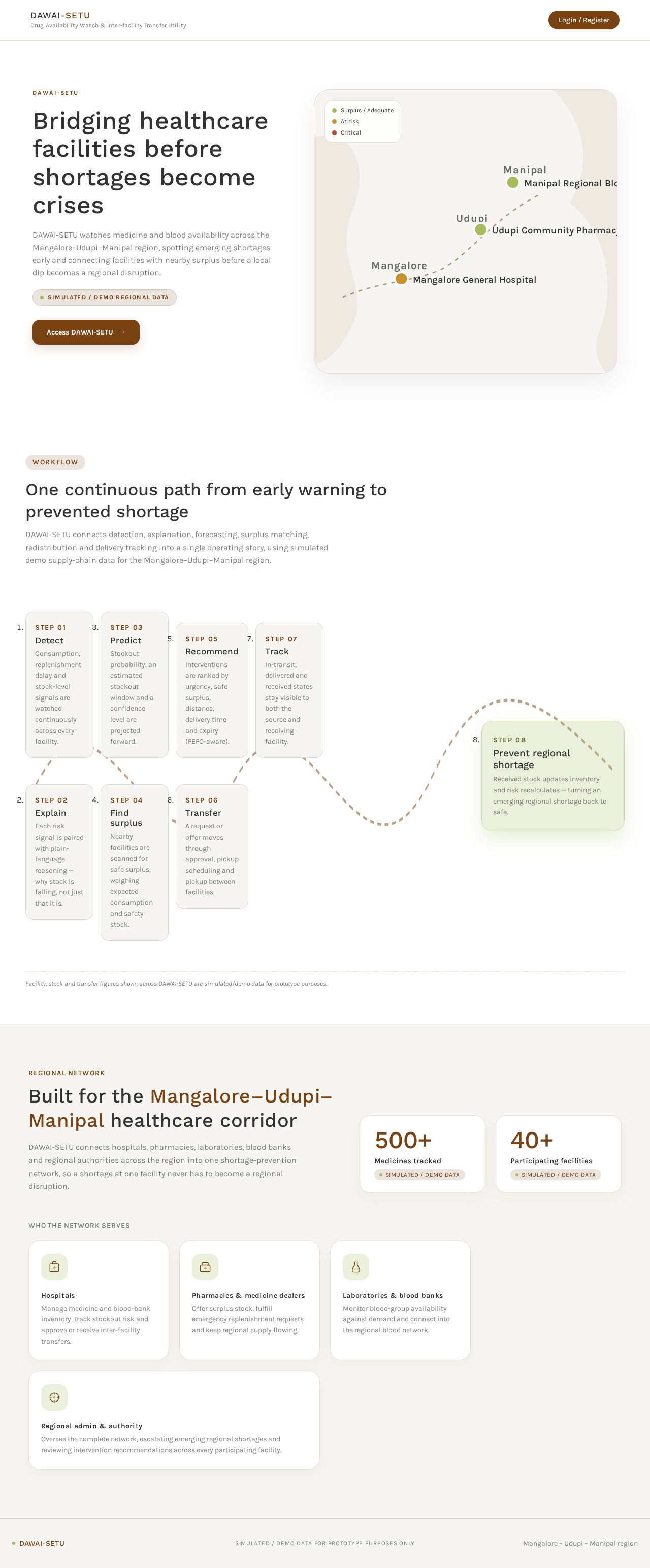
Bridging healthcare facilities before shortages become crises
DAWAI-SETU watches medicine and blood availability across the Mangalore–Udupi–Manipal region, spotting emerging shortages early and connecting facilities with nearby surplus before a local dip becomes a regional disruption.
Simulated / demo regional dataOne continuous path from early warning to prevented shortage
DAWAI-SETU connects detection, explanation, forecasting, surplus matching, redistribution and delivery tracking into a single operating story, using simulated demo supply-chain data for the Mangalore–Udupi–Manipal region.
- Step 01
Detect
Consumption, replenishment delay and stock-level signals are watched continuously across every facility.
- Step 02
Explain
Each risk signal is paired with plain-language reasoning — why stock is falling, not just that it is.
- Step 03
Predict
Stockout probability, an estimated stockout window and a confidence level are projected forward.
- Step 04
Find surplus
Nearby facilities are scanned for safe surplus, weighing expected consumption and safety stock.
- Step 05
Recommend
Interventions are ranked by urgency, safe surplus, distance, delivery time and expiry (FEFO-aware).
- Step 06
Transfer
A request or offer moves through approval, pickup scheduling and pickup between facilities.
- Step 07
Track
In-transit, delivered and received states stay visible to both the source and receiving facility.
- Step 08
Prevent regional shortage
Received stock updates inventory and risk recalculates — turning an emerging regional shortage back to safe.
Facility, stock and transfer figures shown across DAWAI-SETU are simulated/demo data for prototype purposes.
Regional network
Built for the Mangalore–Udupi–Manipal healthcare corridor
DAWAI-SETU connects hospitals, pharmacies, laboratories, blood banks and regional authorities across the region into one shortage-prevention network, so a shortage at one facility never has to become a regional disruption.
Who the network serves
Hospitals
Manage medicine and blood-bank inventory, track stockout risk and approve or receive inter-facility transfers.
Pharmacies & medicine dealers
Offer surplus stock, fulfill emergency replenishment requests and keep regional supply flowing.
Laboratories & blood banks
Monitor blood-group availability against demand and connect into the regional blood network.
Regional admin & authority
Oversee the complete network, escalating emerging regional shortages and reviewing intervention recommendations across every participating facility.
Bridging healthcare facilities before shortages become crises
DAWAI-SETU watches medicine and blood availability across the Mangalore–Udupi–Manipal region, spotting emerging shortages early and connecting facilities with nearby surplus before a local dip becomes a regional disruption.
Simulated / demo regional dataOne continuous path from early warning to prevented shortage
DAWAI-SETU connects detection, explanation, forecasting, surplus matching, redistribution and delivery tracking into a single operating story, using simulated demo supply-chain data for the Mangalore–Udupi–Manipal region.
- Step 01
Detect
Consumption, replenishment delay and stock-level signals are watched continuously across every facility.
- Step 02
Explain
Each risk signal is paired with plain-language reasoning — why stock is falling, not just that it is.
- Step 03
Predict
Stockout probability, an estimated stockout window and a confidence level are projected forward.
- Step 04
Find surplus
Nearby facilities are scanned for safe surplus, weighing expected consumption and safety stock.
- Step 05
Recommend
Interventions are ranked by urgency, safe surplus, distance, delivery time and expiry (FEFO-aware).
- Step 06
Transfer
A request or offer moves through approval, pickup scheduling and pickup between facilities.
- Step 07
Track
In-transit, delivered and received states stay visible to both the source and receiving facility.
- Step 08
Prevent regional shortage
Received stock updates inventory and risk recalculates — turning an emerging regional shortage back to safe.
Facility, stock and transfer figures shown across DAWAI-SETU are simulated/demo data for prototype purposes.
Regional network
Built for the Mangalore–Udupi–Manipal healthcare corridor
DAWAI-SETU connects hospitals, pharmacies, laboratories, blood banks and regional authorities across the region into one shortage-prevention network, so a shortage at one facility never has to become a regional disruption.
Who the network serves
Hospitals
Manage medicine and blood-bank inventory, track stockout risk and approve or receive inter-facility transfers.
Pharmacies & medicine dealers
Offer surplus stock, fulfill emergency replenishment requests and keep regional supply flowing.
Laboratories & blood banks
Monitor blood-group availability against demand and connect into the regional blood network.
Regional admin & authority
Oversee the complete network, escalating emerging regional shortages and reviewing intervention recommendations across every participating facility.
No comments yet. Be the first!