dar-ul-sehat
 Baba Boi
7. Staff Login and Permissions Section - Create a secure login system for all clinic staff members. - Each staff member should have a unique username and password. - The administrator should be able to create, edit, deactivate, and manage staff accounts. - Assign different roles and permissions to staff members based on their responsibilities. - Include the following user roles: - Admin/Owner: Full access to all sections, settings, staff accounts, permissions, financial records, and reports. - Receptionist: Access to patient registration, patient records, and appointment management. - Doctor: Access to assigned patient records, medical history, prescriptions, treatment details, and appointments. - Pharmacist/Inventory Manager: Access to medicine inventory, stock management, medicine purchases, and sales. - Accountant: Access to the finance section, expenses, doctor payments, salaries, and financial reports. - Staff Member: Limited access to assigned tasks and permitted sections. - Allow the administrator to customize permissions for each staff member, including viewing, adding, editing, and deleting records. - Restrict access to sensitive information, especially patient medical records, salaries, and financial transactions. - Ensure staff members can only access the sections and information permitted by their assigned roles. - Maintain a login history showing the staff member, login time, and account activity where appropriate. - Automatically log out inactive users after a specified period. - Allow the administrator to reset passwords, revoke access, and deactivate accounts when staff members leave the clinic. - Record important actions, such as changes to patient records, medicine stock, and financial transactions, in an activity log for accountability. - Protect passwords and sensitive information using appropriate security measures. - Ensure that staff members cannot change their own permissions or access administrator-only settings unless explicitly authorized. Make it offline but I should be able to take backup locally and on my Google drive also and should be able to restore it using that backyp

Comments (0)
Sign in to leave a comment
Project Tasks
27 planning tasksGenerate system requirement document
Generate personas & user flows
Create flow for Admin/Owner
Create flow for Receptionist
Create flow for Doctor
Create flow for Pharmacist/Inventory Manager
Create flow for Accountant
Create flow for Staff Member
Landing
Fix Landing review findings: Desktop content grid collapses the backup panel to a… (+1 more)
Landing / Navigation
Landing / Hero
Landing / Role Strip
Landing / Offline Backup Panel
Landing / Sign In Entry
Landing / Footer
Fix Landing: Desktop content grid collapses the backup panel to a narrow sliver and hides the role…
Fix Landing: The desktop grid assigns the role strip and backup panel equal-width tracks with , but…
Navigation
Footer
Staff Login and Permissions
Staff Accounts
Login History
Activity Log
Backup & Restore
Architecture
Workspace task plan
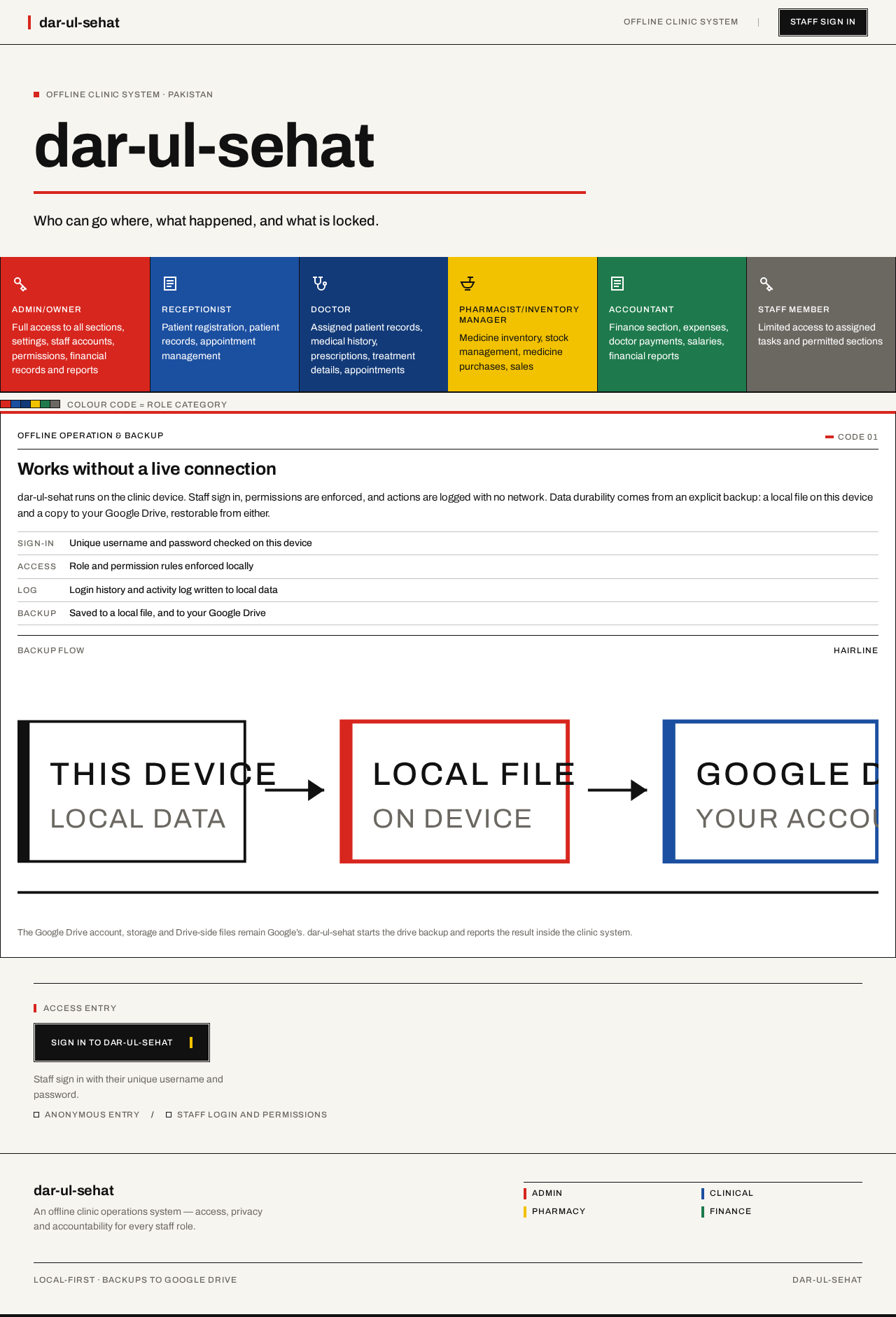
Offline Clinic System · Pakistan
dar-ul-sehat
Who can go where, what happened, and what is locked.
Staff roles and the sections each may reach
- Admin/Owner
Full access to all sections, settings, staff accounts, permissions, financial records and reports
- Receptionist
Patient registration, patient records, appointment management
- Doctor
Assigned patient records, medical history, prescriptions, treatment details, appointments
- Pharmacist/Inventory Manager
Medicine inventory, stock management, medicine purchases, sales
- Accountant
Finance section, expenses, doctor payments, salaries, financial reports
- Staff Member
Limited access to assigned tasks and permitted sections
Colour code = role category
Offline Clinic System · Pakistan
dar-ul-sehat
Who can go where, what happened, and what is locked.
Staff roles and the sections each may reach
- Admin/Owner
Full access to all sections, settings, staff accounts, permissions, financial records and reports
- Receptionist
Patient registration, patient records, appointment management
- Doctor
Assigned patient records, medical history, prescriptions, treatment details, appointments
- Pharmacist/Inventory Manager
Medicine inventory, stock management, medicine purchases, sales
- Accountant
Finance section, expenses, doctor payments, salaries, financial reports
- Staff Member
Limited access to assigned tasks and permitted sections
Colour code = role category
No comments yet. Be the first!