dar-ul-sehat
 Baba Boi
7. Staff Login and Permissions Section - Create a secure login system for all clinic staff members. - Each staff member should have a unique username and password. - The administrator should be able to create, edit, deactivate, and manage staff accounts. - Assign different roles and permissions to staff members based on their responsibilities. - Include the following user roles: - Admin/Owner: Full access to all sections, settings, staff accounts, permissions, financial records, and reports. - Receptionist: Access to patient registration, patient records, and appointment management. - Doctor: Access to assigned patient records, medical history, prescriptions, treatment details, and appointments. - Pharmacist/Inventory Manager: Access to medicine inventory, stock management, medicine purchases, and sales. - Accountant: Access to the finance section, expenses, doctor payments, salaries, and financial reports. - Staff Member: Limited access to assigned tasks and permitted sections. - Allow the administrator to customize permissions for each staff member, including viewing, adding, editing, and deleting records. - Restrict access to sensitive information, especially patient medical records, salaries, and financial transactions. - Ensure staff members can only access the sections and information permitted by their assigned roles. - Maintain a login history showing the staff member, login time, and account activity where appropriate. - Automatically log out inactive users after a specified period. - Allow the administrator to reset passwords, revoke access, and deactivate accounts when staff members leave the clinic. - Record important actions, such as changes to patient records, medicine stock, and financial transactions, in an activity log for accountability. - Protect passwords and sensitive information using appropriate security measures. - Ensure that staff members cannot change their own permissions or access administrator-only settings unless explicitly authorized. Make it offline but I should be able to take backup locally and on my Google drive also and should be able to restore it using that backyp

Comments (0)
Sign in to leave a comment
System Requirements
System Requirements Document for dar-ul-sehat
1. Introduction
dar-ul-sehat is an offline-first clinic operations system for a Pakistani clinic. Its defining concern is not clinical record-keeping alone but who may go where, what happened, and what is locked: a secure staff login system, role- and permission-scoped access to clinic sections, administrator control over staff accounts and permissions, accountability through login history and an activity log, and local plus Google Drive backup and restore of the clinic's data.
This document is the System Requirements Document for dar-ul-sehat. It specifies the staff login and permissions capability in full — the secure login surface, the six staff roles, per-staff permission customization, restriction of sensitive information, login history, automatic inactivity logout, administrator account management (create, edit, deactivate, reset password, revoke access), the activity log, and password/sensitive-data protection — together with the offline operating constraint and the local and Google Drive backup and restore capability.
The audience is the clinic's own staff: the Admin/Owner who provisions and governs access, and the Receptionist, Doctor, Pharmacist/Inventory Manager, Accountant, and Staff Member who work inside the sections their roles permit.
2. System Overview
dar-ul-sehat runs as an offline clinic system. All staff work is performed against locally held data; the system does not depend on a live network connection to operate. Data durability is provided by explicit backup: a local backup on the device and a backup to the user's Google Drive, with restoration from a backup.
Access is application-owned. Every staff member has a unique username and password. The Admin/Owner provisions staff accounts, assigns one of six roles, and customizes per-staff permissions covering viewing, adding, editing, and deleting records. Staff members sign in through a secure login surface and can reach only the sections and information their assigned role and customized permissions allow. Sensitive information — patient medical records, salaries, and financial transactions — is restricted. Staff cannot change their own permissions or reach administrator-only settings unless explicitly authorized. Inactive users are logged out automatically after a specified period. Login history records the staff member, login time, and account activity where appropriate, and an activity log records important actions such as changes to patient records, medicine stock, and financial transactions.
The current delivery comprises six surfaces: an anonymous Landing surface, the Staff Login and Permissions surface, and four administrator-restricted surfaces — Staff Accounts, Login History, Activity Log, and Backup & Restore.
Removed from scope
- None. No concept from the authoritative requirement thread has been removed.
2a. Product Interpretation and Delivery Boundary
dar-ul-sehat is delivered as a first-party application with application-owned identity. The Landing surface is reachable anonymously and explains the offline clinic system and its staff roles before identity is established. The Staff Login and Permissions surface is also reachable anonymously so that a staff member can present credentials; protected clinic state remains unavailable until identity is established. Staff Accounts, Login History, Activity Log, and Backup & Restore are administrator-restricted surfaces and are reachable only by an authenticated Admin/Owner.
The system is offline: clinic operation, sign-in, permission enforcement, logging, and backup creation do not require a live connection. The Google Drive backup destination is an external provider surface owned by Google; dar-ul-sehat initiates the backup to the user's Google Drive and reports its outcome, but the Drive account, storage, and Drive-side file management remain Google's. Restoration is performed inside dar-ul-sehat from a chosen backup.
Everything described in this document is current. No future-horizon capabilities are specified.
2c. Page Content and Component Coverage
Landing
- Information/state: Anonymous entry. States the product as an offline clinic management system and presents the six staff roles — Admin/Owner, Receptionist, Doctor, Pharmacist/Inventory Manager, Accountant, Staff Member — with the scope each role covers. No clinic data, no staff data, no counts of real records.
- Primary action: Proceed to the Staff Login and Permissions surface to sign in.
- Supporting actions: Read role descriptions; read the offline and backup explanation.
- Domain entities: Role (name, scope description); product description.
- Component responsibilities: Role strip presenting the six roles as equal coded blocks with role name in uppercase label type; offline/backup explanation block; entry control to sign-in.
- States: Loading — static content, no data fetch. Empty — not applicable. Success — role strip and entry control rendered. Error — not applicable. Recovery — if the entry control is used without a reachable sign-in surface, the user is returned to Landing with the sign-in entry still available.
Staff Login and Permissions
- Information/state: Anonymous credential entry (unique username, password). After successful authentication: the signed-in staff member's identity, their role, their effective permissions, and a live inactivity countdown. Access state: anonymous before sign-in; authenticated and role/permission-scoped after sign-in.
- Primary action: Sign in with username and password.
- Supporting actions: Sign out; observe the inactivity countdown; observe which sections are available versus locked under the current role and permissions.
- Domain entities: Staff account (username, password credential, role, active/inactive status, per-staff permissions); session (staff member, start time, inactivity deadline); permission (section, view/add/edit/delete).
- Component responsibilities: Credential form; authentication check against staff accounts; session establishment; role and permission resolution that determines reachable sections; inactivity timer that ends the session at the specified period; sign-out control; locked-section indication.
- States: Loading — credential submission in progress. Empty — no credentials entered. Success — session established, permitted sections reachable, countdown running. Error — invalid username or password, deactivated account, or revoked access: sign-in refused with a clear message and no session created. Recovery — re-enter credentials; after automatic inactivity logout, return to the credential form and sign in again.
Staff Accounts
- Information/state: Administrator-restricted. The roster of staff accounts with username, role, active/inactive status, and per-staff permissions across viewing, adding, editing, and deleting records. Access state: authenticated Admin/Owner only.
- Primary action: Create a staff account with a unique username, password, and role.
- Supporting actions: Edit a staff account; assign or change role; customize per-staff permissions for viewing, adding, editing, and deleting records; reset a staff member's password; revoke access; deactivate an account when a staff member leaves the clinic.
- Domain entities: Staff account; role (Admin/Owner, Receptionist, Doctor, Pharmacist/Inventory Manager, Accountant, Staff Member); permission set; account status.
- Component responsibilities: Account list; account create/edit form; role assignment control; permission matrix per staff member; password reset control; revoke-access control; deactivate control; uniqueness validation on username.
- States: Loading — roster retrieval. Empty — no staff accounts beyond the administrator: prompt to create the first account. Success — account created/edited/deactivated/revoked and reflected in the roster and in the permission matrix. Error — duplicate username rejected; missing required account fields rejected; operation on a non-existent account reported. Recovery — correct the input and resubmit; a failed operation leaves the prior account state intact.
Login History
- Information/state: Administrator-restricted. A record of staff sign-ins showing the staff member, login time, and account activity where appropriate. Access state: authenticated Admin/Owner only.
- Primary action: Review login history entries.
- Supporting actions: Read the staff member, login time, and associated account activity for each entry.
- Domain entities: Login history entry (staff member, login time, account activity).
- Component responsibilities: Ruled ledger of entries with timestamps; staff member identification; activity annotation.
- States: Loading — history retrieval. Empty — no sign-ins recorded yet: explicit empty statement. Success — entries listed in ruled rows. Error — retrieval failure reported without altering stored history. Recovery — retry retrieval.
Activity Log
- Information/state: Administrator-restricted. A record of important actions, including changes to patient records, medicine stock, and financial transactions, for accountability. Access state: authenticated Admin/Owner only.
- Primary action: Review recorded important actions.
- Supporting actions: Read the action, the acting staff member, and the time of each entry.
- Domain entities: Activity log entry (action, affected record category, acting staff member, timestamp).
- Component responsibilities: Ruled ledger of entries; action description; actor identification; timestamp.
- States: Loading — log retrieval. Empty — no important actions recorded yet: explicit empty statement. Success — entries listed in ruled rows. Error — retrieval failure reported without altering stored log. Recovery — retry retrieval.
Backup & Restore
- Information/state: Administrator-restricted. Backup status for two destinations — this device (local) and Google Drive — with the last-backup timestamp for each, and the restore entry point. Access state: authenticated Admin/Owner only.
- Primary action: Create a local backup on this device.
- Supporting actions: Create a backup to Google Drive; restore data from a backup; read last-backup timestamps.
- Domain entities: Backup (destination, creation time, contents of system data); restore operation (source backup, outcome).
- Component responsibilities: Two-column local/Google Drive backup panel; backup initiation per destination; last-backup timestamp display; restore control with backup selection; outcome reporting.
- States: Loading — backup or restore in progress. Empty — no backup taken yet for a destination: explicit statement and prompt to create one. Success — backup created and timestamp updated; restore completed and data replaced from the chosen backup. Error — local write failure, Google Drive unavailable or unauthorized, or invalid/unreadable backup reported with the failure reason and no partial replacement of data. Recovery — retry the backup; choose a different backup for restore; the pre-restore data remains intact when a restore fails.
3. Functional Requirements
FR-1 — Secure staff login. As a staff member, I should sign in to dar-ul-sehat with my unique username and password so that I reach the clinic system under my own identity. (explicit)
- Trigger/input: username and password entered on the Staff Login and Permissions surface.
- Observable result: an authenticated session bound to that staff account; permitted sections become reachable.
- Access state: anonymous entry permitted on the login surface; clinic state unavailable until authenticated.
- Failure/recovery: invalid credentials, a deactivated account, or revoked access refuse sign-in with a clear message and create no session; the staff member re-enters credentials.
- Continuation: the staff member proceeds into the sections their role and permissions allow.
FR-2 — Unique username and password per staff member. As the system, I should ensure each staff member has a unique username and a password so that identities are unambiguous. (explicit)
- Trigger/input: account creation or edit by the administrator.
- Observable result: a username that is not already held by another staff account is accepted; a duplicate is rejected.
- Failure/recovery: duplicate username rejected with a clear message; the administrator supplies a different username.
- Continuation: the account is saved and appears in the staff roster.
FR-3 — Administrator manages staff accounts. As an Admin/Owner, I should create, edit, deactivate, and manage staff accounts so that the clinic's staff roster reflects reality. (explicit)
- Trigger/input: account details entered on Staff Accounts.
- Observable result: the account is created, updated, or deactivated and the roster reflects the new state.
- Access state: administrator-restricted.
- Failure/recovery: invalid or incomplete account details are rejected and the prior account state is preserved.
- Continuation: the administrator continues managing other accounts or moves to permission assignment.
FR-4 — Role assignment. As an Admin/Owner, I should assign a role to each staff member based on their responsibilities so that access matches the work they do. (explicit)
- Trigger/input: role selection for a staff account.
- Observable result: the staff account carries the assigned role, and that role's section scope governs what the staff member can reach.
- Failure/recovery: an unassigned or invalid role is rejected; the previous role remains in effect.
- Continuation: the administrator customizes permissions or leaves the role defaults in place.
FR-5 — Supported roles. As the system, I should support exactly the roles Admin/Owner, Receptionist, Doctor, Pharmacist/Inventory Manager, Accountant, and Staff Member so that responsibilities map to defined scopes. (explicit)
- Observable result: each staff account holds one of these six roles.
- Continuation: role scope determines reachable sections, subject to per-staff customization.
FR-6 — Admin/Owner full access. As an Admin/Owner, I should have full access to all sections, settings, staff accounts, permissions, financial records, and reports so that I can run and govern the clinic. (explicit)
- Observable result: every section, setting, staff account, permission control, financial record, and report is reachable.
- Continuation: the administrator provisions staff, reviews logs, and manages backups.
FR-7 — Receptionist access. As a Receptionist, I should have access to patient registration, patient records, and appointment management so that I can handle front-desk work. (explicit)
- Observable result: patient registration, patient records, and appointment management are reachable; sections outside this scope are not.
- Failure/recovery: an attempt to reach a section outside the permitted scope is refused and the permitted scope remains available.
- Continuation: the receptionist continues front-desk work within scope.
FR-8 — Doctor access. As a Doctor, I should have access to my assigned patient records, medical history, prescriptions, treatment details, and appointments so that I can document care for my patients. (explicit)
- Observable result: assigned patient records, medical history, prescriptions, treatment details, and appointments are reachable; records of patients not assigned to me and financial data are not.
- Failure/recovery: an attempt to reach an unassigned patient record or a restricted section is refused.
- Continuation: the doctor continues documenting care for assigned patients.
FR-9 — Pharmacist/Inventory Manager access. As a Pharmacist/Inventory Manager, I should have access to medicine inventory, stock management, medicine purchases, and sales so that I can keep stock accurate and record purchases and sales. (explicit)
- Observable result: medicine inventory, stock management, medicine purchases, and sales are reachable; changes are captured in the activity log.
- Failure/recovery: an attempt to reach a section outside this scope is refused.
- Continuation: the pharmacist continues inventory work within scope.
FR-10 — Accountant access. As an Accountant, I should have access to the finance section, expenses, doctor payments, salaries, and financial reports so that I can record and review financial transactions. (explicit)
- Observable result: the finance section, expenses, doctor payments, salaries, and financial reports are reachable; salary and financial data remain restricted to authorized staff.
- Failure/recovery: an attempt to reach a section outside this scope is refused.
- Continuation: the accountant continues financial work within scope.
FR-11 — Staff Member limited access. As a Staff Member, I should have limited access to my assigned tasks and permitted sections so that I can complete assigned work without exposure to restricted information. (explicit)
- Observable result: only assigned tasks and permitted sections are reachable.
- Failure/recovery: an attempt to reach a non-permitted section is refused.
- Continuation: the staff member continues assigned work within scope.
FR-12 — Per-staff permission customization. As an Admin/Owner, I should customize permissions for each staff member, including viewing, adding, editing, and deleting records, so that access is tuned to the individual. (explicit)
- Trigger/input: permission changes for a specific staff account across viewing, adding, editing, and deleting records.
- Observable result: the staff member's effective permissions change accordingly and their reachable sections and record operations follow.
- Access state: administrator-restricted.
- Failure/recovery: an invalid permission change is rejected and the previous permission set remains in effect.
- Continuation: the administrator reviews the resulting permission matrix or adjusts further.
FR-13 — Restrict sensitive information. As the system, I should restrict access to sensitive information — especially patient medical records, salaries, and financial transactions — so that only authorized staff reach it. (explicit)
- Observable result: staff without the relevant role or customized permission cannot reach patient medical records, salaries, or financial transactions.
- Failure/recovery: a refused attempt does not disclose the restricted content.
- Continuation: authorized staff continue their work in those areas.
FR-14 — Role-scoped access only. As the system, I should ensure staff members can only access the sections and information permitted by their assigned roles so that scope is enforced consistently. (explicit)
- Observable result: reachable sections and information are exactly those permitted by the staff member's role and customized permissions.
- Failure/recovery: out-of-scope access is refused.
- Continuation: the staff member continues within permitted scope.
FR-15 — Login history. As an Admin/Owner, I should review a login history showing the staff member, login time, and account activity where appropriate so that sign-in activity is accountable. (explicit)
- Trigger/input: opening Login History.
- Observable result: entries listing staff member, login time, and associated account activity where appropriate.
- Access state: administrator-restricted.
- Failure/recovery: a retrieval failure is reported without altering stored history; the administrator retries.
- Continuation: the administrator returns to staff management or the activity log.
FR-16 — Automatic inactivity logout. As the system, I should automatically log out inactive users after a specified period so that unattended sessions do not remain open. (explicit)
- Observable result: after the specified period of inactivity the session ends and protected sections become unreachable until sign-in again.
- Failure/recovery: the staff member returns to the credential form and signs in again.
- Continuation: work resumes under a new session.
FR-17 — Password reset, access revocation, deactivation. As an Admin/Owner, I should reset passwords, revoke access, and deactivate accounts when staff members leave the clinic so that departing or compromised access ends. (explicit)
- Trigger/input: reset, revoke, or deactivate action on a staff account.
- Observable result: the password is reset, access is revoked, or the account is deactivated, and the account's status reflects it.
- Access state: administrator-restricted.
- Failure/recovery: an operation on a non-existent account is reported; the prior account state is preserved.
- Continuation: the administrator confirms the roster state.
FR-18 — Activity log of important actions. As the system, I should record important actions — such as changes to patient records, medicine stock, and financial transactions — in an activity log for accountability. (explicit)
- Observable result: each such action produces an activity log entry identifying the action, the acting staff member, and the time.
- Continuation: the administrator reviews entries in Activity Log.
FR-19 — Protect passwords and sensitive information. As the system, I should protect passwords and sensitive information using appropriate security measures so that credentials and restricted data are not exposed. (explicit)
- Observable result: passwords are not stored or displayed in plain form; sensitive information is reachable only by authorized staff.
- Failure/recovery: an authentication or authorization check that fails denies access without disclosing the protected content.
- Continuation: authorized work proceeds normally.
FR-20 — No self-elevation. As the system, I should prevent staff members from changing their own permissions or accessing administrator-only settings unless explicitly authorized so that access control cannot be bypassed. (explicit)
- Observable result: a staff member cannot alter their own permission set and cannot reach administrator-only settings; only an explicitly authorized exception permits otherwise.
- Failure/recovery: the attempt is refused and the staff member's existing permissions are unchanged.
- Continuation: the staff member continues within their existing scope.
FR-21 — Offline operation. As a staff member, I should use dar-ul-sehat without a live network connection so that clinic work continues when connectivity is unavailable. (explicit)
- Observable result: sign-in, permission enforcement, logging, and backup creation to the local device operate without a live connection.
- Failure/recovery: a Google Drive backup attempted while the provider is unreachable reports the failure and leaves local data intact.
- Continuation: work continues offline; the Google Drive backup can be retried.
FR-22 — Local backup. As an Admin/Owner, I should take a backup locally on this device so that the clinic's data can be preserved on site. (explicit)
- Trigger/input: local backup action on Backup & Restore.
- Observable result: a local backup is created and the last-backup timestamp for this device is updated.
- Access state: administrator-restricted.
- Failure/recovery: a local write failure is reported and existing data is unchanged; the administrator retries.
- Continuation: the administrator proceeds to a Google Drive backup or returns to clinic work.
FR-23 — Google Drive backup. As an Admin/Owner, I should take a backup to my Google Drive so that a copy of the clinic's data exists off the device. (explicit)
- Trigger/input: Google Drive backup action on Backup & Restore.
- Observable result: a backup is delivered to the user's Google Drive and the Google Drive last-backup timestamp is updated.
- Access state: administrator-restricted; the Drive account and storage are owned by Google.
- Failure/recovery: an unavailable or unauthorized Google Drive connection is reported with the reason and local data is unchanged; the administrator retries.
- Continuation: the administrator confirms the backup status.
FR-24 — Restore from backup. As an Admin/Owner, I should restore data from a backup so that the clinic's data can be recovered. (explicit)
- Trigger/input: selection of a backup and confirmation of restore on Backup & Restore.
- Observable result: system data is replaced from the chosen backup and the restored state is reported.
- Access state: administrator-restricted.
- Failure/recovery: an invalid or unreadable backup is reported and the pre-restore data remains intact; the administrator selects another backup.
- Continuation: the administrator verifies the restored data and resumes clinic work.
FR-25 — Administrator provisions accounts with roles and permissions. As an Admin/Owner, I should provision staff accounts with unique usernames and passwords and assign roles and permissions so that a staff member can begin work. (required_inference)
- Trigger/input: account creation followed by role assignment and permission customization.
- Observable result: the staff account exists, is active, carries a role, and has an effective permission set.
- Continuation: the staff member signs in for the first time.
FR-26 — Returning staff verification. As a staff member, I should verify my identity on the secure login surface on each return so that my session is bound to me. (required_inference)
- Trigger/input: username and password on the Staff Login and Permissions surface.
- Observable result: a session bound to the correct staff account, with that account's role and permissions applied.
- Failure/recovery: failed verification returns to the credential form without a session.
- Continuation: the staff member proceeds into permitted sections.
FR-27 — Inactivity session termination. As the system, I should end a session after the specified inactivity period so that the staff member must verify identity again. (required_inference)
- Observable result: the session ends and protected sections become unreachable.
- Continuation: the staff member signs in again.
FR-28 — Role- and permission-based restriction of sections and sensitive records. As the system, I should restrict sections and sensitive records according to role and customized permissions so that scope is enforced at the point of access. (required_inference)
- Observable result: only permitted sections and records are reachable; restricted ones are refused.
- Continuation: the staff member continues within scope.
FR-29 — Administrator-only access to governance surfaces. As an Admin/Owner, I should be the only role able to reach Staff Accounts, Login History, Activity Log, and Backup & Restore so that governance and recovery remain controlled. (required_inference)
- Observable result: those four surfaces are reachable only by an authenticated Admin/Owner.
- Failure/recovery: a non-administrator attempt is refused.
- Continuation: the administrator performs governance work.
4. User Personas
Admin/Owner
- Product context: The clinic's owner-operator. Holds full access to all sections, settings, staff accounts, permissions, financial records, and reports, and is the only role that governs access and recovery.
- Primary goal: Keep staff access correctly provisioned and sensitive records protected, while retaining full command of the clinic's operations.
- Distinct responsibilities: Creates, edits, deactivates, and manages staff accounts; assigns roles; customizes per-staff permissions across viewing, adding, editing, and deleting records; resets passwords, revokes access, and deactivates accounts when staff leave; reviews login history and the activity log; takes local and Google Drive backups and restores from backup.
- Inputs and decisions: Which role fits each staff member's responsibilities; which record operations each staff member may perform; when to reset, revoke, or deactivate; which backup to restore from.
- Interactions with other participants: Provisions every other role's access and can end it; is the audience for the accountability records produced by all staff activity.
- Observable success: Staff access matches responsibilities, restricted information stays restricted, accountability records are reviewable, and a usable backup exists locally and on Google Drive.
Receptionist
- Product context: Front-desk staff working within a role scope of patient registration, patient records, and appointment management.
- Primary goal: Register patients and manage appointments without reaching restricted medical or financial data.
- Distinct responsibilities: Patient registration, working with patient records, and appointment management — and nothing outside that scope.
- Inputs and decisions: Patient details at registration; appointment scheduling decisions.
- Interactions with other participants: Signs in under an account provisioned by the Admin/Owner; works alongside Doctors whose appointments are managed; cannot change their own permissions or reach administrator-only settings.
- Observable success: Patients are registered and appointments managed while restricted medical and financial data remain unreachable.
Doctor
- Product context: Clinical staff working with assigned patient records, medical history, prescriptions, treatment details, and appointments.
- Primary goal: Document care for assigned patients accurately while other patients' records and financial data stay restricted.
- Distinct responsibilities: Reviewing assigned patient records and medical history; recording prescriptions and treatment details; working with appointments.
- Inputs and decisions: Clinical findings, prescriptions, and treatment decisions for assigned patients.
- Interactions with other participants: Signs in under an account provisioned by the Admin/Owner; sees only patients assigned to them; their record changes are captured in the activity log.
- Observable success: Treatment details and prescriptions are recorded for assigned patients, and unassigned records and financial data remain inaccessible.
Pharmacist/Inventory Manager
- Product context: Pharmacy and stock staff working with medicine inventory, stock management, medicine purchases, and sales.
- Primary goal: Keep inventory and stock records current and traceable.
- Distinct responsibilities: Maintaining medicine inventory; managing stock; recording medicine purchases and sales.
- Inputs and decisions: Stock movements, purchase records, and sales records.
- Interactions with other participants: Signs in under an account provisioned by the Admin/Owner; stock changes are captured in the activity log for the Admin/Owner's review.
- Observable success: Inventory and stock records stay accurate and every change is traceable in the activity log.
Accountant
- Product context: Finance staff working in the finance section with expenses, doctor payments, salaries, and financial reports.
- Primary goal: Keep financial records and reports accurate and accountable while salary and financial data stay restricted to authorized staff.
- Distinct responsibilities: Recording and reviewing expenses, doctor payments, salaries, and financial reports.
- Inputs and decisions: Expense entries, payment records, salary records, and report review.
- Interactions with other participants: Signs in under an account provisioned by the Admin/Owner; financial transaction changes are captured in the activity log.
- Observable success: Financial records and reports are accurate, and salary and financial data are reachable only by authorized staff.
Staff Member
- Product context: General clinic staff with limited access to assigned tasks and permitted sections only.
- Primary goal: Complete assigned tasks without exposure to restricted information.
- Distinct responsibilities: Working assigned tasks and the sections their role and customized permissions permit.
- Inputs and decisions: Task work within permitted sections.
- Interactions with other participants: Signs in with a unique username and password; is logged out automatically after inactivity; can only reach sections allowed by their assigned role and customized permissions; cannot change their own permissions.
- Observable success: Assigned tasks are completed and restricted information is never exposed.
5. Core User Flows
Flow A — Admin/Owner provisions a staff account
- The Admin/Owner signs in on the Staff Login and Permissions surface with their username and password and lands in an authenticated session.
- The Admin/Owner opens Staff Accounts (administrator-restricted).
- The Admin/Owner creates a staff account, entering a unique username and a password. A duplicate username is rejected with a clear message and the Admin/Owner supplies a different one.
- The Admin/Owner assigns one of the six roles — Admin/Owner, Receptionist, Doctor, Pharmacist/Inventory Manager, Accountant, or Staff Member — based on the staff member's responsibilities.
- The Admin/Owner customizes that staff member's permissions for viewing, adding, editing, and deleting records.
- The account is saved and appears in the roster with its role, active status, and permission set. Observable result: the staff member can now sign in with the scope the Admin/Owner defined.
- Continuation: the Admin/Owner provisions further accounts or moves to reviewing login history and the activity log.
Flow B — Staff member signs in and works within scope
- The staff member opens the Landing surface anonymously and proceeds to the Staff Login and Permissions surface.
- The staff member enters their unique username and password.
- On valid credentials, a session is established bound to that staff account; the role and customized permissions resolve which sections are reachable, and the inactivity countdown begins.
- The staff member works in their permitted sections — for example a Receptionist in patient registration, patient records, and appointment management; a Doctor in assigned patient records, medical history, prescriptions, treatment details, and appointments; a Pharmacist/Inventory Manager in medicine inventory, stock management, medicine purchases, and sales; an Accountant in the finance section, expenses, doctor payments, salaries, and financial reports; a Staff Member in assigned tasks and permitted sections.
- Failure/recovery: invalid credentials, a deactivated account, or revoked access refuse sign-in with a clear message and create no session; the staff member re-enters credentials. An attempt to reach a section outside the permitted scope is refused and the permitted scope remains available.
- Continuation: the staff member signs out, or the session ends automatically after the specified inactivity period and the staff member signs in again.
Flow C — Automatic inactivity logout
- A signed-in staff member stops interacting with the system.
- The inactivity countdown reaches the specified period.
- The session ends automatically and protected sections become unreachable. Observable result: the staff member is logged out.
- Recovery/continuation: the staff member returns to the credential form on the Staff Login and Permissions surface and signs in again to resume work.
Flow D — Admin/Owner customizes permissions and reviews the resulting access
- The Admin/Owner signs in and opens Staff Accounts.
- The Admin/Owner selects a staff account and adjusts its permissions for viewing, adding, editing, and deleting records.
- The change is saved and the staff member's effective permissions update. Observable result: the staff member's reachable sections and record operations follow the new permission set.
- Failure/recovery: an invalid permission change is rejected and the previous permission set remains in effect.
- Continuation: the Admin/Owner reviews the permission matrix and adjusts further or leaves it as set.
Flow E — Admin/Owner resets a password, revokes access, or deactivates an account
- The Admin/Owner signs in and opens Staff Accounts.
- The Admin/Owner selects the staff account and chooses to reset the password, revoke access, or deactivate the account when the staff member leaves the clinic.
- The operation completes and the account's status reflects it. Observable result: the reset password, revoked access, or deactivated account no longer permits the prior access.
- Failure/recovery: an operation on a non-existent account is reported and the prior account state is preserved.
- Continuation: the Admin/Owner confirms the roster state.
Flow F — Admin/Owner reviews login history
- The Admin/Owner signs in and opens Login History (administrator-restricted).
- The Admin/Owner reviews entries showing the staff member, login time, and account activity where appropriate.
- Failure/recovery: a retrieval failure is reported without altering stored history; the Admin/Owner retries.
- Continuation: the Admin/Owner returns to staff management or opens the Activity Log.
Flow G — Admin/Owner reviews the activity log
- The Admin/Owner signs in and opens Activity Log (administrator-restricted).
- The Admin/Owner reviews recorded important actions — changes to patient records, medicine stock, and financial transactions — with the acting staff member and time.
- Failure/recovery: a retrieval failure is reported without altering the stored log; the Admin/Owner retries.
- Continuation: the Admin/Owner returns to clinic governance work.
Flow H — Admin/Owner takes a local backup
- The Admin/Owner signs in and opens Backup & Restore (administrator-restricted).
- The Admin/Owner initiates a local backup on this device.
- The backup is created and the last-backup timestamp for this device updates. Observable result: a local backup exists.
- Failure/recovery: a local write failure is reported and existing data is unchanged; the Admin/Owner retries.
- Continuation: the Admin/Owner proceeds to a Google Drive backup or returns to clinic work.
Flow I — Admin/Owner takes a Google Drive backup
- The Admin/Owner signs in and opens Backup & Restore.
- The Admin/Owner initiates a backup to their Google Drive.
- The backup is delivered to the user's Google Drive and the Google Drive last-backup timestamp updates. Observable result: an off-device copy exists in the Admin/Owner's Drive.
- Failure/recovery: an unavailable or unauthorized Google Drive connection is reported with the reason and local data is unchanged; the Admin/Owner retries.
- Continuation: the Admin/Owner confirms the backup status.
Flow J — Admin/Owner restores from a backup
- The Admin/Owner signs in and opens Backup & Restore.
- The Admin/Owner selects a backup and confirms the restore.
- System data is replaced from the chosen backup and the restored state is reported. Observable result: the clinic's data reflects the backup.
- Failure/recovery: an invalid or unreadable backup is reported and the pre-restore data remains intact; the Admin/Owner selects another backup.
- Continuation: the Admin/Owner verifies the restored data and resumes clinic work.
Flow K — Staff member attempts an out-of-scope action
- A signed-in staff member attempts to reach a section or record outside their role and customized permissions — for example a Staff Member reaching for administrator-only settings, or any staff member attempting to change their own permissions.
- The system refuses the attempt without disclosing restricted content. Observable result: the staff member's existing permissions are unchanged and the restricted area remains unreachable.
- Continuation: the staff member continues within their existing scope.
6. Visuals Colors and Theme
Muse and headline: Massimo Vignelli — Wayfinding for the clinic: Vignelli-grade access control. Information design as public infrastructure: strict columns, colour-coded categories, Helvetica-grade hierarchy, zero ornament.
Mode: Light mode only.
Colour tokens (flat, never gradient):
| Role | Token | Hex |
|---|---|---|
| Page ground (warm paper, ~70% of page) | --bg | #F7F5F0 |
| Panels (pure white, ~20%) | --surface | #FFFFFF |
| Type | --text | #111111 |
| Admin / restricted | --primary | #D7261E |
| Accent (4px rules, tab underline, status chips only) | --accent | #F2C200 |
| Secondary metadata | --muted | #6B6862 |
| Clinical records | --clinical | #1B4FA0 |
| Pharmacy / inventory | --pharmacy | #F2C200 |
| Finance | --finance | #1E7A4C |
Accent yellow is never used as body text on white. Colour is always flat and coded to a fixed role; it is never decorative.
Typography: Headings and body both Archivo. Headings use two weights only — Archivo 700 for section heads and role names, Archivo 500 for labels set uppercase with 0.08em tracking. Flush-left, ragged-right, never centred. Modular scale 1.25: 12 / 14 / 16 / 20 / 25 / 31 / 39 / 49 / 61px. Hero display clamp(40px, 7vw, 88px); section heads 31–39px; role names 20px; labels 12px uppercase 0.08em; body 16px/1.55. Tabular numerals via font-feature-settings: 'tnum' for counts, timestamps, and IDs.
Shape language: Hard edges — 0px radius on panels, inputs, and buttons; 2px only on status chips. 1px black rules and 4px colour-coded rules are structural elements. Buttons are solid rectangles with a 1px inset border; toggles are square sliders. No shadows, no blurs, no rounded cards.
Layout: A visible 12-column grid with a persistent 240px left rail carrying the coded module map — Patients, Appointments, Pharmacy, Finance, Staff & Access, Activity Log, Backup — each module wearing a 4px coded rule matching the role that owns it. A top bar holds the clinic name, signed-in staff, role chip, and a live inactivity timer. Content is column-locked: permission matrices as tabular rule-separated rows, the activity log as a ruled ledger with monospace timestamps, the backup panel as a two-column local/Google Drive split. Section transitions are horizontal colour-rule wipes, not slides. All grids collapse to a single column at 375px with the rail becoming a horizontal scrollable coded tab strip.
Imagery: No photography, no illustration. Diagrams only — a role-permission matrix as a colour-coded grid, a login-history timeline as ruled ticks, a backup flow diagram (device → local file → Google Drive) in black hairlines with the four coded colours. Role pictograms as 24px geometric glyphs (stethoscope, mortar, ledger, key) in 2px stroke.
Readability constraint: Headlines, wordmarks, labels, numbers, and controls stay entirely inside the viewport and their container at 375px, 768px, and 1280px, wrapping or scaling to fit; nothing covers any part of them.
7. Signature Design Concept
The public entry is the Landing surface, composed as a transit map of who can go where rather than a marketing hero.
- First frame: the warm paper ground
#F7F5F0fills the viewport. Flush-left at the top, an Archivo 700 headline atclamp(40px, 7vw, 88px)names dar-ul-sehat as an offline clinic system. Directly beneath it, a 12-column role strip runs edge to edge of the content column: six equal blocks — Admin/Owner in#D7261E, Receptionist in#1B4FA0, Doctor in a darker clinical blue, Pharmacist/Inventory Manager in#F2C200, Accountant in#1E7A4C, Staff Member in#6B6862— each carrying the role name in 12px uppercase Archivo 500 with 0.08em tracking, separated by 1px black rules. - Right-hand ruled panel: a narrow column bounded by a 1px black rule explains the offline operation and the local-plus-Google-Drive backup model, with the backup flow drawn as a black-hairline diagram (device → local file → Google Drive).
- Entry control: a single solid black rectangle with a 1px inset border, flush-left beneath the role strip, leading to the Staff Login and Permissions surface. No centred headline, no hero subtext, no card grid, no button floating in the hero.
- Signature moves carried through the product: the coded role strip as persistent navigation; the permission matrix as a Vignelli transit map with filled coded dots for granted and open circles for denied permissions, legend in 12px uppercase; the activity log as a ruled ledger with monospace tabular timestamps; the backup panel as a two-column local/Google Drive diagram with restore as a single solid black rectangle; section headers as a 4px colour rule flush under a 31–39px flush-left Archivo 700 title with the module's code colour and a 12px uppercase label on the right.
8. Interaction Model & Motion Direction
Interaction Model: Static (direction) Motion Tempo: still Hero Dimensionality: flat
Landing Hero Motion Brief
- Focal subject: the six-block colour-coded role strip on the warm paper ground, read as a transit map of staff roles.
- Input → transformation → outcome thesis: as the pointer moves across a role block, that block's 4px coded rule draws left-to-right in 120ms linear, confirming the role's category; the outcome is a legible, colour-coded map of who can go where, with the entry control to sign-in unchanged and always available.
- Motion vocabulary: instant state changes with 120ms linear fades only; no bounce, no parallax, no decorative animation. The one purposeful motion is the 4px colour rule drawing left-to-right when a permission row is granted or revoked, and the same rule-draw confirms a role block on the Landing surface. The inactivity countdown ticks in tabular numerals.
- Composed first frame: paper ground, flush-left Archivo 700 headline, the six-block role strip edge to edge beneath it, the ruled offline/backup panel on the right, and the solid black entry rectangle flush-left below the strip.
- Reduced-motion state: all rule-draw transitions resolve instantly to their final state; the role strip, ruled panel, and entry control remain fully visible and usable with no motion.
9. Non-Functional Requirements
- Offline operation (explicit): the system must work offline. Sign-in, permission enforcement, logging, and local backup creation operate without a live network connection.
- Access enforcement (explicit): staff members can only access the sections and information permitted by their assigned roles; enforcement applies at the point of access, not only in navigation.
- Sensitive-information restriction (explicit): access to sensitive information — especially patient medical records, salaries, and financial transactions — must be restricted to authorized staff.
- No self-elevation (explicit): staff members cannot change their own permissions or access administrator-only settings unless explicitly authorized.
- Credential and data protection (explicit): passwords and sensitive information must be protected using appropriate security measures; passwords are not stored or displayed in plain form.
- Inactivity logout (explicit): inactive users must be automatically logged out after a specified period.
- Accountability records (explicit): login history records the staff member, login time, and account activity where appropriate; the activity log records important actions such as changes to patient records, medicine stock, and financial transactions.
- Backup durability (explicit): a local backup and a Google Drive backup can both be created, and data can be restored from a backup; a failed backup or restore leaves existing data intact.
- Readability (direction): readable text and controls stay whole and inside the viewport and their container at 375px, 768px, and 1280px.
10. Tech Stack
- Frontend: React web application implementing the six surfaces, the coded role strip navigation, the permission matrix, the ruled ledgers, and the two-column backup panel.
- Backend: Python/FastAPI service providing authentication, session and inactivity handling, role and permission enforcement, staff account management, login history, activity logging, and backup/restore orchestration.
- Storage: local durable storage on the device for clinic data, staff accounts, permissions, login history, activity log, and backup files, consistent with offline operation.
- Google Drive integration: outbound backup delivery to the user's Google Drive; the Drive account and storage remain Google-owned.
- Deployment: Docker/docker-compose for the application services on the clinic device.
11. Assumptions and Constraints
- Offline-first (explicit constraint): the system must work offline; only the Google Drive backup destination depends on an external connection.
- Application-owned identity (required_inference): staff identity, sessions, roles, and permissions are owned by dar-ul-sehat; the Landing and Staff Login and Permissions surfaces are anonymously reachable, and all other surfaces require an authenticated session.
- Administrator-restricted surfaces (required_inference): Staff Accounts, Login History, Activity Log, and Backup & Restore are reachable only by an authenticated Admin/Owner.
- Specified inactivity period (explicit, value unspecified): the automatic logout period is a specified period; the exact duration is not fixed by the source and is treated as a configurable setting.
- Explicit authorization exception (explicit): the prohibition on staff changing their own permissions or reaching administrator-only settings holds "unless explicitly authorized"; the source does not define that authorization path, so it is preserved as a qualified exception rather than resolved.
- Google Drive ownership (explicit boundary): the Drive account, storage, and Drive-side file management are Google's; dar-ul-sehat initiates the backup and reports the outcome.
- Role scope (explicit): the six roles and their stated section scopes are fixed; per-staff customization refines record operations within the administrator's control.
12. Glossary
- Admin/Owner: the role with full access to all sections, settings, staff accounts, permissions, financial records, and reports; the only role that governs access and recovery.
- Staff account: a staff member's identity in dar-ul-sehat, comprising a unique username, a password, a role, an active/inactive status, and a customized permission set.
- Role: one of Admin/Owner, Receptionist, Doctor, Pharmacist/Inventory Manager, Accountant, or Staff Member, defining a staff member's section scope.
- Permission: a per-staff grant covering viewing, adding, editing, or deleting records, customized by the administrator.
- Session: an authenticated period bound to a staff account, ended by sign-out or by the specified inactivity period.
- Inactivity logout: automatic termination of a session after the specified period without activity.
- Login history: the record of staff sign-ins showing the staff member, login time, and account activity where appropriate.
- Activity log: the record of important actions — such as changes to patient records, medicine stock, and financial transactions — kept for accountability.
- Local backup: a backup of system data written to this device.
- Google Drive backup: a backup of system data delivered to the user's Google Drive.
- Restore: replacement of system data from a chosen backup.
- Sensitive information: patient medical records, salaries, and financial transactions, restricted to authorized staff.
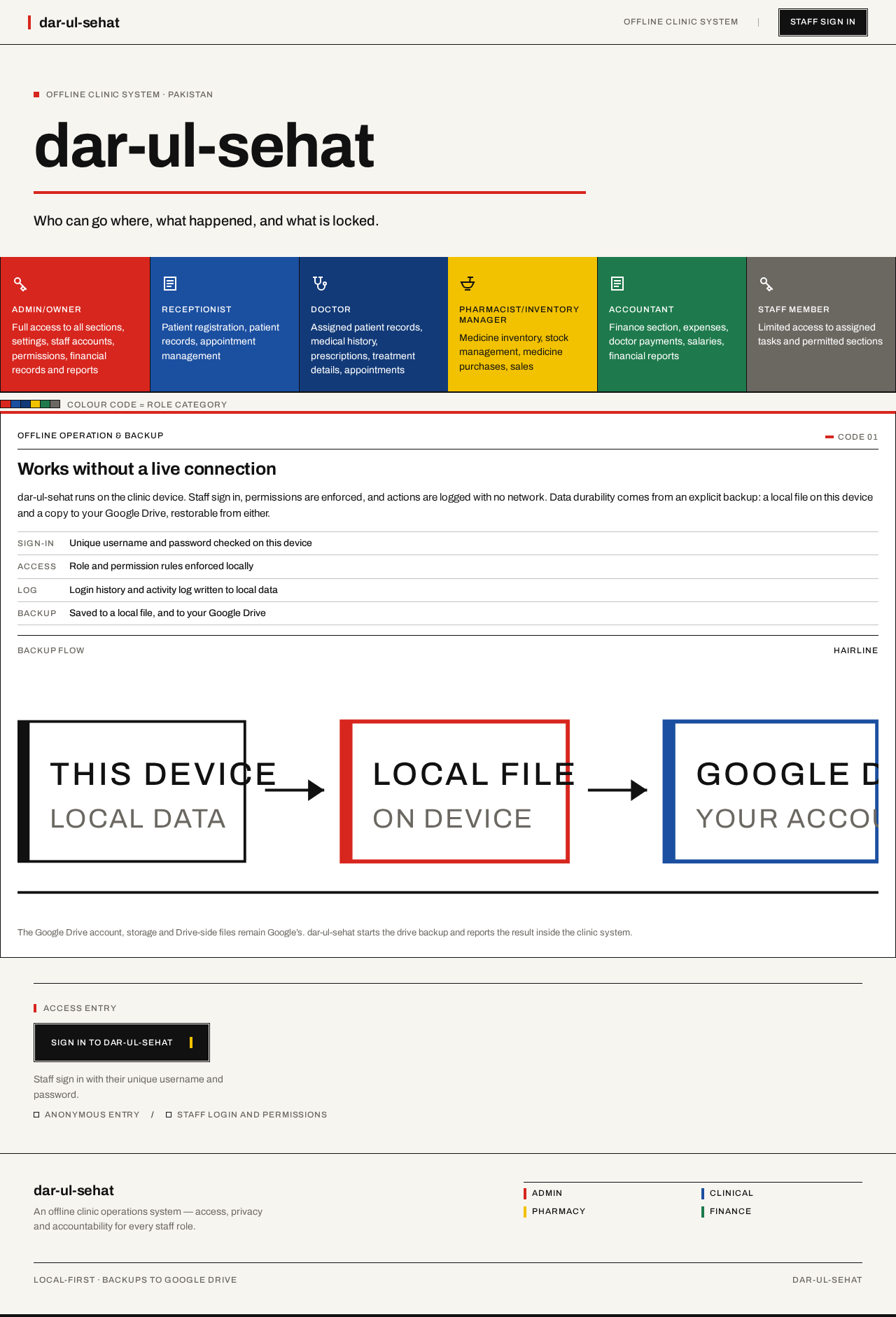
Offline Clinic System · Pakistan
dar-ul-sehat
Who can go where, what happened, and what is locked.
Staff roles and the sections each may reach
- Admin/Owner
Full access to all sections, settings, staff accounts, permissions, financial records and reports
- Receptionist
Patient registration, patient records, appointment management
- Doctor
Assigned patient records, medical history, prescriptions, treatment details, appointments
- Pharmacist/Inventory Manager
Medicine inventory, stock management, medicine purchases, sales
- Accountant
Finance section, expenses, doctor payments, salaries, financial reports
- Staff Member
Limited access to assigned tasks and permitted sections
Colour code = role category
Offline Clinic System · Pakistan
dar-ul-sehat
Who can go where, what happened, and what is locked.
Staff roles and the sections each may reach
- Admin/Owner
Full access to all sections, settings, staff accounts, permissions, financial records and reports
- Receptionist
Patient registration, patient records, appointment management
- Doctor
Assigned patient records, medical history, prescriptions, treatment details, appointments
- Pharmacist/Inventory Manager
Medicine inventory, stock management, medicine purchases, sales
- Accountant
Finance section, expenses, doctor payments, salaries, financial reports
- Staff Member
Limited access to assigned tasks and permitted sections
Colour code = role category
No comments yet. Be the first!