daily-stand-up
 Maitry Mehta
Build a web-based Daily Stand-up Management System with three role-based portals: Developer, PM/Management, and Admin. Developers can submit daily stand-ups and view their own history. PM/Management can monitor submitted, missing, leave, blocker, help, and concern data; filter by developer, team lead, designation, project, and date; generate private monthly developer summaries; and export filtered data to Excel, CSV, and PDF. Admin can manage users, designations, projects, team lead mapping, leave, holidays, working days, roles, and permissions. Missing stand-up calculations must exclude approved leave, holidays, weekends, and non-required days. Monthly summaries and management dashboard data must remain hidden from developers. The UI should be clean, responsive, and dashboard-oriented.


Comments (0)
Sign in to leave a comment
System Requirements
System Requirements Document
1. Introduction
1.1 Purpose
This document specifies the requirements for a web-based Employee Daily Stand-up Management System. The system replaces the current practice of maintaining developer stand-ups inside a continuously growing Google Document, where retrieving a specific developer's stand-up, a specific date or date range, or a monthly summary is difficult, and where missing submissions cannot be reliably distinguished from approved leave.
The system stores every daily stand-up as structured data and provides separate interfaces for Developers, PM/Management, and Admin users.
1.2 Problem Statement
The existing document-based process makes it difficult for the Project Manager to:
- Retrieve stand-ups for a specific developer.
- Retrieve stand-ups for a specific date or date range.
- Prepare monthly developer summaries.
- Identify dates where a developer did not submit a stand-up.
- Differentiate missing stand-ups from approved leave.
- Track blockers and management help requests.
- Export historical stand-up information.
- Review developer activity across an entire month.
1.3 Core Stand-up Structure
The existing stand-up format is retained as the core structure of the new system:
- Completed Tasks Yesterday
- Goals for the Day
- Blockers
- Help Needed from Management
- Concerns
1.4 Scope Note
Advanced AI-generated evaluation and employee performance scoring are not part of the initial stand-up management workflow and are excluded unless added later as a separate approved feature.
2. System Overview
The application consists of one common Login Page followed by three separate role-based portals:
| Portal | Purpose |
|---|---|
| Portal 1 — Developer Portal | Developers submit and review their own stand-ups. |
| Portal 2 — PM / Management Portal | PM and specifically authorized management users monitor stand-ups, reports, missing stand-up tracking, leave comparison, monthly summaries, and exports. |
| Portal 3 — Admin Portal | Master data, user management, permissions, leave data, holiday settings, projects, designations, and system configuration. |
Users must only be able to access portals and modules for which they have permission. Access must be enforced on the backend as well as the frontend; hiding a menu item is not sufficient.
2.1 Primary Objectives
The system shall:
- Allow every developer to submit a daily stand-up through a structured form.
- Maintain one stand-up record per developer per working date.
- Allow developers to view their own historical stand-ups.
- Allow PM/authorized management users to view stand-ups of all developers.
- Allow PM to filter stand-ups developer-wise, date-wise, project-wise, and across all dates.
- Automatically identify missing stand-up submissions.
- Exclude approved leave, holidays, weekends, and non-required days from missing stand-up calculations.
- Allow PM to generate private monthly summaries for individual developers.
- Keep monthly summaries hidden from developers.
- Allow PM to export filtered data in Excel, CSV, and PDF formats.
- Provide Admin configuration for developers, designations, projects, leaves, holidays, roles, permissions, and stand-up settings.
2.2 Suggested Navigation
Developer Portal: Dashboard · Add Stand-up · My Stand-ups · Profile / Logout
PM / Management Portal: Dashboard · Daily Stand-ups · Developer Tracking · Missing Stand-ups · All Records · Leave View · Monthly Summary · Reports · Profile / Logout
Admin Portal: Developer Master · Designation Master · Team Lead Mapping · Project Master · Leave Management · Holiday Master · Working Days · Stand-up Settings · Roles & Permissions · Audit Logs
3. Functional Requirements
Requirements are expressed as user stories. Each independently testable capability from the source material is captured as its own story.
3.1 Login & Authentication
- FR-AUTH-01 — As a registered user, I want to log in with my Email Address and Password so that I can access the system.
- FR-AUTH-02 — As a registered user, I want a "Remember Me" option on the login screen so that my session persists between visits.
- FR-AUTH-03 — As a registered user, I want a "Forgot Password" action on the login screen so that I can recover access to my account.
- FR-AUTH-04 — As a system, I want to route users after successful authentication to the correct portal — Developer → Developer Portal, PM/Authorized Management → PM & Management Portal, Admin → Admin Portal — so that each user lands in the right workspace.
- FR-AUTH-05 — As a user holding more than one authorized role, I want a portal switcher after login so that I can move between the portals I am authorized for.
- FR-AUTH-06 — As a user, I want to access only the portals and modules for which I have permission so that unauthorized areas are never reachable.
3.2 Developer Portal
3.2.1 Developer Dashboard
- FR-DEV-01 — As a Developer, I want a simple dashboard displaying my Developer Name, Designation, Team Lead, Current Date, and Today's Stand-up Status so that I know my current standing at a glance.
- FR-DEV-02 — As a Developer, I want my stand-up status shown as one of Not Submitted, Draft, or Submitted so that I understand what action is pending.
- FR-DEV-03 — As a Developer, I want to see Submitted At and Last Updated At when my stand-up is submitted so that I know when it was recorded.
- FR-DEV-04 — As a Developer, I want an Add Today's Stand-up action on my dashboard so that I can start submission in one step.
- FR-DEV-05 — As a Developer, I want a View My Stand-ups action on my dashboard so that I can reach my history directly.
- FR-DEV-06 — As a Developer, I want a Recent Stand-ups list showing Date, Project(s), Submission Status, Blocker Status, and Submitted Time, with View and Edit (if editing is permitted) actions, so that I can quickly revisit recent entries.
- FR-DEV-07 — As a Developer, I want my dashboard to contain no management analytics and no organization-level summary cards so that I am not shown restricted information.
3.2.2 Submit Daily Stand-up — Basic Information
- FR-SUB-01 — As a Developer, I want a required Stand-up Date field defaulting to the current date so that I can record the correct stand-up day.
- FR-SUB-02 — As a Developer, I want previous-date entry to be controlled through Admin Settings so that back-dated submissions follow configured rules.
- FR-SUB-03 — As a Developer, I want my Developer Name auto-filled from my logged-in user and read-only so that my record is always attributed correctly.
- FR-SUB-04 — As a Developer, I want my Designation auto-filled and read-only so that my record shows the correct designation.
- FR-SUB-05 — As a Developer, I want my Team Lead auto-filled and read-only so that my record reflects the correct reporting structure.
3.2.3 Project Selection
- FR-SUB-06 — As a Developer, I want a searchable multi-select "Projects Worked On" dropdown requiring at least one value where applicable so that I can record project coverage accurately.
- FR-SUB-07 — As a Developer, I want to select multiple projects for the same day so that my stand-up reflects the multi-project working pattern already used in the existing document.
- FR-SUB-08 — As a Developer, I want an Other Project Name text field to appear when I select "Other" so that unlisted projects can still be recorded.
- FR-SUB-09 — As an Admin, I want the project list to be backed by example values including 8080.ai, SISO, HRP, FX-157, FX-160, Internal, Learning, R&D, and Other, so that the picker matches existing work categories.
3.2.4 Completed Tasks Yesterday
- FR-SUB-10 — As a Developer, I want a required rich-text/multiline "Completed Tasks Yesterday" field so that I can describe completed work.
- FR-SUB-11 — As a Developer, I want the Completed Tasks field to support bullet points, numbered lists, new lines, task IDs, project headings, and URLs so that I can enter structured, project-wise detail.
3.2.5 Goals for Today
- FR-SUB-12 — As a Developer, I want a required rich-text/multiline "Goals for Today" field so that I can record my planned work.
- FR-SUB-13 — As a Developer, I want to add goals project-wise using headings and bullet points so that planned work is organized by project.
3.2.6 Blocker Section
- FR-SUB-14 — As a Developer, I want a "Do you currently have any blocker?" Yes/No field defaulting to No so that I do not have to type "No blockers" repeatedly.
- FR-SUB-15 — As a Developer, I want a required multiline Blocker Details field to appear when I answer Yes so that the blocker is described.
- FR-SUB-16 — As a Developer, I want a Blocker Category dropdown with Technical, Client Dependency, Internal Dependency, Requirement Clarification, Infrastructure, Access / Permission, Third-party Dependency, Resource Dependency, and Other so that blockers are classified consistently.
- FR-SUB-17 — As a Developer, I want an optional Blocker Since date field so that the age of a blocker is captured.
- FR-SUB-18 — As a Developer, I want an optional Dependency On text/search field so that the blocking dependency can be identified.
3.2.7 Help Needed From Management
- FR-SUB-19 — As a Developer, I want a "Do you need help from management?" Yes/No field so that help requests are explicitly captured.
- FR-SUB-20 — As a Developer, I want a required multiline Help Details field to appear when I answer Yes so that the request is described.
- FR-SUB-21 — As a Developer, I want to set a Priority of Normal, High, or Critical on a help request so that urgency is communicated.
3.2.8 Concern Section
- FR-SUB-22 — As a Developer, I want a "Do you have any concern to raise?" Yes/No field so that concerns can be raised through the stand-up.
- FR-SUB-23 — As a Developer, I want a required multiline Concern Details field to appear when I answer Yes so that the concern is described.
3.2.9 Additional Notes
- FR-SUB-24 — As a Developer, I want an optional multiline Additional Notes field so that I can record client dependency, deployment information, meeting outcomes, special context, or other activity not covered above.
3.2.10 Form Actions & Duplicate Prevention
- FR-SUB-25 — As a Developer, I want a Save Draft action that saves my stand-up without final submission so that I can complete it later.
- FR-SUB-26 — As a Developer, I want a Submit Stand-up action that finalizes my stand-up so that my entry is recorded.
- FR-SUB-27 — As a Developer, I want a Cancel action so that I can abandon my in-progress entry.
- FR-SUB-28 — As a Developer, I want a success message "Stand-up submitted successfully for [Date]." after submission so that I have confirmation.
- FR-SUB-29 — As a Developer, I want the system to allow only one primary stand-up for a Developer + Stand-up Date combination so that duplicate records are never created.
- FR-SUB-30 — As a Developer, I want the message "You have already submitted your stand-up for this date." when a record already exists so that I understand the conflict.
- FR-SUB-31 — As a Developer, I want View Existing Stand-up and Edit Existing Stand-up (if permitted) actions offered when a duplicate is detected so that I can review or amend the existing record instead.
3.2.11 My Stand-ups
- FR-HIST-01 — As a Developer, I want the My Stand-ups screen to show only my own records so that other developers' data stays private.
- FR-HIST-02 — As a Developer, I want filters for From Date, To Date, Today, This Week, This Month, Last Month, All Dates, Project, and Blocker Yes/No so that I can narrow my history.
- FR-HIST-03 — As a Developer, I want full-text search within Completed Tasks, Goals, Blockers, Concerns, and Project names so that I can find past entries by content.
- FR-HIST-04 — As a Developer, I want list fields for Date, Project(s), Status, Blocker, Submitted At, Last Updated At, View, and Edit so that my history is readable and actionable.
3.2.12 Developer Stand-up Detail
- FR-HIST-05 — As a Developer, I want a stand-up detail view showing Developer Information (Developer Name, Designation, Team Lead, Date, Projects) so that my record header is complete.
- FR-HIST-06 — As a Developer, I want the detail view to show Stand-up Content (Completed Tasks Yesterday, Goals for Today, Blocker, Blocker Details, Management Help, Management Help Details, Concern, Concern Details, Additional Notes) so that the full entry is visible.
- FR-HIST-07 — As a Developer, I want Submitted At and Last Updated At shown on the detail view so that I can see the record's timestamps.
3.3 PM / Management Portal
3.3.1 Portal Access & Scope
- FR-PM-01 — As a Project Manager, I want the PM / Management Portal restricted to Project Managers and explicitly authorized management members so that organization-level information is never exposed to regular developers.
3.3.2 PM Dashboard Summary Cards
- FR-PM-02 — As a Project Manager, I want summary cards for Total Active Developers, Submitted Today, Missing Today, Developers On Leave Today, Developers With Blockers, Management Help Requested, and Concerns Raised so that I can assess the day at a glance.
- FR-PM-03 — As a Project Manager, I want optional cards for Late Submissions and Monthly Submission Percentage so that submission discipline is visible over time.
- FR-PM-04 — As a Project Manager, I want summary cards visible only to PM, Admin (if granted), and selected Management users so that restricted management information is protected.
- FR-PM-05 — As a Project Manager, I want every card to be clickable so that, for example, clicking "Missing Today — 7" opens the Missing Stand-up screen already filtered for today's date.
3.3.3 PM Dashboard Filters
- FR-PM-06 — As a Project Manager, I want dashboard filters for Developer, Team Lead, Designation, Project, Date, From Date, To Date, Submission Status, Leave Status, Blocker Status, Management Help Status, and Concern Status so that I can isolate the data I need.
- FR-PM-07 — As a Project Manager, I want Department to be absent from the entire system so that no department dimension appears in filters, records, or masters.
3.3.4 Daily Stand-up View
- FR-PM-08 — As a Project Manager, I want to select any date on the Daily Stand-ups screen so that I can review that day's activity.
- FR-PM-09 — As a Project Manager, I want a Submitted group showing developers who submitted so that completed stand-ups are visible.
- FR-PM-10 — As a Project Manager, I want a Missing group showing developers expected to submit but who did not so that follow-up is possible.
- FR-PM-11 — As a Project Manager, I want an On Leave group showing developers with approved leave so that leave is distinguished from missing submissions.
- FR-PM-12 — As a Project Manager, I want a Holiday / Weekend group that is not treated as missing so that non-working days do not create false gaps.
- FR-PM-13 — As a Project Manager, I want each submitted developer card to show Developer, Designation, Team Lead, Projects, Completed Tasks, Goals, Blocker, Help Needed, Concern, and Submission Time so that the full stand-up is visible without drilling down.
3.3.5 Developer Tracking
- FR-PM-14 — As a Project Manager, I want to select a required Developer and a required Date Range / Month on the Developer Stand-up Tracking screen so that I can scope the analysis.
- FR-PM-15 — As a Project Manager, I want the tracking view to display Developer Name, Designation, Team Lead, Joining Date, and Current Status so that the developer's context is clear.
- FR-PM-16 — As a Project Manager, I want stand-up statistics of Total Working Days, Expected Stand-up Days, Submitted Days, Missing Days, Approved Leave Days, Holiday Days, Weekend Days, and Submission Percentage so that I can quantify compliance.
3.3.6 Developer Calendar / Date-wise Status
- FR-PM-17 — As a Project Manager, I want a calendar or chronological date-wise view showing one status per date (for example: 1 Sep — Submitted, 2 Sep — Submitted, 3 Sep — Leave, 4 Sep — Missing, 5 Sep — Submitted, 6 Sep — Weekend) so that a developer's month is readable at a glance.
- FR-PM-18 — As a Project Manager, I want the supported statuses to be Submitted, Missing, Approved Leave, Half-day Leave, Holiday, Weekend, and Not Required so that every date has an accurate classification.
- FR-PM-19 — As a Project Manager, I want clear status indicators on the calendar so that statuses are instantly distinguishable.
3.3.7 Missing Stand-up Calculation
- FR-PM-20 — As a Project Manager, I want a developer marked Missing only when all of the following are true: the employee is Active; Stand-up Required = Yes; the date is on or after the applicable joining date; the date is a configured working day; the date is not a company holiday; the developer is not on approved full-day leave; and no valid stand-up submission exists for that date.
- FR-PM-21 — As a Project Manager, I want the expected stand-up day computed as Working Day − Holiday − Approved Full-Day Leave − Non-required Day, where Expected Stand-up Day = Yes and no stand-up exists → Status = Missing, so that calculations are deterministic and auditable.
3.3.8 Half-day Leave Logic
- FR-PM-22 — As an Admin, I want half-day leave to not automatically remove the stand-up requirement unless I explicitly configure that behavior, so that the policy remains controllable.
- FR-PM-23 — As an Admin, I want a "Stand-up Required on Half-day Leave" Yes/No setting defaulting to Yes so that the recommended behavior applies unless changed.
3.3.9 Leave Tracking
- FR-PM-24 — As a Project Manager, I want a leave view showing Developer, Designation, Leave From, Leave To, Leave Type, Full Day / Half Day, Status, and Notes so that I can see developer leave history, while leave creation and management may remain Admin-controlled.
- FR-PM-25 — As a Project Manager, I want only Approved leave to affect missing stand-up calculations so that Pending or Rejected leave never automatically excludes a missing day.
3.3.10 Developer Monthly Detail
- FR-PM-26 — As a Project Manager, I want to select Developer + Month + Year so that a monthly view is generated automatically.
- FR-PM-27 — As a Project Manager, I want an Attendance / Submission Summary showing Total Working Days, Expected Stand-ups, Submitted, Missing, Approved Leave, Holidays, and Submission Percentage so that monthly compliance is quantified.
- FR-PM-28 — As a Project Manager, I want a Missing Dates list (for example: 4 September 2026, 15 September 2026) so that gaps are explicit.
- FR-PM-29 — As a Project Manager, I want a Leave Dates list (for example: 10 September 2026, 11 September 2026) so that absences are explained.
- FR-PM-30 — As a Project Manager, I want a unique list of Projects Worked On during the selected period so that project involvement is visible.
- FR-PM-31 — As a Project Manager, I want Blocker Dates listing only dates where blocker = Yes so that recurring blockers are easy to spot.
- FR-PM-32 — As a Project Manager, I want Management Help Dates listing only dates where management help = Yes so that escalations are tracked.
- FR-PM-33 — As a Project Manager, I want Concern Dates listing only dates where concern = Yes so that raised concerns are tracked.
- FR-PM-34 — As a Project Manager, I want Stand-up History showing all daily stand-up content in chronological order so that the month can be reviewed end to end.
3.3.11 Monthly Summary
- FR-PM-35 — As a Project Manager, I want the Monthly Summary to be a private PM/Management feature so that it never appears in the Developer Portal.
- FR-PM-36 — As a Project Manager, I want the Monthly Summary to never be automatically shared with the developer so that internal assessment stays private.
- FR-PM-37 — As a Project Manager, I want no notification sent to the developer when a summary is created so that generation remains silent.
- FR-PM-38 — As a Project Manager, I want the Monthly Summary to remain visible only to authorized users so that access is controlled.
3.3.12 Generate Monthly Summary
- FR-PM-39 — As a Project Manager, I want a Monthly Summary screen with required Developer, Month, and Year filters plus an optional Project filter (default All) so that I can scope the summary precisely.
- FR-PM-40 — As a Project Manager, I want a Generate Monthly Summary button so that the summary is compiled on demand.
3.3.13 Monthly Summary Content
- FR-PM-41 — As a Project Manager, I want automatically compiled Employee Information (Developer Name, Employee ID, Designation, Team Lead, Month, Year) so that the summary is properly identified.
- FR-PM-42 — As a Project Manager, I want automatically compiled Stand-up Statistics (Total Working Days, Expected Stand-up Days, Submitted Days, Missing Days, Leave Days, Holiday Days, Submission Percentage) so that the summary is quantified.
- FR-PM-43 — As a Project Manager, I want a Projects Worked On section listing all projects worked on during the month so that project coverage is summarized.
- FR-PM-44 — As a Project Manager, I want a Completed Work section showing date-wise completed tasks so that the month's delivery is documented.
- FR-PM-45 — As a Project Manager, I want a Planned Work / Goals section showing date-wise goals so that planned versus completed work is comparable.
- FR-PM-46 — As a Project Manager, I want a Blockers section including only records where blocker = Yes so that the summary is focused.
- FR-PM-47 — As a Project Manager, I want a Management Help Requested section including only applicable records so that escalations are captured.
- FR-PM-48 — As a Project Manager, I want a Concerns Raised section including only applicable records so that concerns are captured.
- FR-PM-49 — As a Project Manager, I want a Missing Stand-up Dates list so that gaps are itemized.
- FR-PM-50 — As a Project Manager, I want an Approved Leave Dates list so that leave is itemized.
3.3.14 Private PM Fields
- FR-PM-51 — As a Project Manager, I want a rich-text PM Notes field on the Monthly Summary so that internal commentary can be recorded.
- FR-PM-52 — As a Project Manager, I want a rich-text Internal Remarks field on the Monthly Summary so that internal observations can be recorded.
- FR-PM-53 — As a Project Manager, I want a Summary Status field with options Draft, Finalized, and Archived so that the summary lifecycle is tracked.
- FR-PM-54 — As a Developer, I want PM Notes, Internal Remarks, and Summary Status to remain hidden from me so that private PM assessment is never exposed.
3.3.15 Monthly Summary Storage
- FR-PM-55 — As a Project Manager, I want every generated summary stored (not generated as a temporary summary only) with Summary ID, Employee ID, Developer, Designation, Team Lead, Month, Year, Generated By, Generated At, Summary Content, PM Notes, Internal Remarks, Status, Last Updated By, and Last Updated At so that summaries are retrievable and auditable.
3.3.16 All Records
- FR-PM-56 — As a Project Manager, I want an All Stand-up Records screen with filters for Developer, Designation, Team Lead, Project, From Date, To Date, Blocker, Help Required, Concern, and Submission Status so that I can locate any record.
- FR-PM-57 — As a Project Manager, I want columns for Date, Developer, Designation, Team Lead, Projects, Completed Tasks, Goals, Blocker, Help Needed, Concern, Submitted At, and Last Updated At so that records are fully readable.
3.3.17 Export
- FR-PM-58 — As a Project Manager, I want an Export button available on Daily Stand-ups, All Records, Developer Tracking, Missing Stand-ups, Monthly Developer Detail, Monthly Summary, and Leave Reports so that any reviewed view can be exported.
- FR-PM-59 — As a Project Manager, I want export options of Excel (.xlsx), CSV, PDF, and Print where applicable so that output fits different downstream uses.
- FR-PM-60 — As a Project Manager, I want exports to respect the currently applied filters so that, for example, an export with Developer = Ayush Patel, From = 1 Sep 2026, To = 30 Sep 2026 contains only Ayush Patel's stand-ups for that date range.
- FR-PM-61 — As a Project Manager, I want the raw stand-up Excel export to include the columns Serial Number, Date, Employee ID, Developer Name, Designation, Team Lead, Project(s), Completed Tasks Yesterday, Goals for Today, Has Blocker, Blocker Category, Blocker Details, Blocker Since, Management Help Required, Management Help Details, Management Help Priority, Concern Raised, Concern Details, Additional Notes, Submission Status, Submitted At, and Last Updated At.
3.3.18 Missing Stand-up Report
- FR-PM-62 — As a Project Manager, I want Missing Stand-up Report filters for Date, Date Range, Month, Developer, Team Lead, and Designation so that missing records can be isolated.
- FR-PM-63 — As a Project Manager, I want the Missing Stand-up Report to show Developer, Employee ID, Designation, Team Lead, Missing Date, Leave Status, and Last Submitted Stand-up Date so that follow-up has full context.
- FR-PM-64 — As a Project Manager, I want to export the Missing Stand-up Report to Excel, CSV, and PDF so that it can be circulated.
3.3.19 PM Reports
- FR-PM-65 — As a Project Manager, I want a Daily Stand-up Report covering Submitted / Missing / Leave / Blockers so that each day can be reported.
- FR-PM-66 — As a Project Manager, I want a Developer Stand-up Report covering one developer across a selected period so that individual activity can be reported.
- FR-PM-67 — As a Project Manager, I want a Monthly Stand-up Report covering all developers with Expected Days, Submitted Days, Missing Days, Leave Days, and Submission Percentage so that organization-wide monthly performance can be reported.
- FR-PM-68 — As a Project Manager, I want a Missing Stand-up Report containing only missing records so that gaps are reported in isolation.
- FR-PM-69 — As a Project Manager, I want a Leave Report of employee leave records so that leave usage can be reported.
- FR-PM-70 — As a Project Manager, I want a Blocker Report of all blocker entries so that recurring blockers can be reported.
- FR-PM-71 — As a Project Manager, I want a Management Help Report of all management-help requests so that escalations can be reported.
- FR-PM-72 — As a Project Manager, I want a Concern Report of all raised concerns so that concerns can be reported.
3.4 Admin Portal
- FR-ADM-01 — As an Admin, I want an Admin Portal containing Developer Master, Designation Master, Team Lead Mapping, Project Master, Leave Management, Holiday Master, Working Day Settings, Stand-up Settings, User Roles & Permissions, and Audit Logs so that all configuration lives in one place.
3.4.1 Developer Master
- FR-ADM-02 — As an Admin, I want Developer Master fields for Employee ID, Full Name, Email, Designation, Team Lead, Joining Date, optional Exit Date, Status (Active/Inactive), Stand-up Required (Yes/No), and System Role (Developer / Team Lead / PM / Management / Admin) so that each employee record is complete.
- FR-ADM-03 — As an Admin, I want per-user permissions including Can View Management Portal, Can View Management Dashboard, Can View All Stand-ups, Can View Team Stand-ups, Can Generate Monthly Summary, Can View Monthly Summaries, Can Export Management Data, and Can Manage Leave so that access is explicit rather than implied.
- FR-ADM-04 — As an Admin, I want permission-based access instead of assuming every user with the same designation has identical access so that access reflects responsibility rather than title.
3.4.2 Designation Master
- FR-ADM-05 — As an Admin, I want Designation Master fields for Designation Name and Status so that designations stay standardized.
- FR-ADM-06 — As an Admin, I want the designation list to be manageable with examples including Junior Software Engineer, Software Engineer, Senior Software Engineer, Staff Engineer, Team Lead, QA Engineer, Senior QA Engineer, UI/UX Designer, AI/ML Engineer, Senior AI/ML Engineer, DevOps Engineer, and Project Manager so that the organization's titles are represented.
- FR-ADM-07 — As an Admin, I want Department to be excluded from Designation Master so that department is not used anywhere in the system.
3.4.3 Team Lead Mapping
- FR-ADM-08 — As an Admin, I want Team Lead Mapping fields for Developer, Team Lead, Effective From, Effective To, and Status so that reporting lines are defined over time.
- FR-ADM-09 — As an Admin, I want historical mapping retained so that old reports continue showing the correct reporting structure for the relevant period.
3.4.4 Project Master
- FR-ADM-10 — As an Admin, I want Project Master fields for Project Code, Project Name, Client Name, Project Manager, Team Lead, Start Date, End Date, and Status so that projects are managed centrally.
- FR-ADM-11 — As an Admin, I want project Status values of Active, On Hold, Completed, and Internal so that project state is tracked.
- FR-ADM-12 — As an Admin, I want only active projects to normally appear in the developer project selection list so that developers pick from current work.
3.4.5 Leave Management
- FR-ADM-13 — As an Admin, I want Leave Management fields for Developer, Leave From, Leave To, Leave Type, Full Day / Half Day, Status, Notes, Added By, Created At, and Updated At so that leave records are complete and traceable.
- FR-ADM-14 — As an Admin, I want Leave Status values of Pending, Approved, Rejected, and Cancelled so that leave state is explicit.
- FR-ADM-15 — As an Admin, I want only approved leave to affect stand-up calculations so that missing-stand-up logic is not distorted by pending or rejected requests.
3.4.6 Holiday Master
- FR-ADM-16 — As an Admin, I want Holiday Master fields for Holiday Name, Date, Holiday Type, and Status so that holidays are centrally configured.
- FR-ADM-17 — As an Admin, I want Holiday Type values of Company Holiday and Optional Holiday so that holiday categories are distinguished.
- FR-ADM-18 — As an Admin, I want only company-wide holidays to automatically exclude stand-up requirements in Phase 1 unless optional-holiday employee mapping is implemented, so that exclusion behavior stays predictable.
3.4.7 Working Day Settings
- FR-ADM-19 — As an Admin, I want to configure which weekdays require a stand-up (for example Monday Yes, Tuesday Yes, Wednesday Yes, Thursday Yes, Friday Yes, Saturday Configurable, Sunday No) so that the working calendar matches company policy.
- FR-ADM-20 — As an Admin, I want working days not hard-coded to Monday–Friday so that non-standard working weeks are supported.
3.4.8 Stand-up Settings
- FR-ADM-21 — As an Admin, I want a configurable Submission Deadline (for example 11:00 AM) so that submission cut-off is policy-driven.
- FR-ADM-22 — As an Admin, I want an Allow Previous-Date Submission Yes/No setting so that back-dated entry can be enabled or disabled.
- FR-ADM-23 — As an Admin, I want a Maximum Previous Days setting (for example 1 day) so that back-dating is bounded.
- FR-ADM-24 — As an Admin, I want an Allow Editing After Submission Yes/No setting so that post-submission edits are controlled.
- FR-ADM-25 — As an Admin, I want a configurable Edit Window (for example 24 hours) so that editing is time-boxed.
- FR-ADM-26 — As an Admin, I want a Stand-up Required During Half-day Leave Yes/No setting so that half-day policy is controllable.
- FR-ADM-27 — As an Admin, I want an Allow Draft Yes/No setting so that draft saving can be permitted or disabled.
- FR-ADM-28 — As an Admin, I want a Mark Missing After setting (for example 11:30 AM) so that the missing threshold is configurable.
3.4.9 Audit Log
- FR-ADM-29 — As an Admin, I want the system to track user login, stand-up created, stand-up edited, stand-up finalized, leave added, leave changed, monthly summary generated, monthly summary edited, monthly summary finalized, user role changed, permission changed, and master data changed so that important operations are recorded.
- FR-ADM-30 — As an Admin, I want each audit record to contain User, Action, Entity, Record, Old Value where applicable, New Value where applicable, and Timestamp so that changes are reconstructable.
3.5 Access Control Requirements
- FR-AC-01 — As a system owner, I want access enforced on the backend as well as the frontend, with hiding a menu item explicitly treated as insufficient, so that protected data cannot be reached by direct request.
- FR-AC-02 — As a Developer, I want to submit my own stand-up, view my own stand-ups, and edit my own stand-up within the configured period so that I can complete my own workflow.
- FR-AC-03 — As a Developer, I want to be prevented from viewing another developer's stand-up, the PM dashboard, missing counts, others' leave details, monthly summaries, and management notes so that management data stays confidential.
- FR-AC-04 — As a Project Manager, I want to view all developer stand-ups, filter and export, view missing days, view leave information required for stand-up analysis, generate monthly summaries, and maintain private PM notes so that I can perform monitoring and reporting.
- FR-AC-05 — As an Authorized Management user, I want access granted only according to my explicit permissions so that I see exactly what I am entitled to.
- FR-AC-06 — As an Admin, I want to manage users, roles, permissions, master data, leave, holidays, and settings so that the system stays correctly configured.
3.6 Business Rule Requirements
- FR-BR-01 — As a Developer, I want only one stand-up per date so that my history has a single authoritative record per day.
- FR-BR-02 — As a Project Manager, I want inactive employees excluded after their exit/effective inactive date so that staffing figures reflect the active workforce.
- FR-BR-03 — As a Project Manager, I want employees never marked missing before their joining date so that pre-employment dates are not misreported.
- FR-BR-04 — As a Project Manager, I want approved full-day leave to never count as missing so that legitimate absence is not penalized.
- FR-BR-05 — As a Project Manager, I want holidays to never count as missing so that non-working dates are excluded.
- FR-BR-06 — As a Project Manager, I want weekends and non-working days to never count as missing so that the compliance metric stays accurate.
- FR-BR-07 — As an Admin, I want the stand-up requirement on half-day leave to be configurable so that policy can adapt.
- FR-BR-08 — As a Developer, I want to be unable to view other developers' records so that peer data remains private.
- FR-BR-09 — As a Project Manager, I want monthly summaries to remain private so that internal assessment is protected.
- FR-BR-10 — As a Developer, I want PM summary cards not visible to me so that management analytics stay restricted.
- FR-BR-11 — As an Admin, I want Department not used anywhere in the system so that the data model stays free of an unneeded dimension.
- FR-BR-12 — As a Project Manager, I want Designation stored and filterable so that reporting can be sliced by designation.
- FR-BR-13 — As a Project Manager, I want exports to respect active filters so that exported data matches what I reviewed.
- FR-BR-14 — As a Project Manager, I want historical records to remain available even when developer, project, or team lead status changes so that past reporting is never invalidated.
3.7 Phase 1 Priority
The first release shall prioritize: Authentication; the three-role portal structure; Developer Master; Designation Master; Project Master; the Daily Stand-up Form; My Stand-ups; PM Dashboard; Daily Stand-up View; Developer/date filters; Missing Stand-up calculation; Leave records; Holiday/working-day logic; Developer Monthly Detail; Private Monthly Summary; Excel Export; PDF Export; Admin permissions and settings.
Advanced AI-generated evaluation or employee performance scoring is not required for the initial stand-up management workflow unless added later as a separate approved feature.
3.8 Core Acceptance Criteria
The feature is considered successfully implemented when:
- A developer can log in and submit their daily stand-up.
- The same developer cannot accidentally create two stand-ups for the same date.
- A developer can view only their own historical stand-ups.
- PM can select any developer and see all their stand-ups.
- PM can select a date and see who submitted, who is missing, and who is on leave.
- PM can view the number of missing stand-up days for a developer during a selected month.
- Approved leave is excluded from missing stand-up counts.
- Holidays and non-working days are excluded.
- PM can filter by Developer, Team Lead, Designation, Project, and Date.
- PM can export the filtered result.
- PM can generate and save a monthly developer summary.
- Monthly summaries and PM notes remain hidden from developers.
- Management dashboard summary cards are visible only to authorized users.
- Admin can manage developers, designations, projects, leave, holidays, roles, permissions, and working-day rules.
- Historical records remain searchable and exportable.
4. User Personas
| Persona | Description | Primary Goals | Visible Information |
|---|---|---|---|
| Developer | Individual contributor using the Developer Portal. | Submit a daily stand-up; save a draft; review and edit own history within the permitted window. | Own stand-up records only; own status, recent submissions, own entry detail. No management analytics, no missing counts, no other developers' data, no monthly summaries. |
| Team Lead | Developer who additionally may be granted access to their assigned team. | Submit own stand-up; optionally review stand-ups of the assigned team when the Team Lead permission is enabled. | Own stand-up plus assigned-team stand-ups where permitted; management dashboard and monthly summaries only if separately authorized. |
| Project Manager | Owner of day-to-day monitoring and reporting. | Monitor submitted, missing, leave, blocker, help, and concern data; filter by developer, team lead, designation, project, and date; track missing stand-ups; generate private monthly summaries; export filtered data. | All developer stand-ups, missing days, leave information required for stand-up analysis, all reports, and private PM notes. |
| Authorized Management User | Selected management member granted explicit permissions. | Review management information to the extent permitted. | Only the management portal areas explicitly granted through permissions; no implicit access by designation. |
| Administrator | System configuration owner. | Manage users, designations, projects, team lead mapping, leave, holidays, working days, stand-up settings, roles, permissions, and audit logs. | All master data, configuration, permission assignments, and audit records. |
5. Core User Flows
5.1 Developer — Submit Today's Stand-up
- Developer logs in with email address and password → routed to the Developer Portal.
- Developer Dashboard shows Developer Name, Designation, Team Lead, Current Date, and Today's Stand-up Status (Not Submitted / Draft / Submitted).
- Developer selects Add Today's Stand-up.
- Stand-up Date defaults to the current date; Developer Name, Designation, and Team Lead are auto-filled and read-only.
- Developer selects one or more Projects (searchable multi-select); if "Other" is chosen, enters the Other Project Name.
- Developer completes Completed Tasks Yesterday and Goals for Today using bullets, numbering, headings, task IDs, and URLs.
- Developer answers Blocker Yes/No (default No); if Yes, completes Blocker Details (required), Blocker Category, optional Blocker Since, and optional Dependency On.
- Developer answers Management Help Yes/No; if Yes, completes Help Details (required) and Priority (Normal / High / Critical).
- Developer answers Concern Yes/No; if Yes, completes Concern Details (required).
- Developer optionally adds Additional Notes.
- Developer either Save Draft or Submit Stand-up.
- On submission the system displays "Stand-up submitted successfully for [Date]." and marks Today's Status as Submitted with Submitted At and Last Updated At.
5.2 Developer — Duplicate Submission Attempt
- Developer opens the stand-up form for a date that already has a record.
- System detects the existing Developer + Stand-up Date record and creates no duplicate.
- System displays "You have already submitted your stand-up for this date."
- Developer chooses View Existing Stand-up or Edit Existing Stand-up (if editing is permitted).
5.3 Developer — Review Own History
- Developer opens My Stand-ups.
- System lists only that developer's records.
- Developer applies filters (From/To Date, Today, This Week, This Month, Last Month, All Dates, Project, Blocker Yes/No) and/or full-text search across Completed Tasks, Goals, Blockers, Concerns, and Project names.
- Developer opens a record to see Developer Information, full Stand-up Content, Submitted At, and Last Updated At.
- Developer edits the record only if editing is permitted within the configured edit window.
5.4 Project Manager — Daily Monitoring
- PM logs in → routed to the PM & Management Portal.
- PM Dashboard shows summary cards: Total Active Developers, Submitted Today, Missing Today, Developers On Leave Today, Developers With Blockers, Management Help Requested, Concerns Raised, plus optional Late Submissions and Monthly Submission Percentage.
- PM clicks a card, e.g., "Missing Today — 7" → the Missing Stand-up screen opens pre-filtered for today's date.
- PM opens Daily Stand-ups, selects a date, and reviews Submitted, Missing, On Leave, and Holiday/Weekend groups.
- PM expands a submitted developer card to read Developer, Designation, Team Lead, Projects, Completed Tasks, Goals, Blocker, Help Needed, Concern, and Submission Time.
- PM applies dashboard filters (Developer, Team Lead, Designation, Project, Date, From Date, To Date, Submission Status, Leave Status, Blocker Status, Management Help Status, Concern Status) to refine the view.
5.5 Project Manager — Investigate a Developer's Month
- PM opens Developer Stand-up Tracking.
- PM selects Developer (required) and Date Range / Month (required).
- System displays Developer Name, Designation, Team Lead, Joining Date, Current Status, and statistics (Total Working Days, Expected Stand-up Days, Submitted Days, Missing Days, Approved Leave Days, Holiday Days, Weekend Days, Submission Percentage).
- PM switches to the calendar/date-wise view, where each date carries one status: Submitted, Missing, Approved Leave, Half-day Leave, Holiday, Weekend, or Not Required.
- PM opens Developer Monthly Detail for Developer + Month + Year to review the Attendance/Submission Summary, Missing Dates, Leave Dates, Projects Worked On, Blocker Dates, Management Help Dates, Concern Dates, and chronological Stand-up History.
5.6 Project Manager — Generate a Private Monthly Summary
- PM opens Monthly Summary.
- PM sets Developer (required), Month (required), Year (required), and Project (optional / All).
- PM selects Generate Monthly Summary.
- System compiles Employee Information, Stand-up Statistics, Projects Worked On, date-wise Completed Work, date-wise Planned Work/Goals, Blockers (Yes only), Management Help (applicable only), Concerns (applicable only), Missing Stand-up Dates, and Approved Leave Dates.
- PM adds PM Notes and Internal Remarks (rich text) and sets Summary Status to Draft, Finalized, or Archived.
- System stores the summary with Summary ID, Employee ID, Developer, Designation, Team Lead, Month, Year, Generated By, Generated At, Summary Content, PM Notes, Internal Remarks, Status, Last Updated By, and Last Updated At.
- The developer receives no notification and cannot see the summary, PM Notes, Internal Remarks, or Status.
5.7 Project Manager — Export Filtered Data
- PM opens an exportable screen: Daily Stand-ups, All Records, Developer Tracking, Missing Stand-ups, Monthly Developer Detail, Monthly Summary, or Leave Reports.
- PM applies filters, e.g., Developer = Ayush Patel, From = 1 Sep 2026, To = 30 Sep 2026.
- PM selects Export and chooses Excel (.xlsx), CSV, PDF, or Print where applicable.
- System exports only the filtered result set and logs the action where applicable.
5.8 Administrator — Onboard a Developer
- Admin logs in → routed to the Admin Portal.
- Admin opens Developer Master and creates the record with Employee ID, Full Name, Email, Designation, Team Lead, Joining Date, optional Exit Date, Status, Stand-up Required, and System Role.
- Admin assigns permissions (Can View Management Portal, Can View Management Dashboard, Can View All Stand-ups, Can View Team Stand-ups, Can Generate Monthly Summary, Can View Monthly Summaries, Can Export Management Data, Can Manage Leave) as appropriate.
- Admin confirms Designation exists in Designation Master and creates or updates Team Lead Mapping with Effective From / Effective To.
- System records the master-data change in the Audit Log.
5.9 Administrator — Configure Calendar and Rules
- Admin opens Working Day Settings and marks which weekdays require a stand-up (Saturday is configurable; Sunday is No).
- Admin opens Holiday Master and records Holiday Name, Date, Holiday Type (Company Holiday / Optional Holiday), and Status.
- Admin opens Leave Management and records leave with Developer, Leave From, Leave To, Leave Type, Full Day / Half Day, Status, and Notes; only Approved leave affects stand-up calculations.
- Admin opens Stand-up Settings and sets Submission Deadline, Allow Previous-Date Submission, Maximum Previous Days, Allow Editing After Submission, Edit Window, Stand-up Required During Half-day Leave, Allow Draft, and Mark Missing After.
- Admin reviews Audit Logs to confirm the changes.
5.10 System — Missing Stand-up Determination
- For each active employee with Stand-up Required = Yes, for each date on or after the applicable joining date:
- If the date is a configured working day AND is not a company holiday AND the developer is not on approved full-day leave AND the date is a required day → Expected Stand-up Day = Yes.
- If Expected Stand-up Day = Yes and no valid stand-up submission exists → Status = Missing.
- Weekend, holiday, approved full-day leave, and non-required days are classified accordingly and never counted as Missing.
6. Visuals Colors and Theme
The source requires a clean, responsive, dashboard-oriented UI. The following restrained defaults are derived from that intent and the monitoring/reporting domain.
6.1 Direction
A calm, high-clarity operations theme built for dense reading of tables, cards, and status chips — not a marketing aesthetic. Neutral surfaces dominate; color is reserved almost entirely for status meaning and primary actions.
6.2 Palette
Warm paper ground with true-white data surfaces so tables read as printed schedules rather than floating cards. Colour is used only on rules, labels, dots, and one button per view — never as a section background tint.
| Token | Purpose | Value (Light) |
|---|---|---|
--surface-canvas | App background (warm paper ground) | #F4F1EC |
--surface-raised | Data surfaces, tables, panels | #FFFFFF |
--border-subtle | Hairline rules and table borders | #E2DCD3 |
--text-primary | Headings, values, table text (ink) | #1C1A17 |
--text-secondary | Labels, metadata, muted text | #7A736A |
--accent-primary | Signal red — the single most important call to action per screen (Submit Stand-up) and the 'Missing' status | #D33A21 |
--accent-secondary | Accent yellow — second line colour, used for 'Help Needed' and 'Draft' | #F2B705 |
--status-non-required | Non-required day hairline grey | #B8B0A6 |
Blue–indigo primary colours on white or near-white are forbidden for this project, including in charts and focus rings: no #2563EB, #4F46E5, or #6366F1 class colours anywhere.
6.3 Status Semantics (used consistently across dashboard cards, calendar, tracking tables, and exports)
Status is a colour-coded word, never a pill: small caps text with a 6px square of the status colour to its left, sitting in a ruled table column, so the whole dashboard reads as printed signage and statuses stay legible in grayscale printouts of the PDF export.
| Status | Color | Token |
|---|---|---|
| Submitted | Signal green | --status-submitted: #1F7A4D |
| Missing | Signal red | --status-missing: #D33A21 |
| Draft | Accent yellow | --status-draft: #F2B705 |
| Approved Leave | Line blue | --status-leave: #2B6CB0 |
| Holiday | Muted grey | --status-holiday: #7A736A |
| Non-required day | Hairline grey | --status-non-required: #B8B0A6 |
| Half-day |
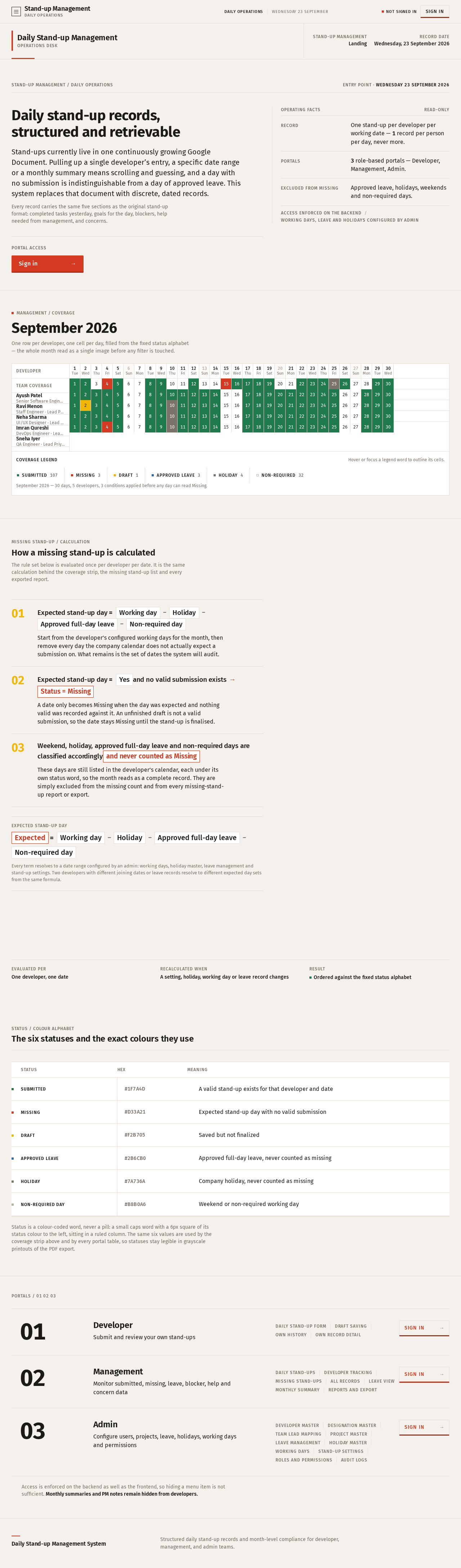
Daily Stand-up Management
Operations deskStand-up management / Daily operations
Entry pointWednesday 23 September 2026
Daily stand-up records, structured and retrievable
Stand-ups currently live in one continuously growing Google Document. Pulling up a single developer’s entry, a specific date range or a monthly summary means scrolling and guessing, and a day with no submission is indistinguishable from a day of approved leave. This system replaces that document with discrete, dated records.
Every record carries the same five sections as the original stand-up format: completed tasks yesterday, goals for the day, blockers, help needed from management, and concerns.
Operating facts
Read-only
- Record
- One stand-up per developer per working date — 1 record per person per day, never more.
- Portals
- 3 role-based portals — Developer, Management, Admin.
- Excluded from missing
- Approved leave, holidays, weekends and non-required days.
Access enforced on the backendWorking days, leave and holidays configured by Admin
Management / Coverage
September 2026
One row per developer, one cell per day, filled from the fixed status alphabet — the whole month read as a single image before any filter is touched.
Coverage legend
Hover or focus a legend word to outline its cells.
September 2026 — 30 days, 5 developers, 3 conditions applied before any day can read Missing.
Missing stand-up / Calculation
How a missing stand-up is calculated
The rule set below is evaluated once per developer per date. It is the same calculation behind the coverage strip, the missing stand-up list and every exported report.
Expected stand-up day=Working day−Holiday−Approved full-day leave−Non-required day
Start from the developer’s configured working days for the month, then remove every day the company calendar does not actually expect a submission on. What remains is the set of dates the system will audit.
Expected stand-up day=Yesand no valid submission exists→Status = Missing
A date only becomes Missing when the day was expected and nothing valid was recorded against it. An unfinished draft is not a valid submission, so the date stays Missing until the stand-up is finalised.
Weekend, holiday, approved full-day leave and non-required days are classified accordinglyand never counted as Missing
These days are still listed in the developer’s calendar, each under its own status word, so the month reads as a complete record. They are simply excluded from the missing count and from every missing-stand-up report or export.
Expected stand-up day
Expected=Working dayHolidayApproved full-day leaveNon-required day
Every term resolves to a date range configured by an admin: working days, holiday master, leave management and stand-up settings. Two developers with different joining dates or leave records resolve to different expected day sets from the same formula.
Evaluated per
One developer, one date
Recalculated when
A setting, holiday, working day or leave record changes
Result
Ordered against the fixed status alphabet
Status / Colour Alphabet
The six statuses and the exact colours they use
| Swatch | Status | Hex | Meaning |
|---|---|---|---|
| Submitted | #1F7A4D | A valid stand-up exists for that developer and date | |
| Missing | #D33A21 | Expected stand-up day with no valid submission | |
| Draft | #F2B705 | Saved but not finalized | |
| Approved Leave | #2B6CB0 | Approved full-day leave, never counted as missing | |
| Holiday | #7A736A | Company holiday, never counted as missing | |
| Non-required day | #B8B0A6 | Weekend or non-required working day |
Status is a colour-coded word, never a pill: a small caps word with a 6px square of its status colour to the left, sitting in a ruled column. The same six values are used by the coverage strip above and by every portal table, so statuses stay legible in grayscale printouts of the PDF export.
Portals / 01 02 03
Developer
Submit and review your own stand-ups
- Daily stand-up form
- draft saving
- own history
- own record detail
Management
Monitor submitted, missing, leave, blocker, help and concern data
- Daily stand-ups
- developer tracking
- missing stand-ups
- all records
- leave view
- monthly summary
- reports and export
Admin
Configure users, projects, leave, holidays, working days and permissions
- Developer master
- designation master
- team lead mapping
- project master
- leave management
- holiday master
- working days
- stand-up settings
- roles and permissions
- audit logs
Access is enforced on the backend as well as the frontend, so hiding a menu item is not sufficient. Monthly summaries and PM notes remain hidden from developers.
Daily Stand-up Management
Operations deskStand-up management / Daily operations
Entry pointWednesday 23 September 2026
Daily stand-up records, structured and retrievable
Stand-ups currently live in one continuously growing Google Document. Pulling up a single developer’s entry, a specific date range or a monthly summary means scrolling and guessing, and a day with no submission is indistinguishable from a day of approved leave. This system replaces that document with discrete, dated records.
Every record carries the same five sections as the original stand-up format: completed tasks yesterday, goals for the day, blockers, help needed from management, and concerns.
Operating facts
Read-only
- Record
- One stand-up per developer per working date — 1 record per person per day, never more.
- Portals
- 3 role-based portals — Developer, Management, Admin.
- Excluded from missing
- Approved leave, holidays, weekends and non-required days.
Access enforced on the backendWorking days, leave and holidays configured by Admin
Management / Coverage
September 2026
One row per developer, one cell per day, filled from the fixed status alphabet — the whole month read as a single image before any filter is touched.
Coverage legend
Hover or focus a legend word to outline its cells.
September 2026 — 30 days, 5 developers, 3 conditions applied before any day can read Missing.
Missing stand-up / Calculation
How a missing stand-up is calculated
The rule set below is evaluated once per developer per date. It is the same calculation behind the coverage strip, the missing stand-up list and every exported report.
Expected stand-up day=Working day−Holiday−Approved full-day leave−Non-required day
Start from the developer’s configured working days for the month, then remove every day the company calendar does not actually expect a submission on. What remains is the set of dates the system will audit.
Expected stand-up day=Yesand no valid submission exists→Status = Missing
A date only becomes Missing when the day was expected and nothing valid was recorded against it. An unfinished draft is not a valid submission, so the date stays Missing until the stand-up is finalised.
Weekend, holiday, approved full-day leave and non-required days are classified accordinglyand never counted as Missing
These days are still listed in the developer’s calendar, each under its own status word, so the month reads as a complete record. They are simply excluded from the missing count and from every missing-stand-up report or export.
Expected stand-up day
Expected=Working dayHolidayApproved full-day leaveNon-required day
Every term resolves to a date range configured by an admin: working days, holiday master, leave management and stand-up settings. Two developers with different joining dates or leave records resolve to different expected day sets from the same formula.
Evaluated per
One developer, one date
Recalculated when
A setting, holiday, working day or leave record changes
Result
Ordered against the fixed status alphabet
Status / Colour Alphabet
The six statuses and the exact colours they use
| Swatch | Status | Hex | Meaning |
|---|---|---|---|
| Submitted | #1F7A4D | A valid stand-up exists for that developer and date | |
| Missing | #D33A21 | Expected stand-up day with no valid submission | |
| Draft | #F2B705 | Saved but not finalized | |
| Approved Leave | #2B6CB0 | Approved full-day leave, never counted as missing | |
| Holiday | #7A736A | Company holiday, never counted as missing | |
| Non-required day | #B8B0A6 | Weekend or non-required working day |
Status is a colour-coded word, never a pill: a small caps word with a 6px square of its status colour to the left, sitting in a ruled column. The same six values are used by the coverage strip above and by every portal table, so statuses stay legible in grayscale printouts of the PDF export.
Portals / 01 02 03
Developer
Submit and review your own stand-ups
- Daily stand-up form
- draft saving
- own history
- own record detail
Management
Monitor submitted, missing, leave, blocker, help and concern data
- Daily stand-ups
- developer tracking
- missing stand-ups
- all records
- leave view
- monthly summary
- reports and export
Admin
Configure users, projects, leave, holidays, working days and permissions
- Developer master
- designation master
- team lead mapping
- project master
- leave management
- holiday master
- working days
- stand-up settings
- roles and permissions
- audit logs
Access is enforced on the backend as well as the frontend, so hiding a menu item is not sufficient. Monthly summaries and PM notes remain hidden from developers.
No comments yet. Be the first!