customer-support-ecommerce

byMarketing 8080AI

build an AI customer support system for a UK eCommerce store of our client (WordPress, 80-150 orders per day). We manage the technical side of the project and the integration; our client approves the final developer or agency, and payments. The agent will help customers with promotions and offers, order tracking, and common pre-sale and post-sale questions, with handover to a human when needed. The project is split into 3 phases, with the focus on the voice support agent built with Vapi, which is developed first, followed by the chat agent. Both agents must use one shared knowledge base. The solution will rely on n8n automations and API integrations (WooCommerce, order data, knowledge base) running on our self-hosted n8n instance on a VPS. Key requirement: every question the agent cannot answer is logged, and the client’s team can review these in one place, add the correct answer, and have both agents use it from then on, without a developer.

Landing
Landing

Comments (0)

No comments yet. Be the first!

System Requirements

System Requirements Document for customer-support-ecommerce

1. Introduction

This document specifies the AI customer support system for a UK eCommerce store operated by our client on WordPress, handling 80–150 orders per day. The system is delivered by Marketing 8080AI, who own the technical side of the project and the integration; the client approves the final developer or agency, and payments.

The product gives the store's shoppers an AI support agent that helps with promotions and offers, order tracking, and common pre-sale and post-sale questions, and that hands over to a human when needed. The project is split into 3 phases: the voice support agent built with Vapi is developed first, followed by the chat agent. Both agents draw on one shared knowledge base. The solution relies on n8n automations and API integrations (WooCommerce, order data, knowledge base) running on our self-hosted n8n instance on a VPS.

The defining requirement is the feedback loop: every question the agent cannot answer is logged, the client's team reviews these in one place, adds the correct answer, and both agents use it from then on — without a developer.

The audience is two-sided: the client's support team, who live in the review-and-answer tooling all day, and the store's shoppers, who meet the voice and chat agents.

Page 1 of 32

2. System Overview

The system comprises:

  • Customer-facing AI agents — a Vapi-powered voice support agent (phase 1) and a chat support agent (phase 2), both answering from one shared knowledge base and both able to hand a conversation over to a human.
  • A shared knowledge base — the single source of answers used by both agents, extended by the client's team through the application.
  • An unanswered-question log — every question an agent cannot answer is recorded and surfaced in one place for the client's team.
  • A human handover path — conversations the agent cannot resolve are queued for a human support agent with the customer's context intact.
  • n8n automations on the self-hosted VPS — orchestrating unanswered-question logging and shared knowledge base sync, plus API integrations with WooCommerce, order data, and the knowledge base.
  • A first-party web application — the Landing entry, Voice Support and Chat Support surfaces for shoppers, and the protected Handover Queue, Unanswered Questions, and Answer Editor for the client's team and human support agents, with Login and Sign Up for identity.

Provisioned infrastructure: a shared FastAPI backend process for application APIs and domain modules; MariaDB for application-owned persistent data; a React frontend; a LiteLLM gateway for the backend's model-provider calls; and PostgreSQL supporting LiteLLM, separate from application-owned storage.

Removed from scope

  • None stated by the user.
Page 2 of 32

2a. Product Interpretation and Delivery Boundary

The voice agent is the first delivery focus and is built with Vapi; the chat agent follows in a later phase. Both are customer-facing and reachable without an account: a shopper can start a voice or chat support conversation from the public Landing page or the dedicated support surfaces without signing in. The agents answer from one shared knowledge base and escalate to a human when they cannot help.

The client's team and human support agents use a first-party application with application-owned identity. A client support team member enrolls through Sign Up and returns through Login; a human support agent returns through Login. The Unanswered Questions, Answer Editor, and Handover Queue destinations are role-restricted. The anonymous entry interactions (Landing, Voice Support, Chat Support, Login, Sign Up) remain reachable without prior identity.

The n8n instance on the self-hosted VPS owns the automation work: logging unanswered questions, syncing accepted answers into the shared knowledge base, and calling WooCommerce and order data APIs for order tracking. The FastAPI backend owns application APIs and domain modules; MariaDB holds application-owned persistent data; LiteLLM mediates the backend's model-provider calls, backed by its own PostgreSQL. The client approves the final developer or agency, and payments — this is a commercial boundary, not a product behavior.

2c. Page Content and Component Coverage

Page 3 of 32

Landing

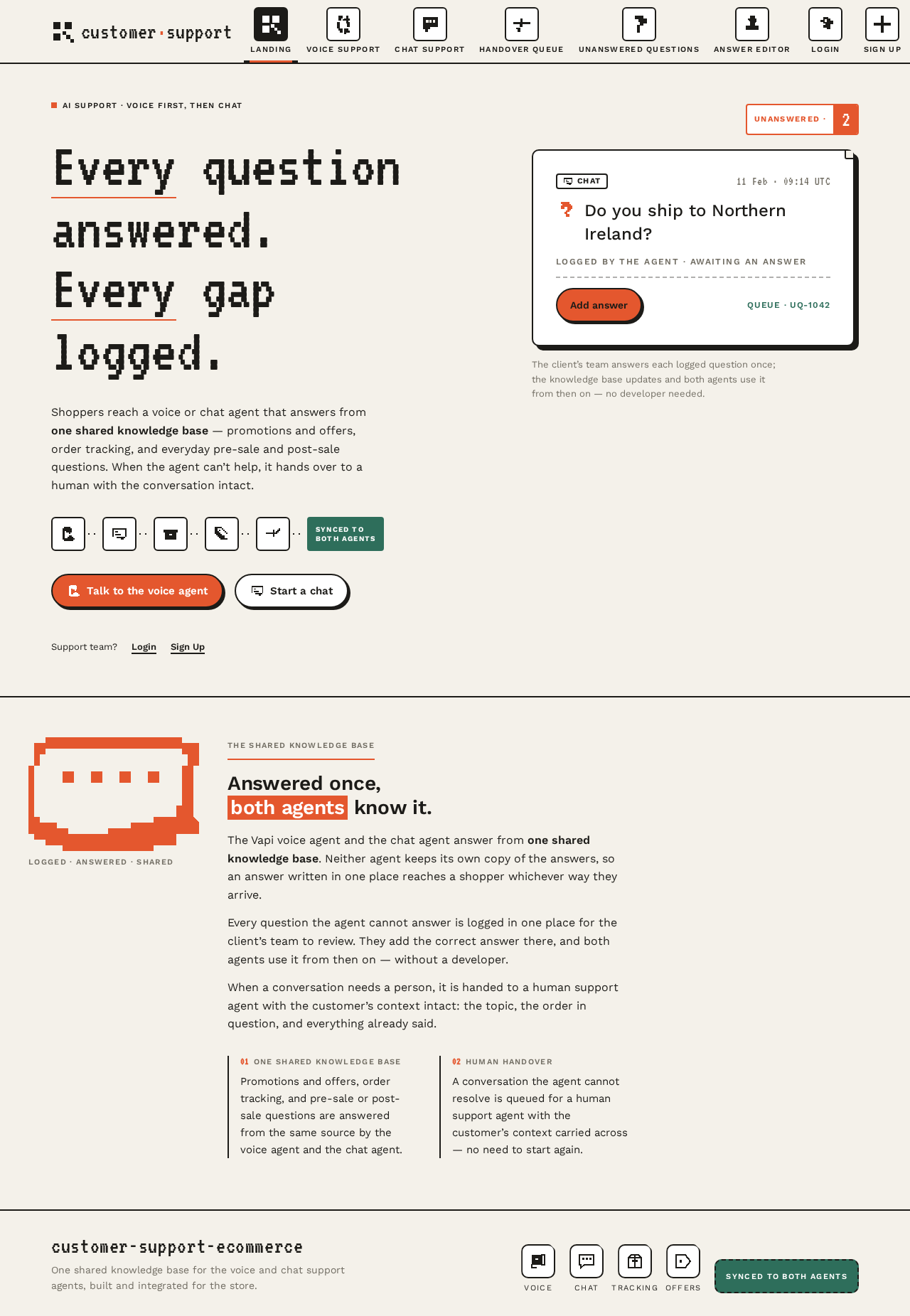
  • Information/state: public entry explaining the AI customer support system for the client's UK eCommerce store; the two support channels (voice, chat); the shared-knowledge promise ("Every question answered. Every gap logged."); a split-flap terracotta counter reading UNANSWERED · <n>; a row of 48px pixel icon tiles (voice, chat, parcel, tag, handover) joined by a dotted ink line to a green stamp tile reading SYNCED TO BOTH AGENTS; one oversized white outlined "unanswered question" card with an Add answer button rendered as a physical sticker with a 6px solid ink offset shadow.
  • Primary actions: enter Voice Support; enter Chat Support; go to Login; go to Sign Up.
  • Supporting actions: read the explanation of the shared knowledge base and handover.
  • Domain entities: unanswered-question count (read-only display); channel descriptors.
  • Component responsibilities: hero headline block (VT323, flush-left, terracotta rule under first word); icon-tile row with dotted connector; stamp tile; mock unanswered card; split-flap counter; top bar of pixel-icon tabs.
  • States: loading (counter placeholder); empty (counter shows UNANSWERED · 0); success (counter and stamp render); error (counter unavailable — show muted — and keep navigation usable); recovery (retry counter fetch).
Page 4 of 32

Voice Support

  • Information/state: the Vapi voice support agent session; a 12-bar pixel equaliser as the listening indicator; a record dot pulsing on a 1.2s two-step cycle while listening; live transcript of the conversation; current topic context (promotions and offers, order tracking, pre-sale/post-sale questions).
  • Primary actions: start a voice conversation; speak a question; end the conversation.
  • Supporting actions: view transcript; accept handover to a human when offered.
  • Domain entities: voice session; transcript turns; order lookup context; unanswered-question record (created by the system when the agent cannot answer); handover request.
  • Component responsibilities: Vapi session control; equaliser visualiser; transcript panel; handover prompt; error banner.
  • States: idle (ready to start); listening (equaliser stepping, record dot pulsing); speaking (agent response); empty (no transcript yet); success (answer delivered, transcript updated); error (microphone unavailable or session failed — show message and retry); recovery (restart session); handover (agent offers human handover and the conversation is queued).
Page 5 of 32

Chat Support

  • Information/state: the chat support agent conversation; message history; current topic context (promotions and offers, order tracking, pre-sale/post-sale questions); shared knowledge base answers.
  • Primary actions: send a message; receive an answer.
  • Supporting actions: view conversation history; accept handover to a human when offered.
  • Domain entities: chat session; messages; order lookup context; unanswered-question record; handover request.
  • Component responsibilities: message list; composer; agent response renderer; handover prompt; error banner.
  • States: empty (no messages yet — prompt to ask a question); loading (agent typing indicator); success (answer rendered); error (message failed to send — retry); recovery (resend); handover (agent offers human handover and the conversation is queued).
Page 6 of 32

Handover Queue

  • Information/state: role-restricted list of conversations handed over from the voice and chat agents; each entry shows the customer's context (channel, transcript or summary, topic, timestamp); status of each handover.
  • Primary actions: open a handed-over conversation; continue helping the customer.
  • Supporting actions: mark a handover as handled.
  • Domain entities: handover record; conversation context; customer; channel; status.
  • Component responsibilities: queue list; conversation detail panel; status control; empty-state illustration (oversized pixel handover-arrow icon).
  • States: loading (queue skeleton); empty (no handovers — friendly pixel illustration and message); success (queue populated, detail opens); error (queue failed to load — retry); recovery (refresh).
Page 7 of 32

Unanswered Questions

  • Information/state: the single place where every question the voice and chat agents could not answer is logged; tiled grid of 3-up cards (2-up at 768px, 1-up at 375px); each card is a white 2px-outlined tile with a pixel icon, the customer's question in Work Sans, a channel tag (VOICE / CHAT), a tabular timestamp, and an inline Add answer button; a dashed pending chip on unanswered items; a solid green live in both agents chip on resolved items; a split-flap terracotta counter in the top bar stepping the unanswered count on every new log.
  • Primary actions: review logged questions; open Answer Editor via Add answer.
  • Supporting actions: filter or scan by channel; read timestamps.
  • Domain entities: unanswered-question record; channel; timestamp; status (pending / resolved); linked answer.
  • Component responsibilities: tiled card grid; channel tag; pixel icon per card; split-flap counter; inline Add answer button; status chip.
  • States: loading (grid skeleton); empty (no unanswered questions — friendly pixel illustration and message); success (grid populated); error (log failed to load — retry); recovery (refresh); resolved (card flips to green resolved state with a 3-frame pixel drop and the chip becomes solid live in both agents).
Page 8 of 32

Answer Editor

  • Information/state: the logged unanswered question being answered; the question text; channel and timestamp context; an answer field; save/submit control; confirmation that the answer is live in both agents.
  • Primary actions: write the correct answer; submit it.
  • Supporting actions: review the original question context; cancel.
  • Domain entities: unanswered-question record; answer; knowledge base entry; sync status.
  • Component responsibilities: question context panel; answer text area; submit button; pixel-stamp confirmation animation; error banner.
  • States: loading (question context loading); empty (no answer yet); success (answer submitted — pixel stamp drops onto the card, chip becomes solid live in both agents); error (save failed — retry, answer preserved); recovery (resubmit).

Login

  • Information/state: returning verification for client support team members and human support agents; email and password fields; error messaging.
  • Primary actions: sign in.
  • Supporting actions: navigate to Sign Up.
  • Domain entities: user identity; session.
  • Component responsibilities: credential form; submit button; error banner; link to Sign Up.
  • States: idle; loading (submit in progress); success (redirect to the appropriate protected destination); error (invalid credentials — message, fields preserved); recovery (retry).
Page 9 of 32

Sign Up

  • Information/state: self-service first-use enrollment for the client's support team; fields for identity establishment; confirmation.
  • Primary actions: create an account.
  • Supporting actions: navigate to Login.
  • Domain entities: user identity; session.
  • Component responsibilities: enrollment form; submit button; error banner; link to Login.
  • States: idle; loading (submit in progress); success (account created, proceed to protected work); error (validation or creation failure — message, fields preserved); recovery (retry).
Page 10 of 32

3. Functional Requirements

FR-1 — AI customer support system for the client's UK eCommerce store (explicit) As the client's store, I should have an AI customer support system built for a WordPress store handling 80–150 orders per day, so that shoppers get support without a developer in the loop.

  • Actor: eCommerce customer (initiator); client support team member (participant).
  • Trigger: a shopper contacts support.
  • Observable result: the agent responds from the shared knowledge base.
  • Access: public support surfaces.
  • Failure/recovery: if the agent cannot answer, the question is logged (FR-9) and handover is offered (FR-5).
  • Continuation: the shopper continues in the same channel or with a human.

FR-2 — Promotions and offers help (explicit) As an eCommerce customer, I should get help with promotions and offers from the AI agent, so that I understand current deals.

  • Actor: eCommerce customer.
  • Trigger: shopper asks about a promotion or offer.
  • Observable result: the agent answers from the shared knowledge base.
  • Access: public support surfaces.
  • Failure/recovery: unanswered → logged (FR-9), handover offered (FR-5).
  • Continuation: shopper asks a follow-up or ends the conversation.
Page 11 of 32

FR-3 — Order tracking help (explicit) As an eCommerce customer, I should get help tracking my order from the AI agent, so that I know where my order is.

  • Actor: eCommerce customer.
  • Trigger: shopper asks about an order.
  • Observable result: the agent answers using order data via the WooCommerce and order data API integrations.
  • Access: public support surfaces.
  • Failure/recovery: lookup failure or unanswered → logged (FR-9), handover offered (FR-5).
  • Continuation: shopper receives tracking information or a human handover.

FR-4 — Common pre-sale and post-sale questions (explicit) As an eCommerce customer, I should get common pre-sale and post-sale questions answered by the AI agent, so that routine questions are resolved immediately.

  • Actor: eCommerce customer.
  • Trigger: shopper asks a pre-sale or post-sale question.
  • Observable result: the agent answers from the shared knowledge base.
  • Access: public support surfaces.
  • Failure/recovery: unanswered → logged (FR-9), handover offered (FR-5).
  • Continuation: shopper asks another question or ends.
Page 12 of 32

FR-5 — Human handover when needed (explicit) As an eCommerce customer, I should be handed over to a human when the AI agent cannot help, so that my issue is still resolved.

  • Actor: eCommerce customer (initiator); human support agent (participant).
  • Trigger: the agent cannot resolve the customer's need.
  • Observable result: the conversation is queued in the Handover Queue with the customer's context intact; the human support agent picks it up.
  • Access: customer side public; human side role-restricted.
  • Failure/recovery: if no human is available, the conversation remains queued and the customer is informed.
  • Continuation: the human support agent continues the conversation.

FR-6 — Three-phase delivery, voice first (explicit) As Marketing 8080AI, I should deliver the project in 3 phases with the Vapi voice support agent developed first and the chat agent following, so that the voice channel is prioritized.

  • Actor: Marketing 8080AI (delivery).
  • Trigger: project delivery.
  • Observable result: Voice Support is delivered first; Chat Support follows.
  • Access: n/a (delivery constraint).
  • Failure/recovery: n/a.
  • Continuation: phase 2 delivers the chat agent.
Page 13 of 32

FR-7 — One shared knowledge base (explicit) As the client's store, I should have both agents use one shared knowledge base, so that answers are consistent across voice and chat.

  • Actor: system (both agents); client support team member (contributor).
  • Trigger: an agent answers a question.
  • Observable result: both agents draw from the same knowledge base.
  • Access: internal.
  • Failure/recovery: if the knowledge base is unavailable, the agent logs the question (FR-9) and offers handover (FR-5).
  • Continuation: answers added by the team are used by both agents (FR-12).

FR-8 — n8n automations and API integrations on the self-hosted VPS (explicit) As Marketing 8080AI, I should run n8n automations and API integrations (WooCommerce, order data, knowledge base) on our self-hosted n8n instance on a VPS, so that the integration is under our control.

  • Actor: system (n8n).
  • Trigger: agent needs order data, knowledge base sync, or unanswered-question logging.
  • Observable result: automations execute on the self-hosted VPS.
  • Access: internal.
  • Failure/recovery: automation failure is surfaced and retried.
  • Continuation: the agent responds or logs the question.
Page 14 of 32

FR-9 — Log every unanswered question (explicit) As the client's store, I should have every question the agent cannot answer logged, so that no gap is lost.

  • Actor: system (agent + n8n); client support team member (reviewer).
  • Trigger: the agent cannot answer a question.
  • Observable result: an unanswered-question record is created and appears in Unanswered Questions.
  • Access: internal logging; review is role-restricted.
  • Failure/recovery: if logging fails, the question is retried; the customer still receives a handover offer.
  • Continuation: the record is reviewed (FR-10).

FR-10 — Review logged questions in one place (explicit) As a client support team member, I should review the logged unanswered questions in one place, so that I can see every gap from both agents.

  • Actor: client support team member.
  • Trigger: team member opens Unanswered Questions.
  • Observable result: all logged questions from voice and chat are shown in one tiled grid.
  • Access: role-restricted.
  • Failure/recovery: load failure → retry.
  • Continuation: team member opens Answer Editor (FR-11).
Page 15 of 32

FR-11 — Add the correct answer (explicit) As a client support team member, I should add the correct answer to a logged unanswered question, so that the gap is closed.

  • Actor: client support team member.
  • Trigger: team member selects Add answer on a card.
  • Observable result: the answer is saved to the shared knowledge base.
  • Access: role-restricted.
  • Failure/recovery: save failure → retry with answer preserved.
  • Continuation: both agents use the answer (FR-12).

FR-12 — Both agents use the answer from then on, without a developer (explicit) As the client's store, I should have both agents use the added answer from then on without a developer, so that the fix is immediate and permanent.

  • Actor: system (both agents); client support team member (author).
  • Trigger: an answer is submitted in Answer Editor.
  • Observable result: the answer is live in both agents; the card shows the solid live in both agents chip.
  • Access: internal.
  • Failure/recovery: sync failure → retry; the card remains pending until synced.
  • Continuation: future questions on the topic are answered by both agents.
Page 16 of 32

FR-13 — Client support team member self-service enrollment (required_inference) As a client support team member, I should be able to enroll via Sign Up, so that I can begin reviewing and answering questions.

  • Actor: client support team member.
  • Trigger: first use.
  • Observable result: an account is created and the team member can proceed to protected work.
  • Access: anonymous entry.
  • Failure/recovery: validation or creation failure → message, fields preserved, retry.
  • Continuation: proceed to Unanswered Questions.

FR-14 — Returning verification via Login (required_inference) As a client support team member or human support agent, I should be able to log in, so that I can resume my protected work.

  • Actor: client support team member; human support agent.
  • Trigger: returning use.
  • Observable result: a session is established and the appropriate protected destination opens.
  • Access: anonymous entry.
  • Failure/recovery: invalid credentials → message, fields preserved, retry.
  • Continuation: resume Unanswered Questions, Answer Editor, or Handover Queue.
Page 17 of 32

FR-15 — Role-restricted access to protected destinations (required_inference) As the client's store, I should have Unanswered Questions, Answer Editor, and Handover Queue restricted by role, so that only authorized team members and human support agents act on them.

  • Actor: client support team member; human support agent.
  • Trigger: attempt to open a protected destination.
  • Observable result: authorized users proceed; unauthorized users are redirected to Login.
  • Access: role-restricted.
  • Failure/recovery: unauthorized → Login.
  • Continuation: authorized work proceeds.

FR-16 — n8n automations for logging and knowledge base sync (required_inference) As Marketing 8080AI, I should have n8n automations on the self-hosted VPS handle unanswered-question logging and shared knowledge base sync, so that the loop runs without manual intervention.

  • Actor: system (n8n).
  • Trigger: an unanswered question or a submitted answer.
  • Observable result: the record is logged or the answer is synced to the shared knowledge base.
  • Access: internal.
  • Failure/recovery: automation failure → retry; status remains pending.
  • Continuation: the loop completes.
Page 18 of 32

FR-17 — WooCommerce and order data API integrations (required_inference) As an eCommerce customer, I should have my order looked up via WooCommerce and order data APIs, so that order tracking answers are accurate.

  • Actor: system (n8n + APIs); eCommerce customer (initiator).
  • Trigger: shopper asks about an order.
  • Observable result: order data is retrieved and the agent answers.
  • Access: public support surfaces.
  • Failure/recovery: lookup failure → logged (FR-9), handover offered (FR-5).
  • Continuation: shopper receives tracking information or a human handover.

4. User Personas

Page 19 of 32

Client support team member

  • Product context: a non-developer on the client's team who lives in the review-and-answer tooling all day. They are the person who closes the loop: they see every gap the voice and chat agents hit and type the answer that fixes it.
  • Primary goal: close recurring gaps once, so both agents answer consistently from then on without a developer.
  • Distinct responsibilities: review the single place where every unanswered question from both agents is logged; add the correct answer to a logged question; confirm the answer is live in both agents.
  • Inputs/decisions: the customer's question text, channel tag (VOICE / CHAT), timestamp; the decision of what the correct answer is; whether to submit.
  • Interactions: with the eCommerce customer indirectly (their logged questions); with the human support agent indirectly (shared knowledge base); with the system (n8n sync).
  • Observable success: the card flips to the green resolved state with a solid live in both agents chip, and the unanswered count steps down.
Page 20 of 32

eCommerce customer

  • Product context: a shopper on the client's UK WordPress store who contacts support by voice or chat to ask about promotions and offers, track an order, or get a common pre-sale or post-sale question answered.
  • Primary goal: get a correct answer or a human handover without waiting on a developer.
  • Distinct responsibilities: start a voice or chat conversation; ask a question; accept handover when offered.
  • Inputs/decisions: the question; the channel choice; whether to accept handover.
  • Interactions: with the AI agent (voice or chat); with the human support agent after handover.
  • Observable success: an answer delivered in the same channel, or a human handover with context intact.

Human support agent

  • Product context: a human on the client's team who receives conversations handed over from the AI agent when it cannot resolve the customer's need.
  • Primary goal: take over the conversation with the customer's context intact.
  • Distinct responsibilities: open a handed-over conversation from the Handover Queue; continue helping the customer; mark the handover as handled.
  • Inputs/decisions: the customer's context (channel, transcript or summary, topic, timestamp); how to resolve the issue.
  • Interactions: with the eCommerce customer (continuing the conversation); with the client support team member indirectly (shared knowledge base).
  • Observable success: the customer's issue is resolved and the handover is marked handled.
Page 21 of 32

5. Core User Flows

Flow A — Shopper gets a voice answer (eCommerce customer)

  1. Shopper opens Landing and selects the Voice Support tab.
  2. Voice Support loads; the record dot pulses and the 12-bar equaliser steps while listening.
  3. Shopper speaks a question about a promotion, an order, or a pre-sale/post-sale topic.
  4. The agent answers from the shared knowledge base (or via WooCommerce/order data for tracking).
  5. Shopper hears the answer; the transcript updates.
  6. Shopper asks a follow-up or ends the conversation.
  • Failure/recovery: if the microphone is unavailable or the session fails, an error banner appears and the shopper can restart the session.

Flow B — Shopper gets a chat answer (eCommerce customer)

  1. Shopper opens Landing and selects the Chat Support tab.
  2. Chat Support loads with an empty conversation and a prompt to ask a question.
  3. Shopper sends a message.
  4. The agent answers from the shared knowledge base.
  5. Shopper reads the answer and continues or ends.
  • Failure/recovery: if a message fails to send, a retry control appears and the message is preserved.
Page 22 of 32

Flow C — Shopper is handed over to a human (eCommerce customer → human support agent)

  1. Shopper asks a question the agent cannot answer.
  2. The agent offers a human handover; the shopper accepts.
  3. The conversation is queued in the Handover Queue with the customer's context intact.
  4. The human support agent logs in via Login (if not already signed in).
  5. The human support agent opens the Handover Queue and selects the conversation.
  6. The human support agent continues helping the customer.
  7. The human support agent marks the handover as handled.
  • Failure/recovery: if no human is available, the conversation remains queued and the customer is informed.

Flow D — Unanswered question is logged (system → client support team member)

  1. The agent cannot answer a question.
  2. n8n logs an unanswered-question record.
  3. The record appears in Unanswered Questions as a white outlined tile with a pixel icon, the question, a channel tag, a timestamp, and an Add answer button; the split-flap counter steps up.
  4. The client support team member (signed in) opens Unanswered Questions and reviews the tile.
  • Failure/recovery: if logging fails, n8n retries; the customer still receives a handover offer.
Page 23 of 32

Flow E — Client support team member adds an answer (client support team member)

  1. Client support team member signs up via Sign Up (first use) or logs in via Login (returning).
  2. They open Unanswered Questions and scan the tiled grid.
  3. They select Add answer on a card, opening Answer Editor.
  4. They write the correct answer and submit.
  5. The answer is saved to the shared knowledge base; the card flips to the green resolved state with a 3-frame pixel drop, and the dashed pending chip becomes a solid live in both agents chip.
  6. Both agents use the answer from then on.
  • Failure/recovery: if save fails, an error banner appears, the answer is preserved, and the team member can resubmit.

Flow F — Human support agent resumes work (human support agent)

  1. Human support agent opens Login and signs in.
  2. The Handover Queue opens (role-restricted).
  3. They select a handed-over conversation and continue helping the customer.
  4. They mark the handover as handled.
  • Failure/recovery: invalid credentials → message, fields preserved, retry.
Page 24 of 32

6. Visuals Colors and Theme

Muse: Susan Kare. Headline: "Every question answered. Every gap logged."

Colour tokens (light mode):

  • Background: #F4F1EA (warm paper)
  • Surface: #FFFFFF (white tiles)
  • Text: #1C1B18 (ink)
  • Primary: #E4572E (terracotta — single hot action colour: primary buttons, unanswered count badge, record dot)
  • Accent: #2E6E5B (deep green — resolved / synced state, stamps, status chips)
  • Muted: #8A8578 (metadata, timestamps)
  • Balance: ~70% paper, 20% white tiles, 10% colour. No blue anywhere.

Typography:

  • Display: VT323, clamp(40px, 7vw, 96px), sentence case, flush-left, often one word per line.
  • H1: VT323 clamp(32px, 4.5vw, 56px).
  • H2: 28px; H3: 20px (Work Sans 500/600 where readability at body scale matters).
  • Body: Work Sans 16px/1.6.
  • Label: 11px/1.4 uppercase, tracking +0.12em (e.g. UNANSWERED · 14).
  • Numerals: tabular VT323 at 1.4× surrounding size.
  • Scale: 1.333 modular.
Page 25 of 32

Shape language: chunky 2px ink outlines on white tiles with 10px radius; pixel-step corners (a single 2px notch cut from one corner of hero blocks); pill buttons with a 3px solid offset shadow in ink; stamp-shaped chips with a dashed border for pending; 8px grid throughout — icon tiles 48×48 squares, badges 20px rounded squares. No soft shadows, no blur, no glass.

Layout: visible 12-column grid on the warm paper ground with 32px gutters at 1280px, collapsing to a single column at 375px. Unanswered Questions is a tiled grid of 3-up cards (2-up at 768px, 1-up at 375px). Navigation is a top bar of pixel-icon tabs, not a sidebar. Every page begins with a left-aligned oversized VT323 wordmark and a single rule.

Imagery: pixel pictograms as the image system — a 24×24 and 48×48 icon set drawn on the grid for phone, speech bubble, parcel, tag/promotion, handover arrow, question mark, stamp and sync. Where a larger visual is needed, a single oversized pixel icon (e.g. a parcel or speech bubble) is rendered at 240px as a flat colour block on the paper ground. No photography, no illustration scenes, no 3D.

Page 26 of 32

7. Signature Design Concept

The public entry is a flat, poster-like first screen on warm paper #F4F1EA. The left 7 columns carry a stacked VT323 headline at clamp(40px, 7vw, 96px) — "Every question answered. / Every gap logged." — each line flush-left with a terracotta 2px rule beneath the first word. Beneath it, a single row of 48px pixel icon tiles (voice, chat, parcel, tag, handover) is connected by a dotted ink line to a green stamp tile reading SYNCED TO BOTH AGENTS. The right 5 columns hold one oversized white outlined tile — a mock "unanswered question" card with its Add answer button — tilted 0deg but with a 6px solid ink offset shadow so it reads as a physical sticker on the page. A thin terracotta split-flap counter top-right reads UNANSWERED · 14. No gradient, no blob, no centred stack, no blue button. The concept recomposes only accepted content and controls: the two channel entries, the shared-knowledge promise, the unanswered count, and the Add answer action.

Page 27 of 32

8. Interaction Model & Motion Direction

Interaction Model: Animated Motion Tempo: restrained Hero Dimensionality: flat

Landing Hero Motion Brief

  • Focal subject: the mock unanswered-question card as a physical sticker, joined by a dotted ink line to the green SYNCED TO BOTH AGENTS stamp tile.
  • Input → transformation → outcome thesis: as the page settles, the split-flap counter steps the unanswered number and the stamp tile snaps into its green resolved state — the visual argument that a logged gap becomes a shared answer.
  • Motion vocabulary: frame-by-frame, not eased — state changes snap in 100ms steps; the unanswered count flips like a split-flap numeral; an answer submitted stamps onto the card with a 3-frame pixel drop; the voice agent's waveform is a 12-bar pixel equaliser that steps rather than flows; one purposeful loop only — the record dot pulses on a 1.2s two-step cycle while listening.
  • Composed first frame: warm paper ground, flush-left stacked VT323 headline with terracotta rule, icon-tile row with dotted connector, sticker card with 6px ink offset shadow, split-flap counter top-right.
  • Reduced-motion state: all of this becomes instant state swaps with no loop; the counter and stamp render in their final state.

9. Non-Functional Requirements

Page 28 of 32
  • NFR-1 — No-developer answer loop (explicit): the client's team must be able to review unanswered questions and add answers without a developer. Rationale: the defining requirement of the product.
  • NFR-2 — One shared knowledge base (explicit): both agents must use one shared knowledge base. Rationale: consistency across voice and chat.
  • NFR-3 — Phase order (explicit): the voice support agent built with Vapi is developed first, followed by the chat agent, across 3 phases. Rationale: delivery priority.
  • NFR-4 — Self-hosted n8n on VPS (explicit): n8n automations and API integrations (WooCommerce, order data, knowledge base) run on the self-hosted n8n instance on a VPS. Rationale: integration control.
  • NFR-5 — Store profile (explicit): the store is a UK eCommerce store on WordPress handling 80–150 orders per day. Rationale: capacity and integration context.
  • NFR-6 — Commercial approval (explicit): the client approves the final developer or agency, and payments. Rationale: commercial boundary.
  • NFR-7 — Readable text and controls (explicit design constraint): headlines, wordmarks, labels, numbers, cards' text and controls stay entirely inside the viewport and their container at 375px, 768px and 1280px, wrapping or scaling to fit; no other element covers any part of them. Imagery, decoration and motion may be cropped, bled, rotated, overlapped or cut as the direction asks, as long as it covers no readable text or control.
  • NFR-8 — Reduced motion (explicit design constraint): under prefers-reduced-motion, all motion becomes instant state swaps with no loop; a usable static arrangement is provided.
  • NFR-9 — No blue (explicit design constraint): no blue anywhere; the generic indigo/blue-on-white SaaS template is forbidden.
  • NFR-10 — Accessible contrast (required_inference): ink #1C1B18 on paper #F4F1EA and white #FFFFFF meets readable contrast; terracotta and green are used for actions and status, not body text.
Page 29 of 32

10. Tech Stack

  • Frontend: React application UI.
  • Backend: shared FastAPI process for application APIs and domain modules.
  • Database: MariaDB for application-owned persistent data.
  • Model gateway: LiteLLM gateway for the backend's model-provider calls, backed by PostgreSQL (separate from application-owned storage).
  • Voice agent: Vapi (phase 1).
  • Chat agent: phase 2, sharing the knowledge base.
  • Automation: n8n on the self-hosted VPS.
  • Integrations: WooCommerce, order data, knowledge base APIs.
  • Store platform: WordPress (client-owned).
  • Deployment: docker-compose with the provisioned services (backend, database, frontend, litellm, postgres).
Page 30 of 32

11. Assumptions and Constraints

  • A-1: The client's store is on WordPress and handles 80–150 orders per day (explicit).
  • A-2: The voice agent is built with Vapi and delivered first; the chat agent follows (explicit).
  • A-3: Both agents use one shared knowledge base (explicit).
  • A-4: n8n runs on the self-hosted VPS (explicit).
  • A-5: The client approves the final developer or agency, and payments (explicit).
  • A-6: Application-owned identity is used for the client's team and human support agents; shoppers use the public support surfaces without an account (required_inference).
  • A-7: Unanswered Questions, Answer Editor, and Handover Queue are role-restricted (required_inference).
  • A-8: LiteLLM and PostgreSQL are provisioned infrastructure supporting the backend's model calls; they do not add product requirements (scaffold).
  • A-9: The visual direction (Susan Kare muse, palette, typography, motion) is authoritative for presentation (creative direction).
Page 31 of 32

12. Glossary

  • Vapi: the voice AI platform used to build the voice support agent.
  • n8n: the automation platform running on the self-hosted VPS.
  • WooCommerce: the eCommerce plugin providing order data.
  • Shared knowledge base: the single source of answers used by both the voice and chat agents.
  • Unanswered question: a question the agent could not answer, logged for review.
  • Handover: the transfer of a conversation from the AI agent to a human support agent.
  • Split-flap counter: the terracotta numeral display in the top bar showing the unanswered-question count.
  • Pixel stamp: the green resolved-state animation applied when an answer is submitted.
  • LiteLLM: the model gateway mediating the backend's model-provider calls.
Page 32 of 32
Live
Landing design preview
Landing: Read shared-knowledge promise
Sign Up: Create account
Login: Sign in
Unanswered Questions: Review logged questions
Unanswered Questions: Scan by channel
Answer Editor: Write correct answer
Answer Editor: 1. Submit answer
Answer Editor: 2. Resubmit preserved answer
Unanswered Questions: Confirm live in both agents
Live
Landing design preview
Landing: Read shared-knowledge promise
Sign Up: Create account
Login: Sign in
Unanswered Questions: Review logged questions
Unanswered Questions: Scan by channel
Answer Editor: Write correct answer
Answer Editor: 1. Submit answer
Answer Editor: 2. Resubmit preserved answer
Unanswered Questions: Confirm live in both agents