cts-bgmi-scrims

byYatendra Kagot

Create a professional, fully functional BGMI Esports Scrims and Tournament Booking Website. Website name: [YOUR ESPORTS NAME] Design theme: - Premium esports gaming look. - Black, White and Ice Blue color combination. - Modern BGMI-inspired gaming UI. - Professional and clean design. - Fully responsive for Android, iPhone, tablet and desktop. - Smooth animations and premium tournament cards. 1. Homepage - Professional esports logo and website name. - Home, Tournaments, My Bookings, Wallet, Leaderboard, Contact Us. - Login / Sign Up with Google. - Display upcoming BGMI scrims and tournaments. - Show prize pool, entry fee, match time, date and available slots. - Live tournament announcements. 2. User Account - Google Sign-in and registration. - Each user gets a personal dashboard. - Profile name, email and mobile number. - Wallet balance. - Booking history. - Transaction history. - Team registration history. 3. Add Money Wallet - Users can add money to their website wallet. - Integrate a secure Indian payment gateway such as Razorpay. - UPI, Google Pay, PhonePe, Paytm and cards. - Automatically update wallet balance only after verified successful payment. - Show payment receipts and transaction IDs. - Admin can manage refunds and wallet transactions. 4. Tournament / Scrims Booking Every tournament card must show: - Tournament name. - Solo / Duo / Squad mode. - Erangel / Miramar / Sanhok map. - Match date and time. - Entry fee. - Prize pool. - Available slots. - Rules and match information. Book Slot button: - User selects a tournament. - Selects available team slot. - Pays the entry fee using wallet balance. - Amount is deducted only after successful booking. - Generate a unique booking ID. - Show booking confirmation. 5. Team Details Form After successful booking, collect: - Team name. - Captain name. - Captain WhatsApp number. - BGMI Character ID. - In-game name (IGN). - Player 2 name and ID. - Player 3 name and ID. - Player 4 name and ID. - Substitute player details (optional). Save all team details in the database and allow users to edit them until the registration deadline. 6. WhatsApp Group After successful booking and team registration: - Show a Join WhatsApp Group button. - Open the official tournament WhatsApp group invitation link. - Display instructions to join the group. - Admin can change the WhatsApp group link for every tournament. 7. My Bookings Users can see: - Registered tournaments. - Booking ID. - Payment status. - Team details. - Match date and time. - Room ID and password when released by admin. - Booking status. 8. Admin Dashboard Create a separate secure admin panel. Admin can: - Create and manage tournaments. - Set entry fees and prize pools. - Set available slots. - View registered teams. - View player names and WhatsApp numbers. - Manage payments and refunds. - Update WhatsApp group links. - Upload tournament banners. - Publish room IDs and passwords. - Cancel tournaments. - Send announcements. - Manage users and wallet transactions. - Export team registration data to Excel. 9. Database and Security Use Supabase for: - Authentication. - User profiles. - Wallet transactions. - Tournament listings. - Team registrations. - Booking records. - Admin permissions. Important: - Never trust frontend wallet balances. - Verify every payment on the server. - Use secure Razorpay payment verification and webhooks. - Prevent duplicate bookings and double payments. - Use database transactions for wallet deductions and slot booking. - Protect user information and admin access. - Show clear payment success and failure messages. 10. Final Requirements Build a fully working website, not just a static design or demo. All buttons, login, registration, wallet, payments, bookings, team forms and admin dashboard must work. Create a premium professional esports platform that can handle real BGMI scrims and tournaments.

HomeLogin
Home

Comments (0)

No comments yet. Be the first!

System Requirements

System Requirements Document for cts-bgmi-scrims

1. Introduction

cts-bgmi-scrims is a professional, fully functional BGMI (Battlegrounds Mobile India) esports scrims and tournament booking website. It is a real, working platform — not a static design or demo — where BGMI squads discover upcoming scrims and tournaments, fund a website wallet through Razorpay, book team slots, register their rosters, join the official tournament WhatsApp group, and receive room IDs and passwords before match time. A separate secure admin panel lets the tournament organizer run the entire operation: creating tournaments, setting fees and prize pools, publishing room credentials, sending announcements, managing payments and refunds, and exporting team data to Excel.

The product intent is a premium, high-stakes mobile-first esports experience for young Indian BGMI squads, backed by server-verified money movement and Supabase as the system of record. The audience is two-fold: Player / Team Captain squads who compete, and the Tournament Admin who operates the scrims and tournaments.

The design theme is a premium esports gaming look in black, white and ice blue, with a modern BGMI-inspired UI, professional and clean layout, smooth animations, premium tournament cards, and full responsiveness across Android, iPhone, tablet and desktop.

Page 1 of 35

2. System Overview

cts-bgmi-scrims is delivered as a responsive React web application backed by a shared FastAPI service, with Supabase providing authentication, user profiles, wallet transactions, tournament listings, team registrations, booking records and admin permissions, and Razorpay providing Indian payment collection (UPI, Google Pay, PhonePe, Paytm and cards). A MariaDB database service is provisioned alongside the backend for application-owned persistent data.

Two active human personas operate the platform: the Player / Team Captain, who books slots, pays from the wallet, registers team details, joins the WhatsApp group and reads room credentials; and the Tournament Admin, who runs tournaments, payments, announcements and data exports from a separate secure admin panel.

Current accepted behavior spans: the public homepage with logo, navigation, upcoming tournaments and live announcements; Google sign-in and registration; a personal dashboard with profile, wallet balance and histories; wallet top-up through Razorpay with server-verified balance updates; tournament cards with full match data and slot booking paid from wallet balance; a team details form editable until the registration deadline; a Join WhatsApp Group button with admin-managed links; My Bookings with booking ID, payment status, team details, room ID and password; and the admin panel covering tournaments, teams, payments, refunds, users, announcements, banners, room credentials and Excel export.

Page 2 of 35

Hard constraints: never trust frontend wallet balances; verify every payment on the server; use secure Razorpay payment verification and webhooks; prevent duplicate bookings and double payments; use database transactions for wallet deductions and slot booking; protect user information and admin access; show clear payment success and failure messages; the admin panel must be separate and secure.

Removed from scope

  • None.
Page 3 of 35

2a. Product Interpretation and Delivery Boundary

The product is a first-party application with application-owned identity. Players establish identity through Google sign-in on a public Login page before reaching protected destinations (Tournaments booking, Team Details, My Bookings, Wallet, Dashboard). The Home, Leaderboard and Contact Us pages are publicly reachable. The admin panel is a separate, secure, role-restricted surface reachable only by an account whose admin role is set in Supabase; it is not reachable by ordinary players.

Money movement is server-authoritative. Wallet balances are never read from or written by the frontend as truth; every Razorpay payment is verified on the server (including webhooks) before the wallet balance changes, and wallet deductions and slot bookings occur inside database transactions to prevent duplicate bookings and double payments. Payment success and failure are always surfaced to the user in clear messages.

WhatsApp group membership is handled on WhatsApp itself: the platform shows a Join WhatsApp Group button that opens the official tournament invitation link and displays join instructions; the admin can change that link per tournament. The platform does not manage WhatsApp membership.

Leaderboard and Contact Us are navigation destinations on the homepage. Their content is presented as destinations within the accepted navigation; no additional scoring, ranking computation, or messaging capability beyond what the source states is introduced.

2b. Source Content Inventory

Not applicable — no reference directive with content_source was supplied.

2c. Page Content and Component Coverage

Page 4 of 35

Home

  • Information/state: Professional esports logo and website name; primary navigation (Home, Tournaments, My Bookings, Wallet, Leaderboard, Contact Us); Login / Sign Up with Google entry; upcoming BGMI scrims and tournaments with prize pool, entry fee, match time, date and available slots; live tournament announcements.
  • Primary actions: Navigate to any listed destination; start Google sign-in/sign-up; open a tournament to book.
  • Supporting actions: Read live announcements; view tournament summary data.
  • Domain entities: Tournament (name, mode, map, date/time, entry fee, prize pool, available slots), Announcement.
  • Component responsibilities: Hero with logo/wordmark and sign-in CTA; navigation bar (desktop) and mobile tab/nav; upcoming tournaments grid of premium tournament cards; live announcement ticker/rail.
  • States: Loading (tournaments and announcements fetching); empty (no upcoming tournaments — show a clear empty message); success (cards and announcements render); error (fetch failure — show retry); recovery (retry reloads data).
Page 5 of 35

Login

  • Information/state: Google sign-in and registration entry; explanation that sign-in is required for wallet, bookings and dashboard.
  • Primary actions: Continue with Google (sign in or register in one step).
  • Supporting actions: Return to Home.
  • Domain entities: User profile (name, email).
  • Component responsibilities: Google sign-in button; status/error messaging.
  • States: Idle; loading (auth in progress); success (redirect to intended protected destination or Dashboard); error (auth failure — clear message and retry); recovery (retry sign-in).

Tournaments

  • Information/state: Tournament cards each showing tournament name, Solo/Duo/Squad mode, Erangel/Miramar/Sanhok map, match date and time, entry fee, prize pool, available slots, and rules and match information.
  • Primary actions: Book Slot — select tournament, select an available team slot, pay entry fee from wallet balance.
  • Supporting actions: Read rules and match information; view available slots.
  • Domain entities: Tournament, Slot, Booking, Wallet balance.
  • Component responsibilities: Tournament card with all required fields; slot selector; Book Slot control; wallet-balance display and insufficient-balance prompt; booking confirmation with unique booking ID.
  • States: Loading; empty (no tournaments); success (booking confirmed with unique booking ID); error (insufficient wallet balance, slot taken, payment failure — clear message); recovery (top up wallet or choose another slot and retry).
Page 6 of 35

Team Details

  • Information/state: Post-booking team registration form: team name, captain name, captain WhatsApp number, BGMI Character ID, in-game name (IGN), Player 2 name and ID, Player 3 name and ID, Player 4 name and ID, optional substitute player details; registration deadline indicator.
  • Primary actions: Submit team details; edit saved team details until the registration deadline.
  • Supporting actions: View the Join WhatsApp Group button and join instructions after successful booking and team registration.
  • Domain entities: Team registration, Player, Booking.
  • Component responsibilities: Team details form with all named fields; optional substitute section; save/edit controls; deadline state; WhatsApp group join panel.
  • States: Loading; empty (no team details yet); success (saved to database, confirmation); error (validation failure, deadline passed — editing locked with clear message); recovery (correct fields and resubmit before deadline).
Page 7 of 35

My Bookings

  • Information/state: Registered tournaments; booking ID; payment status; team details; match date and time; room ID and password when released by admin; booking status.
  • Primary actions: Review booking and payment status; read room ID and password once released; open team details to edit before deadline.
  • Supporting actions: Open the Join WhatsApp Group link.
  • Domain entities: Booking, Payment, Team registration, Tournament, Room credentials.
  • Component responsibilities: Booking list/detail with all required fields; room credential panel (shown only when released); status badges.
  • States: Loading; empty (no bookings); success (bookings listed with statuses); error (fetch failure — retry); recovery (retry).

Wallet

  • Information/state: Current wallet balance; add-money flow through Razorpay (UPI, Google Pay, PhonePe, Paytm and cards); payment receipts and transaction IDs; transaction history.
  • Primary actions: Add money; complete Razorpay payment.
  • Supporting actions: View receipts and transaction IDs.
  • Domain entities: Wallet, Wallet transaction, Payment receipt, Transaction ID.
  • Component responsibilities: Balance display; amount entry; Razorpay checkout launch; receipt and transaction ID list; success/failure messaging.
  • States: Loading; empty (no transactions); success (balance updated only after verified successful payment, receipt and transaction ID shown); error (payment failed or verification failed — clear message, balance unchanged); recovery (retry payment).
Page 8 of 35

Leaderboard

  • Information/state: Leaderboard destination reachable from homepage navigation.
  • Primary actions: View leaderboard.
  • Supporting actions: Navigate back to other destinations.
  • Domain entities: Leaderboard entries as presented.
  • Component responsibilities: Leaderboard presentation surface.
  • States: Loading; empty; success; error with retry.

Contact Us

  • Information/state: Contact Us destination reachable from homepage navigation.
  • Primary actions: View contact information.
  • Supporting actions: Navigate back to other destinations.
  • Domain entities: Contact information as presented.
  • Component responsibilities: Contact presentation surface.
  • States: Static success; error with retry if content fetch fails.
Page 9 of 35

Dashboard

  • Information/state: Personal dashboard with profile name, email and mobile number; wallet balance; booking history; transaction history; team registration history.
  • Primary actions: Review profile and histories; navigate to Wallet, My Bookings, Tournaments.
  • Supporting actions: Update profile mobile number.
  • Domain entities: User profile, Wallet, Booking, Transaction, Team registration.
  • Component responsibilities: Profile panel; wallet balance card; booking history list; transaction history list; team registration history list.
  • States: Loading; empty (new user with no history); success; error with retry.
Page 10 of 35

Admin Tournaments

  • Information/state: Tournament management: create and manage tournaments; set entry fees and prize pools; set available slots; update WhatsApp group links per tournament; upload tournament banners; publish room IDs and passwords; cancel tournaments; send announcements.
  • Primary actions: Create/edit tournament; set fees, prize pools, slots; upload banner; update WhatsApp link; publish room ID and password; cancel tournament; send announcement.
  • Supporting actions: Review tournament list and status.
  • Domain entities: Tournament, Slot, Banner, WhatsApp group link, Room credentials, Announcement.
  • Component responsibilities: Tournament editor; fee/prize/slot controls; banner upload; WhatsApp link field; room credential publisher; cancel control; announcement composer.
  • States: Loading; empty (no tournaments); success (saved/published confirmation); error (validation or save failure — clear message); recovery (correct and resubmit).

Admin Teams

  • Information/state: Registered teams per tournament with player names and WhatsApp numbers; export team registration data to Excel.
  • Primary actions: View registered teams and player details; export to Excel.
  • Supporting actions: Filter by tournament.
  • Domain entities: Team registration, Player, Tournament.
  • Component responsibilities: Team roster table; player name and WhatsApp number columns; Excel export control.
  • States: Loading; empty (no registrations); success (table and export); error (fetch/export failure — retry); recovery (retry).
Page 11 of 35

Admin Payments

  • Information/state: Payments, refunds, wallet transactions and users management.
  • Primary actions: Manage payments and refunds; manage wallet transactions; manage users.
  • Supporting actions: Review transaction and user records.
  • Domain entities: Payment, Refund, Wallet transaction, User.
  • Component responsibilities: Payment/refund controls; wallet transaction list; user management list.
  • States: Loading; empty; success (action confirmed); error (action failure — clear message); recovery (retry).
Page 12 of 35

3. Functional Requirements

FR-1 — Homepage identity and navigation (explicit) As a Player / Team Captain or Tournament Admin, I should see a professional esports logo and website name with Home, Tournaments, My Bookings, Wallet, Leaderboard and Contact Us navigation, so that I can reach every destination.

  • Trigger: opening the site. Observable result: logo, wordmark and all six navigation items render. Access: public. Failure/recovery: navigation fetch failure shows retry. Continuation: select any destination.

FR-2 — Google sign-in and registration (explicit) As a Player / Team Captain, I should log in and sign up with Google, so that I can access protected features.

  • Trigger: selecting Login / Sign Up with Google. Observable result: authenticated session and user profile (name, email). Access: anonymous entry on Login. Failure/recovery: auth failure shows a clear message and retry. Continuation: proceed to Dashboard or intended destination.

FR-3 — Upcoming tournaments on homepage (explicit) As a Player / Team Captain, I should see upcoming BGMI scrims and tournaments on the homepage with prize pool, entry fee, match time, date and available slots, so that I can evaluate what to join.

  • Trigger: homepage load. Observable result: tournament cards with prize pool, entry fee, match time, date and available slots. Access: public. Failure/recovery: fetch failure shows retry. Continuation: open Tournaments to book.
Page 13 of 35

FR-4 — Live tournament announcements (explicit) As a Player / Team Captain, I should see live tournament announcements on the homepage, so that I stay informed of current alerts.

  • Trigger: homepage load or announcement update. Observable result: live announcements displayed. Access: public. Failure/recovery: fetch failure shows retry. Continuation: read announcements.

FR-5 — Personal dashboard (explicit) As a Player / Team Captain, I should have a personal dashboard showing profile name, email, mobile number, wallet balance, booking history, transaction history and team registration history, so that I can review my account at a glance.

  • Trigger: opening Dashboard. Observable result: all listed profile and history data. Access: authenticated. Failure/recovery: fetch failure shows retry. Continuation: navigate to Wallet, My Bookings or Tournaments.

FR-6 — Add money to wallet via Razorpay (explicit) As a Player / Team Captain, I should add money to my website wallet through Razorpay using UPI, Google Pay, PhonePe, Paytm and cards, so that I can pay entry fees.

  • Trigger: entering an amount and launching Razorpay checkout. Observable result: payment collected through the selected method. Access: authenticated. Failure/recovery: payment failure shows a clear message and balance stays unchanged. Continuation: retry payment.

FR-7 — Server-verified wallet credit (explicit + required_inference) As a Player / Team Captain, I should have my wallet balance update automatically only after a verified successful payment, so that my balance is trustworthy.

  • Trigger: Razorpay payment completion. Observable result: server verifies the payment (including webhooks) and only then credits the wallet. Access: authenticated. Failure/recovery: verification failure leaves balance unchanged with a clear message. Continuation: retry or contact support.
Page 14 of 35

FR-8 — Payment receipts and transaction IDs (explicit) As a Player / Team Captain, I should see payment receipts and transaction IDs, so that I have proof of payment.

  • Trigger: completed wallet transaction. Observable result: receipt and transaction ID displayed. Access: authenticated. Failure/recovery: fetch failure shows retry. Continuation: review in Wallet and Dashboard transaction history.

FR-9 — Admin refunds and wallet transaction management (explicit) As a Tournament Admin, I should manage refunds and wallet transactions, so that player money is handled correctly.

  • Trigger: admin opens Admin Payments. Observable result: refunds and wallet transactions updated with confirmation. Access: admin role. Failure/recovery: action failure shows a clear message. Continuation: retry or review records.

FR-10 — Tournament card data (explicit) As a Player / Team Captain, I should see on every tournament card the tournament name, Solo/Duo/Squad mode, Erangel/Miramar/Sanhok map, match date and time, entry fee, prize pool, available slots, and rules and match information, so that I can make an informed booking decision.

  • Trigger: viewing Tournaments. Observable result: all listed fields on each card. Access: authenticated. Failure/recovery: fetch failure shows retry. Continuation: read rules, then book.

FR-11 — Slot booking with wallet payment (explicit) As a Player / Team Captain, I should select a tournament, select an available team slot, and pay the entry fee using wallet balance, so that I secure a place.

  • Trigger: Book Slot. Observable result: slot selected and entry fee paid from wallet. Access: authenticated. Failure/recovery: insufficient balance or slot taken shows a clear message. Continuation: top up wallet or choose another slot.
Page 15 of 35

FR-12 — Deduction only after successful booking with unique booking ID (explicit) As a Player / Team Captain, I should have the amount deducted only after a successful booking, receive a unique booking ID, and see a booking confirmation, so that I know my booking is real.

  • Trigger: confirmed booking. Observable result: wallet deducted, unique booking ID generated, confirmation shown. Access: authenticated. Failure/recovery: booking failure leaves wallet unchanged with a clear message. Continuation: proceed to Team Details.

FR-13 — Team details form (explicit) As a Player / Team Captain, I should submit team name, captain name, captain WhatsApp number, BGMI Character ID, in-game name (IGN), Player 2 name and ID, Player 3 name and ID, Player 4 name and ID, and optional substitute player details after a successful booking, so that my roster is registered.

  • Trigger: opening Team Details after booking. Observable result: all fields saved to the database. Access: authenticated. Failure/recovery: validation failure shows field errors. Continuation: proceed to WhatsApp group join.

FR-14 — Edit team details until registration deadline (explicit) As a Player / Team Captain, I should edit my saved team details until the registration deadline, so that I can correct my roster.

  • Trigger: editing before deadline. Observable result: updated details saved. Access: authenticated. Failure/recovery: edits after deadline are locked with a clear message. Continuation: review in My Bookings.
Page 16 of 35

FR-15 — Join WhatsApp Group (explicit) As a Player / Team Captain, I should see a Join WhatsApp Group button after successful booking and team registration that opens the official tournament WhatsApp group invitation link, with instructions to join, so that I receive match communications.

  • Trigger: completed booking and team registration. Observable result: button and instructions shown; selecting it opens the official invitation link. Access: authenticated. Failure/recovery: missing link shows a clear message. Continuation: join the group on WhatsApp.

FR-16 — Admin changes WhatsApp group link per tournament (explicit) As a Tournament Admin, I should change the WhatsApp group link for every tournament, so that players always reach the correct group.

  • Trigger: editing a tournament's WhatsApp link. Observable result: updated link used by the Join WhatsApp Group button. Access: admin role. Failure/recovery: save failure shows a clear message. Continuation: verify link.

FR-17 — My Bookings (explicit) As a Player / Team Captain, I should see registered tournaments, booking ID, payment status, team details, match date and time, room ID and password when released by admin, and booking status, so that I am ready for match day.

  • Trigger: opening My Bookings. Observable result: all listed fields; room credentials appear only when released. Access: authenticated. Failure/recovery: fetch failure shows retry. Continuation: edit team details or join WhatsApp group.
Page 17 of 35

FR-18 — Admin tournament management (explicit) As a Tournament Admin, I should create and manage tournaments, set entry fees and prize pools, set available slots, upload tournament banners, publish room IDs and passwords, and cancel tournaments, so that I can run the schedule.

  • Trigger: admin actions in Admin Tournaments. Observable result: tournaments created/updated, banners uploaded, room credentials published, cancellations applied. Access: admin role. Failure/recovery: validation or save failure shows a clear message. Continuation: review tournament list.

FR-19 — Admin views registered teams and player contacts (explicit) As a Tournament Admin, I should view registered teams and player names and WhatsApp numbers, so that I can coordinate matches.

  • Trigger: opening Admin Teams. Observable result: registered teams with player names and WhatsApp numbers. Access: admin role. Failure/recovery: fetch failure shows retry. Continuation: export or contact players.

FR-20 — Admin sends announcements (explicit) As a Tournament Admin, I should send announcements, so that players see live tournament announcements.

  • Trigger: composing and sending an announcement. Observable result: announcement published and shown on the homepage. Access: admin role. Failure/recovery: send failure shows a clear message. Continuation: verify on homepage.

FR-21 — Admin manages users and wallet transactions (explicit) As a Tournament Admin, I should manage users and wallet transactions, so that accounts and balances stay correct.

  • Trigger: admin actions in Admin Payments. Observable result: user and wallet transaction records updated. Access: admin role. Failure/recovery: action failure shows a clear message. Continuation: review records.
Page 18 of 35

FR-22 — Export team registration data to Excel (explicit) As a Tournament Admin, I should export team registration data to Excel, so that I can share rosters offline.

  • Trigger: selecting export. Observable result: Excel file of team registration data. Access: admin role. Failure/recovery: export failure shows a clear message. Continuation: retry export.

FR-23 — Supabase as system of record (explicit) As the platform, I should use Supabase for authentication, user profiles, wallet transactions, tournament listings, team registrations, booking records and admin permissions, so that all state is authoritative and secure.

  • Trigger: any data operation. Observable result: data persisted and read from Supabase. Access: server-mediated. Failure/recovery: operation failure surfaces a clear message. Continuation: retry.

FR-24 — Server-side payment verification and webhooks (explicit) As the platform, I should verify every payment on the server using secure Razorpay verification and webhooks, so that wallet balances are never trusted from the frontend.

  • Trigger: payment event. Observable result: server-verified payment state. Access: server. Failure/recovery: unverified payment never credits wallet. Continuation: reconcile via webhook.

FR-25 — Prevent duplicate bookings and double payments (explicit) As the platform, I should prevent duplicate bookings and double payments, so that players are not charged twice.

  • Trigger: concurrent or repeated booking/payment attempts. Observable result: at most one booking and one charge per intent. Access: server. Failure/recovery: duplicate attempt rejected with a clear message. Continuation: review My Bookings.
Page 19 of 35

FR-26 — Transactional wallet deduction and slot booking (explicit) As the platform, I should use database transactions for wallet deductions and slot booking, so that balance and slots stay consistent.

  • Trigger: booking confirmation. Observable result: atomic deduction and slot assignment. Access: server. Failure/recovery: transaction rollback leaves state unchanged. Continuation: retry.

FR-27 — Protect user information and admin access (explicit) As the platform, I should protect user information and admin access, so that only authorized parties see sensitive data.

  • Trigger: any protected read/write. Observable result: access enforced by Supabase auth and admin permissions. Access: authenticated / admin role. Failure/recovery: unauthorized access denied with a clear message. Continuation: sign in with correct account.

FR-28 — Clear payment success and failure messages (explicit) As a Player / Team Captain, I should see clear payment success and failure messages, so that I know the outcome of every payment.

  • Trigger: payment completion or failure. Observable result: explicit success or failure message. Access: authenticated. Failure/recovery: failure message with retry. Continuation: retry or review receipts.

FR-29 — Fully working platform (explicit) As a Player / Team Captain or Tournament Admin, I should have every button, login, registration, wallet, payment, booking, team form and admin dashboard function work, so that the platform handles real BGMI scrims and tournaments.

  • Trigger: any interaction. Observable result: the action performs its real function. Access: per destination. Failure/recovery: errors surfaced clearly. Continuation: proceed.
Page 20 of 35

FR-30 — Admin role established in Supabase (required_inference) As a Tournament Admin, I should have my admin role set in Supabase before accessing the admin panel, so that the separate secure admin panel is protected.

  • Trigger: admin sign-in. Observable result: admin panel access granted only to admin-role accounts. Access: admin role. Failure/recovery: non-admin accounts are denied. Continuation: access admin destinations.

4. User Personas

Page 21 of 35

Player / Team Captain

  • Product context: A young Indian BGMI squad leader who plays scrims and tournaments at night on a phone, and needs to book slots fast and trust that money and rosters are handled correctly.
  • Primary goal: Secure a team slot in an upcoming scrim or tournament, pay the entry fee from the wallet, register the roster, and get room credentials before match time.
  • Distinct accepted responsibilities: Sign in with Google; add money via Razorpay; select a tournament and available team slot; pay entry fee from wallet; receive unique booking ID and confirmation; submit and edit team details until the registration deadline; join the official WhatsApp group; read room ID and password in My Bookings.
  • Relevant inputs or decisions: Tournament choice, slot choice, top-up amount and payment method (UPI, Google Pay, PhonePe, Paytm, card), roster details (team name, captain name, captain WhatsApp number, BGMI Character ID, IGN, Player 2–4 names and IDs, optional substitute).
  • Interactions with other accepted participants: Pays the Tournament Admin's entry fee; receives admin-published room credentials and announcements; joins the admin-managed WhatsApp group.
  • Observable success: Booking confirmed with unique booking ID, wallet deducted only on success, roster saved, WhatsApp group joined, room ID and password visible when released.
Page 22 of 35

Tournament Admin

  • Product context: The organizer running BGMI scrims and tournaments, operating a separate secure admin panel to schedule matches, collect fees, coordinate teams and publish match credentials.
  • Primary goal: Run a full tournament cycle — create tournaments, set fees/prizes/slots, collect and refund payments, coordinate teams, and deliver room credentials and announcements on time.
  • Distinct accepted responsibilities: Create and manage tournaments; set entry fees, prize pools and available slots; upload banners; update WhatsApp group links per tournament; publish room IDs and passwords; cancel tournaments; send announcements; view registered teams with player names and WhatsApp numbers; manage payments, refunds, users and wallet transactions; export team registration data to Excel.
  • Relevant inputs or decisions: Tournament configuration, fee and prize values, slot counts, banner assets, WhatsApp links, room credentials, refund decisions, announcement content.
  • Interactions with other accepted participants: Receives entry-fee payments from players; publishes credentials and announcements players consume; manages player accounts and wallet transactions.
  • Observable success: Tournaments live with correct data, teams registered and exportable, payments and refunds reconciled, room credentials and announcements delivered.

5. Core User Flows

Page 23 of 35

Flow A — Player signs in and reviews the homepage

  1. Player opens Home (public) and sees the esports logo, website name, navigation (Home, Tournaments, My Bookings, Wallet, Leaderboard, Contact Us), upcoming tournaments with prize pool, entry fee, match time, date and available slots, and live tournament announcements.
  2. Player selects Login and continues with Google.
  3. On success, the player lands on Dashboard with profile name, email, mobile number, wallet balance and histories.
  4. Failure: auth error shows a clear message; player retries. Continuation: browse Tournaments.

Flow B — Player adds money to the wallet

  1. Player opens Wallet (authenticated) and sees current balance and transaction history.
  2. Player enters an amount and launches Razorpay checkout, choosing UPI, Google Pay, PhonePe, Paytm or a card.
  3. On payment completion, the server verifies the payment (including webhooks); only then is the wallet balance updated.
  4. Player sees a clear success message, payment receipt and transaction ID; the transaction appears in Wallet and Dashboard history.
  5. Failure: payment or verification failure shows a clear failure message and the balance stays unchanged; player retries.
Page 24 of 35

Flow C — Player books a tournament slot

  1. Player opens Tournaments and reviews a card: tournament name, Solo/Duo/Squad mode, Erangel/Miramar/Sanhok map, match date and time, entry fee, prize pool, available slots, and rules and match information.
  2. Player selects the tournament, selects an available team slot, and pays the entry fee from wallet balance.
  3. On successful booking, the amount is deducted, a unique booking ID is generated, and a booking confirmation is shown.
  4. Failure: insufficient balance prompts a top-up; a taken slot or payment failure shows a clear message and the wallet is unchanged; player retries.
  5. Continuation: player proceeds to Team Details.

Flow D — Player registers team details and joins WhatsApp

  1. After booking, player opens Team Details and submits team name, captain name, captain WhatsApp number, BGMI Character ID, IGN, Player 2 name and ID, Player 3 name and ID, Player 4 name and ID, and optional substitute details.
  2. Details are saved to the database and a confirmation is shown.
  3. Player can edit details until the registration deadline; after the deadline, editing is locked with a clear message.
  4. After successful booking and team registration, the player sees a Join WhatsApp Group button with instructions; selecting it opens the official tournament WhatsApp group invitation link.
  5. Failure: validation errors are shown inline; a missing link shows a clear message. Continuation: review in My Bookings.
Page 25 of 35

Flow E — Player checks bookings and room credentials

  1. Player opens My Bookings and sees registered tournaments, booking ID, payment status, team details, match date and time, and booking status.
  2. When the admin releases room credentials, the room ID and password appear in the booking.
  3. Player can open Team Details to edit before the deadline or open the WhatsApp group link.
  4. Failure: fetch failure shows retry. Continuation: join the match.

Flow F — Admin creates and publishes a tournament

  1. Admin signs in and opens the separate secure Admin Tournaments panel (admin role required).
  2. Admin creates a tournament, sets entry fee, prize pool and available slots, uploads a banner, and sets the WhatsApp group link.
  3. Admin publishes the tournament; it appears on Home and Tournaments.
  4. Failure: validation or save failure shows a clear message; admin corrects and resubmits.

Flow G — Admin coordinates teams and publishes room credentials

  1. Admin opens Admin Teams and views registered teams with player names and WhatsApp numbers.
  2. Admin exports team registration data to Excel.
  3. Admin returns to Admin Tournaments and publishes room IDs and passwords for the match.
  4. Players see the credentials in My Bookings.
  5. Failure: fetch or export failure shows retry; admin retries.
Page 26 of 35

Flow H — Admin manages payments, refunds, users and announcements

  1. Admin opens Admin Payments and reviews payments, refunds, wallet transactions and users.
  2. Admin processes a refund or adjusts a wallet transaction; the change is confirmed.
  3. Admin sends an announcement from Admin Tournaments; it appears as a live announcement on Home.
  4. Admin can cancel a tournament; affected bookings reflect the cancellation.
  5. Failure: action failure shows a clear message; admin retries.
Page 27 of 35

6. Visuals Colors and Theme

Muse: Gleb Kuznetsov — cinematic arena light for BGMI scrims. Dark grounds, ice-blue glow and HUD data for a premium, fast, high-stakes night-on-a-phone esports feel.

Headline: "Cinematic arena light for BGMI scrims."

Palette (dark mode):

  • Background: #05070C
  • Surface: #0D131C
  • Text: #F4F8FF
  • Primary: #8FE8FF
  • Accent: #2FD4FF
  • Muted: #6F8296

Black ground holds ~70% of the screen. Ice blue #8FE8FF marks key numbers and borders. White text sits on dark surfaces only. Muted #6F8296 carries labels at 4.6:1 or better.

Typography:

  • Headings: Space Grotesk, weight 700, wide uppercase, 0.02em tracking.
  • Micro-labels: 11px uppercase Space Grotesk, 0.16em tracking.
  • Body: Barlow.
  • Scale (1.25 modular): 96 / 72 / 56 / 44 / 32 / 22 / 16 / 14. Display: clamp(40px, 9vw, 112px).

Shape language: Sharp 2px corners on cards; thin ice-blue 1px strokes; clip-path corner notches on the top-right of each card; floating glass panels at 8% white opacity.

Page 28 of 35

Layout: Full-bleed dark arena; 12-column grid with HUD rails on the left; tournament cards in a dense 3-up row that becomes 1-up on mobile; data uses ruled rows with label and value pairs.

Motion: Slow 20s glow drift behind the hero; scroll-scrubbed parallax on hero layers; slot counters count up on entry; card hover raises a 1px ice-blue edge light.

Imagery: Abstract 3D arena shards and topographic map lines in ice blue; no stock people; map thumbnails use thin line diagrams of Erangel, Miramar and Sanhok.

Readability rule: Headlines, wordmarks, labels, numbers, card text and controls stay entirely inside the viewport and their container at 375px, 768px and 1280px, wrapping or scaling to fit; no other element covers them. Imagery and decoration may crop, bleed, rotate or overlap as the direction asks, but never cover readable text or controls. With prefers-reduced-motion, provide a usable static arrangement.

Page 29 of 35

7. Signature Design Concept

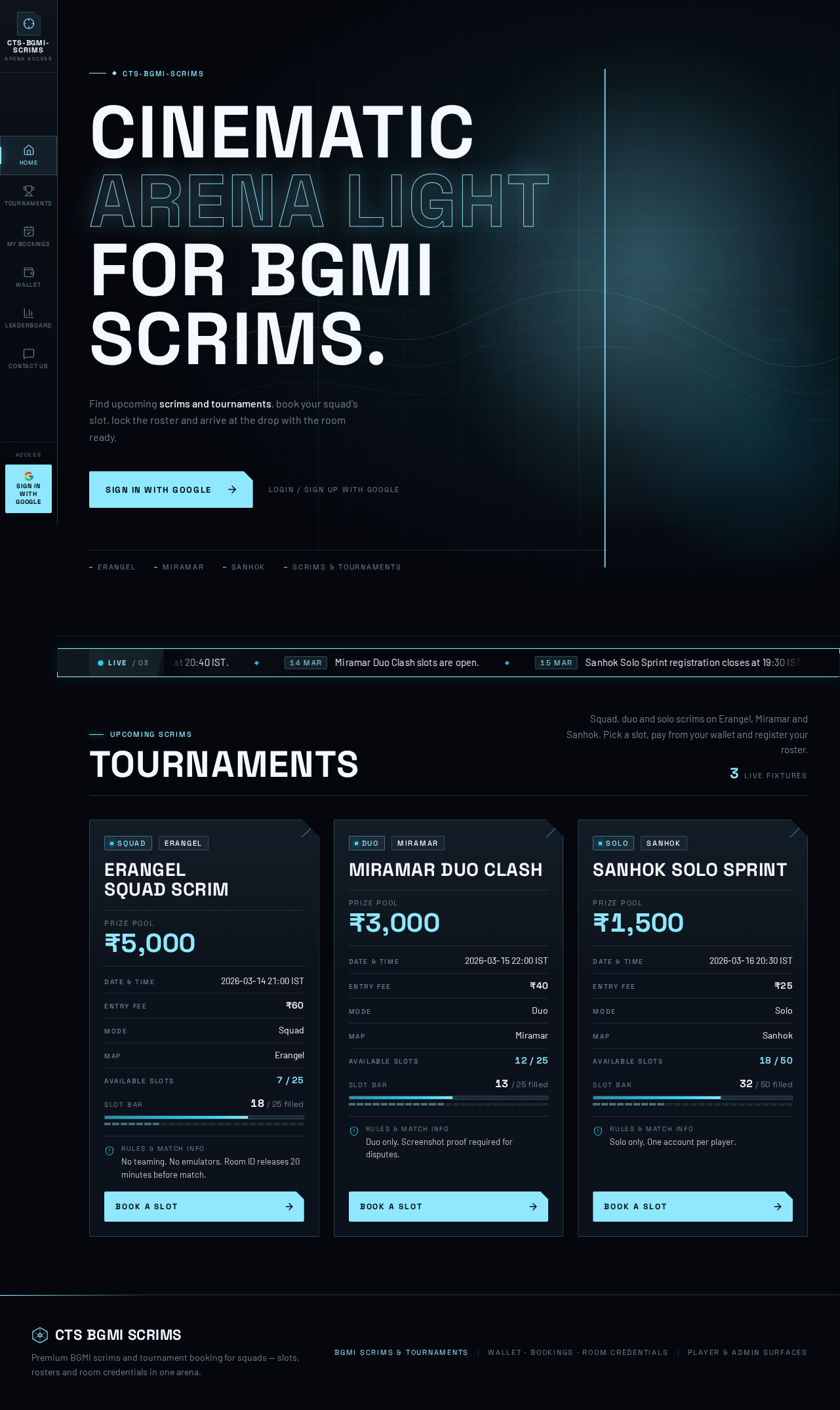
The public entry is a full-bleed black hero. A large 3D ice-blue wireframe arena shard floats at the right at 60% viewport width, slowly orbiting on a 20s cycle with parallax layers on scroll. The headline sits left in 9 columns at clamp(40px, 9vw, 112px) in wide uppercase Space Grotesk. A live announcement ticker — a thin ice-blue rail — runs under the headline, scrolling match alerts and pausing on hover. The primary CTA is a solid ice-blue block with black text ("Book a Slot" / "Sign in with Google"). Tournament cards below carry a notched top-right corner, a ruled data block (mode, map, date/time, entry fee, prize pool, available slots), and a slot bar that fills with ice-blue light; prize pool numbers count up in Space Grotesk tabular figures when cards enter the viewport. Navigation is a fixed left HUD rail on desktop with icon and label pairs, and a bottom tab bar on mobile. The concept only recomposes accepted content, states and controls — no new behavior or destination.

Page 30 of 35

8. Interaction Model & Motion Direction

Interaction Model: Parallax Motion Tempo: cinematic Hero Dimensionality: webgl

Landing Hero Motion Brief

  • Focal subject: A large 3D ice-blue wireframe arena shard floating at the right at 60% viewport width, with topographic map-line layers behind it.
  • Input → transformation → outcome thesis: On load, the shard orbits slowly (20s) while a glow drifts behind it; on scroll, hero layers parallax at different depths; the live announcement ticker scrolls match alerts and pauses on hover; tournament cards count up prize pools and fill slot bars as they enter the viewport. Outcome: the player perceives a live, high-stakes arena and is drawn to Book a Slot.
  • Motion vocabulary: Slow 20s glow drift; scroll-scrubbed parallax; count-up tabular figures; 1px ice-blue edge light on card hover; ticker scroll with hover pause.
  • Composed first frame: Black ground, headline left in 9 columns, wireframe shard right, ticker rail under the headline, solid ice-blue CTA, tournament cards beginning below the fold.
  • Reduced-motion state: Static arrangement — shard rendered still, ticker items wrapped into rows or horizontally scrollable so each is fully readable, prize pools shown at final values, no parallax.

Landing Hero 3D Scene Brief — DIRECTION-DERIVED A single crafted real-time object: an ice-blue wireframe arena shard (low-poly, thin-line material) orbiting slowly on a 20s cycle, lit by a drifting ice-blue glow, with topographic map-line layers behind it. The scene shows the product's defining state — a live arena awaiting squads — and must degrade to a static still under reduced motion.
Page 31 of 35

9. Non-Functional Requirements

  • NFR-1 (explicit): Never trust frontend wallet balances; all balance reads and writes are server-authoritative.
  • NFR-2 (explicit): Verify every payment on the server.
  • NFR-3 (explicit): Use secure Razorpay payment verification and webhooks.
  • NFR-4 (explicit): Prevent duplicate bookings and double payments.
  • NFR-5 (explicit): Use database transactions for wallet deductions and slot booking.
  • NFR-6 (explicit): Protect user information and admin access.
  • NFR-7 (explicit): Show clear payment success and failure messages.
  • NFR-8 (explicit): The admin panel must be separate and secure.
  • NFR-9 (explicit): Fully responsive for Android, iPhone, tablet and desktop.
  • NFR-10 (explicit): Fully working — not a static design or demo; all buttons, login, registration, wallet, payments, bookings, team forms and admin dashboard must work.
  • NFR-11 (explicit): Premium esports look in black, white and ice blue with a modern BGMI-inspired UI, professional and clean, with smooth animations and premium tournament cards.
  • NFR-12 (required_inference): Admin role is established in Supabase before admin panel access; non-admin accounts are denied.
Page 32 of 35

10. Tech Stack

  • Frontend: React application UI (responsive web).
  • Backend: Shared FastAPI process for application APIs and domain modules, including Razorpay payment verification and webhook handling.
  • Database: MariaDB for application-owned persistent data (provisioned service).
  • Supabase: Authentication (Google sign-in), user profiles, wallet transactions, tournament listings, team registrations, booking records and admin permissions.
  • Payments: Razorpay (UPI, Google Pay, PhonePe, Paytm, cards) with server-side verification and webhooks.
  • Excel export: Server-generated Excel export of team registration data.
  • Deployment: docker-compose with backend, database and frontend services.
Page 33 of 35

11. Assumptions and Constraints

  • A-1 (required_inference): Google sign-in is the sole identity method; no password-based accounts are introduced.
  • A-2 (required_inference): Admin role is assigned in Supabase by the operator; the platform does not provide self-service admin promotion.
  • A-3 (explicit): WhatsApp group membership is managed on WhatsApp; the platform only opens the admin-managed invitation link and shows instructions.
  • A-4 (explicit): Leaderboard and Contact Us are navigation destinations; no additional ranking computation or messaging capability beyond the source is introduced.
  • A-5 (explicit): Room ID and password are visible to players only after the admin releases them.
  • A-6 (explicit): Team details are editable only until the registration deadline.
  • A-7 (explicit): Wallet balance changes only after server-verified successful payment.
  • A-8 (explicit): Entry fee is deducted only after successful booking.
  • A-9 (explicit): The admin panel is separate and secure, protected by Supabase admin permissions.
Page 34 of 35

12. Glossary

  • BGMI: Battlegrounds Mobile India, the battle royale game the platform serves.
  • Scrim: A practice match between squads, bookable like a tournament.
  • Solo / Duo / Squad: Match modes with one, two or four players per team.
  • Erangel / Miramar / Sanhok: BGMI maps shown on tournament cards.
  • Slot: An available team place in a tournament that a player books.
  • Entry fee: The amount deducted from the wallet to book a slot.
  • Prize pool: The total prize money for a tournament.
  • Booking ID: The unique identifier generated on successful booking.
  • IGN: In-game name.
  • BGMI Character ID: The player's in-game character identifier.
  • Room ID and password: Match credentials published by the admin before match time.
  • Razorpay: The Indian payment gateway used for wallet top-ups.
  • Webhook: A server-to-server Razorpay callback used to verify payments.
  • Supabase: The backend platform providing authentication, database and admin permissions.
  • Registration deadline: The cutoff after which team details can no longer be edited.
Page 35 of 35
Live
Home design preview
Home: View upcoming tournaments
Home: Read live announcements
Home: Start Google sign-in
Login: 1. Continue with Google
Login: 2. Retry sign-in after error
Dashboard: Review profile and histories
Home: Browse Leaderboard
Leaderboard: View leaderboard
Home: Open Contact Us
Contact Us: View contact information
Wallet: 1. Review balance and history
Wallet: 2. Enter top-up amount
Wallet: 3. Complete Razorpay payment
Wallet: 4. Retry after payment failure
Wallet: 5. View receipt and transaction ID
Tournaments: 6. Review tournament card details
Tournaments: 7. Read rules and match info
Tournaments: 8. Select available team slot
Tournaments: 9. Pay entry fee from wallet
Tournaments: 10. Top up after insufficient balance
Tournaments: 11. Retry with another slot
Tournaments: View booking confirmation
Team Details: 1. Submit team roster details
Team Details: 2. Correct validation errors
Team Details: 1. Edit details before deadline
Team Details: 2. Join WhatsApp group
My Bookings: 3. Review booking and payment status
My Bookings: Read room ID and password
My Bookings: 4. Retry after fetch failure
Live
Home design preview
Home: View upcoming tournaments
Home: Read live announcements
Home: Start Google sign-in
Login: 1. Continue with Google
Login: 2. Retry sign-in after error
Dashboard: Review profile and histories
Home: Browse Leaderboard
Leaderboard: View leaderboard
Home: Open Contact Us
Contact Us: View contact information
Wallet: 1. Review balance and history
Wallet: 2. Enter top-up amount
Wallet: 3. Complete Razorpay payment
Wallet: 4. Retry after payment failure
Wallet: 5. View receipt and transaction ID
Tournaments: 6. Review tournament card details
Tournaments: 7. Read rules and match info
Tournaments: 8. Select available team slot
Tournaments: 9. Pay entry fee from wallet
Tournaments: 10. Top up after insufficient balance
Tournaments: 11. Retry with another slot
Tournaments: View booking confirmation
Team Details: 1. Submit team roster details
Team Details: 2. Correct validation errors
Team Details: 1. Edit details before deadline
Team Details: 2. Join WhatsApp group
My Bookings: 3. Review booking and payment status
My Bookings: Read room ID and password
My Bookings: 4. Retry after fetch failure