crystal-page
 Diya Trivedi
create a project to build a simple singlepage design


Comments (0)
Sign in to leave a comment
Project Tasks16
Implement LandingHero for Landing
As a frontend developer, implement the LandingHero section for the Landing page. This section uses React useState and useEffect to track scroll position (scrolled state triggers at window.scrollY > 60). It renders an animated gradient backdrop using Framer Motion AnimatePresence with two keyed motion.div elements (lh-bg-blue and lh-bg-coral) that crossfade over 1.1s on scroll. Two decorative orb divs (lh-orb-1, lh-orb-2) provide ambient background blobs. The main lh-content uses a Framer Motion container/item stagger variant (staggerChildren: 0.18, delayChildren: 0.15, y: 28 fade-up per item with cubic-bezier [0.22,1,0.36,1]). Content includes: lh-eyebrow span ('crystal-page'), lh-headline h1 with accent span ('Effortless'), lh-subhead paragraph, and a lh-cta anchor linking to /Home with an arrow span. A scroll indicator (lh-scroll) pulses with repeating opacity/y/scale animation via AnimatePresence, fading out once scrolled. Import LandingHero.css for all styles.
Implement LandingContent for Landing
As a frontend developer, implement the LandingContent section for the Landing page. This section defines a FEATURES array of 4 objects (icons: Sparkles, MousePointerClick, Layers, Gauge from lucide-react; each with title, desc, tags[]). It uses GSAP ScrollTrigger (registered via gsap.registerPlugin) and Framer Motion useAnimation to trigger per-card fade-up (opacity 0→1, y 40→0, duration 0.7, delay based on index%2*0.12) when the card enters the viewport at 'top 85%'. Each FeatureBlock component uses useRef, useAnimation, useState for offset and iconHover. On mousemove, it calculates cursor offset from card center and applies a subtle parallax (x*0.05, y*0.07) via spring (stiffness 140, damping 18). The icon div animates on hover via iconHover state. Import LandingContent.css for styles.
Implement LandingInteractive for Landing
As a frontend developer, implement the LandingInteractive section for the Landing page. This section uses GSAP ScrollTrigger with scrub (0.5) to animate a progressObj ref ({t: 0→1}) tied to scroll position between 'top center' and 'bottom center'. A lerp/colorAt utility interpolates between PRIMARY ({r:74,g:144,b:226}) and SECONDARY ({r:233,g:78,b:119}) as t progresses. The applyProgress function updates bgRef backgroundColor, fillRef bar width (progress bar), activeStep state (0/1/2 based on t<0.34/<0.67/else), and markActive state (glowing milestones near t=0.5 and t=0.85). useLayoutEffect initializes GSAP context on sectionRef; useEffect watches hovered state to tighten scrubTween duration (0.2 hovered vs 0.5 default). A STEPS array (3 items: 'Scroll to paint', 'Hover to accelerate', 'Milestones glow') renders step indicators with activeStep highlight. The li-bg-grain div adds texture. Import LandingInteractive.css for styles.
Implement LandingCTA for Landing
As a frontend developer, implement the LandingCTA section for the Landing page. This section features a particle burst CTA button using useState for particles[] and useCallback for handleBurst/clearBurst. buildParticles generates PARTICLE_COUNT=14 particles using polar coordinates (angle, distance 46–84px, random delay ≤0.08s) keyed by batch timestamp. Framer Motion AnimatePresence renders each lcta-particle as a motion.span that animates from opacity:1/x:0/y:-18 to exit. The section contains: lcta-eyebrow ('crystal-page') with whileInView fade-up (viewport once, amount 0.4), lcta-headline h2 with scale+y entrance ([0.22,1,0.36,1] ease), lcta-sub paragraph with 0.1s delay fade-up, and a containerVariants/linkVariants stagger for 4 secondary links (Explore Home→/Home, Back to Landing→/Landing, How it works→/Home, Get the overview→/Landing). A decorative lcta-glow div provides ambient glow. Import LandingCTA.css for styles.
Setup Theme Design System
As a Frontend Developer, set up the global theme and design system for Crystal-Page. Configure the color palette (primary: #4A90E2, primary_light: #A6C8F0, secondary: #E94E77, accent: #F5A623, highlight: #F8E71C, bg: #FFFFFF, surface: rgba(255,255,255,0.9), text: #333333, text_muted: #777777, border: rgba(0,0,0,0.1)) as CSS custom properties and/or a JS theme object. Set up global CSS resets, typography scale, and shared utility classes. Install and configure framer-motion and gsap (with ScrollTrigger plugin) as shared dependencies available to all section components. Create a shared animations library (cardVariants, staggerContainer, staggerItem, headerVariants, fadeUp) reusable across Landing and Home pages. Note: All section tasks (LandingHero, LandingContent, LandingInteractive, LandingCTA, HomeWelcome, HomeFeatures, HomeShowcase, HomeCallToAction) depend on this task.
Implement HomeWelcome for Home
As a frontend developer, implement the HomeWelcome section for the Home page. This is the hero/navbar section and serves as the entry point for the Home page. Implement the hw-root section with three animated floating orbs (hw-orb-1, hw-orb-2, hw-orb-3) whose background colors morph from primary blue rgba(74,144,226) to secondary coral rgba(233,78,119) as the user scrolls, using framer-motion's useScroll and useTransform hooks with a [0,600]px scroll range. Each orb uses a distinct useMemo-cached float animation config with different durations (4.2s, 5.4s, 6.0s) and opacity oscillations. The hw-inner content container includes a motion.span eyebrow with opacity/y entrance animation (delay 0.1s), a motion.h1 with scale 0.8→1 spring entrance (cubic bezier [0.22,1,0.36,1], delay 0.2s) containing an hw-headline-accent span, and a motion.p subhead with opacity/y entrance. Includes navLinks array with Dashboard, Settings, Privacy, Terms routes. This section depends on the Landing page tasks to establish page-level chaining.
Setup SPA Routing
As a Frontend Developer, configure client-side routing for the Crystal-Page single-page application. Install and set up React Router (or equivalent). Define routes for /Landing and /Home pages as referenced by navigation links across section components (LandingHero links to /Home, LandingCTA has links to /Home and /Landing, HomeWelcome navLinks include Dashboard, Settings, Privacy, Terms, HomeCallToAction secondaryLinks reference /Landing and /Home). Ensure scroll restoration and smooth page transitions between routes are handled correctly. Create a root App component that wraps the router and renders the appropriate page layout. Note: All section tasks depend on this routing foundation being in place.
Implement HomeFeatures for Home
As a frontend developer, implement the HomeFeatures section for the Home page. Build a 4-card feature grid using a features array with items: 'Single-Page Simplicity', 'Living Minimalist Canvas', 'Seamless Scroll Experience', and 'Effortless Responsive Design', each with inline SVG icons, color variants (primary/secondary/accent), and descriptive text. Use framer-motion's useAnimation hook with cardVariants (hidden: opacity 0, y 40 → visible: staggered by i*0.12s delay, cubic bezier [0.22,1,0.36,1]) and headerVariants for the section header. Integrate gsap with ScrollTrigger (registered via gsap.registerPlugin) using a sectionRef to trigger card entrance animations on scroll. iconGlowColors map applies per-card box-shadow glows in primary rgba(74,144,226,0.55), secondary rgba(233,78,119,0.55), and accent rgba(245,166,35,0.55). This section is independent of HomeWelcome's internal state and can be built in parallel; depends only on HomeWelcome for page structure.
Implement HomeShowcase for Home
As a frontend developer, implement the HomeShowcase section for the Home page. Build a scroll-driven color-transition showcase using gsap ScrollTrigger with a sectionRef, bgRef, progressRef, accentRef, and scrollHintRef. The bgRef element animates backgroundColor from primary blue to #E94E77 (coral) via gsap.to with scrub:0.5, triggered from 'top center' to 'bottom center'. A progressRef bar animates width from 0 to 100% in sync with scroll. An accentRef element pulses with gsap.fromTo scale 0.9→1.15 and opacity 0.5→1 in a yoyo repeat. Manage progress (0–1 float) and stageIndex (0/1/2) in React useState, updated via a useCallback handleProgress fed by ScrollTrigger's onUpdate self.progress. Render STAGES array (3 items: 'The Canvas Awakens' blue stage, 'The Transition Blooms' mid stage, 'Warmth Takes Over' coral stage) each with title, desc, highlight, and after text fields. This section is independent of HomeFeatures state and can be built in parallel; depends only on HomeWelcome for page structure.
Implement HomeCallToAction for Home
As a frontend developer, implement the HomeCallToAction section for the Home page. Build the hocta-root section with a motion.span eyebrow, motion.h2 headline (scale 0.92→1 spring entrance with cubic bezier [0.22,1,0.36,1]) containing an hocta-headline-accent span for 'simplicity', and a motion.p subhead — all using whileInView with viewport once:true, amount:0.4. Implement a bloom ripple effect: an hocta-btn-bloom div that transitions boxShadow from '0 0 0 0px rgba(248,231,28,0.6)' to '0 0 0 24px rgba(248,231,28,0)' on button hover using isHovered useState toggled by useCallback handlers (handleHoverStart/handleHoverEnd) on mouseEnter, mouseLeave, focus, and blur. The CTA button uses whileHover scale:1.1 and whileTap scale:0.97. Render secondaryLinks list (Return to Landing, Explore Home, How it works, View features) using staggerContainer/staggerItem framer-motion variants (staggerChildren:0.1, delayChildren:0.3, x:-12→0 entrance). Depends on HomeWelcome for page structure.
Assemble Landing Page
As a Frontend Developer, assemble the Landing page by composing all Landing section components (LandingHero, LandingContent, LandingInteractive, LandingCTA) into a single Landing page component. Ensure correct section ordering, proper scroll behavior across sections, and that GSAP ScrollTrigger contexts are scoped and cleaned up correctly to prevent conflicts between sections. Verify framer-motion AnimatePresence wrappers are placed at the correct level. Handle any shared scroll state or context that needs to flow between sections.
Assemble Home Page
As a Frontend Developer, assemble the Home page by composing all Home section components (HomeWelcome, HomeFeatures, HomeShowcase, HomeCallToAction) into a single Home page component. Ensure correct section ordering, proper scroll behavior across sections, and that GSAP ScrollTrigger contexts are scoped and cleaned up correctly to prevent conflicts between sections. Verify framer-motion useScroll and useTransform hooks are properly scoped. Handle orb color morph scroll state in HomeWelcome and ensure it does not interfere with HomeShowcase scroll animations.
Implement Accessibility Standards
As a Frontend Developer, audit and implement web accessibility best practices across the entire Crystal-Page application per the Non-Functional Requirements. Ensure all animated elements respect prefers-reduced-motion media query by wrapping framer-motion and GSAP animations with conditional checks. Add proper ARIA labels to interactive elements, ensure keyboard navigation works for all CTAs and nav links, verify sufficient color contrast ratios for the defined palette (primary #4A90E2, secondary #E94E77, accent #F5A623 on white background), add focus-visible styles, and ensure semantic HTML structure is used throughout all section components.
Implement Responsive Design
As a Frontend Developer, implement responsive design across all pages and section components to ensure the application adapts to various screen sizes and devices per the Non-Functional Requirements. Define breakpoints for mobile (< 768px), tablet (768px–1024px), and desktop (> 1024px). Ensure the HomeFeatures 4-card grid reflows correctly on smaller screens, LandingContent feature blocks stack properly, orb sizes and positions adjust responsively, and CTA buttons/links remain tappable on mobile. Verify framer-motion and GSAP animations perform acceptably on lower-powered mobile devices.
Optimize Frontend Performance
As a Frontend Developer, optimize the Crystal-Page application for fast load times per the Non-Functional Requirements. Implement code splitting and lazy loading for Landing and Home page components via React.lazy and Suspense. Audit and optimize framer-motion bundle size (use tree-shaking, import only needed components). Ensure GSAP ScrollTrigger instances are properly killed on component unmount to prevent memory leaks. Add appropriate loading states. Configure asset optimization (image compression if any assets are added, font loading strategy). Target a Lighthouse performance score of 90+ on desktop.
Configure Frontend Deployment
As a DevOps Engineer, configure the build and deployment pipeline for the Crystal-Page frontend application. Set up a production build configuration (Vite or Create React App build script). Configure static asset hosting (e.g., Nginx serving the built SPA, or a CDN-backed static host). Ensure the SPA fallback routing is correctly configured so all routes (/, /Landing, /Home) serve index.html. Set up environment-specific build configs if needed. Verify the docker-compose setup (already done) correctly serves the built frontend. Configure any necessary CI/CD steps for automated build on push.
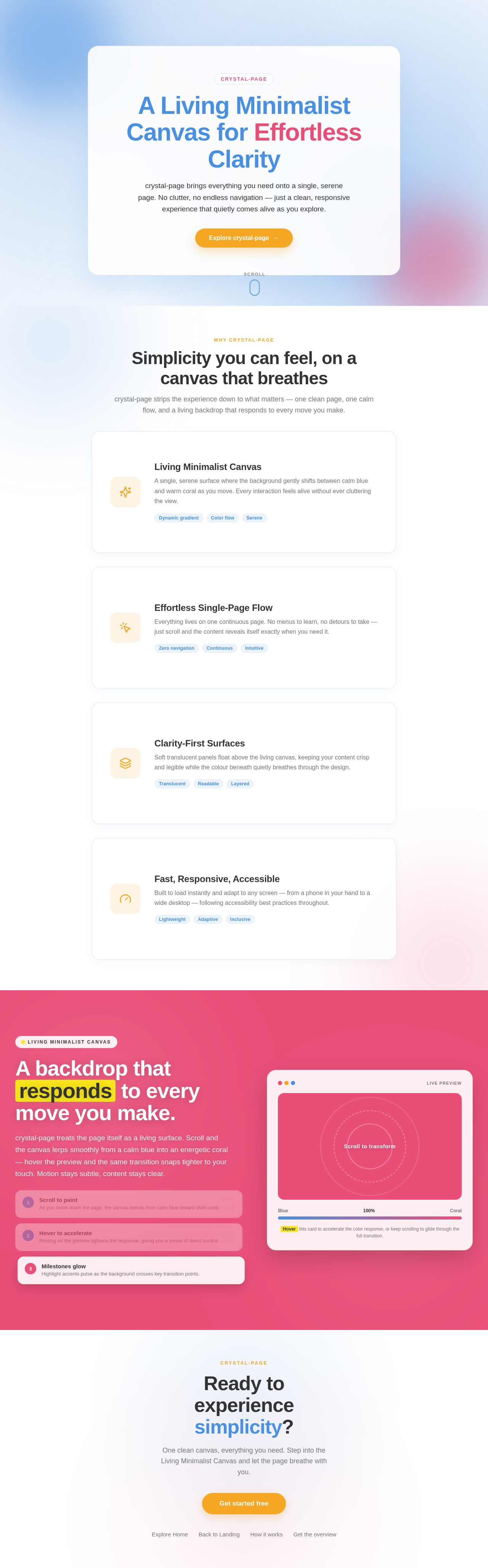
A Living Minimalist Canvas for Effortless Clarity
crystal-page brings everything you need onto a single, serene page. No clutter, no endless navigation — just a clean, responsive experience that quietly comes alive as you explore.
Simplicity you can feel, on a canvas that breathes
crystal-page strips the experience down to what matters — one clean page, one calm flow, and a living backdrop that responds to every move you make.
Living Minimalist Canvas
A single, serene surface where the background gently shifts between calm blue and warm coral as you move. Every interaction feels alive without ever cluttering the view.
Effortless Single-Page Flow
Everything lives on one continuous page. No menus to learn, no detours to take — just scroll and the content reveals itself exactly when you need it.
Clarity-First Surfaces
Soft translucent panels float above the living canvas, keeping your content crisp and legible while the colour beneath quietly breathes through the design.
Fast, Responsive, Accessible
Built to load instantly and adapt to any screen — from a phone in your hand to a wide desktop — following accessibility best practices throughout.
A backdrop that responds to every move you make.
crystal-page treats the page itself as a living surface. Scroll and the canvas lerps smoothly from a calm blue into an energetic coral — hover the preview and the same transition snaps tighter to your touch. Motion stays subtle, content stays clear.
Scroll to paint
As you move down the page, the canvas blends from calm blue toward vivid coral.
Hover to accelerate
Resting on the preview tightens the response, giving you a sense of direct control.
Milestones glow
Highlight accents pulse as the background crosses key transition points.
Hover this card to accelerate the color response, or keep scrolling to glide through the full transition.
Ready to experience simplicity?
One clean canvas, everything you need. Step into the Living Minimalist Canvas and let the page breathe with you.
No comments yet. Be the first!