crystal-page
 Diya Trivedi
create a project to build a simple singlepage design


Comments (0)
Sign in to leave a comment
System Requirements
Crystal-Page System Requirements Document
Introduction
The project "Crystal-Page" aims to develop a simple, single-page design. The primary focus is on simplicity and ease of use, with no specific requirements beyond creating a straightforward user experience.
System Overview
Crystal-Page is designed as a minimalistic, single-page application. The goal is to provide users with a clean and intuitive interface that requires minimal navigation and interaction. The application will serve as a foundational template that can be expanded upon in the future if needed.
Functional Requirements
- As a User, I should be able to access all content on a single page without needing to navigate to other pages.
- As a User, I should experience a clean and simple interface that is easy to understand and use.
User Personas
- User: The primary persona for Crystal-Page, representing any individual who interacts with the single-page application. This user values simplicity and ease of use.
Core User Flows
- User opens the application -> User views all content on a single page -> User interacts with content as needed.
Visuals Colors and Theme
For Crystal-Page, a unique color palette has been created to emphasize simplicity and clarity:
- primary: #4A90E2 (a calm blue)
- primary_light: #A6C8F0 (a lighter tint of the primary blue)
- secondary: #E94E77 (a contrasting coral for emphasis)
- accent: #F5A623 (a vibrant orange for calls to action)
- highlight: #F8E71C (a warm yellow for hover states)
- bg: #FFFFFF (a clean white background)
- surface: rgba(255, 255, 255, 0.9) (a subtle white for cards/panels)
- text: #333333 (a dark gray for primary text)
- text_muted: #777777 (a softer gray for secondary text)
- border: rgba(0, 0, 0, 0.1) (a light gray for borders)
Signature Design Concept
The signature design concept for Crystal-Page is a "Living Minimalist Canvas." The homepage will feature a dynamic, interactive background that subtly shifts colors based on user interaction. As users scroll or hover over different sections, the background will transition smoothly between the primary and secondary colors, creating a serene and engaging experience. This effect will be achieved using framer-motion for smooth transitions and gsap for scroll-triggered animations. The design will maintain a minimalist aesthetic, ensuring that the focus remains on simplicity and user content.
Interaction Model & Motion Direction
The interaction model for Crystal-Page will be "animated." This approach will incorporate moderate scroll-triggered reveals and hover transitions, providing a polished experience without overwhelming the user. The animated model will enhance the single-page design by adding subtle motion to interactive elements, ensuring a modern and engaging user experience.
Non-Functional Requirements
- The application should load quickly and efficiently, ensuring a seamless user experience.
- The design should be responsive, adapting to various screen sizes and devices.
- The application should be accessible, following best practices for web accessibility.
Tech Stack
- Frontend: React for Web
- Backend: Not applicable for a single-page design
- Database: Not applicable for a single-page design
Assumptions and Constraints
- The project assumes that users will access the application via modern web browsers.
- The design is constrained to a single page, focusing on simplicity and ease of use.
Glossary
- Single-page application (SPA): A web application that interacts with the user by dynamically rewriting the current page rather than loading entire new pages from the server.
- Responsive Design: An approach to web design that makes web pages render well on a variety of devices and window or screen sizes.
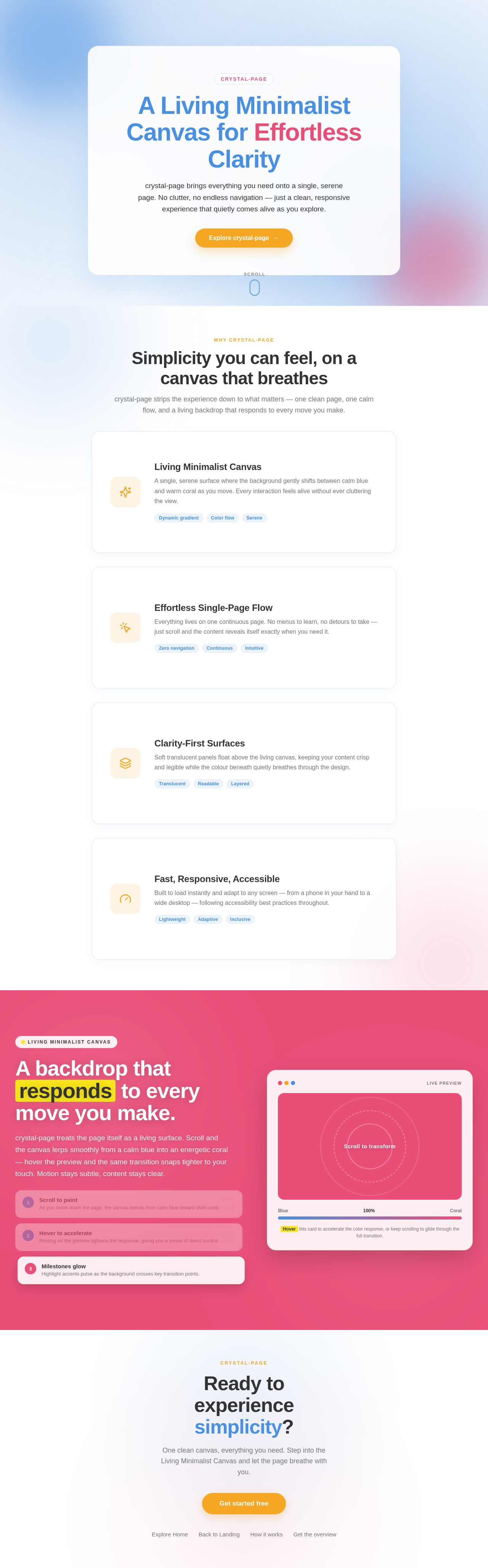
A Living Minimalist Canvas for Effortless Clarity
crystal-page brings everything you need onto a single, serene page. No clutter, no endless navigation — just a clean, responsive experience that quietly comes alive as you explore.
Simplicity you can feel, on a canvas that breathes
crystal-page strips the experience down to what matters — one clean page, one calm flow, and a living backdrop that responds to every move you make.
Living Minimalist Canvas
A single, serene surface where the background gently shifts between calm blue and warm coral as you move. Every interaction feels alive without ever cluttering the view.
Effortless Single-Page Flow
Everything lives on one continuous page. No menus to learn, no detours to take — just scroll and the content reveals itself exactly when you need it.
Clarity-First Surfaces
Soft translucent panels float above the living canvas, keeping your content crisp and legible while the colour beneath quietly breathes through the design.
Fast, Responsive, Accessible
Built to load instantly and adapt to any screen — from a phone in your hand to a wide desktop — following accessibility best practices throughout.
A backdrop that responds to every move you make.
crystal-page treats the page itself as a living surface. Scroll and the canvas lerps smoothly from a calm blue into an energetic coral — hover the preview and the same transition snaps tighter to your touch. Motion stays subtle, content stays clear.
Scroll to paint
As you move down the page, the canvas blends from calm blue toward vivid coral.
Hover to accelerate
Resting on the preview tightens the response, giving you a sense of direct control.
Milestones glow
Highlight accents pulse as the background crosses key transition points.
Hover this card to accelerate the color response, or keep scrolling to glide through the full transition.
Ready to experience simplicity?
One clean canvas, everything you need. Step into the Living Minimalist Canvas and let the page breathe with you.
No comments yet. Be the first!