crystal-modern
 Ayomide Johnson
Build a modern mobile app called AI Walkie — an AI-powered push-to-talk communication app that allows users to communicate instantly through voice channels, similar to a traditional walkie-talkie but enhanced with artificial intelligence. Core Features 1. User Authentication * Sign up and log in with email, phone number, Google, or Apple. * Create a username and profile picture. * Allow users to add friends. 2. Push-to-Talk * Create a large central HOLD TO TALK button. * When the user holds the button, record their voice. * Release the button to send the voice message. * Messages should be transmitted with very low latency. * Show speaking status in real time. * Play incoming messages automatically through the speaker. 3. Channels * Create public and private channels. * Join channels using a channel name or invite code. * Show who is currently online. * Show who is speaking. * Allow channel administrators to remove or mute members. 4. AI Assistant Add an AI voice assistant that can: * Understand spoken commands. * Answer questions by voice. * Summarize conversations. * Convert voice to text. * Translate conversations between languages. * Allow users to say commands such as: * “Translate this to Portuguese.” * “Summarize the last five messages.” * “Send this message to Channel 2.” 5. Voice Translation * Detect the language being spoken. * Translate the speech into the selected language. * Convert the translation back into natural-sounding speech. * Support English, Portuguese, Spanish, French, Yoruba, and additional languages. 6. Voice-to-Text * Display a text transcript below each voice message. * Allow users to copy transcripts. * Store transcripts securely. 7. Emergency Mode * Add an optional emergency channel. * Include a large emergency button. * Allow users to send an urgent voice alert to selected contacts. * Include optional location sharing. 8. User Interface Create a clean, modern interface inspired by professional radio/walkie-talkie devices. Main screens: * Splash screen * Login/Register * Home * Walkie-Talkie channel * Channel creation * Channel members * AI Assistant * Conversation history * Friends * Notifications * Profile * Settings Walkie-Talkie Screen The main screen should contain: Channel Name Online Users Current Speaker Large HOLD TO TALK button Microphone status Recent voice messages AI button Mute/Speaker button Channel settings The interface should feel fast and responsive, with animations showing when someone is speaking. Technical Requirements Use: * Flutter or React Native for the mobile application. * WebRTC for real-time voice communication. * Node.js backend. * PostgreSQL or Supabase database. * Secure authentication. * Push notifications. * WebSocket-based real-time events. * An AI real-time voice API for the AI assistant. * Speech-to-text and text-to-speech services. Design the architecture so that voice communication is handled separately from normal application data to maintain low latency. Security Implement: * Encrypted communication where appropriate. * Secure authentication. * User permissions. * Private channels. * Channel invite codes. * Rate limiting. * Secure storage of user information. * Microphone permission handling. * Location permission handling only when the user enables location sharing. Important Do NOT build this as a simple voice-message chat app. The primary experience should feel like a real-time walkie-talkie: users hold a button, speak, release it, and other connected users hear the message immediately. Build the project with clean, scalable code and a professional UI. Start with an MVP containing authentication, channels, real-time push-to-talk voice communication, and the AI assistant, then structure the project so additional features can easily be added later.

Comments (0)
Sign in to leave a comment
System Requirements
System Requirements Document for crystal-modern
1. Introduction
The "AI Walkie" project aims to develop a modern mobile application that functions as an AI-powered push-to-talk communication tool. The app is designed to replicate the real-time communication experience of traditional walkie-talkies, enhanced with artificial intelligence capabilities. The target audience includes individuals and groups seeking efficient, instant voice communication with added AI functionalities such as translation, summarization, and voice-to-text conversion.
2. System Overview
AI Walkie is a mobile application that provides real-time voice communication through voice channels, similar to a traditional walkie-talkie, but enhanced with AI features. The app supports user authentication, channel creation, AI voice assistance, voice translation, and an emergency mode. It is built using Flutter or React Native, WebRTC for voice communication, Node.js for the backend, and PostgreSQL or Supabase for data storage. The system ensures low latency and secure communication.
2a. Product Interpretation and Delivery Boundary
The application is designed to provide a real-time walkie-talkie experience, not a simple voice-message chat app. It includes a robust authentication system, channel management, and AI-powered features. The app's architecture separates voice communication from normal application data to maintain low latency. The initial MVP focuses on core functionalities with a structure that allows for future feature expansion. The app maintains secure communication and user data handling, with permissions managed appropriately.
2b. Source Content Inventory
Not applicable as no content source directive was provided.
2c. Page Content and Component Coverage
Landing
- Purpose: Introduce AI Walkie, its features, and benefits.
- Components:
- Overview of AI Walkie
- Explanation of real-time push-to-talk communication
- Call-to-action for user registration or login
Login/Register
- Purpose: User authentication and account creation.
- Components:
- Email, phone, Google, or Apple sign-up/login
- Username and profile picture setup
- Friend addition functionality
Splash Screen
- Purpose: Initial app loading screen.
- Components:
- App logo and branding
- Transition to Login/Register or Home
Home
- Purpose: Main navigation and channel entry point.
- Components:
- List of available channels
- Access to Friends, Notifications, and Settings
Walkie-Talkie Channel
- Purpose: Real-time voice communication.
- Components:
- Channel name and current speaker display
- Large HOLD TO TALK button
- Online users and microphone status
- Recent voice messages and AI button
- Mute/Speaker button and channel settings
Channel Creation
- Purpose: Create new communication channels.
- Components:
- Public or private channel options
- Channel name and invite code setup
Channel Members
- Purpose: Manage channel participants.
- Components:
- List of current members
- Options to remove or mute members (admin only)
AI Assistant
- Purpose: Provide AI-powered voice assistance.
- Components:
- Voice command input
- Conversation summarization and translation
- Voice-to-text conversion
Conversation History
- Purpose: Access past conversations and transcripts.
- Components:
- List of recent conversations
- Transcript display and copy option
Friends
- Purpose: Manage friend relationships.
- Components:
- List of friends
- Add or remove friends
Notifications
- Purpose: Display app notifications.
- Components:
- List of recent notifications
- Notification settings
Emergency
- Purpose: Send urgent alerts and share location.
- Components:
- Large emergency button
- Contact selection for alerts
- Optional location sharing
Profile
- Purpose: Manage user profile details.
- Components:
- Username and profile picture
- Account settings
Settings
- Purpose: Configure app preferences.
- Components:
- Audio and notification settings
- Permissions management
3. Functional Requirements
- As a User, I should be able to sign up and log in using email, phone number, Google, or Apple to access the app. (explicit)
- As a User, I should be able to create a username and profile picture to personalize my account. (explicit)
- As a User, I should be able to add friends to communicate with them easily. (explicit)
- As a User, I should be able to hold a button to talk and release it to send a voice message with very low latency. (explicit)
- As a User, I should be able to see who is speaking and who is online in a channel. (explicit)
- As a Channel Administrator, I should be able to remove or mute members in my channel. (explicit)
- As a User, I should be able to use an AI assistant to understand commands, answer questions, summarize conversations, and translate languages. (explicit)
- As a User, I should be able to translate voice messages into different languages and hear them in natural-sounding speech. (explicit)
- As a User, I should be able to view and copy text transcripts of voice messages. (explicit)
- As a User, I should be able to send urgent alerts and share my location in an emergency. (explicit)
- As a User, I should experience a clean, modern interface with fast, responsive animations. (explicit)
4. User Personas
- User: Engages with authentication, profiles, friends, channels, push-to-talk communication, AI assistance, translation, transcripts, notifications, emergency alerts, and personal settings.
- Channel Administrator: Manages channel membership by removing or muting members and controls channel settings for channels they administer.
5. Core User Flows
User Authentication Flow
- User opens the app and lands on the Splash Screen.
- User proceeds to the Login/Register page.
- User selects a sign-up or login method (email, phone, Google, Apple).
- User completes authentication and is directed to the Home page.
Push-to-Talk Communication Flow
- User navigates to the Walkie-Talkie Channel page.
- User holds the HOLD TO TALK button to record a message.
- User releases the button to send the message.
- Other users in the channel hear the message immediately.
AI Assistant Interaction Flow
- User accesses the AI Assistant page.
- User speaks a command (e.g., "Translate this to Portuguese").
- AI processes the command and provides a response.
- User receives the translated or summarized output.
Emergency Alert Flow
- User navigates to the Emergency page.
- User presses the emergency button to send an alert.
- Selected contacts receive the alert and optional location information.
6. Visuals Colors and Theme
- Muse: Virgil Abloh
- Palette:
- Background: #141517
- Surface: #1E1E1E
- Text: #FFFFFF
- Primary: #FF8800
- Accent: #FFD700
- Muted: #333333
- Typography:
- Headings: Bebas Neue — All caps, wide letterspacing
- Body: Roboto
- Scale: 1.5 modular, 48/32/24/18/16
- Shape Language: Label and tag motifs, hazard stripes, exposed grid lines
- Layout: Structured with industrial framing, bold central elements, clear hierarchy
- Motion: Snappy transitions with marquees and tag flips
7. Signature Design Concept
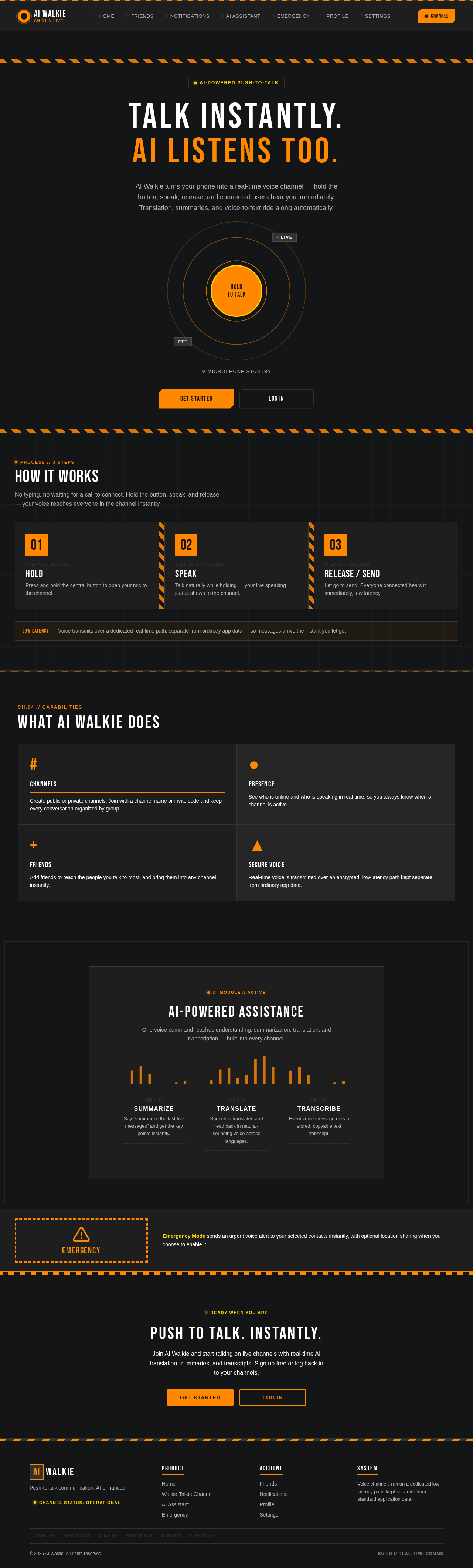
The public entry features a full-screen dark background with a central HOLD TO TALK button in safety orange, accented with hazard stripes and UI elements styled as industrial labels. The design emphasizes a professional walkie-talkie aesthetic with bold typography and structured layout.
8. Interaction Model & Motion Direction
- Interaction Model: Static
- Motion Tempo: Expressive
- Hero Dimensionality: Flat
- Landing Hero Motion Brief: The central HOLD TO TALK button animates with rings indicating activity. Tag flip animations are used for notifications and status updates, maintaining a bold and industrial aesthetic.
9. Non-Functional Requirements
- Security: Implement encrypted communication, secure authentication, user permissions, and secure storage of user information. Handle microphone and location permissions appropriately.
- Performance: Ensure low latency in voice communication by separating it from normal application data.
- Scalability: Design the system to support future feature additions without major architectural changes.
10. Tech Stack
- Mobile Application: Flutter or React Native
- Voice Communication: WebRTC
- Backend: Node.js
- Database: PostgreSQL or Supabase
- AI Services: AI real-time voice API, speech-to-text, and text-to-speech services
11. Assumptions and Constraints
- The primary experience must be real-time walkie-talkie communication.
- The initial MVP scope includes authentication, channels, real-time push-to-talk communication, and the AI assistant.
- Voice communication must be handled separately from normal application data to maintain low latency.
- Location permission is requested only when the user enables location sharing.
12. Glossary
- AI Assistant: A feature that provides voice-based assistance, including translation and summarization.
- Channel: A virtual space where users can communicate via voice messages.
- Push-to-Talk: A communication method where users press a button to speak and release it to send the message.
- Emergency Mode: A feature that allows users to send urgent alerts and share their location with selected contacts.
Talk instantly.
AI listens too.
AI Walkie turns your phone into a real-time voice channel — hold the button, speak, release, and connected users hear you immediately. Translation, summaries, and voice-to-text ride along automatically.
How It Works
No typing, no waiting for a call to connect. Hold the button, speak, and release — your voice reaches everyone in the channel instantly.
Press and hold the central button to open your mic to the channel.
Talk naturally while holding — your live speaking status shows to the channel.
Let go to send. Everyone connected hears it immediately, low-latency.
Voice transmits over a dedicated real-time path, separate from ordinary app data — so messages arrive the instant you let go.
What AI Walkie Does
Channels
Create public or private channels. Join with a channel name or invite code and keep every conversation organized by group.
Presence
See who is online and who is speaking in real time, so you always know when a channel is active.
Friends
Add friends to reach the people you talk to most, and bring them into any channel instantly.
Secure Voice
Real-time voice is transmitted over an encrypted, low-latency path kept separate from ordinary app data.
AI-Powered Assistance
One voice command reaches understanding, summarization, translation, and transcription — built into every channel.
Emergency
Emergency Mode sends an urgent voice alert to your selected contacts instantly, with optional location sharing when you choose to enable it.
Push To Talk. Instantly.
Join AI Walkie and start talking on live channels with real-time AI translation, summaries, and transcripts. Sign up free or log back in to your channels.
Talk instantly.
AI listens too.
AI Walkie turns your phone into a real-time voice channel — hold the button, speak, release, and connected users hear you immediately. Translation, summaries, and voice-to-text ride along automatically.
How It Works
No typing, no waiting for a call to connect. Hold the button, speak, and release — your voice reaches everyone in the channel instantly.
Press and hold the central button to open your mic to the channel.
Talk naturally while holding — your live speaking status shows to the channel.
Let go to send. Everyone connected hears it immediately, low-latency.
Voice transmits over a dedicated real-time path, separate from ordinary app data — so messages arrive the instant you let go.
What AI Walkie Does
Channels
Create public or private channels. Join with a channel name or invite code and keep every conversation organized by group.
Presence
See who is online and who is speaking in real time, so you always know when a channel is active.
Friends
Add friends to reach the people you talk to most, and bring them into any channel instantly.
Secure Voice
Real-time voice is transmitted over an encrypted, low-latency path kept separate from ordinary app data.
AI-Powered Assistance
One voice command reaches understanding, summarization, translation, and transcription — built into every channel.
Emergency
Emergency Mode sends an urgent voice alert to your selected contacts instantly, with optional location sharing when you choose to enable it.
Push To Talk. Instantly.
Join AI Walkie and start talking on live channels with real-time AI translation, summaries, and transcripts. Sign up free or log back in to your channels.
No comments yet. Be the first!