crystal-modern
 Ayomide Johnson
Build a modern mobile app called AI Walkie — an AI-powered push-to-talk communication app that allows users to communicate instantly through voice channels, similar to a traditional walkie-talkie but enhanced with artificial intelligence. Core Features 1. User Authentication * Sign up and log in with email, phone number, Google, or Apple. * Create a username and profile picture. * Allow users to add friends. 2. Push-to-Talk * Create a large central HOLD TO TALK button. * When the user holds the button, record their voice. * Release the button to send the voice message. * Messages should be transmitted with very low latency. * Show speaking status in real time. * Play incoming messages automatically through the speaker. 3. Channels * Create public and private channels. * Join channels using a channel name or invite code. * Show who is currently online. * Show who is speaking. * Allow channel administrators to remove or mute members. 4. AI Assistant Add an AI voice assistant that can: * Understand spoken commands. * Answer questions by voice. * Summarize conversations. * Convert voice to text. * Translate conversations between languages. * Allow users to say commands such as: * “Translate this to Portuguese.” * “Summarize the last five messages.” * “Send this message to Channel 2.” 5. Voice Translation * Detect the language being spoken. * Translate the speech into the selected language. * Convert the translation back into natural-sounding speech. * Support English, Portuguese, Spanish, French, Yoruba, and additional languages. 6. Voice-to-Text * Display a text transcript below each voice message. * Allow users to copy transcripts. * Store transcripts securely. 7. Emergency Mode * Add an optional emergency channel. * Include a large emergency button. * Allow users to send an urgent voice alert to selected contacts. * Include optional location sharing. 8. User Interface Create a clean, modern interface inspired by professional radio/walkie-talkie devices. Main screens: * Splash screen * Login/Register * Home * Walkie-Talkie channel * Channel creation * Channel members * AI Assistant * Conversation history * Friends * Notifications * Profile * Settings Walkie-Talkie Screen The main screen should contain: Channel Name Online Users Current Speaker Large HOLD TO TALK button Microphone status Recent voice messages AI button Mute/Speaker button Channel settings The interface should feel fast and responsive, with animations showing when someone is speaking. Technical Requirements Use: * Flutter or React Native for the mobile application. * WebRTC for real-time voice communication. * Node.js backend. * PostgreSQL or Supabase database. * Secure authentication. * Push notifications. * WebSocket-based real-time events. * An AI real-time voice API for the AI assistant. * Speech-to-text and text-to-speech services. Design the architecture so that voice communication is handled separately from normal application data to maintain low latency. Security Implement: * Encrypted communication where appropriate. * Secure authentication. * User permissions. * Private channels. * Channel invite codes. * Rate limiting. * Secure storage of user information. * Microphone permission handling. * Location permission handling only when the user enables location sharing. Important Do NOT build this as a simple voice-message chat app. The primary experience should feel like a real-time walkie-talkie: users hold a button, speak, release it, and other connected users hear the message immediately. Build the project with clean, scalable code and a professional UI. Start with an MVP containing authentication, channels, real-time push-to-talk voice communication, and the AI assistant, then structure the project so additional features can easily be added later.

Comments (0)
Sign in to leave a comment
Architecture
No Services Diagrams Yet
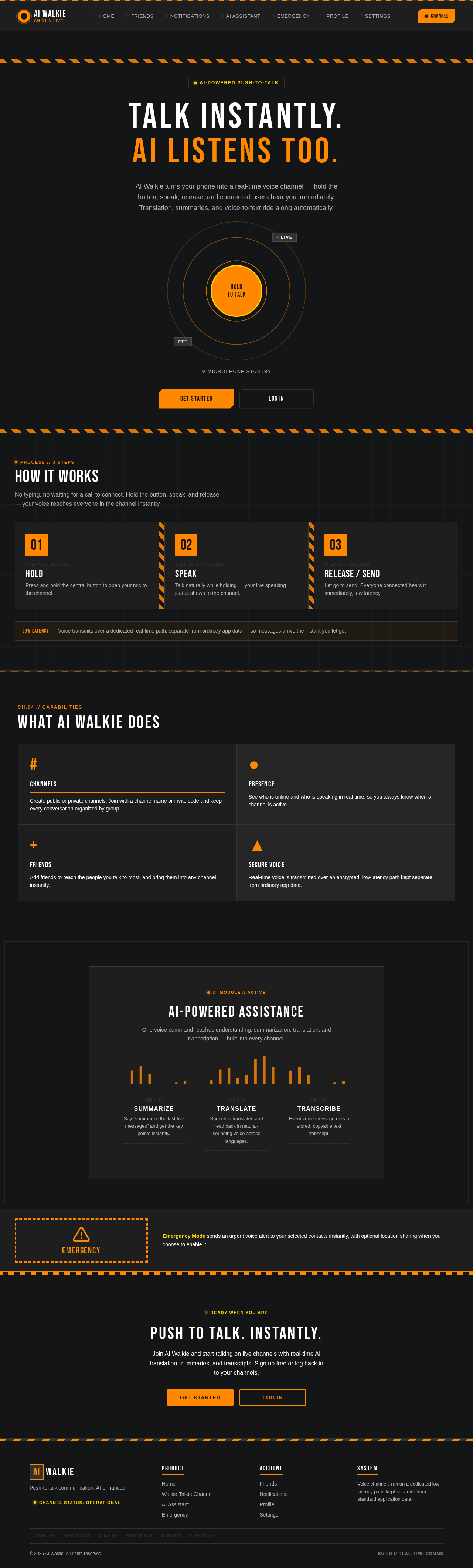
Talk instantly.
AI listens too.
AI Walkie turns your phone into a real-time voice channel — hold the button, speak, release, and connected users hear you immediately. Translation, summaries, and voice-to-text ride along automatically.
How It Works
No typing, no waiting for a call to connect. Hold the button, speak, and release — your voice reaches everyone in the channel instantly.
Press and hold the central button to open your mic to the channel.
Talk naturally while holding — your live speaking status shows to the channel.
Let go to send. Everyone connected hears it immediately, low-latency.
Voice transmits over a dedicated real-time path, separate from ordinary app data — so messages arrive the instant you let go.
What AI Walkie Does
Channels
Create public or private channels. Join with a channel name or invite code and keep every conversation organized by group.
Presence
See who is online and who is speaking in real time, so you always know when a channel is active.
Friends
Add friends to reach the people you talk to most, and bring them into any channel instantly.
Secure Voice
Real-time voice is transmitted over an encrypted, low-latency path kept separate from ordinary app data.
AI-Powered Assistance
One voice command reaches understanding, summarization, translation, and transcription — built into every channel.
Emergency
Emergency Mode sends an urgent voice alert to your selected contacts instantly, with optional location sharing when you choose to enable it.
Push To Talk. Instantly.
Join AI Walkie and start talking on live channels with real-time AI translation, summaries, and transcripts. Sign up free or log back in to your channels.
Talk instantly.
AI listens too.
AI Walkie turns your phone into a real-time voice channel — hold the button, speak, release, and connected users hear you immediately. Translation, summaries, and voice-to-text ride along automatically.
How It Works
No typing, no waiting for a call to connect. Hold the button, speak, and release — your voice reaches everyone in the channel instantly.
Press and hold the central button to open your mic to the channel.
Talk naturally while holding — your live speaking status shows to the channel.
Let go to send. Everyone connected hears it immediately, low-latency.
Voice transmits over a dedicated real-time path, separate from ordinary app data — so messages arrive the instant you let go.
What AI Walkie Does
Channels
Create public or private channels. Join with a channel name or invite code and keep every conversation organized by group.
Presence
See who is online and who is speaking in real time, so you always know when a channel is active.
Friends
Add friends to reach the people you talk to most, and bring them into any channel instantly.
Secure Voice
Real-time voice is transmitted over an encrypted, low-latency path kept separate from ordinary app data.
AI-Powered Assistance
One voice command reaches understanding, summarization, translation, and transcription — built into every channel.
Emergency
Emergency Mode sends an urgent voice alert to your selected contacts instantly, with optional location sharing when you choose to enable it.
Push To Talk. Instantly.
Join AI Walkie and start talking on live channels with real-time AI translation, summaries, and transcripts. Sign up free or log back in to your channels.
No comments yet. Be the first!