crm-lead-management
 Meghna Rajawat
Develop a secure, scalable, AI-powered CRM system with customer and lead management, sales pipelines, follow-up automation, AI-driven communication, workflow integrations, reporting, and user management - Implementing basic reporting and analytics. - Setting up a secure database and user management. - Ensuring the system is scalable and can be maintained independently.


Comments (0)
Sign in to leave a comment
System Requirements
System Requirements Document for crm-lead-management
1. Introduction
crm-lead-management is a secure, scalable, AI-powered Customer Relationship Management (CRM) system. It is built for small sales teams, sales leads, and RevOps-minded operators who need to manage customers and leads, move deals through sales pipelines, automate follow-ups, communicate with AI assistance, connect workflow integrations, and see basic reporting and analytics — all backed by a secure database and user management, and maintainable independently without external dependence.
The product intent is to take repetitive sales work off the desk and make the number: durable customer and lead records, a pipeline that reflects real deal state, follow-up automation that ensures no lead is missed, AI-driven communication that keeps outreach timely, workflow integrations that connect the CRM to the rest of the stack, and basic reporting that makes pipeline health and team performance visible and actionable.
The audience is the day-to-day sales representative working leads and customers, the sales manager overseeing pipeline and performance, and the CRM administrator who owns secure database setup, user management, and integrations so the system stays secure, scalable, and independently maintainable.
2. System Overview
crm-lead-management is delivered as a first-party web application with an application-owned identity layer, a durable backend for CRM records and pipeline state, background automation execution, AI-driven communication, workflow integrations, and basic reporting. The system is designed to be secure, scalable, and maintainable independently.
Actors
- Sales Representative — works leads and customers day to day; manages customer and lead records, moves deals through sales pipelines, and uses AI-driven communication and follow-up automation to keep outreach timely.
- Sales Manager — oversees the team's pipeline and performance; uses reporting and analytics to review sales activity and outcomes and to keep follow-up and workflow automation working for the team.
- CRM Administrator — owns secure database setup, user management, and workflow integrations so the CRM stays secure, scalable, and independently maintainable.
Accepted current behavior
- AI-powered CRM system
- Customer management
- Lead management
- Sales pipelines
- Follow-up automation
- AI-driven communication
- Workflow integrations
- Basic reporting and analytics
- Secure database
- User management
- Scalable system that can be maintained independently
Ownership and delivery boundary
The application owns its identity layer: anonymous visitors reach the Landing page before any identity establishment; independently starting CRM users enroll through self-service Sign Up; returning users verify through Login before protected CRM state is available; and privileged administrative access to users, integrations, and database setup requires CRM Administrator provisioning or invitation. Durable CRM records, pipeline state, automation, AI communication, integrations, reporting, user management, and secure database operations are executed by the backend.
Narrow exclusions
- Reporting and analytics scope is basic — advanced analytics, custom report builders, and data-warehouse-style exploration are out of current scope.
- No blue or indigo palette anywhere; the accent is signal red only.
- No rounded corners, soft shadows, glass panels, or hover-lift cards.
- No stock photography of smiling people at laptops or in meetings; no gradient blobs; no 3D renders.
- No decorative icon sets used as filler; icons only where they carry information.
- No bouncy, springy, or particle-based motion; nothing plays more than once per screen.
2a. Product Interpretation and Delivery Boundary
crm-lead-management is a first-party web application. The public entry is the Landing page, which explains the AI-powered CRM, its personas, and its capabilities before any identity establishment. Identity is application-owned: self-service Sign Up creates a first-use account for independently starting CRM users, Login verifies returning users before protected CRM state is available, and CRM Administrator provisioning or invitation is required before privileged administrative access to users, integrations, and database setup.
All CRM work — customer and lead records, pipeline stages, follow-up automation, AI-driven communication, workflow integrations, reporting, user management, and secure database operations — is durable backend state owned by the application. Background automation and AI communication execute on the backend and produce observable results in the CRM. Workflow integrations connect to external providers under the CRM Administrator's ownership; the CRM owns the connection configuration and the resulting CRM-side state.
Current scope is the accepted capability set listed in Section 2. Future ideas, advanced analytics, and adjacent account-management capabilities are not current scope.
2c. Page Content and Component Coverage
Landing
- Information/state: Anonymous public entry. Explains the AI-powered CRM, its personas (Sales Representative, Sales Manager, CRM Administrator), and its capabilities (customer and lead management, sales pipelines, follow-up automation, AI-driven communication, workflow integrations, basic reporting and analytics, secure database, user management, scalability and independent maintainability).
- Primary actions: Navigate to Sign Up (START FREE); navigate to Login.
- Supporting actions: Read capability sections; read persona sections.
- Domain entities: None (public surface).
- Component responsibilities: Full-viewport editorial hero with oversized Archivo headline; ruled label/value row with live pipeline, leads scored, and average response micro-type; solid signal-red CTA rectangle; full-bleed 1px rules separating sections with hanging uppercase section numbers; fixed black left nav on app surfaces (not on Landing).
- States: Loading (static content, no data fetch required); empty (not applicable); success (rendered); error (not applicable); recovery (not applicable).
Login
- Information/state: Returning verification surface for all CRM personas with application-owned durable state.
- Primary actions: Submit credentials to verify identity; proceed to Dashboard on success.
- Supporting actions: Navigate to Sign Up; navigate back to Landing.
- Domain entities: User identity.
- Component responsibilities: Credential form panel on white working surface; 1px black hairline inputs; single signal-red submit rectangle; inline error region.
- States: Loading (submitting); empty (blank form); success (redirect to Dashboard); error (invalid credentials, inline message, form retained); recovery (retry submission).
Sign Up
- Information/state: Self-service enrollment surface for independently starting CRM users.
- Primary actions: Submit enrollment details to create a first-use account; proceed to Dashboard on success.
- Supporting actions: Navigate to Login; navigate back to Landing.
- Domain entities: User identity.
- Component responsibilities: Enrollment form panel on white working surface; 1px black hairline inputs; single signal-red submit rectangle; inline error region.
- States: Loading (submitting); empty (blank form); success (account created, redirect to Dashboard); error (validation or duplicate account, inline message, form retained); recovery (retry submission).
Dashboard
- Information/state: Post-authentication summary and routing hub for the CRM's core work areas. Shows current pipeline summary, recent leads and customers, follow-up automation status, and links to all work areas.
- Primary actions: Route to Customers, Leads, Pipeline, Follow-up Automation, AI Communication, Reports (per role), Integrations, Users, Database (per role).
- Supporting actions: Review summary metrics; review recent activity.
- Domain entities: Customer, Lead, Deal, Pipeline stage, Follow-up automation, User.
- Component responsibilities: Ruled label/value summary rows with tabular numerals; full-bleed rules; fixed black left nav with signal-red active rule; white working canvas.
- States: Loading (fetching summary); empty (no records yet, guidance to create first lead or customer); success (summary rendered); error (summary unavailable, retry control); recovery (retry fetch).
Customers
- Information/state: Durable customer record browse, create, view, and update owner for Sales Representative.
- Primary actions: Browse customer list; create customer; view customer detail; update customer.
- Supporting actions: Search/filter customers; navigate to related leads, deals, and communication.
- Domain entities: Customer (name, contact details, account information, related deals, related communication history).
- Component responsibilities: Ruled customer rows with hairline separators; detail panel on white working surface; 1px black hairline form inputs; single signal-red primary action rectangle.
- States: Loading (fetching list or detail); empty (no customers, guidance to create first customer); success (list or detail rendered); error (fetch or save failure, inline message, retry control); recovery (retry fetch or save).
Leads
- Information/state: Durable lead record browse, create, view, and update owner for Sales Representative.
- Primary actions: Browse lead list; create lead; view lead detail; update lead.
- Supporting actions: Search/filter leads; convert or progress lead; navigate to related communication and follow-up.
- Domain entities: Lead (name, contact details, source, status, related communication history, follow-up state).
- Component responsibilities: Ruled lead rows with hairline separators; detail panel on white working surface; 1px black hairline form inputs; single signal-red primary action rectangle.
- States: Loading (fetching list or detail); empty (no leads, guidance to create first lead); success (list or detail rendered); error (fetch or save failure, inline message, retry control); recovery (retry fetch or save).
Pipeline
- Information/state: Sales pipeline stage management owner for moving deals through stages.
- Primary actions: View pipeline board; move deal between stages; view deal detail.
- Supporting actions: Filter pipeline by owner or stage; open related customer or lead.
- Domain entities: Deal, Pipeline stage, Customer, Lead.
- Component responsibilities: Pipeline board as columns of ruled rows; active stage header solid black, other stage headers muted; 1px hairline separators; tabular numerals for deal values; single signal-red rectangle for the primary action.
- States: Loading (fetching pipeline); empty (no deals, guidance to create first deal); success (board rendered); error (fetch or move failure, inline message, retry control); recovery (retry fetch or move).
Follow-up Automation
- Information/state: Configuration and operation owner for follow-up automation across leads and customers.
- Primary actions: Configure follow-up automation rules; enable/disable automation; view automation status and results.
- Supporting actions: Review triggered follow-ups; adjust timing or conditions.
- Domain entities: Follow-up automation rule, Lead, Customer, Communication.
- Component responsibilities: Ruled rule rows with hairline separators; rule configuration panel on white working surface; 1px black hairline inputs; single signal-red primary action rectangle; status indicators.
- States: Loading (fetching rules and status); empty (no rules, guidance to create first rule); success (rules and status rendered); error (fetch or save failure, inline message, retry control); recovery (retry fetch or save).
AI Communication
- Information/state: AI-driven outreach drafting and sending owner for leads and customers.
- Primary actions: Draft AI-assisted communication for a lead or customer; review and edit draft; send communication.
- Supporting actions: Select recipient lead or customer; review communication history.
- Domain entities: Communication, Lead, Customer, AI draft.
- Component responsibilities: Draft panel on white working surface; recipient selector; 1px black hairline inputs; single signal-red send rectangle; communication history as ruled rows.
- States: Loading (generating draft or fetching history); empty (no draft yet, guidance to select recipient); success (draft rendered or communication sent); error (generation or send failure, inline message, retry control); recovery (retry generation or send).
Integrations
- Information/state: Workflow integration connection and management owner for CRM Administrator.
- Primary actions: Connect workflow integration; configure integration; view integration status; disconnect integration.
- Supporting actions: Review integration activity; test connection.
- Domain entities: Integration connection, Integration configuration, Integration activity.
- Component responsibilities: Ruled integration rows with hairline separators; configuration panel on white working surface; 1px black hairline inputs; single signal-red primary action rectangle; status indicators.
- States: Loading (fetching integrations); empty (no integrations, guidance to connect first integration); success (integrations and status rendered); error (connect, configure, or disconnect failure, inline message, retry control); recovery (retry operation).
Reports
- Information/state: Basic reporting and analytics owner for sales activity and pipeline visibility.
- Primary actions: View basic reports on sales activity and pipeline; filter by period or owner.
- Supporting actions: Review metric deltas; navigate to related records.
- Domain entities: Sales activity, Pipeline, Deal, Lead, Customer.
- Component responsibilities: Ruled label/value metric rows with tabular numerals; full-bleed rules; single signal-red metric delta marker; white working canvas.
- States: Loading (fetching report data); empty (no data for period, guidance to adjust filter); success (reports rendered); error (fetch failure, inline message, retry control); recovery (retry fetch).
Users
- Information/state: User and access management owner for CRM Administrator.
- Primary actions: View users; provision or invite user; manage user access.
- Supporting actions: Review user activity; deactivate user.
- Domain entities: User, Role, Access.
- Component responsibilities: Ruled user rows with hairline separators; user detail panel on white working surface; 1px black hairline inputs; single signal-red primary action rectangle.
- States: Loading (fetching users); empty (no users beyond administrator, guidance to invite first user); success (users rendered); error (fetch, provision, or update failure, inline message, retry control); recovery (retry operation).
Database
- Information/state: Secure database setup and maintenance owner for CRM Administrator.
- Primary actions: Configure secure database settings; view database status; perform maintenance operations.
- Supporting actions: Review database health; review security configuration.
- Domain entities: Database configuration, Database status, Security setting.
- Component responsibilities: Ruled configuration rows with hairline separators; configuration panel on white working surface; 1px black hairline inputs; single signal-red primary action rectangle; status indicators.
- States: Loading (fetching database status); empty (not applicable); success (status and configuration rendered); error (fetch or save failure, inline message, retry control); recovery (retry operation).
3. Functional Requirements
FR-1 — AI-powered CRM system As a Sales Representative, I should work within an AI-powered CRM system that assists my customer, lead, pipeline, and communication work, so that repetitive sales work is taken off my desk.
- Provenance: explicit
- Trigger/input: I open the CRM after identity verification.
- Observable result: AI-assisted capabilities (AI-driven communication, follow-up automation) are available in my work areas.
- Access state: Authenticated.
- Failure/recovery: If AI assistance is unavailable, the underlying CRM records and manual work remain usable; I can retry the AI action.
- Continuation: I continue with customer, lead, pipeline, or communication work.
FR-2 — Customer management As a Sales Representative, I should browse, create, view, and update durable customer records, so that customer information is accurate and available.
- Provenance: explicit
- Trigger/input: I open Customers and select or create a customer.
- Observable result: The customer record is created or updated and visible in the customer list and detail view.
- Access state: Authenticated, role-restricted to Sales Representative.
- Failure/recovery: If save fails, the form retains my input and shows an inline error; I can retry.
- Continuation: I navigate to related leads, deals, or communication.
FR-3 — Lead management As a Sales Representative, I should browse, create, view, and update durable lead records, so that no lead is missed.
- Provenance: explicit
- Trigger/input: I open Leads and select or create a lead.
- Observable result: The lead record is created or updated and visible in the lead list and detail view.
- Access state: Authenticated, role-restricted to Sales Representative.
- Failure/recovery: If save fails, the form retains my input and shows an inline error; I can retry.
- Continuation: I progress the lead, communicate with it, or attach follow-up automation.
FR-4 — Sales pipelines As a Sales Representative, I should view the pipeline board and move deals through stages, so that deal state reflects reality.
- Provenance: explicit
- Trigger/input: I open Pipeline and move a deal between stages.
- Observable result: The deal's stage changes and the pipeline board reflects the new state.
- Access state: Authenticated, role-restricted to Sales Representative.
- Failure/recovery: If the move fails, the deal remains in its prior stage and an inline error appears; I can retry.
- Continuation: I continue working other deals or open the deal's customer or lead.
FR-5 — Follow-up automation As a Sales Representative, I should configure and operate follow-up automation across leads and customers, so that outreach stays timely without manual tracking.
- Provenance: explicit
- Trigger/input: I open Follow-up Automation and configure a rule, or automation triggers on a lead or customer condition.
- Observable result: The rule is saved and enabled; triggered follow-ups appear in automation status and results.
- Access state: Authenticated, role-restricted to Sales Representative.
- Failure/recovery: If configuration save fails, the form retains my input and shows an inline error; if a triggered follow-up fails, it is visible in automation status with a retry path.
- Continuation: I review triggered follow-ups and adjust timing or conditions.
FR-6 — AI-driven communication As a Sales Representative, I should draft AI-assisted communication for a lead or customer, review and edit it, and send it, so that outreach is timely and relevant.
- Provenance: explicit
- Trigger/input: I open AI Communication, select a recipient lead or customer, and request a draft.
- Observable result: An AI draft is generated; after my review and edit, the communication is sent and recorded in communication history.
- Access state: Authenticated, role-restricted to Sales Representative.
- Failure/recovery: If generation fails, I can retry or write manually; if send fails, the draft is retained and an inline error appears.
- Continuation: I review communication history or move to the next recipient.
FR-7 — Workflow integrations As a CRM Administrator, I should connect, configure, view the status of, and disconnect workflow integrations, so that the CRM connects to the rest of the stack.
- Provenance: explicit
- Trigger/input: I open Integrations and connect, configure, or disconnect an integration.
- Observable result: The integration connection and configuration are saved and its status is visible.
- Access state: Authenticated, role-restricted to CRM Administrator.
- Failure/recovery: If connect, configure, or disconnect fails, the prior state is retained and an inline error appears; I can retry.
- Continuation: I review integration activity or test the connection.
FR-8 — Basic reporting and analytics As a Sales Manager, I should view basic reports on sales activity and pipeline, so that pipeline health and team performance are visible and actionable.
- Provenance: explicit
- Trigger/input: I open Reports and select a period or owner filter.
- Observable result: Basic reports on sales activity and pipeline are rendered with metric values and deltas.
- Access state: Authenticated, role-restricted to Sales Manager.
- Failure/recovery: If report data fails to load, an inline error appears with a retry control.
- Continuation: I review metric deltas and navigate to related records.
FR-9 — Secure database As a CRM Administrator, I should configure and maintain a secure database, so that CRM data is protected and the system stays secure.
- Provenance: explicit
- Trigger/input: I open Database and configure secure database settings or perform maintenance.
- Observable result: Database configuration and status are saved and visible.
- Access state: Authenticated, role-restricted to CRM Administrator.
- Failure/recovery: If configuration save fails, the form retains my input and shows an inline error; I can retry.
- Continuation: I review database health and security configuration.
FR-10 — User management As a CRM Administrator, I should view users, provision or invite users, and manage user access, so that the right people have the right access.
- Provenance: explicit
- Trigger/input: I open Users and provision, invite, or update a user.
- Observable result: The user is provisioned or invited and their access is recorded and visible.
- Access state: Authenticated, role-restricted to CRM Administrator.
- Failure/recovery: If provisioning or update fails, the prior state is retained and an inline error appears; I can retry.
- Continuation: I review user activity or deactivate a user.
FR-11 — Scalable system that can be maintained independently As a CRM Administrator, I should operate a system that scales and can be maintained independently, so that the CRM stays reliable without external dependence.
- Provenance: explicit
- Trigger/input: I operate and maintain the CRM as usage grows.
- Observable result: The system continues to serve CRM work areas under load and can be maintained without external dependence.
- Access state: Authenticated, role-restricted to CRM Administrator.
- Failure/recovery: If a component degrades, the affected work area shows an inline error with a retry control while other work areas remain usable.
- Continuation: I continue maintenance and operation.
FR-12 — Anonymous visitor reaches the Landing page As an anonymous visitor, I should reach the Landing page before identity establishment, so that I can understand the AI-powered CRM, its personas, and its capabilities.
- Provenance: required_inference
- Trigger/input: I navigate to the CRM's public entry.
- Observable result: The Landing page renders with capability and persona information and calls to Sign Up or Login.
- Access state: Anonymous.
- Failure/recovery: Not applicable (static public surface).
- Continuation: I navigate to Sign Up or Login.
FR-13 — Self-service enrollment As an independently starting CRM user, I should enroll through self-service Sign Up to create a first-use account, so that I can start using the CRM.
- Provenance: required_inference
- Trigger/input: I submit enrollment details on Sign Up.
- Observable result: A first-use account is created and I proceed to the Dashboard.
- Access state: Anonymous entry; authenticated after success.
- Failure/recovery: If validation fails or the account already exists, the form retains my input and shows an inline error; I can retry.
- Continuation: I proceed to the Dashboard.
FR-14 — Returning verification As a returning CRM user, I should verify through Login before protected CRM state is available, so that my durable CRM state is protected.
- Provenance: required_inference
- Trigger/input: I submit credentials on Login.
- Observable result: My identity is verified and protected CRM state becomes available.
- Access state: Anonymous entry; authenticated after success.
- Failure/recovery: If credentials are invalid, the form retains my input and shows an inline error; I can retry.
- Continuation: I proceed to the Dashboard.
FR-15 — CRM Administrator provisioning or invitation As a CRM Administrator, I should provision or invite users before privileged administrative access to users, integrations, and database setup, so that privileged access is controlled.
- Provenance: required_inference
- Trigger/input: I provision or invite a user from Users.
- Observable result: The user is provisioned or invited and their privileged access is recorded.
- Access state: Authenticated, role-restricted to CRM Administrator.
- Failure/recovery: If provisioning or invitation fails, the prior state is retained and an inline error appears; I can retry.
- Continuation: I review user activity or manage further access.
FR-16 — Backend execution for durable CRM operations As the CRM system, I should execute durable CRM records, pipeline state, automation, AI communication, integrations, reporting, user management, and secure database operations on the backend, so that CRM state is durable and consistent.
- Provenance: required_inference
- Trigger/input: A CRM action is initiated from a work area.
- Observable result: The durable state change is persisted and reflected in the initiating work area.
- Access state: Backend execution on behalf of an authenticated actor.
- Failure/recovery: If backend execution fails, the initiating work area shows an inline error with a retry control and the prior state is retained.
- Continuation: The actor retries or continues with other work.
4. User Personas
Sales Representative
Product context: Works leads and customers day to day inside crm-lead-management. The CRM is the primary instrument for their outreach and deal work.
Primary goal: Ensure no lead or follow-up is missed and deals progress through the pipeline.
Distinct accepted responsibilities: Manages customer records (browse, create, view, update); manages lead records (browse, create, view, update); moves deals through sales pipeline stages; configures and operates follow-up automation across leads and customers; drafts, reviews, edits, and sends AI-driven communication to leads and customers.
Relevant inputs or decisions: Which lead or customer to work next; which stage a deal belongs in; what follow-up timing and conditions to configure; whether an AI draft is ready to send or needs editing.
Interactions with other accepted participants: Works within the pipeline and reporting visibility that the Sales Manager oversees; operates within the user access and integration configuration that the CRM Administrator owns.
Observable success: Leads and customers are current, deals move through pipeline stages, follow-ups trigger and are visible in automation status, and AI communication is sent and recorded in communication history.
Sales Manager
Product context: Oversees the team's pipeline and performance inside crm-lead-management, using reporting and analytics to review sales activity and outcomes.
Primary goal: Keep pipeline health and team performance visible and actionable, and keep follow-up and workflow automation working for the team.
Distinct accepted responsibilities: Views basic reports on sales activity and pipeline; filters reports by period or owner; reviews metric deltas; navigates to related records; keeps follow-up and workflow automation working for the team.
Relevant inputs or decisions: Which period or owner to review; which metric deltas need action; whether follow-up and workflow automation are working for the team.
Interactions with other accepted participants: Reviews the pipeline and activity produced by Sales Representatives; relies on the integrations and user access configured by the CRM Administrator.
Observable success: Basic reports render with metric values and deltas, pipeline health and team performance are visible, and follow-up and workflow automation are working for the team.
CRM Administrator
Product context: Owns secure database setup, user management, and workflow integrations inside crm-lead-management so the CRM stays secure, scalable, and independently maintainable.
Primary goal: Keep users, access, and integrations configured and the system maintainable without external dependence.
Distinct accepted responsibilities: Connects, configures, views the status of, and disconnects workflow integrations; views users, provisions or invites users, and manages user access; configures and maintains a secure database; operates and maintains the system as usage grows.
Relevant inputs or decisions: Which integrations to connect or disconnect; which users to provision or invite and what access to grant; which secure database settings to configure; what maintenance operations to perform.
Interactions with other accepted participants: Provisions or invites the Sales Representatives and Sales Managers who use the CRM; owns the integrations and database that support their work.
Observable success: Integrations are connected and their status is visible, users are provisioned or invited with recorded access, database configuration and status are saved and visible, and the system continues to serve CRM work areas under load without external dependence.
5. Core User Flows
Flow 1 — Anonymous visitor understands the CRM (Landing)
- An anonymous visitor navigates to the CRM's public entry.
- The Landing page renders with the AI-powered CRM's capabilities and personas.
- The visitor reads capability and persona sections.
- The visitor chooses to navigate to Sign Up (START FREE) or Login.
- Next step: enrollment (Flow 2) or verification (Flow 3).
Flow 2 — Independently starting user enrolls (Sign Up)
- From Landing, the visitor navigates to Sign Up.
- The visitor submits enrollment details.
- On success, a first-use account is created and the user proceeds to the Dashboard.
- If validation fails or the account already exists, the form retains input and shows an inline error; the user retries.
- Next step: the user works in the CRM (Flows 5–9).
Flow 3 — Returning user verifies (Login)
- From Landing, the user navigates to Login.
- The user submits credentials.
- On success, identity is verified and protected CRM state becomes available; the user proceeds to the Dashboard.
- If credentials are invalid, the form retains input and shows an inline error; the user retries.
- Next step: the user works in the CRM (Flows 5–9).
Flow 4 — CRM Administrator provisions or invites a user (Users)
- The CRM Administrator verifies through Login and reaches the Dashboard.
- The administrator navigates to Users.
- The administrator provisions or invites a user and records their access.
- On success, the user appears in the user list with recorded access.
- If provisioning or invitation fails, the prior state is retained and an inline error appears; the administrator retries.
- Next step: the administrator reviews user activity or manages further access.
Flow 5 — Sales Representative manages a customer (Customers)
- The Sales Representative verifies through Login and reaches the Dashboard.
- The representative navigates to Customers.
- The representative browses the customer list, or creates a new customer.
- The representative views or updates the customer record.
- On success, the customer record is created or updated and visible in the list and detail view.
- If save fails, the form retains input and shows an inline error; the representative retries.
- Next step: the representative navigates to related leads, deals, or communication.
Flow 6 — Sales Representative manages a lead (Leads)
- The Sales Representative verifies through Login and reaches the Dashboard.
- The representative navigates to Leads.
- The representative browses the lead list, or creates a new lead.
- The representative views or updates the lead record.
- On success, the lead record is created or updated and visible in the list and detail view.
- If save fails, the form retains input and shows an inline error; the representative retries.
- Next step: the representative progresses the lead, communicates with it, or attaches follow-up automation.
Flow 7 — Sales Representative moves a deal through the pipeline (Pipeline)
- The Sales Representative verifies through Login and reaches the Dashboard.
- The representative navigates to Pipeline.
- The representative views the pipeline board and moves a deal between stages.
- On success, the deal's stage changes and the board reflects the new state.
- If the move fails, the deal remains in its prior stage and an inline error appears; the representative retries.
- Next step: the representative continues working other deals or opens the deal's customer or lead.
Flow 8 — Sales Representative configures and operates follow-up automation (Follow-up Automation)
- The Sales Representative verifies through Login and reaches the Dashboard.
- The representative navigates to Follow-up Automation.
- The representative configures a follow-up automation rule and enables it.
- On success, the rule is saved and enabled; triggered follow-ups appear in automation status and results.
- If configuration save fails, the form retains input and shows an inline error; if a triggered follow-up fails, it is visible in automation status with a retry path.
- Next step: the representative reviews triggered follow-ups and adjusts timing or conditions.
Flow 9 — Sales Representative drafts and sends AI-driven communication (AI Communication)
- The Sales Representative verifies through Login and reaches the Dashboard.
- The representative navigates to AI Communication.
- The representative selects a recipient lead or customer and requests a draft.
- An AI draft is generated; the representative reviews and edits it.
- The representative sends the communication.
- On success, the communication is sent and recorded in communication history.
- If generation fails, the representative retries or writes manually; if send fails, the draft is retained and an inline error appears.
- Next step: the representative reviews communication history or moves to the next recipient.
Flow 10 — Sales Manager reviews basic reports (Reports)
- The Sales Manager verifies through Login and reaches the Dashboard.
- The manager navigates to Reports.
- The manager selects a period or owner filter.
- Basic reports on sales activity and pipeline render with metric values and deltas.
- If report data fails to load, an inline error appears with a retry control; the manager retries.
- Next step: the manager reviews metric deltas and navigates to related records.
Flow 11 — CRM Administrator manages workflow integrations (Integrations)
- The CRM Administrator verifies through Login and reaches the Dashboard.
- The administrator navigates to Integrations.
- The administrator connects, configures, or disconnects a workflow integration.
- On success, the integration connection and configuration are saved and its status is visible.
- If connect, configure, or disconnect fails, the prior state is retained and an inline error appears; the administrator retries.
- Next step: the administrator reviews integration activity or tests the connection.
Flow 12 — CRM Administrator configures and maintains the secure database (Database)
- The CRM Administrator verifies through Login and reaches the Dashboard.
- The administrator navigates to Database.
- The administrator configures secure database settings or performs maintenance operations.
- On success, database configuration and status are saved and visible.
- If configuration save fails, the form retains input and shows an inline error; the administrator retries.
- Next step: the administrator reviews database health and security configuration.
6. Visuals Colors and Theme
Muse: Tobias van Schneider. Headline direction: Editorial swagger for a CRM that sells itself before you log in.
Color tokens (light mode):
| Role | Hex |
|---|---|
| Background (page ground) | #F4F1EA |
| Surface (working surfaces: data tables, form panels, pipeline columns) | #FFFFFF |
| Text | #0B0B0B |
| Primary | #0B0B0B |
| Accent (signal red, under 5% of any screen) | #E0311C |
| Muted (metadata, labels, secondary values, hairline rules) | #8C877D |
No blues anywhere — the accent is the only chromatic event. Pure white #FFFFFF is reserved for working surfaces so product areas read as paper laid on a warmer desk.
Typography:
- Headings: Archivo, weight 700–800. Uppercase for section labels; sentence case for display headlines. Tracking
-0.03emon large sizes and+0.12emon uppercase micro-labels. - Body: Archivo, weight 400–500, 16–18px, line-height 1.6, tabular numerals for every metric and currency value.
- Scale: 1.25 modular on a 4px base — 160/112/72/44/28/20/18/16/14/12.
- Display:
clamp(44px, 9vw, 160px); section headline:clamp(32px, 4.5vw, 72px); data numerals:clamp(28px, 3vw, 44px)with tabular figures. - Headlines run at 96–160px on desktop and 44–56px on mobile, tight leading (0.92–0.98), allowed to break mid-phrase across lines as a compositional act.
Shape language: Sharp corners, no exceptions — 0px radius on cards, buttons, inputs, table cells, and modals. Structure comes from 1px black or #8C877D hairlines and from solid black or red fills, never from shadows or rounding. Buttons are hard rectangles with a 1px black border and a black fill on hover; the primary CTA is a solid #E0311C rectangle with white type. Dividers are full-bleed rules running the entire viewport width.
Layout: Asymmetric editorial grid — a 12-column grid where content lives in columns 1–7 or 6–12, never centred. Left rail is a thin vertical black rule with rotated uppercase micro-labels for section names, flush at the viewport edge. The landing hero is a full-viewport type composition; the app shell is a fixed 260px left nav (black ground, white type, red active rule) with a white working canvas. Data is presented as ruled rows with aligned label/value pairs, not floating cards. Every section is separated by a full-bleed 1px rule with a small uppercase section number (01, 02, 03) hanging in the left margin. At 375px the rail collapses into a 2px top rule with the section label inline, and grids stack to a single column with the same hairline rhythm.
Imagery: Typography is the imagery. Where a photograph appears it is a single full-bleed monochrome (duotone black on the warm ground) editorial shot — a sales floor, a desk with a laptop and notebook, a hand writing — cropped hard against a viewport edge and never placed behind readable text. In-app imagery is diagrammatic: thin black line diagrams of the pipeline, workflow, and integration graph, drawn at 1px with red nodes for the active step. No stock people smiling at laptops, no gradient blobs, no 3D renders.
7. Signature Design Concept
"CLOSE THE LOOP." — a full-viewport editorial type composition for the Landing page.
The ground is #F4F1EA. A single oversized Archivo 800 headline — "CLOSE THE LOOP." — is set at clamp(56px, 13vw, 180px), tracking -0.04em, leading 0.9, and runs across the full width, deliberately breaking across three lines. The second line is set in #E0311C; the third line is indented to column 4 to create the asymmetric break.
Beneath it, pinned to the bottom-left of the viewport, a single 1px-ruled row holds three label/value pairs in uppercase 12px micro-type (+0.14em): PIPELINE — LIVE, LEADS SCORED — 1,284, AVG RESPONSE — 42s.
Bottom-right, a solid #E0311C rectangle button, 220×56, hard-cornered, with white uppercase type reading START FREE.
A vertical 1px black rule runs from the top of the viewport down the left margin at column 1, with a rotated uppercase label AI CRM / 2024.
No illustration, no gradient, no floating cards — the type is the hero and it owns the whole screen. The composition recomposes only accepted Landing content and controls (capability and persona information, Sign Up and Login navigation); it introduces no new behavior, page, or destination.
8. Interaction Model & Motion Direction
Interaction Model: Static Motion Tempo: restrained Hero Dimensionality: flat
Landing Hero Motion Brief
- Focal subject: The oversized Archivo 800 headline "CLOSE THE LOOP." breaking across three lines, with the second line in signal red and the third indented to column 4.
- Input → transformation → outcome thesis: As the visitor scrolls the Landing page, each headline line fades and lifts 12px, staggered 80ms, revealing the full editorial composition; the ruled label/value row and the START FREE rectangle settle into their final positions. The outcome is the complete hero composition with the visitor able to read capabilities and navigate to Sign Up or Login.
- Motion vocabulary: Restrained and slow — 600–900ms crossfades on scroll-reveal for headline lines (each line fades and lifts 12px, staggered 80ms); 200ms instant state change on interactive elements; hover swaps on the pipeline board where a column lifts its stage name to full black and greys the rest of the board. No bounce, no spring, no particles. Numbers count up once on first reveal, 700ms, easing out.
- Composed first frame: The
#F4F1EAground with the vertical 1px black rule at column 1 and the rotated "AI CRM / 2024" label; the headline's first line at final position; the ruled label/value row and START FREE rectangle at final position. - Reduced-motion state: Everything appears in final state, no stagger, and the pipeline board becomes a scrollable horizontal row.
9. Non-Functional Requirements
NFR-1 — Security The system must be secure. CRM data, user identity, and database operations are protected; secure database setup and maintenance are owned by the CRM Administrator.
- Provenance: explicit
- Rationale: Explicit hard constraint in the authoritative user evidence.
NFR-2 — Scalability The system must be scalable. It continues to serve CRM work areas as usage grows.
- Provenance: explicit
- Rationale: Explicit hard constraint in the authoritative user evidence.
NFR-3 — Independent maintainability The system must be maintainable independently, without external dependence.
- Provenance: explicit
- Rationale: Explicit hard constraint in the authoritative user evidence.
NFR-4 — Basic reporting scope Reporting and analytics scope is basic — sales activity and pipeline visibility, not advanced analytics.
- Provenance: explicit
- Rationale: Explicit hard constraint in the authoritative user evidence.
NFR-5 — Durable state CRM records, pipeline state, automation, AI communication, integrations, reporting, user management, and secure database operations are durable.
- Provenance: required_inference
- Rationale: Required to make accepted current journeys executable.
NFR-6 — Readable text and controls at every viewport
Headlines, wordmarks, labels, numbers, cards' text, and controls stay entirely inside the viewport and their container at 375px, 768px, and 1280px, wrapping or scaling (for example font-size: clamp(...) with its mobile size) to fit, and no other element covers any part of them. Imagery, decoration, and motion may be cropped, bled off an edge, rotated, overlapped, or cut as the creative direction asks, as long as they cover no readable text or control.
- Provenance: explicit (creative direction)
- Rationale: Readable text and controls stay whole at every viewport.
NFR-7 — Reduced motion
With prefers-reduced-motion, everything appears in final state, no stagger, and the pipeline board becomes a scrollable horizontal row.
- Provenance: explicit (creative direction)
- Rationale: Accessible static arrangement.
10. Tech Stack
- Frontend: React (web application).
- Backend: Python / FastAPI, extending a single shared backend process for CRM APIs, durable records, pipeline state, automation, AI communication, integrations, reporting, user management, and secure database operations.
- Storage: Secure database for durable CRM state.
- Cache/queue: Redis for background automation and AI communication execution.
- Deployment: Docker / docker-compose for the runnable services.
11. Assumptions and Constraints
Assumptions
- The CRM is delivered as a first-party web application with an application-owned identity layer.
- Self-service Sign Up is available for independently starting CRM users; CRM Administrator provisioning or invitation is required before privileged administrative access to users, integrations, and database setup.
- Background automation and AI communication execute on the backend and produce observable results in the CRM.
- Workflow integrations connect to external providers under the CRM Administrator's ownership; the CRM owns the connection configuration and the resulting CRM-side state.
Constraints
- System must be secure.
- System must be scalable.
- System must be maintainable independently.
- Reporting and analytics scope is basic.
- No blue or indigo anywhere in the palette.
- No rounded corners, soft shadows, glass panels, or hover-lift cards.
- No stock photography of smiling people at laptops or in meetings; no gradient blobs; no 3D renders.
- No decorative icon sets used as filler; icons only where they carry information.
- More than one chromatic accent per screen is not allowed — red is the only colour event.
- No bouncy, springy, or particle-based motion; nothing plays more than once per screen.
12. Glossary
- CRM — Customer Relationship Management system.
- Lead — A prospective customer record that can be worked, communicated with, and progressed.
- Customer — A durable customer record with contact details, account information, related deals, and communication history.
- Deal — A sales opportunity that moves through pipeline stages.
- Pipeline — The set of stages through which deals progress.
- Pipeline stage — A discrete step in the sales pipeline.
- Follow-up automation — Configured rules that trigger follow-up communication across leads and customers.
- AI-driven communication — AI-assisted drafting, review, editing, and sending of outreach to leads and customers.
- Workflow integration — A connection between the CRM and an external provider, configured and managed by the CRM Administrator.
- Basic reporting and analytics — Reports on sales activity and pipeline visibility, with metric values and deltas.
- Secure database — The protected durable store for CRM data, configured and maintained by the CRM Administrator.
- User management — Viewing users, provisioning or inviting users, and managing user access.
- Sales Representative — The persona who works leads and customers day to day.
- Sales Manager — The persona who oversees the team's pipeline and performance.
- CRM Administrator — The persona who owns secure database setup, user management, and workflow integrations.
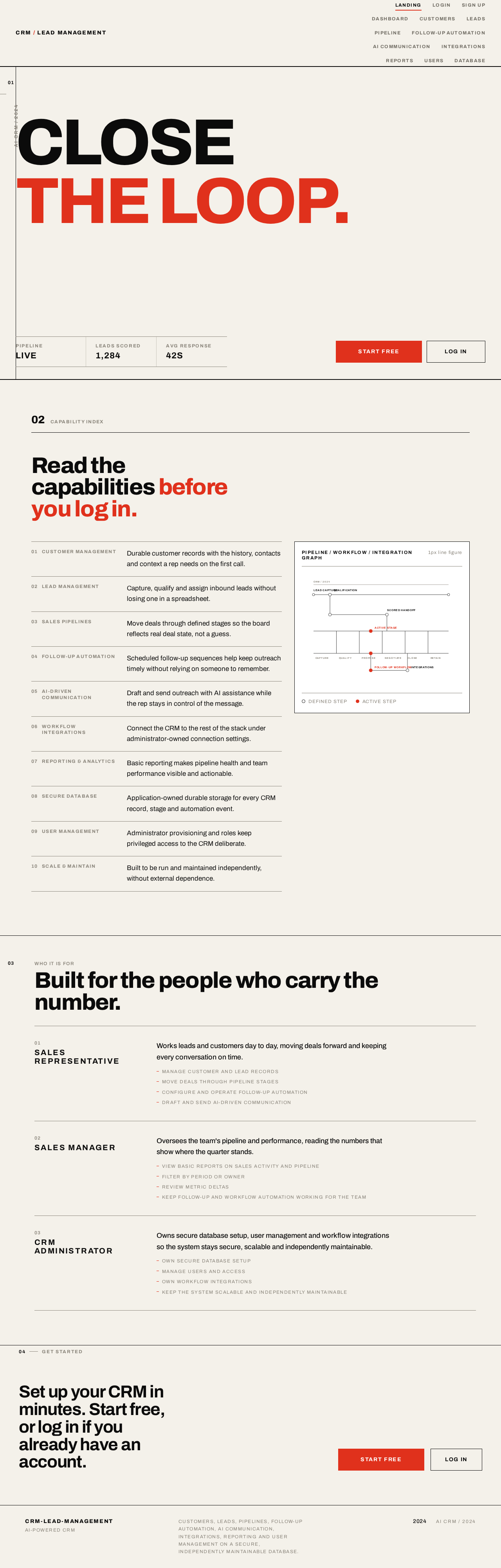
CLOSETHE LOOP.
Who it is for
Built for the people who carry the number.
- 01
Sales Representative
Works leads and customers day to day, moving deals forward and keeping every conversation on time.
- Manage customer and lead records
- Move deals through pipeline stages
- Configure and operate follow-up automation
- Draft and send AI-driven communication
- 02
Sales Manager
Oversees the team's pipeline and performance, reading the numbers that show where the quarter stands.
- View basic reports on sales activity and pipeline
- Filter by period or owner
- Review metric deltas
- Keep follow-up and workflow automation working for the team
- 03
CRM Administrator
Owns secure database setup, user management and workflow integrations so the system stays secure, scalable and independently maintainable.
- Own secure database setup
- Manage users and access
- Own workflow integrations
- Keep the system scalable and independently maintainable
Set up your CRM in minutes. Start free, or log in if you already have an account.
CLOSETHE LOOP.
Who it is for
Built for the people who carry the number.
- 01
Sales Representative
Works leads and customers day to day, moving deals forward and keeping every conversation on time.
- Manage customer and lead records
- Move deals through pipeline stages
- Configure and operate follow-up automation
- Draft and send AI-driven communication
- 02
Sales Manager
Oversees the team's pipeline and performance, reading the numbers that show where the quarter stands.
- View basic reports on sales activity and pipeline
- Filter by period or owner
- Review metric deltas
- Keep follow-up and workflow automation working for the team
- 03
CRM Administrator
Owns secure database setup, user management and workflow integrations so the system stays secure, scalable and independently maintainable.
- Own secure database setup
- Manage users and access
- Own workflow integrations
- Keep the system scalable and independently maintainable
No comments yet. Be the first!