crimson-application
 Diya Trivedi
start a simple single page design of the todo application

Comments (0)
Sign in to leave a comment
System Requirements
System Requirements Document for crimson-application
1. Introduction
crimson-application is a simple todo application delivered as a single-page design. Its purpose is to let one person manage their own day on one page: add new todo items, view the list of existing items, mark items complete, and delete items they no longer need. The product's successful outcome is a clear, up-to-date view of what remains to be done.
The audience is a single individual managing their own tasks — a personal productivity tool used by one person, not a shared or team workspace. The design should feel like calm control with a sense of momentum: a task list that reads as a designed, sculptural object rather than a spreadsheet of chores.
The product is named crimson-application, and its signature is a deep-red accent against a dark, architectural ground.
2. System Overview
crimson-application is a single-page web application. It has exactly one page, Todo, which is the anonymous public entry surface and owns all of the product's accepted behavior: adding todo items, viewing the list of todo items, marking items complete, and deleting items.
There is one active human actor, the Todo user, who manages their own tasks. There is no sign-in, no account, and no multi-user sharing: the page is reachable without identity, and the todo list is the user's own working state on that page.
The page is a single-column editorial composition: a full-bleed hero at the top with an oversized left-aligned display statement and a sweeping crimson-to-gold arc behind it, and below it a capsule input row with a crimson add button and one large asymmetric list panel holding the todo rows. The visual language is Zaha Hadid's: continuous curves, dramatic negative space, luminous surfaces, a charcoal ground with pearl text and a single hot crimson signal color.
Todo items persist as durable state so the user's list survives a revisit to the page.
Removed from scope
- None — no concepts were removed by the user.
2a. Product Interpretation and Delivery Boundary
The user asked for a simple single-page design of a todo application. That is the whole current delivery: one page, one user, four actions — add, view, complete, delete. Everything in this document elaborates those four actions and the single page that hosts them; nothing adjacent (projects, categories, due dates, priorities, reminders, sharing, accounts, settings, dashboards) is part of the product.
The page is publicly reachable and requires no identity. The user's todo list is durable application-owned state, but it is not gated behind an account: there is no sign-in, registration, or profile. The single page is the entry point and the working surface at once.
No future requirements have been stated by the user. The current scope is the complete scope.
2c. Page Content and Component Coverage
Todo
The single page of the application. It is the anonymous public entry and the complete working surface.
Information and state
- The hero: a 12px uppercase crimson micro-label, an oversized left-aligned display statement in Jost 300 pearl white ("A list with momentum."), and a single sweeping SVG arc in a crimson-to-gold gradient running from lower-left to upper-right behind the headline, cropped by the viewport edge.
- A faint topographic contour pattern (thin pearl lines at 6% opacity) behind the hero.
- A thin pearl rule separating the hero from the working area.
- The todo list: all current todo items, each with its text and its completion state.
- Counts or status of remaining items are not required; the list itself is the state.
Primary actions
- Add a todo: a full-width capsule input with a crimson pill button pinned to its right edge. The user types the todo text and submits; the new item appears in the list.
- Mark a todo complete: a control on each row toggles the item to complete; the row's text collapses to a strikethrough in muted grey and a crimson tick draws itself on the left.
- Delete a todo: a control on each row removes the item from the list.
Supporting actions and states
- The input capsule border animates from pearl to crimson along its curve on focus.
- Empty state: when there are no todo items, the list panel shows an empty list area (no rows) — the input remains available so the user can add the first item.
- Loading state: while the list is being read on page load, the list panel shows a quiet placeholder; the input remains usable.
- Success state: an added item fades and rises 8px into the list; a completed item shows the drawn crimson tick and struck-through muted text; a deleted item is removed from the list.
- Error and recovery: if adding, completing, or deleting fails, the row or input returns to its prior state and a short inline message in muted grey explains that the change was not saved, with the action available to retry. If the list cannot be loaded, the panel shows an inline message with a retry control.
Domain entities
- Todo item: the text the user entered, and its completion state (open or complete). Items are durable and belong to the page's list.
Component responsibilities
- Hero: renders the micro-label, display statement, gradient arc, and contour pattern; the arc draws itself once on load.
- Todo input row: capsule text field plus crimson pill add button; validates that the text is non-empty before submitting; shows focus animation.
- Todo list panel: one large surface with 32px radius on three corners and a 96px curve on the top-right; renders the rows, the empty state, the loading placeholder, and the load-error message.
- Todo row: renders the item text, the completion toggle with its drawn crimson tick, and the delete control; applies the completed styling (strikethrough, muted grey) and the 4%-lightness hover tint with no lift.
3. Functional Requirements
FR-1 — Single-page delivery (explicit) As a Todo user, I should use the entire todo application on one simple single page, so that I never navigate away from my list.
- Trigger: the user opens the application.
- Observable result: the Todo page loads as the only page, containing the hero, the add-todo input, and the todo list.
- Access: anonymous; no identity required.
- Failure/recovery: if the page fails to load, reloading the page restores it.
- Continuation: the user can immediately add, view, complete, or delete items.
FR-2 — Add a todo item (explicit) As a Todo user, I should add new todo items, so that I can capture what I need to do.
- Trigger: the user types text into the capsule input and submits via the crimson pill add button (or pressing Enter).
- Observable result: the new item appears in the list, fading and rising 8px over 200ms ease-out; the input clears and remains focused for the next entry.
- Access: anonymous.
- Failure/recovery: if the text is empty, nothing is added and the input stays ready. If saving fails, the item does not remain in the list, an inline muted-grey message says the change was not saved, and the user can retry.
- Continuation: the user can add another item or act on the new row.
FR-3 — View the todo list (explicit) As a Todo user, I should view my list of todo items, so that I can see everything I still need to do and what is already done.
- Trigger: the user opens the page or returns to it.
- Observable result: the list panel shows every saved todo item with its text and completion state; completed items show struck-through muted-grey text and a crimson tick.
- Access: anonymous.
- Failure/recovery: if the list cannot be loaded, the panel shows an inline message with a retry control; retrying reloads the list.
- Continuation: the user can act on any row.
FR-4 — Mark a todo item complete (explicit) As a Todo user, I should mark todo items as complete, so that I can see what is done.
- Trigger: the user activates the completion control on a row.
- Observable result: the row's text becomes struck-through in muted grey and a crimson tick draws its stroke in 240ms on the left of the row; the completed state is saved.
- Access: anonymous.
- Failure/recovery: if saving fails, the row returns to its prior state and an inline muted-grey message says the change was not saved, with the action available to retry.
- Continuation: the user can continue with other rows.
FR-5 — Delete a todo item (explicit) As a Todo user, I should delete todo items, so that I can remove things I no longer need.
- Trigger: the user activates the delete control on a row.
- Observable result: the item is removed from the list and the removal is saved.
- Access: anonymous.
- Failure/recovery: if saving fails, the item remains in the list and an inline muted-grey message says the change was not saved, with the action available to retry.
- Continuation: the user can continue with the remaining rows.
FR-6 — Durable todo state (required_inference) As a Todo user, I should find my todo items still there when I return to the page, so that my list reflects my real remaining work.
- Trigger: the user revisits the page after adding, completing, or deleting items.
- Observable result: the list shows the same items and completion states as when the user left.
- Access: anonymous; the state is application-owned and tied to the page's list.
- Failure/recovery: if the state cannot be read, FR-3's load-error message and retry apply.
- Continuation: the user resumes managing the list.
4. User Personas
Todo user
Product context. One person managing their own day with a personal productivity tool. They are the only actor in the product; there is no team, no sharing, and no account. They arrive at the page to capture tasks and to see what is left.
Primary goal. A clear, up-to-date view of what remains to be done — a list that feels designed and calm rather than a spreadsheet of chores.
Distinct responsibilities.
- Capture a new task by typing it into the capsule input and submitting with the crimson add button.
- Review the list of existing tasks and their completion states.
- Mark a task complete when it is done, watching the crimson tick draw and the text settle into struck-through muted grey.
- Delete a task they no longer need.
Inputs and decisions. The task text they type; the decision of when a task is done (complete) and when it is no longer needed (delete).
Interactions with other participants. None — the Todo user is the sole human actor and acts only on their own list.
Observable success. The list on the page matches reality: new tasks appear as they are added, completed tasks read as done, deleted tasks are gone, and the list is still correct on return.
5. Core User Flows
Flow 1 — Add a todo item
- The Todo user opens the application; the Todo page loads with the hero, the capsule input, and the list panel.
- The user clicks into the capsule input; its border animates from pearl to crimson along its curve.
- The user types the task text.
- The user presses the crimson pill add button (or Enter).
- The new item fades and rises 8px into the list over 200ms; the input clears and stays focused.
- Failure/recovery: if the text is empty, nothing is added. If saving fails, the item does not remain, an inline muted-grey message says the change was not saved, and the user retries.
- Continuation: the user adds another item or moves on to the list.
Flow 2 — View the todo list
- The Todo user opens or returns to the page.
- The list panel shows a quiet loading placeholder while the list is read.
- The list appears: every saved item with its text, completed items struck through in muted grey with a crimson tick.
- Failure/recovery: if the list cannot be loaded, the panel shows an inline message with a retry control; the user retries and the list loads.
- Continuation: the user acts on any row.
Flow 3 — Mark a todo item complete
- The Todo user finds the row for a finished task in the list panel.
- The user activates the row's completion control.
- The crimson tick draws its stroke in 240ms on the left of the row and the text becomes struck-through muted grey; the completed state is saved.
- Failure/recovery: if saving fails, the row returns to its prior state and an inline muted-grey message says the change was not saved; the user retries.
- Continuation: the user continues with other rows.
Flow 4 — Delete a todo item
- The Todo user finds the row for a task they no longer need.
- The user activates the row's delete control.
- The item is removed from the list and the removal is saved.
- Failure/recovery: if saving fails, the item remains and an inline muted-grey message says the change was not saved; the user retries.
- Continuation: the user continues with the remaining rows.
6. Visuals Colors and Theme
Muse and headline. Zaha Hadid — A list with momentum.
Mode. Dark mode only.
Color tokens (exact hex by role)
- Background (deep charcoal ground):
#141416 - Surface (lifted charcoal panels):
#1E1E22 - Text (pearl white, body size):
#F2F0EC - Primary (single hot signal — add button, active states, completion tick):
#C8102E - Accent (secondary — focus rings, small metadata):
#E4B363 - Muted (secondary labels only; must remain at least 4.5:1 against the surface it sits on):
#8A8A92 - Hairline borders: pearl, drawn from
#F2F0ECat hairline weight.
Typography
- Headings: Jost — wide geometric sans, elegant light weights. Headline set in Jost 300 at large scale with generous tracking (+0.02em); uppercase for the wordmark, sentence case for the hero statement. Section labels use Jost 500 uppercase at 12px with +0.18em tracking.
- Body: Jost 400 at 17px with 1.6 line-height.
- Scale: 1.333 modular — 96 / 72 / 54 / 40 / 27 / 20 / 17 / 14.
- Hero display:
clamp(44px, 8vw, 104px); section headlines:clamp(28px, 4.5vw, 48px); body 17px; micro-labels 12px uppercase. - Forbidden as heading or body fonts: Inter, Roboto, Arial, Helvetica, Poppins, system-ui.
Shape language. Sweeping continuous curves and flowing section boundaries. The todo list rows sit inside a single large rounded surface with an asymmetric curve on the top-right corner. Inputs and buttons use capsule or pill radii (999px); the list container uses one soft-cornered panel (32px radius on three corners, 96px curve on the top-right). Decorative flow lines arc diagonally behind the hero. No hard 90-degree grid intersections in the main composition; edges are either fully rounded or follow a gentle curve.
Spacing rhythm. Single-column editorial composition centred at 640px max-width for the list, with the hero spanning the full viewport width. The hero occupies the top 60vh. Below, the input row and list panel sit centred with generous vertical breathing room. A thin pearl rule separates the hero from the working area. At 375px the hero collapses to a stacked statement with the flow line reduced to a small arc; the list panel goes full-width with 16px side padding.
Imagery style. No photography. Visual interest comes from the generated flow line (an SVG arc with a crimson-to-gold gradient stroke) and the asymmetric curve of the list panel. A subtle topographic contour pattern (thin pearl lines at 6% opacity) sits behind the hero as a nod to Hadid's architectural drawings. No clip art, no stock photos, no 3D blobs.
Forbidden look. Centred headline + subtext + blue button SaaS hero; identical hover-lift cards in a grid; gradient blobs or floating glass panels; blue or indigo primary on a white ground; photographic stock imagery or 3D character illustrations; bouncy or springy micro-interactions; dense data tables or dashboard chrome.
Readability rule. Headlines, wordmarks, labels, numbers, and controls stay entirely inside the viewport and their container at 375px, 768px, and 1280px, wrapping or scaling (for example clamp(...) with its mobile size) to fit, with no other element covering any part of them. Decoration and motion may be cropped, bled off an edge, or overlapped exactly as the direction asks, as long as they cover no readable text or control.
7. Signature Design Concept
The public entry is a full-bleed dark charcoal hero (#141416) with a single sweeping SVG arc in a crimson-to-gold gradient running from lower-left to upper-right, cropped by the viewport edge, and a faint topographic contour pattern at 6% opacity behind it. Above an oversized left-aligned display statement in Jost 300 pearl white at clamp(44px, 8vw, 104px) — "A list with momentum." — sits a 12px uppercase crimson micro-label. Directly beneath the headline, aligned to its left edge (not centred), is the capsule input row with the crimson pill add button pinned to its right edge.
Below a thin pearl rule, the todo list sits inside one large asymmetric panel — 32px radius on three corners and a 96px curve on the top-right — so the list itself reads as an architectural form rather than a stack of cards. Each completed row collapses its text to a strikethrough in muted grey while a crimson tick draws itself on the left. The composition recomposes only the accepted content and controls: the hero statement, the add input, the list, and each row's completion and delete controls.
8. Interaction Model & Motion Direction
Interaction Model: Animated Motion Tempo: restrained Hero Dimensionality: layered_2d
Landing Hero Motion Brief
- Focal subject: the single sweeping SVG arc in a crimson-to-gold gradient, running diagonally behind the hero headline and cropped by the viewport edge, over a faint topographic contour pattern.
- Input → transformation → outcome thesis: on load, the arc draws itself once along its path over a slow 1.2s ease-out, resolving into the composed hero; the headline, micro-label, and input row are present and readable throughout. The motion reveals the accepted hero composition — it does not add behavior.
- Motion vocabulary: restrained cinematic — one slow 1.2s ease-out arc draw on load; list items fade and rise 8px on add (200ms ease-out); the completion tick draws its stroke in 240ms; row hover shifts the surface tint by 4% lightness with no lift. Scroll does not scrub or parallax. No bouncy or springy micro-interactions.
- Composed first frame: dark charcoal ground, contour pattern at 6% opacity, crimson micro-label, oversized pearl display statement, and the capsule input row with its crimson pill button — with the arc either fully drawn or mid-draw, never absent in a way that leaves the hero empty.
- Reduced-motion state: all transitions become instant; the flow line appears fully drawn; the hero and list are fully usable and readable as a static arrangement.
9. Non-Functional Requirements
- Single-page constraint (explicit): the design must be a simple single page. There is exactly one page, Todo; no additional routes, tabs, or destinations.
- Anonymous access (explicit via planning scope): the page requires no identity, sign-in, or account; it is the anonymous public entry.
- Durable state (required_inference): todo items and their completion states persist across revisits so the list reflects the user's real remaining work.
- Readability at every viewport (explicit): readable text and controls stay whole and inside the viewport and their container at 375px, 768px, and 1280px; decoration may be cropped but never covers readable text or controls.
- Contrast (explicit): muted grey
#8A8A92is used only for secondary labels and must remain at least 4.5:1 against the surface it sits on; body text is pearl white#F2F0EC. - Reduced motion (explicit): with
prefers-reduced-motion, all transitions become instant and the flow line appears fully drawn, leaving a usable static arrangement. - No photography or 3D (explicit): no stock photos, clip art, 3D blobs, or 3D character illustrations; visual interest comes from the SVG flow line and the asymmetric panel curve.
10. Tech Stack
- Frontend: React single-page application rendering the Todo page.
- Backend: Python / FastAPI service providing the todo list read and the add, complete, and delete operations, plus durable storage of todo items.
- Storage: a persistent store for todo items and their completion states.
- Deployment: Docker / docker-compose running the frontend and backend services together.
11. Assumptions and Constraints
- Assumption: the todo list is a single personal list on the one page; there are no multiple lists, projects, or categories. (required_inference — the source asks only for "the todo application" on one page.)
- Assumption: the user's list is durable application-owned state reachable without identity, consistent with the anonymous single-page entry. (required_inference)
- Constraint: exactly one page, named Todo, with no additional destinations. (explicit)
- Constraint: no accounts, sign-in, sharing, or multi-user features. (explicit via anonymous access and single-user scope)
- Constraint: the palette, fonts, shape language, layout, and motion follow the creative direction in sections 6–8; the generic indigo/blue-on-white SaaS template is forbidden. (explicit)
- Constraint: no future requirements have been stated; the current scope is complete.
12. Glossary
- Todo item — a single task in the user's list, consisting of its text and its completion state (open or complete).
- Todo page — the single page of the application; the anonymous public entry and the complete working surface.
- Todo user — the single human actor who manages their own todo list.
- Completion tick — the crimson check mark that draws its stroke on a row when the item is marked complete.
- Flow line — the sweeping SVG arc in a crimson-to-gold gradient behind the hero headline.
- List panel — the large asymmetric surface (32px radius on three corners, 96px curve on the top-right) that holds the todo rows.
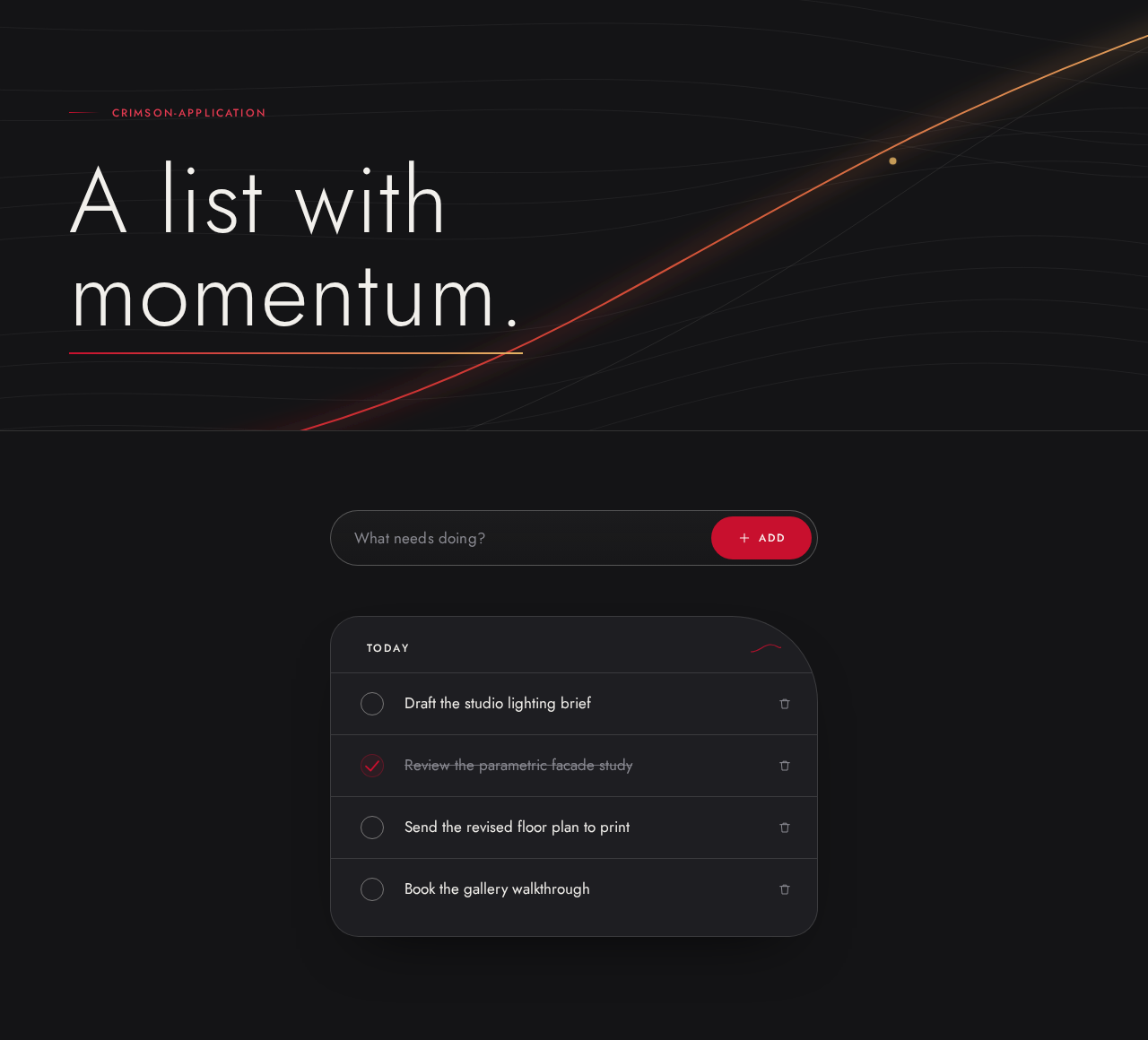
A list with momentum.
Your todo list
Today
Draft the studio lighting brief
Review the parametric facade study
Send the revised floor plan to print
Book the gallery walkthrough
A list with momentum.
Your todo list
Today
Draft the studio lighting brief
Review the parametric facade study
Send the revised floor plan to print
Book the gallery walkthrough
No comments yet. Be the first!