copper-website
 Shashwat
build an automated website for dropshipping
Comments (0)
Sign in to leave a comment
Project Tasks18
Implement Theme Color System
As a frontend developer, I want to implement the global theme, color palette, and typography system for the copper-website so that all pages share a consistent visual identity. Set up CSS custom properties (--primary: #FF6F3C, --bg: #F8F9FA, --surface: #FFFFFF, --text: #333333, --text_muted: #B0BEC5, --border: rgba(176,190,197,0.3)), configure Inter font, define reusable button, card, input, and badge component styles matching the Copper Flow design system. Remove any scaffold pages not in the project (signup, welcome, ai-assistant, settings). This task is independent and must be completed before all page implementation tasks.
Build Home Page
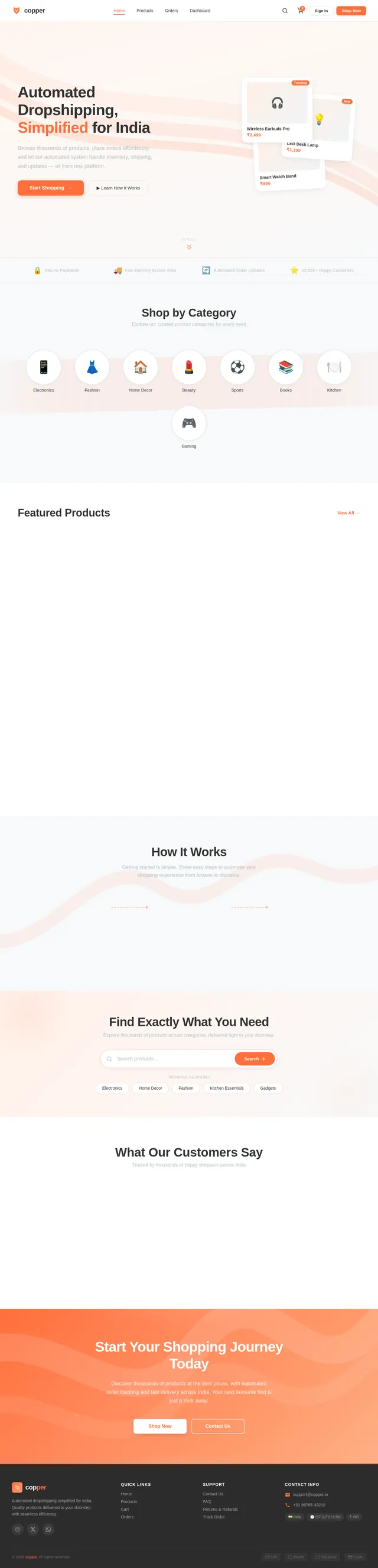
As a user, I want to use the Home page to browse and search products so I can discover items to purchase. Implement the Home page based on the existing JSX design (v2) including: NavBar with copper ribbon logo, Hero section with dynamic copper ribbon animation, product category orbs, featured products grid, search bar, micro-interactions on scroll, and Footer. Follows the Copper Flow signature concept. Links to: Results page (search), Product page (product click), Login page (sign in CTA).
Build Login Page
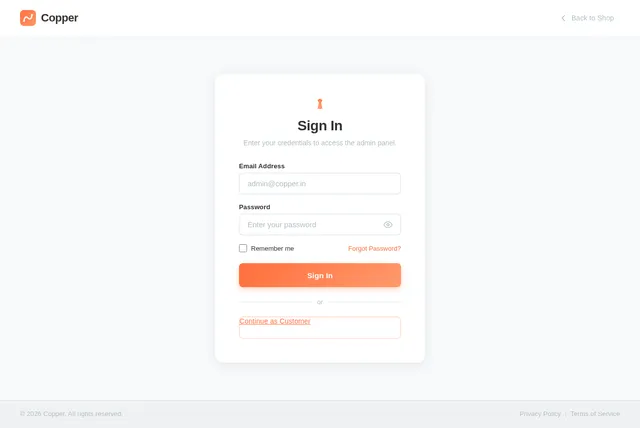
As a user, I want to use the Login page to sign in to my account so I can access the platform as a customer or admin. Implement the Login page based on the existing JSX design (v3) including: NavBar, BrandPanel (left panel with copper ribbon animation, welcome headline, trust badges), LoginCard (email + password form, remember me, forgot password, sign in CTA, continue as customer link), and Footer. On successful admin login, navigate to Dashboard. On customer login, navigate to Home.
Build Dashboard Page
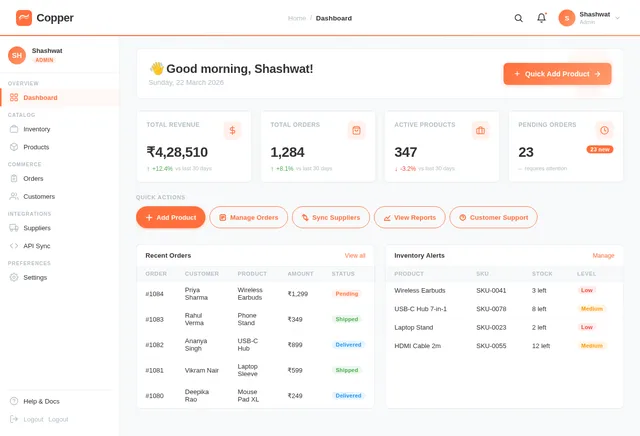
As an admin, I want to use the Dashboard page to get an overview of store performance so I can monitor key metrics at a glance. Implement the Dashboard page based on the existing JSX design (v3) including: TopBar with copper logo and admin avatar, Sidebar with nav links (Dashboard active, Inventory, Orders, Suppliers), stats cards (total products, orders today, revenue in INR, pending shipments), recent orders table, low stock alerts, and quick action buttons. Links from: Login. Links to: Inventory, Orders, Suppliers.
Build Inventory Page
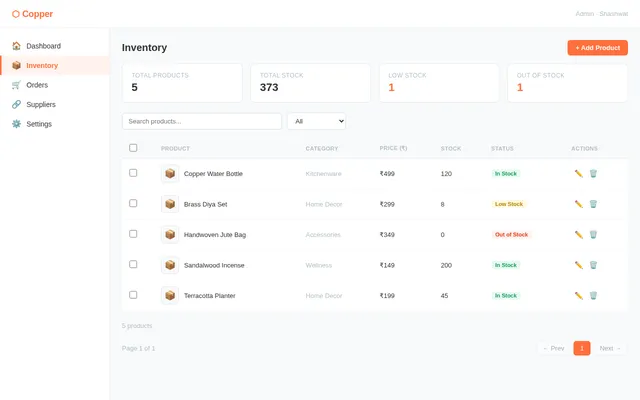
As an admin, I want to use the Inventory page to add, edit, and remove products so I can keep the product catalog up to date. Implement the Inventory page based on the existing JSX design (v2) including: TopBar, Sidebar (Inventory active), PageHeader with 'Add Product' CTA, InventoryStatsBar (total, in stock, low stock, out of stock), InventoryToolbar (search, category filter, stock filter, export CSV), InventoryTable (product rows with image, name, SKU, category, price in INR, stock quantity color-coded, supplier, actions), BulkActionsBar (slide-up on row selection with update stock, change category, delete), PaginationBar, and AddEditProductModal. Links from: Dashboard.
Build Suppliers Page
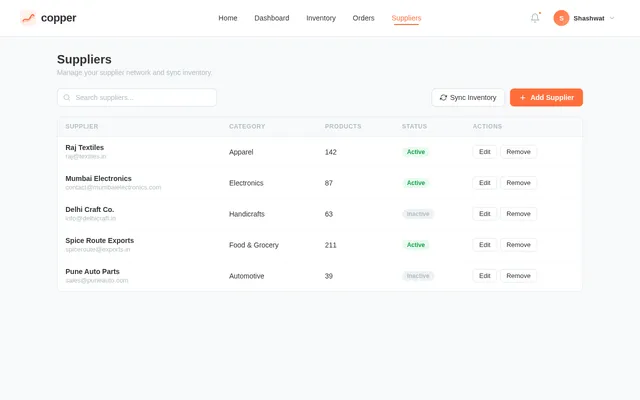
As an admin, I want to use the Suppliers page to manage supplier integrations and sync inventory so I can keep product stock automatically updated. Implement the Suppliers page based on the existing JSX design (v3) including: NavBar, PageHeader, FiltersSidebar, SuppliersToolbar, SuppliersTable, PaginationBar, SyncStatusPanel, AddEditSupplierModal, and Footer. Links from: Dashboard.
Integrate Payment Gateway
As a user, I want to use the payment backend to make secure payments in INR at checkout so I can complete my purchase. Integrate a payment gateway (Razorpay or PayU) into the FastAPI backend: POST /payments/create-order, POST /payments/verify, POST /payments/webhook. Support UPI, credit/debit card, and COD. Ensure HTTPS, PCI compliance, and adherence to Indian payment gateway standards. Update order status on successful payment.
Implement Order Notifications
As a user, I want to receive automated notifications for order confirmation and shipping updates so I stay informed about my orders. Implement a notification service in the FastAPI backend: send email notifications on order placement, status updates (shipped, delivered), and payment confirmation. Use IST timezone for timestamps. Integrate with an email provider (SendGrid or SMTP). Include notification log in the database.
Connect Frontend to Backend
As a user, I want all frontend pages to communicate with the backend APIs so the application is fully functional with real data. Wire up all React pages to their corresponding FastAPI endpoints using axios or fetch: product listings (Home, Results, Product), cart operations (Cart), order placement and tracking (Checkout, Orders), supplier management (Suppliers), inventory management (Inventory), dashboard stats (Dashboard). Handle loading states, error states, and INR formatting throughout.
Build Results Page
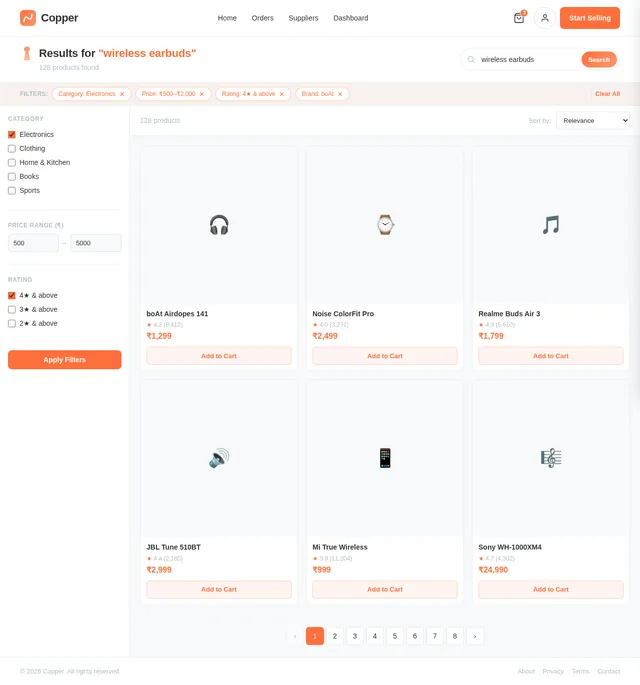
As a user, I want to use the Results page to view product search listings so I can find specific products by keyword. Implement the Results page based on the existing JSX design (v3) including: NavBar, search results header with query and count, filter sidebar (category, price range, stock status), product listing grid with product cards (image, name, price in INR, add to cart button), sort controls, and pagination. Links from: Home (search). Links to: Product page (product click), Cart (add to cart).
Build Orders Page
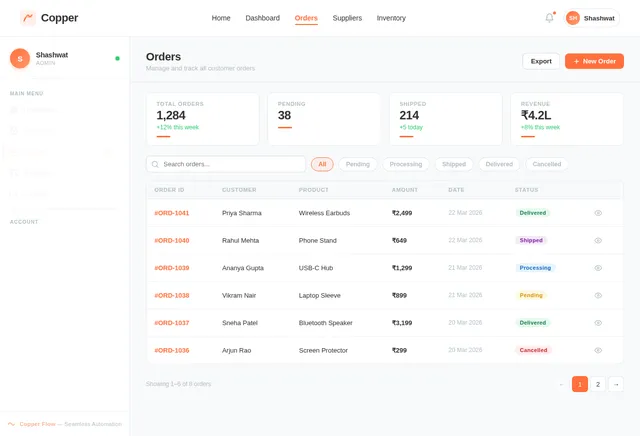
As an admin, I want to use the Orders page to view and manage all customer orders and update their fulfillment status so I can ensure timely delivery. Implement the Orders page based on the existing JSX design (v3) including: TopBar, Sidebar (Orders active), PageHeader, orders stats bar, orders table (order ID, customer name, products, total in INR, status badge, date, actions), status filter tabs (All, Pending, Processing, Shipped, Delivered, Cancelled), order detail drawer/modal with status update controls, and pagination. Also supports customer Order Tracking view. Links from: Dashboard, Checkout.
Implement Suppliers Sync API
As an admin, I want to use the backend API for supplier management and inventory syncing so the product catalog stays automatically updated. Implement FastAPI endpoints: GET /suppliers, POST /suppliers, PUT /suppliers/{id}, DELETE /suppliers/{id}, POST /suppliers/{id}/sync (trigger sync), GET /suppliers/sync-status. Include supplier API key storage (encrypted), sync frequency scheduling, sync log tracking, and product stock update logic on successful sync. Use MySQL with Alembic migrations.
Build Product Page
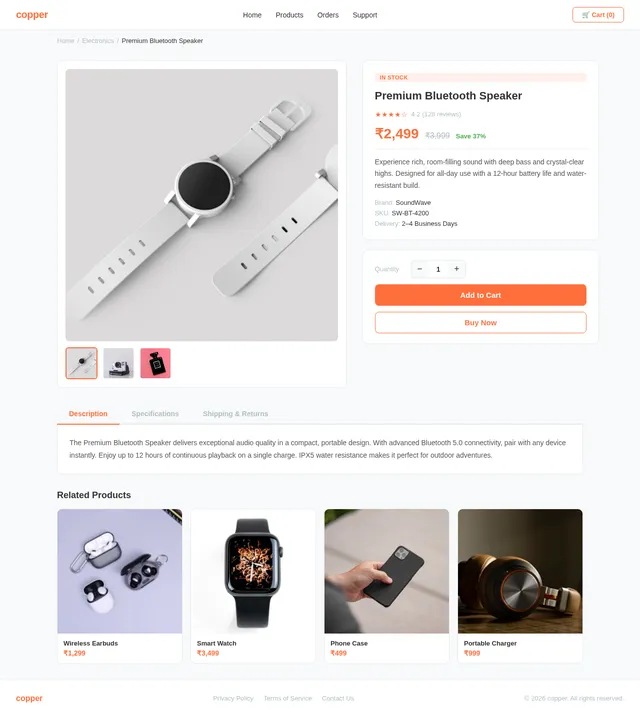
As a user, I want to use the Product detail page to view full product information so I can make an informed purchase decision. Implement the Product page based on the existing JSX design (v2) including: NavBar, product image gallery, product name, price in INR (₹), description, stock status badge, quantity selector, Add to Cart CTA button, supplier info, and related products section. Links from: Results, Home. Links to: Cart page.
Build Cart Page
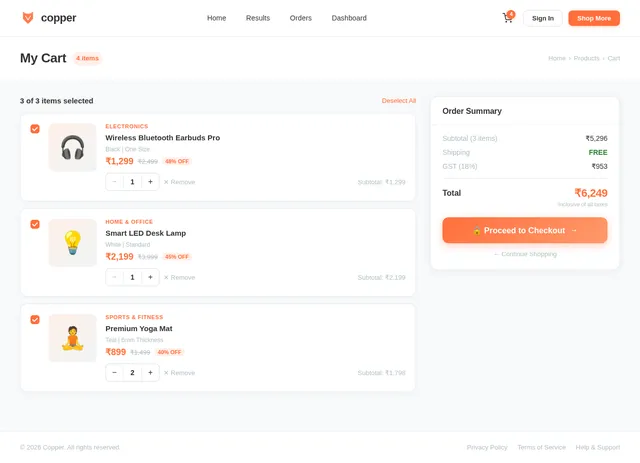
As a user, I want to use the Cart page to review my selected products and order before proceeding to checkout. Implement the Cart page based on the existing JSX design (v3) including: NavBar, cart items list (product image, name, quantity stepper, price in INR, remove button), order summary panel (subtotal, shipping, taxes, total in INR), empty cart state with CTA back to Home, and Proceed to Checkout button. Links from: Product, Results. Links to: Checkout page.
Implement Products API
As a user, I want to use the backend API for product listings so I can browse, search, and view product details. Implement FastAPI endpoints: GET /products (list with pagination, search by keyword, filter by category/stock), GET /products/{id} (product detail), POST /products (admin create), PUT /products/{id} (admin update), DELETE /products/{id} (admin delete). Include INR pricing, stock quantity, product images, category, and supplier fields. Use MySQL with Alembic migration for the products table.
Build Checkout Page
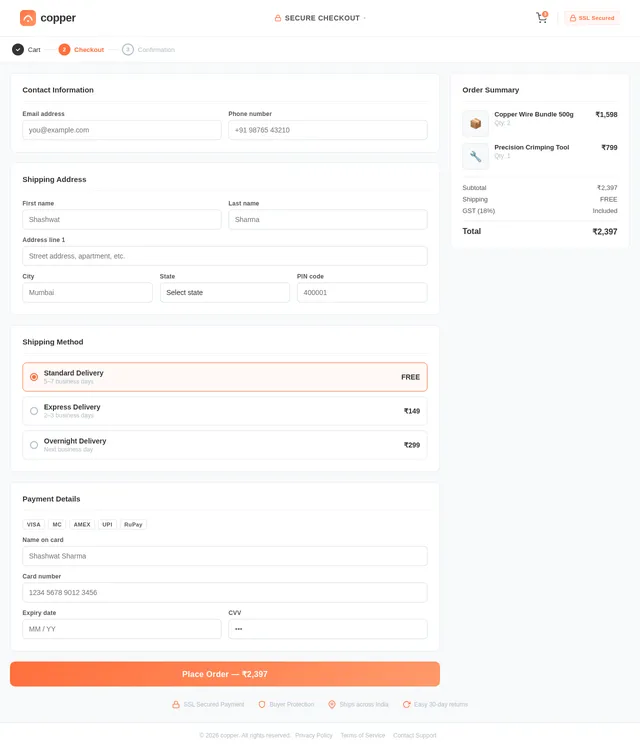
As a user, I want to use the Checkout page to enter my delivery details and make a payment so I can complete my purchase. Implement the Checkout page based on the existing JSX design (v3) including: NavBar, multi-step checkout flow (Address → Payment → Confirmation), shipping address form (India-specific fields, pincode lookup), payment method selector (UPI, card, COD), order summary sidebar in INR, place order CTA, and post-order confirmation screen with order ID. Links from: Cart. Links to: Orders (track order).
Implement Cart Orders API
As a user, I want to use the backend API for cart and orders so I can add products, place orders, and track their status. Implement FastAPI endpoints: POST /cart/add, GET /cart, DELETE /cart/{item_id}, POST /orders (place order), GET /orders (list user orders), GET /orders/{id} (order detail + tracking), PUT /orders/{id}/status (admin update status). Include INR amounts, IST timestamps, order item details, and shipping address (India-specific). Use MySQL with Alembic migrations.
Integrate AI Support Chatbot
As a user, I want to interact with an AI-powered customer support chatbot on the website so I can get instant help with product queries, order status, and general support. Integrate GPT 5.2 into the FastAPI backend as a customer support chatbot service: POST /chatbot/message endpoint accepting user messages and returning AI responses. Implement context-aware responses for product inquiries, order tracking, and FAQs. Add a chat widget UI component (floating button, chat window with message history) to the frontend that calls the chatbot API. Store conversation logs in the database.
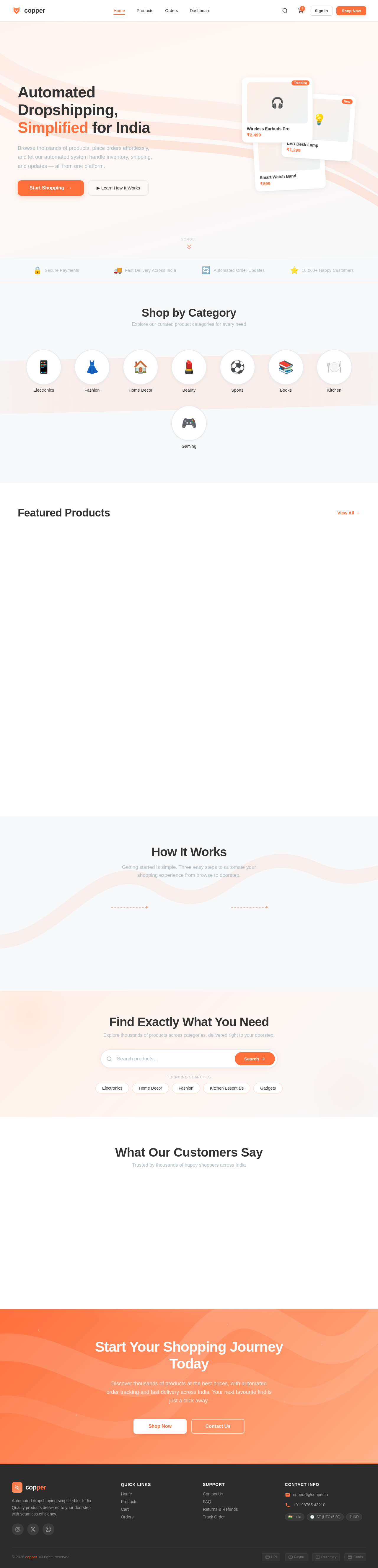
Automated Dropshipping, Simplified for India
Browse thousands of products, place orders effortlessly, and let our automated system handle inventory, shipping, and updates — all from one platform.
Shop by Category
Explore our curated product categories for every need
Featured Products
View All→Wireless Bluetooth Earbuds
₹1,299
Smart LED Desk Lamp
₹2,499
Organic Cotton T-Shirt
₹899
Stainless Steel Water Bottle
₹649
Portable Phone Charger 10000mAh
₹1,599
Bamboo Cutting Board Set
₹1,149
Minimalist Analog Watch
₹3,499
Handcrafted Ceramic Mug
₹499
How It Works
Getting started is simple. Three easy steps to automate your shopping experience from browse to doorstep.
Browse & Search Products
Explore our curated catalog of trending products. Use smart search and filters to find exactly what you need.
Add to Cart & Checkout
Add your favorites to the cart and complete your purchase with secure payment options including UPI and cards.
We Handle the Rest
Sit back while we automate order fulfillment, supplier coordination, and delivery tracking across India.
Find Exactly What You Need
Explore thousands of products across categories, delivered right to your doorstep.
Trending Searches
What Our Customers Say
Trusted by thousands of happy shoppers across India
Start Your Shopping Journey Today
Discover thousands of products at the best prices, with automated order tracking and fast delivery across India. Your next favourite find is just a click away.
No comments yet. Be the first!