content-production-agency
 J2B Virtual Ops
AGENCY AUTOMATION SYSTEM Project: AI Content Production Engine Objective: Build a repeatable content production system that takes an idea from brainstorming to a finished, publish-ready social media video. Rather than manually managing every step, we'll design an AI-assisted creative agency workflow. 1. Proposed Automation Workflow Stage Task AI/Tool 1. Ideation Generate content angles ChatGPT 2. Strategy Select audience and objective ChatGPT 3. Scripting Write hooks and scripts ChatGPT 4. Storyboarding Create scene-by-scene plans ChatGPT 5. Visual Production Generate supporting visuals ImageGen 6. Video Editing Assemble video CapCut 7. Quality Control Review scripts and videos AI + Human 8. Publishing Schedule social content Publishing platform 9. Analytics Evaluate performance AI + Analytics 2. Build Your AI Creative Employees Let's structure the operation around five specialized AI assistants. AI Employee Responsibility Output AI Strategist Research and content planning Content calendar AI Copywriter Hooks, scripts, captions Finished copy AI Art Director Visual concepts and prompts Storyboards AI Video Producer Production instructions Editing plans AI Analyst Performance evaluation Weekly reports Important: These are proposed roles, not independently deployed agents yet. We can progressively automate their responsibilities. 3. The n8n Automation Blueprint Here's the first workflow I'd build. Trigger: New content idea added to Google Sheets. Workflow: 1. n8n detects the new idea. 2. ChatGPT develops five content angles. 3. AI selects or ranks the strongest concepts. 4. ChatGPT generates the script. 5. AI creates the storyboard. 6. Results are saved into Google Drive. 7. Google Sheets updates the production status. 8. You receive a notification to review and approve. Human approval is required before moving into production. 4. Suggested Content Production Database Create a central content tracker with these fields: Field Example Content ID AI001 Topic AI Roadmap Angle Educational Hook Learn AI in the right order Script Approved script Storyboard Scene breakdown Visual Assets Pending Editing Status Not Started Approval Pending Publishing Status Scheduled This becomes the foundation of your AI Command Center. 5. Automation Roadmap Phase Automation Priority 1 Idea-to-script automation High 2 Script-to-storyboard automation High 3 Automated asset organization Medium 4 Content approval notifications High 5 Publishing workflow Medium 6 Automated analytics reports Medium CREATIVE DIRECTOR'S DECISION I recommend starting with one automation: IDEA → 5 CONTENT ANGLES → SCRIPT → STORYBOARD → APPROVAL Why? Because this eliminates repetitive creative administration while keeping creative decisions under human control. Once this works reliably, we can expand into visual production, publishing, and analytics. One decision before implementation: Which automation platform should we use as the backbone? A. n8n – Visual workflows, powerful integrations, flexible AI automation. B. Make.com – Beginner-friendly visual automation. C. Zapier – Simple app-to-app automation.


Comments (0)
Sign in to leave a comment
Project Tasks
37 tasksGenerate system requirement document
Generate personas & user flows
Architecture
Workspace task plan
Create flow for Creative Director
Create flow for Content Producer
Landing
Login
Ideas
Content Tracker
Approvals
Landing / Hero
Landing / Pipeline Rail
Landing / Role Summary
Landing / Navigation
Landing / Footer
Navigation
Footer
Fix Landing: Desktop hero and pipeline rail collapse into narrow vertical strips, breaking all…
Fix Landing: Pipeline rail rows are too narrow, breaking stage names into vertical letter stacks and…
Fix Landing: The same collapsed grid stretches the page to ~4011px tall with a large empty graphite…
Fix Landing: The stage rail's row text (, , ) is rendered inside the collapsed column and is…
Fix Landing review findings: Desktop hero and pipeline rail collapse into narrow… (+3 more)
Login / Navigation
Login / Access Panel
Login / Pipeline Context
Login / Footer
Ideas / Navigation
Ideas / Capture Panel
Ideas / Pipeline Context
Ideas / Footer
Content Tracker / Navigation
Content Tracker / Header
Content Tracker / Stage Rail
Content Tracker / Table
Content Tracker / Footer
AI Strategist
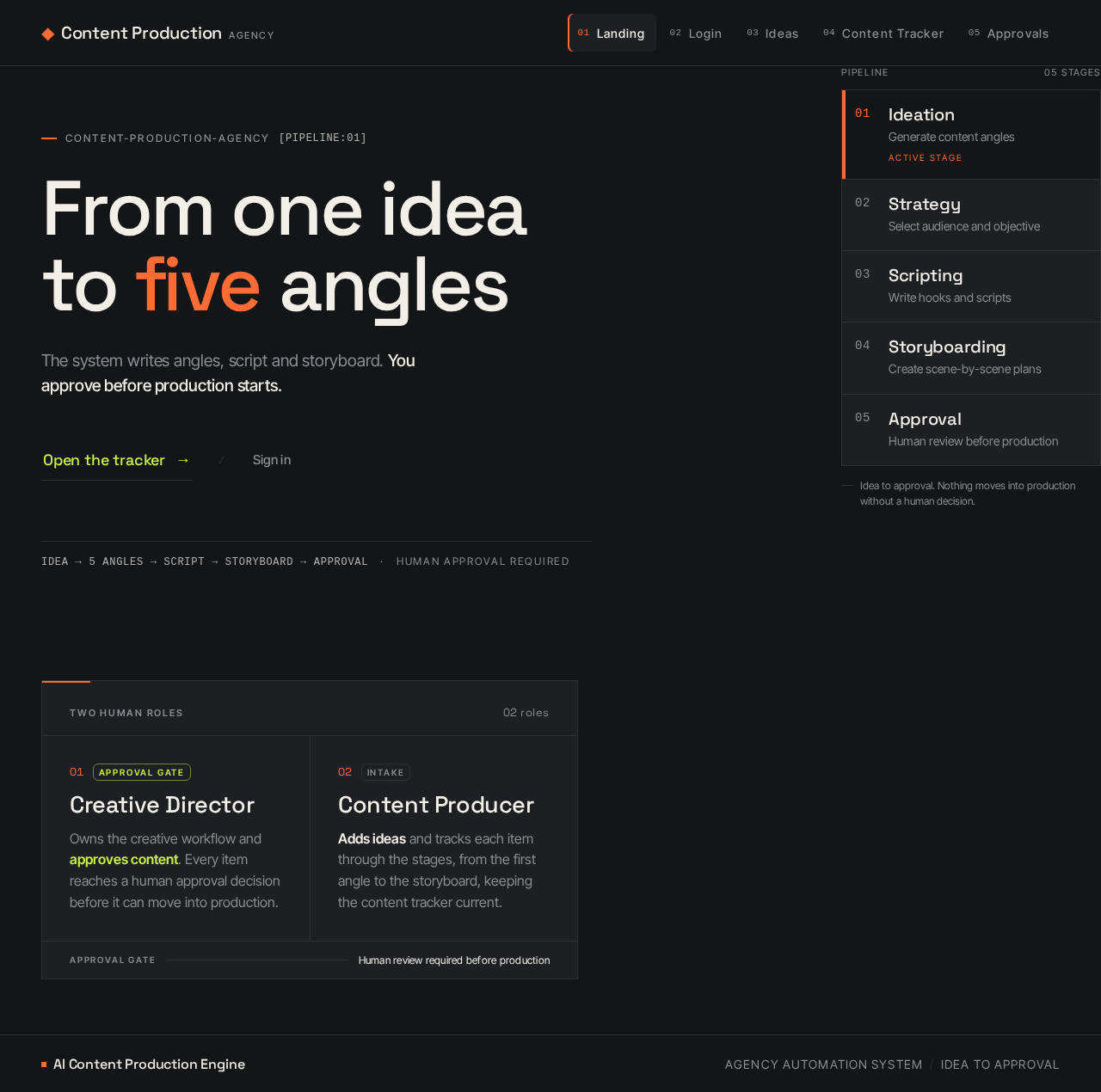
content-production-agency
From one ideato five angles
The system writes angles, script and storyboard. You approve before production starts.
IDEA → 5 ANGLES → SCRIPT → STORYBOARD → APPROVALHuman approval required
- 01IdeationGenerate content anglesActive stage
- 02StrategySelect audience and objective
- 03ScriptingWrite hooks and scripts
- 04StoryboardingCreate scene-by-scene plans
- 05ApprovalHuman review before production
Idea to approval. Nothing moves into production without a human decision.
Two human roles
02 rolesCreative Director
Owns the creative workflow and approves content. Every item reaches a human approval decision before it can move into production.
Content Producer
Adds ideas and tracks each item through the stages, from the first angle to the storyboard, keeping the content tracker current.
No comments yet. Be the first!