content-production-agency
 J2B Virtual Ops
AGENCY AUTOMATION SYSTEM Project: AI Content Production Engine Objective: Build a repeatable content production system that takes an idea from brainstorming to a finished, publish-ready social media video. Rather than manually managing every step, we'll design an AI-assisted creative agency workflow. 1. Proposed Automation Workflow Stage Task AI/Tool 1. Ideation Generate content angles ChatGPT 2. Strategy Select audience and objective ChatGPT 3. Scripting Write hooks and scripts ChatGPT 4. Storyboarding Create scene-by-scene plans ChatGPT 5. Visual Production Generate supporting visuals ImageGen 6. Video Editing Assemble video CapCut 7. Quality Control Review scripts and videos AI + Human 8. Publishing Schedule social content Publishing platform 9. Analytics Evaluate performance AI + Analytics 2. Build Your AI Creative Employees Let's structure the operation around five specialized AI assistants. AI Employee Responsibility Output AI Strategist Research and content planning Content calendar AI Copywriter Hooks, scripts, captions Finished copy AI Art Director Visual concepts and prompts Storyboards AI Video Producer Production instructions Editing plans AI Analyst Performance evaluation Weekly reports Important: These are proposed roles, not independently deployed agents yet. We can progressively automate their responsibilities. 3. The n8n Automation Blueprint Here's the first workflow I'd build. Trigger: New content idea added to Google Sheets. Workflow: 1. n8n detects the new idea. 2. ChatGPT develops five content angles. 3. AI selects or ranks the strongest concepts. 4. ChatGPT generates the script. 5. AI creates the storyboard. 6. Results are saved into Google Drive. 7. Google Sheets updates the production status. 8. You receive a notification to review and approve. Human approval is required before moving into production. 4. Suggested Content Production Database Create a central content tracker with these fields: Field Example Content ID AI001 Topic AI Roadmap Angle Educational Hook Learn AI in the right order Script Approved script Storyboard Scene breakdown Visual Assets Pending Editing Status Not Started Approval Pending Publishing Status Scheduled This becomes the foundation of your AI Command Center. 5. Automation Roadmap Phase Automation Priority 1 Idea-to-script automation High 2 Script-to-storyboard automation High 3 Automated asset organization Medium 4 Content approval notifications High 5 Publishing workflow Medium 6 Automated analytics reports Medium CREATIVE DIRECTOR'S DECISION I recommend starting with one automation: IDEA → 5 CONTENT ANGLES → SCRIPT → STORYBOARD → APPROVAL Why? Because this eliminates repetitive creative administration while keeping creative decisions under human control. Once this works reliably, we can expand into visual production, publishing, and analytics. One decision before implementation: Which automation platform should we use as the backbone? A. n8n – Visual workflows, powerful integrations, flexible AI automation. B. Make.com – Beginner-friendly visual automation. C. Zapier – Simple app-to-app automation.


Comments (0)
Sign in to leave a comment
System Requirements
System Requirements Document for Agency Automation System
1. Introduction
The Agency Automation System is an AI Content Production Engine for J2B Virtual Ops (PH): a repeatable content production system that takes an idea from brainstorming to a publish-ready social media video. Rather than manually managing every step, the system runs an AI-assisted creative agency workflow in which the repetitive creative administration — generating angles, writing the script, building the storyboard — is automated, while creative decisions stay under human control.
The first and current automation is deliberately narrow: IDEA → 5 CONTENT ANGLES → SCRIPT → STORYBOARD → APPROVAL. A new content idea is detected, five content angles are generated, the strongest concepts are selected or ranked, a script is generated from the selected concept, a storyboard is created, results are saved to Google Drive, the production status is updated in Google Sheets, and a notification is sent for review and approval. Human approval is required before moving into production.
The audience is a small creative agency: a Creative Director who owns the creative workflow and approves content, and a Content Producer who adds ideas and tracks each item through the production stages. The system is their AI Command Center, anchored by a central content tracker.
Success Criteria
- A new content idea reliably produces five ranked content angles, a script, and a storyboard without manual step-by-step administration.
- Every item reaches a human approval decision before it can move into production; no item enters production unapproved.
- The central content tracker always reflects the current production status of every item across its ten fields.
- Results are persisted to Google Drive and status is reflected in Google Sheets on every run.
- The Creative Director can review and approve from a single Approvals surface with a clear, auditable decision.
2. System Overview
The Agency Automation System is a web application backed by a shared FastAPI service, with application-owned persistent data in MariaDB and model-provider calls routed through a LiteLLM gateway (backed by its own PostgreSQL store). A React frontend provides the command center: a public Landing page, a Login page, an Ideas page for capturing new content ideas, a Content Tracker showing the ten tracker fields and production status, and an Approvals page where the Creative Director reviews and approves content before production.
The current automation is the idea-to-storyboard-to-approval pipeline. The five AI employee roles — AI Strategist, AI Copywriter, AI Art Director, AI Video Producer, AI Analyst — are proposed roles, not independently deployed agents yet; their responsibilities are progressively automated within the pipeline rather than existing as separate deployed agents. Visual production, publishing, and analytics expansion come after the first automation works reliably and are out of current scope.
2a. Product Interpretation and Delivery Boundary
The product is a first-party, application-owned command center. Identity is application-owned: the Creative Director and Content Producer establish and verify identity through Login, and protected content records (Ideas, Content Tracker, Approvals) are reachable only after identity is established. The Landing page is the anonymous public entry that explains the system, its users, and its work.
The automation itself runs as a background process owned by the application backend, triggered when a new content idea is added. It calls model providers through the LiteLLM gateway, writes results to Google Drive, updates Google Sheets, and raises a review-and-approval notification. The human approval gate is a first-party responsibility owned by the Approvals page and is a hard boundary: nothing moves into production without it.
The automation platform backbone (n8n, Make.com, or Zapier) remains an open decision; this document does not select one. The pipeline behavior described here is the accepted product behavior regardless of which backbone is chosen.
Current scope is the idea-to-approval automation and its command center. Visual production (ImageGen), video editing (CapCut), publishing, and analytics are future expansion, explicitly deferred until the first automation works reliably.
Removed from scope
- None. No concept from the authoritative thread was removed or replaced by a later refinement.
2c. Page Content and Component Coverage
Landing
- Information/state: Anonymous public entry. Headline "From one idea to five angles"; subline "The system writes angles, script and storyboard. You approve before production starts."; call to action "Open the tracker". Explains the content production system, its users, and its work.
- Primary action: "Open the tracker" — routes an anonymous visitor toward identity establishment (Login) before protected content is reachable.
- Supporting actions: Navigate to Login.
- Domain entities: None persisted; presents the pipeline concept (five stages) and the two human roles.
- Component responsibilities: Hero block (nine-column headline, vertical pipeline rail with five numbered stage rows and one tangerine active bar, CTA in acid green text on graphite); stage rail; role summary.
- States: Loading (static content, no data fetch); empty (n/a); success (rendered hero); error (n/a); recovery (n/a). Reduced-motion: static arrangement of the stage rail.
Login
- Information/state: Identity access surface. Anonymous entry state for first-use self-service enrollment and returning identity verification. Protected state (Ideas, Content Tracker, Approvals) remains unavailable until identity is established.
- Primary actions: Self-service enrollment (first use); verify identity (returning).
- Supporting actions: Return to Landing.
- Domain entities: User identity (Creative Director or Content Producer), role assignment.
- Component responsibilities: Enrollment form; verification form; validation and error messaging; role binding so the Creative Director's approval role is established before Approvals is available.
- States: Loading (submitting); empty (blank forms); success (identity established, redirect to Content Tracker); error (invalid credentials or incomplete enrollment, with inline recovery); recovery (retry, return to Landing).
Ideas
- Information/state: Role-restricted to the Content Producer. Capture of a new content idea that triggers the automation. Shows the idea's Topic and its entry into the tracker.
- Primary action: Add a new content idea (Topic) — triggers detection and the idea-to-storyboard pipeline.
- Supporting actions: View the resulting tracker item; navigate to Content Tracker.
- Domain entities: Content idea; Content ID; Topic; production status.
- Component responsibilities: Idea capture form; submission feedback; link to the created tracker record.
- States: Loading (submitting idea); empty (no ideas yet, prompt to add one); success (idea accepted, pipeline triggered, status shown); error (submission failure with retry); recovery (resubmit without duplicate item).
Content Tracker
- Information/state: Login-required, available to Creative Director and Content Producer. The central content tracker showing the ten fields per item: Content ID, Topic, Angle, Hook, Script, Storyboard, Visual Assets, Editing Status, Approval, Publishing Status. Dense tracker table with tabular numerals and hairline dividers.
- Primary actions: View all items and their production status; open an item's fields.
- Supporting actions: Filter/sort by status; navigate to Approvals (Creative Director) or Ideas (Content Producer).
- Domain entities: Content item with the ten tracker fields; production status; approval state.
- Component responsibilities: Tracker table; status labels in uppercase micro-type; per-item detail; stage rail reflecting the active pipeline stage.
- States: Loading (fetching items); empty (no items, prompt to add an idea); success (populated table); error (fetch failure with retry); recovery (refresh).
Approvals
- Information/state: Role-restricted to the Creative Director. Queue of items awaiting review and approval, with the script and storyboard available for review. Approval state is the only place acid green is used.
- Primary actions: Review an item's script and storyboard; approve the item so it may move into production.
- Supporting actions: Return an item for revision (reject/deny approval); navigate to Content Tracker.
- Domain entities: Content item; Approval state (Pending/Approved); review decision.
- Component responsibilities: Approval queue; review pane (script, storyboard); approve/deny controls; status update reflected in the tracker.
- States: Loading (fetching queue); empty (nothing awaiting approval); success (decision recorded, item status updated); error (decision submission failure with retry); recovery (re-open item, re-submit decision).
3. Functional Requirements
FR-1 — Repeatable content production system (explicit) As a Creative Director, I should have a repeatable content production system that takes an idea from brainstorming to a publish-ready social media video, so that production is consistent rather than manually managed step by step.
- Trigger: a new content idea enters the system.
- Observable result: the item progresses through the defined pipeline stages with its status tracked.
- Failure/recovery: a failed stage leaves the item at its last completed status with a retry path.
- Continuation: the item advances to the next stage on success.
FR-2 — First automation scope (explicit) As a Creative Director, I should start with one automation — idea → five content angles → script → storyboard → approval — so that repetitive creative administration is eliminated while creative decisions stay under human control.
- Trigger: a new content idea.
- Observable result: five angles, a script, and a storyboard produced, then routed to approval.
- Failure/recovery: partial results are retained and the run can be retried.
- Continuation: on approval, the item is cleared to move into production.
FR-3 — Detect new idea and generate five angles (explicit) As a Content Producer, I should have the system detect a new content idea and generate five content angles, so that ideation is automated.
- Trigger: a new idea added (via Ideas, reflected in the tracker).
- Observable result: five content angles recorded against the item.
- Failure/recovery: generation failure surfaces an error and allows retry.
- Continuation: angles proceed to selection/ranking.
FR-4 — Select or rank strongest concepts (explicit) As a Creative Director, I should have the system select or rank the strongest concepts, so that the best angle drives the script.
- Trigger: five generated angles.
- Observable result: a ranked/selected concept recorded on the item.
- Failure/recovery: if ranking fails, the item holds with angles available for manual selection.
- Continuation: the selected concept feeds scripting.
FR-5 — Generate script (explicit) As a Creative Director, I should have the system generate the script from the selected concept, so that copy is produced automatically.
- Trigger: selected concept.
- Observable result: Script field populated.
- Failure/recovery: failure retains the selected concept and allows regeneration.
- Continuation: script feeds storyboarding.
FR-6 — Create storyboard (explicit) As a Creative Director, I should have the system create the storyboard, so that scene-by-scene planning is automated.
- Trigger: generated script.
- Observable result: Storyboard field populated with a scene breakdown.
- Failure/recovery: failure retains the script and allows regeneration.
- Continuation: storyboard feeds approval.
FR-7 — Save results to Google Drive (explicit) As a Creative Director, I should have results saved to Google Drive, so that outputs are persisted externally.
- Trigger: script and storyboard produced.
- Observable result: results written to Google Drive.
- Failure/recovery: a Drive write failure is surfaced and retried without losing the item.
- Continuation: status update proceeds.
FR-8 — Update production status in Google Sheets (explicit) As a Content Producer, I should have the production status updated in Google Sheets, so that the tracker reflects current state.
- Trigger: stage completion.
- Observable result: Google Sheets production status updated.
- Failure/recovery: a Sheets update failure is surfaced and retried.
- Continuation: notification proceeds.
FR-9 — Review-and-approve notification (explicit) As a Creative Director, I should receive a notification to review and approve, so that I know an item is ready.
- Trigger: item ready for approval.
- Observable result: notification delivered; item appears in Approvals.
- Failure/recovery: undelivered notification leaves the item visible in Approvals.
- Continuation: review and approval.
FR-10 — Human approval gate (explicit) As a Creative Director, I should approve content before it moves into production, so that creative decisions stay under human control.
- Trigger: item awaiting approval.
- Observable result: Approval state changes from Pending to Approved; item cleared for production.
- Failure/recovery: a denied item does not move into production and returns for revision.
- Continuation: approved item proceeds to production.
FR-11 — Central content tracker (explicit) As a Content Producer, I should have a central content tracker with fields Content ID, Topic, Angle, Hook, Script, Storyboard, Visual Assets, Editing Status, Approval, and Publishing Status, so that every item's state is visible in one place.
- Trigger: opening Content Tracker.
- Observable result: table of items with all ten fields.
- Failure/recovery: fetch failure shows an error with retry.
- Continuation: open an item for detail.
FR-12 — Five AI employee roles as proposed roles (explicit) As a Creative Director, I should have the five AI employee roles (AI Strategist, AI Copywriter, AI Art Director, AI Video Producer, AI Analyst) treated as proposed roles whose responsibilities are progressively automated, not independently deployed agents, so that automation grows without overcommitting.
- Trigger: pipeline execution.
- Observable result: responsibilities fulfilled within the pipeline; no independent agent deployment.
- Failure/recovery: n/a (structural constraint).
- Continuation: progressive automation.
FR-13 — Self-service enrollment (required_inference) As a new Creative Director or Content Producer, I should complete self-service enrollment on Login, so that I can reach protected content.
- Trigger: first visit to Login.
- Observable result: identity established; role bound; redirect to Content Tracker.
- Failure/recovery: incomplete enrollment shows inline errors and allows retry.
- Continuation: proceed to protected pages.
FR-14 — Returning identity verification (required_inference) As a returning Creative Director or Content Producer, I should verify identity on Login, so that I can resume my work.
- Trigger: returning visit to Login.
- Observable result: session established; redirect to Content Tracker.
- Failure/recovery: invalid credentials show an error with retry.
- Continuation: resume work.
FR-15 — Creative Director approval role (required_inference) As a Creative Director, I should hold the approval role before Approvals is available, so that only the approver can approve.
- Trigger: identity established with Creative Director role.
- Observable result: Approvals accessible to Creative Director; not to Content Producer.
- Failure/recovery: unauthorized access is denied with a path back.
- Continuation: review and approve.
4. User Personas
Creative Director
The Creative Director owns the creative workflow and keeps creative decisions under human control. Their primary goal is to move ideas through the pipeline without losing creative authority: they review the generated angles, script, and storyboard, and they alone approve content before it moves into production. Their distinct responsibility is the approval gate — the hard boundary that no item crosses unapproved. They interact with the Content Producer (who supplies ideas and tracks status) and with the automation (which produces angles, script, and storyboard). Their relevant decisions are selecting/ranking the strongest concept and approving or denying an item. Observable success: every item that enters production carries an explicit Creative Director approval, and review is fast from a single Approvals surface.
Content Producer
The Content Producer adds new content ideas and tracks each item through the production stages. Their primary goal is to keep a steady flow of ideas entering the pipeline and to always know each item's status and pending approvals. Their distinct responsibility is idea capture and status visibility — they initiate the automation by adding an idea and rely on the Content Tracker to see the ten fields and current production status. They interact with the Creative Director (whose approval unblocks production) and with the automation (which consumes their idea). Their relevant inputs are the Topic of each new idea. Observable success: every idea they add appears in the tracker with its status advancing, and they can see which items await approval.
5. Core User Flows
Flow A — Content Producer adds an idea and the pipeline runs
- Content Producer opens Login and completes self-service enrollment (first use) or verifies identity (returning). Observable result: identity established; redirect to Content Tracker.
- Content Producer opens Ideas and adds a new content idea (Topic). Observable result: idea accepted; a Content ID is assigned; the item appears in the tracker with status reflecting the pipeline start.
- The system detects the new idea and generates five content angles. Observable result: five angles recorded on the item.
- The system selects or ranks the strongest concepts. Observable result: a ranked/selected concept recorded.
- The system generates the script from the selected concept. Observable result: Script field populated.
- The system creates the storyboard. Observable result: Storyboard field populated with a scene breakdown.
- The system saves results to Google Drive. Observable result: results persisted externally.
- The system updates production status in Google Sheets. Observable result: Sheets status updated.
- The system sends a review-and-approve notification. Observable result: item appears in Approvals awaiting the Creative Director.
- Content Producer opens Content Tracker to confirm the item's status and that it awaits approval. Continuation: the item waits for the Creative Director's decision.
- Failure/recovery: if any stage fails, the item holds at its last completed status, the failure is surfaced, and the run can be retried without losing prior results.
Flow B — Creative Director reviews and approves
- Creative Director opens Login and verifies identity. Observable result: session established; Approvals available under the approval role.
- Creative Director opens Approvals and sees the queue of items awaiting review. Observable result: queue rendered.
- Creative Director reviews an item's script and storyboard. Observable result: review pane shows the content.
- Creative Director approves the item. Observable result: Approval state changes from Pending to Approved; the item is cleared to move into production; the tracker reflects the new status.
- Creative Director returns to Content Tracker to confirm the approved status. Continuation: the item proceeds to production.
- Failure/recovery: if the Creative Director denies the item, it does not move into production and returns for revision; if the decision submission fails, the item remains Pending and the decision can be re-submitted.
Flow C — Content Producer tracks status
- Content Producer opens Login and verifies identity. Observable result: session established.
- Content Producer opens Content Tracker and views all items across the ten fields. Observable result: dense tracker table with tabular numerals and status labels.
- Content Producer filters/sorts by status to find items awaiting approval or in progress. Observable result: filtered view.
- Content Producer opens an item's detail to inspect its fields. Continuation: monitor progress or add a new idea via Ideas.
- Failure/recovery: if the tracker fails to load, an error with retry is shown; refresh restores the view.
6. Visuals Colors and Theme
Muse: Rasmus Andersson. Headline: "From one idea to five angles."
Mode: Dark. Warm graphite ground, warm paper text, one hot accent, tabular numerals as ornament.
Color tokens (exact hex by role):
- Background:
#141517 - Surface:
#1D1F22 - Text:
#F2EFE9 - Primary (active pipeline stage):
#FF6B35 - Accent (approval only):
#C8F04A - Muted:
#8A8D93 - Hairline borders:
#2C2F33
Typography:
- Headings: Space Grotesk — tight tracking, medium weight, sentence case.
- Body: Inter Tight.
- Numbers: tabular monospace numerals.
- Scale (1.333 modular): 64 / 48 / 36 / 27 / 20 / 16 / 14 px.
- Display:
clamp(36px, 7vw, 96px).
Shape language: Compact controls with 6px radii; hairline 1px borders; sharp corners on data panels; no soft shadows.
Layout: 12-column grid with 4/8-pt spacing; left rail holds the stages; dense tracker table fills the main area; numerals align in tabular columns.
Imagery: The interface is the imagery — schematic pipeline diagrams, code-like stage labels, and tabular status rows.
Accessibility: Readable text and controls stay whole at 375px, 768px, and 1280px, wrapping or scaling to fit; no element covers readable text or controls. Under prefers-reduced-motion, a usable static arrangement is provided.
Avoid: Blue or indigo accents on white grounds; gradient blobs and glass panels; identical hover-lift card grids; rounded pill buttons with soft shadows; Inter, Roboto, or system-ui as heading fonts. The generic indigo/blue-on-white SaaS template is forbidden.
7. Signature Design Concept
The public entry (Landing) is a dark graphite first screen. A nine-column headline sits at the left, set clamp(36px, 7vw, 96px): "From one idea to five angles." Beneath it, the subline "The system writes angles, script and storyboard. You approve before production starts." and the CTA "Open the tracker" in acid green text on graphite. At the right, a vertical pipeline rail shows the five stages as numbered rows; the active row carries a solid tangerine bar. The composition recomposes only accepted content — the pipeline stages, the two roles, and the CTA — and introduces no new behavior or destination.
8. Interaction Model & Motion Direction
Interaction Model: Animated Motion Tempo: restrained Hero Dimensionality: flat
Landing Hero Motion Brief
- Focal subject: the vertical pipeline rail with five numbered stage rows.
- Input → transformation → outcome thesis: as the visitor arrives, the active stage row's tangerine bar slides in (120–200ms), marking the current stage; the numbered rows remain legible; the CTA sits under the headline in acid green.
- Motion vocabulary: fast 120–200ms state transitions; the active stage row gets a tangerine bar that slides in; no decorative motion.
- Composed first frame: graphite ground, nine-column headline at left, subline and acid-green CTA beneath, vertical stage rail at right with the active row's tangerine bar.
- Reduced-motion state: the stage rail renders statically with the active bar in place; no sliding transition.
9. Non-Functional Requirements
- Human approval gate (explicit): no item moves into production without a recorded Creative Director approval. Rationale: keeps creative decisions under human control.
- Proposed roles, not deployed agents (explicit): the five AI employee roles are not independently deployed agents; their responsibilities are progressively automated within the pipeline. Rationale: avoids overcommitting to agent infrastructure.
- Single first automation (explicit): current scope is idea → five angles → script → storyboard → approval. Rationale: prove reliability before expansion.
- Deferred expansion (explicit): visual production, publishing, and analytics come after the first automation works reliably. Rationale: staged roadmap.
- Open platform decision (explicit): the automation backbone (n8n, Make.com, or Zapier) is undecided; the pipeline behavior is specified independently of the choice.
- Durable state (required_inference): content items, their ten fields, and approval state persist in application-owned storage so status survives across sessions.
- Identity continuity (required_inference): protected content records require established identity; the Landing remains anonymous.
- External persistence (explicit): results are saved to Google Drive and status to Google Sheets on each run, with failure surfaced and retried.
10. Tech Stack
- Frontend: React application UI.
- Backend: shared FastAPI process for application APIs and domain modules (pipeline orchestration, tracker, approvals).
- Application database: MariaDB for application-owned persistent data (content items, tracker fields, approval state, identity).
- Model gateway: LiteLLM gateway for the backend's model-provider calls (angle generation, ranking, scripting, storyboarding).
- Gateway store: PostgreSQL supporting LiteLLM; separate from application-owned storage.
- External integrations: Google Drive (result persistence) and Google Sheets (production status), per the accepted workflow.
- Automation backbone: open decision (n8n, Make.com, or Zapier) — not selected in this document.
11. Assumptions and Constraints
- Assumption: the automation backbone will be chosen before implementation; the pipeline behavior is backbone-agnostic.
- Assumption: Google Drive and Google Sheets are the accepted external persistence surfaces for results and status.
- Constraint: human approval is mandatory before production.
- Constraint: the five AI employee roles are proposed roles, not independently deployed agents.
- Constraint: current scope is the single idea-to-approval automation; visual production, publishing, and analytics are deferred.
- Constraint: the Creative Director holds the approval role; Approvals is role-restricted.
- Constraint: the Content Producer adds ideas; Ideas is role-restricted.
- Constraint: the Landing is anonymous; protected pages require established identity.
12. Glossary
- AI Command Center: the central content tracker and its surrounding command surfaces.
- Content Tracker: the central table of content items across the ten fields.
- Content ID: the identifier assigned to each content item (e.g., AI001).
- Angle: a content angle generated for an idea.
- Hook: the opening line of the script.
- Storyboard: the scene-by-scene plan.
- Approval: the Creative Director's decision clearing an item for production.
- AI Strategist / AI Copywriter / AI Art Director / AI Video Producer / AI Analyst: the five proposed AI employee roles, not independently deployed agents.
- LiteLLM: the model gateway routing the backend's provider calls.
- n8n / Make.com / Zapier: candidate automation backbones; the choice is open.
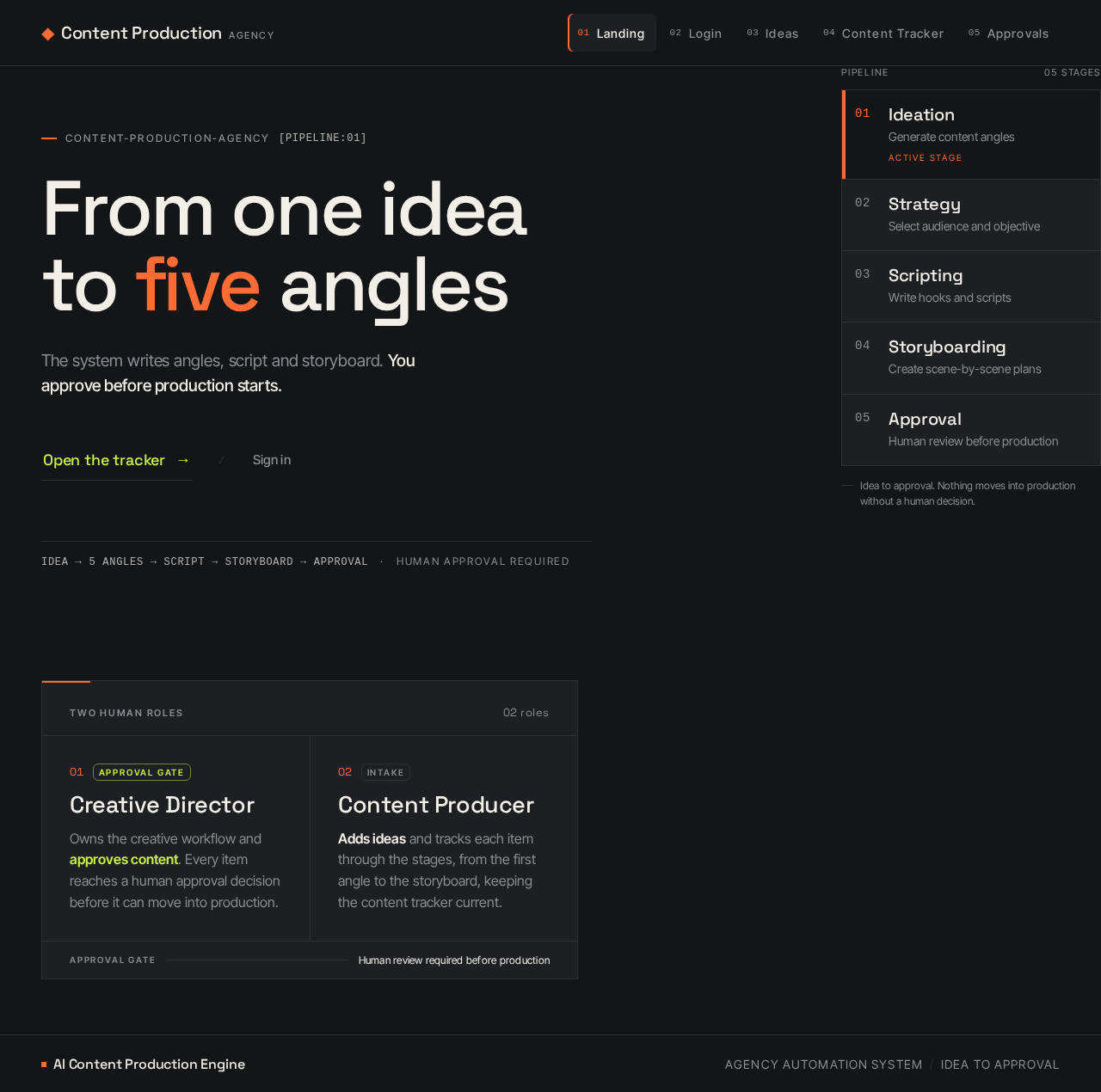
content-production-agency
From one ideato five angles
The system writes angles, script and storyboard. You approve before production starts.
IDEA → 5 ANGLES → SCRIPT → STORYBOARD → APPROVALHuman approval required
- 01IdeationGenerate content anglesActive stage
- 02StrategySelect audience and objective
- 03ScriptingWrite hooks and scripts
- 04StoryboardingCreate scene-by-scene plans
- 05ApprovalHuman review before production
Idea to approval. Nothing moves into production without a human decision.
Two human roles
02 rolesCreative Director
Owns the creative workflow and approves content. Every item reaches a human approval decision before it can move into production.
Content Producer
Adds ideas and tracks each item through the stages, from the first angle to the storyboard, keeping the content tracker current.
No comments yet. Be the first!