cms-playahead-lunarstorm
 Johan Tornell
Create a new cool cms, inspired by playahead & lunarstorm. Playahead had: Core Features Feature Description Profiles Personal pages with photo, presentation, interests, music taste, relationship status, etc. Guestbook A public wall where friends could leave greetings — similar to Facebook’s wall. Blog Users could write posts, share thoughts, and comment on each other’s blogs. Albums Upload and share photos, often with comments and ratings. Friends / Teams Social connections — users could create “teams” (groups) or add friends. Mingle A feed-like view showing photos and statuses — an early version of a social feed. Chat / Live Real-time chat directly in the browser, similar to MSN Messenger. Forum / Discussions Topic-based forums for everything from music to love. VIP Status (Silver, Black, Gold) Premium features like extra design options, more photos, stats, and exclusive icons. Icons / “I LIKE IT” Small graphic badges you could buy or give to others as appreciation. Statistics Displayed profile visits, points, and activity. Relationships Option to “create a relationship” — marking friendship, dating, or flirting status. Social and Interactive Plugins Dr. Love – a playful “compatibility test” showing how well you matched with others. Point System – activity gave points, increasing visibility. Music Favorites – users could show what they were listening to. Blog Comments and Ratings – encouraged interaction. VIP Black / Silver / Gold – unlocked more design and exclusive features. Themes and Colors – VIP users could customize background, text color, and layout. 🧩 Technical and Design Details Flash-based elements (for animations and chat). HTML profile editing (users could insert custom code snippets). SMS integration (for notifications and premium features). “Playahead GO” – a campaign or plugin for finding new contacts. Lunarstorm had: Core Features & Plugins Category Description Krypin (Profile Page) Each user had a personal “krypin” (den), like a mini homepage. You could customize colors, backgrounds, and add guestbooks, photos, and lists of friends. Gästbok (Guestbook) Public message board on your profile — similar to Facebook wall posts later. LunarMail / LunarMejl Internal private messaging system for direct communication. Lajv (Live Chat) Real-time chat plugin — at the top under navigation/menu short message (paid one) that users could see across the whole site. Logged out/logged in. Forum / Diskussionsgrupper Topic-based discussion boards, often themed around interests, regions, or humor. Dagbok (Diary/Blog) Personal blog entries visible to friends or public — one of the earliest “microblog” systems in Sweden. Bildalbum (Photo Album) Upload and share photos, comment on others’ pictures. Grupper (Groups) Public or private communities for shared interests — like mini-forums inside the platform. Events / Kalender Used for meetups, parties, and local gatherings. VIP / Pro Membership Paid upgrade unlocking profile styles, extra storage, and special emoticons. Radio Lunar Integrated streaming radio station with music and talk shows. Mobil Lunar SMS integration — you could receive notifications or send messages via mobile. Tycka / Snacka / Skoj Sections Interactive zones for polls, quizzes, and humor content. Krypin Statistik Showed visitor counts and popularity metrics for your profile.


Comments (0)
Sign in to leave a comment
System Requirements
System Requirements Document for cms-playahead-lunarstorm
1. Introduction
This System Requirements Document describes cms-playahead-lunarstorm, a new social community platform inspired by Playahead and Lunarstorm. It defines the current product’s accepted capabilities, users, page ownership, workflows, visual direction, and technical boundaries.
The platform is for Community Members who want a customizable personal presence and ongoing social interaction, and Community Moderators who oversee forums and groups. The product combines profiles, photos, music, messages, groups, discussions, and community activity in a contemporary interpretation of expressive early social-web culture.
2. System Overview
The system is a browser-based social community platform with a React frontend, a shared FastAPI backend, MariaDB for durable application data, and Redis for the accepted shared state, caching, queue, or coordination need. The backend owns application APIs and domain modules; these features do not require separate service processes.
Community Members create and customize profiles, share photos and posts, connect with others, and participate in community activities. Community Moderators oversee forum and group participation through restricted workflows. Application-owned identity supports enrollment and returning access to durable community state. The source does not establish differentiated permissions beyond the moderator oversight boundary for forums and groups.
Current capabilities include profiles and customization; guestbooks; blogs and comments; albums, photo comments and ratings; friends; groups; a photo-and-status feed; private messages; real-time browser chat; forums; VIP or Pro membership; appreciation badges; profile and activity statistics; relationship statuses; compatibility tests; activity points and visibility; events; radio; interactive polls, quizzes, and humor; and SMS notifications or messaging and premium features.
The supplied historical screenshots are visual inspiration only. They do not prescribe a page layout or supply current product facts. The platform is not a reproduction of the old sites’ exact layouts or dated browser-era chrome.
2a. Product Interpretation and Delivery Boundary
The ordered page contract is the current information architecture. Landing and Sign Up are anonymous entry points; Moderator Login is the anonymous verification entry for the moderator role. The remaining contracted pages require application identity as specified below. Community Members self-enroll before creating durable profiles or participating in protected workflows, and returning members verify their identity to resume their own state. Moderators are provisioned for the moderator role and verify that role before restricted forum or group oversight.
The platform owns its community features and durable state. SMS delivery and premium features are accepted capabilities, but no SMS provider, payment provider, pricing, or external service is specified. Radio is an integrated streaming capability; no station, catalogue, or streaming provider is specified. Flash is mentioned as a historical technical detail, not a current implementation requirement. The source does not specify how HTML profile editing is implemented or constrained.
No future-horizon requirements were supplied. No removed concepts were identified.
2c. Page Content and Component Coverage
Landing
- Information and state: Public introduction to the community and its purpose; anonymous visitor state.
- Primary actions: Start enrollment through Sign Up; returning Community Members proceed to their identity-verification path.
- Supporting components: Charcoal masthead, wordmark tag, compact navigation, welcome hero, community status label, and member-photo/activity strip using authentic member content when available.
- Entities: Community identity and, when available, member profile tiles and activity labels.
- States: Loading or unavailable member content must not prevent the introduction or entry actions. Empty state uses no fabricated member activity. Success routes to the selected entry path; errors remain visible and allow retry.
- Access: Public, anonymous.
Mingle
- Information and state: Feed-like view of community photos and statuses, with visibility affected by earned activity points.
- Primary actions: Browse the feed and open the associated member or content context.
- Supporting components: Photo-and-status stream, activity labels, and points-related visibility presentation.
- Entities: Member, photo, status, activity points, and feed item.
- States: Loading, empty feed, successful browsing, and recoverable load failure.
- Access: Community Member identity required.
Profile
- Information and state: Personal photo, presentation, interests, music taste, relationship status, friends, profile colors, backgrounds, and layout.
- Primary actions: Create or update profile details and customization; display music favorites and relationship status.
- Supporting components: Profile identity panel, customization controls, music favorites, relationship status, and friend list.
- Entities: Member profile, photo, interests, music favorites, relationship status, visual theme, and friends.
- States: Loading, incomplete or empty profile, saved profile, and recoverable save failure.
- Access: Community Member identity required. VIP-dependent customization is available according to the member’s membership entitlement.
Albums
- Information and state: Member photo albums and shared photos.
- Primary actions: Upload and share photos; comment on and rate photos.
- Supporting components: Album and photo presentation, upload interaction, photo comments, and ratings.
- Entities: Album, photo, comment, rating, and member.
- States: Loading, no albums or photos, successful upload/share/comment/rating, and recoverable upload or submission failure.
- Access: Community Member identity required.
Blog
- Information and state: Diary or blog posts and comments on community members’ posts.
- Primary actions: Write and publish posts; comment on posts.
- Supporting components: Post composition and presentation, post comments, and ratings where applicable to blog interaction.
- Entities: Blog post, author, comment, and rating.
- States: Loading, no posts, published post or comment, and recoverable save failure.
- Access: Community Member identity required.
Guestbook
- Information and state: Public messages on member profiles and their revisitable history.
- Primary actions: Leave a greeting on a profile and read guestbook messages.
- Supporting components: Profile-linked message list and message entry.
- Entities: Profile, guestbook message, author, and recipient.
- States: Loading, empty guestbook, posted message, and recoverable submission failure.
- Access: Community Member identity required.
Friends
- Information and state: Member social connections.
- Primary actions: Add friends and revisit the connection list.
- Supporting components: Connection list and add-friend interaction.
- Entities: Member and friend connection.
- States: Loading, no connections, successful connection, and recoverable connection failure.
- Access: Community Member identity required.
Groups
- Information and state: Public and private groups, their participation, and moderator oversight.
- Primary actions: Create and participate in groups; moderators oversee group participation.
- Supporting components: Group discovery and presentation, group participation, and restricted oversight controls.
- Entities: Group, member, participation, and moderator.
- States: Loading, no available groups, successful creation or participation, and recoverable failure. Private-group information is available only within its accepted access boundary.
- Access: Community Member identity required for member workflows. Community Moderator identity and provisioned moderator role required for restricted oversight.
Messages
- Information and state: Internal private member-to-member messages.
- Primary actions: Send and receive private messages and revisit message conversations.
- Supporting components: Conversation presentation and message composition.
- Entities: Sender, recipient, message, and conversation.
- States: Loading, no conversations, sent or received message, and recoverable send failure.
- Access: Community Member identity required.
Chat
- Information and state: Browser-based real-time chat.
- Primary actions: Participate in live chat and send messages to other participating members.
- Supporting components: Live conversation view and message entry.
- Entities: Participating members and chat messages.
- States: Connecting, active conversation, no active conversation, and recoverable connection or send failure.
- Access: Community Member identity required.
Forums
- Information and state: Topic-based forums and discussions.
- Primary actions: Participate in discussions; moderators oversee forum participation.
- Supporting components: Topic and discussion presentation, participation controls, and restricted oversight controls.
- Entities: Forum topic, discussion, member, and moderator.
- States: Loading, no discussions, successful participation, and recoverable submission failure.
- Access: Community Member identity required for participation. Community Moderator identity and provisioned moderator role required for restricted oversight.
Events
- Information and state: Community events and calendar meetups.
- Primary actions: Create and participate in events.
- Supporting components: Event and calendar presentation, event creation, and participation.
- Entities: Event, organizer, and participating members.
- States: Loading, no events, successful creation or participation, and recoverable failure.
- Access: Community Member identity required.
Fun
- Information and state: Polls, quizzes, humor content, and the playful compatibility test.
- Primary actions: Participate in polls and quizzes, view humor content, and take the compatibility test.
- Supporting components: Interactive content presentation and response controls.
- Entities: Poll, quiz, response, humor item, member, and compatibility result.
- States: Loading, no available interactive content, completed response or test result, and recoverable submission failure.
- Access: Community Member identity required.
Statistics
- Information and state: Profile visits, popularity, points, and activity; points increase visibility.
- Primary actions: View profile and activity statistics.
- Supporting components: Statistics presentation and points/visibility indicators.
- Entities: Profile visit, popularity measure, activity, and points.
- States: Loading, no recorded activity, successful statistics display, and recoverable load failure.
- Access: Community Member identity required.
VIP
- Information and state: VIP or Pro membership and its accepted premium features: additional profile customization, photo or storage capacity, statistics, and exclusive icons or emoticons. VIP tiers named in the source include Silver, Black, and Gold.
- Primary actions: Obtain VIP or Pro membership and use included premium features.
- Supporting components: Membership tier presentation and premium-feature availability.
- Entities: Member, membership tier, entitlement, and premium feature.
- States: Loading, membership not held, membership active, and recoverable failure to obtain or apply membership. No payment provider or purchase terms are specified.
- Access: Community Member identity required.
Badges
- Information and state: Graphic appreciation badges that members can give or buy.
- Primary actions: Give a badge to another member or buy a badge.
- Supporting components: Badge presentation, recipient selection, and give/buy interaction.
- Entities: Badge, giver, recipient, and purchase state where applicable.
- States: Loading, available badges, successful gift or purchase, and recoverable failure.
- Access: Community Member identity required.
Radio
- Information and state: Integrated streaming radio with music and talk shows.
- Primary actions: Access and listen to the integrated stream.
- Supporting components: Stream presentation and playback controls.
- Entities: Radio stream and playback state.
- States: Loading, playing, unavailable stream, and recoverable playback retry.
- Access: Community Member identity required.
Sign Up
- Information and state: Anonymous first-use enrollment needed before a Community Member creates durable personal profiles or participates in protected community workflows.
- Primary actions: Self-enroll as a Community Member.
- Supporting components: Enrollment form and outcome feedback. Specific fields and verification methods are not specified.
- Entities: New member identity.
- States: Form ready, submission in progress, successful enrollment, and recoverable validation or enrollment failure.
- Access: Public, anonymous; protected community state remains unavailable until enrollment and identity establishment succeed.
Moderator Login
- Information and state: Anonymous entry for returning verification of a provisioned Community Moderator role.
- Primary actions: Verify moderator identity and resume restricted forum or group oversight.
- Supporting components: Verification form and outcome feedback. Specific credentials and verification methods are not specified.
- Entities: Moderator identity and provisioned role.
- States: Form ready, verification in progress, successful verification, and recoverable verification failure.
- Access: Public, anonymous entry; restricted oversight remains unavailable until moderator identity and role are verified.
3. Functional Requirements
-
As a Community Member, I should be able to self-enroll before creating durable personal profiles or participating in protected community workflows.
Provenance:required_inference. Lifecycle: The anonymous visitor submits enrollment on Sign Up; the system establishes member identity and reports success or a recoverable failure. On success, the member continues to protected community work; on failure, the visitor can correct or retry. Enrollment fields and verification method are unspecified. Acceptance: Protected member state is unavailable until enrollment succeeds. -
As a Community Member, I should be able to verify my identity when returning so I can resume access to my own durable community state.
Provenance:required_inference. Lifecycle: The returning member initiates verification at the applicable identity entry; the system reports success or recoverable failure. Success resumes the member’s own state and intended workflow; failure permits retry. Acceptance: A member cannot resume another member’s durable state. -
As a Community Moderator, I should be able to verify my provisioned moderator role before accessing restricted forum or group oversight workflows.
Provenance:required_inference. Lifecycle: The moderator uses Moderator Login; the system verifies identity and provisioned role, then grants or denies access with a recoverable retry path. Success continues to the relevant forum or group oversight; failure leaves restricted oversight unavailable. Acceptance: Member identity alone does not grant moderator oversight.
-
As a Community Member, I should be able to create and maintain a personal profile with a photo, presentation, interests, music taste, and relationship status.
Provenance:explicit. Lifecycle: The member enters or updates profile information on Profile; the system saves and displays it. Save failure is reported and can be retried; success continues to profile viewing and other community interactions. Acceptance: The profile presents the stated information and can be revisited. -
As a Community Member, I should be able to customize profile colors, backgrounds, and layout.
Provenance:explicit. Lifecycle: The member selects profile appearance on Profile; the system saves and renders the customization. Failure is reported with retry; success continues to the customized profile. VIP-dependent availability follows the accepted premium entitlement. Acceptance: Saved appearance is visible on the profile. -
As a Community Member, I should be able to leave public guestbook messages on profiles.
Provenance:explicit. Lifecycle: The member writes a greeting on Guestbook; the profile owner is the affected recipient and can observe the posted message on their public guestbook. Submission failure is reported and retryable; success continues to guestbook reading and revisiting. Acceptance: A successful message is associated with its profile and author. -
As a Community Member, I should be able to write diary or blog posts and comment on other members’ posts.
Provenance:explicit. Lifecycle: The author publishes on Blog; other members can read and comment, and the post author can observe those comments. Save or comment failure is reported and retryable; success continues through post revisiting and discussion. Acceptance: Posts and comments remain associated with their authors and posts.
-
As a Community Member, I should be able to upload and share photo albums and comment on and rate photos.
Provenance:explicit. Lifecycle: The member uploads and shares photos on Albums; other members can view shared photos and submit comments or ratings, which the photo owner can observe. Upload or submission failure is reported and retryable; success continues to album revisiting and photo interaction. Acceptance: Shared photos, comments, and ratings are associated with the relevant album/photo and participants. -
As a Community Member, I should be able to add friends and revisit my social connections.
Provenance:explicit. Lifecycle: The initiating member adds another member on Friends; the other member is the affected connection participant and can observe the resulting connection. Failure is reported and retryable; success continues to the revisitable connection list. Acceptance: The connection is represented for the involved members. -
As a Community Member, I should be able to create and participate in public or private groups.
Provenance:explicit. Lifecycle: The member creates or joins a group on Groups; other participating members can observe and participate in the group. Creation or participation failure is reported and retryable; success continues to group participation. Private-group access remains within the private group’s accepted boundary. Acceptance: Group visibility reflects whether it is public or private. -
As a Community Member, I should be able to browse a feed-like view of community photos and statuses.
Provenance:explicit. Lifecycle: The member opens Mingle and browses available photos and statuses; the system presents the feed. Load failure is reported and retryable; success continues to member or content contexts. Acceptance: The view contains photos and statuses rather than an unrelated feed type.
-
As a Community Member, I should be able to communicate through internal private messaging.
Provenance:explicit. Lifecycle: The sender composes and sends a private message on Messages; the recipient can observe and respond through their own messaging interaction. Send failure is reported and retryable; success continues in the conversation. Acceptance: The message is private to its intended participants and remains revisitable. -
As a Community Member, I should be able to communicate through browser-based real-time chat.
Provenance:explicit. Lifecycle: A member initiates or joins Chat and sends a message; participating members receive and can respond in the live conversation. Connection or send failure is visible and retryable; success continues as a real-time exchange. Acceptance: Chat is browser-based and supports real-time interaction. -
As a Community Member, I should be able to participate in topic-based forums and discussions.
Provenance:explicit. Lifecycle: The member participates in a topic discussion on Forums; other participants can observe and respond. Submission or load failure is reported and retryable; success continues the discussion. Acceptance: Discussions are organized around topics. -
As a Community Moderator, I should be able to oversee forum and group participation.
Provenance:required_inferencefor the moderator role and access prerequisite; the source explicitly accepts forums and groups. Lifecycle: A provisioned moderator verifies identity, opens Forums or Groups, and performs the accepted oversight interaction; affected community participants can observe the resulting oversight outcome where applicable. Verification or operation failure is reported and recoverable; success continues within the relevant community. Acceptance: Oversight is limited to the accepted forum and group contexts; no additional moderation powers are specified.
-
As a Community Member, I should be able to obtain VIP or Pro membership with additional profile customization, photo or storage capacity, statistics, and exclusive icons or emoticons.
Provenance:explicit. Lifecycle: The member obtains membership through VIP; the system records the membership entitlement and makes its accepted features available. Failure is reported and recoverable; success continues to use of the included features. Acceptance: VIP or Pro membership provides the stated premium features; tiers named in the source include Silver, Black, and Gold. Purchase provider, pricing, and terms are unspecified. -
As a Community Member, I should be able to give or buy graphic appreciation badges.
Provenance:explicit. Lifecycle: The giver selects a badge and recipient on Badges; the recipient can observe a successfully given badge. A purchase or gift failure is reported and retryable; success continues to badge display or further badge interaction. Acceptance: Badges are graphic appreciation items and support giving or buying. -
As a Community Member, I should be able to view profile visit, popularity, points, and activity statistics.
Provenance:explicit. Lifecycle: The member opens Statistics and views the available measures; load failure is reported and retryable; success continues to profile and activity review. Acceptance: The displayed statistics cover profile visits, popularity, points, and activity. -
As a Community Member, I should be able to mark social relationships such as friendship, dating, or flirting.
Provenance:explicit. Lifecycle: The member sets a relationship status on Profile; the affected other member can observe the resulting status where it concerns them. Save failure is reported and retryable; success continues to profile display. Acceptance: The supported relationship labels include friendship, dating, and flirting.
-
As a Community Member, I should be able to take a playful compatibility test.
Provenance:explicit. Lifecycle: The member takes the test on Fun; the system presents a compatibility result involving the relevant other member, who can observe the result when shared through the accepted test outcome. Failure is reported and retryable; success continues to viewing the result. Acceptance: The test presents a playful compatibility result; no scoring method is specified. -
As a Community Member, I should earn points through activity, with points increasing visibility.
Provenance:explicit. Lifecycle: The member performs accepted community activity; the system records earned points and applies their visibility effect. The member can observe points and activity on Statistics and visibility in Mingle; processing or display failure is recoverable. Acceptance: Activity earns points and points increase visibility; exact point values and ranking rules are unspecified. -
As a Community Member, I should be able to display music favorites on my profile.
Provenance:explicit. Lifecycle: The member sets music favorites on Profile; visitors to the profile can observe them. Save failure is reported and retryable; success continues to profile viewing. Acceptance: Music favorites are displayed as profile information. -
As a Community Member, I should be able to create and participate in events and calendar meetups.
Provenance:explicit. Lifecycle: A member creates an event on Events; other members can observe and participate. Creation or participation failure is reported and retryable; success continues to event revisiting and participation. Acceptance: Events support creation and participation in a calendar-meetup context.
-
As a Community Member, I should be able to access integrated streaming radio and interactive polls, quizzes, and humor sections.
Provenance:explicit. Lifecycle: The member accesses Radio to listen to the stream, and Fun to participate in polls or quizzes or view humor content. Stream or interaction failure is reported and recoverable; success continues within the selected activity. Acceptance: Radio provides streaming radio; interactive content includes polls, quizzes, and humor. -
As a Community Member, I should be able to use SMS notifications or messaging and SMS-related premium features.
Provenance:explicit. Lifecycle: The member uses the accepted SMS capability; the intended recipient can receive the notification or message, and the member can observe the outcome where the platform reports it. Delivery failure is reported or otherwise recoverable where supported; success continues to the relevant notification, messaging, or premium-feature use. Acceptance: SMS supports notifications or messaging and premium features. Provider, enrollment details, and exact delivery mechanics are unspecified.
4. User Personas
Community Member
Provenance: required_inference from accepted member-facing workflows.
A Community Member creates and maintains a personal presence, then uses it to share photos, posts, music favorites, and relationship status. Their distinct work spans both self-expression and interaction: they customize their profile, connect with friends, contribute to guestbooks and discussions, communicate privately or live, and participate in groups, events, and interactive content. They provide profile details, photos, posts, messages, and activity responses; they also receive comments, messages, connection outcomes, and other members’ participation. Success means maintaining a revisitable personal presence and being able to communicate and participate across the community.
Community Moderator
Provenance: required_inference from the accepted forum and group oversight workflows.
A Community Moderator is provisioned for a distinct role and verifies that role before restricted oversight. Their accepted responsibility is limited to overseeing participation in forums and groups, unlike a Community Member’s general participation and personal content work. They interact with members whose community participation is affected by oversight. Success means reaching the restricted forum or group oversight context after role verification and completing that accepted oversight work. No additional biography or moderation powers are specified.
5. Core User Flows
Community Member — First enrollment and return
- An anonymous visitor opens Landing and chooses Sign Up.
- On Sign Up, the visitor submits the enrollment information required by the system; exact fields and verification method are unspecified.
- On success, the system establishes Community Member identity and the member continues to a protected destination. On failure, the visitor sees an error and can correct or retry.
- On a later visit, the member verifies identity through the application’s returning-member entry. Success resumes their own durable state; failure allows retry and does not expose another member’s state.
Community Member — Profile and customization
- The member opens Profile and enters a photo, presentation, interests, music taste, and relationship status.
- The member selects profile colors, backgrounds, and layout, subject to applicable VIP entitlement.
- The system saves and displays the profile. A save failure is shown with a retry path.
- The member revisits the profile; other members can observe its displayed information and customization.
Community Member — Guestbook
- The member opens a profile’s Guestbook and writes a public greeting.
- The system posts the message to that profile. The profile owner can observe it in their guestbook.
- If submission fails, the author can retry. On success, the author and profile owner can revisit the message.
Community Member — Blog and comments
- The member opens Blog, writes a diary or blog post, and publishes it.
- Other members read the post and may comment; the author can observe those comments.
- A post or comment failure is shown and can be retried.
- The author and participants revisit the post and continue the discussion.
Community Member — Albums and photo interaction
- The member opens Albums, uploads photos, and shares an album.
- Other members view shared photos and submit comments or ratings; the photo owner can observe those interactions.
- Upload, comment, or rating failure is shown with a retry path.
- Members revisit the album and continue photo interaction.
Community Member — Friends
- The member opens Friends and adds another member.
- The system records the connection; the other member can observe the resulting connection.
- If the connection operation fails, the initiating member can retry.
- Both members can revisit their connection lists.
Community Member — Groups
- The member opens Groups and creates a group or chooses to participate in one.
- The system records the group and participation; other participating members can observe and take part.
- Private-group information remains within its private access boundary.
- On failure, the member can retry; on success, the member continues participating in the group.
Community Member — Mingle
- The member opens Mingle and browses photos and statuses.
- The system presents available feed items, with visibility affected by activity points.
- If loading fails, the member can retry.
- The member continues to the relevant member or content context.
Community Member — Private messages
- The member opens Messages, composes a private message, and sends it to another member.
- The recipient observes the message and can respond through their own messaging interaction.
- If sending fails, the sender can retry.
- Both participants can revisit the conversation and continue privately.
Community Member — Real-time chat
- The member opens Chat and joins or initiates a browser-based live conversation.
- The member sends a message; other participating members receive it and can respond in real time.
- Connection or send failure is visible and can be retried.
- On success, participants continue the live exchange.
Community Member — Forums
- The member opens Forums and participates in a topic-based discussion.
- Other participants can observe and respond.
- If loading or submission fails, the member can retry.
- On success, participants continue the discussion.
Community Moderator — Forum and group oversight
- A provisioned moderator opens Moderator Login and verifies identity and moderator role.
- On success, the moderator opens Forums or Groups and performs the accepted oversight work in that context.
- Members participating in the affected forum or group can observe the resulting oversight outcome where applicable.
- Verification or operation failure is reported and recoverable. A member without the provisioned moderator role cannot access restricted oversight.
Community Member — VIP or Pro membership
- The member opens VIP and obtains VIP or Pro membership.
- The system records the entitlement and makes accepted premium features available: additional profile customization, photo or storage capacity, statistics, and exclusive icons or emoticons.
- If obtaining or applying membership fails, the member receives an error and can retry.
- On success, the member continues to use the included features. Payment provider, pricing, and terms are unspecified.
Community Member — Appreciation badges
- The member opens Badges, selects a graphic appreciation badge, and chooses to give or buy it.
- For a gift, the recipient can observe the badge; for a purchase, the member observes the resulting badge outcome where supported.
- If the operation fails, the member can retry.
- On success, the member continues to badge interaction or display.
Community Member — Statistics and points
- The member opens Statistics to view profile visits, popularity, points, and activity.
- As the member performs accepted community activity, the system awards points and applies their visibility effect.
- The member observes points and activity in Statistics and the visibility effect in Mingle.
- If statistics or activity state cannot be loaded, the member can retry; exact point values and ranking rules are unspecified.
Community Member — Relationship status
- The member opens Profile and marks a relationship such as friendship, dating, or flirting.
- The system saves and displays the status; the other affected member can observe the resulting status where it concerns them.
- If saving fails, the member can retry.
- On success, the status remains visible on the profile.
Community Member — Compatibility test
- The member opens Fun and takes the playful compatibility test involving another member.
- The system presents a compatibility result; the other member can observe the result when it is shared through the test outcome.
- If the test cannot complete, the member can retry.
- On success, the member views the result. The scoring method is unspecified.
Community Member — Events and calendar meetups
- The member opens Events and creates an event or chooses to participate in one.
- Other members can observe the event and participate.
- If creation or participation fails, the member can retry.
- On success, the event remains available for revisiting and continued participation.
Community Member — Radio and interactive content
- To listen, the member opens Radio and accesses the integrated streaming radio with music and talk shows.
- If the stream is unavailable, the member sees the failure and can retry; on success, playback continues.
- Independently, the member opens Fun to participate in polls or quizzes or view humor content.
- If an interaction fails, the member can retry; on success, the member sees the resulting response or content and can continue within that activity.
Community Member — SMS
- The member uses the accepted SMS notification or messaging capability, or an SMS-related premium feature.
- The intended recipient receives the notification or message when delivery succeeds; the member observes an outcome where the platform reports one.
- Delivery failure is handled through the available recovery path; exact provider and delivery mechanics are unspecified.
- On success, the member continues with the relevant notification, messaging, or premium-feature use.
6. Visuals Colors and Theme
The visual direction is Remixed familiarity: social-web nostalgia with street-level energy. The muse is Virgil Abloh. The headline is “A lively, labeled social noticeboard—not a centered SaaS pitch.”
- Dark-mode palette: Main background charcoal
#17191B; warm off-white surface#F1EEE8; primary text#F7F4EE; primary action and social signal hot pink#FF4D8D; small labels, counts, and industrial stripe accents safety yellow#F2C94C; muted text#A6A29B. Use dark ink on light panels for body text. Pink and yellow are accents, not reading-surface fills. - Typography: Oswald bold condensed uppercase for headings, section names, and short labels; Barlow for body, messages, and profile details. Use quoted micro-labels and wide tracking sparingly. Responsive display type scales from 48px mobile to 96px desktop; section titles 28–40px; interface labels 12–14px; body 16px with 1.5 line-height. Use responsive sizing and wrapping at 375px, 768px, and 1280px.
- Shape and framing: Industrial framing, sharp-cornered panels, exposed rules, compact tag-like labels, and short safety-stripe motifs confined to panel edges. VIP tiers, appreciation icons, and activity points use badge forms.
- Layout: A compact top identity and navigation band leads into an asymmetric composition that gives Mingle and member profiles room to breathe. Use modular profile, guestbook, album, and chat panels with varied widths and clear labels. At narrow widths, stack panels in a deliberate reading order and keep navigation and controls accessible.
- Imagery: Member-uploaded photos and customizable profile artwork express identity. Use authentic, varied member photography in profile thumbnails and albums when available, with restrained industrial borders, tagged captions, and optional halftone treatments. Do not substitute unrelated stock imagery for member content.
- Responsive readability: Headlines, wordmarks, labels, numbers, card text, and controls remain fully inside the viewport and their containers at 375px, 768px, and 1280px. Wrap or scale content as needed. Decorative imagery may crop or overlap only where it does not cover readable text or controls.
7. Signature Design Concept
The public Landing page opens as a full-width charcoal noticeboard framed by a thin exposed grid and a short safety-yellow edge. An oversized, left-aligned Oswald welcome headline occupies the left portion, with a yellow bracket label and hot-pink community status tag. A compact join/sign-in action sits directly beneath the headline. On the right, warm off-white tiles form a horizontal strip of member portraits and activity labels, using member imagery when available. At mobile widths, the portrait strip stacks below the headline rather than covering it. Exposed divider rules and restrained industrial labels carry the nostalgic social-web energy without copying the historical screenshots’ layout.
8. Interaction Model & Motion Direction
Interaction Model: Animated
Motion Tempo: expressive
Hero Dimensionality: flat
Landing Hero Motion Brief
- Focal subject: The welcome headline and the member-photo/activity strip, using member imagery when available.
- Input → transformation → outcome: A visitor chooses the join action → the interface gives a quick, purposeful state transition into Sign Up → the visitor reaches the enrollment interaction. This uses only accepted enrollment behavior.
- Motion vocabulary: Snappy, purposeful transitions; ticker-like community signals may move; badges may flip to reveal their details; panel states change quickly. Readable content remains stationary.
- Composed first frame: Charcoal hero with exposed grid, yellow edge detail, oversized left-aligned headline, pink status tag, join action, and fully visible portrait/activity tiles on the right.
- Reduced-motion state: Keep content static; wrap ticker items or make them horizontally scrollable so every item can be brought fully into view. No moving element may cover text or controls.
9. Non-Functional Requirements
- Responsive readability —
explicit(Creative Direction): At 375px, 768px, and 1280px, readable text and controls remain whole and within the viewport and their containers. Use wrapping or scaling where needed. - Reduced motion —
explicit(Creative Direction): Withprefers-reduced-motion, provide a usable static arrangement. Tickers wrap or become horizontally scrollable, and each item can be brought fully into view. - Content legibility —
explicit(Creative Direction): Do not use tiny body copy to imitate retro interface density. Messages and profile details remain readable. - Visual safety —
explicit(Creative Direction): Ticker motion, decorative stripes, and image crops must not cover readable text or controls. - Member imagery —
explicit(Creative Direction): Use member-uploaded photos and customizable profile artwork as the platform’s identity; do not substitute unrelated stock imagery for member content. - Durable identity continuity —
required_inference(Planning Scope): Enrollment and returning verification must bind members to their own durable community state. Moderator verification must establish the provisioned moderator role before restricted forum or group oversight. - Application-owned persistence —
explicit(Planning Scope): Durable application state is required. MariaDB is provisioned for application-owned persistent data; Redis is provisioned for the accepted shared caching, state, queue, or coordination need. - No unsupported permission expansion —
required_inferenceboundary: Role-restricted moderator oversight is limited to the accepted forum and group contexts. No broader role-based visibility or permission model is specified.
10. Tech Stack
- Frontend: React application UI, as provisioned.
- Backend: FastAPI shared backend for application APIs and domain modules, as provisioned. Reuse this process for feature APIs.
- Persistent database: MariaDB for application-owned durable data, as provisioned.
- Redis: Redis for the accepted shared caching, state, queue, or coordination need, as provisioned.
- Separate services: None specified beyond the provisioned frontend, backend, database, and Redis services. SMS and radio providers are unspecified; do not assume a particular provider.
- Flash: Historical reference only; no current Flash implementation is required or specified.
11. Assumptions and Constraints
- The ordered page names and access surfaces in the Planning Scope are the final page contract and are preserved exactly.
- Community Member self-enrollment and returning identity verification, and provisioned Community Moderator verification, are required journey prerequisites. Enrollment fields, credentials, and verification methods are unspecified.
- The Community Moderator role is limited to restricted forum and group oversight; no additional moderation powers are specified.
- VIP or Pro membership and badge buying are accepted, but payment provider, pricing, purchase terms, and transaction mechanics are unspecified.
- SMS notifications or messaging and premium features are accepted; provider and exact delivery mechanics are unspecified.
- Integrated streaming radio is accepted; station, catalogue, and provider are unspecified.
- The source mentions HTML profile editing with custom code snippets but does not define its current implementation or constraints. No additional profile-code behavior is specified here.
- Flash-based elements are mentioned as historical technical details; no current Flash dependency is specified.
- No future requirements were supplied.
12. Glossary
- Community Member: A member who creates a personal profile and participates in community features.
- Community Moderator: A provisioned role that verifies identity before restricted forum or group oversight.
- Guestbook: A public message board associated with a member profile.
- Mingle: The feed-like view of community photos and statuses.
- VIP or Pro membership: Premium membership associated with additional profile customization, photo or storage capacity, statistics, and exclusive icons or emoticons.
- Activity points: Points earned through activity that increase visibility.
- Compatibility test: The playful test that presents a compatibility result involving members.
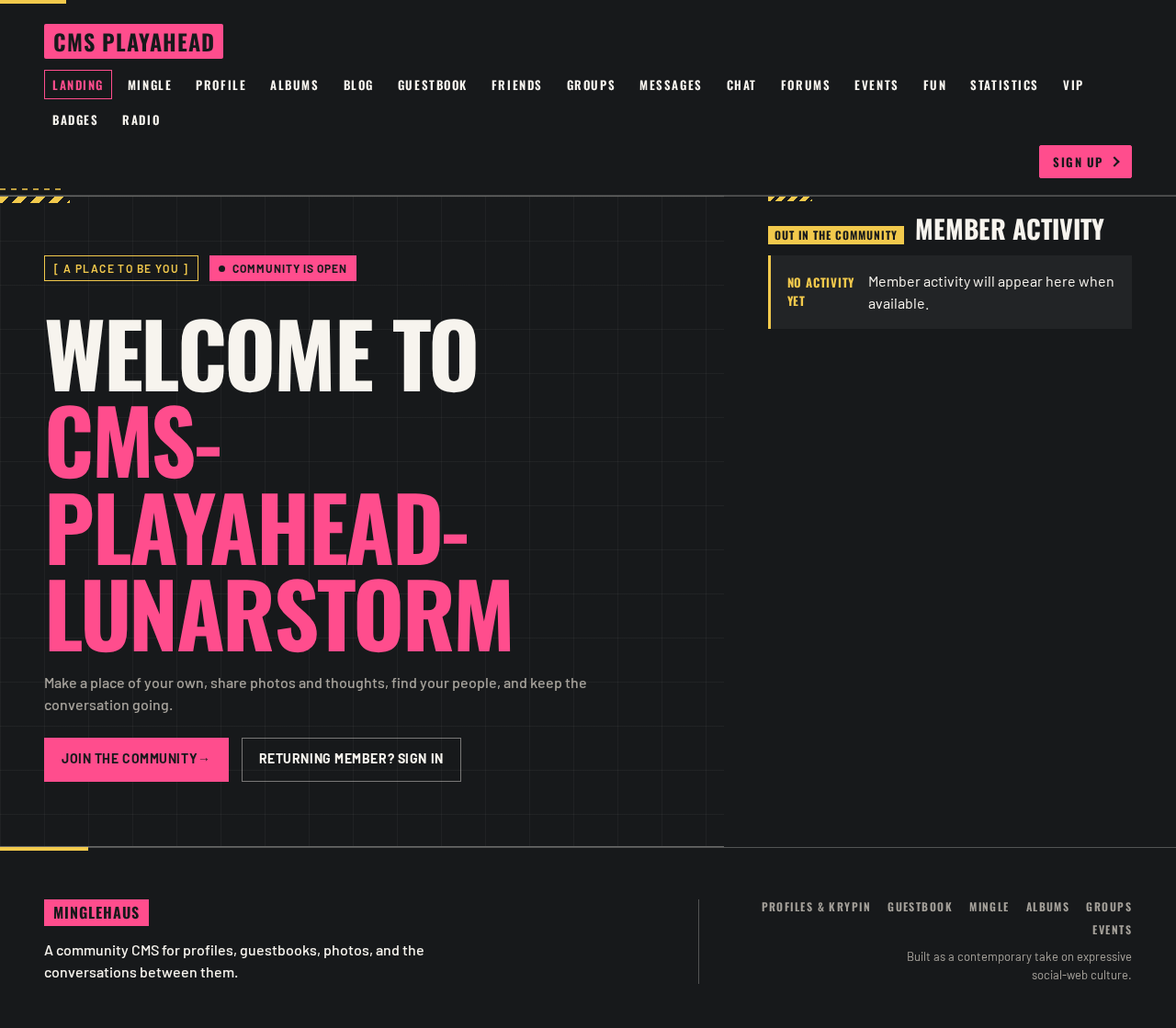
Welcome to cms-playahead-lunarstorm
Make a place of your own, share photos and thoughts, find your people, and keep the conversation going.
Member activity
Welcome to cms-playahead-lunarstorm
Make a place of your own, share photos and thoughts, find your people, and keep the conversation going.
No comments yet. Be the first!