childhood-memory
 Lavinia Divine Mungcal
Build me a beautiful, interactive, and heartwarming childhood memory website for my nephew's 7th birthday. Website Title: “Look How Much You've Grown” Create a personal digital time capsule that tells the story of my nephew's childhood, starting from when he was one month old up to the present day, when he is almost 7 years old. IMPORTANT: Do not organize the website by birthdays or separate yearly birthday albums. Instead, make it a continuous chronological journey through his childhood, showing how he gradually grew from a tiny baby into the little boy he is today. Website Sections 1. Welcome Page - Display the title “Look How Much You've Grown.” - Add a subtitle: “A little collection of moments that made you who you are today.” - Include a beautiful childhood photo and a button labeled “Take a Walk Down Memory Lane.” - Add gentle animations, floating stars, and a warm, nostalgic atmosphere. 2. The Beginning — Your First Months - Start with photos from when he was one month old. - Continue chronologically through his baby months. - Include pictures of his little expressions, smiles, and everyday moments. - Add short captions with his age or the date each picture was taken. 3. Little by Little, You Grew - Continue the timeline through his toddler years and early childhood. - Arrange pictures in chronological order, from his earliest photos to more recent ones. - Include candid moments, funny expressions, family memories, first experiences, and other milestones. - Use a beautiful combination of photo grids, polaroid frames, and scrapbook-style layouts. 4. Look at You Now - Showcase his most recent photos as he approaches his seventh birthday. - Include a then-and-now comparison of his baby pictures and current photos. - Add the heading “You may have grown up, but you'll always be our little boy.” 5. A Little Birthday Letter - End with a heartfelt letter celebrating his seventh birthday. - Make it sweet, personal, and emotional, expressing how special it has been to watch him grow. - Add a final message: “Happy 7th Birthday! No matter how big you get, you'll always be our little sunshine.” Design and Features - Use a soft pastel palette with baby blue, cream, white, and light yellow. - Add stars, clouds, tiny doodles, film frames, and handwritten-style fonts. - Use smooth scrolling and gentle transitions to make the photos feel like pages in a childhood storybook. - Include optional background music with a play/pause button. - Make the website responsive on mobile phones and computers. - Use replaceable photo placeholders and editable captions so I can easily add his own pictures. - Make the timeline flow naturally without separating the content into individual birthday years. The overall experience should feel like opening a precious childhood scrapbook and watching a little boy grow up right before your eyes. Make it emotional, nostalgic, personal, and magical, like a birthday gift made entirely of memories.

Comments (0)
Sign in to leave a comment
System Requirements
System Requirements Document for childhood-memory
1. Introduction
"Look How Much You've Grown" is a personal digital time capsule built as a seventh-birthday gift for a nephew. It tells the story of his childhood as one continuous chronological journey — from his first month of life to the present day, when he is almost seven years old — so that opening the site feels like opening a precious childhood scrapbook and watching a little boy grow up right before your eyes.
The product intent is emotional, nostalgic, personal, and magical: a birthday gift made entirely of memories. It is not a birthday-album organizer and it is not a general photo platform. It is a single, handcrafted keepsake that a family member (the aunt/uncle) fills with real photos and captions, and that the nephew and his family walk through together.
The audience is the nephew himself, the family gathered around him (parents, aunts, uncles, grandparents), and the family member who curates and maintains the album.
2. System Overview
The site is a single continuous vertical journey with five story sections and one private curator workspace:
- Welcome Page — the public entry: title, subtitle, a featured childhood photo, and the "Take a Walk Down Memory Lane" button.
- The Beginning — Your First Months — the chronological baby-month stretch beginning at one month old.
- Little by Little, You Grew — the continuous toddler and early-childhood timeline.
- Look at You Now — recent photos and the then-and-now comparison.
- A Little Birthday Letter — the closing seventh-birthday letter.
- Memory Editor — the curator's workspace for replacing photo placeholders and editing captions.
Actors. Two accepted human personas: the Memory Curator (Aunt/Uncle), who builds and maintains the capsule, and the Birthday Visitor (Nephew and Family), who walks the journey. Background music playback is a browser-owned capability; there are no other external product actors.
Accepted behavior. A continuous, non-year-grouped timeline; replaceable photo placeholders and editable captions; optional background music with a play/pause control; smooth scrolling and gentle transitions; a soft pastel palette with stars, clouds, tiny doodles, film frames, and handwritten-style fonts; full responsiveness on mobile phones and computers.
Exclusions. The site must not be organized by birthdays or separate yearly birthday albums, and the timeline must never break at a birthday or year boundary. No stock photography, no AI-generated faces, no grey placeholder boxes, no 3D/WebGL scenes, and no blue-indigo SaaS palette.
2a. Product Interpretation and Delivery Boundary
The five story sections are publicly reachable with no sign-in — a family member can open a link and immediately walk the memory lane. The Memory Editor is the one private, curator-owned surface: it is where the owner replaces placeholders with real photos and edits captions, and its saved content is what every visitor then sees. Because the editor changes durable, owner-specific content that must remain bound to the correct curator across visits, it requires application-owned identity: the curator establishes access on first use and verifies it on return. The editor is never reachable anonymously, and the public story sections never require identity.
Everything the site displays is first-party application content. There is no provider-owned or external-destination workflow in the current scope. Background music is optional and entirely under the visitor's control through a play/pause button; nothing plays without the visitor's action.
Current scope covers the five story sections and the curator's editing workspace. No future-horizon features were accepted; anything beyond the above (guestbooks, sharing controls, analytics, multi-child albums) is out of scope.
2b. Page Content and Component Coverage
Welcome Page
- Information/state: the title "Look How Much You've Grown"; the subtitle "A little collection of moments that made you who you are today."; a featured childhood photo; the wordmark "a little time capsule"; the "Take a Walk Down Memory Lane" button.
- Primary action: activate "Take a Walk Down Memory Lane" to begin the journey into The Beginning — Your First Months.
- Supporting actions: play/pause the optional background music; scroll onward.
- Domain entities: featured photo, title, subtitle, music track.
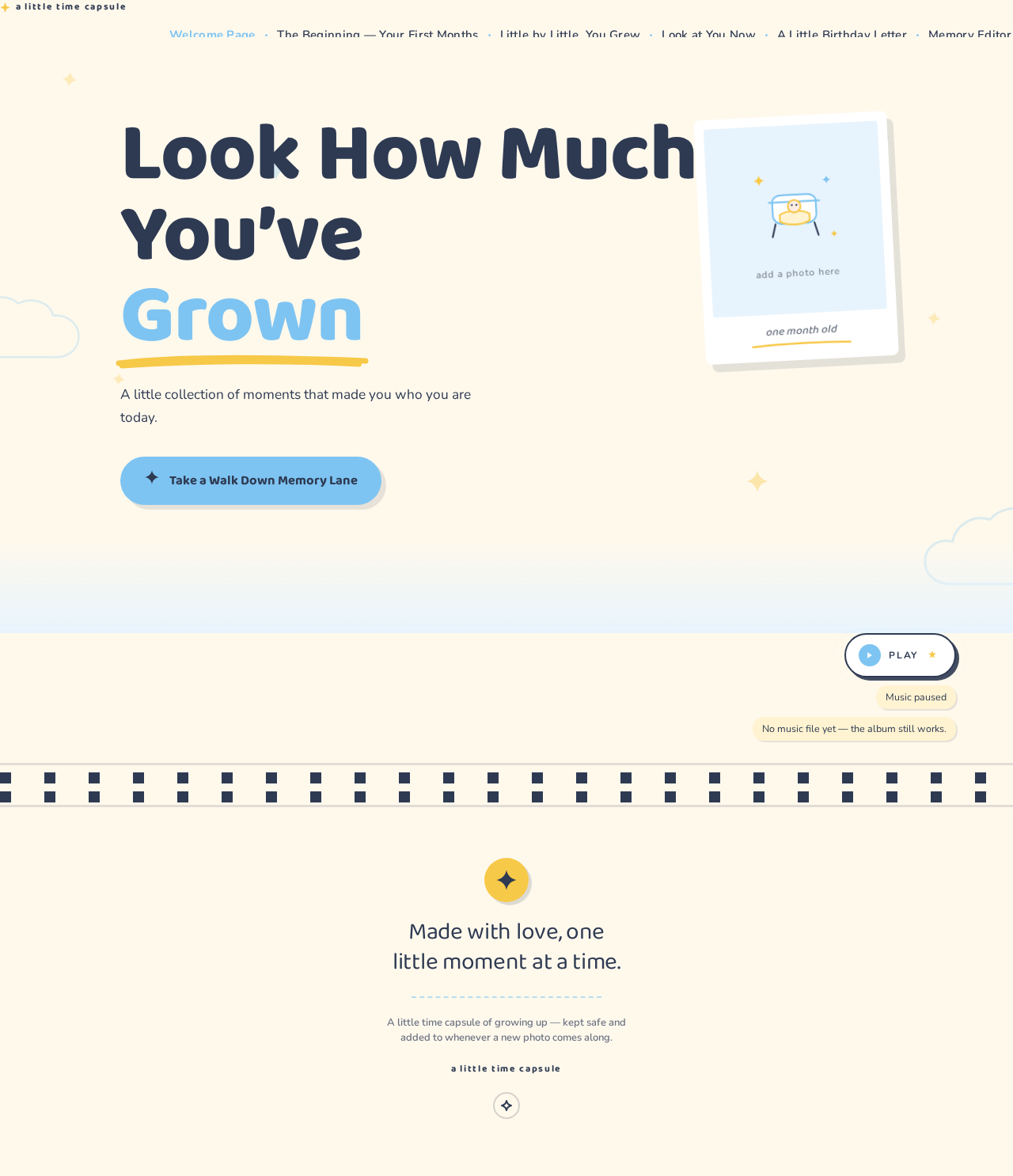
- Component responsibilities: hero stage with the large title (final word "Grown" in baby blue with a hand-drawn yellow crayon underline); a single large tilted polaroid showing the featured photo with a handwritten caption in its white lip; the subtitle at a comfortable reading measure; the pill button with a small yellow star that nudges right on hover; floating stars and two slow clouds drifting behind everything; a soft cream-to-blue wash dissolving into the first section.
- States: loading — the featured photo resolves into its polaroid frame; empty — if no featured photo has been set, the polaroid shows a drawn vector scene with the caption "add a photo here"; success — title, subtitle, photo, and button all render whole and legible; error/recovery — if the featured photo fails to load, the drawn vector placeholder appears in its place and the button remains fully usable.
The Beginning — Your First Months
- Information/state: the chronological baby-month stretch beginning at one month old; each photo carries a short caption with his age or the date it was taken.
- Primary action: scroll continuously through the baby months in order.
- Supporting actions: hover a polaroid to lift and straighten it; play/pause background music.
- Domain entities: baby-month photos, captions (age or date), timeline rail nodes.
- Component responsibilities: the dotted blue timeline rail that draws downward with scroll progress and never breaks at a year boundary; polaroid frames with handwritten lips; a 2-up grid; a 3-up staggered grid with the middle card offset down; a film-strip band of four frames; a single large "moment" photo with a caption card overlapping its bottom-left corner; caption chips pinned to photo lower edges with slight rotation.
- States: loading — photo cards rise and settle into place as they enter view; empty — any unfilled slot shows a drawn vector scene (rounded bassinet, tiny shoes) with the caption "add a photo here"; success — every photo and its caption render in chronological order; error/recovery — a failed photo falls back to its drawn placeholder while its caption and position remain intact.
Little by Little, You Grew
- Information/state: the continuous toddler and early-childhood timeline; candid moments, funny expressions, family memories, first experiences, and other milestones; photos in chronological order from earliest to most recent.
- Primary action: scroll continuously through the growing-up years.
- Supporting actions: hover a polaroid to lift and straighten it; play/pause background music.
- Domain entities: timeline photos, captions, milestone labels, timeline rail nodes.
- Component responsibilities: the same unbroken dotted rail continuing from the previous section; a scrapbook rhythm alternating full-width single polaroid, 2-up grid, 3-up staggered grid, film-strip band, and single large "moment" photo with overlapping caption card; film-strip interstitial bands that slide horizontally and are pausable; caption chips with hand-drawn underlines.
- States: loading — cards reveal with a rise, scale, and rotation settle; empty — unfilled slots show drawn vector scenes (stack of blocks, paper crown) with "add a photo here"; success — the full chronological sequence renders with no year grouping; error/recovery — failed photos fall back to drawn placeholders without breaking the rail or the order.
Look at You Now
- Information/state: his most recent photos as he approaches his seventh birthday; the heading "You may have grown up, but you'll always be our little boy."; a then-and-now comparison of a baby picture and a current photo.
- Primary action: drag the then-and-now divider to compare the baby photo and the current photo.
- Supporting actions: scroll through the recent-photo gallery; play/pause background music.
- Domain entities: recent photos, baby photo, current photo, comparison divider, year labels.
- Component responsibilities: the then-and-now slider with one draggable vertical divider over two stacked photos and a yellow circular handle bearing a tiny star; year labels above the frame that never overlap the handle; the heading set prominently; recent-photo scrapbook arrangement.
- States: loading — the two stacked photos resolve before the divider becomes draggable; empty — an unfilled side of the comparison shows a drawn vector scene with "add a photo here"; success — dragging the divider reveals more of one photo and less of the other, with labels staying clear of the handle; error/recovery — if either photo fails to load, its drawn placeholder appears and the divider remains usable on the loaded side.
A Little Birthday Letter
- Information/state: the heartfelt seventh-birthday letter; the final message "Happy 7th Birthday! No matter how big you get, you'll always be our little sunshine."
- Primary action: read the letter to its end.
- Supporting actions: scroll to trigger the per-line staggered reveal; play/pause background music.
- Domain entities: letter body, signature, final message, wax-seal decoration.
- Component responsibilities: a sheet of cream letter paper with a torn top edge; a wax-seal-style yellow circle in the corner; per-line staggered reveal as the letter scrolls into view; the final message set larger in blue beneath the signature.
- States: loading — lines reveal in sequence as the section enters view; empty — if the letter text has not been written yet, the paper shows a gentle prompt to write it in the Memory Editor; success — the full letter and final message render legibly; error/recovery — if the reveal animation cannot run, the letter renders fully at rest with nothing hidden.
Memory Editor
- Information/state: the curator's workspace listing every photo slot across the five story sections in their chronological order, each with its current image (or drawn placeholder) and its caption field; the letter text field; the featured-photo selection for the Welcome Page; the then-and-now pair selection.
- Primary action: replace a photo placeholder with a real photo and save.
- Supporting actions: edit a caption (age or date); edit the birthday letter text; choose the featured photo and the then-and-now pair; reorder or reassign a photo's position in the continuous timeline; sign in and sign out.
- Domain entities: photo slot, uploaded photo, caption, letter text, featured-photo selection, then-and-now pair, curator identity.
- Component responsibilities: an ordered slot list mirroring the public journey; per-slot upload and caption controls; a letter text editor; featured-photo and comparison selectors; save confirmation; identity entry for first use and return.
- States: loading — the slot list and current content resolve; empty — before any photo is added, every slot shows its drawn vector placeholder and "add a photo here"; success — a saved photo and caption appear immediately in the corresponding public section in the correct chronological position; error/recovery — if an upload fails, the slot keeps its previous image and caption and shows a retry affordance; if a save fails, the curator is told the change was not applied and can retry without losing the edit.
3. Functional Requirements
FR-1 — Public entry with title, subtitle, and featured photo (explicit) As a Birthday Visitor, I should open the Welcome Page and see the title "Look How Much You've Grown," the subtitle "A little collection of moments that made you who you are today.," and a beautiful childhood photo, so that the album greets me warmly before I begin.
- Trigger/input: the visitor opens the site.
- Observable result: title, subtitle, and featured photo render whole and legible at every viewport.
- Access state: public, no sign-in.
- Failure/recovery: if the featured photo fails to load, a drawn vector placeholder with "add a photo here" appears and the rest of the page stays intact.
- Continuation: the visitor can activate the journey button or scroll onward.
FR-2 — "Take a Walk Down Memory Lane" button (explicit) As a Birthday Visitor, I should press a button labeled "Take a Walk Down Memory Lane," so that I begin the chronological journey.
- Trigger/input: the visitor activates the button.
- Observable result: the view moves into The Beginning — Your First Months.
- Access state: public, no sign-in.
- Failure/recovery: if smooth scrolling is unavailable, the browser jumps directly to the section; the destination is never unreachable.
- Continuation: the visitor scrolls through the baby months.
FR-3 — Gentle animations, floating stars, and nostalgic atmosphere on the Welcome Page (explicit) As a Birthday Visitor, I should see gentle animations and floating stars on the Welcome Page, so that the first impression feels warm and nostalgic.
- Trigger/input: the page loads and the visitor scrolls.
- Observable result: stars drift upward slowly with slight opacity pulsing; two clouds track slowly across the hero; the atmosphere reads as warm and nostalgic.
- Access state: public, no sign-in.
- Failure/recovery: with reduced motion, all drift and parallax stop, cards appear at rest, and nothing is hidden or unmovable.
- Continuation: the visitor proceeds into the journey.
FR-4 — Baby months begin at one month old and continue chronologically (explicit) As a Birthday Visitor, I should see photos starting from when he was one month old and continuing chronologically through his baby months, so that I watch his earliest growth in order.
- Trigger/input: the visitor scrolls into The Beginning — Your First Months.
- Observable result: photos appear in chronological baby-month order beginning at one month.
- Access state: public, no sign-in.
- Failure/recovery: a failed photo falls back to its drawn placeholder while its position and caption remain.
- Continuation: the visitor continues into the toddler and early-childhood timeline.
FR-5 — Baby-month expressions, smiles, and everyday moments (explicit) As a Birthday Visitor, I should see pictures of his little expressions, smiles, and everyday moments in the baby months, so that the section feels personal rather than posed.
- Trigger/input: the visitor scrolls through the baby-month photos.
- Observable result: expression, smile, and everyday-moment photos appear within the baby-month sequence.
- Access state: public, no sign-in.
- Failure/recovery: unfilled slots show drawn vector scenes with "add a photo here."
- Continuation: the visitor continues scrolling.
FR-6 — Short captions with age or date (explicit) As a Birthday Visitor, I should see a short caption with his age or the date each picture was taken, so that I know when each moment happened.
- Trigger/input: the visitor views a photo.
- Observable result: each photo carries a caption chip showing his age or the photo's date.
- Access state: public, no sign-in.
- Failure/recovery: if a caption is empty, the chip shows a gentle prompt rather than breaking the layout.
- Continuation: the visitor continues through the timeline.
FR-7 — Continuous toddler and early-childhood timeline (explicit) As a Birthday Visitor, I should continue through his toddler years and early childhood in one unbroken timeline, so that his growth reads as a single story.
- Trigger/input: the visitor scrolls from the baby months into Little by Little, You Grew.
- Observable result: the timeline continues without any year or birthday break.
- Access state: public, no sign-in.
- Failure/recovery: the rail renders fully drawn if scroll-linked drawing is unavailable.
- Continuation: the visitor continues to Look at You Now.
FR-8 — Chronological ordering from earliest to most recent (explicit) As a Birthday Visitor, I should see pictures arranged in chronological order from his earliest photos to more recent ones, so that the growth sequence is truthful.
- Trigger/input: the visitor scrolls the timeline.
- Observable result: photos appear in ascending chronological order across both timeline sections.
- Access state: public, no sign-in.
- Failure/recovery: a photo whose date is unknown is placed by the curator's chosen position and never silently reordered.
- Continuation: the visitor continues scrolling.
FR-9 — Candid moments, funny expressions, family memories, first experiences, and milestones (explicit) As a Birthday Visitor, I should see candid moments, funny expressions, family memories, first experiences, and other milestones, so that the timeline captures real life, not just portraits.
- Trigger/input: the visitor scrolls the toddler and early-childhood timeline.
- Observable result: these moment types appear within the continuous sequence.
- Access state: public, no sign-in.
- Failure/recovery: unfilled slots show drawn vector scenes with "add a photo here."
- Continuation: the visitor continues scrolling.
FR-10 — Photo grids, polaroid frames, and scrapbook-style layouts (explicit) As a Birthday Visitor, I should see a beautiful combination of photo grids, polaroid frames, and scrapbook-style layouts, so that the album feels handmade.
- Trigger/input: the visitor scrolls the timeline.
- Observable result: layouts alternate between full-width single polaroid, 2-up grid, 3-up staggered grid, film-strip band, and single large "moment" photo with an overlapping caption card.
- Access state: public, no sign-in.
- Failure/recovery: if a layout cannot render its full arrangement, photos wrap into a readable stacked arrangement rather than disappearing.
- Continuation: the visitor continues scrolling.
FR-11 — Recent photos approaching the seventh birthday (explicit) As a Birthday Visitor, I should see his most recent photos as he approaches his seventh birthday, so that I see who he is now.
- Trigger/input: the visitor scrolls into Look at You Now.
- Observable result: recent photos render in a scrapbook arrangement.
- Access state: public, no sign-in.
- Failure/recovery: unfilled slots show drawn vector scenes with "add a photo here."
- Continuation: the visitor uses the then-and-now comparison.
FR-12 — Then-and-now comparison (explicit) As a Birthday Visitor, I should compare his baby pictures with his current photos in a then-and-now view, so that the change is felt directly.
- Trigger/input: the visitor drags the vertical divider over the two stacked photos.
- Observable result: dragging reveals more of one photo and less of the other; the yellow circular handle with a tiny star follows the drag; year labels stay above the frame and never overlap the handle.
- Access state: public, no sign-in.
- Failure/recovery: if one photo fails to load, its drawn placeholder appears and the divider remains usable on the loaded side.
- Continuation: the visitor continues to the birthday letter.
FR-13 — "You may have grown up, but you'll always be our little boy." heading (explicit) As a Birthday Visitor, I should see the heading "You may have grown up, but you'll always be our little boy.," so that the section lands emotionally.
- Trigger/input: the visitor scrolls into Look at You Now.
- Observable result: the heading renders prominently and legibly at every viewport.
- Access state: public, no sign-in.
- Failure/recovery: the heading renders at rest if reveal animation is unavailable.
- Continuation: the visitor continues to the letter.
FR-14 — Heartfelt seventh-birthday letter (explicit) As a Birthday Visitor, I should read a heartfelt letter celebrating his seventh birthday that is sweet, personal, and emotional, expressing how special it has been to watch him grow, so that the journey closes with love.
- Trigger/input: the visitor scrolls into A Little Birthday Letter.
- Observable result: the letter renders on cream letter paper with a torn top edge and a wax-seal-style yellow circle, revealing line by line as it enters view.
- Access state: public, no sign-in.
- Failure/recovery: if the reveal cannot run, the letter renders fully at rest with nothing hidden.
- Continuation: the visitor reaches the final message.
FR-15 — Final message (explicit) As a Birthday Visitor, I should see the final message "Happy 7th Birthday! No matter how big you get, you'll always be our little sunshine.," so that the album ends on its warmest note.
- Trigger/input: the visitor reaches the end of the letter.
- Observable result: the final message renders larger in blue beneath the signature.
- Access state: public, no sign-in.
- Failure/recovery: the message renders at rest if animation is unavailable.
- Continuation: the journey is complete; the visitor may scroll back or replay the music.
FR-16 — Soft pastel palette (explicit) As a Birthday Visitor, I should experience a soft pastel palette of baby blue, cream, white, and light yellow, so that the album feels gentle and nostalgic.
- Trigger/input: any page renders.
- Observable result: cream is the page ground everywhere; white cards and polaroid frames sit on it; baby blue carries interaction; light yellow accents stars, sun doodles, the music button, and highlight underlines.
- Access state: public, no sign-in.
- Failure/recovery: no state falls back to a pure-white or blue-indigo SaaS look.
- Continuation: the visitor continues through the album.
FR-17 — Stars, clouds, tiny doodles, film frames, and handwritten-style fonts (explicit) As a Birthday Visitor, I should see stars, clouds, tiny doodles, film frames, and handwritten-style fonts, so that the album reads as a scrapbook.
- Trigger/input: any page renders.
- Observable result: inline-SVG doodles (four-point stars, scalloped cloud, short-ray sun, paper aeroplane, crayon scribble underline) appear as decoration; film-strip bands separate timeline sections; headings use Baloo 2 and body text uses Nunito, with handwritten captions in polaroid lips.
- Access state: public, no sign-in.
- Failure/recovery: decoration never covers readable text or controls at any viewport.
- Continuation: the visitor continues through the album.
FR-18 — Smooth scrolling and gentle transitions (explicit) As a Birthday Visitor, I should experience smooth scrolling and gentle transitions so the photos feel like pages in a childhood storybook.
- Trigger/input: the visitor scrolls.
- Observable result: photo cards enter with a rise, a slight scale, and a rotation settle; the timeline rail's dotted line draws downward with scroll progress.
- Access state: public, no sign-in.
- Failure/recovery: with reduced motion, all drift and parallax stop, cards appear at rest, the rail renders fully drawn, and the timeline becomes a plain vertical list.
- Continuation: the visitor continues scrolling.
FR-19 — Optional background music with play/pause (explicit) As a Birthday Visitor, I should be able to play or pause optional background music with a play/pause button, so that I control the atmosphere.
- Trigger/input: the visitor activates the play/pause button.
- Observable result: music plays when activated and pauses when activated again; the button pulses its ring once every 4s while paused.
- Access state: public, no sign-in; nothing plays without the visitor's action.
- Failure/recovery: if audio cannot play, the button reflects the paused state and the album remains fully usable.
- Continuation: the visitor continues the journey with or without music.
FR-20 — Responsive on mobile phones and computers (explicit) As a Birthday Visitor, I should use the site comfortably on a mobile phone and on a computer, so that the album works wherever the family opens it.
- Trigger/input: the visitor opens the site at 375px, 768px, or 1280px.
- Observable result: headlines, wordmarks, labels, numbers, card text, and controls stay entirely inside the viewport and their container, wrapping or scaling to fit; the timeline rail moves to the far left at 20px with 8px nodes on mobile.
- Access state: public, no sign-in.
- Failure/recovery: moving or scrollable content may cross the viewport edge by design, but every item becomes fully readable as it passes; with reduced motion, items wrap or scroll so each can be brought fully into view.
- Continuation: the visitor continues the journey.
FR-21 — Replaceable photo placeholders and editable captions (explicit) As a Memory Curator, I should replace photo placeholders with his own pictures and edit captions, so that the album reflects the real photos and dates.
- Trigger/input: the curator opens the Memory Editor, selects a slot, uploads a photo, and edits its caption.
- Observable result: the saved photo and caption appear in the corresponding public section in the correct chronological position.
- Access state: private; the curator establishes access on first use and verifies it on return.
- Failure/recovery: if an upload fails, the slot keeps its previous image and caption and offers a retry; if a save fails, the curator is told the change was not applied and can retry without losing the edit.
- Continuation: the curator continues editing other slots or signs out.
FR-22 — Continuous timeline without birthday-year separation (explicit) As a Birthday Visitor, I should experience the timeline as one natural flow with no separation into individual birthday years, so that his growth is never chopped into albums.
- Trigger/input: the visitor scrolls the full journey.
- Observable result: no "Year One / Year Two / Year Three" headers, no birthday-album tabs, and no break in the rail at any birthday.
- Access state: public, no sign-in.
- Failure/recovery: no fallback introduces year grouping.
- Continuation: the visitor reaches the letter.
FR-23 — Curator identity for the private editor (required_inference) As a Memory Curator, I should establish access on first use and verify it on return, so that the album's content stays bound to me and cannot be changed by anyone else.
- Trigger/input: the curator opens the Memory Editor.
- Observable result: an anonymous entry interaction establishes the curator's access; on return, the curator verifies identity and reaches the editor.
- Access state: the editor is protected; the entry interaction is anonymous and the protected editor state stays unavailable until identity is established.
- Failure/recovery: if verification fails, the curator can retry; the public story sections remain fully reachable without identity.
- Continuation: the curator edits and saves, then signs out.
FR-24 — Curator edits the letter, featured photo, and comparison pair (required_inference) As a Memory Curator, I should edit the birthday letter text and choose the featured photo and the then-and-now pair, so that the album's emotional anchors reflect the real child.
- Trigger/input: the curator edits the letter field or selects the featured photo and comparison pair in the Memory Editor.
- Observable result: the Welcome Page featured polaroid, the Look at You Now comparison, and the letter text update to the curator's choices.
- Access state: private; same curator identity as FR-23.
- Failure/recovery: if a save fails, the previous letter text and selections remain and the curator can retry.
- Continuation: the curator reviews the public sections and continues editing.
4. User Personas
Memory Curator (Aunt/Uncle)
Product context. The curator is the family member who builds and maintains the time capsule for their nephew. They hold the real photos — from the one-month-old days through to the almost-seven-year-old present — and they are the one who decides which moments make the album and what each caption says.
Primary goal. A personal, ready-to-share scrapbook site that reflects the real photos and captions, in one continuous chronological order from one month old to nearly seven.
Distinct accepted responsibilities. Replacing photo placeholders with real childhood pictures; editing captions with each photo's age or the date it was taken; keeping the continuous chronological order intact so the timeline never breaks at a birthday; writing the birthday letter; choosing the featured photo on the Welcome Page and the then-and-now pair in Look at You Now.
Relevant inputs and decisions. Which photo belongs in which slot; what age or date each caption should carry; which baby photo and which current photo best show the change; what the letter should say.
Interactions with other accepted participants. The curator's saved work is exactly what the Birthday Visitor sees; the curator never appears in the visitor's journey, and the visitor never edits the curator's content.
Observable success. A saved photo and caption appear immediately in the correct public section; the letter, featured photo, and comparison pair read as intended; the album is ready to share.
Birthday Visitor (Nephew and Family)
Product context. The nephew and the family gathered around him — parents, aunts, uncles, grandparents — open the site together, often on a phone passed around or on a computer in the living room.
Primary goal. An emotional, nostalgic experience of watching him grow, optionally with background music playing.
Distinct accepted responsibilities. Walking the continuous memory journey: scrolling from the Welcome Page through the baby months, the toddler and early-childhood timeline, the then-and-now comparison, and the closing birthday letter; dragging the then-and-now divider; choosing whether to play the music.
Relevant inputs and decisions. Whether to start the walk; how long to linger on each photo; whether to play music; how far to drag the comparison divider.
Interactions with other accepted participants. The visitor consumes the curator's saved photos, captions, and letter; the visitor never edits them.
Observable success. The journey reads as one unbroken story from one month to almost seven; the then-and-now comparison lands; the letter and final message close the experience warmly.
5. Core User Flows
Flow A — The curator fills the album with real photos and captions
- The curator opens the site and goes to the Memory Editor. Because the editor is private, they meet an anonymous entry interaction and establish access on first use.
- The editor shows every photo slot across the five story sections in their chronological order, each with its current image (or drawn placeholder) and its caption field.
- The curator selects a slot — for example, the first baby-month slot — uploads a real photo, and types the caption with his age or the date.
- They save. The photo and caption appear immediately in The Beginning — Your First Months in the correct chronological position.
- The curator repeats this for the toddler and early-childhood slots, the recent-photo slots, and the then-and-now pair.
- They choose the featured photo for the Welcome Page and write the birthday letter text.
- Failure/recovery: if an upload fails, the slot keeps its previous image and caption and offers a retry; if a save fails, the curator is told the change was not applied and can retry without losing the edit.
- Continuation: the curator reviews the public sections, continues editing other slots, and signs out when finished. On return, they verify identity to reach the editor again.
Flow B — The nephew and family walk the memory lane
- A family member opens the site on a phone or computer. The Welcome Page greets them with the title "Look How Much You've Grown," the subtitle "A little collection of moments that made you who you are today.," and the featured childhood photo in its tilted polaroid. Floating stars drift and two clouds track slowly across the hero.
- They press "Take a Walk Down Memory Lane." The view moves into The Beginning — Your First Months.
- They scroll through the baby months, starting at one month old. Each photo carries a short caption with his age or the date. The dotted blue rail draws downward as they scroll and never breaks.
- They continue into Little by Little, You Grew. The timeline runs unbroken through the toddler years and early childhood — candid moments, funny expressions, family memories, first experiences, and milestones — in chronological order, alternating between polaroid frames, 2-up and 3-up grids, film-strip bands, and large "moment" photos with overlapping caption cards. No year headers appear.
- They reach Look at You Now and see his most recent photos under the heading "You may have grown up, but you'll always be our little boy."
- They drag the then-and-now divider. The yellow circular handle with a tiny star follows their finger or cursor, revealing more of the baby photo and less of the current photo, and back again. The year labels stay above the frame and never overlap the handle.
- They continue to A Little Birthday Letter. The cream letter paper with its torn top edge and wax-seal-style yellow circle reveals line by line as it scrolls into view.
- They read the final message: "Happy 7th Birthday! No matter how big you get, you'll always be our little sunshine."
- Optional music: at any point, a family member presses the play/pause button to start or stop the background music. While paused, the button pulses its ring once every 4s. Nothing plays unless they press it.
- Failure/recovery: if a photo fails to load, its drawn vector placeholder appears in its place and the journey continues uninterrupted. With reduced motion, all drift and parallax stop, cards appear at rest, the rail renders fully drawn, and the timeline becomes a plain vertical list — nothing is hidden or unmovable.
- Continuation: the journey is complete; they may scroll back through any section or replay the music.
6. Visuals Colors and Theme
The visual language follows the muse Pablo Stanley under the headline "Warm modular scrapbook — rounded characters, sunny pastels, and copy that talks to a seven-year-old." The album is cream paper, not a dashboard; every photo is a physical print laid on the page.
Colour tokens (light mode):
| Role | Hex | Use |
|---|---|---|
| Background (page ground) | #FFF9EC | Cream paper everywhere — never pure white as the page |
| Surface | #FFFFFF | White cards and polaroid frames on the cream ground |
| Text (ink) | #2E3A52 | Warm navy for all body text and headings (~10:1 on cream) |
| Primary | #7EC4F2 | Baby blue for buttons, timeline rail, active states, links |
| Accent | #F7C948 | Light yellow for stars, sun doodles, the music button, highlight underlines |
| Muted | #8A93A6 | Captions, dates, metadata (4.6:1 on cream) |
| Blue wash | #E8F4FD | Section ground, used sparingly |
| Yellow wash | #FFF3D1 | Section ground, used sparingly |
| Peach wash | #FDEDE3 | Letter section ground |
No gradients as backgrounds — flat colour fields only. No blue-indigo SaaS palette (#2563EB, #4F46E5, #6366F1); the only blues are the soft #7EC4F2 family.
Typography. Headings: Baloo 2 at 700–800 weight, tight-ish tracking (-0.01em), sentence case — never all-caps; sub-headings run 400 weight for a softer, spoken cadence. Body: Nunito. Handwritten captions in polaroid lips use a handwriting face. Scale is a 1.333 modular scale: hero clamp(44px, 9vw, 104px); section h2 clamp(30px, 4.6vw, 52px); h3 clamp(22px, 3vw, 30px); body clamp(16px, 1.35vw, 19px); caption clamp(13px, 1.1vw, 15px); label 12px letterspaced 0.14em. Body line-height 1.7 for a read-aloud pace; captions 1.45. Inter, Roboto, Poppins, Arial, and system-ui are excluded.
Shape language. Everything is rounded and hand-placed. Radii: 28px on photo cards, 999px on every button and pill, 20px on letter paper, 14px on small chips. Polaroid frames are 8px radius with a 14px bottom lip and rotate between -3.5deg and +3.5deg, never aligned to the grid. Doodles are inline SVG with 3px round-capped strokes in ink or blue. A repeating 56px film-strip band of sprocket squares in ink on cream separates timeline sections. Section boundaries are soft curves (a 120px radius ellipse) rather than straight lines.
Spacing rhythm. Max content width 1120px; gutters 24px mobile / 48px tablet / 72px desktop. Shadows are hard offset sticker shadows only — no blurry drop shadows, glassmorphism, or neon glows.
Imagery style. User-supplied photos are the only photography, always framed as physical prints: polaroid (white border, bottom lip, handwritten caption in the lip), film frame (ink sprocket border, no white), or taped snapshot (two strips of semi-transparent washi tape at the corners). Placeholders are flat vector scenes in the muse's language — a rounded bassinet, a stack of blocks, a first-birthday cake with one candle, tiny shoes, a paper crown — drawn in blue/yellow/peach on cream, never grey boxes. No stock photography, no AI-generated faces, no gradient blobs.
7. Signature Design Concept
The public entry is composed as a physical scrapbook page, not a centred SaaS hero.
A full-viewport cream stage (#FFF9EC) opens the album. Top-left, the wordmark "a little time capsule" sits in 12px letterspaced ink. The dominant element is the title "Look How Much You've Grown" set in Baloo 2 at clamp(44px, 9vw, 104px), flush-left, breaking across three lines and spanning roughly 9 of 12 columns, with the final word "Grown" in baby blue #7EC4F2 and a hand-drawn yellow crayon underline beneath it. To the right of the second line, a single large polaroid (roughly 340×400px desktop, 240×290px mobile) tilted -3deg shows the featured baby photo with a handwritten caption in its white lip; it overlaps the title's right edge by 40px but never covers any letter. Below the title, the subtitle sits in 19px ink at a 46ch measure, then the pill button "Take a Walk Down Memory Lane" in baby blue with ink text and a small yellow star that nudges right on hover. The bottom 120px of the viewport is a soft cream-to-blue wash that dissolves into the first section. Floating stars and two slow clouds drift across the whole stage behind everything, at 20–35% opacity so no text loses contrast.
The signature moves carry through the whole album: handwritten polaroid lips that straighten to 0 on hover; a single dotted blue timeline rail that draws itself downward and never breaks at a year boundary; film-strip interstitial bands that slide horizontally and are pausable; a then-and-now slider with a yellow star handle; and the birthday letter as cream letter paper with a torn top edge, a wax-seal-style yellow circle, and a per-line staggered reveal.
8. Interaction Model & Motion Direction
Interaction Model: Animated Motion Tempo: expressive Hero Dimensionality: layered_2d
Landing Hero Motion Brief
- Focal subject: the featured childhood photo in its single large tilted polaroid, overlapping the right edge of the three-line title.
- Input → transformation → outcome thesis: as the visitor loads and scrolls the Welcome Page, floating stars drift upward on a 14–22s loop with slight opacity pulsing and two clouds track slowly across the hero at 0.15 parallax against scroll; the polaroid settles from a 1.5deg rotation offset into its -3deg rest tilt; the outcome is a warm, nostalgic first frame that feels like a print being laid on cream paper — never a tech demo.
- Motion vocabulary: spring-eased (
cubic-bezier(0.34, 1.56, 0.64, 1), 420–560ms); 24px rise with a 0.96→1 scale and a rotation settle on card entry; hover lifts a polaroid 6px and straightens its rotation to 0; the music button pulses its ring once every 4s while paused; the timeline rail's dotted line draws downward with scroll progress. - Composed first frame: cream stage, wordmark top-left, three-line title flush-left with "Grown" in baby blue under a yellow crayon underline, tilted polaroid to the right of the second line, subtitle and pill button below, stars and clouds drifting behind at low opacity, cream-to-blue wash at the bottom edge.
- Reduced-motion state: all drift and parallax off; cards appear at rest; the rail renders fully drawn; the timeline becomes a plain vertical list; nothing is hidden or unmovable.
9. Non-Functional Requirements
NFR-1 — Responsiveness (explicit)
The website must be responsive on mobile phones and computers. Readable text and controls stay whole at 375px, 768px, and 1280px: headlines, wordmarks, labels, numbers, card text, and controls stay entirely inside the viewport and their container, wrapping or scaling (for example font-size: clamp(...) with its mobile size) to fit, and no other element covers any part of them. Moving and scrollable content (film-strip marquees) may cross the viewport or container edge by design; every item must become fully readable as it passes. With prefers-reduced-motion, provide a usable static arrangement: wrap items into rows or allow horizontal scrolling so each item can be brought fully into view.
NFR-2 — Reduced motion (explicit) With reduced motion, all drift and parallax are off, cards appear at rest, the rail renders fully drawn, and the timeline becomes a plain vertical list. Nothing is hidden or unmovable.
NFR-3 — Accessibility of text and controls (explicit)
Readable text and controls stay whole at every viewport. Where the direction asks a readable text or control to be cropped, clipped, covered, or run off an edge, keep it whole and carry the gesture with imagery or decoration instead. Ink #2E3A52 on cream #FFF9EC is ~10:1; muted #8A93A6 on cream is 4.6:1.
NFR-4 — Optional audio (explicit) Background music is optional and controlled by a play/pause button. Nothing plays without the visitor's action; if audio cannot play, the button reflects the paused state and the album remains fully usable.
NFR-5 — Content editability (explicit) Photo placeholders must be replaceable and captions editable by the owner. Saved changes appear immediately in the corresponding public section in the correct chronological position.
NFR-6 — Continuous timeline integrity (explicit) The timeline must flow naturally as one continuous chronological journey and must never be organized by birthdays or separate yearly birthday albums.
NFR-7 — Curator content protection (required_inference) The Memory Editor is protected by application-owned identity so that the album's content stays bound to the correct curator. The public story sections remain reachable without identity.
10. Tech Stack
- Frontend: React (single-page application) with the five story sections and the Memory Editor as routes/views. Smooth scrolling, scroll-linked rail drawing, and reveal animations implemented with CSS transitions and a lightweight scroll-observer approach; no 3D/WebGL libraries.
- Styling: CSS with custom properties for the colour tokens, radii, and type scale; Baloo 2 and Nunito loaded as web fonts; a handwriting face for polaroid lips; inline SVG for all doodles and film-strip bands.
- Backend: Python / FastAPI serving the photo-slot, caption, letter, featured-photo, and comparison-pair APIs, plus curator identity and session handling for the private editor.
- Storage: a relational database for photo slots, captions, letter text, and curator identity; object storage (or a mounted volume) for uploaded photos.
- Deployment: Docker / docker-compose with the frontend and the FastAPI backend as the runnable services. No Kubernetes — the deployment does not require it.
11. Assumptions and Constraints
Constraints (explicit, binding):
- Do not organize the website by birthdays or separate yearly birthday albums; the timeline must flow naturally as one continuous chronological journey.
- Photo placeholders must be replaceable and captions editable by the owner.
- Background music is optional and controlled by a play/pause button.
- The website must be responsive on mobile phones and computers.
Assumptions (narrow, labeled):
- The curator is the only person who edits the album; the nephew and family are read-only visitors. (required_inference)
- The Memory Editor requires application-owned identity because it changes durable, curator-specific content that must remain bound to the correct curator across visits. (required_inference)
- The five story sections are publicly reachable with no sign-in. (required_inference, consistent with the public-entry intent of the source)
- Uploaded photos are supplied by the curator; the site never sources photography itself. (explicit — "use replaceable photo placeholders and editable captions so I can easily add his own pictures")
- The album covers one child; multi-child albums are out of scope. (explicit — the source describes a single nephew)
Out of scope (current): guestbooks, comments, social sharing controls, analytics, multi-child albums, and any 3D/WebGL scene, particle system, or camera move. No future-horizon features were accepted.
12. Glossary
- Time capsule — the whole site: a personal digital keepsake telling the nephew's childhood story from one month old to almost seven.
- Memory Curator — the aunt/uncle who builds and maintains the album by replacing placeholders and editing captions.
- Birthday Visitor — the nephew and the family members who walk the memory journey.
- Photo slot — a position in the continuous timeline that holds one photo and its caption.
- Polaroid frame — a white-bordered photo frame with a 14px bottom lip carrying a handwritten caption, tilted between -3.5deg and +3.5deg.
- Film-strip band — a 56px repeating band of ink sprocket squares on cream that slides horizontally between timeline sections, carrying four small frames.
- Timeline rail — the 3px dotted baby-blue line with circular nodes that runs the full length of the baby-month and growing-up sections and draws downward with scroll progress.
- Then-and-now slider — the draggable vertical divider over two stacked photos (one month / almost seven) with a yellow circular handle bearing a tiny star.
- Drawn vector placeholder — the flat vector scene (bassinet, blocks, cake, tiny shoes, paper crown) shown in an unfilled slot with the caption "add a photo here."
- Memory Editor — the private curator workspace for replacing photos, editing captions, writing the letter, and choosing the featured photo and comparison pair.
a little time capsule
Look How MuchYou’veGrown
A little collection of moments that made you who you are today.
a little time capsule
Look How MuchYou’veGrown
A little collection of moments that made you who you are today.
No comments yet. Be the first!