chasedesk-invoices
 Crezia
Build ChaseDesk, a modern SaaS web application that helps freelancers and small businesses track unpaid invoices and get paid faster. Users can sign in using Supabase magic-link authentication, upload invoices through CSV files, view overdue invoices grouped by how late they are, and generate editable payment reminder messages in friendly, firm, and final tones. Each invoice should have Email and WhatsApp buttons that open the user's email client or WhatsApp with a prefilled message. The app must support multiple currencies, show overdue totals separately for each currency, and allow users to mark invoices as paid. Use Next.js, TypeScript, and Supabase with PostgreSQL and strict row-level security. Build a clean, responsive, professional interface suitable for international customers. Keep the first version focused on invoice tracking and reminders. Do not add automatic email sending, AI features, accounting integrations, team accounts, or unnecessary features. Important: Start by inspecting the project and proposing the implementation plan with a credit estimate. Do not start coding until I approve the plan.


Comments (0)
Sign in to leave a comment
Project Tasks
75 tasksGenerate system requirement document
Generate personas & user flows
Create flow for Freelancer
Create flow for Small business owner
Landing
Fix Landing review finding: Q1 as reviewed now: Mobile headline does not preserve the…
Landing / Navigation
Landing / Editorial Hero
Landing / Currency Readout
Landing / Reminder Panel
Landing / Sign In Band
Landing / Footer
Fix Landing: Desktop hero composition does not match the explicit three-line headline and adjacent…
Navigation
Footer
Login
Login / Navigation Slot
Login / Access Context
Login / Magic Link Panel
Login / Footer Slot
Overdue Invoices
Fix Overdue Invoices review finding: Tablet bucket numbers overlap and obscure the lateness…
Overdue Invoices / Header
Overdue Invoices / Overdue Ledger Heading
Overdue Invoices / Overdue Invoice Ledger
Overdue Invoices / Footer
Fix Overdue Invoices: Tablet bucket numbers overlap and obscure the lateness headings; see selectors , , and .
Import Invoices
Import Invoices / Header
Import Invoices / Heading
Import Invoices / Import Workflow
Import Invoices / Footer
Invoice Details
Fix Invoice Details review finding: Invoice Details renders empty states rather than the…
Fix Invoice Details: Invoice Details renders empty states rather than the requested invoice facts and…
Invoice Details / Navigation
Invoice Details / Heading
Invoice Details / Facts
Invoice Details / Composer
Invoice Details / Footer
Architecture
Create backend_modules diagram
Create er_diagram diagram
Create frontend_modules diagram
Create sequence diagram
Create service_network diagram
Workspace task plan
Display per-currency overdue totals; Retry overdue invoice view fetch; Mark an overdue invoice as paid from Overdue Invoices; View overdue invoices grouped by lateness with per-cur
Explain unreadable or missing-column CSV on Import Invoices and allow fix and re-upload; Upload invoices via CSV; Upload CSV and confirm import into signed-in user's account; Prese
Load invoice facts and default reminder on Invoice Details; Mark invoice as paid; Mark invoice as paid to keep overdue view and per-currency totals accurate; Mark an invoice as pai
Compose reminder message and hand to external client; Open reminder in user's email client or Whats App with text prefilled; Display invoice facts and reminder composer; Compose edi
Send magic link primary action; Require login before accessing product data; Re-request magic link on Login when link does not arrive; Publicly reachable Login page owning the magi
Drill into a currency bucket or row; Render lateness bucket sections with numbered margins and lateness signal bars; Animate totals count-up on first paint; Compute and display ove
Overdue Invoices working surface with currency-totals rail pinned above lateness buckets (1–15, 16–30, 31–60, 60+ days late) and invoice rows aligned to a tabular grid; Mark an inv
Sign in with Supabase magic link; Enter email address and request a magic link; Verify first-use magic link; Verify returning-user magic link; Restore authenticated session and inv
Review overdue invoices grouped by lateness; Review remaining overdue invoices; Show empty Overdue Invoices state pointing to Import Invoices; Display per-currency totals rail; Ref
Open user's own Whats App client via Whats App deep link; Reminders leave the product prefilled and ready to send; Generate and edit reminder text, then hand off prefilled message to
Enforce signed-in-user row-level security for invoice data; Return or modify only signed-in user's owned rows; Handle out-of-scope request with no data or error and clear UI messag
Recovery: return to Overdue Invoices; Open composed reminder in user's own email client or Whats App with message prefilled; Chase Desk never sends; Invoice Details surface for a sin
Return to Overdue Invoices after import; Continue reviewing remaining overdue invoices; Show populated rail and buckets on success; Mark overdue invoice as paid from row control; R
Verify emailed magic link and establish authenticated session; Restore session from returning link
Require login before marking an invoice as paid; Enter email address and request magic link; Authenticate via Supabase magic link with email delivery; Sign in with Supabase magic l
Mark overdue invoice as paid from Invoice Details; Mark invoice paid with failure and retry; Mark invoice paid after sending reminder from external client; Mark invoice as paid via
Import invoices from CSV into the signed-in user's account
Overdue invoice browsing, per-currency totals, and mark-as-paid
Complete sign-in by following the emailed magic link
Application-owned authentication for Chase Desk
Hand the composed reminder to the user's external client
Scope every invoice record to its signed-in owner
Signed-in users reach Overdue Invoices through the sign-in path
Wire the Login page to live magic-link sign-in
Landing page sign-in path and hero motion
CSV import with preview, confirmation, and error recovery
Live overdue ledger with per-currency totals and mark-as-paid
Invoice details with tone-based reminder handoff and mark-as-paid
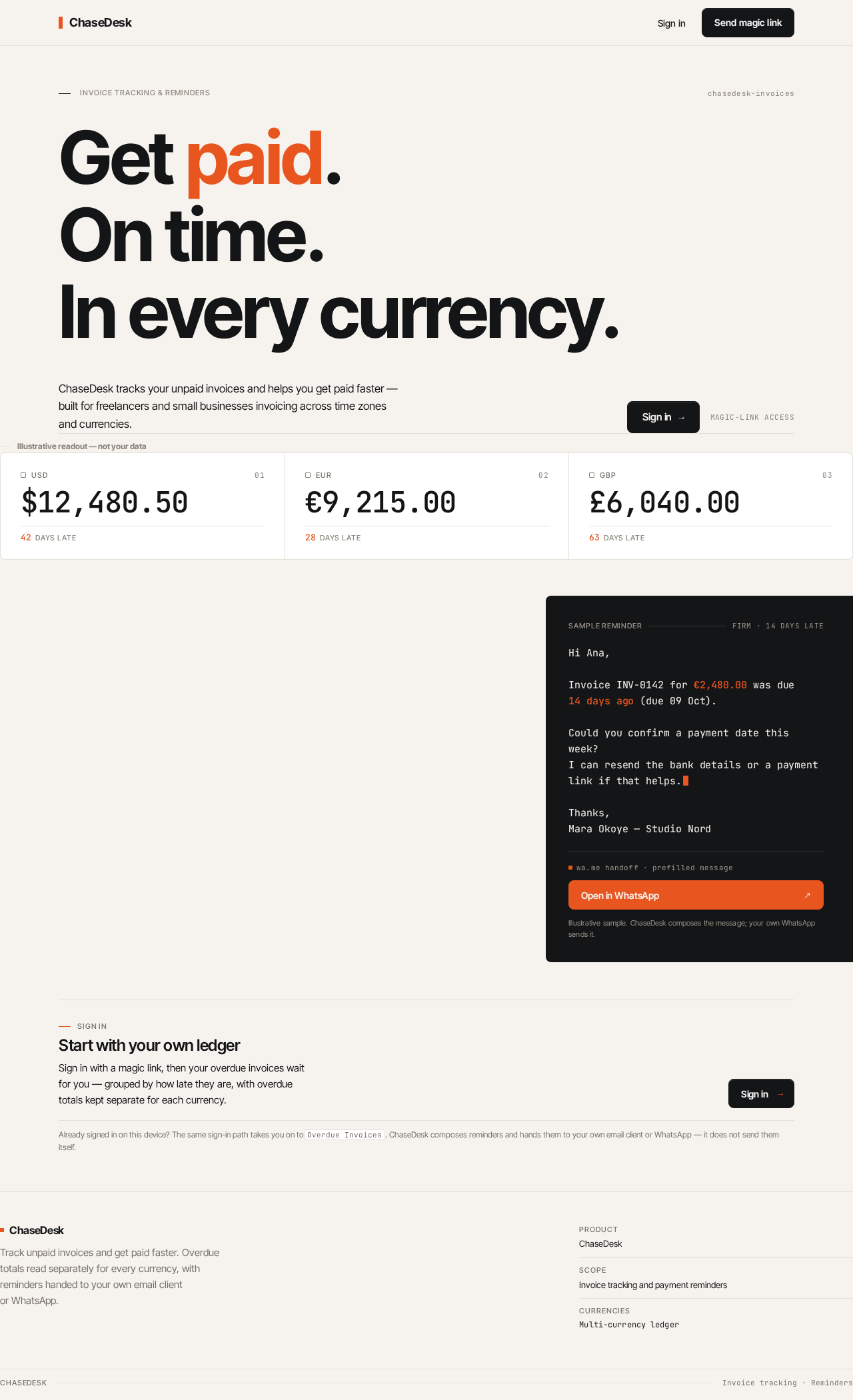
ChaseDesk tracks your unpaid invoices and helps you get paid faster — built for freelancers and small businesses invoicing across time zones and currencies.
Illustrative readout — not your data
- USD
- USD overdue total $12,480.50
- 42days late
- EUR
- EUR overdue total €9,215.00
- 28days late
- GBP
- GBP overdue total £6,040.00
- 63days late
Start with your own ledger
Sign in with a magic link, then your overdue invoices wait for you — grouped by how late they are, with overdue totals kept separate for each currency.
Already signed in on this device? The same sign-in path takes you on toOverdue Invoices. ChaseDesk composes reminders and hands them to your own email client or WhatsApp — it does not send them itself.
ChaseDesk tracks your unpaid invoices and helps you get paid faster — built for freelancers and small businesses invoicing across time zones and currencies.
Illustrative readout — not your data
- USD
- USD overdue total $12,480.50
- 42days late
- EUR
- EUR overdue total €9,215.00
- 28days late
- GBP
- GBP overdue total £6,040.00
- 63days late
Start with your own ledger
Sign in with a magic link, then your overdue invoices wait for you — grouped by how late they are, with overdue totals kept separate for each currency.
Already signed in on this device? The same sign-in path takes you on toOverdue Invoices. ChaseDesk composes reminders and hands them to your own email client or WhatsApp — it does not send them itself.
No comments yet. Be the first!