chasedesk-invoices
 Crezia
Build ChaseDesk, a modern SaaS web application that helps freelancers and small businesses track unpaid invoices and get paid faster. Users can sign in using Supabase magic-link authentication, upload invoices through CSV files, view overdue invoices grouped by how late they are, and generate editable payment reminder messages in friendly, firm, and final tones. Each invoice should have Email and WhatsApp buttons that open the user's email client or WhatsApp with a prefilled message. The app must support multiple currencies, show overdue totals separately for each currency, and allow users to mark invoices as paid. Use Next.js, TypeScript, and Supabase with PostgreSQL and strict row-level security. Build a clean, responsive, professional interface suitable for international customers. Keep the first version focused on invoice tracking and reminders. Do not add automatic email sending, AI features, accounting integrations, team accounts, or unnecessary features. Important: Start by inspecting the project and proposing the implementation plan with a credit estimate. Do not start coding until I approve the plan.


Comments (0)
Sign in to leave a comment
System Requirements
System Requirements Document for chasedesk-invoices
1. Introduction
ChaseDesk is a modern SaaS web application that helps freelancers and small businesses track unpaid invoices and get paid faster. It gives a solo operator a precise, instrument-grade surface for the money they are owed: sign in with a Supabase magic link, import invoices from a CSV file, see overdue invoices grouped by how late they are with overdue totals shown separately for each currency, compose an editable payment reminder in a friendly, firm, or final tone, and open that message in the user's email client or WhatsApp with the text prefilled. When a client settles, the user marks the invoice as paid so the overdue view and per-currency totals stay accurate.
The audience is freelancers and small business owners who invoice clients across time zones and currencies and who need to chase payment without a heavyweight finance suite. The product is deliberately narrow: the first version is focused on invoice tracking and reminders, and it excludes automatic email sending, AI features, accounting integrations, team accounts, and unnecessary features.
The requester (Crezia) asked that work begin by inspecting the project and proposing an implementation plan with a credit estimate, and that coding not start until that plan is approved. That is a delivery-process commitment recorded in this document; the plan, the credit estimate, and any success criteria are not product features and are not presented anywhere in the ChaseDesk interface.
2. System Overview
ChaseDesk is delivered as a Next.js and TypeScript web application backed by Supabase (PostgreSQL) with strict row-level security. Identity is application-owned through Supabase magic-link authentication: a visitor establishes identity by requesting a magic link to their email address and following it, and a returning user verifies the same way. Every invoice record is scoped by row-level security to the signed-in user, so each account sees only its own invoices, totals, and reminders.
The current product consists of five surfaces. Landing is the anonymous public entry that explains what ChaseDesk does and introduces sign-in. Login owns self-service first use and returning verification through the Supabase magic link. Overdue Invoices is the recurring working surface: a currency-totals rail pinned above lateness buckets (1–15, 16–30, 31–60, 60+ days late) with invoice rows aligned to a tabular grid. Import Invoices owns uploading a CSV file and importing invoices into the signed-in user's account. Invoice Details owns a single invoice: generating and editing a tone-based reminder, opening Email or WhatsApp with the message prefilled, and marking the invoice as paid.
Two active human personas use the product: the Freelancer and the Small business owner. Both follow the same accepted workflow; the product does not differentiate their permissions or visibility. Reminders leave the product only through the user's own email client or WhatsApp — ChaseDesk composes and prefills the message but never sends it.
Removed from scope
- Automatic email sending (also: automatic sending, auto-send)
- AI features (also: artificial intelligence, AI-generated reminders)
- Accounting integrations (also: accounting software integrations)
- Team accounts (also: team account, multi-user accounts)
- Unnecessary features (also: out-of-scope extras)
2a. Product Interpretation and Delivery Boundary
ChaseDesk is a first-party web application with application-owned identity. The anonymous entry boundary is split cleanly: Landing is publicly reachable and explains the product, and Login is publicly reachable and owns the magic-link interaction that establishes access. A protected destination never owns the interaction that establishes access to itself — Overdue Invoices, Import Invoices, and Invoice Details all require a signed-in session, and a visitor who reaches them without one is directed to Login and returned to the intended destination after verification.
The reminder delivery boundary is external by design. ChaseDesk generates and lets the user edit the reminder text, then hands the composed message to the user's own email client (via a mailto: link) or to WhatsApp (via a WhatsApp deep link) with the message prefilled. The actual send happens in that external client, under the user's control. ChaseDesk does not send email or WhatsApp messages itself, does not connect to accounting systems, does not use AI to draft or score messages, and does not model teams or shared accounts. Multi-currency support is a first-class read of the data — overdue totals are shown separately for each currency rather than converted into one figure — and marking an invoice paid is the only state change that removes an invoice from the overdue view.
2c. Page Content and Component Coverage
Landing
- Information/state: Anonymous public entry. States the product promise — track unpaid invoices and get paid faster — for freelancers and small businesses, and introduces the sign-in journey. No invoice data is shown; the overdue readout is illustrative of the product's shape, not the visitor's data.
- Primary action: Proceed to Login to sign in.
- Supporting actions: Read the product explanation; follow the sign-in call to action from any section.
- Domain entities: None persisted; presentation only.
- Component responsibilities:
- Oversized editorial headline block: three flush-left lines, "Get paid. On time. In every currency.", with "paid" in tangerine.
- Ruled strip of per-currency overdue totals (USD, EUR, GBP), each with a tabular figure and a days-late count, separated by hairlines.
- Ink panel bleeding off the right edge containing a monospace sample reminder message with a tangerine cursor and a solid tangerine "Open in WhatsApp" button (illustrative, not wired to real data).
- Sign-in call to action leading to Login.
- States: Loading — static content, no data fetch. Empty — not applicable. Success — page renders fully at 375px, 768px, and 1280px with all readable text and controls whole. Error — not applicable. Recovery — if a signed-in user lands here, they can proceed to Overdue Invoices via the sign-in path.
Login
- Information/state: Anonymous identity-access surface. Owns self-service first use and returning verification via Supabase magic link. Shows an email-address field and the magic-link request state.
- Primary action: Enter an email address and request a magic link.
- Supporting actions: Return to Landing; re-request a link if the first did not arrive; follow the emailed link to complete verification and continue to the intended protected destination.
- Domain entities: Email address (input); Supabase auth session (created on verification).
- Component responsibilities:
- Email input with validation.
- "Send magic link" primary action (the single hot accent button on this screen).
- Confirmation state telling the user to check their email.
- Error messaging for invalid email or failed request.
- Post-verification redirect to the destination the user was trying to reach, defaulting to Overdue Invoices.
- States: Loading — request in flight, button disabled with progress. Empty — initial form. Success — "check your email" confirmation. Error — invalid address or request failure with a retry path. Recovery — user can correct the address and resubmit, or re-request the link.
Overdue Invoices
- Information/state: Authenticated recurring browse surface. Currency-totals rail pinned at the top with one hairline-ruled row per currency, each showing that currency's overdue total in large tabular monospace figures. Below it, lateness buckets as full-width ruled sections — 01 (1–15 days), 02 (16–30), 03 (31–60), 04 (60+) — each with a numbered left margin and a tiny lateness signal bar whose colour deepens from amber to rust. Invoice rows aligned to a tabular grid: client, invoice no., due date, days late, amount, actions.
- Primary action: Open an invoice row to Invoice Details (Enter on a focused row).
- Supporting actions: Navigate to Import Invoices; focus search with
/; move row focus with the keyboard; mark an invoice paid directly from its row. - Domain entities: Invoice (client name, invoice number, due date, amount, currency, days late, status); per-currency overdue total.
- Component responsibilities:
- Currency-totals rail: one ruled row per currency present in the user's overdue invoices, each total in tabular monospace.
- Lateness bucket sections with numbered margins and lateness signal bars.
- Invoice row grid with keyboard focus rings and a
/search affordance. - Row-level mark-as-paid control that collapses the row with a 160ms height transition and a tangerine checkmark that fades to ink.
- Totals count up once on first paint (300ms, no bounce).
- States: Loading — skeleton rows and rail placeholders. Empty — no overdue invoices: a calm ruled empty state pointing to Import Invoices. Success — rail and buckets populated. Error — data fetch failure with a retry. Recovery — retry reloads the view; a failed mark-as-paid restores the row and surfaces an inline error.
Import Invoices
- Information/state: Authenticated focused surface for uploading a CSV file and importing invoices into the signed-in user's account. A single centered column with a drag-and-drop zone and a preview table that mirrors the invoice-row grid.
- Primary action: Upload a CSV file and confirm the import.
- Supporting actions: Drag and drop or browse to select a file; review the preview table; cancel; return to Overdue Invoices after import.
- Domain entities: CSV file; parsed invoice rows (client name, invoice number, due date, amount, currency); import result (imported count, rejected rows with reasons).
- Component responsibilities:
- Drag-and-drop zone with browse fallback.
- Preview table mirroring the invoice-row grid, showing parsed columns.
- Confirm-import action (the single hot accent button on this screen).
- Import result summary: number imported, number rejected, per-row rejection reasons.
- States: Loading — file parsing and import in progress. Empty — no file selected. Success — preview populated, then import summary. Error — unreadable file, missing required columns, or invalid rows, each with a clear message and a path to correct and retry. Recovery — user can fix the file and re-upload, or cancel and return to Overdue Invoices.
Invoice Details
- Information/state: Authenticated focused surface for a single invoice. Two-pane split: invoice facts on the left (client, invoice number, due date, amount, currency, days late, status); the reminder composer on the right with tone tabs (Friendly / Firm / Final) as underlined text and a monospace-editable message body.
- Primary action: Compose and edit a reminder, then open it in Email or WhatsApp with the message prefilled.
- Supporting actions: Switch tone tabs; edit the message body; copy the message; mark the invoice as paid; return to Overdue Invoices.
- Domain entities: Invoice (as above); reminder message (tone, body text); delivery channel (Email, WhatsApp).
- Component responsibilities:
- Invoice facts pane with tabular figures.
- Tone tabs as underlined text; switching swaps the message with a 120ms crossfade.
- Monospace-editable message body that updates live.
- Email button opening the user's email client with the composed message prefilled.
- WhatsApp button opening WhatsApp with the composed message prefilled.
- Mark-as-paid control.
- States: Loading — invoice facts and default reminder loading. Empty — no reminder generated yet for the selected tone. Success — message composed and handed to the external client. Error — invoice not found or not owned (row-level security), or a failed mark-as-paid, each with a clear message. Recovery — return to Overdue Invoices; retry mark-as-paid.
3. Functional Requirements
FR-1 — Magic-link sign-in. As a Freelancer or Small business owner, I should sign in using Supabase magic-link authentication so that I can reach my own invoice data. (explicit)
- Trigger/input: an email address entered on Login.
- Observable result: a magic link is requested and, once followed, an authenticated session is established.
- Access state: anonymous on Login; authenticated after verification.
- Failure/recovery: invalid address or failed request shows an error and allows correction and resubmission.
- Continuation: after verification the user lands on the intended protected destination, defaulting to Overdue Invoices.
FR-2 — Self-service first-use enrollment. As a first-time Freelancer or Small business owner, I should establish my account by requesting a magic link to my email and following it, so that I can begin using ChaseDesk without a separate signup flow. (required_inference)
- Trigger/input: first visit to Login, email address submitted.
- Observable result: identity is established on verification; the user's invoice space is empty and ready for import.
- Access state: anonymous → authenticated.
- Failure/recovery: undelivered or expired link allows re-request.
- Continuation: user proceeds to Import Invoices or Overdue Invoices.
FR-3 — Returning verification. As a returning Freelancer or Small business owner, I should verify again via magic link so that I can resume my own invoice data. (required_inference)
- Trigger/input: email address submitted on Login.
- Observable result: session restored; previously imported invoices and their statuses are visible.
- Access state: anonymous → authenticated.
- Failure/recovery: expired link allows re-request.
- Continuation: user resumes on Overdue Invoices.
FR-4 — Authenticated session before protected pages. As a Freelancer or Small business owner, I should be required to hold an authenticated session before accessing Overdue Invoices, Import Invoices, or Invoice Details, so that my invoice data stays private. (required_inference)
- Trigger/input: navigation to a protected destination without a session.
- Observable result: the user is directed to Login and returned to the intended destination after verification.
- Access state: protected destinations require login.
- Failure/recovery: failed verification keeps the user on Login with an error.
- Continuation: successful verification returns the user to the intended destination.
FR-5 — CSV invoice upload. As a Freelancer or Small business owner, I should upload invoices through CSV files so that I can bring my outstanding invoices into ChaseDesk. (explicit)
- Trigger/input: a CSV file selected or dropped on Import Invoices.
- Observable result: the file is parsed into a preview table mirroring the invoice-row grid, then imported into the signed-in user's account on confirmation.
- Access state: login required.
- Failure/recovery: unreadable file, missing required columns, or invalid rows produce clear messages and a path to correct and retry.
- Continuation: after import the user returns to Overdue Invoices to see the imported invoices.
FR-6 — Overdue invoices grouped by lateness. As a Freelancer or Small business owner, I should view overdue invoices grouped by how late they are so that I know which clients to chase first. (explicit)
- Trigger/input: opening Overdue Invoices.
- Observable result: overdue invoices appear in lateness buckets (1–15, 16–30, 31–60, 60+ days late) as full-width ruled sections with numbered margins and lateness signal bars.
- Access state: login required.
- Failure/recovery: data fetch failure shows a retry.
- Continuation: user opens a row to Invoice Details.
FR-7 — Editable tone-based reminders. As a Freelancer or Small business owner, I should generate editable payment reminder messages in friendly, firm, and final tones so that I can match the message to the relationship and the lateness. (explicit)
- Trigger/input: selecting a tone tab on Invoice Details.
- Observable result: the message body is populated for that tone and remains editable in a monospace field that updates live.
- Access state: login required.
- Failure/recovery: if generation fails, the user can retry or write the message directly.
- Continuation: user proceeds to open the message in Email or WhatsApp.
FR-8 — Email and WhatsApp prefilled handoff. As a Freelancer or Small business owner, I should have Email and WhatsApp buttons on each invoice that open my email client or WhatsApp with a prefilled message so that I can send the reminder from my own client. (explicit)
- Trigger/input: pressing Email or WhatsApp on Invoice Details (or the row action on Overdue Invoices).
- Observable result: the user's email client or WhatsApp opens with the composed message prefilled.
- Access state: login required.
- Failure/recovery: if the external client is unavailable, the user can copy the message and send it manually.
- Continuation: the user sends from the external client and later marks the invoice paid.
FR-9 — Multiple currencies with separate overdue totals. As a Freelancer or Small business owner, I should see overdue totals shown separately for each currency so that I read my receivables as a ledger rather than a single converted figure. (explicit)
- Trigger/input: opening Overdue Invoices.
- Observable result: the currency-totals rail shows one ruled row per currency, each with its own tabular total.
- Access state: login required.
- Failure/recovery: fetch failure shows a retry.
- Continuation: user drills into a bucket or a row.
FR-10 — Mark invoices as paid. As a Freelancer or Small business owner, I should mark invoices as paid so that the overdue view and per-currency totals stay accurate. (explicit)
- Trigger/input: the mark-as-paid control on a row in Overdue Invoices or on Invoice Details.
- Observable result: the invoice leaves the overdue view; the row collapses with a 160ms height transition and a tangerine checkmark that fades to ink; the affected currency total updates.
- Access state: login required.
- Failure/recovery: a failed update restores the row and shows an inline error with retry.
- Continuation: user continues reviewing remaining overdue invoices.
FR-11 — Strict row-level security scoping. As a Freelancer or Small business owner, I should have my invoice data scoped to my signed-in user by strict row-level security so that no other account can read or change it. (required_inference)
- Trigger/input: any read or write of invoice data.
- Observable result: only rows owned by the signed-in user are returned or modified.
- Access state: login required.
- Failure/recovery: an out-of-scope request returns no data or an error, and the UI shows a clear message.
- Continuation: user returns to Overdue Invoices.
FR-12 — Clean, responsive, professional interface. As a Freelancer or Small business owner, I should get a clean, responsive, professional interface suitable for international customers so that I can work confidently across devices and currencies. (explicit)
- Trigger/input: any viewport (375px, 768px, 1280px).
- Observable result: readable text and controls stay whole inside the viewport and their containers; tabular figures align; the palette and typography follow the creative direction.
- Access state: applies to all pages.
- Failure/recovery: not applicable.
- Continuation: not applicable.
FR-13 — Focused first version. As the product owner, I should keep the first version focused on invoice tracking and reminders so that no automatic email sending, AI features, accounting integrations, team accounts, or unnecessary features are added. (explicit)
- Trigger/input: any scope decision.
- Observable result: only the accepted capabilities above are present.
- Access state: not applicable.
- Failure/recovery: not applicable.
- Continuation: not applicable.
FR-14 — Plan before coding. As the requester, I should receive a project inspection and an implementation plan with a credit estimate, and coding should not start until I approve the plan. (explicit)
- Trigger/input: project start.
- Observable result: an inspection and plan with a credit estimate are produced; coding waits for approval.
- Access state: not applicable (delivery process, not product behavior).
- Failure/recovery: not applicable.
- Continuation: coding begins only after approval.
4. User Personas
Freelancer
- Product context: A solo freelancer who invoices clients across time zones and currencies and needs to chase payment without a finance suite. They work fast, often from a laptop, and want the numbers to be legible at a glance.
- Primary goal: Know exactly who owes what, in which currency, and how late — then send the right reminder quickly.
- Distinct accepted responsibilities: Signs in with a Supabase magic link; uploads invoices via CSV; reviews overdue invoices grouped by lateness; generates and edits friendly, firm, or final reminders; opens them in their email client or WhatsApp with the message prefilled; marks invoices as paid; tracks overdue totals per currency.
- Relevant inputs or decisions: Which tone fits the client and the lateness; whether to send via email or WhatsApp; when an invoice is settled.
- Interactions with other accepted participants: The Freelancer's reminder is handed to their own email client or WhatsApp; the client on the other end is not a ChaseDesk user and does not act inside the product.
- Observable success: The overdue view reflects only genuinely unpaid invoices, per-currency totals are accurate, and reminders leave the product prefilled and ready to send.
Small business owner
- Product context: A small business owner managing the company's unpaid invoices in the same workflow. They care about per-currency totals as a ledger and about keeping the overdue view accurate as invoices are settled.
- Primary goal: Monitor overdue amounts separately for each currency and send tone-appropriate reminders through email or WhatsApp.
- Distinct accepted responsibilities: Signs in with a Supabase magic link; imports invoices from CSV; monitors overdue amounts separately for each currency; sends tone-appropriate reminders; marks invoices as paid to keep the overdue view and per-currency totals accurate.
- Relevant inputs or decisions: Which currency totals need attention; which clients need a firmer or final tone; when to mark an invoice paid.
- Interactions with other accepted participants: Same external handoff to email client or WhatsApp; no in-product team collaboration (team accounts are out of scope).
- Observable success: Per-currency totals match reality, and reminders are sent from the owner's own client with the composed message intact.
5. Core User Flows
Flow A — First use: establish identity and import invoices (Freelancer)
- The Freelancer opens Landing and reads the product promise.
- They choose the sign-in call to action and arrive at Login.
- They enter their email address and request a magic link.
- Login shows a "check your email" confirmation.
- They follow the emailed link; Supabase verifies it and an authenticated session is established.
- They are returned to the intended destination, defaulting to Overdue Invoices, which is empty and points to Import Invoices.
- They open Import Invoices, drag a CSV file onto the drop zone, and review the preview table.
- They confirm the import; the result summary shows imported and rejected rows.
- They return to Overdue Invoices and see their invoices in lateness buckets with per-currency totals.
- Failure/recovery: If the link does not arrive, they re-request it on Login. If the CSV is unreadable or missing columns, Import Invoices explains why and they fix and re-upload.
Flow B — Returning verification (Small business owner)
- The owner opens Login (directly or via Landing).
- They enter their email address and request a magic link.
- They follow the link; the session is restored.
- They land on Overdue Invoices and see their previously imported invoices and statuses.
- Failure/recovery: An expired link allows a re-request.
Flow C — Review overdue invoices and per-currency totals (Freelancer)
- The Freelancer opens Overdue Invoices.
- The currency-totals rail shows one ruled row per currency with its tabular total.
- Lateness buckets 01–04 show invoices with numbered margins and lateness signal bars.
- They use
/to focus search and narrow the list, or move row focus with the keyboard. - They press Enter on a row to open Invoice Details.
- Failure/recovery: A fetch failure shows a retry that reloads the view.
Flow D — Compose and send a reminder (Small business owner)
- The owner opens an invoice from Overdue Invoices into Invoice Details.
- The left pane shows invoice facts; the right pane shows the reminder composer.
- They select Friendly, Firm, or Final; the message swaps with a 120ms crossfade.
- They edit the monospace message body; it updates live.
- They press Email or WhatsApp; their email client or WhatsApp opens with the message prefilled.
- They send from that external client.
- Failure/recovery: If the external client is unavailable, they copy the message and send it manually.
Flow E — Mark an invoice paid (Freelancer)
- On Overdue Invoices, the Freelancer uses the row's mark-as-paid control (or does so on Invoice Details).
- The row collapses with a 160ms height transition and a tangerine checkmark that fades to ink.
- The affected currency total updates; the invoice leaves the overdue view.
- They continue reviewing remaining overdue invoices.
- Failure/recovery: A failed update restores the row and shows an inline error with retry.
6. Visuals Colors and Theme
Muse: Rasmus Andersson. Headline: "Instrument-grade product craft for the money you're owed."
Palette (light mode):
- Background:
#F6F3EE(warm paper) - Surface:
#FFFFFF(cards, invoice rows, panels) - Text / primary:
#141517(ink) - Accent:
#E8551F(tangerine) — overdue totals, days-late numerals, active tab underline, primary CTA - Muted:
#8A857C(metadata, labels, hairlines) - Hairline border:
#E4DFD6 - Lateness signals: amber
#C98A00(1–15), tangerine#E8551F(16–30), deep rust#A3300C(31–60), ink#141517(60+) - No blue or indigo anywhere.
Typography:
- Headings: Inter Tight 600–700, tracking
-0.03em, flush-left. - Body: Inter Tight.
- Numerals: JetBrains Mono, tabular figures for money and day counts.
- Micro-labels: uppercase Inter Tight 500, tracking
0.08em. - Scale (1.25 modular with editorial jumps): display
clamp(72px, 10vw, 128px), h1 40/56, h2 28/36, h3 20/24, body 15/17, micro-label 11/12, money figures 34/44 tabular. Line-height 1.05 on display, 1.6 on body.
Shape language: 8px radii on cards and controls, 4px on tags and inputs, 1px hairline borders in #E4DFD6, no soft shadows except a single 1px inner highlight. Buttons are solid ink rectangles with 8px radius; the one hot accent button is reserved for the primary action per screen. Tabs are underlined text, not pills. Numerals are the ornament — large, tabular, flush to a ruled baseline.
Layout: 12-column grid on a 4/8pt spacing scale, max content width 1200px, 32–48px gutters. Overdue Invoices is the spine: currency-totals rail pinned at the top, then lateness buckets as full-width ruled sections with invoice rows aligned to a tabular grid. Import Invoices is a single centered column with a drag-and-drop zone and a preview table mirroring the invoice-row grid. Invoice Details is a two-pane split: invoice facts left, reminder composer right with underlined tone tabs and a monospace-editable body.
7. Signature Design Concept
The public entry is an oversized editorial statement, not a centred SaaS hero. On warm paper (#F6F3EE), the left two-thirds carries the headline "Get paid. On time. In every currency." in Inter Tight 700 at clamp(72px, 10vw, 128px), stacked in three flush-left lines with tight leading, the word "paid" set in tangerine (#E8551F). Beneath it, a single ruled strip of live-looking overdue totals — USD, EUR, GBP — each with its tabular figure and days-late count, separated by hairlines, like a trading desk readout. The right third is a tall ink (#141517) panel bleeding off the right edge, containing a monospace sample reminder message with a tangerine cursor and a solid tangerine "Open in WhatsApp" button, cropped by the viewport. No gradient, no blob, no centred button stack. The composition recomposes only accepted content — the product promise, the per-currency readout, and the reminder handoff — and introduces no new behavior.
8. Interaction Model & Motion Direction
Interaction Model: Animated Motion Tempo: restrained Hero Dimensionality: flat
Landing Hero Motion Brief
- Focal subject: The oversized three-line headline with "paid" in tangerine, and the ruled per-currency overdue strip beneath it.
- Input → transformation → outcome thesis: On first paint, the per-currency totals count up once (300ms, no bounce) from zero to their figures, settling into the ruled strip; the ink panel's monospace reminder message reveals with a tangerine cursor blinking at its end. The outcome is a composed, calm first frame that reads as an instrument panel, using only accepted content.
- Motion vocabulary: Fast, functional 120–200ms transitions with standard ease-out; no decoration; hover states are 1px border darkening and a 2% surface tint, not lifts.
- Composed first frame: Headline flush-left, ruled strip with totals at rest, ink panel cropped at the right edge with the sample message and "Open in WhatsApp" button.
- Reduced-motion state: Totals render at their final values immediately; the cursor is static; the panel is fully composed without reveal.
In-product motion: Tone tabs swap the message with a 120ms crossfade; marking paid collapses the row with a 160ms height transition and a tangerine checkmark that fades to ink; totals count up once on first paint (300ms, no bounce).
9. Non-Functional Requirements
- Security: Supabase PostgreSQL with strict row-level security scoping every invoice record to the signed-in user. (explicit)
- Authentication: Supabase magic-link authentication with email delivery; self-service first use and returning verification. (explicit / required_inference)
- Responsiveness: Clean, responsive, professional interface suitable for international customers; readable text and controls stay whole at 375px, 768px, and 1280px. (explicit)
- Multi-currency correctness: Overdue totals are computed and displayed separately per currency; no cross-currency conversion. (explicit)
- Accessibility: Keyboard-first operation on Overdue Invoices (row focus ring, Enter opens details,
/focuses search); reduced-motion support for all motion. (required_inference, from creative direction) - Scope discipline: No automatic email sending, AI features, accounting integrations, team accounts, or unnecessary features. (explicit)
10. Tech Stack
- Next.js with TypeScript for the web application. (explicit)
- Supabase with PostgreSQL and strict row-level security for data and authentication. (explicit)
- Supabase magic-link authentication for identity. (explicit)
- Fonts: Inter Tight (headings and body), JetBrains Mono (tabular numerals). (from creative direction)
- External handoff:
mailto:links for email and WhatsApp deep links for WhatsApp, opening the user's own clients. (explicit)
11. Assumptions and Constraints
- Assumption: The user has an email client and/or WhatsApp available on their device to complete the send; ChaseDesk only prefills. (narrow, consistent with explicit handoff requirement)
- Assumption: CSV files contain the invoice fields needed for the tabular grid (client, invoice number, due date, amount, currency); exact column names are a delivery detail, not a product constraint. (narrow)
- Constraint: No automatic email sending. (explicit)
- Constraint: No AI features. (explicit)
- Constraint: No accounting integrations. (explicit)
- Constraint: No team accounts. (explicit)
- Constraint: No unnecessary features; first version focused on invoice tracking and reminders. (explicit)
- Constraint: Use Next.js, TypeScript, and Supabase with PostgreSQL and strict row-level security. (explicit)
- Constraint: Start by inspecting the project and proposing an implementation plan with a credit estimate; do not start coding until the user approves the plan. (explicit, delivery process)
12. Glossary
- Magic link: A one-time sign-in link emailed to the user by Supabase; following it establishes an authenticated session.
- Overdue invoice: An invoice whose due date has passed and which has not been marked paid.
- Lateness bucket: A grouping of overdue invoices by days late: 1–15, 16–30, 31–60, 60+.
- Currency-totals rail: The pinned strip on Overdue Invoices showing one overdue total per currency.
- Reminder tone: The register of a payment reminder — Friendly, Firm, or Final.
- Prefilled handoff: Opening the user's email client or WhatsApp with the composed message already filled in.
- Row-level security (RLS): PostgreSQL policy enforcement that scopes each row to its owning user.
- Tabular figures: Monospace numerals that align in columns, used for money and day counts.
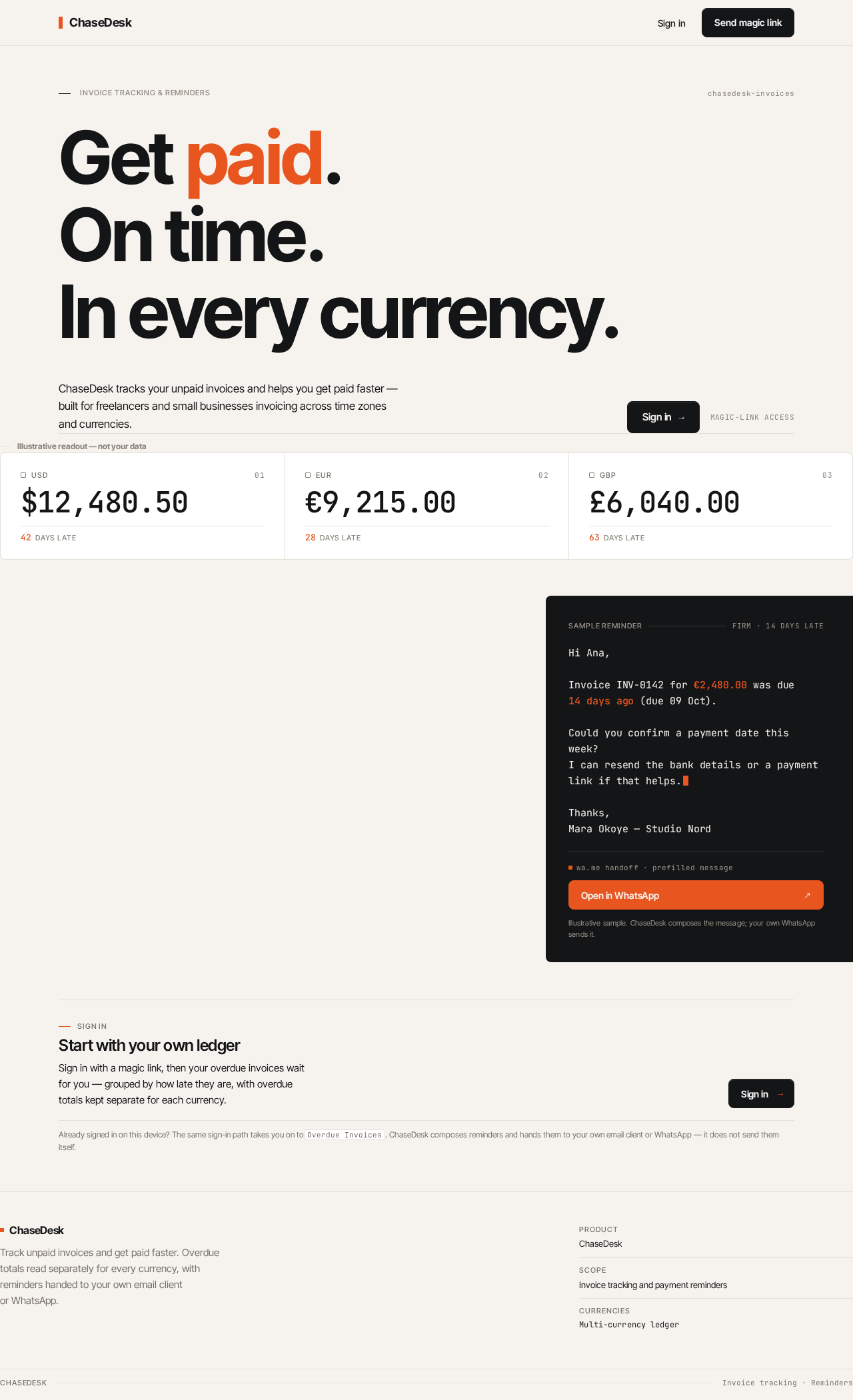
ChaseDesk tracks your unpaid invoices and helps you get paid faster — built for freelancers and small businesses invoicing across time zones and currencies.
Illustrative readout — not your data
- USD
- USD overdue total $12,480.50
- 42days late
- EUR
- EUR overdue total €9,215.00
- 28days late
- GBP
- GBP overdue total £6,040.00
- 63days late
Start with your own ledger
Sign in with a magic link, then your overdue invoices wait for you — grouped by how late they are, with overdue totals kept separate for each currency.
Already signed in on this device? The same sign-in path takes you on toOverdue Invoices. ChaseDesk composes reminders and hands them to your own email client or WhatsApp — it does not send them itself.
ChaseDesk tracks your unpaid invoices and helps you get paid faster — built for freelancers and small businesses invoicing across time zones and currencies.
Illustrative readout — not your data
- USD
- USD overdue total $12,480.50
- 42days late
- EUR
- EUR overdue total €9,215.00
- 28days late
- GBP
- GBP overdue total £6,040.00
- 63days late
Start with your own ledger
Sign in with a magic link, then your overdue invoices wait for you — grouped by how late they are, with overdue totals kept separate for each currency.
Already signed in on this device? The same sign-in path takes you on toOverdue Invoices. ChaseDesk composes reminders and hands them to your own email client or WhatsApp — it does not send them itself.
No comments yet. Be the first!