cart-product-selection
by Gh Hj
Gh Hj
Gh Hj1. Run the project.2. Check for errors.3. Fix all compile/runtime errors.4. Check desktop layout.5. Check mobile layout.6. Make sure images load.7. Make sure cart works.8. Make sure navigation works.9. Make sure product selection works.10. Make sure FAQ works.11. Make sure there is no horizontal overflow.12. Make the final UI as close as reasonably possible to the attached reference image. Do NOT just tell me what I should do. You are acting as the developer.


Comments (0)
Sign in to leave a comment
System Requirements
Page 1 of 25
System Requirements Document for cart-product-selection
1. Introduction
WOLFHAWK is a premium sneaker storefront for modern rebels. The website enables an anonymous Sneaker Shopper to discover WOLFHAWK footwear, browse available products, inspect a selected sneaker, choose an available size, add items to a cart, review cart contents, and consult frequently asked questions.
The product experience must be delivered as a custom, high-impact sneaker-drop storefront with neon/lime accents, industrial dark surfaces, oversized editorial typography, responsive desktop and mobile layouts, semantic HTML, accessible image descriptions, working navigation, product selection, cart behavior, and FAQ interaction.
The requested page title is:
WOLFHАWK | Premium Sneakers
The requested meta description is:
Wolfhawk — premium sneakers designed for modern rebels. Rule the ground, on the sky.
Page 2 of 25
2. System Overview
WOLFHAWK is a public, anonymous-access sneaker storefront. No account creation, sign-in, checkout, payment, order processing, shipping workflow, or customer account management is included in the current scope.
The system provides the following current shopper-facing capabilities:
- View a WOLFHAWK campaign landing experience.
- Navigate between Landing, Shop, Product Details, Cart, and FAQ.
- Browse sneaker products.
- Select an individual sneaker product.
- Inspect product imagery and product information.
- Select a sneaker size.
- Add a selected sneaker and size to the cart.
- Review cart contents.
- Adjust or remove cart items.
- View FAQ questions and answers.
- Continue shopping from the cart.
- Use the experience on desktop and mobile without horizontal overflow.
- View loading-safe product imagery with meaningful alternative text.
The current experience is application-owned and browser-based. It is accessible without identity establishment. Cart state must persist locally on the device during the active browsing session so that selected products remain available while the shopper navigates between pages.
Page 3 of 25
2a. Product Interpretation and Delivery Boundary
WOLFHAWK is a presentation and product-selection storefront, not a complete commerce transaction system. The website supports product discovery, sneaker selection, size selection, cart management, and FAQ consultation before purchase.
The included cart represents the shopper’s selected products and sizes. The current scope ends at cart review. No payment, delivery address collection, shipping selection, purchase confirmation, order history, or customer-support workflow is required.
The supplied reference image was not available in the source material. The final interface must therefore follow the supplied visual direction and user constraints while remaining as close as reasonably possible to the intended reference aesthetic: dark premium sneaker editorial design, neon/lime accents, exposed structure, product-forward imagery, technical typography, and industrial drop-culture styling.
2b. Page Content and Component Coverage
Page 4 of 25
Landing
- Information and state
- WOLFHAWK brand identity and campaign message.
- Hero headline: “RULE / THE / GROUND.”
- Brand line: “ON THE SKY / ON THE GROUND.”
- Featured sneaker campaign imagery.
- Featured product model, drop number, price, and material data.
- Current cart item count.
- Primary actions
- Select “SELECT YOUR PAIR” to navigate to Shop.
- Navigate to Shop, FAQ, and Cart from the site header.
- Supporting actions
- Use the top brand line and navigation labels to orient within the storefront.
- View the featured sneaker and technical product data.
- Domain entities
- Brand campaign.
- Featured sneaker.
- Product model.
- Drop number.
- Price.
- Material data.
- Cart item count.
- Component responsibilities
- Exposed industrial-frame header with WOLFHAWK wordmark, navigation links, and cart counter.
- Full-viewport campaign hero with a left editorial statement and right product image stage.
- Lime vertical product-index strip intersecting the headline.
- Technical rail containing featured product details.
- Wide neon/lime “SELECT YOUR PAIR” action.
- States and recovery
- Product imagery must render with precise alt text.
- If a featured image cannot load, the interface must preserve the product label and provide meaningful image alternative text.
- Cart counter updates after an item is added from Product Details.
- Layout must remain within the viewport on desktop and mobile.
Page 5 of 25
Shop
- Information and state
- Browsable WOLFHAWK sneaker catalog.
- Product image, model number, colorway code, price, and drop label for each displayed product.
- Current cart item count.
- Primary actions
- Select a product card to open Product Details for that sneaker.
- Navigate to Cart.
- Supporting actions
- Navigate to Landing and FAQ.
- Browse available product cards within the storefront.
- Domain entities
- Sneaker product.
- Product model number.
- Colorway code.
- Price.
- Drop label.
- Cart item count.
- Component responsibilities
- Product cards with square matte product photography stages.
- Technical caption strip beneath each image.
- Diagonal lime “DROP” corner label.
- Shared industrial header and cart counter.
- States and recovery
- Product cards must remain legible and selectable on desktop and mobile.
- Product imagery must include meaningful alt text naming the shoe, colorway, and visible angle.
- If an image fails to load, the product title, model data, and action remain available.
- Selecting a product creates a visible transition to Product Details.
- No horizontally overflowing product rail may be exposed beyond the viewport.
Page 6 of 25
Product Details
- Information and state
- Selected sneaker identity.
- Product imagery.
- Product model number.
- Product colorway.
- Price.
- Material information.
- Available size selection state.
- Selected size state.
- Current cart item count.
- Primary actions
- Select an available size.
- Add the selected sneaker and size to the cart.
- Navigate to Cart after adding an item.
- Supporting actions
- Return to Shop.
- Navigate to Landing and FAQ.
- Domain entities
- Selected sneaker.
- Product model number.
- Colorway.
- Price.
- Material data.
- Size.
- Cart item.
- Component responsibilities
- Product media stage with precise alternative text.
- Product specification panel.
- Numbered equipment-style size grid using one-pixel outlined square cells.
- Selected-size indicator using solid neon/lime fill and a small black check marker.
- Add-to-cart control.
- Shared navigation and cart counter.
- States and recovery
- Before a size is selected, the shopper can inspect the product but cannot complete a size-specific cart addition.
- The interface must provide a visible prompt or disabled state when the shopper attempts to add a product without choosing a size.
- After successful addition, the cart counter updates and the shopper can continue shopping or navigate to Cart.
- If product imagery fails, product name, colorway, price, specification information, and size selection remain usable.
- Product selection and size selection must work on desktop and mobile without horizontal overflow.
Page 7 of 25
Cart
- Information and state
- Selected cart items.
- Product image and alternative text.
- Product name or model.
- Selected colorway.
- Selected size.
- Item price.
- Cart item count.
- Empty-cart state when no items are selected.
- Primary actions
- Remove an item from the cart.
- Continue shopping by navigating to Shop.
- Supporting actions
- Navigate to Landing and FAQ.
- Review selected products and sizes.
- Domain entities
- Cart.
- Cart item.
- Sneaker product.
- Selected size.
- Item price.
- Cart item count.
- Component responsibilities
- Cart line-item list.
- Technical product summary for each item.
- Remove-item action.
- Empty-cart message and Shop continuation action.
- Shared header with cart count.
- States and recovery
- Cart contents must persist locally while the shopper navigates during the browsing session.
- Removing an item updates the cart list and cart counter.
- When all items are removed, the empty-cart state appears.
- Empty-cart state provides a clear continuation to Shop.
- If a cart image fails to load, the associated product data remains visible through text and alt text.
- The cart must remain usable on desktop and mobile without horizontal overflow.
Page 8 of 25
FAQ
- Information and state
- Frequently asked questions and corresponding answers.
- Expanded and collapsed answer state.
- Current cart item count.
- Primary actions
- Expand a question to reveal its answer.
- Collapse an expanded answer.
- Supporting actions
- Navigate to Landing, Shop, and Cart.
- Domain entities
- FAQ item.
- Question number.
- Question.
- Answer.
- Expanded state.
- Component responsibilities
- FAQ list with fixed question-number rail.
- Plus glyph indicating collapsed and expanded interaction state.
- Dark, thin-bordered answer panels.
- Shared industrial navigation header.
- States and recovery
- Selecting a question reveals its corresponding answer.
- Selecting an open question collapses its answer.
- If JavaScript interaction is unavailable, FAQ question and answer content should remain semantically available in the document structure where technically feasible.
- FAQ interactions must remain usable on desktop and mobile without horizontal overflow.
Page 9 of 25
3. Functional Requirements
FR-01 — Access the Public Storefront
As a Sneaker Shopper, I should access the WOLFHAWK Landing page without creating an account or signing in so that I can discover the brand and begin browsing sneakers.
- Provenance: required_inference.
- Access state: Anonymous public access.
- Trigger/input: The shopper opens the root website destination.
- Observable result: The Landing page renders the WOLFHAWK campaign hero, primary navigation, featured sneaker information, and cart counter.
- Failure/recovery: If a featured image fails to load, meaningful alternative text and associated product information remain available.
- Continuation: The shopper can navigate to Shop, FAQ, or Cart.
- Acceptance criteria
- The Landing page is available without identity establishment.
- The page uses semantic HTML landmarks appropriate to the content.
- The page displays the WOLFHAWK brand and campaign statement.
- The page does not create horizontal overflow on desktop or mobile.
Page 10 of 25
FR-02 — Navigate the Storefront
As a Sneaker Shopper, I should use navigation controls to move between Landing, Shop, Product Details, Cart, and FAQ contexts so that I can continue my browsing journey.
- Provenance: explicit.
- Access state: Anonymous public access.
- Trigger/input: The shopper selects a visible navigation link, product card, product action, cart control, or FAQ link.
- Observable result: The requested destination or content context opens.
- Failure/recovery: If a destination cannot be resolved, the application must not leave the shopper in a broken or blank interface; the existing navigation remains available.
- Continuation: The shopper can continue browsing, select a product, manage cart contents, or consult FAQ content.
- Acceptance criteria
- Navigation works between Landing, Shop, Cart, and FAQ.
- Selecting a sneaker from Shop opens Product Details for that sneaker.
- Cart navigation remains reachable from the header.
- Navigation is usable on desktop and mobile.
- Navigation does not create horizontal overflow.
Page 11 of 25
FR-03 — Browse Sneakers
As a Sneaker Shopper, I should browse available WOLFHAWK sneaker products so that I can identify a sneaker I want to inspect.
- Provenance: required_inference.
- Access state: Anonymous public access.
- Trigger/input: The shopper opens Shop.
- Observable result: The shopper sees sneaker product cards with product imagery, model information, colorway code, price, and drop label.
- Failure/recovery: If an image does not load, its product information and descriptive alt text remain available.
- Continuation: The shopper can select a product to open Product Details.
- Acceptance criteria
- Shop displays selectable sneaker products.
- Each displayed product presents a product image, product model or name, colorway information, and price.
- Each product image has proper descriptive alt text.
- Product cards work on desktop and mobile.
- Product browsing remains contained within the viewport.
Page 12 of 25
FR-04 — Select and Inspect a Product
As a Sneaker Shopper, I should select a sneaker product and inspect its details so that I can decide whether to add it to my cart.
- Provenance: explicit.
- Access state: Anonymous public access.
- Trigger/input: The shopper selects a product card in Shop.
- Observable result: Product Details opens for the selected sneaker and presents its imagery, product identity, colorway, price, material data, and available size choices.
- Failure/recovery: If selected product imagery does not load, the product’s textual information and selectable size controls remain usable.
- Continuation: The shopper can select a size, add the product to Cart, return to Shop, or navigate elsewhere.
- Acceptance criteria
- Product selection works.
- The selected product is represented consistently between Shop, Product Details, and Cart.
- Product Details provides product image alt text naming the shoe, colorway, and visible angle.
- Product details remain usable on desktop and mobile without horizontal overflow.
Page 13 of 25
FR-05 — Select a Sneaker Size
As a Sneaker Shopper, I should select an available size for a chosen sneaker so that the item added to my cart reflects my intended selection.
- Provenance: required_inference.
- Access state: Anonymous public access.
- Trigger/input: The shopper selects a size cell on Product Details.
- Observable result: The selected size is visibly marked as the active size.
- Failure/recovery: If no size is selected, the system must provide a clear prompt or disabled add-to-cart state rather than adding an unspecified item.
- Continuation: The shopper can add the selected sneaker and size to Cart.
- Acceptance criteria
- Sizes are presented as numbered equipment-grid cells.
- Size cells use outlined square controls.
- The selected size displays as solid neon/lime with a small black check marker.
- The active size is clearly distinguishable from inactive sizes.
- Size selection works on desktop and mobile.
Page 14 of 25
FR-06 — Add a Selected Product to Cart
As a Sneaker Shopper, I should add a selected sneaker and size to my cart so that I can review my intended purchase selections.
- Provenance: explicit for cart behavior and product selection; required_inference for size-specific cart state.
- Access state: Anonymous public access.
- Trigger/input: The shopper selects the add-to-cart control after selecting a size.
- Observable result: A cart item containing the selected sneaker and selected size is created, and the cart counter updates.
- Failure/recovery: If the shopper has not selected a size, no cart item is added and the interface clearly indicates that size selection is required.
- Continuation: The shopper can continue shopping or navigate to Cart.
- Acceptance criteria
- Cart functionality works.
- The item added to Cart retains the selected product and selected size.
- The cart counter visibly updates after successful addition.
- Cart state persists locally while the shopper navigates during the session.
- The add-to-cart interaction works on desktop and mobile.
Page 15 of 25
FR-07 — Review and Manage Cart Contents
As a Sneaker Shopper, I should review and remove selected cart items so that I can manage my intended sneaker selections before purchase.
- Provenance: explicit for cart behavior; required_inference for item removal and empty-state recovery.
- Access state: Anonymous public access.
- Trigger/input: The shopper opens Cart or chooses to remove an existing cart item.
- Observable result: Cart displays selected items with product data, selected size, price, and removal action; removal updates the visible cart state and cart count.
- Failure/recovery: If the cart contains no items, the system presents an empty-cart state with a continuation to Shop.
- Continuation: The shopper can continue shopping or navigate to other public pages.
- Acceptance criteria
- Cart displays selected products and sizes.
- Cart item count corresponds to the selected cart contents.
- Removing an item updates the cart contents and counter.
- An empty-cart state is shown when no items remain.
- The empty-cart state includes a clear route to Shop.
- Cart remains usable on desktop and mobile without horizontal overflow.
Page 16 of 25
FR-08 — Consult Frequently Asked Questions
As a Sneaker Shopper, I should expand and collapse FAQ answers so that I can access storefront information without leaving the FAQ page.
- Provenance: explicit.
- Access state: Anonymous public access.
- Trigger/input: The shopper selects an FAQ question.
- Observable result: The corresponding answer expands in a dark, bordered construction-style panel.
- Failure/recovery: If interaction scripting is unavailable, the FAQ content remains semantically represented where technically feasible.
- Continuation: The shopper can open another question or use navigation to continue browsing.
- Acceptance criteria
- FAQ behavior works.
- Each question has a visible number and plus-glyph interaction affordance.
- Selecting a question reveals its answer.
- Selecting an open question collapses its answer.
- FAQ is usable on desktop and mobile without horizontal overflow.
Page 17 of 25
FR-09 — Deliver Accessible Semantic Content
As a Sneaker Shopper, I should receive semantically structured content and descriptive product imagery so that the storefront remains understandable and accessible.
- Provenance: explicit.
- Access state: Anonymous public access.
- Trigger/input: The shopper loads any public page containing content or imagery.
- Observable result: Pages use semantic HTML structure and all images provide appropriate alternative text.
- Failure/recovery: When images cannot render, their alt text communicates the relevant image subject and product context.
- Continuation: The shopper can continue using product information and navigation without relying solely on images.
- Acceptance criteria
- Semantic HTML is used for page structure, navigation, headings, main content, product content, and FAQ content.
- Every image includes proper alt text.
- Sneaker imagery alt text identifies the sneaker, colorway, and visible angle where applicable.
- Decorative images, if used, are appropriately treated so they do not create redundant spoken content.
Page 18 of 25
FR-10 — Provide Required Search Metadata
As a visitor, I should receive the specified document metadata so that the storefront is accurately represented in browser and search contexts.
- Provenance: explicit.
- Access state: Not applicable.
- Trigger/input: A browser or search system loads the site document metadata.
- Observable result: The document title and meta description match the required values exactly.
- Failure/recovery: If metadata cannot be injected at runtime, it must be included through the application’s standard document-head implementation.
- Continuation: The visitor can proceed to use the storefront.
- Acceptance criteria
- The document title is exactly
WOLFHАWK | Premium Sneakers. - The meta description is exactly
Wolfhawk — premium sneakers designed for modern rebels. Rule the ground, on the sky.
- The document title is exactly
Page 19 of 25
FR-11 — Deliver Responsive, Error-Free Storefront Operation
As a Sneaker Shopper, I should use the storefront on desktop and mobile without layout breakage, horizontal overflow, compile errors, or runtime errors so that I can complete browsing and cart interactions reliably.
- Provenance: explicit.
- Access state: Anonymous public access.
- Trigger/input: The shopper accesses and uses the website on supported desktop or mobile viewport sizes.
- Observable result: The interface renders correctly, images load, navigation functions, product selection works, cart works, and FAQ interactions work.
- Failure/recovery: Compile and runtime errors must be identified and fixed before final delivery. Broken interactions must be corrected rather than replaced by instructions to the user.
- Continuation: The shopper can continue through any supported storefront journey.
- Acceptance criteria
- The project is run before final delivery.
- Compile errors are checked and fixed.
- Runtime errors are checked and fixed.
- Desktop layout is checked.
- Mobile layout is checked.
- Images are checked to ensure they load.
- Cart behavior is checked.
- Navigation behavior is checked.
- Product selection behavior is checked.
- FAQ behavior is checked.
- The application has no horizontal overflow.
- The final UI follows the supplied reference-oriented visual direction as closely as reasonably possible.
4. User Personas
Page 20 of 25
Sneaker Shopper
Product context
The Sneaker Shopper is an anonymous visitor exploring the WOLFHAWK premium sneaker storefront. They engage with a product-led, drop-culture experience that treats footwear as a statement object rather than a conventional retail commodity.
Primary goal
Identify a WOLFHAWK sneaker, inspect its product details, choose a size, add it to a cart, and review selected items before purchase.
Distinct accepted responsibilities
- Enter the public WOLFHAWK Landing page.
- Use storefront navigation.
- Browse sneaker products in Shop.
- Select a specific sneaker product.
- Inspect product images, colorway, price, material information, and product details.
- Select a shoe size.
- Add selected products and sizes to Cart.
- Review and remove cart items.
- Consult FAQ information.
- Continue browsing after reviewing an empty or populated cart.
Relevant inputs and decisions
- Product selection.
- Size selection.
- Add-to-cart decision.
- Remove-from-cart decision.
- Navigation destination selection.
- FAQ question selection.
Interactions with other accepted participants
There are no additional accepted human participants. The shopper interacts directly with the storefront interface and locally maintained cart state.
Observable success
- The shopper can see product imagery and technical information.
- The shopper can select a sneaker and size.
- The shopper sees the cart count update after adding an item.
- The shopper can verify cart contents and selected sizes.
- The shopper can use FAQ content and navigation without broken interactions.
- The shopper can use the storefront on desktop and mobile without horizontal scrolling.
Persona provenance
required_inference. This persona is derived from the accepted product selection, cart, navigation, FAQ, desktop, mobile, image-loading, and storefront requirements.
Page 21 of 25
5. Core User Flows
Flow 1 — Discover WOLFHAWK and Enter the Storefront
- The Sneaker Shopper opens the public WOLFHAWK root destination.
- The Landing page displays the WOLFHAWK campaign poster, “RULE / THE / GROUND.” headline, featured sneaker imagery, product technical rail, navigation, and cart counter.
- The shopper reviews the featured sneaker’s model, drop number, price, and material information.
- The shopper selects “SELECT YOUR PAIR.”
- The system opens Shop.
- The shopper continues by browsing available sneakers.
Recovery: If the featured sneaker image cannot load, the page retains meaningful alternative text and associated textual product information.
Flow 2 — Browse and Select a Sneaker
- The Sneaker Shopper opens Shop through landing-page navigation or the “SELECT YOUR PAIR” action.
- Shop displays selectable sneaker cards containing product imagery, model information, colorway code, price, and drop label.
- The shopper reviews the available sneaker options.
- The shopper selects a product card.
- The system opens Product Details for the selected sneaker.
- Product Details displays the selected sneaker’s imagery, model information, colorway, price, material information, and size controls.
Recovery: If a product image fails to load, the product name or model, colorway, price, and other product information remain visible and selectable.
Page 22 of 25
Flow 3 — Select a Size and Add a Sneaker to Cart
- The Sneaker Shopper opens Product Details for a selected sneaker.
- The shopper reviews product imagery and technical product information.
- The shopper selects a size from the numbered equipment-style size grid.
- The selected size becomes visibly active with a neon/lime state and black check marker.
- The shopper selects the add-to-cart control.
- The system creates a cart item containing the selected sneaker and selected size.
- The cart counter updates to reflect the newly added item.
- The shopper chooses either to continue shopping or open Cart.
Recovery:
If the shopper tries to add the sneaker without choosing a size, the system does not add an unspecified item. The interface presents a visible size-selection prompt or disabled add-to-cart state. The shopper can select a size and retry.
Page 23 of 25
Flow 4 — Review and Manage Cart Contents
- The Sneaker Shopper selects the cart counter or Cart navigation control.
- The Cart page displays selected sneaker items, including product identity, selected colorway, selected size, price, and remove controls.
- The shopper reviews the selected cart items.
- The shopper may remove an item.
- The system updates the cart list and cart counter.
- The shopper may continue shopping through the Shop action.
Empty-cart recovery:
- The shopper opens Cart when no cart items exist, or removes the final cart item.
- The system displays the empty-cart state.
- The shopper selects the continuation action to return to Shop.
- The shopper resumes product browsing.
Flow 5 — Consult FAQ Information
- The Sneaker Shopper opens FAQ using site navigation.
- The FAQ page displays numbered questions with plus-glyph controls.
- The shopper selects a question.
- The corresponding answer expands in a dark, thin-bordered answer panel.
- The shopper may select the same question to collapse the answer.
- The shopper may select another FAQ question or use navigation to continue browsing.
Recovery: If enhanced FAQ scripting is unavailable, the question and answer content remains semantically available where technically feasible.
Page 24 of 25
Flow 6 — Navigate Across the Public Storefront
- The Sneaker Shopper uses the exposed header navigation from Landing, Shop, Product Details, Cart, or FAQ.
- The shopper selects the desired destination.
- The system opens the selected public destination.
- The cart counter remains visible through supported navigation contexts.
- Cart state remains locally available while the shopper navigates during the browsing session.
Recovery: If a destination cannot resolve, the storefront must retain usable navigation rather than presenting a blank or broken view.
6. Visuals Colors and Theme
Creative Direction
Muse: Virgil Abloh
Headline: Industrial drop culture for modern rebels
WOLFHAWK must present as a premium sneaker-drop storefront for style-conscious, streetwear-literate shoppers. The visual language must feel assertive, engineered, limited, and culturally plugged-in. Product specifications are treated as graphic content. Navigation behaves like a label system. Neon/lime functions as a safety signal and product-selection indicator rather than a generic decorative accent.
Page 25 of 25
Color Tokens
| Role | Color | Usage |
|---|---|---|
| Dominant background | #101110 | Primary page ground; approximately 70% of the visual field |
| Charcoal surface | #191B19 | Panels, technical rails, product stages, dark answer fields |
| Primary / accent | #D9FF00 | Purchase actions, active states, sizing markers, rule lines, product index details, cart-active state |
| Primary text | #F1F2EA | Main typography and high-contrast content |
| Secondary label | #C7CBBE | Supporting labels, technical captions, secondary content |
| Muted text | #8E9489 | Lower-emphasis metadata and secondary information |
| Border | #30342F | Exposed one-pixel rules, frames, dividers, grids |
No blue or indigo accents may be used. The interface must not use a white-first storefront layout.
Typography
- Headline font: Archivo Black.
- Body, navigation, product data, and editorial copy font: Space Grotesk.
- Headline treatment: Uppercase, tightly tracked at approximately
-0.055em, with occasional quoted terms where
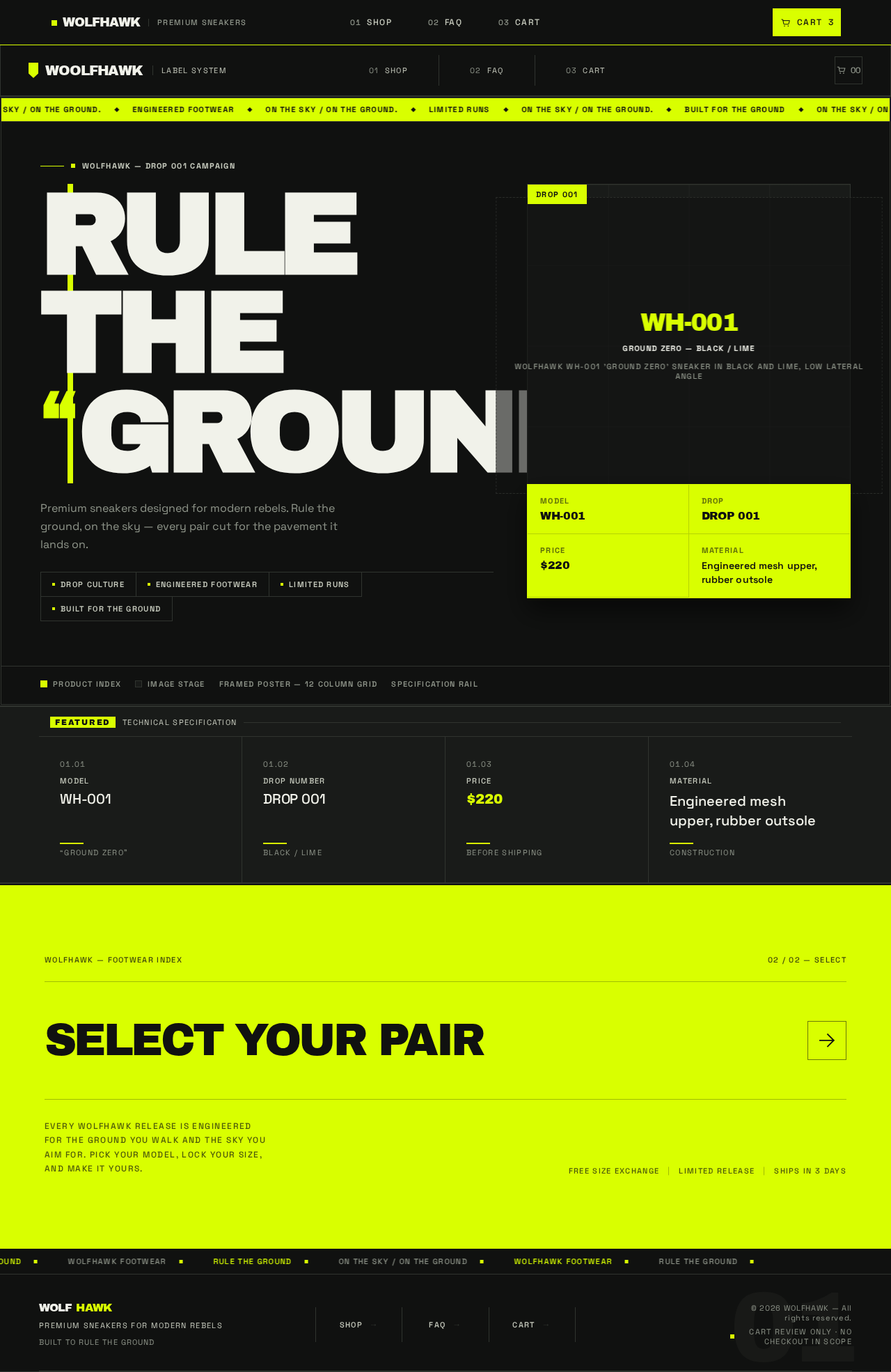
WOLFHAWK — DROP 001 CAMPAIGN
RULETHEGROUND.
Premium sneakers designed for modern rebels. Rule the ground, on the sky — every pair cut for the pavement it lands on.
WH-001GROUND ZERO — Black / LimeWOLFHAWK WH-001 'GROUND ZERO' sneaker in black and lime, low lateral angle
ModelWH-001
DropDROP 001
Price$220
MaterialEngineered mesh upper, rubber outsole
Product indexImage stageFramed poster — 12 column gridSpecification rail
FeaturedTechnical Specification
WOLFHAWK — Footwear Index02 / 02 — Select
Select Your PairEvery WOLFHAWK release is engineered for the ground you walk and the sky you aim for. Pick your model, lock your size, and make it yours.
WOLFHAWK — DROP 001 CAMPAIGN
RULETHEGROUND.
Premium sneakers designed for modern rebels. Rule the ground, on the sky — every pair cut for the pavement it lands on.
WH-001GROUND ZERO — Black / LimeWOLFHAWK WH-001 'GROUND ZERO' sneaker in black and lime, low lateral angle
ModelWH-001
DropDROP 001
Price$220
MaterialEngineered mesh upper, rubber outsole
Product indexImage stageFramed poster — 12 column gridSpecification rail
FeaturedTechnical Specification
WOLFHAWK — Footwear Index02 / 02 — Select
Select Your PairEvery WOLFHAWK release is engineered for the ground you walk and the sky you aim for. Pick your model, lock your size, and make it yours.
No comments yet. Be the first!