Design and implement the database schema for storing uploaded content and its transformations.
Implement role-based access control for different personas (Content Creator, Business Owner).
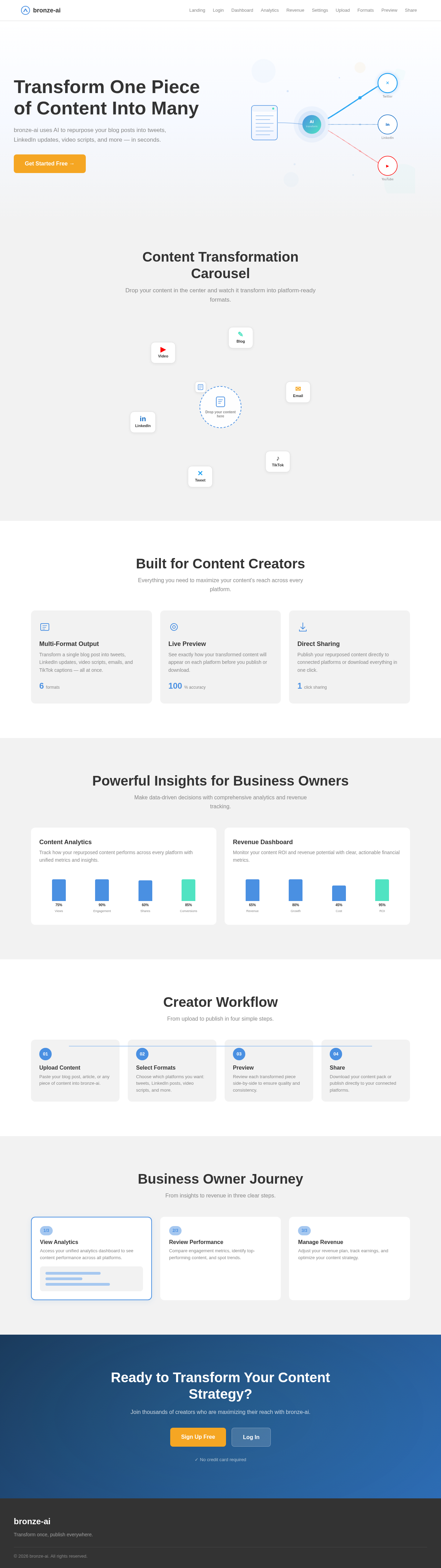
As a frontend developer, implement the Navbar section for the Landing page. This includes a responsive navigation bar with animated links using motion components. The Navbar should toggle a mobile menu with animations when the burger button is clicked. Ensure that links to restricted pages like Analytics, Revenue, and Settings are conditionally shown based on the user's persona.
Page access: shared by all personas (Business Owner, Content Creator).
As a frontend developer, implement the LoginPasswordRecovery section for the Login page, which provides a link to the password recovery page and a visual divider for social login options. This section is accessible by Business Owner and Content Creator personas.
Page access: shared by all personas (Business Owner, Content Creator).
As a frontend developer, implement the LoginSocialSection for the Login page, which includes buttons for social login via Google, GitHub, and Microsoft. Each button triggers a simulated OAuth flow with loading state management. This section is accessible by Business Owner and Content Creator personas.
Page access: shared by all personas (Business Owner, Content Creator).
As a frontend developer, implement the LoginSignupPrompt section for the Login page, which provides a prompt for users to sign up if they don't have an account. This section is accessible by Business Owner and Content Creator personas.
Page access: shared by all personas (Business Owner, Content Creator).
As a frontend developer, implement the Footer section for the Login page, which includes branding and copyright information. Note that this component may already exist from a previous page implementation. This section is accessible by Business Owner and Content Creator personas.
Page access: shared by all personas (Business Owner, Content Creator).
As a frontend developer, implement the RevenueHeader section for the Revenue page. This section includes a title, description, and a button to manage settings. Ensure the button is accessible with an aria-label for screen readers. This page is accessible by Business Owners only.
Page access: Business Owner only.
Develop API endpoints for content creators to upload content and select output formats.
Depends on:#1
Waiting for dependencies
Implement backend services for the Business Owner to access analytics on content performance.
Depends on:#1
Waiting for dependencies
Develop API for Business Owners to view and manage the revenue potential plan.
Depends on:#1
Waiting for dependencies
As a frontend developer, implement the LandingHeroAnimation section for the Landing page. This section features an animated SVG with motion paths and circles that change based on the active platform. The animation should loop through different platforms every 3.3 seconds unless reduced motion is enabled.
Page access: shared by all personas (Business Owner, Content Creator).
Depends on:#11
Waiting for dependencies
As a frontend developer, implement the LandingHeroCopy section for the Landing page. This section includes a headline with animated word-by-word entrance and a call-to-action button that scales on hover. Ensure the description highlights the AI capabilities of bronze-ai for content transformation.
Page access: shared by all personas (Business Owner, Content Creator).
Depends on:#11
Waiting for dependencies
As a frontend developer, implement the CarouselHub section for the Landing page. This interactive section allows users to drag content into a hub to trigger animations. Implement drag-and-drop functionality with visual feedback and a burst animation on drop.
Page access: shared by all personas (Business Owner, Content Creator).
Depends on:#11
Waiting for dependencies
As a frontend developer, implement the CarouselFormatCards section for the Landing page. This section features rotating format cards with hover effects that reveal content previews. Ensure smooth animations and transitions for card interactions.
Page access: shared by all personas (Business Owner, Content Creator).
Depends on:#11
Waiting for dependencies
As a frontend developer, implement the CreatorFeatures section for the Landing page. This section showcases features for content creators with animated statistics and icons. Ensure the animations trigger when the section comes into view.
Page access: shared by all personas (Business Owner, Content Creator).
Depends on:#11
Waiting for dependencies
As a frontend developer, implement the OwnerFeatures section for the Landing page. This section provides insights for business owners with animated charts and bars. Ensure animations are triggered on view and display accurate data for each feature.
Page access: shared by all personas (Business Owner, Content Creator).
Depends on:#11
Waiting for dependencies
As a frontend developer, implement the CreatorFlowTimeline section for the Landing page. This section outlines the creator workflow with step-by-step animations. Ensure each step is animated sequentially as the user scrolls into view.
Page access: shared by all personas (Business Owner, Content Creator).
Depends on:#11
Waiting for dependencies
As a frontend developer, implement the OwnerFlowTimeline section for the Landing page. This section details the business owner journey with interactive steps. Ensure each step is highlighted on hover and displays additional information when active.
Page access: shared by all personas (Business Owner, Content Creator).
Depends on:#11
Waiting for dependencies
As a frontend developer, implement the LandingCTA section for the Landing page. This section includes a call-to-action with animated buttons and a glowing effect. Ensure the buttons scale on hover and the section encourages user engagement.
Page access: shared by all personas (Business Owner, Content Creator).
Depends on:#11
Waiting for dependencies
As a frontend developer, implement the LoginFormSection for the Login page, which includes a form with email and password inputs, a 'Remember Me' checkbox, and error handling. The form uses React state hooks for managing input values and errors, and includes animations using motion/react for form transitions and error messages. The section also simulates an authentication API call with loading state management. This page is accessible by Business Owner and Content Creator personas.
Page access: shared by all personas (Business Owner, Content Creator).
Depends on:#11
Waiting for dependencies
As a frontend developer, implement the RevenuePlanOverview section for the Revenue page. This section displays the current revenue plan details such as tier, monthly and annual projections, subscriber count, churn rate, and start date. It includes a button to view plan details. This page is accessible by Business Owners only.
Page access: Business Owner only.
Depends on:#26
Waiting for dependencies
As a frontend developer, implement the PricingTiers section for the Revenue page. This section allows toggling between monthly and annual billing cycles and displays different subscription plans with features and pricing. It includes interactive elements to expand and view more details about each tier. This page is accessible by Business Owners only.
Page access: Business Owner only.
Depends on:#26
Waiting for dependencies
As a frontend developer, implement the RevenueMetrics section for the Revenue page. This section includes metric cards displaying total revenue, MRR, ARR, and ARPU with a sparkline chart for visualizing trends. Users can switch between monthly, quarterly, and yearly views. This page is accessible by Business Owners only.
Page access: Business Owner only.
Depends on:#26
Waiting for dependencies
As a frontend developer, implement the ManagePricingActions section for the Revenue page. This section provides action buttons for editing pricing, adding tiers, viewing subscribers, exporting reports, and managing billing settings. Each button includes an icon and label. This page is accessible by Business Owners only.
Page access: Business Owner only.
Depends on:#26
Waiting for dependencies
As a Tech Lead, verify the end-to-end integration between the Login frontend implementation and the authentication backend API. Ensure data flows correctly, API responses are handled properly in the UI, and all interactions work as expected.
Depends on:#8#22
Waiting for dependencies
Implement API services to transform uploaded content into selected formats using AI models.
Depends on:#2
Waiting for dependencies
Test the analytics dashboard for Business Owners, ensuring accurate data and functionality.
Depends on:#6
Waiting for dependencies
As a Tech Lead, verify the end-to-end integration between the Content Upload frontend implementation and the Content Upload backend API. Ensure data flows correctly, API responses are handled properly in the UI, and all interactions work as expected.
Depends on:#2#1
Waiting for dependencies
As a Tech Lead, verify the end-to-end integration between the Revenue Management frontend implementation and the Revenue Management backend API. Ensure data flows correctly, API responses are handled properly in the UI, and all interactions work as expected.
Depends on:#28#7
Waiting for dependencies
Create API endpoints for content creators to preview transformed content before finalizing.
Depends on:#3
Waiting for dependencies
As a Tech Lead, verify the end-to-end integration between the Analytics frontend implementation and the Analytics backend API. Ensure data flows correctly, API responses are handled properly in the UI, and all interactions work as expected.
Depends on:#10#6
Waiting for dependencies
Develop API endpoints for downloading or sharing repurposed content to various platforms.
Depends on:#4
Waiting for dependencies
Test the complete workflow for content upload, transformation, preview, and sharing.
Depends on:#2#4#3#5
Waiting for dependencies
As a Tech Lead, verify the end-to-end integration between the Content Transformation frontend implementation and the Content Transformation backend API. Ensure data flows correctly, API responses are handled properly in the UI, and all interactions work as expected.
Depends on:#3#9
Waiting for dependencies
As a Tech Lead, verify the end-to-end integration between the Content Preview frontend implementation and the Content Preview backend API. Ensure data flows correctly, API responses are handled properly in the UI, and all interactions work as expected.
Depends on:#9#4
Waiting for dependencies
As a Tech Lead, verify the end-to-end integration between the Content Sharing frontend implementation and the Content Sharing backend API. Ensure data flows correctly, API responses are handled properly in the UI, and all interactions work as expected.
Depends on:#5#9
Waiting for dependencies



No comments yet. Be the first!