
bronze-ai

byControl Station MEA

AI Content Repurposing Tool: This Micro SaaS helps creators transform a single piece of content (e.g., a blog post) into multiple formats suitable for various platforms (e.g., tweets, LinkedIn posts, video scripts). with revenue potential plan build this saas tool

LandingRevenueLogin
Landing

Comments (0)

No comments yet. Be the first!

System Requirements

System Requirement Document
Page 1 of 4

bronze-ai System Requirements Document

1. Introduction

The bronze-ai project is a Micro SaaS tool designed to assist content creators in transforming a single piece of content into multiple formats suitable for various platforms. This tool aims to enhance the efficiency and reach of content distribution, while also incorporating a revenue potential plan.

2. System Overview

bronze-ai is designed to streamline the process of content repurposing, allowing creators to maximize the utility of their original content. By leveraging AI, the tool will convert content such as blog posts into formats like tweets, LinkedIn posts, and video scripts, thereby increasing the content's accessibility and engagement across different platforms.

3. Functional Requirements as Story Points

  • As a Content Creator, I should be able to upload a single piece of content to the platform.
  • As a Content Creator, I should be able to select the desired output formats (e.g., tweets, LinkedIn posts, video scripts).
  • As a Content Creator, I should be able to preview the transformed content before finalizing it.
  • As a Content Creator, I should be able to download or directly share the repurposed content to various platforms.
  • As a Business Owner, I should be able to access analytics on content performance across different platforms.
  • As a Business Owner, I should be able to view and manage the revenue potential plan associated with the content repurposing tool.
Page 2 of 4

4. User Personas

  • Content Creator: Individuals or teams responsible for creating original content and seeking to maximize its reach and engagement.
  • Business Owner: Individuals or entities interested in the financial performance and strategic growth of the content repurposing tool.

5. Core User Flows

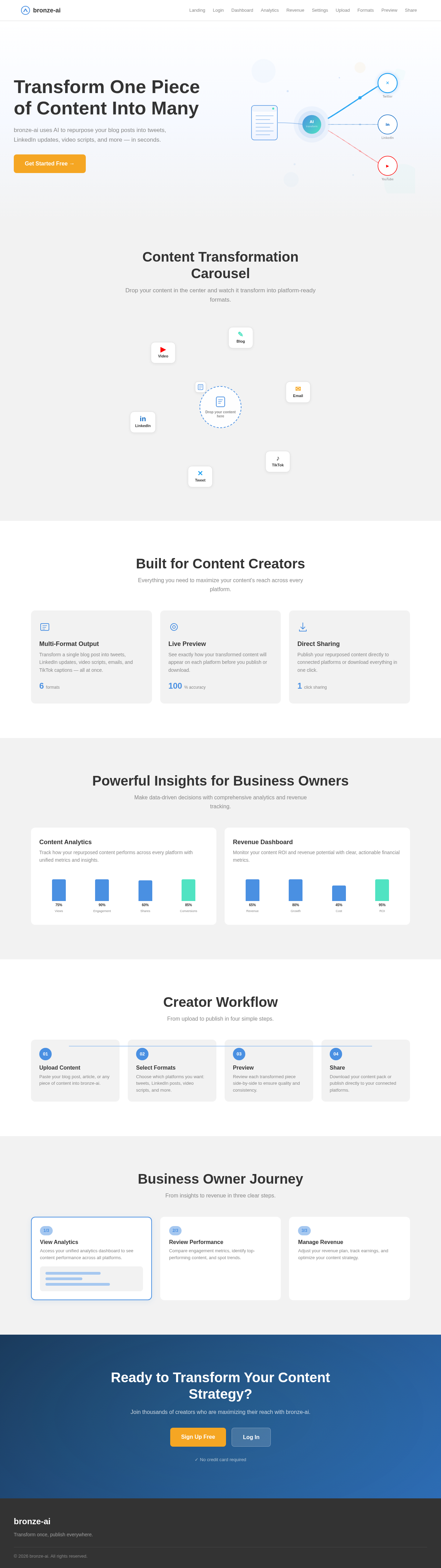
  • Content Creator uploads content -> selects output formats -> previews transformed content -> downloads/shares content.
  • Business Owner accesses analytics dashboard -> reviews content performance -> manages revenue potential plan.

6. Visuals Colors and Theme

[Default — not specified by user]

  • primary: #4A90E2 (a professional blue to convey trust and reliability)
  • primary_light: #A6C8F0 (a lighter tint for hover states)
  • secondary: #50E3C2 (a complementary green for growth and success)
  • accent: #F5A623 (an orange for CTAs and active states)
  • highlight: #F8E71C (a yellow for notifications and active indicators)
  • bg: #FFFFFF (a clean white background)
  • surface: #F2F2F2 (a light grey for cards and panels)
  • text: #333333 (a dark grey for primary text)
  • text_muted: #888888 (a softer grey for secondary text)
  • border: #DDDDDD (a subtle grey for borders)
Page 3 of 4

7. Signature Design Concept

The homepage of bronze-ai will feature an interactive "Content Transformation Carousel." Users can drag and drop a piece of content into a central hub, which then visually transforms into various formats (e.g., tweets, LinkedIn posts, video scripts) that orbit around the hub. Each format is represented by an animated icon that expands to show a preview when hovered over. This dynamic interaction will be built using motion/react for smooth animations and transitions, creating an engaging and intuitive user experience.

LANDING HERO MOTION BRIEF

The landing hero will depict a single piece of content entering a transformation chamber, where it splits into multiple animated streams representing different content formats. These streams will flow into recognizable platform icons (e.g., Twitter bird, LinkedIn logo), illustrating the transformation process. The animation will loop every 10 seconds, with each cycle highlighting a different platform. This will be implemented using motion/react for seamless animations and responsive behavior.

8. Interaction Model & Motion Direction

  • Intended Interaction Model: animated
  • The landing page will feature moderate scroll-triggered reveals and hover transitions, enhancing user engagement without overwhelming them.
  • Each section will have a distinctive core mechanic, such as kinetic typography or morphing SVGs, to maintain visual interest and narrative flow.
Page 4 of 4

9. Non-Functional Requirements

  • The system must ensure high availability and reliability to support content creators globally.
  • The platform should be scalable to handle increasing numbers of users and content transformations.
  • Security measures must be in place to protect user data and content.

10. Tech Stack

  • Frontend: React for Web
  • Backend: Python, FastAPI
  • Database: MySQL or MariaDB, using alembic for migrations
  • AI Models: GPT 5.4 for user-friendly responses, Claude Sonnet 5 for academic or coding work, Google Nano banana for image generation
  • AI Tools: Litellm for LLM Routing, Langchain
  • Local Orchestration: Docker, docker-compose
  • Server-side Orchestration: Kubernetes

11. Assumptions and Constraints

  • The platform will primarily target English-speaking content creators.
  • The system should be designed to accommodate future expansions, such as additional content formats or languages.

12. Glossary

  • Content Creator: An individual or team responsible for generating original content.
  • Business Owner: An individual or entity managing the strategic and financial aspects of the tool.
  • Micro SaaS: A small-scale software as a service product focused on a niche market.
Landing design preview
Landing: View Carousel
Login: Sign In
Dashboard: View Overview
Analytics: View Performance
Analytics: Compare Platforms
Analytics: Export Report
Revenue: View Plan
Revenue: Manage Pricing
Revenue: Update Plan
Settings: Manage Team
Landing design preview
Landing: View Carousel
Login: Sign In
Dashboard: View Overview
Analytics: View Performance
Analytics: Compare Platforms
Analytics: Export Report
Revenue: View Plan
Revenue: Manage Pricing
Revenue: Update Plan
Settings: Manage Team