bright-teacher
 Reeba zeeshan
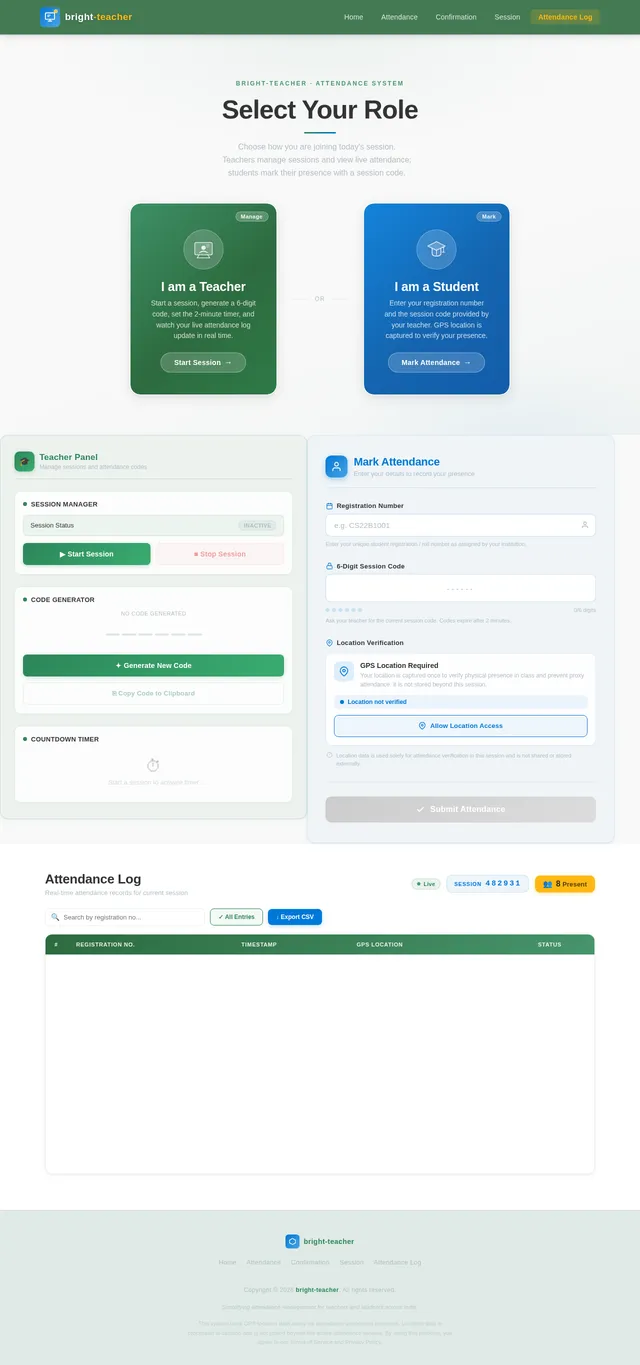
Teacher flow • Select “Teacher” → hit Start Session • A random 6-character code is generated (e.g. X7KR2Q) • A 2-minute countdown timer + progress bar shows how long it’s valid • Live attendance log updates as students mark in Student flow • Select “Student” → enter your Registration Number (e.g. 2022-BS-DS-042) + the session code • App requests your GPS location — both are captured on submission • Duplicate entries are blocked (same reg no can’t mark twice) MVP scope & what’s simulated: • In this MVP, teacher and student share the same browser tab (state is in-memory) — in a real app, the session code + attendance would sync through a backend/database (Firebase, Supabase, etc.) • Location is captured via browser’s native navigator.geolocation • The 2-minute expiry is enforced client-side To go production, you’d add: 1. Backend (Firebase Realtime DB is ideal) to sync sessions across devices 2. Auth for teacher accounts 3. Admin dashboard to export attendance as CSV 4. Geofencing (only allow marking within X meters of classroom)

Comments (0)
Sign in to leave a comment
System Requirements
System Requirements Document (SRD)
Project Name: bright-teacher
1. Introduction
The bright-teacher project is an innovative attendance management system designed to simplify and streamline the process of recording attendance for teachers and students. This system leverages real-time session codes, GPS location tracking, and duplicate entry prevention to ensure accurate and transparent attendance records.
This document outlines the system requirements for the bright-teacher project, focusing on the Minimum Viable Product (MVP) scope while also considering future production enhancements. The system is tailored to meet the needs of teachers and students in India (IN), ensuring locale-specific considerations such as numeric session codes and GPS-based location tracking to prevent proxy attendance.
2. System Overview
The bright-teacher system is a web-based application that facilitates attendance management through the following core functionalities:
- Teachers can generate a unique numeric session code for each attendance session.
- Students can mark their attendance by entering the session code and their registration number.
- GPS location data is captured during attendance marking to ensure authenticity and prevent proxies.
- Duplicate entries are blocked to maintain data integrity.
- Selective re-run capability allows users to regenerate the System Requirements Document (SRD) on demand.
The MVP will simulate these functionalities within a single browser tab using in-memory state management. Future production versions will include backend integration, authentication, and advanced features like geofencing and attendance export.
3. Functional Requirements
Teacher Flow
- As a Teacher, I should be able to select "Teacher" and start a session.
- As a Teacher, I should be able to generate a random 6-digit numeric session code.
- As a Teacher, I should see a 2-minute countdown timer and progress bar indicating the session code's validity.
- As a Teacher, I should see a live attendance log updating as students mark their attendance.
Student Flow
- As a Student, I should be able to select "Student" and enter my registration number and session code.
- As a Student, I should be prompted to share my GPS location when marking attendance.
- As a Student, I should not be able to mark attendance more than once using the same registration number.
MVP Scope
- As a User, I should be able to simulate the teacher and student flows within the same browser tab.
- As a User, I should see the session code and attendance data managed in-memory for the MVP.
- As a User, I should see the 2-minute session expiry enforced client-side.
- As a User, I should be able to trigger a selective re-run to regenerate the System Requirements Document (SRD).
4. User Personas
Teacher
- Role: Initiates attendance sessions and monitors attendance logs.
- Needs: Simple session code generation, real-time attendance updates, and future capabilities like exporting attendance data.
Student
- Role: Marks attendance by entering session codes and registration numbers.
- Needs: Easy access to attendance marking, assurance of data privacy, and prevention of proxy attendance.
5. Visuals Colors and Theme
Color Palette
The bright-teacher project will use a vibrant and professional color palette to reflect its educational purpose while maintaining a modern aesthetic:
- Background: #F4F8FB (light blue-gray for a clean and calming look)
- Surface: #FFFFFF (pure white for cards and input fields)
- Text: #2C3E50 (deep navy for high readability)
- Accent: #1ABC9C (vivid teal for interactive elements like buttons and links)
- Muted Tones: #95A5A6 (soft gray for secondary information and disabled states)
6. Signature Design Concept
The bright-teacher homepage will feature an interactive chalkboard interface.
Key Features:
- Chalkboard Animation: The homepage will resemble a digital chalkboard, with text and icons appearing as if written in real-time with chalk.
- Interactive Session Code Generator: Teachers can "write" on the chalkboard to generate session codes, with animations mimicking chalk dust.
- Student Portal Access: Students can "tap" on their section of the chalkboard to enter their registration number and session code.
- Subtle Sound Effects: Chalk-writing sounds will accompany interactions, creating an immersive experience.
- Dynamic Background: The chalkboard background will subtly shift between shades of green and black, simulating a real classroom environment.
This design will make the bright-teacher platform instantly recognizable and engaging, creating a memorable first impression for users.
7. Non-Functional Requirements
- The system must support a minimum of 100 concurrent users during peak hours.
- The session code generation and validation must occur within 1 second.
- GPS location capture must have an accuracy of at least 50 meters.
- The system must comply with data privacy regulations in India (e.g., GDPR-equivalent laws).
- The selective re-run capability must regenerate the SRD within 5 seconds of the user request.
8. Tech Stack
Frontend
- React for Web
Backend
- Python
- FastAPI
Database
- MySQL (with Alembic for migrations)
AI Tools
- Litellm for LLM Routing
Local Orchestration
- Docker
- docker-compose
Server-Side Orchestration
- Kubernetes
9. Assumptions and Constraints
Assumptions
- Teachers and students will have access to devices with modern web browsers.
- GPS functionality will be available and enabled on student devices.
- Numeric session codes will be easier for users to input and remember.
Constraints
- The MVP will not include backend integration; all data will be managed in-memory.
- The system will rely on browser-native geolocation APIs, which may vary in accuracy.
- The selective re-run capability will be limited to regenerating the SRD document only.
10. Glossary
- MVP: Minimum Viable Product, the simplest version of the system that delivers core functionalities.
- Session Code: A unique 6-digit numeric code generated by the teacher for each attendance session.
- GPS: Global Positioning System, used to capture the location of students marking attendance.
- Geofencing: A feature that restricts attendance marking to a specific geographic area.
- Selective Re-run Capability: A feature allowing users to regenerate the System Requirements Document (SRD) on demand.
This updated SRD incorporates the new requirement for selective re-run capability while maintaining the original structure and intent of the bright-teacher project. Let me know if there are any additional updates or refinements you'd like, Reeba!

Attendance Redefined
Smart session codes. Real-time tracking. Zero proxies.
Generate session codes, verify GPS locations, and record attendance in seconds.
Choose Your Role
Select how you'd like to use Bright Teacher. Whether you're managing a class or marking attendance, we've got you covered.
I'm a Teacher
Start attendance sessions, generate unique session codes, and monitor real-time student check-ins from your dashboard.
Get Started as Teacher →I'm a Student
Enter your registration number and session code to mark attendance quickly. GPS verification ensures authenticity.
Get Started as Student →Core Features
Everything you need for accurate, transparent, and hassle-free attendance management.
Session Code Generation
Teachers generate a unique 6-digit numeric code for each attendance session, ensuring secure and simple access for students.
Real-Time Updates
Monitor your live attendance log as students mark their presence instantly within the active session window.
GPS Tracking
Capture GPS location data during attendance marking to verify student presence and prevent proxy entries.
Duplicate Prevention
Automatically block duplicate registrations to maintain data integrity and ensure each student is recorded only once.
See How Session Codes Work
Real-Time Session Codes for Secure Attendance
Each session code is a unique 6-digit number generated by the teacher at the start of class. Students must enter the code within the 2-minute validity window to mark their attendance, ensuring only those present in the classroom can participate.
- Teacher selects "Start Session" to generate a random 6-digit numeric code.
- The code is valid for exactly 2 minutes, shown by the countdown timer and progress bar.
- Once expired, a new code must be generated — old codes cannot be reused.
- Students enter the code along with their registration number to mark attendance.
- The 2-minute window prevents students from sharing codes with absent peers.
- GPS location is captured alongside the code to verify physical presence.
- Duplicate registration numbers are automatically blocked within a single session.
Built-In Security at Every Step
bright-teacher ensures accurate, tamper-proof attendance records through GPS validation, duplicate detection, and live monitoring.
GPS Verification
Every attendance entry is validated with real-time GPS coordinates, ensuring students are physically present in the classroom. No more proxy attendance from remote locations.
Duplicate Prevention
Our system automatically blocks duplicate entries using unique registration numbers. Each student can only mark attendance once per session, maintaining data integrity.
Real-Time Monitoring
Teachers see attendance updates the moment students mark their presence. Live logs with timestamps and location data give complete session oversight.
How It Works
Two simple workflows designed for teachers and students. Mark attendance in under a minute with real-time verification.
Quick Start Guide
Get up and running in minutes. Choose your role below for step-by-step instructions.
- 1
Select the "Student" role and enter your registration number to get started.
- 2
Type in the 6-digit session code provided by your teacher before it expires.
- 3
Allow GPS location access when prompted — this verifies you are physically present in class.
- 4
Review and confirm your attendance. You are all set — no duplicate entries allowed!
What Our Users Say
Hear from teachers and students who use bright-teacher every day
Generating session codes and tracking attendance in real-time has completely transformed how I manage my classroom. No more manual roll calls or chasing down absent students.
Marking attendance takes just seconds now. I enter my registration number, share the session code, and I am done. The GPS verification gives me confidence that the system is fair for everyone.
Ready to Transform Attendance?
Join thousands of educators using Bright Teacher to take attendance in seconds. Generate session codes, track in real-time, and eliminate proxy attendance — all from your browser.
No comments yet. Be the first!