bright-teacher
 Reeba zeeshan
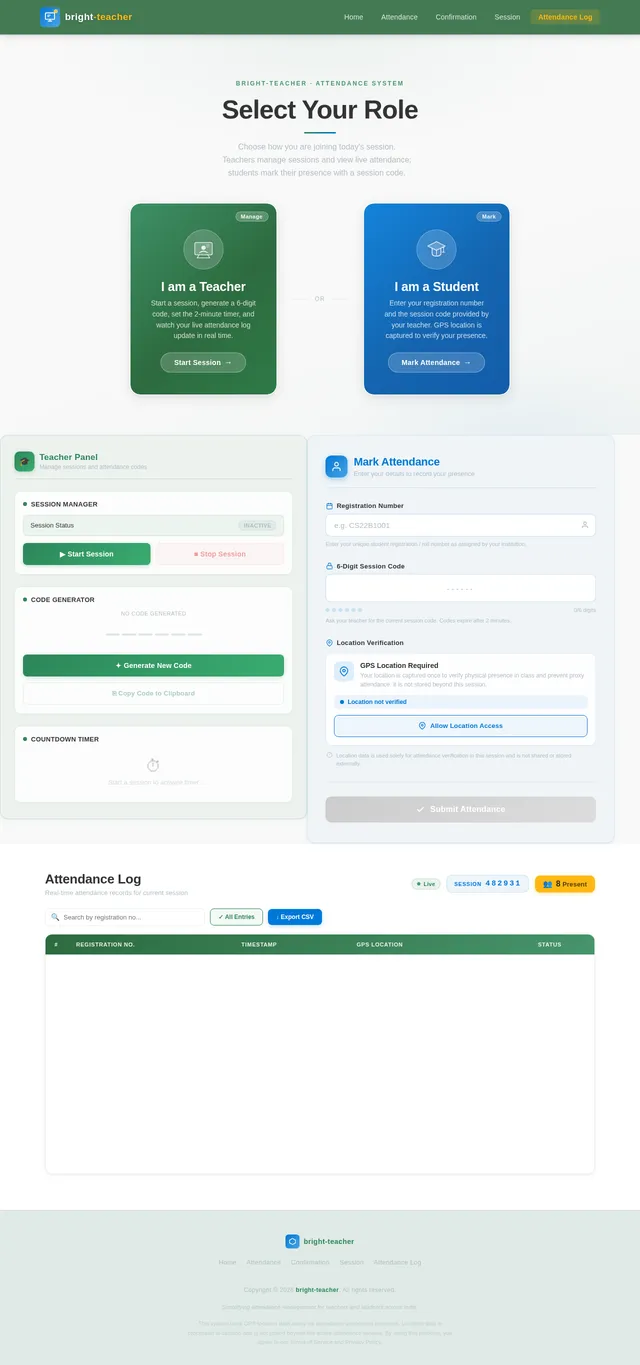
Teacher flow • Select “Teacher” → hit Start Session • A random 6-character code is generated (e.g. X7KR2Q) • A 2-minute countdown timer + progress bar shows how long it’s valid • Live attendance log updates as students mark in Student flow • Select “Student” → enter your Registration Number (e.g. 2022-BS-DS-042) + the session code • App requests your GPS location — both are captured on submission • Duplicate entries are blocked (same reg no can’t mark twice) MVP scope & what’s simulated: • In this MVP, teacher and student share the same browser tab (state is in-memory) — in a real app, the session code + attendance would sync through a backend/database (Firebase, Supabase, etc.) • Location is captured via browser’s native navigator.geolocation • The 2-minute expiry is enforced client-side To go production, you’d add: 1. Backend (Firebase Realtime DB is ideal) to sync sessions across devices 2. Auth for teacher accounts 3. Admin dashboard to export attendance as CSV 4. Geofencing (only allow marking within X meters of classroom)

Comments (0)
Sign in to leave a comment
Architecture
No Services Diagrams Yet

Attendance Redefined
Smart session codes. Real-time tracking. Zero proxies.
Generate session codes, verify GPS locations, and record attendance in seconds.
Choose Your Role
Select how you'd like to use Bright Teacher. Whether you're managing a class or marking attendance, we've got you covered.
I'm a Teacher
Start attendance sessions, generate unique session codes, and monitor real-time student check-ins from your dashboard.
Get Started as Teacher →I'm a Student
Enter your registration number and session code to mark attendance quickly. GPS verification ensures authenticity.
Get Started as Student →Core Features
Everything you need for accurate, transparent, and hassle-free attendance management.
Session Code Generation
Teachers generate a unique 6-digit numeric code for each attendance session, ensuring secure and simple access for students.
Real-Time Updates
Monitor your live attendance log as students mark their presence instantly within the active session window.
GPS Tracking
Capture GPS location data during attendance marking to verify student presence and prevent proxy entries.
Duplicate Prevention
Automatically block duplicate registrations to maintain data integrity and ensure each student is recorded only once.
See How Session Codes Work
Real-Time Session Codes for Secure Attendance
Each session code is a unique 6-digit number generated by the teacher at the start of class. Students must enter the code within the 2-minute validity window to mark their attendance, ensuring only those present in the classroom can participate.
- Teacher selects "Start Session" to generate a random 6-digit numeric code.
- The code is valid for exactly 2 minutes, shown by the countdown timer and progress bar.
- Once expired, a new code must be generated — old codes cannot be reused.
- Students enter the code along with their registration number to mark attendance.
- The 2-minute window prevents students from sharing codes with absent peers.
- GPS location is captured alongside the code to verify physical presence.
- Duplicate registration numbers are automatically blocked within a single session.
Built-In Security at Every Step
bright-teacher ensures accurate, tamper-proof attendance records through GPS validation, duplicate detection, and live monitoring.
GPS Verification
Every attendance entry is validated with real-time GPS coordinates, ensuring students are physically present in the classroom. No more proxy attendance from remote locations.
Duplicate Prevention
Our system automatically blocks duplicate entries using unique registration numbers. Each student can only mark attendance once per session, maintaining data integrity.
Real-Time Monitoring
Teachers see attendance updates the moment students mark their presence. Live logs with timestamps and location data give complete session oversight.
How It Works
Two simple workflows designed for teachers and students. Mark attendance in under a minute with real-time verification.
Quick Start Guide
Get up and running in minutes. Choose your role below for step-by-step instructions.
- 1
Select the "Student" role and enter your registration number to get started.
- 2
Type in the 6-digit session code provided by your teacher before it expires.
- 3
Allow GPS location access when prompted — this verifies you are physically present in class.
- 4
Review and confirm your attendance. You are all set — no duplicate entries allowed!
What Our Users Say
Hear from teachers and students who use bright-teacher every day
Generating session codes and tracking attendance in real-time has completely transformed how I manage my classroom. No more manual roll calls or chasing down absent students.
Marking attendance takes just seconds now. I enter my registration number, share the session code, and I am done. The GPS verification gives me confidence that the system is fair for everyone.
Ready to Transform Attendance?
Join thousands of educators using Bright Teacher to take attendance in seconds. Generate session codes, track in real-time, and eliminate proxy attendance — all from your browser.
No comments yet. Be the first!