bright-sky
 Mr Nobody
build this app


Comments (0)
Sign in to leave a comment
System Requirements
System Requirements Document for bright-sky
1. Introduction
can u help me build THIS APP https://vague-apex-lab-core.base44.app ,Main output Live market condition Bullish/bearish/neutral scenarios Market strength score Important price levels Entry, SL and TP drawings Scenario invalidation Historical comparisons AI explanation, Apex AI Market Analyst An AI assistant that explains what the market is doing, why it is moving, what conditions matter and what could happen next.,Apex AI Market Analyst An AI assistant that explains what the market is doing, why it is moving, what conditions matter and what could happen next.Apex Market Intelligence Engine Top recommendation Analyses market structure, volatility, momentum, trend strength, volume and price behaviour to produce a complete market report.Analyses the unique statistical behaviour of each instrument. Identifies recurring price movement characteristics. Measures average impulse and retracement behaviour. Detects common reversal conditions. Builds individual market behaviour profiles. Compares current price behaviour against historical patterns. Output: A live Market DNA report for XAUUSD, BTCUSD, US30 and other instruments.and a screen for [x] Automatic BUY and SELL setups. ] Entry zone and entry price. [x] Stop loss. [x] TP1, TP2 and TP3. [x] Invalidation logic. [x] Closed-candle confirmation. [x] Multi-timeframe confirmation. [x] Historical setup drawings. [x] Configurable risk settings. [x] Setup quality scoring. Non-repainting signal logic. and another for A forensic analysis system that explains exactly why a market move happened using observable evidence. Reconstructs the movement candle by candle. Identifies the conditions before the move. Measures volume and volatility changes. Finds failed continuation attempts. Identifies the earliest measurable warning signs. Compares the movement against historical examples. Output: A complete market-movement investigation with annotated charts and an evidence report.10 screens for Apex Lab
- Project name: bright-sky.
- The app is to be built from the attached prompt (Pasted_prompt.txt).
2. System Overview
Market Intelligence Dashboard Complete overview of live markets, market direction, volatility, momentum, trend strength and active opportunities. Advanced Market Scanner Scans multiple instruments and timeframes for developing setups, breakouts, reversals and market conditions. Chart Intelligence Studio Interactive charts with automatic BUY/SELL drawings, entry, SL, TP1, TP2, TP3 and invalidation. AI Market Analyst Ask questions about market conditions and receive explanations backed by live market data and calculated indicators. Strategy Testing Laboratory Test setups against historical data, compare results, analyse drawdowns and measure expectancy. News & Economic Intelligence Economic calendar, important announcements, news sentiment and instrument-specific event analysis. Risk & Trade Management Position sizing, risk-to-reward, exposure, stop-loss calculations and trade monitoring. Cross-Market Intelligence Compare Gold, DXY, US10Y, BTCUSD, EURUSD and other instruments through correlation and divergence analysis. Trading Performance Centre Trade history, setup accuracy, win rate, profit factor, performance charts and trading journal. Market Forecast & Scenario Lab Bullish, bearish and sideways scenarios, projected ranges, probability estimates and invalidation levels. Recommended sidebar layout This is how I would organise the website: Navigation Screen OVERVIEW Market Intelligence MARKETS Market Scanner ANALYSIS Chart Intelligence Studio AI TOOLS AI Market Analyst RESEARCH Strategy Testing Lab RESEARCH News & Economic Intelligence MANAGEMENT Risk & Trade Management INTELLIGENCE Cross-Market Intelligence PERFORMANCE Trading Performance Centre FORECASTING Market Forecast Lab,3. Screen design styles Market Intelligence Dashboard Compact data cards, live market statistics, charts and market-condition indicators. Chart Intelligence Studio Large chart area, clean drawings, adjustable tools and floating analysis panels. AI Market
3. Functional Requirements
can u help me build THIS APP https://vague-apex-lab-core.base44.app ,Main output Live market condition Bullish/bearish/neutral scenarios Market strength score Important price levels Entry, SL and TP drawings Scenario invalidation Historical comparisons AI explanation, Apex AI Market Analyst An AI assistant that explains what the market is doing, why it is moving, what conditions matter and what could happen next.,Apex AI Market Analyst An AI assistant that explains what the market is doing, why it is moving, what conditions matter and what could happen next.Apex Market Intelligence Engine Top recommendation Analyses market structure, volatility, momentum, trend strength, volume and price behaviour to produce a complete market report.Analyses the unique statistical behaviour of each instrument. Identifies recurring price movement characteristics. Measures average impulse and retracement behaviour. Detects common reversal conditions. Builds individual market behaviour profiles. Compares current price behaviour against historical patterns. Output: A live Market DNA report for XAUUSD, BTCUSD, US30 and other instruments.and a screen for [x] Automatic BUY and SELL setups. ] Entry zone and entry price. [x] Stop loss. [x] TP1, TP2 and TP3. [x] Invalidation logic. [x] Closed-candle confirmation. [x] Multi-timeframe confirmation. [x] Historical setup drawings. [x] Configurable risk settings. [x] Setup quality scoring. Non-repainting signal logic. and another for A forensic analysis system that explains exactly why a market move happened using observable evidence. Reconstructs the movement candle by candle. Identifies the conditions before the move. Measures volume and volatility changes. Finds failed continuation attempts. Identifies the earliest measurable warning signs. Compares the movement against historical examples. Output: A complete market-movement investigation with annotated charts and an evidence report.10 screens for Apex Lab
Market Intelligence Dashboard Complete overview of live markets, market direction, volatility, momentum, trend strength and active opportunities. Advanced Market Scanner Scans multiple instruments and timeframes for developing setups, breakouts, reversals and market conditions. Chart Intelligence Studio Interactive charts with automatic BUY/SELL drawings, entry, SL, TP1, TP2, TP3 and invalidation. AI Market Analyst Ask questions about market conditions and receive explanations backed by live market data and calculated indicators. Strategy Testing Laboratory Test setups against historical data, compare results, analyse drawdowns and measure expectancy. News & Economic Intelligence Economic calendar, important announcements, news sentiment and instrument-specific event analysis. Risk & Trade Management Position sizing, risk-to-reward, exposure, stop-loss calculations and trade monitoring. Cross-Market Intelligence Compare Gold, DXY, US10Y, BTCUSD, EURUSD and other instruments through correlation and divergence analysis. Trading Performance Centre Trade history, setup accuracy, win rate, profit factor, performance charts and trading journal. Market Forecast & Scenario Lab Bullish, bearish and sideways scenarios, projected ranges, probability estimates and invalidation levels. Recommended sidebar layout This is how I would organise the website: Navigation Screen OVERVIEW Market Intelligence MARKETS Market Scanner ANALYSIS Chart Intelligence Studio AI TOOLS AI Market Analyst RESEARCH Strategy Testing Lab RESEARCH News & Economic Intelligence MANAGEMENT Risk & Trade Management INTELLIGENCE Cross-Market Intelligence PERFORMANCE Trading Performance Centre FORECASTING Market Forecast Lab,3. Screen design styles Market Intelligence Dashboard Compact data cards, live market statistics, charts and market-condition indicators. Chart Intelligence Studio Large chart area, clean drawings, adjustable tools and floating analysis panels. AI Market
Analyst Chat interface with structured market reports, evidence, scenarios and explanations. Strategy Testing Laboratory Professional statistical tables, equity curves, drawdown charts and setup comparisons. Fonts and visual details Headings: Inter or Manrope. Numbers: JetBrains Mono. Rounded corners: 8–12px. Thin borders rather than heavy shadows. Subtle hover animations. Minimal gradients. Professional chart gridlines. Consistent green BUY and red SELL annotations. Special features that make it look premium Animated live market ticker. Instrument search with instant results. Customisable dashboard panels. Expandable full-screen charts. Live data connection indicator. Floating AI analysis assistant. Setup confidence and evidence panels. Custom chart drawing controls. Light/dark chart options. Professional loading skeletons. The final visual direction sho-navi.com My exact recommendation: Apex Lab should look: 70% institutional trading terminal. 20% modern AI intelligence platform. 10% futuristic fintech styling. Avoid making it look like a gaming website, a crypto casino or a generic AI dashboard. The important thing is that it must look like a serious platform used to analyse real financial markets.APEX LAB — GLASS INTELLIGENCE Recommended aesthetic Dark Liquid Glass · Institutional Fintech · AI Intelligence The goal is to make it look like an advanced financial intelligence operating system, not an ordinary trading website. The exact design system I'd use Element Design Background Deep black / midnight navy Panels Transparent smoked glass Blur 18–24px backdrop blur Borders Thin translucent white Highlights Electric cyan and champagne gold BUY Glass emerald SELL Glass crimson Charts Clean TradingView-style Corners 14–20px rounded Animation Smooth, subtle transitions 5 glass UI details Floating glass panels – layered translucent dashboard cards. Liquid navigation – sidebar with glowing active selection. Glass chart workspace – large
chart with floating drawing controls. AI glass assistant – floating intelligence panel with live analysis. Neon edge lighting – subtle cyan and gold borders. AND THE AI VOICE 10 features to include Live Voice Market Analyst – Ask questions about Gold, Bitcoin, forex and indices. Voice Chart Analysis – Ask it to analyse the chart currently open. Voice Setup Scanner – Ask it to find potential BUY and SELL setups. Voice Trade Explanation – Explain why a setup was detected. Multi-Timeframe Voice Analysis – Compare M5, M15, H1 and H4. Voice Market Alerts – Read out important price movements and setup alerts. Voice Trade Calculator – Calculate risk, lot size, SL and TP. News Voice Intelligence – Summarise important economic news. Continuous Market Briefing – Deliver scheduled spoken market updates. Voice Command Navigation – Open screens and change instruments by speaking. Example conversation APEX VOICE AI Online Listening to your commands Voice assistant interface concept YOU Analyse Gold on M15 and H1. Is there a setup? APEX AI Gold is showing a developing bearish structure on M15. H1 confirmation is not yet complete. I am monitoring the resistance zone and waiting for a confirmed candle close before identifying a potential entry. Waiting for confirmation Tap to speak Voice AI visual design Large glowing glass microphone. Animated audio waveform. Circular listening animation. Live transcription. AI response panel. Male or female voice selection. Adjustable speaking speed. Voice activation and mute controls. 10 commands it should understand Voice command Action "Analyse Gold" Analyse XAUUSD "Find setups" Scan available instruments "Open Bitcoin" Open BTCUSD chart "Check H1 trend" Analyse H1 direction "Explain this setup" Explain chart drawings "Find reversals" Scan reversal conditions "Calculate my risk" Open risk calculator "Check the news" Read important events "Give me market updates" Generate market briefing "Show my best
opportunity" Rank available setups My strongest recommendation: Make Voice AI available everywhere in Apex Lab through a floating glass microphone button, with a dedicated full-screen Voice AI workspace.add 1. Live MT5 Account Synchronization
opportunity" Rank available setups My strongest recommendation: Make Voice AI available everywhere in Apex Lab through a floating glass microphone button, with a dedicated full-screen Voice AI workspace.add 1. Live MT5 Account Synchronization
Essential
Connect your MT5 terminal and automatically synchronize:
-
Account balance.
-
Equity.
-
Free margin.
-
Margin level.
-
Floating profit/loss.
-
Account currency and leverage. 2. Live Trade Monitoring
Display all open trades directly inside APEX LAB.
-
Symbol and direction.
-
Entry price.
-
Current price.
-
Lot size.
-
Floating P/L.
-
SL and TP levels. 3. Complete Trading History
- SL and TP levels. 3. Complete Trading History
Import historical MT5 transactions.
-
Winning and losing trades.
-
Entry and exit prices.
-
Trading duration.
-
Historical profit/loss.
-
Symbol performance.
-
Buy versus sell performance. 4.Apex AI Trade Analyst
AI studies your actual MT5 trading activity.
-
Analyses every completed trade.
-
Identifies repeated mistakes.
-
Reviews entry timing.
-
Studies stop-loss placement.
-
Explains winning and losing trades.
-
Provides performance recommendations. 5.Live Account Alert System
Sends notifications when important account events occur.
-
Position opened.
-
Position closed.
-
SL or TP triggered.
-
Drawdown threshold reached.
-
Connection disconnected.
-
Unusual trading activity. 6.MT5 Remote Control Centre
An optional authorized control interface.
-
Open positions.
-
Close individual positions.
-
Modify SL and TP.
-
Close all positions.
-
Enable or disable automated trading.
-
Emergency account protection. 7.Apex Multi-Account Command Centre
-
Connects multiple MT5 accounts.
-
Compares account performance in real time.
-
Tracks combined exposure across brokers.
-
Identifies duplicate positions and excessive correlated risk. 8.Apex MT5 Intelligence Command Centre
Flagship feature
-
Combines live account, trade, market and risk information.
-
Displays AI-generated account insights.
- Shows the most important warnings first.
Flagship feature
- Provides a central view of all connected MT5 terminals.
Flagship feature
-
Supports authorized remote actions with confirmation and audit logs. and Build APEX AI AUTO EXECUTION ENGINE with:
-
Supports authorized remote actions with confirmation and audit logs. and Build APEX AI AUTO EXECUTION ENGINE with:
-
Automated XAUUSD buy and sell entries.
-
Supports authorized remote actions with confirmation and audit logs. and Build APEX AI AUTO EXECUTION ENGINE with:
-
Multi-timeframe confirmation.
-
Supports authorized remote actions with confirmation and audit logs. and Build APEX AI AUTO EXECUTION ENGINE with:
-
Automatic lot-size calculation.
-
Supports authorized remote actions with confirmation and audit logs. and Build APEX AI AUTO EXECUTION ENGINE with:
-
Dynamic SL and TP1, TP2, TP3.
-
Supports authorized remote actions with confirmation and audit logs. and Build APEX AI AUTO EXECUTION ENGINE with:
-
Break-even and trailing-stop management.
-
Supports authorized remote actions with confirmation and audit logs. and Build APEX AI AUTO EXECUTION ENGINE with:
-
Maximum daily loss protection.
-
Supports authorized remote actions with confirmation and audit logs. and Build APEX AI AUTO EXECUTION ENGINE with:
-
Maximum open-trade limits.
-
Supports authorized remote actions with confirmation and audit logs. and Build APEX AI AUTO EXECUTION ENGINE with:
-
News and spread filters.
-
Supports authorized remote actions with confirmation and audit logs. and Build APEX AI AUTO EXECUTION ENGINE with:
-
Duplicate-signal prevention.
-
Supports authorized remote actions with confirmation and audit logs. and Build APEX AI AUTO EXECUTION ENGINE with:
-
Emergency stop-all-trading control.
-
Complete execution and performance history.
Important: The AI should not send orders directly to your broker without validation. The MT5 execution bridge should enforce risk limits independently, even if the AI produces a bad signal.,Apex Multi-Strategy Trader
Runs different strategies simultaneously, each with its own entry rules, risk limits and performance tracking,Apex Portfolio Trader
Scans multiple instruments and allocates trading opportunities according to exposure and portfolio risk limits.with Apex Trade Manager
Manages existing positions, adjusts stops, takes partial profits and closes trades according to configured rules.
Position management
4. User Personas
Apex Lab is a market-intelligence workspace for traders who need to read live conditions, validate setups and understand why price moved. The roles below are the human actors established by the product scope; supporting systems (the Market Intelligence Engine, the AI Market Analyst and the Voice AI) act on their behalf rather than as personas.
| Role | Responsibilities and goals | Inputs | Decisions | Observable success | Access |
|---|---|---|---|---|---|
| Discretionary Trader | Read live market condition (bullish/bearish/neutral), market strength score and key price levels; act on automatic BUY/SELL setups with entry zone, SL and TP1–TP3; judge setup quality and invalidation | Live chart, Market DNA report, setup drawings, closed-candle and multi-timeframe confirmation, historical comparisons | Whether to take, size or skip a setup; where to place entry, SL and TP; when a scenario is invalidated | A setup is confirmed across timeframes, risk is configured, and the trade is executed or deliberately declined | Chart with floating drawing controls, setup scanner, risk settings, AI glass assistant |
| Market Analyst | Explain what the market is doing, why it is moving, which conditions matter and what could happen next; compare current behaviour against historical patterns | Market DNA profiles, volatility/momentum/volume readings, AI explanations | Which conditions are material; whether a move is a genuine signal or a failed continuation | A complete market report and evidence-backed narrative the trader can act on | AI Market Analyst panel, Market DNA reports, forensic investigation output |
| Forensic Investigator | Reconstruct a move candle by candle, identify pre-move conditions, measure volume and volatility changes, find failed continuations and earliest warning signs | Annotated charts, historical examples, evidence report | Which evidence explains the move; which warning signs were earliest and measurable | A complete market-movement investigation with annotated charts and an evidence report | Forensic analysis screens, historical comparison data |
| Voice-First User | Query the market hands-free: analyse an instrument or open chart, scan setups, explain a setup, compare M5/M15/H1/H4, hear alerts and briefings, calculate risk, summarise news, navigate by speech | Spoken commands, live transcription, AI response panel | Which instrument/timeframe to analyse; whether to act on a spoken alert | Commands such as "Analyse Gold" or "Find setups" return a correct spoken and on-screen response | Voice assistant interface, voice activation/mute, male/female voice and speed settings |
Default (labelled): the four roles above are the only human actors evidenced; a single user may hold several at once. No further personas or permissions are asserted from this batch. Detailed business rules for setups, confirmation and risk live in Functional Requirements.
5. Core User Flows
5.1 Read the live market condition and recommendation
Actor: Trader. Trigger: Opening the Market Intelligence Dashboard.
- Trader selects an instrument (e.g. XAUUSD, BTCUSD, US30).
- The Market Intelligence Engine analyses market structure, volatility, momentum, trend strength, volume and price behaviour.
- Dashboard presents the live condition (bullish/bearish/neutral scenarios), market strength score, important price levels, entry/SL/TP drawings, scenario invalidation and historical comparisons.
- Trader requests the AI explanation from Apex AI Market Analyst, which states what the market is doing, why it is moving, which conditions matter and what could happen next. Result: A complete market report with a top recommendation. Branch: if H1 confirmation is incomplete, the analyst reports a developing structure and states it is waiting for a confirmed candle close before identifying an entry.
5.2 Scan for and review automatic BUY/SELL setups
Actor: Trader. Trigger: Opening the Market Scanner or Chart Intelligence Studio.
- Scanner scans multiple instruments and timeframes for developing setups, breakouts, reversals and market conditions.
- For each setup the system shows entry zone and entry price, stop loss, TP1/TP2/TP3, invalidation logic, setup quality score and historical setup drawings.
- Signals are gated by closed-candle confirmation, multi-timeframe confirmation and non-repainting signal logic; risk settings are configurable.
- Trader opens the setup in Chart Intelligence Studio to inspect drawings and evidence panels. Result: A ranked set of confirmed setups with confidence and evidence. Branch: setups lacking closed-candle or multi-timeframe confirmation remain flagged as developing rather than actionable.
5.3 Investigate why a market move happened
Actor: Trader. Trigger: Selecting a completed move for forensic review.
- System reconstructs the movement candle by candle.
- It identifies conditions before the move, measures volume and volatility changes, finds failed continuation attempts and the earliest measurable warning signs.
- It compares the movement against historical examples. Result: A market-movement investigation with annotated charts and an evidence report.
5.4 Review instrument behaviour (Market DNA)
Actor: Trader. Trigger: Opening the Market DNA report for an instrument.
- System identifies recurring price movement characteristics, measures average impulse and retracement behaviour and detects common reversal conditions.
- It builds the instrument's behaviour profile and compares current price behaviour against historical patterns. Result: A live Market DNA report per instrument.
5.5 Ask the AI analyst or use Voice AI
Actor: Trader. Trigger: Typing a question or pressing the floating glass microphone.
- Trader asks about conditions, a chart, a setup, a timeframe comparison, risk or news; voice commands include "Analyse Gold", "Find setups", "Open Bitcoin", "Check H1 trend", "Explain this setup", "Find reversals", "Calculate my risk", "Check the news", "Give me market updates" and "Show my best opportunity".
- Voice AI transcribes the command, performs the action (analyse, scan, open chart, calculate, brief) and speaks the response. Result: An explanation backed by live market data and calculated indicators, or the requested screen/instrument opened. Branch: if the trader asks for a setup before confirmation, the analyst explains the pending confirmation instead of naming an entry.
5.6 Test a strategy and forecast scenarios
Actor: Trader. Trigger: Opening Strategy Testing Lab or Market Forecast & Scenario Lab.
- Trader tests setups against historical data and compares results, drawdowns and expectancy.
- Forecast Lab presents bullish, bearish and sideways scenarios with projected ranges, probability estimates and invalidation levels. Result: Statistical comparison and scenario set for the instrument.
5.7 Manage risk and monitor trades
Actor: Trader. Trigger: Opening Risk & Trade Management.
- Trader calculates position size, risk-to-reward, exposure and stop-loss levels.
- Trade monitoring shows open positions against those parameters. Result: Sized positions and monitored exposure.
5.8 Synchronise and review the MT5 account
Actor: Trader. Trigger: Connecting the MT5 terminal.
- System synchronises balance, equity, free margin, margin level, floating P/L, account currency and leverage.
- Live Trade Monitoring lists open trades with symbol and direction, entry price, current price, lot size, floating P/L and SL/TP levels.
- Historical MT5 transactions are imported: winning and losing trades, entry and exit prices, duration, profit/loss, symbol performance and buy-versus-sell performance.
- Apex AI Trade Analyst studies completed trades, identifies repeated mistakes, reviews entry timing and stop-loss placement, explains winning and losing trades and gives performance recommendations.
- Live Account Alert System raises alerts on account conditions. Result: A unified view of live account state, trade history and AI performance review. Branch: if the terminal is not connected, the account views show no synchronised data until connection succeeds.
5.9 Compare markets and review performance
Actor: Trader. Trigger: Opening Cross-Market Intelligence or Trading Performance Centre.
- Cross-Market Intelligence compares Gold, DXY, US10Y, BTCUSD, EURUSD and others through correlation and divergence analysis.
- Performance Centre shows trade history, setup accuracy, win rate, profit factor, performance charts and the trading journal. Result: Cross-market context and a performance record.
5.10 Navigate by voice
Actor: Trader. Trigger: Speaking a navigation command.
- Voice Command Navigation opens screens and changes instruments by voice. Result: The requested screen or instrument is active; the trader continues in the relevant flow above.
5.11 Command multiple MT5 accounts from one centre
Actor: Trader. Trigger: Opening the Apex Multi-Account Command Centre.
- Trader connects multiple MT5 accounts.
- The centre compares account performance in real time, tracks combined exposure across brokers and identifies duplicate positions and excessive correlated risk.
- Through the optional authorized control interface the trader opens positions, closes individual positions, modifies SL and TP, closes all positions, enables or disables automated trading, or invokes emergency account protection. Result: Consolidated multi-account oversight with authorized control actions. Branch: control actions are available only through the authorized interface; without it the centre remains read-only.
5.12 Review the flagship intelligence view and act remotely
Actor: Trader. Trigger: Opening the Apex MT5 Intelligence Command Centre.
- The centre combines live account, trade, market and risk information and displays AI-generated account insights, showing the most important warnings first.
- Trader initiates an authorized remote action; the system requires confirmation and records it in the audit log. Result: A prioritised intelligence view and a confirmed, audited remote action. Branch: if confirmation is not given, the action is not executed.
5.13 Run or halt automated XAUUSD execution
Actor: Trader. Trigger: Enabling the Apex AI Auto Execution Engine.
- With automated trading enabled, the engine places automated XAUUSD buy and sell entries.
- Trader can disable automated trading or use the emergency stop-all-trading control. Result: Automated XAUUSD execution under trader control. Branch: emergency stop-all-trading halts automated entries until the trader re-enables trading.
6. Visuals Colors and Theme
[Design proposal; unspecified choices are defaults.]
6.1 Visuals, Colours and Theme
Muse: Gleb Kuznetsov — cinematic dark glass with HUD data. Headline: Glass Intelligence. The product reads as an advanced financial intelligence operating system, not an ordinary trading website: 70% institutional trading terminal, 20% modern AI intelligence platform, 10% futuristic fintech styling. It must never resemble a gaming site, a crypto casino or a generic AI dashboard.
Colour tokens (dark mode, by role)
| Role | Token |
|---|---|
| Background (deep black / midnight navy) | #05070E |
| Surface / smoked glass panel | #101826 |
| Text | #E8EEF7 |
| Muted text, gridlines, secondary labels | #8A97AC |
| Primary highlight (electric cyan) | #22D3EE |
| Accent (champagne gold) | #D8B26A |
| BUY (glass emerald) | #2FBF71 |
| SELL (glass crimson) | #E5484D |
| Panel border | 1px translucent white |
Proportion: midnight navy ground 70%, smoked glass panels 20%, cyan and gold highlights 10%. Panels are transparent smoked glass with 18–24px backdrop blur and thin translucent white borders — never heavy drop shadows. Gradients stay minimal.
Typography: headings Space Grotesk, Medium weight, tight tracking, sentence case; body Manrope; all numbers JetBrains Mono with tabular figures. Modular scale 1.25 — 64/48/32/22/16/14 — with display headlines clamped 40px mobile to 96px desktop.
Shape and layout: corners 14–20px; soft inner glow on active panels; circular gauges for scores. Left glass sidebar with grouped navigation (Overview, Markets, Analysis, AI Tools, Research, Management, Intelligence, Performance, Forecasting) and a glowing active item; main area a layered grid of floating glass panels; a thin live ticker above the content. Charts use clean TradingView-style dark gridlines with consistent green BUY and red SELL annotations. Light/dark chart options and professional loading skeletons are part of the surface language.
Voice AI surface: a large glowing glass microphone, animated audio waveform, circular listening animation, live transcription and an AI response panel, with male/female voice selection, adjustable speaking speed and voice activation/mute controls. The same glass microphone floats bottom right on every screen and opens a dedicated full-screen Voice AI workspace.
Imagery: no photography. Charts, candles, gauges and thin luminous strokes carry the screen, with one soft volumetric glow behind the hero panel.
Readable text and controls — headlines, wordmarks, labels, numbers, card text and controls — stay whole inside the viewport and their container at 375px, 768px and 1280px, wrapping or scaling to fit; decoration and motion may bleed and crop instead.
Analyst Chat interface with structured market reports, evidence, scenarios and explanations. Strategy Testing Laboratory Professional statistical tables, equity curves, drawdown charts and setup comparisons. Fonts and visual details Headings: Inter or Manrope. Numbers: JetBrains Mono. Rounded corners: 8–12px. Thin borders rather than heavy shadows. Subtle hover animations. Minimal gradients. Professional chart gridlines. Consistent green BUY and red SELL annotations. Special features that make it look premium Animated live market ticker. Instrument search with instant results. Customisable dashboard panels. Expandable full-screen charts. Live data connection indicator. Floating AI analysis assistant. Setup confidence and evidence panels. Custom chart drawing controls. Light/dark chart options. Professional loading skeletons. The final visual direction sho-navi.com My exact recommendation: Apex Lab should look: 70% institutional trading terminal. 20% modern AI intelligence platform. 10% futuristic fintech styling. Avoid making it look like a gaming website, a crypto casino or a generic AI dashboard. The important thing is that it must look like a serious platform used to analyse real financial markets.APEX LAB — GLASS INTELLIGENCE Recommended aesthetic Dark Liquid Glass · Institutional Fintech · AI Intelligence The goal is to make it look like an advanced financial intelligence operating system, not an ordinary trading website. The exact design system I'd use Element Design Background Deep black / midnight navy Panels Transparent smoked glass Blur 18–24px backdrop blur Borders Thin translucent white Highlights Electric cyan and champagne gold BUY Glass emerald SELL Glass crimson Charts Clean TradingView-style Corners 14–20px rounded Animation Smooth, subtle transitions 5 glass UI details Floating glass panels – layered translucent dashboard cards. Liquid navigation – sidebar with glowing active selection. Glass chart workspace – large
chart with floating drawing controls. AI glass assistant – floating intelligence panel with live analysis. Neon edge lighting – subtle cyan and gold borders. AND THE AI VOICE 10 features to include Live Voice Market Analyst – Ask questions about Gold, Bitcoin, forex and indices. Voice Chart Analysis – Ask it to analyse the chart currently open. Voice Setup Scanner – Ask it to find potential BUY and SELL setups. Voice Trade Explanation – Explain why a setup was detected. Multi-Timeframe Voice Analysis – Compare M5, M15, H1 and H4. Voice Market Alerts – Read out important price movements and setup alerts. Voice Trade Calculator – Calculate risk, lot size, SL and TP. News Voice Intelligence – Summarise important economic news. Continuous Market Briefing – Deliver scheduled spoken market updates. Voice Command Navigation – Open screens and change instruments by speaking. Example conversation APEX VOICE AI Online Listening to your commands Voice assistant interface concept YOU Analyse Gold on M15 and H1. Is there a setup? APEX AI Gold is showing a developing bearish structure on M15. H1 confirmation is not yet complete. I am monitoring the resistance zone and waiting for a confirmed candle close before identifying a potential entry. Waiting for confirmation Tap to speak Voice AI visual design Large glowing glass microphone. Animated audio waveform. Circular listening animation. Live transcription. AI response panel. Male or female voice selection. Adjustable speaking speed. Voice activation and mute controls. 10 commands it should understand Voice command Action "Analyse Gold" Analyse XAUUSD "Find setups" Scan available instruments "Open Bitcoin" Open BTCUSD chart "Check H1 trend" Analyse H1 direction "Explain this setup" Explain chart drawings "Find reversals" Scan reversal conditions "Calculate my risk" Open risk calculator "Check the news" Read important events "Give me market updates" Generate market briefing "Show my best
7. Signature Design Concept
[Design proposal; unspecified choices are defaults.]
Glass Intelligence — a dark liquid-glass operating system for market analysis. The public entry is a full-bleed dark scene: a large glass chart panel floats above a dim cyan volumetric glow, an oversized Space Grotesk headline sits left over the chart, and the live ticker runs across the bottom edge. The first frame composes only accepted content: the headline, the glass chart panel with its dark grid and cyan/gold setup lines, green and red price tags, a circular setup-score gauge, and the ticker.
Signature moves that define the product:
- A glass sidebar item glows cyan and gold when active.
- A thin live ticker crosses the top edge; each instrument fades in as it passes.
- Setup score renders as a circular gauge with a counting number in its centre.
- A floating glass microphone button sits bottom right on every screen, opening the full-screen Voice AI workspace.
- The chart workspace uses a dark grid with cyan and gold setup lines and green and red price tags.
Supporting premium details: instrument search with instant results, customisable dashboard panels, expandable full-screen charts, a live data connection indicator, a floating AI analysis assistant, setup confidence and evidence panels, and custom chart drawing controls.
Avoid: bright white backgrounds, gradient blob heroes, indigo-on-white accents, playful mascots, heavy drop shadows, identical hover-lift card grids.
Analyst Chat interface with structured market reports, evidence, scenarios and explanations. Strategy Testing Laboratory Professional statistical tables, equity curves, drawdown charts and setup comparisons. Fonts and visual details Headings: Inter or Manrope. Numbers: JetBrains Mono. Rounded corners: 8–12px. Thin borders rather than heavy shadows. Subtle hover animations. Minimal gradients. Professional chart gridlines. Consistent green BUY and red SELL annotations. Special features that make it look premium Animated live market ticker. Instrument search with instant results. Customisable dashboard panels. Expandable full-screen charts. Live data connection indicator. Floating AI analysis assistant. Setup confidence and evidence panels. Custom chart drawing controls. Light/dark chart options. Professional loading skeletons. The final visual direction sho-navi.com My exact recommendation: Apex Lab should look: 70% institutional trading terminal. 20% modern AI intelligence platform. 10% futuristic fintech styling. Avoid making it look like a gaming website, a crypto casino or a generic AI dashboard. The important thing is that it must look like a serious platform used to analyse real financial markets.APEX LAB — GLASS INTELLIGENCE Recommended aesthetic Dark Liquid Glass · Institutional Fintech · AI Intelligence The goal is to make it look like an advanced financial intelligence operating system, not an ordinary trading website. The exact design system I'd use Element Design Background Deep black / midnight navy Panels Transparent smoked glass Blur 18–24px backdrop blur Borders Thin translucent white Highlights Electric cyan and champagne gold BUY Glass emerald SELL Glass crimson Charts Clean TradingView-style Corners 14–20px rounded Animation Smooth, subtle transitions 5 glass UI details Floating glass panels – layered translucent dashboard cards. Liquid navigation – sidebar with glowing active selection. Glass chart workspace – large
8. Interaction Model & Motion Direction
[Design proposal; unspecified choices are defaults.]
Interaction Model: Animated Motion Tempo: expressive Hero Dimensionality: layered_2d
Landing Hero Motion Brief
- Focal subject: the floating glass chart panel above a dim cyan volumetric glow, with the oversized headline left and the ticker along the bottom edge.
- Thesis: the live ticker and counting setup gauge (input) resolve into a settled, readable market state (transformation) so the visitor sees a precise, live terminal (outcome) — using only accepted behaviour: ticker fade-in, number count-up, panel rise.
- Motion vocabulary: slow 400–600ms ease transitions; cyan light sweeps across panel edges; numbers count up on load; panels fade in with a small rise; ticker instruments fade in as they pass.
- Composed first frame: dark ground, glass chart panel centred with cyan/gold setup lines and green/red price tags, headline left, circular gauge mid-count, ticker mid-pass.
- Reduced motion: panels appear settled without rise or sweep, numbers show final values, and the ticker becomes a static wrapped row (or horizontally scrollable row) where every instrument can be brought fully into view.
9. Non-Functional Requirements
No additional details specified.
10. Tech Stack
No technology choices were specified in the supplied requirements. The stack below is therefore a set of explicit defaults proposed for the bright-sky build; each is a recommendation, not a user-mandated decision, and may be replaced without affecting the product scope described elsewhere in this document.
10.1 Delivery Platform
- Responsive web application — the ten screens (Market Intelligence Dashboard, Advanced Market Scanner, Chart Intelligence Studio, AI Market Analyst, Strategy Testing Laboratory, News & Economic Intelligence, Risk & Trade Management, Cross-Market Intelligence, Trading Performance Centre, Market Forecast & Scenario Lab) are delivered as a browser-based web app with a sidebar navigation grouped as OVERVIEW, MARKETS, ANALYSIS, AI TOOLS, RESEARCH, MANAGEMENT, INTELLIGENCE, PERFORMANCE and FORECASTING.
- No native mobile application is required; responsive web access covers desktop and smaller viewports.
10.2 Default Frontend Layer
- React with TypeScript for the single-page application shell and screen routing.
- Charting library with drawing primitives (default: a canvas/SVG-based financial chart library) to render automatic BUY/SELL drawings, entry zones and entry prices, stop loss, TP1/TP2/TP3, invalidation levels and historical setup drawings in the Chart Intelligence Studio.
- Compact data-card components for the Market Intelligence Dashboard's live statistics and market-condition indicators, and floating analysis panels over a large chart area in the Chart Intelligence Studio.
10.3 Default Backend and Data Layer
- Server-side API service that computes and serves market structure, volatility, momentum, trend strength, volume and price-behaviour metrics, plus the Market DNA profiles for XAUUSD, BTCUSD, US30 and other instruments.
- Market data ingestion from a live price feed, with historical candle storage to support candle-by-candle reconstruction, historical comparisons and strategy backtesting.
- Non-repainting signal logic evaluated on closed candles, with multi-timeframe confirmation, implemented server-side so results are reproducible.
10.4 Default AI Layer
- LLM-backed analyst service for the Apex AI Market Analyst and the AI explanation outputs, grounded in live market data and calculated indicators rather than free-form generation.
10.5 Default Persistence
- Relational database for trade history, journal entries, configurable risk settings and saved setups; time-series storage for candles and indicator snapshots.
10.6 Explicitly Unspecified
Hosting provider, cloud vendor, authentication mechanism, exact charting library, LLM vendor and database products are not defined by the requirements and are left to implementation choice; the defaults above are placeholders only.
11. Assumptions and Constraints
An optional authorized control interface.
12. Glossary
This glossary defines the project-specific terms used across the bright-sky SRD. Each term has a single authoritative meaning below, regardless of how many capability areas use it.
12.1 Market Analysis Terms
- Market DNA — The instrument-specific behavioural profile produced by the Apex Market Intelligence Engine. It captures recurring price-movement characteristics, average impulse and retracement behaviour, common reversal conditions, and a comparison of current price behaviour against historical patterns. Output is a live Market DNA report per instrument (e.g., XAUUSD, BTCUSD, US30).
- Market Strength Score — A single score summarising the strength of current market conditions, reported alongside the live market condition (bullish, bearish, or neutral).
- Market Condition — The live directional classification of a market: bullish, bearish, or neutral.
- Important Price Levels — The price levels identified as significant for the current market, used as reference points for entries, stops, targets, and invalidation.
- Scenario Invalidation — The condition under which a stated market scenario (bullish, bearish, or sideways) or a detected setup is considered no longer valid. Expressed as invalidation logic and invalidation levels.
- Setup — An automatic BUY or SELL configuration detected by the system, comprising an entry zone and entry price, stop loss, TP1/TP2/TP3, invalidation logic, and a setup quality score.
- Setup Quality Score — A score expressing the assessed quality of a detected setup.
- Non-Repainting Signal Logic — Signal logic whose historical output does not change retroactively; signals are fixed once confirmed.
- Closed-Candle Confirmation — The requirement that a candle must close before a setup or signal is confirmed.
- Multi-Timeframe Confirmation — Confirmation of a setup or directional view across more than one timeframe (e.g., M5, M15, H1, H4).
- Historical Setup Drawings — Chart drawings of past setups retained for comparison and review.
- Forensic Analysis — The evidence-based reconstruction of why a market move happened: candle-by-candle reconstruction, pre-move conditions, volume and volatility changes, failed continuation attempts, earliest measurable warning signs, and comparison against historical examples. Output is a market-movement investigation with annotated charts and an evidence report.
- Cross-Market Intelligence — Comparison of instruments (e.g., Gold, DXY, US10Y, BTCUSD, EURUSD) through correlation and divergence analysis.
- Market Forecast & Scenario Lab — The capability producing bullish, bearish, and sideways scenarios with projected ranges, probability estimates, and invalidation levels.
12.2 AI and Voice Terms
- Apex AI Market Analyst — The AI assistant that explains what the market is doing, why it is moving, what conditions matter, and what could happen next, backed by live market data and calculated indicators.
- Apex Voice AI — The voice interface to the AI Market Analyst. Supports live voice market analysis, voice chart analysis, voice setup scanning, voice trade explanation, multi-timeframe voice analysis, voice market alerts, voice trade calculation, news voice intelligence, continuous market briefing, and voice command navigation.
- Voice Command Navigation — Opening screens and changing instruments by spoken command (e.g., "Analyse Gold", "Open Bitcoin", "Check H1 trend").
- Continuous Market Briefing — Scheduled spoken market updates delivered by Apex Voice AI.
12.3 Platform and Interface Terms
- Apex Lab — The ten-screen application surface of bright-sky, organised by the recommended sidebar navigation: OVERVIEW (Market Intelligence Dashboard), MARKETS (Market Scanner), ANALYSIS (Chart Intelligence Studio), AI TOOLS (AI Market Analyst), RESEARCH (Strategy Testing Lab, News & Economic Intelligence), MANAGEMENT (Risk & Trade Management), INTELLIGENCE (Cross-Market Intelligence), PERFORMANCE (Trading Performance Centre), and FORECASTING (Market Forecast Lab).
- Market Intelligence Dashboard — The overview screen presenting live markets, market direction, volatility, momentum, trend strength, and active opportunities.
- Advanced Market Scanner — The screen scanning multiple instruments and timeframes for developing setups, breakouts, reversals, and market conditions.
- Chart Intelligence Studio — The interactive chart screen with automatic BUY/SELL drawings, entry, SL, TP1, TP2, TP3, and invalidation.
- Strategy Testing Laboratory — The screen for testing setups against historical data, comparing results, analysing drawdowns, and measuring expectancy.
- News & Economic Intelligence — The screen providing the economic calendar, important announcements, news sentiment, and instrument-specific event analysis.
- Risk & Trade Management — The screen for position sizing, risk-to-reward, exposure, stop-loss calculations, and trade monitoring.
- Trading Performance Centre — The screen for trade history, setup accuracy, win rate, profit factor, performance charts, and the trading journal.
- AI Glass Assistant — The floating intelligence panel presenting live analysis.
- Neon Edge Lighting — The visual treatment of subtle cyan and gold borders.
12.4 Defaults
No defaults are asserted in this glossary; all definitions above are drawn from supplied evidence. Where a term's behaviour is not further specified in evidence, its detailed requirements are defined in the chapter covering that capability.
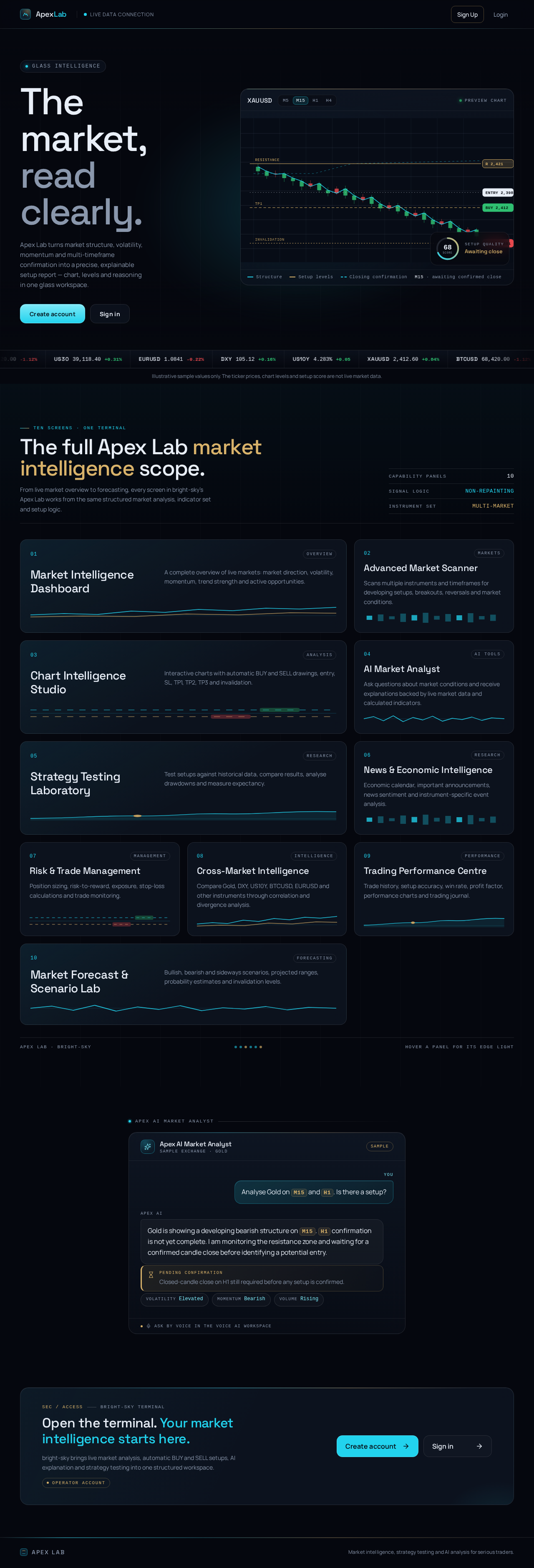
The market, read clearly.
Apex Lab turns market structure, volatility, momentum and multi-timeframe confirmation into a precise, explainable setup report — chart, levels and reasoning in one glass workspace.
Illustrative sample values only. The ticker prices, chart levels and setup score are not live market data.
The full Apex Lab market intelligence scope.
From live market overview to forecasting, every screen in bright-sky's Apex Lab works from the same structured market analysis, indicator set and setup logic.
- 01Overview
Market Intelligence Dashboard
A complete overview of live markets: market direction, volatility, momentum, trend strength and active opportunities.
- 02Markets
Advanced Market Scanner
Scans multiple instruments and timeframes for developing setups, breakouts, reversals and market conditions.
- 03Analysis
Chart Intelligence Studio
Interactive charts with automatic BUY and SELL drawings, entry, SL, TP1, TP2, TP3 and invalidation.
- 04AI Tools
AI Market Analyst
Ask questions about market conditions and receive explanations backed by live market data and calculated indicators.
- 05Research
Strategy Testing Laboratory
Test setups against historical data, compare results, analyse drawdowns and measure expectancy.
- 06Research
News & Economic Intelligence
Economic calendar, important announcements, news sentiment and instrument-specific event analysis.
- 07Management
Risk & Trade Management
Position sizing, risk-to-reward, exposure, stop-loss calculations and trade monitoring.
- 08Intelligence
Cross-Market Intelligence
Compare Gold, DXY, US10Y, BTCUSD, EURUSD and other instruments through correlation and divergence analysis.
- 09Performance
Trading Performance Centre
Trade history, setup accuracy, win rate, profit factor, performance charts and trading journal.
- 10Forecasting
Market Forecast & Scenario Lab
Bullish, bearish and sideways scenarios, projected ranges, probability estimates and invalidation levels.
Analyse Gold on M15 and H1. Is there a setup?
Gold is showing a developing bearish structure on M15. H1 confirmation is not yet complete. I am monitoring the resistance zone and waiting for a confirmed candle close before identifying a potential entry.
Open the terminal. Your market intelligence starts here.
bright-sky brings live market analysis, automatic BUY and SELL setups, AI explanation and strategy testing into one structured workspace.
Operator accountThe market, read clearly.
Apex Lab turns market structure, volatility, momentum and multi-timeframe confirmation into a precise, explainable setup report — chart, levels and reasoning in one glass workspace.
Illustrative sample values only. The ticker prices, chart levels and setup score are not live market data.
The full Apex Lab market intelligence scope.
From live market overview to forecasting, every screen in bright-sky's Apex Lab works from the same structured market analysis, indicator set and setup logic.
- 01Overview
Market Intelligence Dashboard
A complete overview of live markets: market direction, volatility, momentum, trend strength and active opportunities.
- 02Markets
Advanced Market Scanner
Scans multiple instruments and timeframes for developing setups, breakouts, reversals and market conditions.
- 03Analysis
Chart Intelligence Studio
Interactive charts with automatic BUY and SELL drawings, entry, SL, TP1, TP2, TP3 and invalidation.
- 04AI Tools
AI Market Analyst
Ask questions about market conditions and receive explanations backed by live market data and calculated indicators.
- 05Research
Strategy Testing Laboratory
Test setups against historical data, compare results, analyse drawdowns and measure expectancy.
- 06Research
News & Economic Intelligence
Economic calendar, important announcements, news sentiment and instrument-specific event analysis.
- 07Management
Risk & Trade Management
Position sizing, risk-to-reward, exposure, stop-loss calculations and trade monitoring.
- 08Intelligence
Cross-Market Intelligence
Compare Gold, DXY, US10Y, BTCUSD, EURUSD and other instruments through correlation and divergence analysis.
- 09Performance
Trading Performance Centre
Trade history, setup accuracy, win rate, profit factor, performance charts and trading journal.
- 10Forecasting
Market Forecast & Scenario Lab
Bullish, bearish and sideways scenarios, projected ranges, probability estimates and invalidation levels.
Analyse Gold on M15 and H1. Is there a setup?
Gold is showing a developing bearish structure on M15. H1 confirmation is not yet complete. I am monitoring the resistance zone and waiting for a confirmed candle close before identifying a potential entry.
Open the terminal. Your market intelligence starts here.
bright-sky brings live market analysis, automatic BUY and SELL setups, AI explanation and strategy testing into one structured workspace.
Operator account
No comments yet. Be the first!