bright-calculator
 Diya Trivedi
start a project to build a simple single page desin of calculator

Comments (0)
Sign in to leave a comment
System Requirements
System Requirements Document for bright-calculator
1. Introduction
bright-calculator is a simple calculator delivered as a single-page design. The product intent is narrow and explicit: give anyone who needs a quick sum a single screen where they can enter numbers and operators, evaluate the calculation, read the result, and clear or correct the current calculation to start again. There is no account, no saved history requirement, and no multi-page application structure — the calculator itself is the page.
The audience is the everyday person performing quick arithmetic on one screen, referred to in this document as the Calculator User. The experience is designed around playful precision: responsive keys, a live numeric display, and a page that feels alive rather than like a spreadsheet, while remaining an everyday utility.
This document is the System Requirements Document for the project requested by Diya Trivedi.
2. System Overview
2a. Product Interpretation and Delivery Boundary
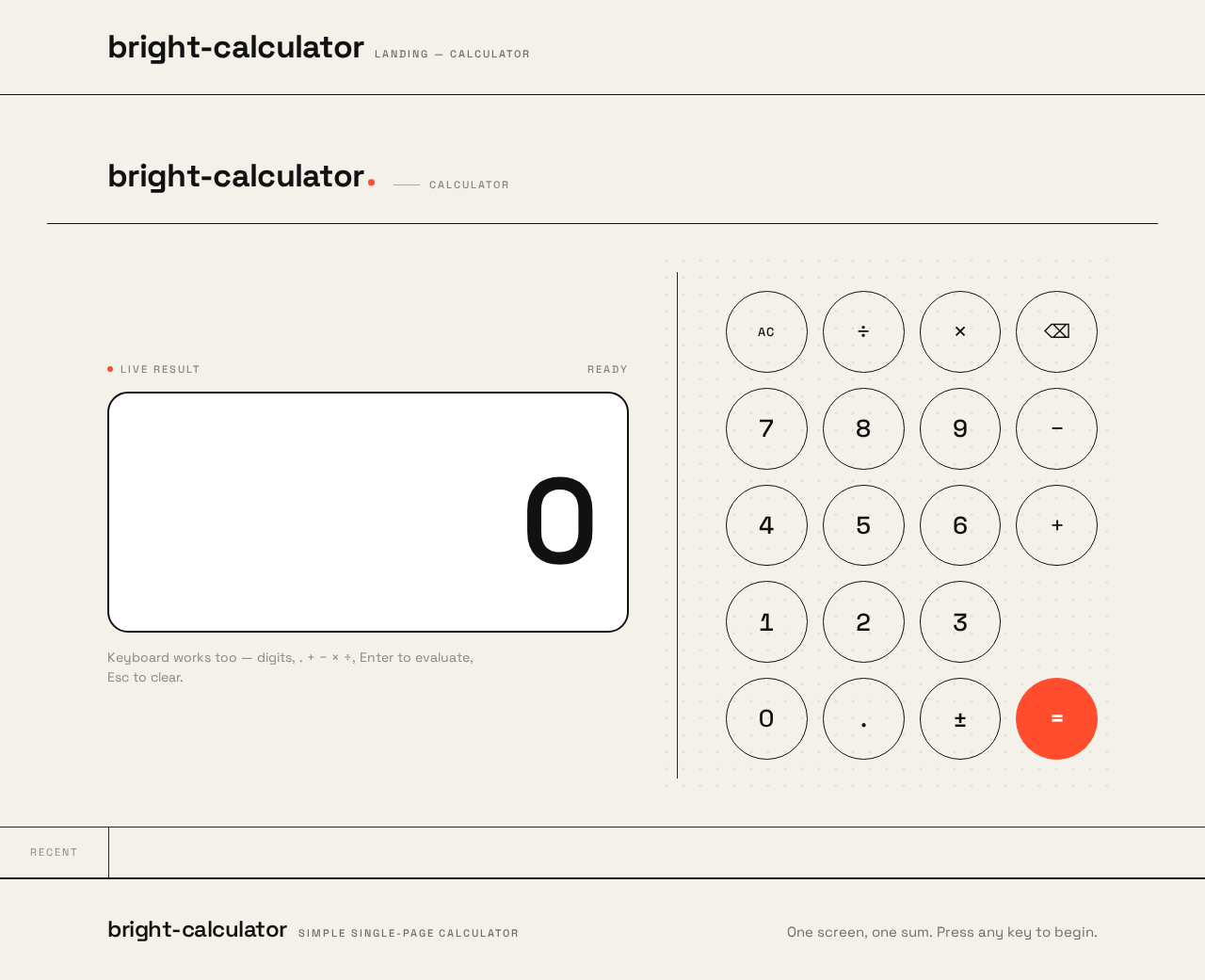
bright-calculator is a first-party, browser-delivered calculator. The entire product is one page: the calculator surface itself, presented as a warm-paper field with an oversized live result numeral, an expression line, and a circular keypad. There is no marketing page separate from the calculator — the first screen is the calculator.
Access is anonymous and immediate. No sign-in, account, profile, or identity establishment is required or implied: the calculator holds no durable per-user state that must be privately owned or resumed, and no commitment, entitlement, or value transfer is bound to a participant. The Calculator User opens the page and begins calculating.
The application is served by a shared backend process (FastAPI) and a React frontend, with a MariaDB instance provisioned as part of the scaffold. The calculator's arithmetic is a client-side interaction; the provisioned database does not by itself justify domain entities, authentication, or persistence of calculations, and none are required by the accepted source. The backend exists as the shared application process for any application APIs and domain modules; it does not add product behavior.
Everything described in this document is current scope. No future-horizon features have been accepted.
Removed from scope
- None. No concepts were removed by the user; the request is a single, unmodified commitment to a simple single-page calculator design.
2c. Page Content and Component Coverage
Landing
The anonymous public entry surface. Because the product is constrained to a single page, the Landing surface is cohesive with the calculator experience: it is the same warm-paper field that presents the calculator, with the calculator as its dominant content. It explains what the simple single-page calculator is and does through its own presence and labeling, then hands the user directly into calculation without a separate navigation step.
- Information and state
- Product identity: the calculator's name/wordmark and a short micro-label identifying it as a calculator.
- The live calculator itself as the dominant element (see Calculator below); the Landing surface does not duplicate it as a separate widget.
- No loading state is required for first paint beyond the page itself; no empty state beyond the initial zeroed display.
- Primary actions
- Begin calculating immediately by pressing any key on the presented keypad.
- Supporting actions
- None beyond those owned by the Calculator surface.
- Domain entities
- None persisted. The in-memory calculation (current entry, pending operator, expression, result) is the only state.
- Component responsibilities
- Page shell: warm-paper background field, generous margins, responsive single centered column on mobile/tablet and two-column split on desktop.
- Identity header: wordmark and micro-label, kept whole and inside the viewport at 375px, 768px, and 1280px.
- Embeds the Calculator surface as its content.
- States
- Loading: not applicable (static first paint).
- Empty: initial display shows
0with an empty expression line. - Success: user is calculating.
- Error: not applicable at this surface.
- Recovery: not applicable at this surface.
Calculator
The single-page calculator surface where the Calculator User enters numbers and operators, evaluates the calculation, sees the result, and clears to start again.
- Information and state
- Result readout: oversized tabular numeral,
clamp(56px, 12vw, 128px), Space Grotesk 600, right-aligned in the display panel; the largest element on the page; updates on every keypress. - Expression line: 20px, shows the current expression (entered operands and the active operator); nudges with a small horizontal parallax when an operator key is hovered.
- Vermilion underline:
#FF4D2E, sweeps in beneath the result on each completed calculation. - Active operator indicator: the currently selected operator key is rendered in the vermilion accent.
- Display panel: rounded-rectangle panel,
#FFFFFFsurface, 2px black border, no shadow. - Keypad: 4×5 grid of perfect circular keys, evenly spaced, hairline black ring, solid fill that inverts on press.
- Recent-results ticker: a tiny horizontal marquee of recent results along the bottom edge.
- Dot-grid texture: faint generative dot-grid at 8% opacity behind the keypad, drifting subtly with pointer movement.
- Vertical hairline rule: separates display/expression column from keypad column on desktop.
- Result readout: oversized tabular numeral,
- Primary actions
- Press digit keys
0–9to enter numbers. - Press operator keys (
+,−,×,÷) to select an operation; the active operator is highlighted in vermilion.
- Press digit keys
- Press the equals key (
=) to evaluate the current expression; the equals key is the vermilion-accented key. - Press the clear key to reset the current calculation and start again.
- Press the decimal key to enter a fractional value.
- Supporting actions
- Correct the current calculation by clearing and re-entering.
- Hover an operator key to nudge the expression line (desktop pointer devices).
- Hover the recent-results ticker to pause its scroll.
- Domain entities
- Current entry (the number being typed).
- Pending operator.
- Accumulated expression.
- Computed result.
- Recent-results list (in-memory, session-scoped, for the ticker).
- Component responsibilities
- Display panel: renders result readout, expression line, and vermilion underline; owns odometer roll animation on result change.
- Keypad: renders the 4×5 circular key grid; owns press feedback (scale to 0.92, fill inversion, 90ms snap) and operator hover parallax.
- Ticker: renders recent results as a continuous marquee; pauses on hover; wraps into static readable rows under
prefers-reduced-motion. - Dot-grid layer: decorative, cursor-reactive, non-interactive, never covers readable text or controls.
- States
- Loading: not applicable.
- Empty: display shows
0, expression line empty, ticker empty or hidden until a first result exists. - Success: result computed and shown; result numeral rolls digit-by-digit (odometer, 220ms stagger); vermilion underline sweeps in; result appended to the ticker.
- Error: invalid or incomplete expression (for example, pressing equals with no pending operation, or division by zero) — the display shows an error indication rather than a stale or misleading result, and the user can clear to recover.
- Recovery: pressing clear resets entry, operator, expression, and result to the empty state; the user can immediately begin a new calculation.
- Reduced motion: odometer roll and parallax removed; ticker wraps into static readable rows; all keys and text remain fully usable and whole at 375px, 768px, and 1280px.
3. Functional Requirements
FR-1 — Enter numbers As a Calculator User, I should be able to press digit keys to enter a number into the calculator, so that I can build the operands of my calculation.
- Provenance:
explicit(simple calculator) withrequired_inferencefor the specific keypad interaction. - Trigger/input: user presses a digit key (
0–9) or the decimal key. - Observable result: the result readout updates to show the entered number; the key scales to 0.92 and inverts fill with a 90ms snap.
- Access state: anonymous, no identity required.
- Failure/recovery: none material; clear resets entry.
- Continuation: user may continue entering digits or select an operator.
FR-2 — Select an operator
As a Calculator User, I should be able to press an operator key (+, −, ×, ÷) to choose the operation, so that the calculator knows how to combine my operands.
- Provenance:
explicit(calculator) withrequired_inferencefor the active-operator highlight. - Trigger/input: user presses an operator key.
- Observable result: the selected operator is highlighted in vermilion (
#FF4D2E); the expression line shows the pending expression; hovering an operator nudges the expression line with a small horizontal parallax. - Access state: anonymous.
- Failure/recovery: pressing a different operator replaces the pending operator.
- Continuation: user enters the next operand.
FR-3 — Evaluate the calculation As a Calculator User, I should be able to press the equals key to evaluate my expression and see the result, so that I get the answer to my sum.
- Provenance:
explicit(calculator) withrequired_inferencefor the odometer roll and underline sweep. - Trigger/input: user presses the equals key (
=, vermilion-accented). - Observable result: the result readout shows the computed result, rolling digit-by-digit odometer-style (220ms stagger); the vermilion underline sweeps in beneath the result; the result is appended to the recent-results ticker.
- Access state: anonymous.
- Failure/recovery: an invalid or incomplete expression (including division by zero) shows an error indication instead of a misleading result; the user clears to recover.
- Continuation: the user may chain a new operation from the result or clear to start again.
FR-4 — Clear and start again As a Calculator User, I should be able to press the clear key to reset the current calculation, so that I can correct a mistake or begin a new sum.
- Provenance:
required_inference(indispensable recovery mechanic for the accepted calculator lifecycle). - Trigger/input: user presses the clear key.
- Observable result: entry, pending operator, expression line, and result readout reset to the empty state (
0, empty expression). - Access state: anonymous.
- Failure/recovery: this is the recovery path.
- Continuation: user begins a new calculation immediately.
FR-5 — See recent results As a Calculator User, I should see a small ticker of my recent results along the bottom edge, so that I can glance back at what I just computed.
- Provenance:
required_inference(observable continuation of the accepted calculation lifecycle; session-scoped, in-memory only). - Trigger/input: each completed calculation appends its result.
- Observable result: the ticker scrolls continuously; it pauses on hover; under
prefers-reduced-motionit wraps into static readable rows. - Access state: anonymous; session-scoped, not persisted.
- Failure/recovery: if no results exist yet, the ticker is empty or hidden.
- Continuation: the user continues calculating.
FR-6 — Reduced-motion usability As a Calculator User who prefers reduced motion, I should be able to use the calculator with motion removed, so that the page remains usable and readable.
- Provenance:
explicit(creative direction motion constraint). - Trigger/input:
prefers-reduced-motion: reduce. - Observable result: odometer roll and operator parallax are removed; the ticker wraps into static readable rows; all keys, numerals, labels, and controls remain whole and inside the viewport at 375px, 768px, and 1280px.
- Access state: anonymous.
- Failure/recovery: not applicable.
- Continuation: full calculation lifecycle remains available.
4. User Personas
Calculator User
- Product context: An everyday person who needs a quick sum on a single screen. They arrive at bright-calculator with no account and no setup; the calculator is immediately in front of them.
- Primary goal: Perform everyday arithmetic quickly — enter numbers and operators, evaluate, read the result, and clear or correct to start again.
- Distinct accepted responsibilities:
- Enters operands via the circular digit keys.
- Selects an operator, seeing it highlighted in vermilion.
- Commits the calculation with the equals key and reads the rolled result.
- Clears to correct a mistake or begin a new sum.
- Glances at the recent-results ticker for continuity.
- Relevant inputs or decisions: which digits to enter, which operator to apply, when to evaluate, and when to clear.
- Interactions with other accepted participants: none. The Calculator User is the only active human persona; there is no counterparty, recipient, or approver in the accepted lifecycle.
- Observable success: the result readout shows the correct answer, the vermilion underline confirms the calculation, and the user can immediately start the next sum.
- What makes this role distinct: the role is defined by direct, tactile manipulation of a single calculator surface — not by browsing, configuring, or managing anything. Every action is a keypress with immediate visual feedback.
5. Core User Flows
Flow 1 — Perform a calculation
- Starting context: The Calculator User opens bright-calculator in a browser. No sign-in is required.
- Landing: The warm-paper field fills the viewport. On desktop, the display and expression line sit on the left, the circular keypad on the right, divided by a vertical hairline rule. On mobile/tablet, a single centered column. The result readout shows
0. - Enter first operand: The user presses digit keys. Each key scales to 0.92 and inverts fill with a 90ms snap; the result readout updates.
- Select operator: The user presses an operator key. It highlights in vermilion; the expression line shows the pending expression.
- Enter second operand: The user presses digit keys for the second operand.
- Evaluate: The user presses the equals key. The result readout rolls digit-by-digit odometer-style (220ms stagger); the vermilion underline sweeps in beneath the result; the result is appended to the recent-results ticker.
- Observable result: The correct answer is displayed as the largest element on the page.
- Continuation: The user may chain a new operation from the result or press clear to start again.
Flow 2 — Correct a mistake and start again
- Starting context: The user is mid-calculation and has entered an incorrect digit or operator.
- Clear: The user presses the clear key. Entry, pending operator, expression line, and result readout reset to
0with an empty expression. - Recovery: The user immediately re-enters the intended calculation following Flow 1.
- Observable result: The display returns to the empty state and the user is unblocked.
Flow 3 — Handle an invalid expression
- Starting context: The user presses equals with an incomplete expression, or performs division by zero.
- Error state: The display shows an error indication rather than a stale or misleading result.
- Recovery: The user presses clear; the calculator resets to the empty state.
- Continuation: The user begins a valid calculation following Flow 1.
Flow 4 — Reduced-motion use
- Starting context: The user's system has
prefers-reduced-motion: reduce. - Static arrangement: The odometer roll and operator parallax are removed; the recent-results ticker wraps into static readable rows.
- Calculation: The user completes Flow 1 with all keys, numerals, labels, and controls whole and inside the viewport at 375px, 768px, and 1280px.
- Observable result: The result appears without motion; the calculator remains fully usable.
6. Visuals Colors and Theme
Muse: Yugo Nakamura — interaction as delight, kinetic type, cursor-reactive physics, generative grids with minimal chrome. Headline idea: "Interaction as delight — a calculator you can feel."
Color tokens (light mode)
| Role | Hex | Usage |
|---|---|---|
| Background | #F4F1EA | Warm paper ground, full viewport |
| Surface | #FFFFFF | Display panel, pressed-key states |
| Text | #111111 | Pure black type and key rings |
| Primary | #111111 | Keys, primary controls |
| Accent | #FF4D2E | Equals key, active operator, live result underline (~5% of surface) |
| Muted | #8C877C | Secondary labels, hint text |
Typography
- Headings and body: Space Grotesk (500–700 weight, tight tracking
-0.02em). - Display numerals: Space Grotesk 600, tabular numerals,
clamp(56px, 12vw, 128px). - Type scale (1.333 modular): display numerals
clamp(56px, 12vw, 128px); expression line 20px; key labels 22–28px; micro-labels 11px uppercase with0.18emletterspacing; body/hints 15px. - Forbidden fonts: Inter, Roboto, Arial, system-ui.
Shape language
- Perfect circles for every number and operator key, evenly spaced in a 4×5 grid, hairline black ring, solid fill that inverts on press.
- Display panel: rounded-rectangle, 2px black border, no shadow.
- No blobs, no glass, no gradient — flat colour and precise geometry only.
Layout
- Single centered column on mobile and tablet.
- Desktop two-column split: large live display and expression history on the left, circular keypad on the right, separated by a vertical hairline rule.
- Wide warm-paper field with generous margins; tiny horizontal ticker of recent results along the bottom edge.
Imagery
None — motion and typography replace imagery. The only graphics are the black circular keys, the display panel, hairline rules, and a faint generative dot-grid texture at 8% opacity behind the keypad.
Avoid
Gradient blobs or glassmorphism; blue or indigo primary buttons on white; Inter/Roboto/Arial/system-ui; rectangular rounded keys with drop shadows; identical hover-lift cards; marketing headline + subtext + CTA hero; stock photography or illustration; bouncy spring easing on key presses.
7. Signature Design Concept
The first screen is the calculator, not a marketing hero. A warm paper field (#F4F1EA) fills the viewport. On the left, a huge live result numeral (clamp(56px, 12vw, 128px), Space Grotesk 600, tabular) sits above a small expression line and a vermilion underline that animates on each calculation. On the right, a 4×5 grid of black-ringed circular keys. The dominant element is the oversized result numeral — the largest thing on the page, changing on every keypress.
Signature moves:
- Oversized tabular result numeral that rolls digit-by-digit odometer-style on every calculation, with a vermilion underline that sweeps in beneath it.
- Every key is a perfect black-ringed circle that scales to 0.92 and inverts to solid black-on-paper (or paper-on-black for the equals key) on press with a 90ms snap.
- Recent-results marquee ticker along the bottom edge that scrolls continuously, pauses on hover, and wraps into static readable rows under
prefers-reduced-motion. - Desktop split layout: display + expression history left, keypad right, divided by a single vertical hairline rule — the calculator becomes a poster, not a widget.
- A faint cursor-reactive dot-grid texture (8% opacity) behind the keypad that drifts subtly with pointer movement.
No headline-above-button composition, no gradient, no card sitting on a white page.
8. Interaction Model & Motion Direction
Interaction Model: Animated Motion Tempo: expressive Hero Dimensionality: layered_2d
Landing Hero Motion Brief
- Focal subject: The oversized live result numeral — the largest element on the page, changing on every keypress.
- Input → transformation → outcome thesis: A keypress (input) triggers a 90ms snap scale-and-invert on the key and, on evaluation, an odometer-style digit roll on the result numeral with a vermilion underline sweep (transformation), producing a result that feels physically computed rather than merely displayed (outcome).
- Motion vocabulary: 90ms snap on key press (scale to 0.92, fill inversion); 220ms staggered digit roll on result change; vermilion underline sweep on each calculation; small horizontal parallax nudge on the expression line when hovering an operator; continuous recent-results ticker that pauses on hover; cursor-reactive dot-grid drift at 8% opacity.
- Composed first frame: Warm paper field; left column with
0in oversized tabular Space Grotesk 600 above an empty expression line; right column with the 4×5 circular keypad; vertical hairline rule between; faint dot-grid behind the keypad; ticker along the bottom edge. - Reduced-motion state: Odometer roll and parallax removed; ticker wraps into static readable rows; all keys, numerals, labels, and controls remain whole and inside the viewport at 375px, 768px, and 1280px.
9. Non-Functional Requirements
- Single-page constraint (
explicit): The calculator design must be a single page. The Landing and Calculator surfaces are cohesive within that one page; no additional routes or pages are introduced. - Readable text and controls (
explicit, creative direction): Headlines, wordmarks, labels, numbers, and controls stay entirely inside the viewport and their container at 375px, 768px, and 1280px, wrapping or scaling (e.g.font-size: clamp(...)) to fit. No other element covers any part of them. Decoration and motion may be cropped or bled, but never over readable text or controls. - Moving content (
explicit, creative direction): The recent-results ticker may cross the viewport edge by design; every item must become fully readable as it passes. Underprefers-reduced-motion, it wraps into static readable rows. - Reduced motion (
explicit, creative direction): All motion respectsprefers-reduced-motionby removing the roll and parallax and letting the ticker wrap into static rows. - Accessibility of contrast (
required_inference): Pure black#111111on warm paper#F4F1EAand on white#FFFFFFprovides high contrast; the vermilion accent#FF4D2Eis reserved for the equals key, active operator, and result underline, not for body text. - No persistence requirement (
explicitby absence): The accepted source does not require saved calculations, accounts, or history beyond the session-scoped ticker. The provisioned MariaDB instance does not justify domain entities or authentication.
10. Tech Stack
- Frontend: React application UI (single page).
- Backend: Shared FastAPI process for application APIs and domain modules.
- Database: MariaDB, provisioned as part of the scaffold. No domain entities or persistence are required by the accepted calculator behavior; the database remains available for application-owned data without adding product scope.
- Containerization: Docker / docker-compose for the backend, database, and frontend services as provisioned in the initial scaffold.
11. Assumptions and Constraints
- Assumption (
required_inference): The calculator performs standard four-function arithmetic (+,−,×,÷) with decimal entry, which is the minimal interpretation of "simple calculator." - Assumption (
required_inference): The recent-results ticker is session-scoped and in-memory; it is not persisted and does not constitute a history feature. - Constraint (
explicit): The design must be a single page. - Constraint (
explicit): The creative direction's palette, typography, shape language, layout, and motion rules are authoritative for visuals and interaction. - Constraint (
explicit): The generic indigo/blue-on-white SaaS template is forbidden. - Constraint (
explicit): No account, sign-in, or identity establishment is required; access is anonymous. - Constraint (
explicitby absence): No future-horizon features are accepted; all requirements are current.
12. Glossary
- Calculator User: The single active human persona who performs arithmetic on the calculator.
- Result readout: The oversized tabular numeral displaying the current value or computed result.
- Expression line: The 20px line showing the pending expression (operands and active operator).
- Active operator: The currently selected operator key, highlighted in vermilion.
- Odometer roll: The 220ms staggered digit-by-digit animation of the result numeral when it changes.
- Recent-results ticker: The session-scoped marquee of recent results along the bottom edge.
- Dot-grid texture: The faint 8% opacity cursor-reactive decorative grid behind the keypad.
- Reduced motion: The
prefers-reduced-motion: reducestate in which roll and parallax are removed and the ticker wraps into static rows.
bright-calculator
Calculator
Live result
Keyboard works too — digits, . + − × ÷, Enter to evaluate, Esc to clear.
bright-calculator
Calculator
Live result
Keyboard works too — digits, . + − × ÷, Enter to evaluate, Esc to clear.
No comments yet. Be the first!