brave-existing
 manikanta varma
Build my existing **CampusConnect** project into a polished, production-quality **SaaS platform for college events**. Do NOT treat it as a basic college CRUD project. It should look like a real startup product suitable for recruiters, colleges, and users. ### STACK Frontend: React 18, TypeScript, Vite, Tailwind CSS, shadcn/ui, Lucide React, React Router, TanStack Query, React Hook Form, Zod, Recharts. Backend: Node.js, Express.js, TypeScript, REST APIs, JWT, Bcrypt.js, Zod. Database: PostgreSQL with Supabase. Deployment: Vercel frontend, Render backend, Supabase database. First inspect the existing codebase and reuse working functionality. Do not unnecessarily rewrite existing features. ### PRODUCT CampusConnect connects students with college events and gives clubs/organizers tools to create, manage, and analyze events. Tagline: **Connecting Students Beyond Classrooms. Every Event. Every Student. One Platform.** Make the UI modern, minimal, premium, responsive, and SaaS-like. Take general inspiration from products such as Linear, Vercel, Notion, and Stripe without copying them. ### ROLES Student: * Discover/search/filter events * View event details * Register/cancel registration * Bookmark events * View upcoming and attended events * View tickets and certificates * Receive notifications * Manage profile Organizer: * Create/edit/publish events * Manage registrations * Generate and scan QR attendance * View analytics * Export participants * Issue certificates * Send announcements College Admin: * Manage users, clubs, organizers and events * Moderate events * View analytics and reports Super Admin: * Manage colleges/organizations * Manage plans * View platform analytics Implement proper backend RBAC. ### SAAS ARCHITECTURE Make the system multi-tenant. Organization → Users → Clubs → Events → Registrations → Attendance → Analytics. Users must never access another organization's private data. Prepare architecture for: Free / Pro / Enterprise Do not create fake payment functionality. ### AUTH Implement: * Registration * Login/logout * Forgot/reset password * Email/OTP verification * JWT authentication * Protected routes * Role-based authorization Use Bcrypt.js. Never expose secrets, passwords, tokens, database errors, or stack traces. ### UI/UX Create a consistent design system. Use: * Excellent typography * Generous whitespace * Rounded cards * Subtle borders * Soft shadows * Clean icons * Strong visual hierarchy * Subtle animations * Responsive layouts Support Light / Dark / System themes. Create reusable components for buttons, inputs, cards, dialogs, tables, badges, forms, modals, toasts, skeletons and empty states. Every page must look like part of the same product. ### LANDING PAGE Create: Navbar: CampusConnect, Features, Events, Students, Organizers, Pricing, About, Login, Get Started. Hero: **Connect. Participate. Grow.** Explain the product clearly. Buttons: Explore Events Create an Event Add: * Product/dashboard preview * Features * How it works * Student benefits * Organizer benefits * Analytics preview * Final CTA * Footer Do not invent fake customers or company logos. ### DASHBOARD Create a SaaS dashboard with responsive sidebar, top navigation, search, notifications and profile menu. Student: Dashboard, Discover Events, My Events, Bookmarks, Certificates, Notifications, Profile. Organizer: Dashboard, Events, Create Event, Registrations, Attendance, Analytics, Notifications, Settings. Admin: Overview, Users, Organizations, Clubs, Events, Analytics, Reports, Settings. ### STUDENT EXPERIENCE Dashboard should show: * Registered events * Upcoming events * Events attended * Certificates * Recommended events * Recent activity * Calendar Event cards should include image, category, title, date, time, location, organizer, seats, bookmark and registration status. ### EVENTS Create event discovery with: Search Category filter Date filter Location filter Event type Availability Sort by: Recommended Upcoming Popular Recently added Event details should include banner, title, organizer, date/time, location, description, schedule, requirements, FAQs and registration card. After registration show: **You're registered ✓** Actions: View Ticket Add to Calendar Cancel Registration ### EVENT CREATION Use a multi-step wizard: 1. Basic information 2. Schedule 3. Location 4. Registration settings 5. Review/publish Support: Save Draft Publish Event ### ORGANIZER Create analytics dashboard with: Total Events Registrations Attendance Rate Engagement Charts: Registrations over time Attendance Popular events Events by category Add participant table and CSV export. ### QR ATTENDANCE Generate a unique QR code for every registration. Student ticket contains: Name, event, registration ID, QR code. Organizer scans QR using camera. Validate: * Registration exists * Correct event * Correct organization * No duplicate attendance Then mark attendance. ### TICKETS & CERTIFICATES Create professional digital event tickets containing event/student details and QR code. Allow organizers to issue certificates after completed events. Certificate should contain: Student name, event, organizer, date, certificate ID. Create: `/verify/certificate/:id` for public verification. ### NOTIFICATIONS Support: Registration confirmation Event reminder Event update Event cancellation Attendance confirmation Certificate issued Organizer announcement Include unread count, mark read and mark all read. ### CLUBS Create club profiles with: Logo Name Description Category Social links Members Events Students can follow clubs. ### ADMIN Admin dashboard should include: Students Organizers Events Registrations Attendance Organizations Add charts for user growth, event growth, registrations and engagement. Admin can manage users, organizations, clubs, categories and events. ### DATABASE Use PostgreSQL tables such as: organizations users clubs club_members events event_categories event_registrations event_attendance event_bookmarks notifications certificates plans subscriptions audit_logs Use UUIDs, foreign keys, indexes, constraints, timestamps and organization-level relationships. ### API Create clean REST APIs for: Auth Users Organizations Events Registrations Attendance Certificates Notifications Clubs Analytics Admin Use consistent responses: { success: true, data: {}, message: "..." } Use centralized error handling. ### SECURITY Implement: JWT RBAC Tenant isolation Bcrypt Zod validation Rate limiting CORS Helmet Secure headers Input validation File validation Backend must enforce permissions. ### QUALITY The application must be: * Fully responsive * Accessible * Fast * Type-safe * Modular * Maintainable Every feature needs loading, empty, error and success states. Use pagination, caching, lazy loading and database indexes where appropriate. Create `.env.example` and never commit real secrets. ### DEVELOPMENT PHASES Build incrementally: 1. Inspect existing project + architecture + design system + database + authentication 2. Landing page + event discovery 3. Student dashboard + registration + bookmarks + tickets 4. Organizer dashboard + event management 5. QR attendance + analytics + certificates 6. Notifications + clubs + admin 7. Multi-tenant SaaS + subscription-ready architecture 8. Security + responsive polish + accessibility + performance + testing Do not implement everything at once. Before every phase, inspect the current code and reuse existing functionality. ### FINAL GOAL CampusConnect should feel like a **real SaaS startup product**, not a college project. Prioritize: **Functionality → Security → Architecture → UX → Visual quality → Performance**

Comments (0)
Sign in to leave a comment
Architecture
No Services Diagrams Yet
CampusConnect
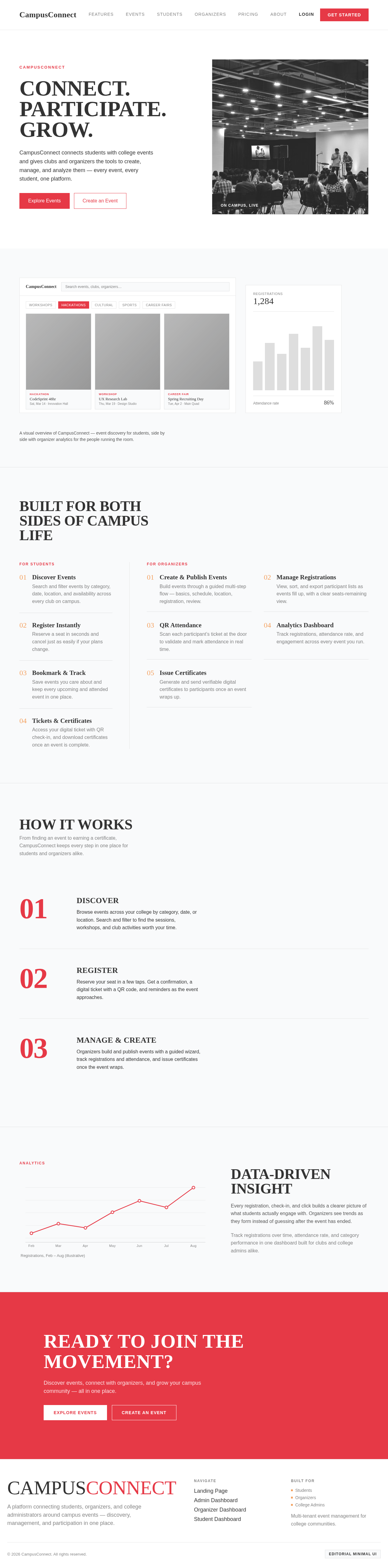
CONNECT.PARTICIPATE.GROW.
CampusConnect connects students with college events and gives clubs and organizers the tools to create, manage, and analyze them — every event, every student, one platform.
 On Campus, Live
A visual overview of CampusConnect — event discovery for students, side by side with organizer analytics for the people running the room.
Built for both sides of campus life
For Students
Discover Events
Search and filter events by category, date, location, and availability across every club on campus.
Register Instantly
Reserve a seat in seconds and cancel just as easily if your plans change.
Bookmark & Track
Save events you care about and keep every upcoming and attended event in one place.
Tickets & Certificates
Access your digital ticket with QR check-in, and download certificates once an event is complete.
For Organizers
Create & Publish Events
Build events through a guided multi-step flow — basics, schedule, location, registration, review.
Manage Registrations
View, sort, and export participant lists as events fill up, with a clear seats-remaining view.
QR Attendance
Scan each participant’s ticket at the door to validate and mark attendance in real time.
Analytics Dashboard
Track registrations, attendance rate, and engagement across every event you run.
Issue Certificates
Generate and send verifiable digital certificates to participants once an event wraps up.
How It Works
From finding an event to earning a certificate, CampusConnect keeps every step in one place for students and organizers alike.
Discover
Browse events across your college by category, date, or location. Search and filter to find the sessions, workshops, and club activities worth your time.
Register
Reserve your seat in a few taps. Get a confirmation, a digital ticket with a QR code, and reminders as the event approaches.
Manage & Create
Organizers build and publish events with a guided wizard, track registrations and attendance, and issue certificates once the event wraps.
Analytics
Registrations, Feb – Aug (illustrative)
Data‑Driven
Insight
Every registration, check-in, and click builds a clearer picture of what students actually engage with. Organizers see trends as they form instead of guessing after the event has ended.
Track registrations over time, attendance rate, and category performance in one dashboard built for clubs and college admins alike.
Ready to join the movement?
Discover events, connect with organizers, and grow your campus community — all in one place.
CampusConnect
CONNECT.PARTICIPATE.GROW.
CampusConnect connects students with college events and gives clubs and organizers the tools to create, manage, and analyze them — every event, every student, one platform.
On Campus, LiveA visual overview of CampusConnect — event discovery for students, side by side with organizer analytics for the people running the room.
Built for both sides of campus life
For Students
Discover Events
Search and filter events by category, date, location, and availability across every club on campus.
Register Instantly
Reserve a seat in seconds and cancel just as easily if your plans change.
Bookmark & Track
Save events you care about and keep every upcoming and attended event in one place.
Tickets & Certificates
Access your digital ticket with QR check-in, and download certificates once an event is complete.
For Organizers
Create & Publish Events
Build events through a guided multi-step flow — basics, schedule, location, registration, review.
Manage Registrations
View, sort, and export participant lists as events fill up, with a clear seats-remaining view.
QR Attendance
Scan each participant’s ticket at the door to validate and mark attendance in real time.
Analytics Dashboard
Track registrations, attendance rate, and engagement across every event you run.
Issue Certificates
Generate and send verifiable digital certificates to participants once an event wraps up.
How It Works
From finding an event to earning a certificate, CampusConnect keeps every step in one place for students and organizers alike.
Discover
Browse events across your college by category, date, or location. Search and filter to find the sessions, workshops, and club activities worth your time.
Register
Reserve your seat in a few taps. Get a confirmation, a digital ticket with a QR code, and reminders as the event approaches.
Manage & Create
Organizers build and publish events with a guided wizard, track registrations and attendance, and issue certificates once the event wraps.
Analytics
Registrations, Feb – Aug (illustrative)
Data‑Driven
Insight
Every registration, check-in, and click builds a clearer picture of what students actually engage with. Organizers see trends as they form instead of guessing after the event has ended.
Track registrations over time, attendance rate, and category performance in one dashboard built for clubs and college admins alike.
Ready to join the movement?
Discover events, connect with organizers, and grow your campus community — all in one place.
No comments yet. Be the first!