bindu
 Krishna Sinha
Role: Senior Product Designer & Frontend Engineer (Next.js, React, Tailwind CSS, TypeScript, Lucide Icons). Context & Objective: Design and build an end-to-end, zero-fluff web interface for "বিন্দু" (Bindu), a mission-critical blood donation platform. In medical emergencies, cognitive overload and unnecessary friction can cost lives. The UI must be hyper-focused, ruthless with simplicity, and immediately operational under stress. Design System & Visual Language: - Vibe: Clinical precision, urgency without panic, trust, and clarity. - Palette: * Primary/Accent: Deep Crimson / Blood Red (e.g., `#991B1B` / `#DC2626` / Tailwind `red-600` to `red-800`). Use sparingly for call-to-actions, blood group tags, and emergency status—do NOT drown the screen in red. * Status Colors: Amber (`amber-500`) for urgent, Rose/Red (`red-600`) for critical/immediate, Emerald (`emerald-600`) for fulfilled/available donor. * Neutral Base: Sterile, high-contrast dark-mode-first or clean light mode (Tailwind `zinc-900`/`zinc-950` or crisp white/slate). * Typography: Crisp sans-serif (Inter or Geist), high legibility, strict typographic scale. Blood group badges must be bold and oversized. Key Constraints: - NO generic hero sections with stock photos, inspirational quotes, or lengthy storytelling. - Every pixel must serve one of two personas: 1. Seeker in urgent need of blood. 2. Potential donor willing to respond. Required Core Views & Architecture: 1. Global Shell / Header: - Minimalist branding: "বিন্দু" with a clean crimson indicator dot. - Fast-action utility: Instant toggle for "Need Blood" vs "Available to Donate". - Quick notification indicator for active matched requests. 2. Above-the-Fold Instant Action Panel (The Core Entry): - High-priority split action: * Left/Primary: "Request Blood Urgently" (High-contrast, prominent). * Right/Secondary: "Browse Active Urgent Needs" (Searchable directly without scrolling). - Instant metric: Live active units needed nearby (simple counter, zero animations). 3. The Request Flow (Zero-Friction Modal or Dedicated View): - Minimal single-step or linear stepped form strictly capturing critical medical data: * Blood Group: Large, tap-friendly pill buttons (`A+`, `A-`, `B+`, `B-`, `AB+`, `AB-`, `O+`, `O-`). * Quantity: Bags/units needed (stepper counter). * Patient Location & Facility: Hospital name, specific ward/cabin, and district/area. * Urgency Level: Immediate (Within 2 hrs) | Urgent (Within 6 hrs) | Scheduled (Date/Time picker). * Primary Contact: Attendee phone number (with instant direct-call CTA) + alternate contact. * Reason/Context (Optional single-line input): e.g., "Surgery", "Thalassemia", "Accident". - Prominent submit action: "Broadcast Emergency Request". 4. Live Emergency Feed / Seeker Feed (Scannable Cards): - High-density, high-legibility cards prioritized strictly by urgency: * Top badge: Blood group badge in bold red pill (e.g., [ O- ]) + Urgency badge ([ 🚨 Critical: Need within 2h ]). * Location: Hospital name + City/Area clearly pinned with distance/location icon. * Requirement: "2 Bags required" • "1 Bag managed". * Direct Actions: - Primary: One-click "I Can Donate" button. - Secondary: Direct dial "Call Attendee" button. - Tertiary: Copy details / Share via WhatsApp. 5. Donor Availability & Response View: - Quick toggle: "My Status: Available to Donate / Ineligible (Cooldown until [Date])". - Simple eligibility checkpoint: "Last donated: [X] months ago". - Direct response log: Showing requests where the donor confirmed arrival or pledged donation. Deliverable: Provide modular, production-ready React components styled with Tailwind CSS, typed with TypeScript, using Lucide icons. Focus on accessible form controls, crisp visual hierarchy, high contrast, and tactile, high-feedback states for buttons and badges.

Comments (0)
Sign in to leave a comment
Project Tasks
21 planning tasksGenerate system requirement document
Generate personas & user flows
Create flow for Seeker
Create flow for Potential Donor
Landing
Fix Landing review finding: frontend/src/components/Landing Emergency Feed Preview.jsx…
Landing / Global Header
Landing / Dispatch Panel
Landing / Blood Line Rule
Landing / Emergency Feed Preview
Landing / Footer
Global Header
Footer
Login
Sign Up
Blood Request
Emergency Feed
Donor Availability
Response Log
Architecture
Workspace task plan
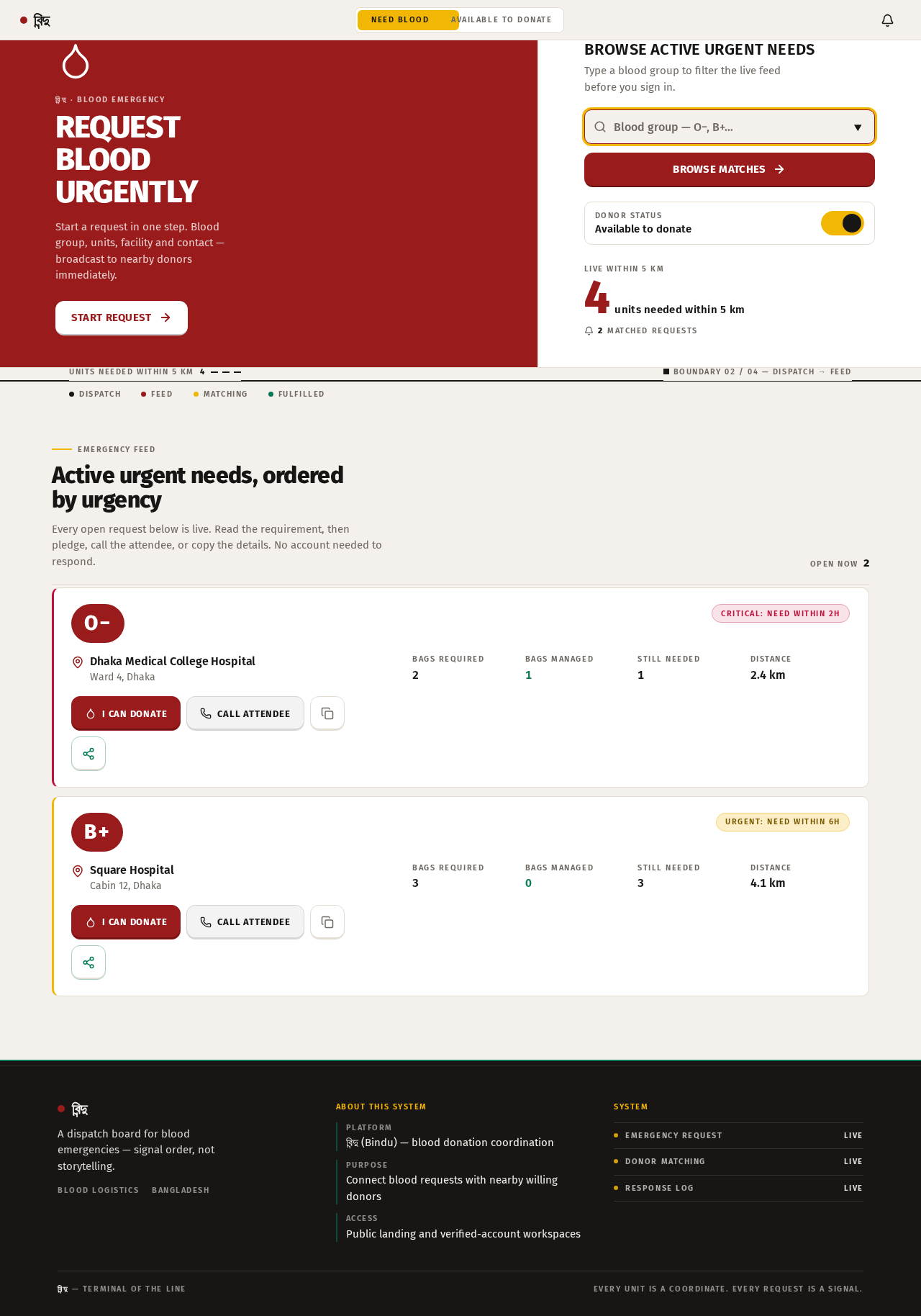
বিন্দু · Blood emergency
Request Blood Urgently
Start a request in one step. Blood group, units, facility and contact — broadcast to nearby donors immediately.
Start requestBrowse Active Urgent Needs
Type a blood group to filter the live feed before you sign in.
Units needed within 5 km4
Boundary 02 / 04 — Dispatch → Feed
Active urgent needs, ordered by urgency
Every open request below is live. Read the requirement, then pledge, call the attendee, or copy the details. No account needed to respond.
- O−Critical: Need within 2hDhaka Medical College HospitalWard 4, DhakaBags required2Bags managed1Still needed1Distance2.4 km
2 Bags required • 1 Bag managed. Call attendee +880 171 1000001.
- B+Urgent: Need within 6hSquare HospitalCabin 12, DhakaBags required3Bags managed0Still needed3Distance4.1 km
3 Bags required • 0 Bags managed. Call attendee +880 171 1000002.
বিন্দু · Blood emergency
Request Blood Urgently
Start a request in one step. Blood group, units, facility and contact — broadcast to nearby donors immediately.
Start requestBrowse Active Urgent Needs
Type a blood group to filter the live feed before you sign in.
Units needed within 5 km4
Boundary 02 / 04 — Dispatch → Feed
Active urgent needs, ordered by urgency
Every open request below is live. Read the requirement, then pledge, call the attendee, or copy the details. No account needed to respond.
- O−Critical: Need within 2hDhaka Medical College HospitalWard 4, DhakaBags required2Bags managed1Still needed1Distance2.4 km
2 Bags required • 1 Bag managed. Call attendee +880 171 1000001.
- B+Urgent: Need within 6hSquare HospitalCabin 12, DhakaBags required3Bags managed0Still needed3Distance4.1 km
3 Bags required • 0 Bags managed. Call attendee +880 171 1000002.
No comments yet. Be the first!