bindu
 Krishna Sinha
Role: Senior Product Designer & Frontend Engineer (Next.js, React, Tailwind CSS, TypeScript, Lucide Icons). Context & Objective: Design and build an end-to-end, zero-fluff web interface for "বিন্দু" (Bindu), a mission-critical blood donation platform. In medical emergencies, cognitive overload and unnecessary friction can cost lives. The UI must be hyper-focused, ruthless with simplicity, and immediately operational under stress. Design System & Visual Language: - Vibe: Clinical precision, urgency without panic, trust, and clarity. - Palette: * Primary/Accent: Deep Crimson / Blood Red (e.g., `#991B1B` / `#DC2626` / Tailwind `red-600` to `red-800`). Use sparingly for call-to-actions, blood group tags, and emergency status—do NOT drown the screen in red. * Status Colors: Amber (`amber-500`) for urgent, Rose/Red (`red-600`) for critical/immediate, Emerald (`emerald-600`) for fulfilled/available donor. * Neutral Base: Sterile, high-contrast dark-mode-first or clean light mode (Tailwind `zinc-900`/`zinc-950` or crisp white/slate). * Typography: Crisp sans-serif (Inter or Geist), high legibility, strict typographic scale. Blood group badges must be bold and oversized. Key Constraints: - NO generic hero sections with stock photos, inspirational quotes, or lengthy storytelling. - Every pixel must serve one of two personas: 1. Seeker in urgent need of blood. 2. Potential donor willing to respond. Required Core Views & Architecture: 1. Global Shell / Header: - Minimalist branding: "বিন্দু" with a clean crimson indicator dot. - Fast-action utility: Instant toggle for "Need Blood" vs "Available to Donate". - Quick notification indicator for active matched requests. 2. Above-the-Fold Instant Action Panel (The Core Entry): - High-priority split action: * Left/Primary: "Request Blood Urgently" (High-contrast, prominent). * Right/Secondary: "Browse Active Urgent Needs" (Searchable directly without scrolling). - Instant metric: Live active units needed nearby (simple counter, zero animations). 3. The Request Flow (Zero-Friction Modal or Dedicated View): - Minimal single-step or linear stepped form strictly capturing critical medical data: * Blood Group: Large, tap-friendly pill buttons (`A+`, `A-`, `B+`, `B-`, `AB+`, `AB-`, `O+`, `O-`). * Quantity: Bags/units needed (stepper counter). * Patient Location & Facility: Hospital name, specific ward/cabin, and district/area. * Urgency Level: Immediate (Within 2 hrs) | Urgent (Within 6 hrs) | Scheduled (Date/Time picker). * Primary Contact: Attendee phone number (with instant direct-call CTA) + alternate contact. * Reason/Context (Optional single-line input): e.g., "Surgery", "Thalassemia", "Accident". - Prominent submit action: "Broadcast Emergency Request". 4. Live Emergency Feed / Seeker Feed (Scannable Cards): - High-density, high-legibility cards prioritized strictly by urgency: * Top badge: Blood group badge in bold red pill (e.g., [ O- ]) + Urgency badge ([ 🚨 Critical: Need within 2h ]). * Location: Hospital name + City/Area clearly pinned with distance/location icon. * Requirement: "2 Bags required" • "1 Bag managed". * Direct Actions: - Primary: One-click "I Can Donate" button. - Secondary: Direct dial "Call Attendee" button. - Tertiary: Copy details / Share via WhatsApp. 5. Donor Availability & Response View: - Quick toggle: "My Status: Available to Donate / Ineligible (Cooldown until [Date])". - Simple eligibility checkpoint: "Last donated: [X] months ago". - Direct response log: Showing requests where the donor confirmed arrival or pledged donation. Deliverable: Provide modular, production-ready React components styled with Tailwind CSS, typed with TypeScript, using Lucide icons. Focus on accessible form controls, crisp visual hierarchy, high contrast, and tactile, high-feedback states for buttons and badges.

Comments (0)
Sign in to leave a comment
System Requirements
System Requirements Document for bindu
1. Introduction
বিন্দু (Bindu) is a mission-critical blood donation platform built for the worst moments of a medical emergency. In those moments, cognitive overload and unnecessary friction can cost lives. Bindu's product intent is therefore narrow and absolute: give a person who urgently needs blood a way to broadcast that need in seconds, and give a person willing to donate a way to see that need and act on it in seconds.
The interface is hyper-focused, ruthless with simplicity, and immediately operational under stress. Every pixel serves exactly one of two personas: the Seeker in urgent need of blood, and the Potential Donor willing to respond. There are no generic hero sections, no stock photography, no inspirational quotes, and no lengthy storytelling.
The audience is two stressed people: a seeker who may be standing in a hospital corridor, one-handed, panicking; and a donor deciding in seconds whether to act. The screen must read like a hospital wayfinding sign and a dispatch board — trust comes from legibility and system, never from reassurance copy.
2. System Overview
Bindu is delivered as an end-to-end web interface built with Next.js, React, Tailwind CSS, TypeScript, and Lucide icons, with durable backend persistence and synchronization for emergency requests, donor pledges, availability, response history, active-unit counts, and matched-request indicators.
The current system comprises seven first-party pages: Landing, Login, Sign Up, Blood Request, Emergency Feed, Donor Availability, and Response Log. A global shell/header carries the minimalist "বিন্দু" wordmark with a clean crimson indicator dot, an instant toggle between "Need Blood" and "Available to Donate", and a quick notification indicator for active matched requests.
Current accepted behavior covers: anonymous operational entry with a full-bleed split action panel and a live nearby-units counter; self-service enrollment and returning verification; a zero-friction emergency request flow capturing blood group, quantity, facility, urgency, contacts, and optional context; an urgency-prioritized live emergency feed with one-click "I Can Donate", direct dial, and copy/WhatsApp share; and a donor workspace for availability status, eligibility checkpoint, and a response log of pledges and confirmed arrivals.
Narrow exclusions. No generic hero sections with stock photos, inspirational quotes, or lengthy storytelling. No blue, indigo, or violet anywhere in the accent budget. No drop shadows, glassmorphism, blur, or rounded-3xl cards. No decorative motion: no odometer counter rolls, staggered card entrances, parallax, confetti, or pulsing red dots. No stock photography of hands, donors, smiling patients, or hospital corridors. No sparkline charts, KPI dashboard tiles, or analytics ornament on the emergency path. No photography, illustration, or 3D imagery of any kind.
2a. Product Interpretation and Delivery Boundary
Bindu is a first-party, application-owned web product. Both accepted personas — Seeker and Potential Donor — independently self-start, so the platform owns self-service enrollment and returning verification. Identity is application-owned because a Seeker must privately control and resume their own emergency requests, and a Potential Donor must have pledges, availability status, and response history remain bound to the correct person across sessions.
The anonymous entry boundary is the Landing page: it is reachable without identity and carries the operational entry — the split action panel, the live nearby-units counter, the mode toggle, and the matched-request indicator. Protected state (a Seeker's own request management, a donor's pledges, availability, and response history) remains unavailable until identity is established. Login and Sign Up are themselves anonymously reachable access surfaces, because a protected destination cannot own the interaction that establishes access to itself.
Blood Request, Donor Availability, and Response Log are role-restricted working surfaces. Emergency Feed requires login because donor response actions (pledging, calling, sharing) and matched-request state are bound to a verified participant.
Everything described in this document is current. No future-horizon capabilities were accepted in the authoritative requirement thread.
2b. Source Content Inventory
Not applicable — no reference directive in this project declares content_source.
2c. Page Content and Component Coverage
Landing
- Information/state: Anonymous operational entry. Brand wordmark "বিন্দু" with crimson indicator dot; the full-bleed two-tile dispatch panel; the live active-units-needed-nearby counter; the mode toggle state (Need Blood / Available to Donate); the matched-request notification indicator.
- Primary actions: "Request Blood Urgently" (crimson tile, primary); "Browse Active Urgent Needs" (white tile, secondary, with a directly-typed search input focused-ready on load).
- Supporting actions: Segmented Need Blood / Available to Donate toggle; bell with matched-request count; navigation into Login / Sign Up.
- Domain entities: Active emergency request (aggregate count), blood group, urgency level, nearby distance radius, matched request.
- Component responsibilities:
GlobalHeader(wordmark + crimson dot, segmented toggle, bell with count);DispatchPanel(7/5 unequal tiles, hard unrounded seam, edge-to-edge, no gap);PrimaryActionTile(solid crimson, 56px Droplet pictogram, uppercase ExtraBold label, white 48px key-style button pinned bottom-left — never centred);SecondaryActionTile(white with 1px hairline on the seam side, half-size label, focused-ready search input, live counter on the tile baseline in tabular figures);LiveUnitCounter(tabular numerals, zero animations);BloodLineRule(2px full-bleed rule in ink with uppercase 11px micro-caps label at the left margin). - States: Loading — counter and feed preview render as static tabular placeholders, no skeleton shimmer. Empty — counter reads zero units; secondary tile shows a plain "no active urgent needs nearby" line. Success — counter and matched-request indicator reflect current live values. Error — counter falls back to last known value with a muted inline note; the split panel remains fully operable. Recovery — retry is implicit on next load; the primary action tile is never blocked by counter failure.
Login
- Information/state: Returning verification surface for Seekers and Potential Donors. Anonymous access.
- Primary actions: Submit credentials to establish a verified session.
- Supporting actions: Navigate to Sign Up; return to Landing.
- Domain entities: Account identity, session.
- Component responsibilities:
AuthFormwith accessible labelled inputs, high-contrast focus rings in signal yellow, 48px key-style submit button;AuthErrorRegionwitharia-live. - States: Loading — submit button enters a disabled pressed state, no spinner animation beyond a static indicator. Empty — pristine form. Success — redirect to the destination the participant was attempting to reach, or to Emergency Feed. Error — inline, specific, non-blaming message above the form; entered values preserved. Recovery — participant can correct and resubmit without re-entering everything.
Sign Up
- Information/state: Self-service enrollment for independently starting Seekers and Potential Donors. Anonymous access.
- Primary actions: Create an account and establish the participant's role context.
- Supporting actions: Navigate to Login; return to Landing.
- Domain entities: Account identity, role context (Seeker / Potential Donor), contact phone number.
- Component responsibilities:
EnrollmentFormwith accessible labelled inputs and the same key-style submit treatment;RoleContextSelectorpresented as coded pills consistent with the blood-group pill family. - States: Loading — submit disabled with static indicator. Empty — pristine form. Success — verified session established and participant routed to their working surface. Error — inline field-level and form-level messages; no data loss. Recovery — correctable in place.
Blood Request
- Information/state: Focused Seeker workflow. Role-restricted. Captures strictly critical medical data: blood group, quantity, patient location and facility, urgency level, primary and alternate contact, optional reason/context.
- Primary actions: "Broadcast Emergency Request".
- Supporting actions: Instant direct-call CTA on the attendee phone number; stepper increment/decrement; urgency selection; scheduled date/time picker when Scheduled is chosen.
- Domain entities: Blood group (A+, A−, B+, B−, AB+, AB−, O+, O−), quantity in bags/units, hospital name, ward/cabin, district/area, urgency level (Immediate within 2 hrs / Urgent within 6 hrs / Scheduled with date-time), primary attendee phone, alternate contact, optional single-line reason.
- Component responsibilities:
BloodGroupPillGroup(eight large tap-friendly pills, 64px tall mobile / 80px desktop, Fira Sans 800 at clamp(20px, 5vw, 28px) with +0.06em tracking, solid crimson fill for the selected group and 2px crimson outline on paper for the rest);QuantityStepper(tabular numerals);FacilityFields(hospital name, ward/cabin, district/area);UrgencySelector(three coded options with amber for Urgent and rose/red for Immediate);ScheduledDateTimePicker(revealed only for Scheduled);ContactFields(primary attendee phone with instant direct-call CTA, alternate contact);ReasonInput(optional, single-line);BroadcastSubmit(prominent, key-style, 48px min height). - States: Loading — submit disabled with static indicator while broadcasting. Empty — pristine form with no group preselected. Success — request is broadcast; Seeker is routed to Emergency Feed with their request visible and the matched-request indicator active. Error — field-level validation messages for missing blood group, quantity below one, missing facility, missing urgency, or missing primary contact; the form retains all entered values. Recovery — correct the flagged field and resubmit; a failed broadcast never clears the form.
Emergency Feed
- Information/state: Urgency-prioritized, searchable feed of active blood needs. Requires login. Cards are high-density and high-legibility, ordered strictly by urgency.
- Primary actions: One-click "I Can Donate" on a card.
- Supporting actions: Direct dial "Call Attendee"; copy details; share via WhatsApp; search/filter by blood group and location.
- Domain entities: Blood group, urgency badge, hospital name, city/area, distance, bags required, bags managed, attendee phone, request status.
- Component responsibilities:
FeedSearchBar(directly typed, no scroll required);EmergencyRequestCard(3px left edge-rail in urgency colour; top row with bold red blood-group pill and urgency badge; location row with MapPin icon; requirement row "N Bags required • M Bag managed"; action row);BloodGroupPill(oversized, bold);UrgencyBadge(amber for Urgent, rose/red for Critical/Immediate, emerald for fulfilled);DonateAction(key-style primary);CallAttendeeAction(key-style secondary, Phone icon);CopyShareActions(Share2 icon, WhatsApp share);LabelValueLattice(uppercase 11px micro-label above a tabular-numeral value, shared column grid across all cards). - States: Loading — cards render as static labelled placeholders in the same lattice, no shimmer. Empty — plain line stating no active urgent needs match the current search. Success — cards ordered strictly by urgency with live bags-required and bags-managed values. Error — inline muted note; previously loaded cards remain readable and their actions remain operable. Recovery — refresh restores the live list; a failed pledge surfaces on the card itself and the card returns to its unpledged action state.
Donor Availability
- Information/state: Potential Donor workspace. Role-restricted. Shows current availability status and the eligibility checkpoint.
- Primary actions: Toggle "My Status: Available to Donate / Ineligible (Cooldown until [Date])".
- Supporting actions: Set or update the cooldown date when Ineligible; record last donation date.
- Domain entities: Availability status, cooldown-until date, last-donated date, derived "Last donated: X months ago".
- Component responsibilities:
AvailabilityToggle(segmented, thumb slides 140ms linear, no bounce; active track in signal yellow);CooldownDateField(revealed only when Ineligible);EligibilityCheckpoint(uppercase micro-label above a tabular value reading "Last donated: X months ago");LastDonationDateInput. - States: Loading — status renders as a static placeholder in the same lattice. Empty — no last-donation date recorded; checkpoint reads as unset and prompts for the date. Success — status and cooldown persist and are reflected in the header toggle. Error — inline message; the previous status remains in force rather than silently flipping. Recovery — retry the toggle; the control returns to its last confirmed state.
Response Log
- Information/state: Revisitable record of the Potential Donor's pledged donations and confirmed arrivals. Role-restricted.
- Primary actions: Review the log of requests the donor pledged or confirmed arrival for.
- Supporting actions: Open the related request in Emergency Feed; direct dial the attendee from a log entry.
- Domain entities: Request reference, blood group, hospital and area, pledge timestamp, arrival confirmation state.
- Component responsibilities:
ResponseLogList(full-width rows sharing the label/value lattice);ResponseStateChip(emerald for confirmed arrival, amber for pledged);LogEntryActions(open request, call attendee). - States: Loading — static labelled placeholders. Empty — plain line stating no pledges or confirmed arrivals yet, with a direct route to Emergency Feed. Success — entries listed with their state chips. Error — inline muted note; existing entries remain readable. Recovery — refresh restores the log.
3. Functional Requirements
FR-1 — Anonymous operational entry. As a Seeker or Potential Donor, I should reach the Bindu entry surface without identity and immediately see the operational actions, so that I can act before I have an account. (provenance: required_inference; access: anonymous)
- Trigger: participant opens Bindu.
- Observable result: the full-bleed split action panel renders with "Request Blood Urgently" as the primary crimson tile and "Browse Active Urgent Needs" as the secondary white tile with a directly-typed search input focused-ready on load.
- Failure/recovery: if the live counter cannot load, the panel remains fully operable and the counter falls back to its last known value.
- Continuation: the participant either starts a request or browses the feed.
FR-2 — Live active-units-needed-nearby counter. As a Seeker or Potential Donor, I should see a simple live counter of active units needed nearby, so that I can gauge the current demand at a glance. (provenance: explicit; access: anonymous)
- Trigger: Landing loads.
- Observable result: a single tabular-numeral counter on the dispatch panel baseline and on the 2px blood-line rule, with zero animations.
- Failure/recovery: counter falls back to last known value with a muted inline note; no blocking.
- Continuation: counter updates on subsequent loads.
FR-3 — Instant mode toggle. As a Seeker or Potential Donor, I should instantly toggle between "Need Blood" and "Available to Donate", so that the interface reflects which side of the exchange I am on. (provenance: explicit; access: anonymous on Landing; identity-bound once signed in)
- Trigger: participant activates the segmented toggle in the global header.
- Observable result: the thumb slides 140ms on a linear curve with no bounce; the active track uses signal yellow; the interface reflects the selected mode.
- Failure/recovery: with
prefers-reduced-motion, the thumb slide is removed and the state swaps instantly. - Continuation: the participant proceeds into the corresponding working surface.
FR-4 — Matched-request notification indicator. As a Seeker or Potential Donor, I should see a quick notification indicator for active matched requests, so that I know when my request or pledge has produced a match. (provenance: explicit; access: requires identity for matched state)
- Trigger: a match occurs on the participant's request or pledge.
- Observable result: the header bell shows a count.
- Failure/recovery: if match state cannot be fetched, the bell renders without a count rather than showing a false number.
- Continuation: the participant opens the relevant surface.
FR-5 — Self-service enrollment. As a Seeker or Potential Donor, I should create my own account, so that I can independently start using Bindu without an invitation or provisioning step. (provenance: required_inference; access: anonymous)
- Trigger: participant chooses to sign up.
- Observable result: an account is created and a verified session is established.
- Failure/recovery: inline field-level and form-level errors; no entered data is lost.
- Continuation: the participant is routed to their working surface.
FR-6 — Returning verification. As a Seeker or Potential Donor, I should verify my identity on return, so that my requests, pledges, availability, and response history remain mine. (provenance: required_inference; access: anonymous entry to the verification surface)
- Trigger: participant attempts to reach protected state.
- Observable result: a verified session is established and the participant reaches the destination they were attempting to reach.
- Failure/recovery: specific, non-blaming inline error; entered values preserved; correctable and resubmittable.
- Continuation: protected state becomes available.
FR-7 — Role-aware authorization. As the system, I should distinguish Seeker request management from Potential Donor availability and response management, so that each participant controls only their own side of the exchange. (provenance: required_inference)
- Trigger: participant reaches a role-restricted surface.
- Observable result: Blood Request is available to the Seeker role; Donor Availability and Response Log are available to the Potential Donor role; Emergency Feed is available to both verified participants.
- Failure/recovery: an unauthorized attempt returns the participant to a surface they can use, without exposing protected state.
- Continuation: the participant continues in an allowed surface.
FR-8 — Emergency request capture. As a Seeker, I should capture strictly critical medical data in a minimal single-step or linear stepped flow, so that I can broadcast under cognitive overload. (provenance: explicit; access: role-restricted)
- Trigger: Seeker opens the request flow.
- Observable result: the flow captures blood group via eight large tap-friendly pill buttons (A+, A−, B+, B−, AB+, AB−, O+, O−); quantity in bags/units via a stepper counter; patient location and facility as hospital name, specific ward/cabin, and district/area; urgency level as Immediate (Within 2 hrs), Urgent (Within 6 hrs), or Scheduled with a date/time picker; primary contact as the attendee phone number with an instant direct-call CTA plus an alternate contact; and an optional single-line reason/context (e.g., "Surgery", "Thalassemia", "Accident").
- Failure/recovery: field-level validation messages for missing blood group, quantity below one, missing facility, missing urgency, or missing primary contact; all entered values are retained.
- Continuation: the Seeker corrects the flagged field and resubmits.
FR-9 — Broadcast emergency request. As a Seeker, I should broadcast my emergency request with one prominent action, so that donors can see and respond to it immediately. (provenance: explicit; access: role-restricted)
- Trigger: Seeker activates "Broadcast Emergency Request".
- Observable result: the request becomes an active entry in the Emergency Feed, ordered by its urgency, and the Seeker's matched-request indicator becomes active.
- Failure/recovery: a failed broadcast never clears the form; the Seeker can retry without re-entering data.
- Continuation: the Seeker monitors the feed for donor responses.
FR-10 — Urgency-prioritized emergency feed. As a Seeker or Potential Donor, I should see active blood needs as high-density, high-legibility scannable cards prioritized strictly by urgency, so that the most critical need is always first. (provenance: explicit; access: requires login)
- Trigger: participant opens the Emergency Feed.
- Observable result: full-width cards ordered strictly by urgency, each with a 3px left edge-rail in its urgency colour and a two-row label/value lattice aligned to a shared column grid.
- Failure/recovery: previously loaded cards remain readable and their actions remain operable if a refresh fails.
- Continuation: the participant acts on a card.
FR-11 — Card badge and location detail. As a Seeker or Potential Donor, I should see each card's blood group, urgency, and pinned location, so that I can judge relevance in one glance. (provenance: explicit)
- Trigger: a card renders.
- Observable result: a top row with the blood group in a bold red pill (e.g., [ O− ]) and an urgency badge (e.g., [\x20\xf0\x9f\x9a\xa8 Critical: Need within 2h ]); a location row with hospital name plus city/area pinned with a distance/location icon.
- Failure/recovery: if distance cannot be resolved, the hospital name and city/area still render.
- Continuation: the participant reads the requirement line.
FR-12 — Requirement and progress line. As a Seeker or Potential Donor, I should see how many bags are required and how many are already managed, so that I know whether the need is still open. (provenance: explicit)
- Trigger: a card renders.
- Observable result: a requirement line reading "N Bags required • M Bag managed" in tabular numerals.
- Failure/recovery: if managed count is unavailable, the required count still renders.
- Continuation: the participant decides whether to act.
FR-13 — One-click pledge. As a Potential Donor, I should pledge with a single "I Can Donate" action on a card, so that I can commit in seconds. (provenance: explicit; access: requires login)
- Trigger: Potential Donor activates "I Can Donate".
- Observable result: the pledge is recorded against the request and against the donor's own response log; the card reflects the increased managed count.
- Failure/recovery: a failed pledge surfaces on the card itself and the card returns to its unpledged action state.
- Continuation: the donor can call the attendee or review the pledge in the Response Log.
FR-14 — Direct dial attendee. As a Seeker or Potential Donor, I should call the attendee directly from a card, so that coordination does not depend on the platform. (provenance: explicit)
- Trigger: participant activates "Call Attendee".
- Observable result: the device dials the attendee's primary contact number.
- Failure/recovery: if the number is unavailable, the action is not offered rather than dialing a wrong number.
- Continuation: the participant returns to the feed.
FR-15 — Copy and share request details. As a Seeker or Potential Donor, I should copy a request's details or share them via WhatsApp, so that I can route the need to people outside Bindu. (provenance: explicit)
- Trigger: participant activates copy or share.
- Observable result: details are placed on the clipboard, or a WhatsApp share is composed with the request details.
- Failure/recovery: if clipboard access is denied, the details remain visible on the card for manual selection.
- Continuation: the participant returns to the feed.
FR-16 — Search and filter the feed. As a Seeker or Potential Donor, I should search active urgent needs directly without scrolling, so that I can find a relevant need immediately. (provenance: explicit)
- Trigger: participant types into the feed search input.
- Observable result: the feed narrows by blood group and location.
- Failure/recovery: an empty result shows a plain line stating no active urgent needs match the current search.
- Continuation: the participant clears the search or acts on a result.
FR-17 — Donor availability status. As a Potential Donor, I should set my status as "Available to Donate" or "Ineligible (Cooldown until [Date])", so that I am only surfaced when I can actually give. (provenance: explicit; access: role-restricted)
- Trigger: Potential Donor toggles their status.
- Observable result: the status persists and is reflected in the header toggle; when Ineligible, a cooldown-until date is captured.
- Failure/recovery: on error the previous status remains in force rather than silently flipping; the control returns to its last confirmed state.
- Continuation: the donor continues to browse the feed or review their log.
FR-18 — Eligibility checkpoint. As a Potential Donor, I should see a simple eligibility checkpoint reading "Last donated: [X] months ago", so that I can judge my own readiness. (provenance: explicit; access: role-restricted)
- Trigger: Potential Donor opens Donor Availability.
- Observable result: an uppercase micro-label above a tabular value reading "Last donated: X months ago".
- Failure/recovery: when no last-donation date is recorded, the checkpoint reads as unset and prompts for the date rather than inventing one.
- Continuation: the donor updates the date or adjusts their status.
FR-19 — Response log. As a Potential Donor, I should review a log of the requests I pledged or confirmed arrival for, so that I can revisit and follow through. (provenance: explicit; access: role-restricted)
- Trigger: Potential Donor opens the Response Log.
- Observable result: entries listed with state chips distinguishing pledged from confirmed arrival, each with the request's blood group, hospital, and area.
- Failure/recovery: existing entries remain readable if a refresh fails.
- Continuation: the donor opens the related request or calls the attendee.
FR-20 — Durable persistence and synchronization. As the system, I should durably persist and synchronize emergency requests, donor pledges, availability, response history, active-unit counts, and matched-request indicators, so that every participant sees the same truth. (provenance: required_inference)
- Trigger: any accepted state change occurs.
- Observable result: the change is reflected across the feed, the counter, the matched-request indicator, and the relevant participant's own surfaces.
- Failure/recovery: a failed write surfaces to the initiating participant and does not silently appear successful.
- Continuation: the participant retries.
4. User Personas
Seeker
Product context. The Seeker is a person in urgent need of blood for a patient. They may be standing in a hospital corridor, holding a phone one-handed, with a ward clerk waiting and a family member asking questions. They are not browsing; they are dispatching.
Primary goal. Get the required units fulfilled as fast as possible under cognitive overload.
Distinct accepted responsibilities. The Seeker broadcasts an emergency request capturing blood group, units needed, patient location and facility, urgency level, primary and alternate contact, and an optional reason. They then monitor the live emergency feed for donor responses and call attendees directly. Their work is initiation and monitoring — they create the demand and watch it get met.
Relevant inputs and decisions. Which blood group is needed; how many bags; which hospital, ward/cabin, and district/area; how urgent it is (Immediate within 2 hrs, Urgent within 6 hrs, or Scheduled with a date and time); which phone number donors should call and which alternate contact to give; and whether to add a one-line reason such as "Surgery", "Thalassemia", or "Accident".
Interactions with other accepted participants. The Seeker's request is what the Potential Donor sees and acts on. The Seeker's primary contact number is what the donor dials. The Seeker's own view of the feed shows the managed count rising as donors pledge.
Observable success. The request is broadcast, appears in the feed ordered by its urgency, and its managed count reaches the required count.
Potential Donor
Product context. The Potential Donor is a person willing to respond. They are deciding in seconds whether to act, often while doing something else. They need to know fast whether a need matches their blood group, is near enough, and is still open.
Primary goal. Find a need they can actually meet and commit to it without friction.
Distinct accepted responsibilities. The Potential Donor browses the live emergency feed of active urgent needs, filters by blood group and location, and pledges with one-click "I Can Donate" or calls the attendee directly. Separately, they manage their own availability status (available vs ineligible with a cooldown date), check their eligibility from their last donation date, and review a log of the requests they confirmed arrival or pledged donation for. Their work is response and self-management — they decide whether they can give, and they keep that answer current.
Relevant inputs and decisions. Their own blood group and location relative to a request; whether they are currently available or in cooldown; when they last donated; and whether to pledge, call, or share a request onward.
Interactions with other accepted participants. The donor acts on the Seeker's request. Their pledge raises the request's managed count, which the Seeker sees. Their call reaches the Seeker's primary contact. Their pledge and arrival confirmation are recorded in their own response log.
Observable success. A pledge is recorded against the request and appears in their response log; their availability status accurately reflects whether they can give; their eligibility checkpoint reads truthfully from their last donation date.
5. Core User Flows
Flow A — Seeker broadcasts an emergency request
- The Seeker opens Bindu and lands on Landing without signing in. The full-bleed dispatch panel renders: the crimson "Request Blood Urgently" tile bleeding off the left viewport edge, the white "Browse Active Urgent Needs" tile bleeding off the right, meeting at a hard unrounded seam.
- The Seeker reads the live counter of active units needed nearby, sitting on the dispatch panel baseline in tabular figures with no animation.
- The Seeker activates "Request Blood Urgently". Because Blood Request is role-restricted and the Seeker has no verified session, they are routed to Login.
- On Login, the Seeker either verifies an existing account or moves to Sign Up and creates one. On success, they are routed to the destination they were attempting to reach — Blood Request.
- On Blood Request, the Seeker selects the blood group from eight large tap-friendly pills. The selected group fills solid crimson; the other seven sit as 2px crimson outlines on paper.
- The Seeker sets the quantity with the stepper counter, then enters the patient location and facility: hospital name, specific ward/cabin, and district/area.
- The Seeker selects the urgency level. Choosing Immediate (Within 2 hrs) or Urgent (Within 6 hrs) is a single tap; choosing Scheduled reveals a date/time picker.
- The Seeker enters the primary attendee phone number — with an instant direct-call CTA available on it — and an alternate contact. Optionally, they type a single-line reason such as "Surgery".
- The Seeker activates "Broadcast Emergency Request". If a required field is missing, field-level messages appear and every entered value is retained; the Seeker corrects the flagged field and resubmits.
- On success, the request becomes an active entry in the Emergency Feed, ordered by its urgency, and the Seeker's matched-request indicator becomes active.
- Continuation: the Seeker moves to the Emergency Feed and watches their request's requirement line — "N Bags required • M Bag managed" — as donors pledge. When a donor calls, the call arrives on the primary attendee number they supplied.
Flow B — Potential Donor finds a need and pledges
- The Potential Donor opens Bindu and lands on Landing without signing in. They see the live counter of active units needed nearby and the "Browse Active Urgent Needs" tile with its search input already focused.
- The donor types their blood group into the search input directly, without scrolling.
- Because Emergency Feed requires login, the donor is routed to Login and verifies, or moves to Sign Up and enrolls. On success they reach Emergency Feed.
- On Emergency Feed, the donor scans full-width cards ordered strictly by urgency. Each card carries a 3px left edge-rail in its urgency colour, a bold red blood-group pill and an urgency badge on the top row, the hospital name and city/area pinned with a location icon, and the requirement line in tabular numerals.
- The donor reads a card's requirement line — "2 Bags required • 1 Bag managed" — and decides the need is still open and matches them.
- The donor activates "I Can Donate". The pledge is recorded against the request and against the donor's own response log, and the card's managed count rises.
- If the pledge fails, the failure surfaces on the card itself and the card returns to its unpledged action state; the donor can retry.
- Continuation: the donor may activate "Call Attendee" to dial the Seeker's primary contact directly, or use copy details / share via WhatsApp to route the need onward. The pledge is then visible in the donor's Response Log.
Flow C — Potential Donor manages availability and eligibility
- The Potential Donor, signed in, opens Donor Availability.
- They read the eligibility checkpoint: an uppercase micro-label above a tabular value reading "Last donated: X months ago". If no last-donation date is recorded, the checkpoint reads as unset and prompts for the date rather than inventing one.
- The donor updates their last donation date if needed.
- The donor toggles "My Status" between "Available to Donate" and "Ineligible (Cooldown until [Date])". The segmented thumb slides 140ms on a linear curve with no bounce; the active track is signal yellow. Choosing Ineligible reveals the cooldown-until date field.
- If the toggle fails, the previous status remains in force rather than silently flipping, and the control returns to its last confirmed state; the donor retries.
- Continuation: the confirmed status is reflected in the global header toggle, so the donor's availability is consistent wherever they are in Bindu.
Flow D — Potential Donor reviews their response log
- The Potential Donor, signed in, opens Response Log.
- They see the requests they pledged or confirmed arrival for, each with a state chip — emerald for confirmed arrival, amber for pledged — and the request's blood group, hospital, and area in the shared label/value lattice.
- If the log is empty, a plain line states there are no pledges or confirmed arrivals yet and offers a direct route to Emergency Feed.
- The donor opens a related request in Emergency Feed, or activates the call action on a log entry to dial the attendee.
- If a refresh fails, existing entries remain readable.
- Continuation: the donor returns to Emergency Feed to find another need.
Flow E — Seeker monitors the feed for responses
- The Seeker, signed in, opens Emergency Feed.
- Their own request appears in the list, ordered by its urgency, with its blood-group pill, urgency badge, pinned hospital and area, and its requirement line.
- As donors pledge, the managed count on the Seeker's card rises, and the matched-request indicator in the global header becomes active.
- The Seeker activates "Call Attendee" on another card if they need to coordinate with a different family, or uses copy details / share via WhatsApp to route a need to people outside Bindu.
- Continuation: the Seeker continues monitoring until the managed count reaches the required count.
6. Visuals, Colors and Theme
Muse: Erik Spiekermann. The register is typography as public infrastructure — the calm authority of a Berlin transit sign applied to blood logistics. Order carries the trust; crimson is a signal line, not a mood. Chosen over Dieter Rams (colder and more industrial than a human emergency needs) and Massimo Vignelli (too austere for tap-friendly pill controls and phone CTAs).
Headline: "Signal colours as blood-group wayfinding."
Colour tokens — light mode
| Role | Hex | Use |
|---|---|---|
| Background | #F4F1EC | Warm paper ground — never sterile white |
| Surface | #FFFFFF | Cards and tiles |
| Hairline | #E3DDD4 | 1px borders; no shadows anywhere |
| Text (ink) | #181614 | All body text (16.9:1 on background) |
| Primary | #991B1B | Blood-group pills, the single primary CTA per screen, the brand dot, critical urgency badges |
| Accent | #F2B705 | "Urgent" (6h) badges, live-counter ticks, focus rings, active toggle track |
| Critical | #BE123C | Critical/immediate urgency at pill scale only |
| Fulfilled / Available | #047857 | Fulfilled and available-donor states at pill scale only |
| Muted | #6E6862 | Metadata, timestamps, distances, small-caps labels |
Crimson is rationed hard: never a page background, never a large filled block except the one primary action tile. No blue, indigo, or violet anywhere.
Typography
- Headings: Fira Sans — Spiekermann's own humanist sans, designed for signage legibility at distance. ExtraBold (800) with tight tracking (−0.02em) for action labels; SemiBold (600) for section heads. Oversized blood-group badges are 800 with +0.06em tracking so "O−" reads as a sign, not a word. No light weights anywhere.
- Body: Fira Sans.
- Scale: 1.250 modular on a 4pt baseline. Display 64px mobile → 96px desktop (clamp), reserved for the blood-group badge and the live unit counter. H1 28 → 40. H2 20 → 24. Body 15 → 16 with 1.5 leading. Micro-label 11px, uppercase, +0.14em, 600, sitting above every data block like a station name.
- Numerals:
font-variant-numeric: tabular-numsenforced on every counter, unit count, phone number, and timestamp so digits never shift.
Shape language
Honest rectangles with 10px radii on cards; 999px only on blood-group pills and status chips — a deliberate two-family system: pills are for coded data, rectangles are for content. 1px hairlines instead of shadows. A 3px left edge-rail in the urgency colour on every feed card. Buttons are 12px radius, 48px min height, with a 2px inset bottom border in a darker shade so they read as physical keys, not flat web buttons.
Layout
A strict 12-column grid on a 1200px max container, but the top of the page breaks it with a full-bleed dispatch strip. First screen, top to bottom: (1) 56px header — crimson dot + "বিন্দু" wordmark left, Need Blood / Available to Donate segmented toggle centre-right, bell with count right; (2) full-bleed split action panel, two unequal tiles at 7/5 columns, edge to edge, no gap — the crimson primary tile bleeds to the left viewport edge, the white secondary tile to the right; (3) a single horizontal rule with the live counter sitting on it, left-aligned, tabular; (4) the emergency feed as a dense single-column list of full-width cards, each with a coloured left rail and a two-row data lattice. At 768px the split panel stacks to 60/40 vertically; at 375px everything is one column with the primary tile first and the counter pinned in a sticky bar under the header.
Imagery
No photography, no illustration, no 3D. The imagery is the system itself: blood-group pills as the dominant visual objects; a Lucide pictogram set used with the discipline of wayfinding icons (Droplet for units, MapPin for facility, Phone for the call CTA, Clock for urgency, Share2 for WhatsApp, Bell for matches); a horizontal "blood line" rule at 2px running the full page width and changing colour per section; and schematic label/value rows. Where a hospital needs visual identity, use a 32px monogram tile built from the hospital's initials in Fira Sans 800 on a solid coded colour — never a logo image.
7. Signature Design Concept
The full-bleed dispatch panel. The public entry is not a hero section — it is a dispatch board. Two colour-blocked action tiles meet at a hard vertical seam: no gap, no rounding on the outer edges, spanning the entire viewport width beneath the header.
The left tile (7/12 on desktop, 100% on mobile) is solid #991B1B with the label "REQUEST BLOOD URGENTLY" set in Fira Sans 800 at clamp(28px, 6vw, 44px), uppercase, flush-left, tight leading. A 56px Droplet pictogram sits above it. A white 48px-tall key-style button is pinned to the tile's bottom-left — it must not be centred. The crimson field bleeds off the left viewport edge.
The right tile (5/12) is #FFFFFF with a 1px hairline border on the seam side, holding "BROWSE ACTIVE URGENT NEEDS" at half the left tile's size, plus a directly-typed search input that is focused-ready on load. The live counter — "৭ units needed within 5 km" — sits on the tile's baseline in tabular figures.
Below both tiles, a 2px full-bleed rule in #181614 carries the live counter's label in uppercase 11px micro-caps at the left margin. No gradient, no blob, no stock photograph, no centred headline-and-subtext stack. The composition is asymmetric, edge-to-edge, and reads as signage before it reads as a website.
8. Interaction Model & Motion Direction
Interaction Model: Static Motion Tempo: restrained Hero Dimensionality: flat
Landing Hero Motion Brief
- Focal subject: the full-bleed two-tile dispatch panel — the crimson primary tile bleeding off the left viewport edge and the white secondary tile off the right, meeting at a hard unrounded seam.
- Input → transformation → outcome thesis: the participant's first input is a choice between two tiles, not a scroll. Pressing the primary tile's key-style button depresses it 1px with a 120ms colour crossfade, and the participant is carried into the request flow; typing into the secondary tile's already-focused search input narrows the feed in place. The outcome is that the participant has either started a request or found a need before the first scroll.
- Motion vocabulary: functional only, per Spiekermann's short-and-purposeful rule. State changes are instant (0ms) with a 120ms colour crossfade on toggle and button press. The segmented toggle slides its thumb 140ms on a linear curve, no bounce. The live counter increments by flipping the changed digit — no odometer roll. New feed cards enter with a single 180ms opacity + 2px translate, never staggered. No parallax, no reveal-on-scroll, no illustration animation.
- Composed first frame: header at 56px with the crimson dot and "বিন্দু" wordmark left, the segmented toggle centre-right, and the bell right. Immediately beneath, the crimson tile fills the left seven columns edge-to-edge with the Droplet pictogram, the uppercase ExtraBold label, and the white key-style button pinned bottom-left; the white tile fills the right five columns with the half-size label, the focused search input, and the tabular counter on its baseline. The 2px ink rule closes the frame with its micro-caps label at the left margin.
- Reduced-motion state:
prefers-reduced-motionremoves the thumb slide and the digit flip, leaving pure instant state swaps. The 120ms colour crossfade and the 180ms card entry collapse to instant. Every readable label, number, and control remains whole and inside its container at 375px, 768px, and 1280px.
9. Non-Functional Requirements
NFR-1 — Zero-animation live metric. The instant metric counter must have zero animations. (provenance: explicit; rationale: a moving number under stress is noise, not information.)
NFR-2 — Strict urgency ordering. Feed cards must be prioritized strictly by urgency. (provenance: explicit; rationale: the most critical need must always be first, without exception.)
NFR-3 — Minimal request flow. The request flow must be a minimal single-step or linear stepped form strictly capturing critical medical data. (provenance: explicit; rationale: cognitive overload makes every extra step a risk.)
NFR-4 — Optional single-line context. The reason/context input is optional and single-line. (provenance: explicit)
NFR-5 — Tap-friendly blood group pills. Blood group selection must use large, tap-friendly pill buttons for all eight groups. (provenance: explicit; rationale: one-handed operation in a hospital corridor.)
NFR-6 — Accessible, high-contrast, tactile controls. Form controls must be accessible; visual hierarchy crisp; contrast high; button and badge states tactile with high feedback. (provenance: explicit)
NFR-7 — No generic hero. No generic hero sections with stock photos, inspirational quotes, or lengthy storytelling. (provenance: explicit)
NFR-8 — Two-persona discipline. Every pixel must serve one of two personas: the Seeker in urgent need of blood or the Potential Donor willing to respond. (provenance: explicit)
NFR-9 — Rationed crimson. Red is used sparingly for call-to-actions, blood group tags, and emergency status — the screen must not be drowned in red. (provenance: explicit)
NFR-10 — Readable text and controls stay whole. Headlines, wordmarks, labels, numbers, cards' text, and controls stay entirely inside the viewport and their container at 375px, 768px, and 1280px, wrapping or scaling to fit, with no other element covering any part of them. (provenance: explicit; rationale: legibility is the trust mechanism.)
NFR-11 — Durable persistence. Emergency requests, donor pledges, availability, response history, active-unit counts, and matched-request indicators must be durably persisted and synchronized. (provenance: required_inference; rationale: a pledge that vanishes is a life-critical failure.)
NFR-12 — Reduced-motion compliance. With prefers-reduced-motion, the toggle thumb slide and digit flip are removed, leaving pure instant state swaps. (provenance: explicit via creative direction)
10. Tech Stack
- Framework: Next.js with React. (provenance: explicit)
- Language: TypeScript. (provenance: explicit)
- Styling: Tailwind CSS. (provenance: explicit)
- Icons: Lucide icons. (provenance: explicit)
- Typography: Fira Sans (headings and body), self-hosted or loaded as a webfont. (provenance: explicit via creative direction)
- Persistence: Durable backend storage for emergency requests, donor pledges, availability, response history, active-unit counts, and matched-request indicators. (provenance: required_inference)
- Delivery: Modular, production-ready React components with accessible form controls, crisp visual hierarchy, high contrast, and tactile high-feedback states for buttons and badges. (provenance: explicit)
11. Assumptions and Constraints
Assumptions
- A1 — Seekers and Potential Donors independently self-start, so self-service enrollment is the correct bootstrap rather than invitation or provisioning. (required_inference)
- A2 — A Seeker's request and a Potential Donor's pledges, availability, and response history must remain bound to the correct person across sessions, so application-owned identity is indispensable. (required_inference)
- A3 — The live nearby-units counter reflects active units needed within a nearby radius; the radius itself is not specified by the source and is presented as a distance label rather than a configurable control. (required_inference)
- A4 — "Confirmed arrival" is a state a Potential Donor records on their own pledge; the source names the state but does not specify a separate verification workflow, so none is added. (required_inference)
Constraints
- C1 — No generic hero sections with stock photos, inspirational quotes, or lengthy storytelling. (explicit)
- C2 — Every pixel must serve one of two personas: the Seeker in urgent need of blood or the Potential Donor willing to respond. (explicit)
- C3 — Red is used sparingly for call-to-actions, blood group tags, and emergency status; the screen must not be drowned in red. (explicit)
- C4 — The instant metric counter must have zero animations. (explicit)
- C5 — Feed cards must be prioritized strictly by urgency. (explicit)
- C6 — The request flow must be minimal single-step or linear stepped, strictly capturing critical medical data. (explicit)
- C7 — The reason/context input is optional and single-line. (explicit)
- C8 — Blood group selection must use large, tap-friendly pill buttons for all eight groups. (explicit)
- C9 — Form controls must be accessible; visual hierarchy crisp; contrast high; button and badge states tactile with high feedback. (explicit)
- C10 — No blue, indigo, or violet anywhere in the accent budget. (explicit via creative direction)
- C11 — No drop shadows, glassmorphism, blur, or rounded-3xl cards; depth comes from hairlines and colour rails. (explicit via creative direction)
- C12 — No decorative motion: no odometer counter rolls, staggered card entrances, parallax, confetti, or pulsing red dots. (explicit via creative direction)
- C13 — No stock photography of hands, donors, smiling patients, or hospital corridors; no photography, illustration, or 3D imagery of any kind. (explicit via creative direction)
- C14 — No sparkline charts, KPI dashboard tiles, or analytics ornament on the emergency path. (explicit via creative direction)
- C15 — Fira Sans everywhere, no exceptions; Inter, Roboto, Poppins, and system-ui are excluded. (explicit via creative direction)
- C16 — The generic indigo/blue-on-white SaaS template is forbidden for this project. (explicit via creative direction)
12. Glossary
- Bindu (বিন্দু) — The product; literally "dot". The crimson indicator dot in the wordmark is its visual signature.
- Seeker — The accepted persona in urgent need of blood for a patient; initiates and monitors an emergency request.
- Potential Donor — The accepted persona willing to respond; browses the feed, pledges, calls attendees, and manages their own availability and response history.
- Emergency Request — A broadcast need for a specific blood group, quantity, facility, urgency, and contact.
- Blood Group Pill — The oversized, bold, tap-friendly control representing one of A+, A−, B+, B−, AB+, AB−, O+, O−.
- Urgency Level — Immediate (Within 2 hrs), Urgent (Within 6 hrs), or Scheduled (with a date/time picker).
- Managed Count — The number of bags already pledged against a request, shown alongside the required count.
- Pledge — A Potential Donor's one-click "I Can Donate" commitment to a request.
- Confirmed Arrival — The state a Potential Donor records when they have arrived to donate.
- Cooldown — The period during which a Potential Donor is ineligible to donate, expressed as "Ineligible (Cooldown until [Date])".
- Eligibility Checkpoint — The "Last donated: [X] months ago" readout on Donor Availability.
- Matched Request — A request or pledge that has produced a match, surfaced by the header notification indicator.
- Blood Line — The 2px full-width rule that runs the page and changes colour at each section boundary, used as the section divider.
- Dispatch Panel — The full-bleed two-tile split action panel on Landing; the product's signature composition.
- Key-Style Button — A button rendered as a physical key: 12px radius, 48px min height, 2px darker inset bottom border, 1px press-down translate on active.
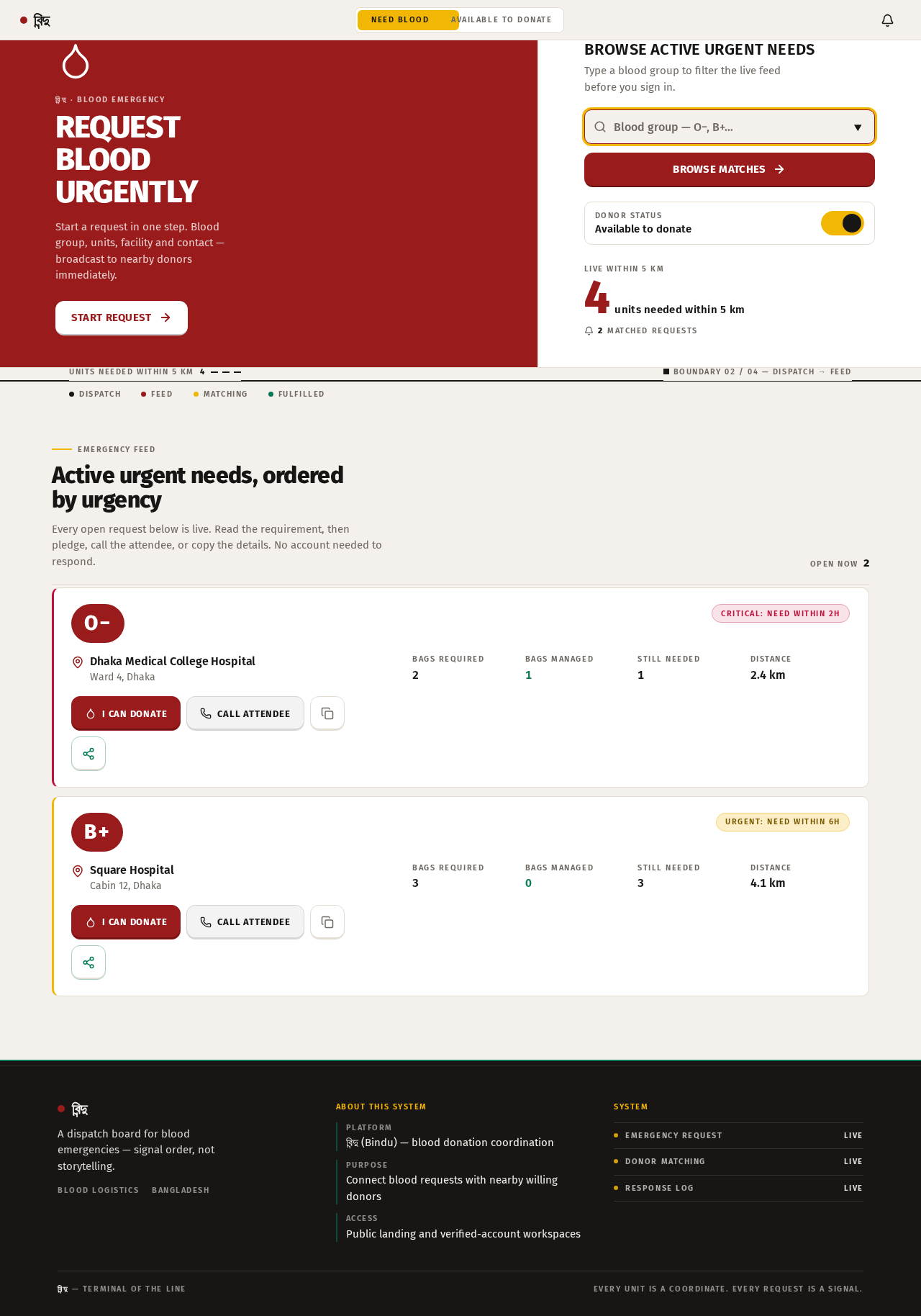
বিন্দু · Blood emergency
Request Blood Urgently
Start a request in one step. Blood group, units, facility and contact — broadcast to nearby donors immediately.
Start requestBrowse Active Urgent Needs
Type a blood group to filter the live feed before you sign in.
Units needed within 5 km4
Boundary 02 / 04 — Dispatch → Feed
Active urgent needs, ordered by urgency
Every open request below is live. Read the requirement, then pledge, call the attendee, or copy the details. No account needed to respond.
- O−Critical: Need within 2hDhaka Medical College HospitalWard 4, DhakaBags required2Bags managed1Still needed1Distance2.4 km
2 Bags required • 1 Bag managed. Call attendee +880 171 1000001.
- B+Urgent: Need within 6hSquare HospitalCabin 12, DhakaBags required3Bags managed0Still needed3Distance4.1 km
3 Bags required • 0 Bags managed. Call attendee +880 171 1000002.
বিন্দু · Blood emergency
Request Blood Urgently
Start a request in one step. Blood group, units, facility and contact — broadcast to nearby donors immediately.
Start requestBrowse Active Urgent Needs
Type a blood group to filter the live feed before you sign in.
Units needed within 5 km4
Boundary 02 / 04 — Dispatch → Feed
Active urgent needs, ordered by urgency
Every open request below is live. Read the requirement, then pledge, call the attendee, or copy the details. No account needed to respond.
- O−Critical: Need within 2hDhaka Medical College HospitalWard 4, DhakaBags required2Bags managed1Still needed1Distance2.4 km
2 Bags required • 1 Bag managed. Call attendee +880 171 1000001.
- B+Urgent: Need within 6hSquare HospitalCabin 12, DhakaBags required3Bags managed0Still needed3Distance4.1 km
3 Bags required • 0 Bags managed. Call attendee +880 171 1000002.
No comments yet. Be the first!