befree-itr-automation
 Janvi shah
this is scope of work I need proper designs


Comments (0)
Sign in to leave a comment
Project Tasks
9Implement Identity and Authorization
As a Backend Developer, I want to implement identity and authorization management to ensure secure access to the portal. Implementation contract: - Outcome: Secure access control implemented - Requirement sources: - src-cad981ca76b37feb - src-d18d4a13963657c1 - src-f5380115b65b18fe - Owned behavior: - Manage user roles and permissions - Authenticate users via email and password - Interfaces: - identity.authorization.api - State transitions: - User login - Role assignment - Failure and safety behavior: - Unauthorized access - Invalid credentials Acceptance criteria: - Users can log in with email and password - Roles are assigned dynamically
Align Database Schema
As a Backend Developer, I want to align the database schema to ensure consistency and support for all application data. Implementation contract: - Outcome: Database schema is aligned with application requirements - Requirement sources: - src-042a0526c951d425 - src-8aa5ad64a32a90c6 - src-971ad867cc2ffdd9 - Owned behavior: - Define tables, columns, and constraints - Interfaces: - PostgreSQL - State transitions: - Schema migration - Failure and safety behavior: - Schema drift - Migration conflicts Acceptance criteria: - Schema matches application requirements - No pending migrations
Implement Shared Header
As a Frontend Developer, implement the shared Header component from its approved JSX/CSS design and reuse it across all declared pages without duplicating local variants. Implementation contract: - Outcome: Provide the reusable Header component for Landing, Document Sets, Dashboard, Guidance, Login, Configuration, Outputs, Processing, Test Cases. - Owned behavior: - Implement shared design sections: Header. Acceptance criteria: - The shared Header component renders once and is reused by every declared consuming page.
Implement Shared Footer
As a Frontend Developer, implement the shared Footer component from its approved JSX/CSS design and reuse it across all declared pages without duplicating local variants. Implementation contract: - Outcome: Provide the reusable Footer component for Landing, Document Sets, Dashboard, Guidance, Login, Configuration, New Document Set, Outputs, Processing, Test Cases, Review. - Owned behavior: - Implement shared design sections: Footer. Acceptance criteria: - The shared Footer component renders once and is reused by every declared consuming page.
Implement Shared Navbar
As a Frontend Developer, implement the shared Navbar component from its approved JSX/CSS design and reuse it across all declared pages without duplicating local variants. Implementation contract: - Outcome: Provide the reusable Navbar component for Landing, Document Sets, Dashboard, Guidance, Login, Configuration, New Document Set, Outputs, Processing, Test Cases, Review. - Owned behavior: - Implement shared design sections: Navbar. Acceptance criteria: - The shared Navbar component renders once and is reused by every declared consuming page.
Implement Background Jobs
As a Backend Developer, I want to implement background jobs for document processing to ensure efficient handling of tasks. Implementation contract: - Outcome: Background jobs process documents efficiently - Requirement sources: - src-3e94b72bc76680ab - Owned behavior: - Schedule and execute document processing tasks - Interfaces: - Async job queue - State transitions: - Job scheduling - Job execution - Failure and safety behavior: - Job failure - Retry logic Acceptance criteria: - Jobs are processed without blocking main application - Retry logic is implemented
Implement Landing page
As a frontend developer, implement the Landing page sections: LandingHero, LandingIntroduction, and LandingCTA. The LandingHero section features a split-screen layout with a central dividing line, showcasing document uploads on one side and processed outputs on the other. It uses deep ink and crisp white colors with orange accents for interactive zones. The LandingIntroduction provides a narrative introduction to the Befree ITR Automation Portal, using structured grey surface for readability and clear typography hierarchy. The LandingCTA includes a prominent 'Go to Login' button with hover effects, directing users to the login page. Acceptance criteria: The page must render exactly once with the split-screen hero, introduction, and CTA sections visible. The design structure and theme must match the provided JSX and CSS, including hover interactions and responsive behavior. The page must be accessible to Admin, Preparer/Staff, and Reviewer/Approver personas without role-specific restrictions. Implementation contract: - Outcome: observable page/section result - Requirement sources: - src-f61d55728f0c8105 - src-4df3ffd2ce1a22cc - src-fb801fb29dd6d3a6 - Owned behavior: - Split-screen layout with hover interactions - Narrative introduction with structured layout - CTA button with hover effects - Prototype-to-live replacements: - Replace the prototype value with live runtime state. Acceptance criteria: - Landing page renders with all sections visible - Design matches provided JSX and CSS - Hover interactions and responsive behavior are functional - Accessible to Admin, Preparer/Staff, and Reviewer/Approver personas Page audience: Admin, Preparer/Staff, Reviewer/Approver. Access requirement: public. Audience targeting does not request authentication or RBAC.
Implement Login page
As a frontend developer, implement the Login page, which includes the LoginSplitAccess and LoginProcessPreview sections. The LoginSplitAccess section is responsible for the internal user's sign-in workflow, featuring a form with email and password fields, a 'remember me' checkbox, and a submit button. It manages local state for form validation, submission, and error handling, and transitions to the Dashboard on successful login. The LoginProcessPreview section provides a static visual context with a technical illustration and cursor-following highlights to demonstrate AI processing. Ensure the split-screen layout is maintained with the correct typography and color scheme. Acceptance criteria: The Login page must render exactly once with both sections visible. The LoginSplitAccess form must validate inputs and handle submission with inline feedback. The LoginProcessPreview must display the illustration with hover effects. The page must adhere to the design structure and theme, and the LoginSplitAccess section must integrate with the backend for authentication using the identity.login.api capability. Access is shared among Admin, Preparer/Staff, and Reviewer/Approver personas. Implementation contract: - Outcome: observable page/section result - Requirement sources: - src-042a0526c951d425 - src-ef24d5dce7d04c08 - Owned behavior: - form validation - submission handling - error feedback - illustration hover effects - Interfaces: - identity.login.api - State transitions: - successful login redirects to Dashboard - Failure and safety behavior: - display error message on invalid credentials Acceptance criteria: - Login page renders with both sections - Form validates and submits correctly - Illustration displays with hover effects - Design structure and theme are preserved - Backend integration for authentication Page audience: Admin, Preparer/Staff, Reviewer/Approver. Access requirement: public. Audience targeting does not request authentication or RBAC.
Implement Dashboard page
As a frontend developer, implement the Dashboard page including the DashboardWelcome, DashboardQuickActions, DashboardRecentActivity, and DashboardSecondaryLinks sections. Ensure the page adheres to the split-screen design philosophy with precise 8-pt spacing and the specified color palette. The DashboardWelcome section should greet the user, confirm their role, and provide context about the dashboard's purpose. The DashboardQuickActions section should provide buttons for starting a new document set and viewing all document sets, with appropriate navigation links. The DashboardRecentActivity section should display recent document sets with their status and extraction progress, allowing navigation to detailed views. The DashboardSecondaryLinks section should provide access to configuration and guidance resources. Acceptance criteria: The Dashboard page must render exactly once upon login, displaying all sections with their respective content and interactions. The design structure must preserve the split-screen layout and color scheme. The 'Start New Document Set' and 'View All Document Sets' buttons must navigate to their respective pages. The recent activity list must display document sets with clickable rows for navigation. The secondary links must navigate to the correct configuration and guidance pages. Access to the Dashboard is restricted to logged-in users with appropriate roles. Implementation contract: - Outcome: observable page/section result - Requirement sources: - src-66bc1efd2835d3f0 - Owned behavior: - visible and interactive behavior owned by these sections - Interfaces: - consumed API, data, or event contracts - State transitions: - material source-backed transition with its trigger and observable result - Failure and safety behavior: - source-backed failure behavior owned by this task Acceptance criteria: - observable task-owned checks Page audience: Admin, Preparer/Staff, Reviewer/Approver. Access requirement: authenticated. Reuse the validated shared login contract.
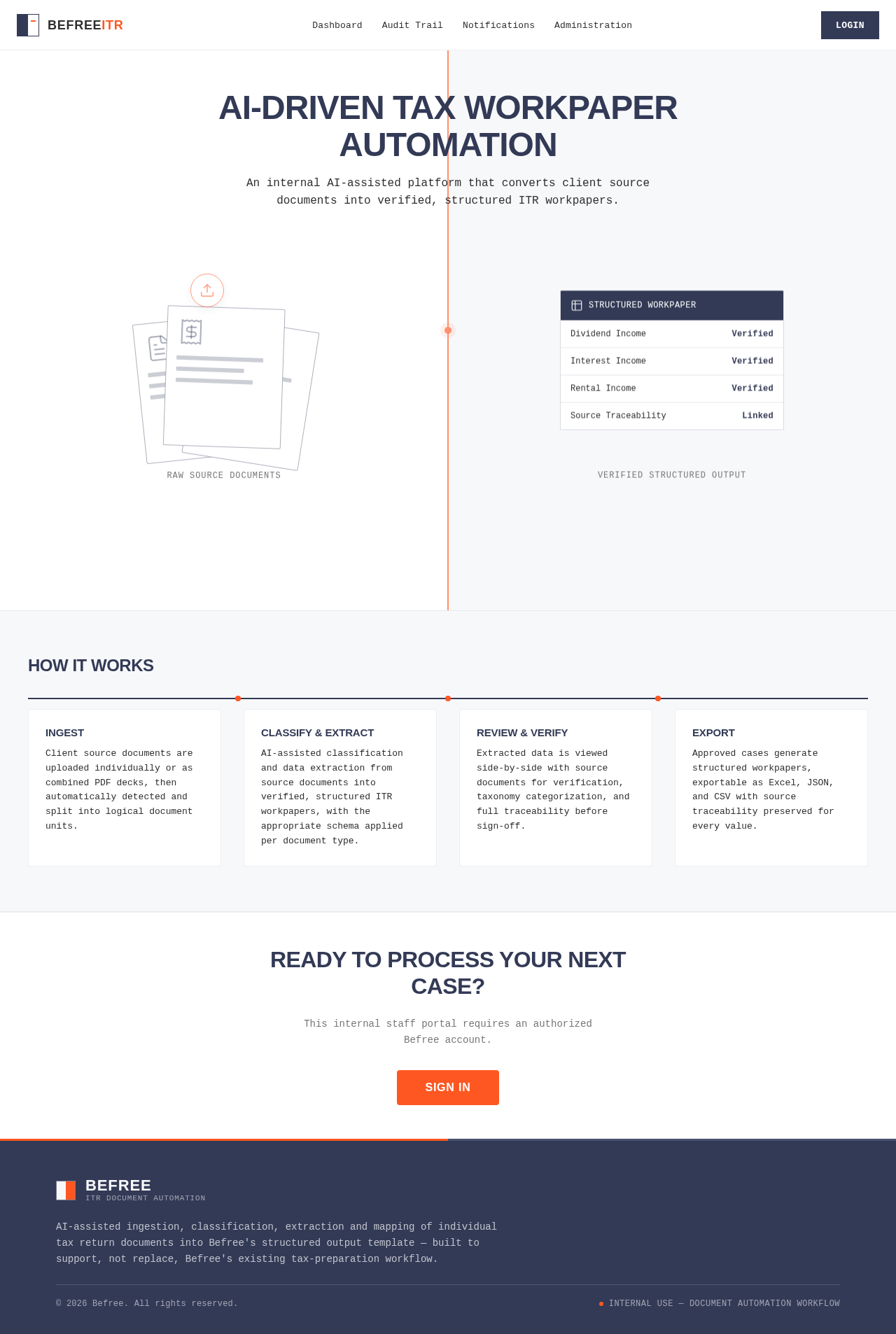
AI-Driven Tax Workpaper Automation
An internal AI-assisted platform that converts client source documents into verified, structured ITR workpapers.
How It Works
Ingest
Client source documents are uploaded individually or as combined PDF decks, then automatically detected and split into logical document units.
Classify & Extract
AI-assisted classification and data extraction from source documents into verified, structured ITR workpapers, with the appropriate schema applied per document type.
Review & Verify
Extracted data is viewed side-by-side with source documents for verification, taxonomy categorization, and full traceability before sign-off.
Export
Approved cases generate structured workpapers, exportable as Excel, JSON, and CSV with source traceability preserved for every value.
Ready to Process Your Next Case?
This internal staff portal requires an authorized Befree account.
Sign InAI-Driven Tax Workpaper Automation
An internal AI-assisted platform that converts client source documents into verified, structured ITR workpapers.
How It Works
Ingest
Client source documents are uploaded individually or as combined PDF decks, then automatically detected and split into logical document units.
Classify & Extract
AI-assisted classification and data extraction from source documents into verified, structured ITR workpapers, with the appropriate schema applied per document type.
Review & Verify
Extracted data is viewed side-by-side with source documents for verification, taxonomy categorization, and full traceability before sign-off.
Export
Approved cases generate structured workpapers, exportable as Excel, JSON, and CSV with source traceability preserved for every value.
Ready to Process Your Next Case?
This internal staff portal requires an authorized Befree account.
Sign In
No comments yet. Be the first!