befree-itr-automation
 Janvi shah
this is scope of work I need proper designs


Comments (0)
Sign in to leave a comment
System Requirements
System Requirements Document for befree-itr-automation
Introduction
This document outlines the system requirements for the Befree ITR Automation Portal, an internal AI-assisted platform designed for Befree's tax processing staff. The platform aims to automate the conversion of client source documents into verified, structured Individual Tax Return (ITR) workpapers.
System Overview
The Befree ITR Automation Portal is a secure, internal enterprise application that facilitates the processing of tax documents. It is designed to streamline the workflow from document ingestion to the generation of structured workpapers, leveraging AI for document classification and data extraction. The application is intended for use by Befree's tax processing staff and includes roles for preparers, reviewers, and administrators.
Product Interpretation and Delivery Boundary
The platform is strictly for internal use by Befree's tax processing staff, with no public-facing components. Access is controlled through email-and-password authentication, with role-scoped authorization for different functionalities. The system is designed to be schema-driven and extensible, allowing for the accommodation of evolving document types and extraction requirements.
Page Content and Component Coverage
Landing
- Brief introduction to the Befree ITR Automation Portal.
- Directs staff to authenticated access.
Login
- Email and password authentication.
- Access to the dashboard upon successful login.
Dashboard
- Summary cards: total active cases, cases pending review, cases completed this period, average turnaround.
- Table of cases: client name, financial year, status, document count, last updated, assigned staff.
- Filters: status, financial year, assigned staff. Search by client name.
- "New Case" button for case creation.
New Case
- Form for entering client name, client ID/reference, financial year, and notes.
- On save, creates a Case record and routes to the Case Workspace in "document ingestion" state.
Document Intake
- Upload area for individual files or combined PDF decks.
- Initiates ingestion and exposes split document units.
Document Processing
- Displays document-level processing status: classification, schema application, pipeline status.
- Attention issues highlighted for user action.
Data Review
- Side-by-side view of source documents and extracted data.
- Verification, edits, taxonomy categorization, and traceability features.
Final Review
- Workspace for final case review, approval, sign-off, and completion before export.
Workpapers
- Generation of structured workpapers from approved case data.
Exports
- Export completed workpapers in Excel, JSON, and CSV formats with source traceability.
Notifications
- Actionable notifications for processing completions and pending reviews.
Audit Trail
- Review-history showing before/after values, actor identity, and timestamps.
Administration
- Admin-only configuration for role/access assignments, taxonomy entries, and document-type extraction schemas.
Functional Requirements
User Stories
- As a Preparer/Staff, I want to log in to the portal using email and password, so that I can access the dashboard and perform my tasks. (explicit)
- As a Preparer/Staff, I want to create a new case by entering client details, so that I can start processing their documents. (explicit)
- As a Preparer/Staff, I want to upload individual documents or a combined PDF deck, so that the system can process them for tax return preparation. (explicit)
- As a Preparer/Staff, I want the system to detect and split combined PDF decks into logical documents, so that each document can be processed independently. (explicit)
- As a Preparer/Staff, I want the system to classify documents by type, so that appropriate data extraction schemas can be applied. (explicit)
- As a Preparer/Staff, I want to view the status of each document in the ingestion pipeline, so that I can monitor progress and address any issues. (explicit)
- As a Preparer/Staff, I want to see extracted data alongside the original document, so that I can verify accuracy and traceability. (explicit)
- As a Preparer/Staff, I want to categorize transactions using a predefined taxonomy, so that they are organized correctly for tax reporting. (explicit)
- As a Preparer/Staff, I want to review and verify extracted data, so that I can ensure its accuracy before generating the final workpaper. (explicit)
- As a Reviewer/Approver, I want to perform a final review and sign-off on cases, so that they can be exported as completed workpapers. (explicit)
- As an Admin, I want to manage user roles and access, so that I can control who has access to different parts of the system. (explicit)
- As an Admin, I want to configure the category taxonomy, so that it reflects current tax reporting requirements. (explicit)
- As an Admin, I want to manage document type schemas, so that the system can adapt to new document types without code changes. (explicit)
- As a User, I want to receive notifications for processing completions and pending reviews, so that I can stay informed about case statuses. (explicit)
- As a User, I want to search and filter cases on the dashboard, so that I can quickly find specific cases based on criteria like status or client name. (explicit)
- As a User, I want to export completed workpapers in Excel, JSON, or CSV formats, so that they can be used for tax filing. (explicit)
- As a User, I want every value in the export to be traceable back to its source document, so that I can ensure data integrity. (explicit)
- As a User, I want an audit trail of all changes made during the review process, so that I can track who made changes and when. (explicit)
- As a Preparer/Staff, I want to process Dividend Statements, so that I can extract relevant financial data for tax reporting. (explicit)
- As a Preparer/Staff, I want to process Expense Statements, so that I can extract relevant financial data for tax reporting. (explicit)
- As a Preparer/Staff, I want to process Interest Statements, so that I can extract relevant financial data for tax reporting. (explicit)
- As a Preparer/Staff, I want to process Rental Statements, so that I can extract relevant financial data for tax reporting. (explicit)
- As a Preparer/Staff, I want to generate workpapers/output, so that I can produce structured documents ready for tax filing. (explicit)
User Personas
- Preparer/Staff: Responsible for creating cases, uploading documents, monitoring processing, and performing initial review and verification.
- Reviewer/Approver: Conducts final review and approval of cases before workpaper export.
- Admin: Manages user roles, category taxonomy, and document type schemas.
Core User Flows
-
Login and Dashboard Access:
- User logs in using email and password.
- Lands on the dashboard with case summaries and actions.
-
Case Creation and Document Ingestion:
- User creates a new case.
- Uploads documents and initiates the ingestion pipeline.
-
Document Processing and Review:
- System processes documents through classification and extraction.
- User reviews and verifies data.
-
Final Review and Workpaper Generation:
- Reviewer approves the case.
- System generates exportable workpapers.
Visuals Colors and Theme
- Palette: Light mode with a crisp white background (#FFFFFF), structured grey surface (#F7F8FA), dark grey text (#2E2E2E), deep ink primary color (#333A56), and orange accent (#FF5722).
- Typography: Headings in Sora (Bold, large size, tight tracking, all caps), body in Roboto Mono, with a 1.25 modular scale (48/32/24/18/16).
- Design Language: Split-screen layout with mirrored halves for clear function delineation, precise 8-pt spacing grid.
Signature Design Concept
- Hero Direction: A split-screen hero featuring a central dividing line with digital document uploads on one side and processed structured outputs on the other. Dominant deep ink and crisp white, with orange accents marking interactive zones.
Interaction Model & Motion Direction
- Interaction Model: Static with restrained motion tempo.
- Motion: Reveal-by-hover interactions across the split-screen, with subtle parallax effects between the halves.
- Hero Dimensionality: Layered 2D.
Non-Functional Requirements
- Data Security: Enforce authenticated, role-scoped access to all cases and documents.
- Scalability: Handle variable volumes of cases/documents without UI redesign.
- Extensibility: Configurable document types, extraction schemas, and category taxonomy.
- Traceability: Maintain links between extracted values and their source documents.
- Auditability: Log all human edits during review with before/after values.
Tech Stack
- Frontend: React (Next.js) + TypeScript.
- Backend: Node/FastAPI (Python) REST or tRPC API.
- Database: PostgreSQL.
- File/Object Storage: Local/S3-compatible storage.
- Background Jobs/Queue: For ingestion and processing pipeline.
- Service Interfaces: Swappable interfaces for OCR, classification, extraction, and transaction classification services.
Assumptions and Constraints
- The platform is for internal use only, with no public-facing components.
- The system must be schema-driven and extensible to accommodate evolving document types and extraction requirements.
Glossary
- ITR: Individual Tax Return.
- OCR: Optical Character Recognition.
- SSO: Single Sign-On.
- CRUD: Create, Read, Update, Delete.
- UI: User Interface.
- AI: Artificial Intelligence.
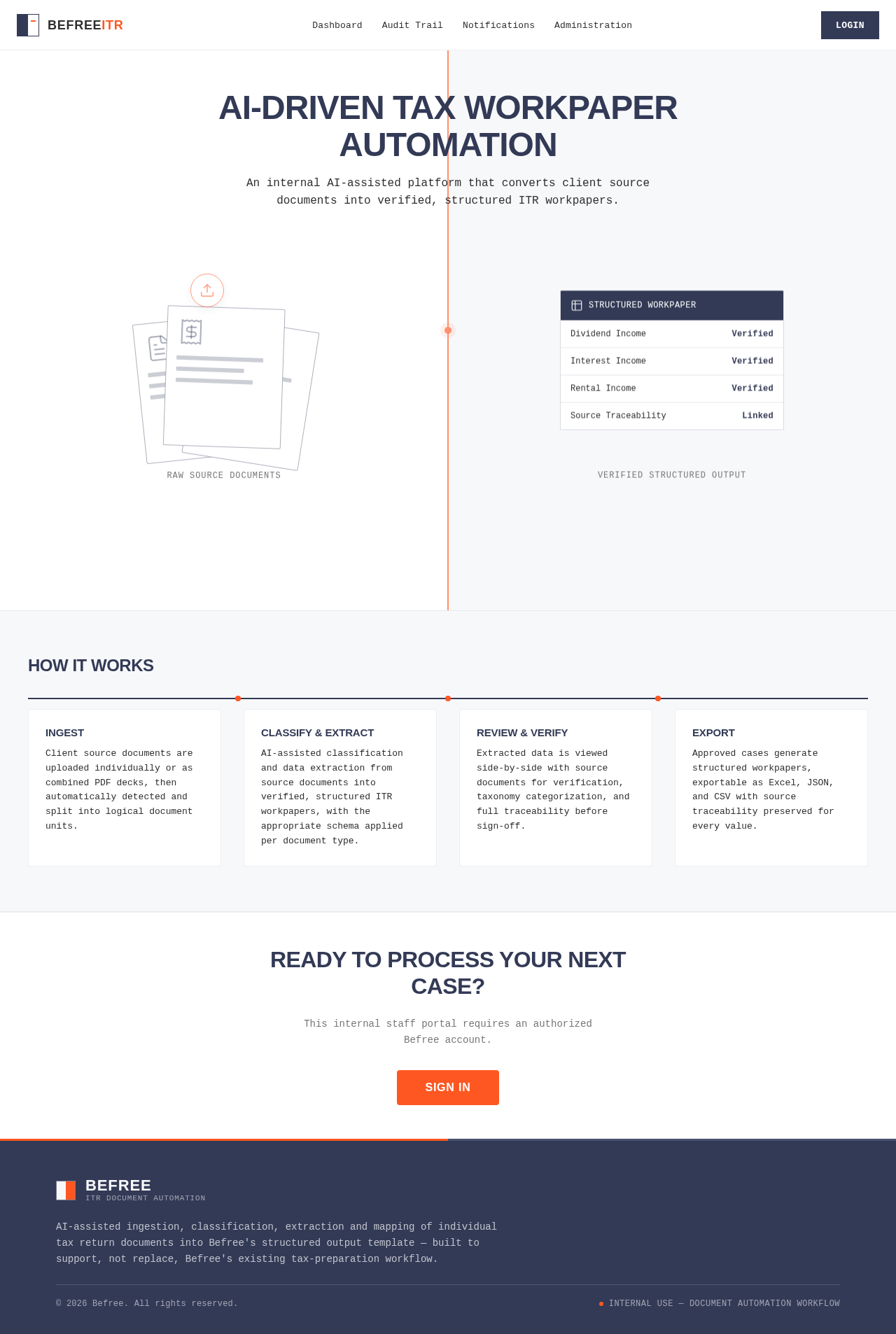
AI-Driven Tax Workpaper Automation
An internal AI-assisted platform that converts client source documents into verified, structured ITR workpapers.
How It Works
Ingest
Client source documents are uploaded individually or as combined PDF decks, then automatically detected and split into logical document units.
Classify & Extract
AI-assisted classification and data extraction from source documents into verified, structured ITR workpapers, with the appropriate schema applied per document type.
Review & Verify
Extracted data is viewed side-by-side with source documents for verification, taxonomy categorization, and full traceability before sign-off.
Export
Approved cases generate structured workpapers, exportable as Excel, JSON, and CSV with source traceability preserved for every value.
Ready to Process Your Next Case?
This internal staff portal requires an authorized Befree account.
Sign InAI-Driven Tax Workpaper Automation
An internal AI-assisted platform that converts client source documents into verified, structured ITR workpapers.
How It Works
Ingest
Client source documents are uploaded individually or as combined PDF decks, then automatically detected and split into logical document units.
Classify & Extract
AI-assisted classification and data extraction from source documents into verified, structured ITR workpapers, with the appropriate schema applied per document type.
Review & Verify
Extracted data is viewed side-by-side with source documents for verification, taxonomy categorization, and full traceability before sign-off.
Export
Approved cases generate structured workpapers, exportable as Excel, JSON, and CSV with source traceability preserved for every value.
Ready to Process Your Next Case?
This internal staff portal requires an authorized Befree account.
Sign In
No comments yet. Be the first!