azure-workspace
 Orion Photo
## THE THESIS Every app exists because humans can't do something fast enough. - Email exists because you can't deliver messages by hand - Excel exists because you can't calculate 10,000 rows in your head - Jira exists because you can't remember 500 tasks across 20 people - Chrome exists because you can't visit 100 websites simultaneously - CRM exists because you can't remember 10,000 customer interactions **What if ONE AI could do ALL of it — and remember everything, learn from everything, and get better every time?** Not by integrating with apps. Not by being a chatbot that answers questions. Not by being a task runner that disappears after completion. By being the PLACE where all your work happens. The AI does the work. The workspace ORGANIZES the work. The knowledge ACCUMULATES. The system LEARNS. You DIRECT and REVIEW. **We're building IntelliFish — an open-source AI agent where:** - You type what you need in natural language - AI agents execute it (browser automation, desktop control, data extraction, form filling, research) - Results are AUTOMATICALLY organized into a living workspace - Knowledge compounds — run 100 is smarter than run 1 - Everything is searchable, shareable, exportable, schedulable - The AI remembers your preferences, your projects, your entities, your patterns - Zero vendor lock-in — self-hosted, open source, your data stays yours **The workspace IS the product. Not the chat. Not the agents. The WORKSPACE.** --- ## WHAT WE'VE ALREADY BUILT (real, working code — 30K+ lines) ### Agent Engine (working, tested) - 10 parallel browser agents with live CDP video streaming - DuckDuckGo self-healing when pages block the agent - BrightData residential proxy on every agent - Stealth fingerprinting (UA rotation, WebGL spoof, timezone match) - Smart Loop V2: lightweight navigation (512 tokens) + full-power extraction (4096 tokens) - Progressive extraction — data saved at EVERY step, crash-resilient - 5-dimension quality scoring on every agent output (goal adherence, completeness, freshness, depth, content quality) - Cross-agent intelligence bus — parallel agents share discoveries in real-time - Site memory — agents learn per-site cookie selectors, data locations, navigation patterns - UNIVERSAL_EXTRACTION_MANDATE — structured V11 intelligence schema - SearXNG dynamic source discovery — 20+ sources per query in real-time ### Frontend (91 components, 87 pages built) - AG-UI chat interface with GenUI cards (approval, progress, results, error) - Live multi-screen browser streaming (watch all agents work simultaneously) - Intelligence report page with findings, entities, traceability, export - Workspace page with artifacts, entities, entity graph, canvas, timeline, search - Full sidebar navigation (Chat, Templates, Jobs, History, Settings, Help) ### Database - PostgreSQL with workspace tables: artifacts, entities, relationships, facts, canvas_items - Intelligence runs table with full audit trail - Workspace builder that auto-populates after every agent run ### Export - ZIP package: PDF + Excel + PPTX + JSON + per-agent source reports + SHA-256 manifest + audit trail --- ## THE QUESTION I NEED ANSWERED **How do I design a workspace that makes every other app unnecessary?** Not a dashboard. Not a project management tool. Not a knowledge base. Not a CRM. Not a task tracker. ALL OF THEM. In ONE place. Powered by AI agents that do the work automatically. --- ## WHAT I NEED PERPLEXITY TO RESEARCH (go DEEP, latest April 2026) ### 1. THE WORKSPACE AS OPERATING SYSTEM How would you design a workspace that functions as a personal operating system for all knowledge work? Not a file system. Not a database. A LIVING SYSTEM where: - AI agents are first-class citizens alongside humans - Every piece of information is connected to every other piece - Knowledge grows automatically from agent work - The system LEARNS what you care about and surfaces it - Tasks generate themselves from findings - Alerts trigger themselves from changes - Reports compile themselves from accumulated data What does this look like? What patterns exist? What's been tried? What failed? What would WORK? Investigate: - Notion's "connected workspace" concept — what makes it sticky? What's missing for AI agents? - ClickUp's "everything app" approach — what works? What's bloated? - Obsidian's "second brain" with bidirectional linking — why do developers love it? - Linear's opinionated design — why is it 10x better than Jira despite having fewer features? - Superhuman's speed — what makes a workspace feel FAST? - Arc browser's "spaces" — how does spatial organization help? - Figma's multiplayer — what makes real-time collaboration work? - Apple's ecosystem integration — what makes everything "just work" together?

Comments (0)
Sign in to leave a comment
System Requirements
System Requirements Document (SRD)
Project Name: azure-workspace
1. Introduction
Welcome to the System Requirements Document (SRD) for azure-workspace, a groundbreaking AI-powered workspace envisioned by Orion Photo in Canada. This document outlines the functional, technical, and design specifications for creating a self-organizing, visually engaging, and highly innovative workspace that integrates AI agents as first-class citizens alongside human users. The goal is to build a living system that organizes knowledge, learns from user interactions, and becomes indispensable for productivity.
The azure-workspace project is designed to be self-hostable, open-source, and adaptable for solo developers, project managers, freelancers, small businesses, and enterprise teams. It aims to unify fragmented workflows into a cohesive, intelligent ecosystem powered by cutting-edge AI and intuitive design.
2. System Overview
The azure-workspace is not just a tool but a paradigm shift in productivity. It combines AI agents, a self-organizing workspace, and a compound knowledge engine to create a system that grows smarter and more valuable over time.
Key Features:
- Self-Organizing Workspace: Automatically categorizes and links information based on user activity and AI insights.
- AI Agents: Execute tasks like browser automation, data extraction, form filling, and research, while sharing discoveries in real-time.
- Compound Knowledge Engine: Accumulates and refines knowledge from every interaction, making subsequent runs smarter and faster.
- Visual Design Language: A workspace that feels alive, with dynamic visualizations and micro-interactions.
- Engagement Loop: Daily briefings, notifications, and predictive insights ensure users return every day.
3. Functional Requirements
As User:
- I should be able to type natural language commands for AI agents to execute tasks.
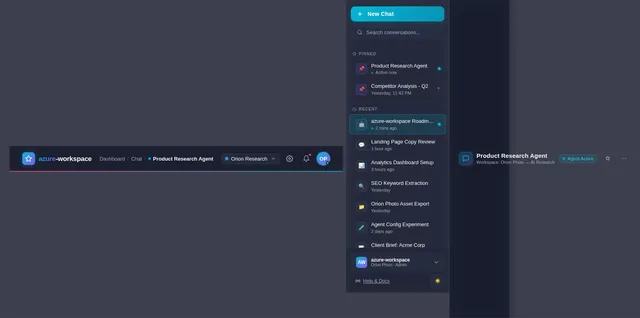
- I should be able to view real-time activity feeds of AI agents working.
- I should be able to search across all artifacts, entities, and relationships.
- I should be able to receive daily briefings summarizing overnight activity and scheduled runs.
- I should be able to export results in multiple formats (PDF, Excel, JSON, etc.).
- I should be able to customize notifications for alerts and task updates.
As Admin:
- I should be able to manage user permissions and workspace configurations.
- I should be able to monitor system performance and agent activity.
- I should be able to schedule automated monitoring tasks for recurring workflows.
As Guest:
- I should be able to view shared artifacts and reports without editing permissions.
4. User Personas
1. Solo Developer
- Needs a workspace to organize code snippets, research, and project tasks.
- Prefers keyboard shortcuts and real-time feedback.
2. Project Manager
- Requires tools for team collaboration, task tracking, and reporting.
- Values visual clarity and actionable insights.
3. Freelancer
- Seeks a workspace for client projects, invoices, and deliverables.
- Prefers self-hostable solutions for data privacy.
4. Small Business Owner
- Needs a centralized hub for team workflows, customer interactions, and analytics.
- Values automation and ease of use.
5. Enterprise Team
- Requires scalability, robust permissions, and integration with existing systems.
- Prefers advanced reporting and monitoring capabilities.
5. Visuals Colors and Theme
Color Palette:
- Background: #1A1D2E (Deep Midnight Blue)
- Surface: #2E3447 (Slate Gray)
- Text: #F5F7FA (Soft White)
- Accent: #06B6D4 (Cyan)
- Muted Tones: #A3A8B8 (Cloudy Gray)
Mood Direction:
The theme is designed to evoke a sense of intelligence, clarity, and modernity. The deep blue and gray tones provide a professional and calming backdrop, while the cyan accent adds vibrancy and focus.
6. Signature Design Concept
Concept: The Living Workspace Garden
The homepage of azure-workspace will resemble a living garden, where knowledge grows and evolves visually.
Key Features:
- Dynamic Growth Animation: As users interact with the workspace, nodes representing artifacts, entities, and tasks will "grow" like plants sprouting leaves.
- Interactive Knowledge Graph: Users can zoom in and out of a 3D graph where connections pulse with activity, showing relationships between data points.
- Agent Activity Visualization: AI agents appear as glowing orbs that move across the graph, leaving trails of light as they execute tasks.
- Micro-Interactions: Hovering over nodes reveals detailed previews, while clicking expands them into full reports.
- Time-Based Transitions: The garden’s colors subtly shift based on the time of day, creating a sense of continuity and immersion.
This design ensures the workspace feels alive and engaging, making users excited to explore and interact with their data.
7. Non-Functional Requirements
- Performance: Must support real-time collaboration and search across 100K+ artifacts without latency.
- Scalability: Capable of handling enterprise-level data and user loads.
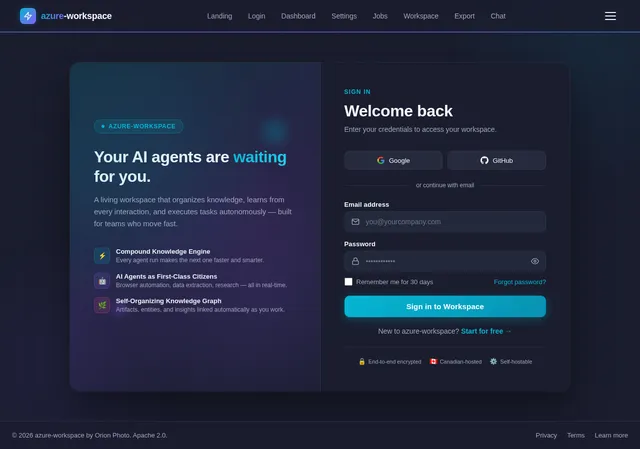
- Security: Implements robust encryption and user authentication protocols.
- Accessibility: Fully compliant with WCAG 2.1 standards.
- Localization: Supports English and French (Canada-specific).
8. Tech Stack
Frontend:
- React for Web
- Tailwind CSS for styling
- Zustand for state management
Backend:
- Python
- FastAPI
Database:
- PostgreSQL with tsvector and pgvector for full-text search and vector embeddings
- Alembic for migrations
AI Models:
- GPT 5.4 for user-friendly responses
- Claude 4.6 Opas for academic or coding work
- Gemini 3.1 Pro for conversational tasks
- Google Nano Banana for image generation
AI Tools:
- LangChain for agent orchestration
- Litellm for LLM routing
Orchestration:
- Docker and docker-compose for local development
- Kubernetes for server-side orchestration
9. Assumptions and Constraints
Assumptions:
- Users will prefer self-hostable solutions for data privacy.
- The workspace must integrate seamlessly with existing workflows.
- AI agents will require continuous training and improvement.
Constraints:
- Must use PostgreSQL as the primary database.
- Must reuse existing React components to minimize development overhead.
- Must adhere to open-source licensing (Apache 2.0).
10. Glossary
- Artifact: A piece of data or output generated by AI agents.
- Entity: A person, organization, or concept identified within the workspace.
- Knowledge Graph: A visual representation of relationships between artifacts and entities.
- Agent: An AI-powered tool that executes tasks autonomously.
- Workspace: The central hub where all user and agent activity is organized and displayed.
This SRD provides a comprehensive foundation for the azure-workspace project, ensuring alignment with Orion's vision while maintaining technical feasibility and user-centric design.

The Living Workspace Garden
A self-organizing workspace where AI agents cultivate your knowledge, automate tasks, and grow smarter with every interaction. Watch your ideas bloom into compound intelligence.
The Living Knowledge Garden
Watch your workspace grow. Artifacts connect, AI agents traverse the graph, and knowledge compounds in real time.
Why Azure Workspace?
A living system that organizes knowledge, learns from every interaction, and grows smarter over time.
Self-Organizing Workspace
Your workspace automatically categorizes and links information based on activity and AI insights. No more manual sorting — everything finds its place naturally, like a garden that tends itself.
Effortless StructureAI-Powered Agents
Intelligent agents execute browser automation, research, and data extraction while sharing discoveries in real-time. They work alongside you as first-class collaborators, not just tools.
Always WorkingCompound Knowledge
Every interaction refines your knowledge graph. The engine accumulates insights across sessions, making subsequent runs smarter and faster — true compounding intelligence.
Ever-GrowingEverything You Need to Work Smarter
A complete toolkit of intelligent features designed to organize, automate, and amplify your productivity.
Natural Language Commands
Type instructions in plain English and let AI agents execute complex tasks across your entire workspace automatically.
Try commands→Real-Time Activity Feeds
Watch AI agents work in real time with live updates on task progress, discoveries, and knowledge graph changes.
View feeds→Global Search
Instantly search across all artifacts, entities, and relationships in your workspace with intelligent fuzzy matching.
Explore search→Daily Briefings
Start each day with a curated summary of overnight activity, scheduled runs, and actionable insights from your agents.
See briefings→Multi-Format Export
Export results and reports in PDF, Excel, JSON, and more. Share insights with your team in any format they need.
Export options→Notifications
Customize real-time alerts for task completions, system events, and important workspace changes that matter to you.
Set up alerts→Workspace Customization
Tailor layouts, themes, and workflows to match your unique productivity style with flexible configuration options.
Customize now→Knowledge Graph Explorer
Visualize and navigate the connections between your artifacts, entities, and AI-discovered relationships interactively.
Explore graph→One Workspace, Every Role
From solo builders to enterprise teams, azure-workspace adapts to how you work and grows with your ambitions.
Solo Developer
Ship faster with organized knowledge
- Organize code snippets, research & project tasks
- Keyboard-first workflow with real-time feedback
- AI agents automate repetitive dev tasks
Project Manager
Clarity across every project milestone
- Visual task tracking and team collaboration
- Actionable daily briefings and reporting
- AI-powered insights for resource allocation
Freelancer
Own your data, delight your clients
- Manage client projects, invoices & deliverables
- Self-hostable for complete data privacy
- Multi-format exports for professional delivery
Small Business Owner
Automate workflows, grow smarter
- Centralized hub for team and customer data
- Automated monitoring for recurring workflows
- Easy-to-use dashboards for quick decisions
Enterprise Team
Scale securely with advanced controls
- Robust permissions and role-based access
- Integration with existing enterprise systems
- Advanced reporting and performance monitoring
Autonomous Agents That Work for You
AI agents execute tasks, extract data, and share discoveries in real-time — growing smarter with every interaction through compound learning.
Task Execution
AI agents autonomously execute browser automation, scraping, and multi-step workflows in the background while you focus on higher-level thinking.
Research
Agents crawl the web, aggregate sources, and synthesize findings into structured artifacts ready for your review.
Data Extraction
Pull structured data from any source — PDFs, web pages, APIs — and automatically map it into your knowledge graph.
Form Filling
Automate repetitive form submissions across platforms using learned context from previous interactions.
Real-Time Sharing
Every discovery, extraction, and insight is shared to your activity feed the moment it happens — nothing gets lost.
Compound LearningCore
Each agent run refines the knowledge engine. Subsequent tasks become smarter and faster, building on every past interaction.
Watch Your Knowledge Come Alive
Every research run, every discovery, every connection builds a living graph of intelligence. Entities, artifacts, and relationships emerge automatically as AI agents work.
Compound knowledge in action. This graph grew automatically from 12 research runs about Tesla. Each run discovered new entities, extracted artifacts, and created relationships — no manual tagging or folder creation required.
Explore Full Graph→Loved by Every Persona
From solo developers to enterprise architects, see how azure-workspace transforms the way people work.
Choose Your Plan
Start free and scale as your workspace grows. Every plan includes our self-organizing knowledge engine and AI-powered agents.
Starter
Perfect for solo developers exploring AI-powered productivity.
Free forever, no credit card required
Includes
- Up to 3 AI agent runs per day
- Basic knowledge graph (500 nodes)
- Natural language commands
- Single workspace
- Community support
- PDF & JSON export
Professional
For freelancers and teams who need the full power of the living workspace.
Or $24/mo billed annually
Everything in Free, plus
- Unlimited AI agent runs
- Full knowledge graph (unlimited nodes)
- Advanced browser automation
- Real-time activity feeds
- Daily AI briefings
- Multi-format export (PDF, Excel, JSON)
- Custom notification rules
- Priority support
- 5 workspaces
Enterprise
Scalable, secure, and fully customizable for organizations of any size.
Tailored pricing based on your team size and needs
Everything in Professional, plus
- Everything in Professional
- Unlimited workspaces & users
- Role-based access control (RBAC)
- SSO & SAML integration
- Dedicated AI agent pool
- Custom model routing (GPT, Claude, Gemini)
- Audit logs & compliance reports
- On-premise / self-hosted deployment
- Dedicated account manager
- SLA & uptime guarantees
Ready to Transform Your Workspace?
Join thousands of teams using azure-workspace to build a living, self-organizing knowledge system. Let AI agents handle the busywork while your ideas compound into something extraordinary.
No credit card required · Self-hostable · Open source
No comments yet. Be the first!