azure-wordpress
 Chirag Panchal
this is mine current website in wordpress, I would like to create in reactjs now with custom code.

Comments (0)
Sign in to leave a comment
Project Tasks17
Implement Navbar for Home
As a frontend developer, implement the Navbar section for the Home page. Build a responsive navigation bar using React with useState (mobileOpen, activeIndex, scrolled), useRef (navbarRef, logoPathRef, underlineRef, linkRefs, mobileMenuRef), and useCallback hooks. Implement GSAP SVG path draw animation on the logo using strokeDasharray/strokeDashoffset on mount. Implement a sliding underline indicator that uses getBoundingClientRect to position and animate via gsap.to() on both hover (handleLinkHover) and active state (positionUnderline). Add scroll detection via window.addEventListener('scroll') to toggle a CSS shadow class when scrollY > 10. Animate mobile menu open/close with GSAP opacity/y transitions. Handle window resize to reposition underline. NAV_ITEMS array includes Home, About, Portfolio, Legacy with href anchors. Note: this component may be shared across pages.
WordPress REST API Setup
Configure and expose WordPress REST API endpoints for the ReactJS frontend to consume. Set up CORS headers to allow requests from the React frontend domain. Ensure endpoints for pages, posts, and custom fields (ACF or similar) are available and authenticated if needed. Expose /wp-json/wp/v2/pages, /wp-json/wp/v2/posts, and any custom endpoints required by the HomeLegacy and HomePortfolio sections. Note: frontend tasks (HomeLegacy, HomePortfolio) depend on this API being available.
React Router & Legacy Route
Set up React Router (v6) for the ReactJS frontend. Configure two routes: '/' for the Home page and '/legacy/' for the dedicated Legacy page, matching the WordPress permalink structure at https://nischalbarot.com/legacy/. Implement scroll-to-section logic using React Router hash links or useNavigate for internal anchor navigation (Home, About, Portfolio, Legacy sections). Ensure the Navbar anchor links (#about, #portfolio, #legacy) trigger smooth scroll behavior on the Home page. This is a cross-cutting concern shared by Navbar (9f37e508) and HomeLegacy (bfc04efb).
Design System & Theme Setup
Set up the global design system and theme configuration for the ReactJS frontend. Define CSS custom properties (variables) for all brand colors specified in the SRD: --primary: #1A73E8, --primary-light: #E8F0FE, --secondary: #FF6F61, --accent: #FFD700, --highlight: #FFA500, --bg: #FFFFFF, --surface: rgba(240,240,240,0.8), --text: #333333, --text-muted: #777777, --border: rgba(200,200,200,0.5). Set up global CSS reset, base typography, and responsive breakpoints. Configure GSAP and framer-motion as shared dependencies. Create a shared CSS var(--scroll) scroll position tracker used by parallax decorative layers across multiple components (HomeHero, HomeLegacy, HomeCallToAction, Footer). This is a cross-cutting concern that all frontend section tasks depend on.
React App Project Scaffold
Scaffold the ReactJS application structure using Create React App or Vite. Set up the project directory structure with /src/components, /src/pages, /src/hooks, /src/utils, and /src/assets folders. Install core dependencies: react-router-dom (v6), gsap (with ScrollTrigger plugin), framer-motion, react-helmet-async, and axios (or fetch wrapper) for WordPress REST API calls. Configure environment variables (.env) for REACT_APP_WP_API_BASE_URL pointing to the WordPress REST API base. Set up ESLint and Prettier for code quality. This scaffold is a prerequisite for all frontend section tasks.
Implement HomeHero for Home
As a frontend developer, implement the HomeHero section for the Home page. Build a full-screen hero using React with useState (ctaOffset, particles), useRef (rootRef, ctaRef, headlineRef, subheadlineRef, badgeRef, ctaAreaRef, secondaryRef, particleIdRef), and useCallback hooks. Implement GSAP entrance animations: background gradient shift via gsap.fromTo on rootRef, and a staggered timeline (gsap.timeline) that reveals badgeRef, headlineRef, subheadlineRef, ctaAreaRef, and secondaryRef with opacity/y transitions. Add a scroll parallax effect via a manual window scroll listener that adjusts headline and subheadline y/opacity using gsap.set(). Implement a magnetic CTA button effect via handleCtaMouseMove using getBoundingClientRect to compute center offset stored in ctaOffset state. Use framer-motion AnimatePresence for particle effects managed via particleIdRef. Wrap all GSAP in gsap.context() for proper cleanup via ctx.revert().
Implement TimelineMarker for Home
As a frontend developer, implement the TimelineMarker section for the Home page. Build a decorative vertical timeline node component using React with useState (isInView) and useRef (rootRef, lineTopRef, lineBottomRef, ringRef, dotRef, pulseRef, nodeWrapperRef, tweensRef). Set up an IntersectionObserver (threshold: 0.5) to trigger scroll-into-view state. Implement three GSAP animation layers: (1) continuous opacity pulse on lineTop/lineBottom between 0.3–1.0 with yoyo repeat, (2) continuous 360° rotation on ringRef with transformOrigin center and infinite repeat, (3) scale-up entrance animation on isInView using gsap.fromTo with back.out(1.7) ease. Implement handleNodeClick with a GSAP bounce sequence on the dot (scale 1→1.6 yoyo) and a pulse ring expand animation (scale 1→2.5, opacity 0.8→0) on pulseRef. Store all tweens in tweensRef and kill them on cleanup.
Implement HomeAbout for Home
As a frontend developer, implement the HomeAbout section for the Home page. Build a two-column about section using React with useRef (rootRef, labelRef, headlineRef, bodyRef, bodySecRef, statRowRef, nodeRef, nodeWrapperRef, bloomRefs, orbitRef). Register GSAP ScrollTrigger plugin. Implement scroll-triggered staggered text slide-in from x:-100 for labelRef, headlineRef, bodyRef, bodySecRef, statRowRef using ScrollTrigger.create (start: 'top 80%', once: true). Add timeline node expand animation via elastic.out(1, 0.5) ease triggered at 85% viewport. Implement a scrub-based scroll-driven glow intensification on nodeRef that dynamically updates boxShadow (rgba(26, 115, 232)) from progress 0→1, scaling glowSize from 20px to 50px and glowOpacity from 0.15 to 0.50. Add orbitRef scale/opacity fade-in at 80% scroll threshold. Implement hover bloom effect on nodeWrapperRef using bloomRefs array. Wrap all in gsap.context() for cleanup.
Implement HomePortfolio for Home
As a frontend developer, implement the HomePortfolio section for the Home page. Build an interactive portfolio grid using React with useState, useRef, and useCallback hooks, driven by the PORTFOLIO_ITEMS array (6 items: cms-migration, cms-headless, perf-optimization, legacy-archive, responsive-design, docker-deploy). Each item includes id, title, shortDesc, fullDesc, techs array, icon, and tag fields. Use framer-motion motion components for card entrance animations. Implement GSAP-powered hover interactions on portfolio cards. Build a card expand/detail view mechanism that shows fullDesc and techs when a card is selected. Implement filter or tag-based navigation across the 6 portfolio entries. Animate card transitions using framer-motion variants with stagger. Apply CSS Grid layout with responsive breakpoints for the card grid defined in HomePortfolio.css.
Implement HomeLegacy for Home
As a frontend developer, implement the HomeLegacy section for the Home page. Build a book-unfold animated legacy section using React with useState (hasAnimated) and useRef (rootRef, leftPageRef, rightPageRef, labelRef, headlineRef, descRef, entryRefs, ctaRowRef, ctaRef, bookRef, spineRef). Use IntersectionObserver (threshold: 0.2) to trigger runUnfoldAnimation() once. Implement runUnfoldAnimation() as a GSAP timeline: (1) fade-in header elements (labelRef, headlineRef, descRef) with stagger, (2) spineRef scaleY from 0→1 with power2.out, (3) responsive book page unfold — on desktop rotateY:0 for leftPageRef and rightPageRef (horizontal unfold), on mobile (< 768px) rotateX:0 (vertical unfold). Animate LEGACY_ENTRIES (4 items about WordPress history) staggering into view via entryRefs. Use PAGE_LINES array [60,100,140,180,220,260,300] for decorative ruled lines on the book pages rendered in SVG or CSS. Animate ctaRowRef and ctaRef as final timeline steps. Set hasAnimated guard to prevent re-triggering.
Implement HomeCallToAction for Home
As a frontend developer, implement the HomeCallToAction section for the Home page. Build a CTA section using React with useRef (primaryRippleRef, secondaryRippleRef) and useCallback. Implement triggerRipple() using GSAP: gsap.killTweensOf then gsap.fromTo animating scale from 0→2.2 and opacity 0.8→0 with power2.out ease (duration 0.65) using x/y '-50%' centering. Use framer-motion motion components with four variant sets: headlineVariants (opacity/y, duration 0.7), sublineVariants (delay 0.2), btnRowVariants (delay 0.4), and separatorVariants (scaleX 0→1, delay 0.1), all triggered via whileInView with viewport once:true. Render a multi-layer parallax decorative background: hcta-decor-bg (speed 0.3) with three orbs (gold, blue, orange), hcta-decor-mid (speed 0.5) with two lines and three dots, driven by CSS var(--scroll). Include hcta-bg-accent pulsing gradient. Wire ripple triggers to primary and secondary CTA buttons.
Implement Footer for Home
As a frontend developer, implement the Footer section for the Home page. Build a multi-column footer using React with useRef (rootRef, colRefs array, copyrightRef, socialIconRefs array), using setColRef(i) and setSocialRef(i) factory functions to populate ref arrays. Implement GSAP context animations: staggered column slide-in from y:50 opacity:0 with 0.1 stagger and 0.15 delay via gsap.from on colRefs, and a copyright fade-in (y:20, delay 0.65) on copyrightRef, both with onComplete callbacks setting opacity:'1'. Implement social icon hover glow using mouseenter/mouseleave event listeners — alternating glowColor (even: rgba(26,115,232,0.5) azure blue, odd: rgba(255,215,0,0.5) gold) animating boxShadow and scale:1.1 on enter, reverting on leave. Render productLinks (Home, About, Portfolio, Legacy Archive) and resourceLinks (Documentation, Our Work, Migration Story, Get Started) columns with href anchors. Include a parallax decorative layer at speed 0.2 via CSS var(--scroll). Clean up ctx.revert() and remove all event listeners on unmount. Note: this component may be shared across pages.
Legacy Content API Endpoint
Create or configure a dedicated WordPress REST API endpoint to serve legacy section content for the /legacy/ page and the HomeLegacy section. This may involve a custom post type 'legacy', custom fields, or a filtered /wp-json/wp/v2/posts?category=legacy endpoint. Ensure the endpoint returns all fields required by the LEGACY_ENTRIES array (id, title, description, date, etc.). Note: frontend tasks bfc04efb (HomeLegacy) and the Legacy page depend on this endpoint.
Portfolio Content API Endpoint
Create or configure a WordPress REST API endpoint to serve portfolio items for the HomePortfolio section. This may involve a custom post type 'portfolio' with custom fields for id, title, shortDesc, fullDesc, techs array, icon, and tag. Ensure the endpoint returns the 6 portfolio items (cms-migration, cms-headless, perf-optimization, legacy-archive, responsive-design, docker-deploy) with all required fields. Note: frontend task da00d443 (HomePortfolio) depends on this endpoint.
WordPress CORS & Proxy Config
Configure CORS on the WordPress backend to allow cross-origin requests from the ReactJS frontend domain (nischalbarot.com and localhost for development). If direct CORS configuration on WordPress is not feasible, set up a lightweight reverse proxy (nginx or similar) to forward /api/* requests to the WordPress REST API, avoiding browser CORS issues. Update docker-compose service configuration to wire the frontend, backend (WordPress), and proxy together. Ensure environment variables for API base URL are configurable per environment (development, production).
SEO Meta Tags Integration
Implement SEO meta tags across the ReactJS application to maintain existing search engine rankings per the SRD Assumptions and Constraints. Use react-helmet-async or a similar library to manage per-page meta tags (title, description, og:title, og:description, canonical URL). Configure meta tags for the Home page (/) and Legacy page (/legacy/). Ensure the canonical URL for /legacy/ matches https://nischalbarot.com/legacy/ to preserve existing rankings. Add structured data (JSON-LD) if the current WordPress site uses it. This is a cross-cutting concern affecting both the Home and Legacy pages.
Implement Legacy Dedicated Page
As a frontend developer, implement the dedicated Legacy page at the /legacy/ route. Build the full-page layout that displays all legacy content fetched from the WordPress REST API legacy endpoint. Use a 'static' interaction model (no parallax) to prioritize content readability per the SRD Interaction Model section. Include the shared Navbar (9f37e508) and Footer (f5d2a087) components. Fetch legacy entries from the backend API and render them in a readable list or grid format. Implement SEO meta tags (title, description) for the /legacy/ route to maintain search rankings. This page is accessed when the user clicks 'View All' in the HomeLegacy section (bfc04efb).
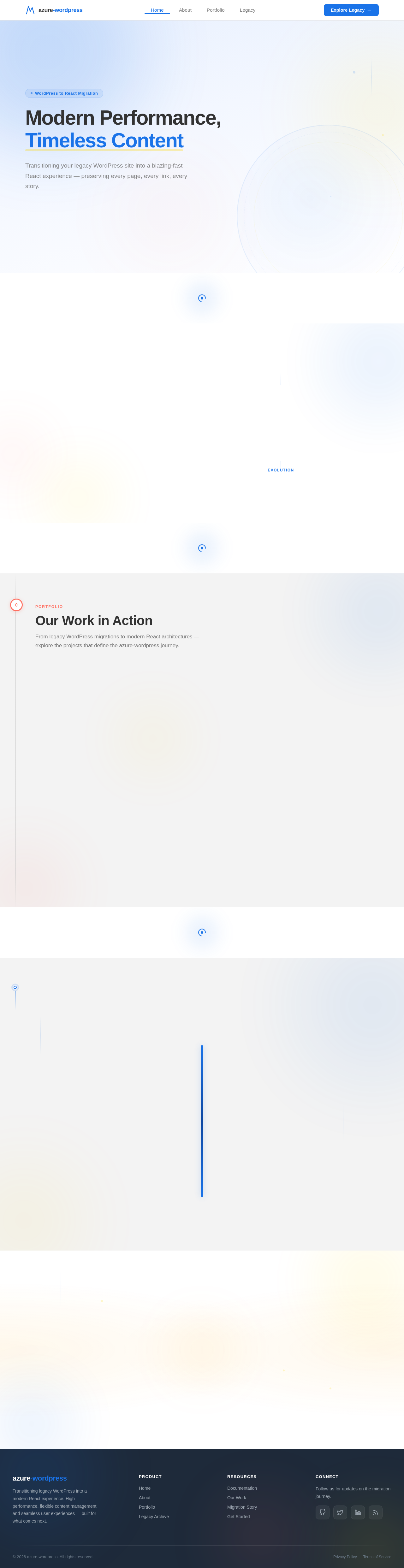
Modern Performance, Timeless Content
Transitioning your legacy WordPress site into a blazing-fast React experience — preserving every page, every link, every story.
Bridging WordPress Legacy with Modern React
The azure-wordpress project transforms a traditional WordPress site into a high-performance React application — preserving every piece of content while unlocking faster load times, richer interactions, and a developer experience built for the future.
WordPress continues to power the CMS backend, feeding structured content to a React frontend that renders at lightning speed. Internal linking, SEO integrity, and the legacy archive all carry forward seamlessly.
Our Work in Action
From legacy WordPress migrations to modern React architectures — explore the projects that define the azure-wordpress journey.
WordPress to React Migration
Seamless transition from legacy WordPress to a modern React front-end.
ArchitectureWordPress to React Migration
Complete architectural overhaul converting a monolithic WordPress theme into a component-driven React application. Maintained SEO rankings throughout the migration while achieving 3x faster page loads and improved Core Web Vitals scores.
Headless CMS Integration
WordPress as a headless CMS powering a decoupled React front-end.
IntegrationHeadless CMS Integration
Implemented a headless WordPress architecture using the REST API to serve content to a React client. Custom endpoints, optimized queries, and edge caching deliver sub-second content updates without sacrificing editorial workflows.
Performance Optimization
Achieving sub-3-second load times across all devices and browsers.
PerformancePerformance Optimization
Comprehensive performance audit and optimization pass including code splitting, lazy loading, image optimization with modern formats, and CDN configuration. Reduced initial bundle size by 68% and achieved consistent Lighthouse scores above 95.
Legacy Content Archive
Preserving years of content history in an accessible, searchable archive.
ContentLegacy Content Archive
Built a dedicated legacy archive page that preserves the full editorial history of the WordPress site. Features full-text search, category filtering, and a timeline view that lets users explore content chronologically with smooth GSAP-powered animations.
Responsive Design System
A unified design system ensuring consistency across every breakpoint.
DesignResponsive Design System
Developed a comprehensive design token system with CSS custom properties, responsive typography scales, and component variants that adapt fluidly from 320px mobile to 4K displays. Includes dark mode support and accessibility compliance.
Docker Orchestration
Containerized deployment pipeline for reliable, reproducible builds.
DevOpsDocker Orchestration
Configured a multi-container Docker Compose setup orchestrating WordPress, MySQL, and the React dev server. Includes hot-reload in development, staged builds for production, and automated health checks for zero-downtime deployments.
Preserving Our WordPress Heritage
A decade of content, carefully maintained and ready for the next chapter. Explore the archive that shaped our digital presence.
The Story So Far
From our first WordPress theme to a fully managed CMS powering hundreds of pages — each milestone brought us closer to the modern React experience you see today.
Ready to Transform Your WordPress Experience?
Migrate your legacy content into a blazing-fast React front-end — while keeping WordPress as your CMS. High performance, flexible content management, and seamless user experiences await.
No comments yet. Be the first!