autumn-team
 Fabrizio Reale
Here is a clean, structured prompt you can paste into an AI coding tool to generate your application. *** ## Project Title Team Work, Time, and Cost Tracking Tool ## Goal Build a web application that lets companies define projects with detailed cost structures, track teams’ hours and expenses, and always see remaining budget and project status in real time. [mastt](https://www.mastt.com/resources/project-cost-template) *** ## User Roles 1. Admin / Project Manager - Creates and edits clients and projects. - Defines budgets, activities, and cost rates. - Views all reports and dashboards. 2. Team Member / Operative - Sees only the projects/activities assigned to them. - Logs worked hours and project-related expenses. - Can see their own timesheets and expense history. 3. Finance / Controller (optional role) - Views cost and margin dashboards. - Exports data to accounting/invoicing systems. *** ## Core Concepts and Data 1. Client - Name, reference code. - Contact info (basic). 2. Project - Client. - Name, code, description. - Start date, end date (planned). - Overall budget (total), currency. - Status: Planned, In progress, On hold, Completed, Cancelled. - Project manager (user). 3. Activity / Task - Project. - Name, code. - Type: Billable / Non-billable. - Planned start/end dates. - Budgeted hours. - Budgeted cost (labor + fixed). - Optional cost code / category. [enerpize](https://www.enerpize.com/templates/project-cost) 4. Roles and Rates - Role (e.g., Developer, PM, Designer). - Internal cost rate per hour. - Billing rate per hour (optional). 5. Time Entry (Timesheet) - User. - Date. - Project. - Activity / Task. - Hours worked. - Optional notes. 6. Expense Entry - User. - Date. - Project. - Activity / Task (optional). - Category (travel, software, materials, etc.). - Amount, currency. - Description. - Receipt file upload (optional). - Status: Draft, Submitted, Approved, Rejected. [connecteam](https://connecteam.com/best-time-and-expense-tracking-software/) *** ## Functional Requirements ### A. Project and Budget Setup 1. Create/Edit Projects - Admin/PM can create projects with: client, name, description, dates, overall budget, project manager, status. - Attach activities/tasks with per-activity budgets in hours and cost. [slideshare](https://www.slideshare.net/slideshow/easy-guide-to-project-cost-tracking-template-docx/274127045) 2. Define Cost Structure - Maintain a list of roles with internal hourly cost rates and (optionally) billing rates. - For each project, allow: - Default role rates. - Custom overrides per project (e.g., higher rate for specific client). 3. Fixed Costs - Allow adding fixed costs to a project or a specific activity: - Name, category, planned amount, date. - Mark as one-off or recurring (e.g., monthly license). - Track planned vs actual for fixed costs. [mastt](https://www.mastt.com/resources/project-cost-template) 4. Work Breakdown / Activities - For each project, define activities/tasks with: - Budgeted hours per role or total hours. - Budgeted fixed costs. - Optional simple hierarchy (Phase → Task) is enough. *** ### B. Time Tracking 1. Time Entry - Team members can log hours by: date, project, activity/task, hours, notes. [getharvest](https://www.getharvest.com/blog/guide-to-time-and-expense-tracking) - Two modes are acceptable: - Manual entry (fill in fields). - Optional start/stop timer (if easy to implement). 2. Validation - Prevent logging time on closed/completed projects. - Configurable max hours per day per user (e.g., warn if > 12 hours). 3. Timesheet Views - Daily and weekly view for each user. - Users can filter by project and date range. - Project managers can view timesheets for their project team. *** ### C. Expense Tracking 1. Expense Entry - Team members can add project-related expenses with: date, project, optional activity, category, amount, description, and receipt upload. [blog.data-basics](https://blog.data-basics.com/the-ultimate-guide-to-time-and-expense-software) - Multi-currency support is a plus; base currency stored on project. 2. Approval Workflow - Statuses: Draft → Submitted → Approved/Rejected. - Project Manager (or Finance) can approve/reject expenses. - Approved expenses count toward actual costs of the project. 3. Expense Lists - Filterable list by project, user, date range, status, category. - Export to CSV/Excel. *** ### D. Budget, Remaining Budget, and Status 1. Budget Calculation Logic - For each project and activity, calculate: - Budgeted hours and budgeted labor cost (hours × role rate). - Budgeted fixed costs. - Total budgeted cost = labor + fixed. - Actuals: - Actual hours (sum of timesheets). - Actual labor cost (hours × relevant role rate). - Actual fixed/expense cost (approved expenses + recorded fixed costs). - Remaining budget = Budgeted total − Actual total. - Variance (absolute and percentage). [jotform](https://www.jotform.com/board-templates/project-cost-tracking-template) 2. Project Status Indicators - Show per project: - Budget used (%). - Hours used (%). - Timeline (today vs end date). - Simple traffic light logic: - Green: within budget (e.g., < 80%) and time. - Yellow: between 80–100% budget or close to end date. - Red: exceeds budget or overdue. 3. Activity-Level View - For each activity/task: planned vs actual hours and costs, remaining budget and variance. *** ### E. Reporting and Dashboards 1. Project Dashboard (for PMs and Admin) - List of all projects with: - Client, PM, status. - Budgeted cost, actual cost to date, remaining budget, variance. - Budget used (%). - Filters: by client, PM, status, date range. [scribd](https://www.scribd.com/document/503928692/IC-Project-Tracking-Template-8640-V1) 2. Detailed Project View - Tabs: - Overview: main KPIs (budget vs actual, remaining budget, status). - Activities: table of tasks with planned vs actual hours & costs. - Time: list or summary of timesheet entries. - Expenses: list or summary of expenses. 3. Time and Expense Reports - By user: hours and costs by period and project. - By project: hours, labor cost, expenses, total. - Exportable to CSV/Excel. *** ### F. Non-Functional Requirements 1. Platform & Tech (you decide, but specify) - Web-based application, responsive UI (desktop first, mobile-friendly). - REST or GraphQL API for all main entities (projects, time entries, expenses, reports). 2. Performance - List views and dashboards should load under 2 seconds for typical data sets. - Reports for a single project should generate under 5 seconds. [dataforest](https://dataforest.ai/blog/software-requirements-specification-understandable-framework) 3. Security & Access Control - Authentication with email/password (and ready to plug SSO in future). - Role-based permissions: Admin, PM, Team Member, Finance. - Data isolation per organization (future multi-tenant ready). 4. Auditability - Track who created/updated/deleted time entries and expenses. - Log status changes for expenses (who approved/rejected and when). [blog.data-basics](https://blog.data-basics.com/the-ultimate-guide-to-time-and-expense-software) *** ### G. Nice-to-Have Features (If time allows) 1. Invoicing Prep - Generate a summarized “billable time & expenses” report per client and project. - Show billable amount based on billing rates. 2. Integrations (future-ready) - Webhooks or basic API endpoints for integration with accounting/CRM. 3. Simple Notifications - Email or in-app alerts when: - Budget reaches certain thresholds (e.g., 80%, 100%). - Expenses are submitted/approved. *** ### Deliverables - Database schema or migration scripts. - Backend API. - Frontend UI for all roles. - Basic test data and instructions to run the app locally (e.g., Docker or simple setup). ***
Comments (0)
Sign in to leave a comment
Project Tasks15
Implement Autumn Theme & Structure
As a user I want to see a consistent autumn theme across all pages so that the app feels cohesive and on-brand. Apply the design tokens from the SRD: Primary Burnt Orange (#CC5500), Secondary Deep Brown (#5C4033), Accent Golden Yellow (#FFD700), Background Light Beige (#F5F5DC), Text Dark Gray (#333333). Set up global CSS variables, font (Inter), base layout structure (topbar + sidebar + content), and remove any scaffold pages not needed (AI assistant, generic welcome page). This task is independent and must be completed before all other frontend tasks.
Implement Projects & Clients API
As a user I want to use backend APIs for projects and clients so that I can create, read, update and delete project and client data. Implement FastAPI endpoints: POST/GET/PUT/DELETE /projects, POST/GET/PUT/DELETE /clients, GET /projects/{id} with full detail including activities and budget summary, POST /projects/{id}/activities, PUT/DELETE /projects/{id}/activities/{activity_id}, POST /projects/{id}/fixed-costs. Include role-based access control (Admin/PM only for write operations). Return budget computed fields (budgeted cost, actual cost, remaining, variance) in project detail response.
Build Landing Page
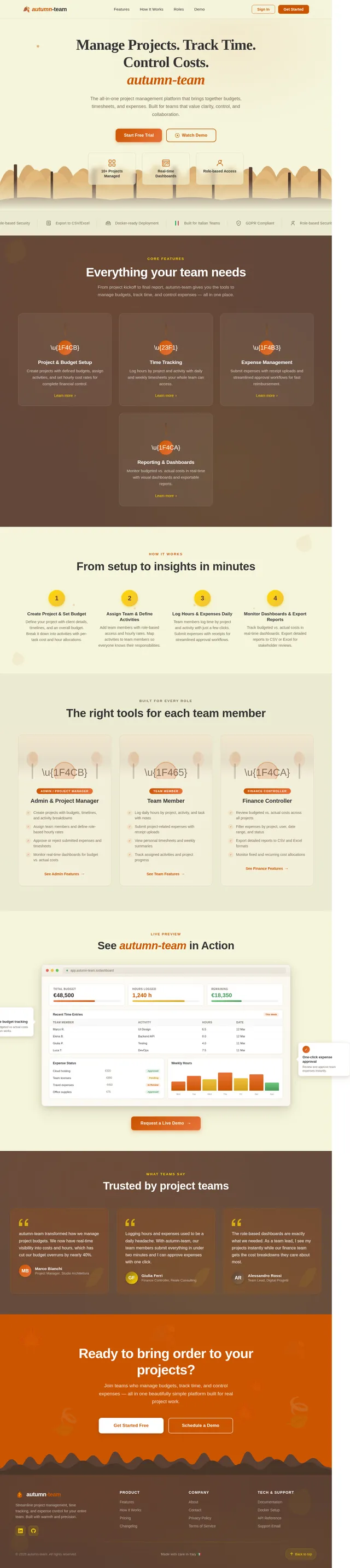
As a user I want to see an immersive animated autumn forest landing page so that I can understand the product and sign in. Implement the Landing page based on the existing JSX design (v2). Includes: NavBar with logo, nav links, CTA buttons; Hero section with parallax forest animation and falling leaves; TrustBadges strip; FeatureHighlights 3-column card grid with tree trunk micro-interactions; HowItWorks 4-step flow; RolePersonas 3-column grid; LiveDemoPreview browser mockup; Testimonials dark panel; CallToAction burnt orange section; Footer. Sign In navigates to the Login page.
Build Login & Auth Pages
As a user I want to log in with email and password so that I can access the application securely. Implement the Login page with autumn theme styling (warm beige background, burnt orange CTA button, autumn-team logo). Include form validation, error messages, and a 'Forgot password' link. On success, redirect to the Dashboard. Reuse existing scaffold login logic but align visuals to the autumn design system established in t1.
Implement Time Tracking API
As a user I want to use backend APIs for time entries so that I can log, retrieve and manage timesheet data. Implement FastAPI endpoints: POST/GET/PUT/DELETE /time-entries, GET /time-entries?user_id&project_id&date_from&date_to for filtered views, GET /timesheets/weekly?user_id&week for weekly grid data, POST /timesheets/submit for week submission. Include validation: prevent logging on closed projects, warn if daily hours exceed configurable threshold. Aggregate daily/weekly totals. Track created_by, updated_by audit fields.
Implement Expenses API
As a user I want to use backend APIs for expenses so that I can submit, approve, reject and filter project expenses. Implement FastAPI endpoints: POST/GET/PUT/DELETE /expenses, POST /expenses/{id}/submit, POST /expenses/{id}/approve, POST /expenses/{id}/reject, GET /expenses?project_id&user_id&status&category&date_from&date_to. Support receipt file upload (multipart/form-data). Status transitions: Draft → Submitted → Approved/Rejected. Log who approved/rejected and when for auditability. Approved expenses must contribute to project actual cost calculations.
Implement Roles & Rates API
As a user I want to use backend APIs for roles and cost rates so that I can define hourly rates per role and override them per project. Implement FastAPI endpoints: POST/GET/PUT/DELETE /roles, GET /roles with internal cost rate and billing rate per role, POST /projects/{id}/role-rates for project-specific rate overrides, GET /projects/{id}/team with member assignments and their rates. Support assignment of users to projects with a specific role. These rates are used in budget and actual cost calculations.
Build Dashboard Page
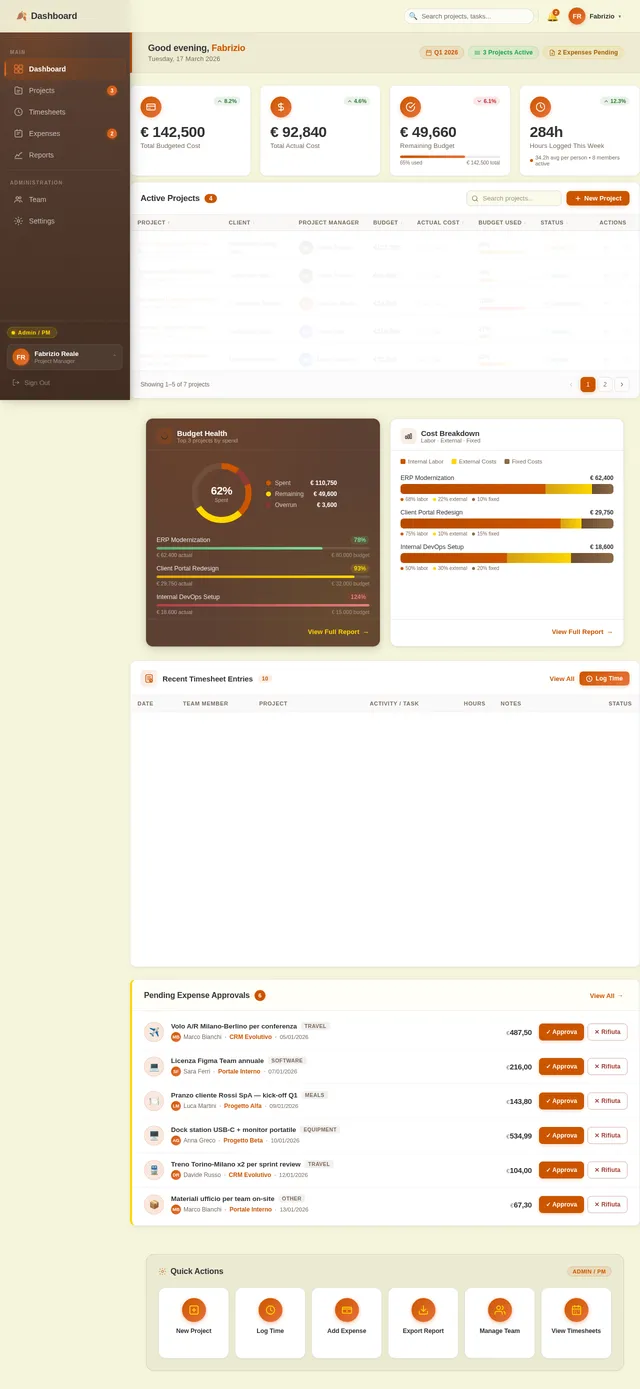
As a user I want to view a dashboard with project overviews, KPIs, and assignments so that I can quickly understand project health. Implement the Dashboard page based on the existing JSX design (v2). Includes: TopBar with breadcrumb and user avatar dropdown; Sidebar navigation with active state highlighting and role badge; StatsOverview KPI cards (total projects, budget used, hours this week, pending expenses); ProjectsTable with budget status indicators (green/yellow/red traffic light), client, PM, status columns; QuickActions panel; RecentActivity feed. Adapts per role: Admin/PM sees all projects, Team Member sees assigned projects.
Implement Reports & Export API
As a user I want to use backend APIs for reports so that I can retrieve aggregated project data and export it to CSV or Excel. Implement FastAPI endpoints: GET /reports/projects (list with budget vs actual summary), GET /reports/projects/{id} (detailed KPIs), GET /reports/by-user?date_from&date_to (hours and costs per user), GET /reports/time-expenses?project_id&date_from&date_to, GET /reports/export?format=csv|xlsx (streaming file response). Calculations include: budgeted vs actual hours, labor cost, expense cost, remaining budget, variance, budget used %.
Build Projects List Page
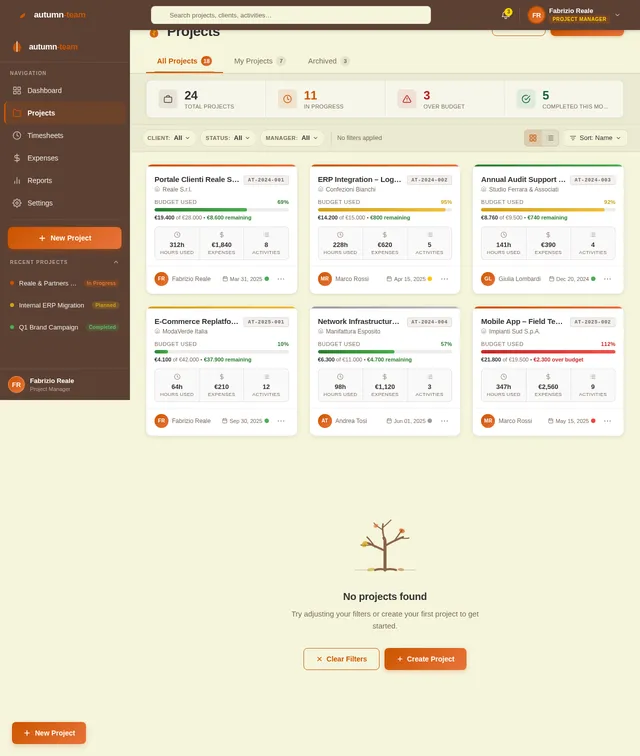
As a user I want to view, filter and create projects so that I can manage all company projects in one place. Implement the Projects page based on the existing JSX design (v2). Includes: TopBar; Sidebar; ProjectsHeader with 'New Project' button and filter bar (by client, status, PM, date range); ProjectsGrid or table with project cards showing status badge, budget used %, client name, PM avatar; Pagination. 'Create Project' button opens a modal or navigates to a project creation form. Clicking a project navigates to the Project Detail page.
Build Timesheet Page
As a user I want to log and review my weekly hours so that I can accurately track time spent on projects and activities. Implement the Timesheet page based on the existing JSX design (v2). Includes: TopBar with breadcrumb; Sidebar; TimesheetHeader with weekly KPI chips (Total Hours, Billable Hours, Pending Approval) and Add Time Entry / Export Week buttons; WeekNavigator with prev/next week arrows, Today button, calendar picker, and hours progress bar; WeeklyHoursGrid with editable cells per day per project-activity row, today column highlight, total row; LogHoursPanel collapsible form (date, project, activity, hours, notes); DailySummaryBar mini bar chart; RecentEntriesList with status badges and Submit Week button; StatusBar.
Build Expenses Page
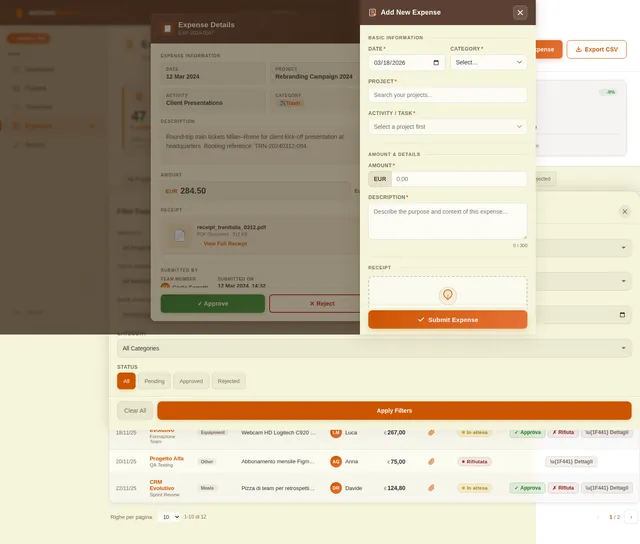
As a user I want to submit, view and manage project expenses so that I can track costs and get approvals efficiently. Implement the Expenses page based on the existing JSX design (v2). Includes: TopBar; Sidebar; ExpensesHeader with 'Add Expense' button and summary KPI chips (Total Submitted, Pending Approval, Approved This Month); FilterBar (status, category, project, date range, member); ExpensesTable with date, member, project, category icon, amount, status badge, receipt thumbnail, and approve/reject actions for Admin/Finance roles; AddExpenseModal with form fields (date, project, activity, category, amount, description, receipt upload); ExpenseSummaryFooter. Status workflow: Draft → Submitted → Approved/Rejected.
Build Reports Page
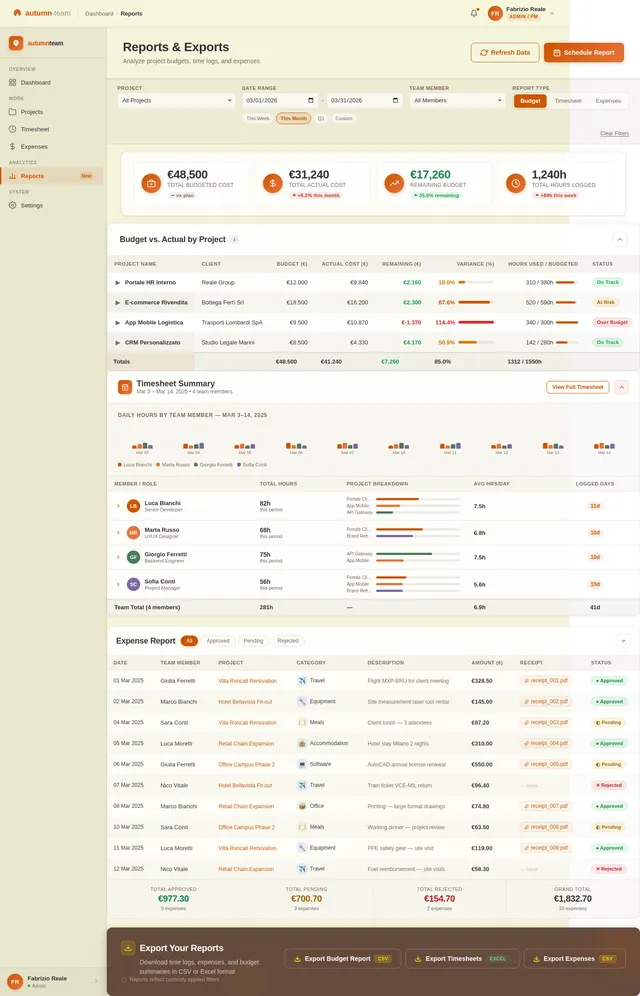
As a user I want to view and export time and expense reports so that I can analyze project performance and share data with stakeholders. Implement the Reports page based on the existing JSX design (v2). Includes: TopBar; Sidebar; ReportsHeader with export buttons (CSV, Excel); ReportFilterBar (report type, project, user, date range); SummaryKPIs strip; ReportChart (bar/line chart of budget vs actual over time); DetailedReportTable with columns for project, hours, labor cost, expenses, total, variance; ByUserReport table; ExportModal with format options. Covers: by-project report, by-user report, time & expense report.
Build Project Detail Page
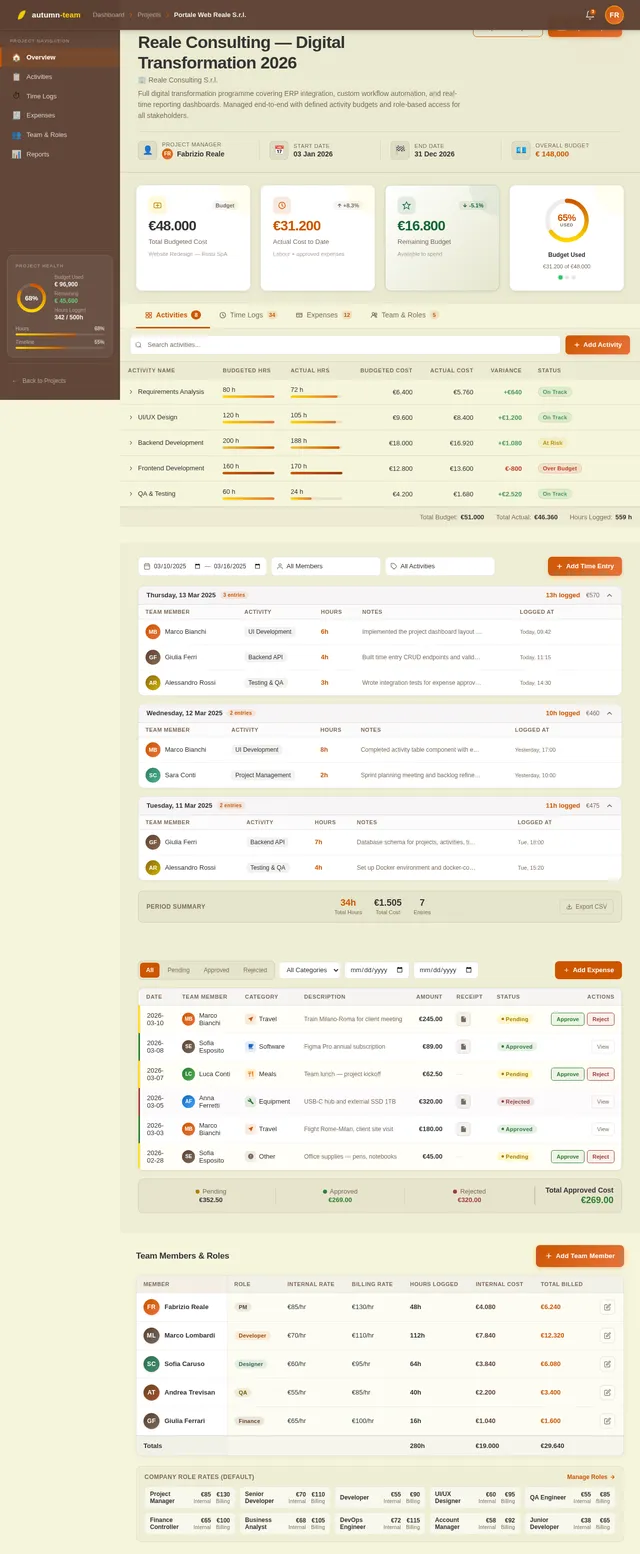
As a user I want to view and manage a single project's details, activities, time logs, expenses and team so that I can track project progress end-to-end. Implement the Project Detail page based on the existing JSX design (v2). Includes: TopBar with breadcrumb (Dashboard > Projects > [Project Name]); Sidebar with project quick-nav; ProjectHeader panel (status badge, project name, client, description, Edit/Export buttons, metadata strip with PM, dates, budget); BudgetStatusBar with 4 KPI cards (Budgeted Cost, Actual Cost, Remaining Budget, Budget Used % arc); ProjectTabNav (Activities, Time Logs, Expenses, Team & Roles); ActivitiesPanel table with inline progress bars and expandable rows; TimeLogsPanel grouped by date; ExpensesPanel with approve/reject workflow; TeamRolesPanel with cost rates table.
Integrate Frontend with Backend APIs
As a user I want all frontend pages to be connected to live backend data so that I can use the application with real project, timesheet, expense and report data. Wire up all pages (Dashboard, Projects, Project Detail, Timesheet, Expenses, Reports) to their respective FastAPI endpoints. Implement API client service layer (axios/fetch with auth token headers), React Query or SWR for data fetching and caching, loading states, error states, and empty states. Handle JWT token refresh. Ensure role-based UI rendering (Admin/PM vs Team Member vs Finance Controller views).
No comments yet. Be the first!